
別再手動(dòng)拼接 SQL 了,MyBatis 動(dòng)態(tài) SQL 寫(xiě)法應(yīng)有盡有,建議收藏!
回復(fù)架構(gòu)師獲取資源
大家好,我是你們的朋友架構(gòu)君,一個(gè)會(huì)寫(xiě)代碼吟詩(shī)的架構(gòu)師。
一、MyBatis動(dòng)態(tài) sql 是什么
動(dòng)態(tài) SQL 是 MyBatis 的強(qiáng)大特性之一。在 JDBC 或其它類似的框架中,開(kāi)發(fā)人員通常需要手動(dòng)拼接 SQL 語(yǔ)句。根據(jù)不同的條件拼接 SQL 語(yǔ)句是一件極其痛苦的工作。
例如,拼接時(shí)要確保添加了必要的空格,還要注意去掉列表最后一個(gè)列名的逗號(hào)。而動(dòng)態(tài) SQL 恰好解決了這一問(wèn)題,可以根據(jù)場(chǎng)景動(dòng)態(tài)的構(gòu)建查詢。
動(dòng)態(tài)SQL(code that is executed dynamically),它一般是根據(jù)用戶輸入或外部條件動(dòng)態(tài)組合的SQL語(yǔ)句塊。動(dòng)態(tài)SQL能靈活的發(fā)揮SQL強(qiáng)大的功能、方便的解決一些其它方法難以解決的問(wèn)題。相信使用過(guò)動(dòng)態(tài)SQL的人都能體會(huì)到它帶來(lái)的便利,然而動(dòng)態(tài)SQL有時(shí)候在執(zhí)行性能 (效率)上面不如靜態(tài)SQL,而且使用不恰當(dāng),往往會(huì)在安全方面存在隱患 (SQL 注入式攻擊)。
1.Mybatis 動(dòng)態(tài) sql 是做什么的?
Mybatis 動(dòng)態(tài) sql 可以讓我們?cè)?Xml 映射文件內(nèi),以標(biāo)簽的形式編寫(xiě)動(dòng)態(tài) sql,完成邏輯判斷和動(dòng)態(tài)拼接 sql 的功能。
2.Mybatis 的 9 種 動(dòng) 態(tài) sql 標(biāo) 簽有哪些?
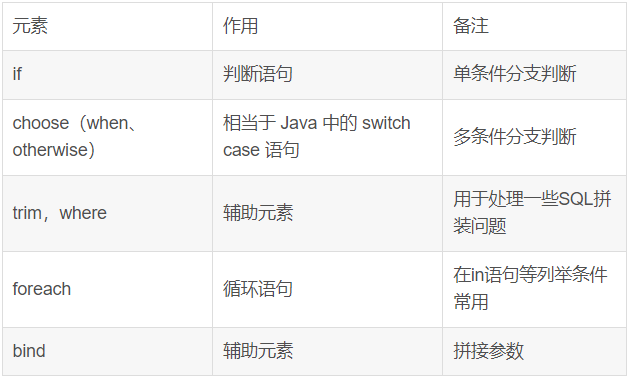
3.動(dòng)態(tài) sql 的執(zhí)行原理?
原理為:使用 OGNL 從 sql 參數(shù)對(duì)象中計(jì)算表達(dá)式的值,根據(jù)表達(dá)式的值動(dòng)態(tài)拼接 sql,以此來(lái)完成動(dòng)態(tài) sql 的功能。
二、MyBatis標(biāo)簽
1.if標(biāo)簽:條件判斷
MyBatis if 類似于 Java 中的 if 語(yǔ)句,是 MyBatis 中最常用的判斷語(yǔ)句。使用 if 標(biāo)簽可以節(jié)省許多拼接 SQL 的工作,把精力集中在 XML 的維護(hù)上。
1)不使用動(dòng)態(tài)sql
<select id="selectUserByUsernameAndSex"
        resultType="user" parameterType="com.ys.po.User">
    <!-- 這里和普通的sql 查詢語(yǔ)句差不多,對(duì)于只有一個(gè)參數(shù),后面的 #{id}表示占位符,里面          不一定要寫(xiě)id,
         寫(xiě)啥都可以,但是不要空著,如果有多個(gè)參數(shù)則必須寫(xiě)pojo類里面的屬性 -->
    select * from user where username=#{username} and sex=#{sex}
</select>
if 語(yǔ)句使用方法簡(jiǎn)單,常常與 test 屬性聯(lián)合使用。語(yǔ)法如下:
<if test="判斷條件"> SQL語(yǔ)句</if>
2)使用動(dòng)態(tài)sql
上面的查詢語(yǔ)句,我們可以發(fā)現(xiàn),如果 #{username} 為空,那么查詢結(jié)果也是空,如何解決這個(gè)問(wèn)題呢?使用 if 來(lái)判斷,可多個(gè) if 語(yǔ)句同時(shí)使用。
以下語(yǔ)句表示為可以按照網(wǎng)站名稱(name)或者網(wǎng)址(url)進(jìn)行模糊查詢。如果您不輸入名稱或網(wǎng)址,則返回所有的網(wǎng)站記錄。但是,如果你傳遞了任意一個(gè)參數(shù),它就會(huì)返回與給定參數(shù)相匹配的記錄。
<select id="selectAllWebsite" resultMap="myResult">
    select id,name,url from website
    where 1=1
   <if test="name != null">
       AND name like #{name}
   </if>
   <if test="url!= null">
       AND url like #{url}
   </if>
</select>
2.where+if標(biāo)簽
where、if同時(shí)使用可以進(jìn)行查詢、模糊查詢
注意,
<if>失敗后,<where>關(guān)鍵字只會(huì)去掉庫(kù)表字段賦值前面的and,不會(huì)去掉語(yǔ)句后面的and關(guān)鍵字,即注意,<where>只會(huì)去掉<if>語(yǔ)句中的最開(kāi)始的and關(guān)鍵字。所以下面的形式是不可取的
<select id="findQuery" resultType="Student">
    <include refid="selectvp"/>
    <where>
        <if test="sacc != null">
            sacc like concat('%' #{sacc} '%')
        </if>
        <if test="sname != null">
            AND sname like concat('%' #{sname} '%')
        </if>
        <if test="sex != null">
            AND sex=#{sex}
        </if>
        <if test="phone != null">
            AND phone=#{phone}
        </if>
    </where>
</select>
這個(gè)“where”標(biāo)簽會(huì)知道如果它包含的標(biāo)簽中有返回值的話,它就插入一個(gè)‘where’。此外,如果標(biāo)簽返回的內(nèi)容是以AND 或OR 開(kāi)頭的,則它會(huì)剔除掉。
3.set標(biāo)簽
set可以用來(lái)修改
<update id="upd">
    update student
    <set>
        <if test="sname != null">sname=#{sname},</if>
        <if test="spwd != null">spwd=#{spwd},</if>
        <if test="sex != null">sex=#{sex},</if>
        <if test="phone != null">phone=#{phone}</if>
    sid=#{sid}
    </set>
    where sid=#{sid}
</update>
4.choose(when,otherwise) 語(yǔ)句
有時(shí)候,我們不想用到所有的查詢條件,只想選擇其中的一個(gè),查詢條件有一個(gè)滿足即可,使用 choose 標(biāo)簽可以解決此類問(wèn)題,類似于 Java 的 switch 語(yǔ)句
<select id="selectUserByChoose" resultType="com.ys.po.User" parameterType="com.ys.po.User">
      select * from user
      <where>
          <choose>
              <when test="id !='' and id != null">
                  id=#{id}
              </when>
              <when test="username !='' and username != null">
                  and username=#{username}
              </when>
              <otherwise>
                  and sex=#{sex}
              </otherwise>
          </choose>
      </where>
  </select>
也就是說(shuō),這里我們有三個(gè)條件,id、username、sex,只能選擇一個(gè)作為查詢條件
-
如果 id 不為空,那么查詢語(yǔ)句為: select * from user where id=? -
如果 id 為空,那么看username 是否為空,如果不為空,那么語(yǔ)句為 select * from user where username=?; -
如果 username 為空,那么查詢語(yǔ)句為 select * from user where sex=?
5.trim
trim標(biāo)記是一個(gè)格式化的標(biāo)記,可以完成set或者是where標(biāo)記的功能
①、用 trim 改寫(xiě)上面第二點(diǎn)的 if+where 語(yǔ)句
<select id="selectUserByUsernameAndSex" resultType="user" parameterType="com.ys.po.User">
    select * from user
    <!-- <where>
        <if test="username != null">
           username=#{username}
        </if>

        <if test="username != null">
           and sex=#{sex}
        </if>
    </where>  -->
    <trim prefix="where" prefixOverrides="and | or">
        <if test="username != null">
           and username=#{username}
        </if>
        <if test="sex != null">
           and sex=#{sex}
        </if>
    </trim>
</select>
-
prefix:前綴 -
prefixoverride:去掉第一個(gè)and或者是or
②、用 trim 改寫(xiě)上面第三點(diǎn)的 if+set 語(yǔ)句
<!-- 根據(jù) id 更新 user 表的數(shù)據(jù) -->
<update id="updateUserById" parameterType="com.ys.po.User">
    update user u
        <!-- <set>
            <if test="username != null and username != ''">
                u.username = #{username},
            </if>
            <if test="sex != null and sex != ''">
                u.sex = #{sex}
            </if>
        </set> -->
        <trim prefix="set" suffixOverrides=",">
            <if test="username != null and username != ''">
                u.username = #{username},
            </if>
            <if test="sex != null and sex != ''">
                u.sex = #{sex},
            </if>
        </trim>

     where id=#{id}
</update>
-
suffix:后綴 -
suffixoverride:去掉最后一個(gè)逗號(hào)(也可以是其他的標(biāo)記,就像是上面前綴中的and一樣)
③、trim+if同時(shí)使用可以添加
<insert id="add">
    insert  into student
    <trim prefix="(" suffix=")" suffixOverrides=",">
        <if test="sname != null">sname,</if>
        <if test="spwd != null">spwd,</if>
        <if test="sex != null">sex,</if>
        <if test="phone != null">phone,</if>
    </trim>

    <trim prefix="values (" suffix=")"  suffixOverrides=",">
        <if test="sname != null">#{sname},</if>
        <if test="spwd != null">#{spwd},</if>
        <if test="sex != null">#{sex},</if>
        <if test="phone != null">#{phone}</if>
    </trim>

</insert>
6.MyBatis foreach標(biāo)簽
foreach是用來(lái)對(duì)集合的遍歷,這個(gè)和Java中的功能很類似。通常處理SQL中的in語(yǔ)句。
foreach 元素的功能非常強(qiáng)大,它允許你指定一個(gè)集合,聲明可以在元素體內(nèi)使用的集合項(xiàng)(item)和索引(index)變量。它也允許你指定開(kāi)頭與結(jié)尾的字符串以及集合項(xiàng)迭代之間的分隔符。這個(gè)元素也不會(huì)錯(cuò)誤地添加多余的分隔符
你可以將任何可迭代對(duì)象(如 List、Set 等)、Map 對(duì)象或者數(shù)組對(duì)象作為集合參數(shù)傳遞給 foreach。當(dāng)使用可迭代對(duì)象或者數(shù)組時(shí),index 是當(dāng)前迭代的序號(hào),item 的值是本次迭代獲取到的元素。當(dāng)使用 Map 對(duì)象(或者 Map.Entry 對(duì)象的集合)時(shí),index 是鍵,item 是值。
//批量查詢
<select id="findAll" resultType="Student" parameterType="Integer">
    <include refid="selectvp"/> WHERE sid in
    <foreach item="ids" collection="array"  open="(" separator="," close=")">
        #{ids}
    </foreach>
</select>
//批量刪除
<delete id="del"  parameterType="Integer">
    delete  from  student  where  sid in
    <foreach item="ids" collection="array"  open="(" separator="," close=")">
        #{ids}
    </foreach>
</delete>
整合案例
xml
<?xml version="1.0" encoding="UTF-8" ?>
<!DOCTYPE mapper
        PUBLIC "-//mybatis.org//DTD Mapper 3.0//EN"
        "http://mybatis.org/dtd/mybatis-3-mapper.dtd">
<mapper namespace="com.yzx.mapper.StuMapper">
    <sql id="selectvp">
        select  *  from  student
    </sql>

    <select id="find" resultType="Student">
        <include refid="selectvp"/>
    </select>

    <select id="findbyid"  resultType="student">
        <include refid="selectvp"/>
        WHERE 1=1
        <if test="sid != null">
            AND sid like #{sid}
        </if>
    </select>

        <select id="findQuery" resultType="Student">
            <include refid="selectvp"/>
            <where>
                <if test="sacc != null">
                    sacc like concat('%' #{sacc} '%')
                </if>
                <if test="sname != null">
                    AND sname like concat('%' #{sname} '%')
                </if>
                <if test="sex != null">
                    AND sex=#{sex}
                </if>
                <if test="phone != null">
                    AND phone=#{phone}
                </if>
            </where>
        </select>

    <update id="upd">
        update student
        <set>
            <if test="sname != null">sname=#{sname},</if>
            <if test="spwd != null">spwd=#{spwd},</if>
            <if test="sex != null">sex=#{sex},</if>
            <if test="phone != null">phone=#{phone}</if>
        sid=#{sid}
        </set>
        where sid=#{sid}
    </update>

    <insert id="add">
        insert  into student
        <trim prefix="(" suffix=")" suffixOverrides=",">
            <if test="sname != null">sname,</if>
            <if test="spwd != null">spwd,</if>
            <if test="sex != null">sex,</if>
            <if test="phone != null">phone,</if>
        </trim>

        <trim prefix="values (" suffix=")"  suffixOverrides=",">
            <if test="sname != null">#{sname},</if>
            <if test="spwd != null">#{spwd},</if>
            <if test="sex != null">#{sex},</if>
            <if test="phone != null">#{phone}</if>
        </trim>

    </insert>
    <select id="findAll" resultType="Student" parameterType="Integer">
        <include refid="selectvp"/> WHERE sid in
        <foreach item="ids" collection="array"  open="(" separator="," close=")">
            #{ids}
        </foreach>
    </select>

    <delete id="del"  parameterType="Integer">
        delete  from  student  where  sid in
        <foreach item="ids" collection="array"  open="(" separator="," close=")">
            #{ids}
        </foreach>
    </delete>


</mapper>
測(cè)試類:
package com.yzx.test;

import com.yzx.entity.Student;
import com.yzx.mapper.StuMapper;
import org.apache.ibatis.io.Resources;
import org.apache.ibatis.session.SqlSession;
import org.apache.ibatis.session.SqlSessionFactory;
import org.apache.ibatis.session.SqlSessionFactoryBuilder;
import org.junit.After;
import org.junit.Before;
import org.junit.Test;

import java.io.IOException;
import java.io.InputStream;
import java.util.List;

public class StuTest {
    SqlSession sqlSession=null;
    InputStream is=null;

    @Before
    public   void  before() throws IOException {
        //1.讀取核心配置文件
        is= Resources.getResourceAsStream("sqlMapperConfig.xml");
        //2.拿到工廠構(gòu)建類
        SqlSessionFactoryBuilder sqlSessionFactoryBuilder=new SqlSessionFactoryBuilder();
        //3.拿到具體工廠
        SqlSessionFactory build=sqlSessionFactoryBuilder.build(is);
        //4.拿到session
        sqlSession = build.openSession();
    }

    @After
    public  void  after(){
        //7,提交事務(wù)
        sqlSession.commit();
        //8.關(guān)閉資源
        sqlSession.close();
        if(is!=null){
            try {
                is.close();
            } catch (IOException e) {
                e.printStackTrace();
            }
        };
    }

    //查詢所有
    @Test
    public  void  find(){
        //5.獲取具體的mapper接口
        StuMapper mapper=sqlSession.getMapper(StuMapper.class);
        //6.調(diào)用執(zhí)行
        List<Student> list=mapper.find();
        list.forEach(a-> System.out.println(a));
    }
    //查詢單個(gè)
    @Test
    public  void  findbyid(){

        StuMapper mapper=sqlSession.getMapper(StuMapper.class);
        List<Student> list=mapper.findbyid(2);
        list.forEach(a-> System.out.println(a));
    }
    //模糊查詢
    @Test
    public  void  findQuery(){

        StuMapper mapper=sqlSession.getMapper(StuMapper.class);

        Student  stu=new Student();
        stu.setSname("小");
        stu.setSex("男");
        List<Student> list=mapper.findQuery(stu);
        list.forEach(a-> System.out.println(a));
    }
    //修改
    @Test
    public  void  upd(){

        StuMapper mapper=sqlSession.getMapper(StuMapper.class);

        Student  stu=new Student();
        stu.setSid(3);
        stu.setSname("小若");
        stu.setSex("人妖");
        int i=mapper.upd(stu);
        System.out.println("修改了"+i+"條數(shù)據(jù)"+"  "+stu.toString());

    }
    //添加
    @Test
    public  void  add(){

        StuMapper mapper=sqlSession.getMapper(StuMapper.class);

        Student  stu=new Student();
        stu.setSname("小賀");
        stu.setSex("男");
        stu.setPhone("99999999");
        int i=mapper.add(stu);
        System.out.println("添加了"+i+"條數(shù)據(jù)"+"  "+stu.toString());

    }

    //批量操作
    @Test
    public  void  findAll(){

        StuMapper mapper=sqlSession.getMapper(StuMapper.class);
        Integer[] i={1,2,3,4};
        List<Student> list=mapper.findAll(i);
        list.forEach(a-> System.out.println(a));
    }
    //批量操作

    //批量刪除
    @Test
    public  void  del(){
        StuMapper mapper=sqlSession.getMapper(StuMapper.class);
        Integer[] i={1,2,3,4};
        int i1=mapper.del(i);
        System.out.println("刪除了"+i1+"條數(shù)據(jù)");
    }
}
7.sql
在實(shí)際開(kāi)發(fā)中會(huì)遇到許多相同的SQL,比如根據(jù)某個(gè)條件篩選,這個(gè)篩選很多地方都能用到,我們可以將其抽取出來(lái)成為一個(gè)公用的部分,這樣修改也方便,一旦出現(xiàn)了錯(cuò)誤,只需要改這一處便能處處生效了,此時(shí)就用到了<sql>這個(gè)標(biāo)簽了。
當(dāng)多種類型的查詢語(yǔ)句的查詢字段或者查詢條件相同時(shí),可以將其定義為常量,方便調(diào)用。為求<select>結(jié)構(gòu)清晰也可將 sql 語(yǔ)句分解。
<sql id="selectvp">
    select  *  from  student
</sql>
8.include
這個(gè)標(biāo)簽和<sql>是天仙配,是共生的,include用于引用sql標(biāo)簽定義的常量。比如引用上面sql標(biāo)簽定義的常量
refid這個(gè)屬性就是指定<sql>標(biāo)簽中的id值(唯一標(biāo)識(shí))
<select id="findbyid"  resultType="student">
    <include refid="selectvp"/>
    WHERE 1=1
    <if test="sid != null">
        AND sid like #{sid}
    </if>
</select>
9.如何引用其他XML中的SQL片段
比如你在com.xxx.dao.xxMapper這個(gè)Mapper的XML中定義了一個(gè)SQL片段如下:
<sql id="Base_Column_List"> ID,MAJOR,BIRTHDAY,AGE,NAME,HOBBY</sql>
此時(shí)我在com.xxx.dao.PatinetMapper中的XML文件中需要引用,如下:
<include refid="com.xxx.dao.xxMapper.Base_Column_List"></include>
三、MyBatis關(guān)聯(lián)查詢
1.MyBatis一對(duì)多關(guān)聯(lián)查詢
<!--一對(duì)多-->
<resultMap id="myStudent1" type="student1">
    <id property="sid" column="sid"/>
    <result property="sname" column="sname"/>
    <result property="sex" column="sex"/>
    <result property="sage" column="sage"/>
    <collection property="list" ofType="teacher">
        <id property="tid" column="tid"/>
        <result property="tname" column="tname"/>
        <result property="tage" column="tage"/>
    </collection>
</resultMap>

<!--一對(duì)多-->
<select id="find1" resultMap="myStudent1">
    select  *  from  student1  s  left  join  teacher  t  on s.sid=t.sid
</select>
2.MyBatis多對(duì)一關(guān)聯(lián)查詢
<!--多對(duì)一-->
<resultMap id="myTeacher" type="teacher">
    <id property="tid" column="tid"/>
    <result property="tname" column="tname"/>
    <result property="tage" column="tage"/>
    <association property="student1" javaType="Student1">
        <id property="sid" column="sid"/>
        <result property="sname" column="sname"/>
        <result property="sex" column="sex"/>
        <result property="sage" column="sage"/>
    </association>
</resultMap>


<!--多對(duì)一-->
<select id="find2" resultMap="myTeacher">
select  *  from  teacher  t right join student1 s on  t.sid=s.sid
</select>
3.MyBatis多對(duì)多關(guān)聯(lián)查詢
<!--多對(duì)多 以誰(shuí)為主表查詢的時(shí)候,主表約等于1的一方,另一方相當(dāng)于多的一方-->
<select id="find3" resultMap="myStudent1">
    select  *  from  student1 s  left join relevance r on  s.sid=r.sid  left join teacher t on  r.tid=t.tid
</select>
這些年小編給你分享過(guò)的干貨
2.優(yōu)質(zhì)ERP系統(tǒng)帶進(jìn)銷存財(cái)務(wù)生產(chǎn)功能(附源碼)
3.優(yōu)質(zhì)SpringBoot帶工作流管理項(xiàng)目(附源碼)
4.最好用的OA系統(tǒng),拿來(lái)即用(附源碼)
5.SBoot+Vue外賣(mài)系統(tǒng)前后端都有(附源碼)
6.SBoot+Vue可視化大屏拖拽項(xiàng)目(附源碼)

轉(zhuǎn)發(fā)在看就是最大的支持??