
SpringBoot 調(diào)用外部接口的三種方式
回復(fù)架構(gòu)師獲取資源
大家好,我是你們的朋友架構(gòu)君,一個會寫代碼吟詩的架構(gòu)師。
作者:Chelsea
來源:blog.csdn.net/Chelsea__/article/details/126689495
SpringBoot不僅繼承了Spring框架原有的優(yōu)秀特性,而且還通過簡化配置來進一步簡化了Spring應(yīng)用的整個搭建和開發(fā)過程。在Spring-Boot項目開發(fā)中,存在著本模塊的代碼需要訪問外面模塊接口,或外部url鏈接的需求, 比如在apaas開發(fā)過程中需要封裝接口在接口中調(diào)用apaas提供的接口(像發(fā)起流程接口submit等等)下面也是提供了三種方式(不使用dubbo的方式)供我們選擇
2、方式一:使用原始httpClient請求
/* * @description get方式獲取入?yún)ⅲ迦霐?shù)據(jù)并發(fā)起流程* @author lyx* @date 2022/8/24 16:05* @params documentId* @return String*///("/submit/{documentId}")public String submit1( String documentId) throws ParseException {//此處將要發(fā)送的數(shù)據(jù)轉(zhuǎn)換為json格式字符串Map<String,Object> map =task2Service.getMap(documentId);String jsonStr = JSON.toJSONString(map, SerializerFeature.WRITE_MAP_NULL_FEATURES,SerializerFeature.QuoteFieldNames);JSONObject jsonObject = JSON.parseObject(jsonStr);JSONObject sr = task2Service.doPost(jsonObject);return sr.toString();}
/** @description 使用原生httpClient調(diào)用外部接口* @author lyx* @date 2022/8/24 16:08* @params date* @return JSONObject*/public static JSONObject doPost(JSONObject date) {String assessToken="eyJ0eXAiOiJKV1QiLCJhbGciOiJIUzUxMiJ9.eyJ4ZGFwYXBwaWQiOiIzNDgxMjU4ODk2OTI2OTY1NzYiLCJleHAiOjE2NjEyMjY5MDgsImlhdCI6MTY2MTIxOTcwOCwieGRhcHRlbmFudGlkIjoiMzAwOTgxNjA1MTE0MDUyNjA5IiwieGRhcHVzZXJpZCI6IjEwMDM0NzY2MzU4MzM1OTc5NTIwMCJ9.fZAO4kJSv2rSH0RBiL1zghdko8Npmu_9ufo6Wex_TI2q9gsiLp7XaW7U9Cu7uewEOaX4DTdpbFmMPvLUtcj_sQ";CloseableHttpClient client = HttpClients.createDefault();// 要調(diào)用的接口urlString url = "http://39.103.201.110:30661 /xdap-open/open/process/v1/submit";HttpPost post = new HttpPost(url);JSONObject jsonObject = null;try {//創(chuàng)建請求體并添加數(shù)據(jù)StringEntity s = new StringEntity(date.toString());//此處相當于在header里頭添加content-type等參數(shù)s.setContentType("application/json");s.setContentEncoding("UTF-8");post.setEntity(s);//此處相當于在Authorization里頭添加Bear token參數(shù)信息post.addHeader("Authorization", "Bearer " +assessToken);HttpResponse res = client.execute(post);String response1 = EntityUtils.toString(res.getEntity());if (res.getStatusLine().getStatusCode() == HttpStatus.SC_OK) {// 返回json格式:String result = EntityUtils.toString(res.getEntity());jsonObject = JSONObject.parseObject(result);}} catch (Exception e) {throw new RuntimeException(e);}return jsonObject;}
3、方式二:使用RestTemplate方法
Spring-Boot開發(fā)中,RestTemplate同樣提供了對外訪問的接口API,這里主要介紹Get和Post方法的使用。
Get請求
提供了getForObject 、getForEntity兩種方式,其中g(shù)etForEntity如下三種方法的實現(xiàn):
Get--getForEntity,存在以下兩種方式重載
1.getForEntity(Stringurl,Class responseType,Object…urlVariables)2.getForEntity(URI url,Class responseType)
Get--getForEntity(URI url,Class responseType)
//該方法使用URI對象來替代之前的url和urlVariables參數(shù)來指定訪問地址和參數(shù)綁定。URI是JDK java.net包下的一個類,表示一個統(tǒng)一資源標識符(Uniform Resource Identifier)引用。參考如下:RestTemplate restTemplate=new RestTemplate();UriComponentsuriComponents=UriComponentsBuilder.fromUriString("http://USER-SERVICE/user?name={name}").build().expand("dodo").encode();URI uri=uriComponents.toUri();ResponseEntityresponseEntity=restTemplate.getForEntity(uri,String.class).getBody();
Get--getForEntity(Stringurl,Class responseType,Object…urlVariables)
//該方法提供了三個參數(shù),其中url為請求的地址,responseType為請求響應(yīng)body的包裝類型,urlVariables為url中的參數(shù)綁定,該方法的參考調(diào)用如下:// http://USER-SERVICE/user?name={name)RestTemplate restTemplate=new RestTemplate();Mapparams=new HashMap<>();params.put("name","dada"); //ResponseEntityresponseEntity=restTemplate.getForEntity("http://USERSERVICE/user?name={name}",String.class,params);
Get--getForObject,存在以下三種方式重載
1.getForObject(String url,Class responseType,Object...urlVariables)2.getForObject(String url,Class responseType,Map urlVariables)3.getForObject(URI url,Class responseType)
getForObject方法可以理解為對getForEntity的進一步封裝,它通過HttpMessageConverterExtractor對HTTP的請求響應(yīng)體body內(nèi)容進行對象轉(zhuǎn)換,實現(xiàn)請求直接返回包裝好的對象內(nèi)容。
Post 請求
Post請求提供有postForEntity、postForObject和postForLocation三種方式,其中每種方式都有三種方法,下面介紹postForEntity的使用方法。
Post--postForEntity,存在以下三種方式重載
1.postForEntity(String url,Object request,Class responseType,Object... uriVariables)2.postForEntity(String url,Object request,Class responseType,Map uriVariables)3.postForEntity(URI url,Object request,Class responseType)
如下僅演示第二種重載方式
/** @description post方式獲取入?yún)ⅲ迦霐?shù)據(jù)并發(fā)起流程* @author lyx* @date 2022/8/24 16:07* @params* @return*/@PostMapping("/submit2")public Object insertFinanceCompensation(@RequestBody JSONObject jsonObject) {String documentId=jsonObject.get("documentId").toString();return task2Service.submit(documentId);}
/** @description 使用restTimeplate調(diào)外部接口* @author lyx* @date 2022/8/24 16:02* @params documentId* @return String*/public String submit(String documentId){String assessToken="eyJ0eXAiOiJKV1QiLCJhbGciOiJIUzUxMiJ9.eyJ4ZGFwYXBwaWQiOiIzNDgxMjU4ODk2OTI2OTY1NzYiLCJleHAiOjE2NjEyMjY5MDgsImlhdCI6MTY2MTIxOTcwOCwieGRhcHRlbmFudGlkIjoiMzAwOTgxNjA1MTE0MDUyNjA5IiwieGRhcHVzZXJpZCI6IjEwMDM0NzY2MzU4MzM1OTc5NTIwMCJ9.fZAO4kJSv2rSH0RBiL1zghdko8Npmu_9ufo6Wex_TI2q9gsiLp7XaW7U9Cu7uewEOaX4DTdpbFmMPvLUtcj_sQ";RestTemplate restTemplate = new RestTemplate();//創(chuàng)建請求頭HttpHeaders httpHeaders = new HttpHeaders();//此處相當于在Authorization里頭添加Bear token參數(shù)信息httpHeaders.add(HttpHeaders.AUTHORIZATION, "Bearer " + assessToken);//此處相當于在header里頭添加content-type等參數(shù)httpHeaders.add(HttpHeaders.CONTENT_TYPE,"application/json");Map<String, Object> map = getMap(documentId);String jsonStr = JSON.toJSONString(map);//創(chuàng)建請求體并添加數(shù)據(jù)HttpEntity<Map> httpEntity = new HttpEntity<Map>(map, httpHeaders);String url = "http://39.103.201.110:30661/xdap-open/open/process/v1/submit";ResponseEntity<String> forEntity = restTemplate.postForEntity(url,httpEntity,String.class);//此處三個參數(shù)分別是請求地址、請求體以及返回參數(shù)類型return forEntity.toString();}
4、方式三:使用Feign進行消費
在maven項目中添加依賴
<dependency><groupId>org.springframework.cloud</groupId><artifactId>spring-cloud-starter-feign</artifactId><version>1.2.2.RELEASE</version></dependency>
啟動類上加上@EnableFeignClients
(basePackages = {"com.definesys.mpaas", "com.xdap.*" ,"com.xdap.*"})public class MobilecardApplication {public static void main(String[] args) {SpringApplication.run(MobilecardApplication.class, args);}}
此處編寫接口模擬外部接口供feign調(diào)用外部接口方式使用
定義controller
PrintService printService;public String test( TestDto testDto) {return printService.print(testDto);}
定義service
public interface PrintService {public String print(TestDto testDto);}
定義serviceImpl
public class PrintServiceImpl implements PrintService {public String print(TestDto testDto) {return "模擬外部系統(tǒng)的接口功能"+testDto.getId();}}
構(gòu)建Feigin的Service
定義service
//此處name需要設(shè)置不為空,url需要在.properties中設(shè)置public interface FeignService2 {public String getMessage( TestDto testDto);}
定義controller
FeignService2 feignService2;//測試feign調(diào)用外部接口入口public String test2( TestDto testDto) {return feignService2.getMessage(testDto);}
postman測試
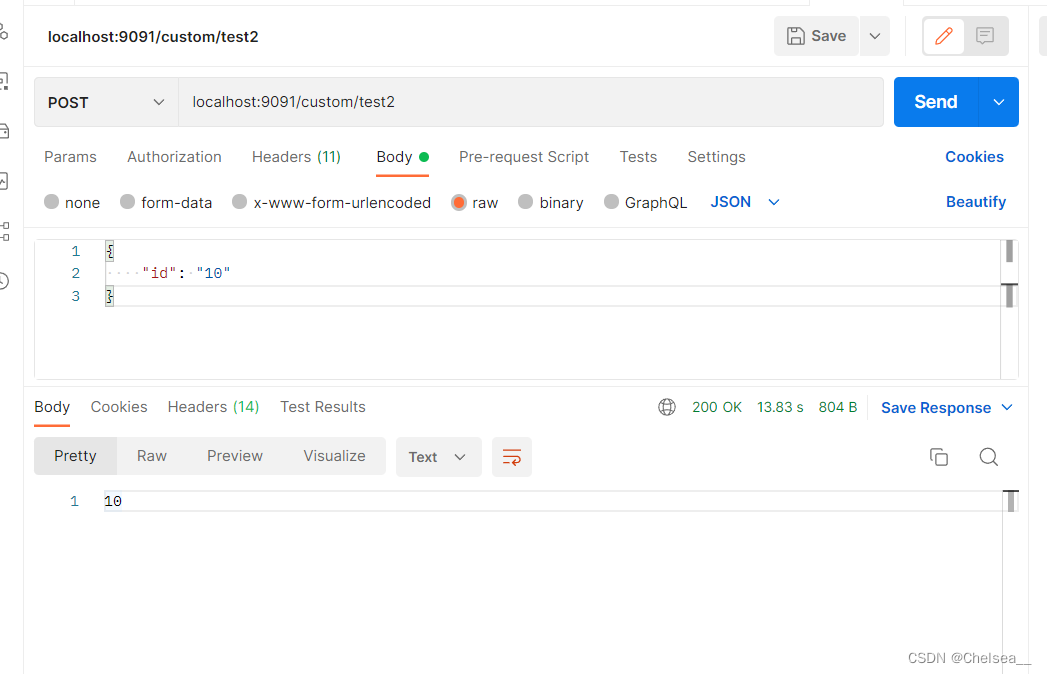
此處因為我使用了所在項目,所以需要添加一定的請求頭等信息,關(guān)于Feign的請求頭添加也會在后續(xù)補充
補充如下:
添加Header解決方法
將token等信息放入Feign請求頭中,主要通過重寫RequestInterceptor的apply方法實現(xiàn)
定義config
public class FeignConfig implements RequestInterceptor {public void apply(RequestTemplate requestTemplate) {//添加tokenrequestTemplate.header("token", "eyJ0eXAiOiJKV1QiLCJhbGciOiJIUzUxMiJ9.eyJ4ZGFwYXBwaWQiOiIzNDgxMjU4ODk2OTI2OTY1NzYiLCJleHAiOjE2NjEyMjY5MDgsImlhdCI6MTY2MTIxOTcwOCwieGRhcHRlbmFudGlkIjoiMzAwOTgxNjA1MTE0MDUyNjA5IiwieGRhcHVzZXJpZCI6IjEwMDM0NzY2MzU4MzM1OTc5NTIwMCJ9.fZAO4kJSv2rSH0RBiL1zghdko8Npmu_9ufo6Wex_TI2q9gsiLp7XaW7U9Cu7uewEOaX4DTdpbFmMPvLUtcj_sQ");}}
定義service
public interface TokenDemoClient {public String getMessage( TestDto testDto);}
定義controller
//測試feign調(diào)用外部接口入口,加上tokenpublic String test4( TestDto testDto) {return tokenDemoClient.getMessage(testDto);}
這些年小編給你分享過的干貨
2.優(yōu)質(zhì)ERP系統(tǒng)帶進銷存財務(wù)生產(chǎn)功能(附源碼)
3.優(yōu)質(zhì)SpringBoot帶工作流管理項目(附源碼)
5.SBoot+Vue外賣系統(tǒng)前后端都有(附源碼)

轉(zhuǎn)發(fā)在看就是最大的支持??