
Python web框架FastAPI——一個比Flask和Tornada更高性能的API 框架
點擊上方“Python爬蟲與數據挖掘”,進行關注
回復“書籍”即可獲贈Python從入門到進階共10本電子書
0
前言
????前幾天給大家分別分享了(入門篇)簡析Python web框架FastAPI——一個比Flask和Tornada更高性能的API 框架和(進階篇)Python web框架FastAPI——一個比Flask和Tornada更高性能的API 框架。今天歡迎大家來到 FastAPI 系列分享的完結篇,本文主要是對于前面文章的補充和擴展。
當然這些功能在實際開發(fā)中也扮演者極其重要的角色。

1
中間件的使用
????Flask 有?鉤子函數,可以對某些方法進行裝飾,在某些全局或者非全局的情況下,增添特定的功能。
????同樣在 FastAPI 中也存在著像鉤子函數的東西,也就是中間件 Middleware了。
計算回調時間
#?-*-?coding:?UTF-8?-*-
import?time
from?fastapi?import?FastAPI
from?starlette.requests?import?Request

app?=?FastAPI()


@app.middleware("http")
async?def?add_process_time_header(request:?Request,?call_next):
????start_time?=?time.time()
????response?=?await?call_next(request)
????process_time?=?time.time()?-?start_time
????response.headers["X-Process-Time"]?=?str(process_time)
????print(response.headers)
????return?response


@app.get("/")
async?def?main():
????return?{"message":?"Hello?World"}


if?__name__?==?'__main__':
????import?uvicorn
????uvicorn.run(app,?host="127.0.0.1",?port=8000)
請求重定向中間件
from?fastapi?import?FastAPI
from?starlette.middleware.httpsredirect?import?HTTPSRedirectMiddleware

app?=?FastAPI()

app.add_middleware(HTTPSRedirectMiddleware)

# 被重定向到 301
@app.get("/")
async?def?main():
????return?{"message":?"Hello?World"}
授權允許?Host?訪問列表(支持通配符匹配)
from?fastapi?import?FastAPI
from?starlette.middleware.trustedhost?import?TrustedHostMiddleware

app?=?FastAPI()

app.add_middleware(
????TrustedHostMiddleware,?allowed_hosts=["example.com",?"*.example.com"]
)


@app.get("/")
async?def?main():
????return?{"message":?"Hello?World"}
跨域資源共享
from?fastapi?import?FastAPI
from?starlette.middleware.cors?import?CORSMiddleware

app?=?FastAPI()

#允許跨域請求的域名列表(不一致的端口也會被視為不同的域名)
origins?=?[
????"https://gzky.live",
????"https://google.com",
????"http://localhost:5000",
????"http://localhost:8000",
]

#?通配符匹配,允許域名和方法
app.add_middleware(
????CORSMiddleware,
????allow_origins=origins,???
????allow_credentials=True,?
????allow_methods=["*"],???
????allow_headers=["*"],???
)
????在前端 ajax 請求,出現了外部鏈接的時候就要考慮到跨域的問題,如果不設置允許跨域,瀏覽器就會自動報錯,跨域資源?的安全問題。
????所以,中間件的應用場景還是比較廣的,比如爬蟲,有時候在做全站爬取時抓到的 Url 請求結果為 301,302, 之類的重定向狀態(tài)碼,那就有可能是網站管理員設置了該域名(二級域名) 不在 Host 訪問列表?中而做出的重定向處理,當然如果你也是網站的管理員,也能根據中間件做些反爬的措施。
更多中間件參考??https://fastapi.tiangolo.com/advanced/middleware
2
BackgroundTasks
????創(chuàng)建異步任務函數,使用 async 或者普通 def 函數來對后端函數進行調用。
發(fā)送消息
#?-*-?coding:?UTF-8?-*-
from?fastapi?import?BackgroundTasks,?Depends,?FastAPI

app?=?FastAPI()


def?write_log(message:?str):
????with?open("log.txt",?mode="a")?as?log:
????????log.write(message)


def?get_query(background_tasks:?BackgroundTasks,?q:?str?=?None):
????if?q:
????????message?=?f"found?query:?{q}\n"
????????background_tasks.add_task(write_log,?message)
????return?q


@app.post("/send-notification/{email}")
async?def?send_notification(
????email:?str,?background_tasks:?BackgroundTasks,?q:?str?=?Depends(get_query)
):
????message?=?f"message?to?{email}\n"
????background_tasks.add_task(write_log,?message)
????return?{"message":?"Message?sent"}
????使用方法極其的簡單,也就不多廢話了,write_log 當成 task 方法被調用,先方法名,后傳參。
3
自定義 Response 狀態(tài)碼
在一些特殊場景我們需要自己定義返回的狀態(tài)碼
from?fastapi?import?FastAPI
from?starlette?import?status

app?=?FastAPI()

#?201
@app.get("/201/",?status_code=status.HTTP_201_CREATED)
async?def?item201():
????return?{"httpStatus":?201}

#?302
@app.get("/302/",?status_code=status.HTTP_302_FOUND)
async?def?items302():
????return?{"httpStatus":?302}

#?404
@app.get("/404/",?status_code=status.HTTP_404_NOT_FOUND)
async?def?items404():
????return?{"httpStatus":?404}

#?500
@app.get("/500/",?status_code=status.HTTP_500_INTERNAL_SERVER_ERROR)
async?def?items500():
????return?{"httpStatus":?500}


if?__name__?==?'__main__':
????import?uvicorn
????uvicorn.run(app,?host="127.0.0.1",?port=8000)
這么一來就有趣了,設想有個人寫了這么一段代碼
async?def?getHtml(self,?url,?session):
????try:
????????async?with?session.get(url,?headers=self.headers,?timeout=60,?verify_ssl=False)?as?resp:
????????????if?resp.status?in?[200,?201]:
????????????????data?=?await?resp.text()
????????????????return?data
????except?Exception?as?e:
????????print(e)
????????pass
????那么就有趣了,這段獲取 Html 源碼的函數根據 Http狀態(tài)碼 來判斷是否正常的返回。那如果根據上面的寫法,我直接返回一個 404 或者 304 的狀態(tài)碼,但是響應數據卻正常,那么這個爬蟲豈不是什么都爬不到了么。所以,嘿嘿你懂的!!
4
關于部署
部署?FastAPI?應用程序相對容易
Uvicorn?
????FastAPI 文檔推薦使用?Uvicorn 來部署應用( 其次是 hypercorn),Uvicorn 是一個基于 asyncio 開發(fā)的一個輕量級高效的 Web 服務器框架(僅支持 python 3.5.3 以上版本)
安裝
pip?install?uvicorn
啟動方式
uvicorn?main:app?--reload?--host?0.0.0.0?--port?8000
Gunicorn
????如果你仍然喜歡用 Gunicorn 在部署項目的話,請看下面
安裝
pip?install?gunicorn
啟動方式
gunicorn?-w?4?-b?0.0.0.0:5000??manage:app?-D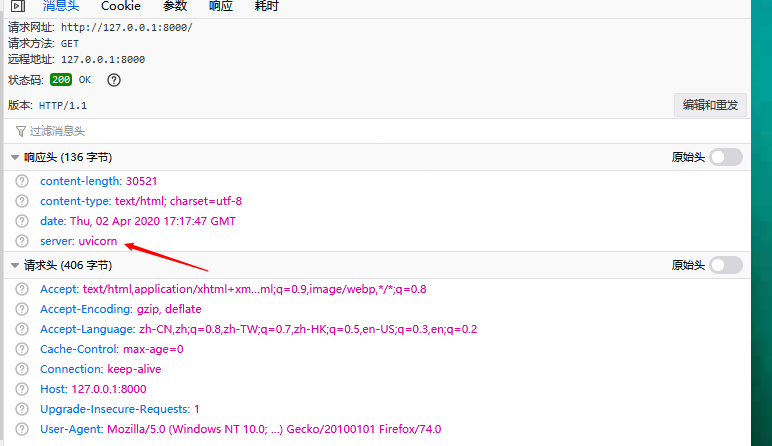
Docker部署
????采用 Docker 部署應用的好處就是不用搭建特定的運行環(huán)境(實際上就是? docker 在幫你拉取),通過 Dockerfile 構建 FastAPI ?鏡像,啟動 Docker 容器,通過端口映射可以很輕松訪問到你部署的應用。
Nginx
????在 Uvicorn/Gunicorn ?+ FastAPI 的基礎上掛上一層 Nginx 服務,一個網站就可以上線了,事實上直接使用 Uvicorm 或 Gunicorn 也是沒有問題的,但 Nginx 能讓你的網站看起來更像網站。
撒花 !!!
-------------------?End?-------------------
往期精彩文章推薦:

歡迎大家點贊,留言,轉發(fā),轉載,感謝大家的相伴與支持
想加入Python學習群請在后臺回復【入群】
萬水千山總是情,點個【在看】行不行
/今日留言主題/
說一兩個你知道的Python框架吧~