
Nginx 常用配置清單
來(lái)源:vishnu.hashnode.dev/nginx-cheatsheet
Nginx 是一個(gè)高性能的 HTTP 和反向代理 web 服務(wù)器,同時(shí)也提供了 IMAP/POP3/SMTP 服務(wù),其因豐富的功能集、穩(wěn)定性、示例配置文件和低系統(tǒng)資源的消耗受到了開發(fā)者的歡迎。
本文,我們總結(jié)了一些常用的 Nginx 配置代碼,希望對(duì)大家有所幫助。
偵聽端口
server {
# Standard HTTP Protocol
listen 80;
# Standard HTTPS Protocol
listen 443 ssl;
# For http2
listen 443 ssl http2;
# Listen on 80 using IPv6
listen [::]:80;
# Listen only on using IPv6
listen [::]:80 ipv6only=on;
}
訪問(wèn)日志
server {
# Relative or full path to log file
access_log /path/to/file.log;
# Turn 'on' or 'off'
access_log on;
}
域名
server {
# Listen to yourdomain.com
server_name yourdomain.com;
# Listen to multiple domains server_name yourdomain.com www.yourdomain.com;
# Listen to all domains
server_name *.yourdomain.com;
# Listen to all top-level domains
server_name yourdomain.*;
# Listen to unspecified Hostnames (Listens to IP address itself)
server_name "";
}
靜態(tài)資產(chǎn)
server {
listen 80;
server_name yourdomain.com;
location / {
root /path/to/website;
}
}
重定向
server {
listen 80;
server_name www.yourdomain.com;
return 301 http://yourdomain.com$request_uri;
}
server {
listen 80;
server_name www.yourdomain.com;
location /redirect-url {
return 301 http://otherdomain.com;
}
}
反向代理
server {
listen 80;
server_name yourdomain.com;
location / {
proxy_pass http://0.0.0.0:3000;
# where 0.0.0.0:3000 is your application server (Ex: node.js) bound on 0.0.0.0 listening on port 3000
}
}
負(fù)載均衡
upstream node_js {
server 0.0.0.0:3000;
server 0.0.0.0:4000;
server 123.131.121.122;
}
server {
listen 80;
server_name yourdomain.com;
location / {
proxy_pass http://node_js;
}
}
SSL 協(xié)議
server {
listen 443 ssl;
server_name yourdomain.com;
ssl on;
ssl_certificate /path/to/cert.pem;
ssl_certificate_key /path/to/privatekey.pem;
ssl_stapling on;
ssl_stapling_verify on;
ssl_trusted_certificate /path/to/fullchain.pem;
ssl_protocols TLSv1 TLSv1.1 TLSv1.2;
ssl_session_timeout 1h;
ssl_session_cache shared:SSL:50m;
add_header Strict-Transport-Security max-age=15768000;
}
# Permanent Redirect for HTTP to HTTPS
server
{
listen 80;
server_name yourdomain.com;
return 301 https://$host$request_uri;
}
其實(shí)可以采用可視化的方式對(duì) Nginx 進(jìn)行配置,我在 GitHub 上發(fā)現(xiàn)了一款可以一鍵生成 Nginx 配置的神器,相當(dāng)給力。
先來(lái)看看它都支持什么功能的配置:反向代理、HTTPS、HTTP/2、IPv6, 緩存、WordPress、CDN、Node.js 支持、 Python (Django) 服務(wù)器等等。
如果你想在線進(jìn)行配置,只需要打開網(wǎng)站:https://nginxconfig.io/,按照自己的需求進(jìn)行操作就行了。
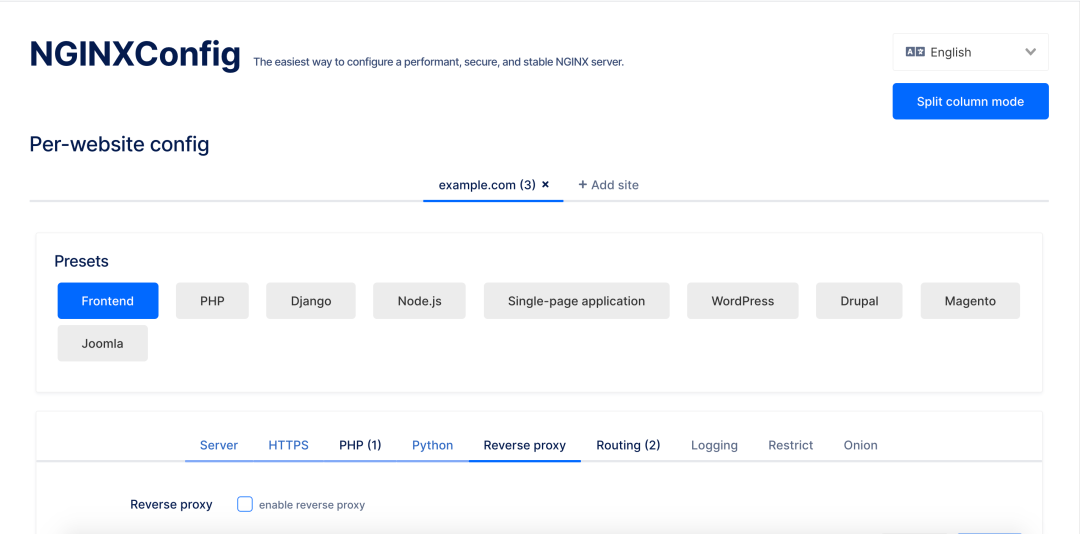
選擇你的場(chǎng)景,填寫好參數(shù),系統(tǒng)就會(huì)自動(dòng)生成配置文件。
開源地址:github.com/digitalocean/nginxconfig.io
網(wǎng)站:digitalocean.com/community/tools/nginx
-- end --
喜歡就三連呀
點(diǎn)擊"閱讀原文"可跳轉(zhuǎn)至我的博客。
關(guān)注 Stephen,一起學(xué)習(xí),一起成長(zhǎng)。