
微前端框架實(shí)現(xiàn)原理
本文適合對(duì)微前端感興趣、以及想深入微前端原理學(xué)習(xí)的小伙伴閱讀。
歡迎關(guān)注前端早茶,與廣東靚仔攜手共同進(jìn)階~
作者:廣東靚仔
一、前言
本文轉(zhuǎn)載于掘金:
https://juejin.cn/post/7004661323124441102
這么多實(shí)現(xiàn)方案解決的場(chǎng)景問(wèn)題還是分為兩類:
單實(shí)例:當(dāng)前頁(yè)面只存在一個(gè)子應(yīng)用,一般使用 qiankun 就行
多實(shí)例:當(dāng)前頁(yè)面存在多個(gè)子應(yīng)用,可以使用瀏覽器原生隔離方案,比如 iframe 或者 WebComponent 這些
二、前置工作
yarn eject。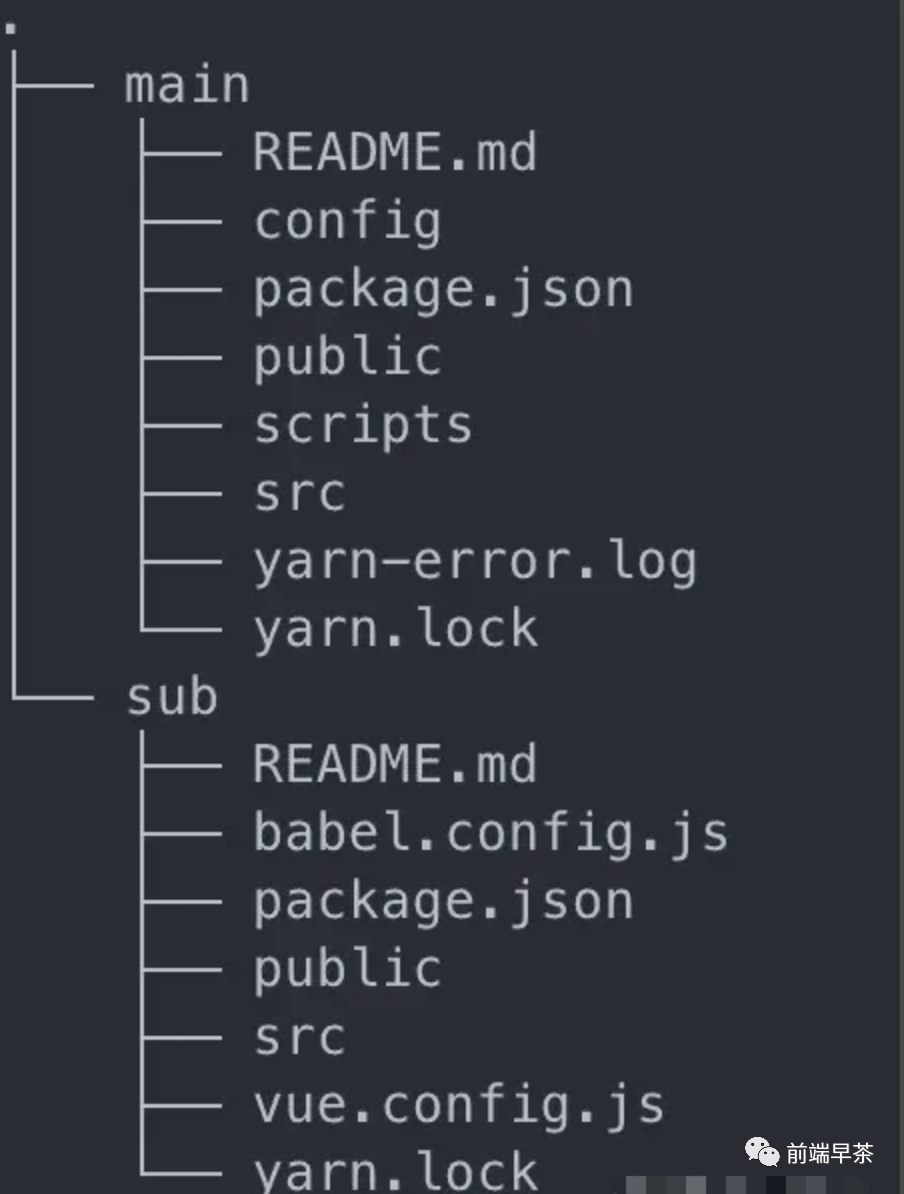
三、正文
主應(yīng)用:負(fù)責(zé)整體布局以及子應(yīng)用的配置及注冊(cè)這類內(nèi)容。
應(yīng)用注冊(cè)
在有了主應(yīng)用之后,我們需要先在主應(yīng)用中注冊(cè)子應(yīng)用的信息,內(nèi)容包含以下幾塊:
name:子應(yīng)用名詞
entry:子應(yīng)用的資源入口
container:主應(yīng)用渲染子應(yīng)用的節(jié)點(diǎn)
activeRule:在哪些路由下渲染該子應(yīng)用
其實(shí)這些信息和我們?cè)陧?xiàng)目中注冊(cè)路由很像,entry 可以看做需要渲染的組件,container 可以看做路由渲染的節(jié)點(diǎn),activeRule 可以看做如何匹配路由的規(guī)則。
接下來(lái)我們先來(lái)實(shí)現(xiàn)這個(gè)注冊(cè)子應(yīng)用的函數(shù):
// src/types.ts
export interface IAppInfo {
  name: string;
  entry: string;
  container: string;
  activeRule: string;
}

// src/start.ts
export const registerMicroApps = (appList: IAppInfo[]) => {
  setAppList(appList);
};

// src/appList/index.ts
let appList: IAppInfo[] = [];

export const setAppList = (list: IAppInfo[]) => {
  appList = list;
};

export const getAppList = () => {
  return appList;
};
只需要將用戶傳入的 appList 保存起來(lái)即可。
路由劫持
hash 模式,也就是 URL 中攜帶 #histroy 模式,也就是常見(jiàn)的 URL 格式了
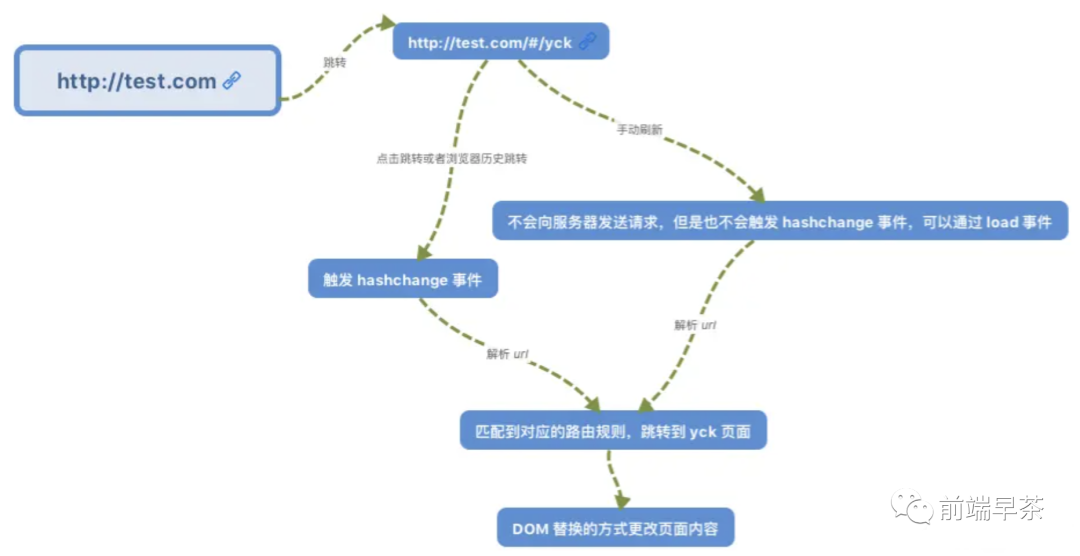
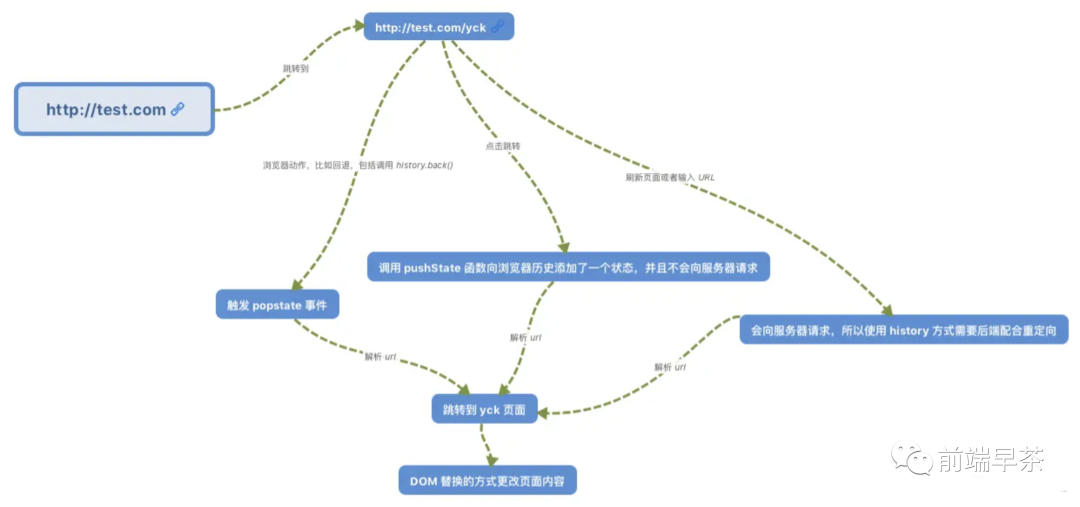
從上述圖中我們可以發(fā)現(xiàn),路由變化會(huì)涉及到兩個(gè)事件:
popstatehashchange
因此這兩個(gè)事件我們肯定是需要去監(jiān)聽(tīng)的。除此之外,調(diào)用 pushState 以及 replaceState 也會(huì)造成路由變化,但不會(huì)觸發(fā)事件,因此我們還需要去重寫(xiě)這兩個(gè)函數(shù)。
知道了該監(jiān)聽(tīng)什么事件以及重寫(xiě)什么函數(shù)之后,接下來(lái)我們就來(lái)實(shí)現(xiàn)代碼:
// src/route/index.ts

// 保存原有方法
const originalPush = window.history.pushState;
const originalReplace = window.history.replaceState;

export const hijackRoute = () => {
  // 重寫(xiě)方法
  window.history.pushState = (...args) => {
    // 調(diào)用原有方法
    originalPush.apply(window.history, args);
    // URL 改變邏輯,實(shí)際就是如何處理子應(yīng)用
    // ...
  };
  window.history.replaceState = (...args) => {
    originalReplace.apply(window.history, args);
    // URL 改變邏輯
    // ...
  };

  // 監(jiān)聽(tīng)事件,觸發(fā) URL 改變邏輯
  window.addEventListener("hashchange", () => {});
  window.addEventListener("popstate", () => {});

  // 重寫(xiě)
  window.addEventListener = hijackEventListener(window.addEventListener);
  window.removeEventListener = hijackEventListener(window.removeEventListener);
};

const capturedListeners: Record<EventType, Function[]> = {
  hashchange: [],
  popstate: [],
};
const hasListeners = (name: EventType, fn: Function) => {
  return capturedListeners[name].filter((listener) => listener === fn).length;
};
const hijackEventListener = (func: Function): any => {
  return function (name: string, fn: Function) {
    // 如果是以下事件,保存回調(diào)函數(shù)
    if (name === "hashchange" || name === "popstate") {
      if (!hasListeners(name, fn)) {
        capturedListeners[name].push(fn);
        return;
      } else {
        capturedListeners[name] = capturedListeners[name].filter(
          (listener) => listener !== fn
        );
      }
    }
    return func.apply(window, arguments);
  };
};
// 后續(xù)渲染子應(yīng)用后使用,用于執(zhí)行之前保存的回調(diào)函數(shù)
export function callCapturedListeners() {
  if (historyEvent) {
    Object.keys(capturedListeners).forEach((eventName) => {
      const listeners = capturedListeners[eventName as EventType]
      if (listeners.length) {
        listeners.forEach((listener) => {
          // @ts-ignore
          listener.call(this, historyEvent)
        })
      }
    })
    historyEvent = null
  }
}
以上代碼看著很多行,實(shí)際做的事情很簡(jiǎn)單,總體分為以下幾步:
重寫(xiě)
pushState以及replaceState方法,在方法中調(diào)用原有方法后執(zhí)行如何處理子應(yīng)用的邏輯監(jiān)聽(tīng)
hashchange及popstate事件,事件觸發(fā)后執(zhí)行如何處理子應(yīng)用的邏輯重寫(xiě)監(jiān)聽(tīng) / 移除事件函數(shù),如果應(yīng)用監(jiān)聽(tīng)了
hashchange及popstate事件就將回調(diào)函數(shù)保存起來(lái)以備后用
應(yīng)用生命周期
beforeLoad:掛載子應(yīng)用前mounted:掛載子應(yīng)用后unmounted:卸載子應(yīng)用
bootstrap:首次應(yīng)用加載觸發(fā),常用于配置子應(yīng)用全局信息mount:應(yīng)用掛載時(shí)觸發(fā),常用于渲染子應(yīng)用unmount:應(yīng)用卸載時(shí)觸發(fā),常用于銷毀子應(yīng)用
// src/types.ts
export interface ILifeCycle {
  beforeLoad?: LifeCycle | LifeCycle[];
  mounted?: LifeCycle | LifeCycle[];
  unmounted?: LifeCycle | LifeCycle[];
}

// src/start.ts
// 改寫(xiě)下之前的
export const registerMicroApps = (
  appList: IAppInfo[],
  lifeCycle?: ILifeCycle
) => {
  setAppList(appList);
  lifeCycle && setLifeCycle(lifeCycle);
};

// src/lifeCycle/index.ts
let lifeCycle: ILifeCycle = {};

export const setLifeCycle = (list: ILifeCycle) => {
  lifeCycle = list;
};
因?yàn)槭侵鲬?yīng)用的生命周期,所以我們?cè)谧?cè)子應(yīng)用的時(shí)候就順帶注冊(cè)上了。
然后子應(yīng)用的生命周期:
// src/enums.ts
// 設(shè)置子應(yīng)用狀態(tài)
export enum AppStatus {
  NOT_LOADED = "NOT_LOADED",
  LOADING = "LOADING",
  LOADED = "LOADED",
  BOOTSTRAPPING = "BOOTSTRAPPING",
  NOT_MOUNTED = "NOT_MOUNTED",
  MOUNTING = "MOUNTING",
  MOUNTED = "MOUNTED",
  UNMOUNTING = "UNMOUNTING",
}
// src/lifeCycle/index.ts
export const runBeforeLoad = async (app: IInternalAppInfo) => {
  app.status = AppStatus.LOADING;
  await runLifeCycle("beforeLoad", app);

  app = await 加載子應(yīng)用資源;
  app.status = AppStatus.LOADED;
};

export const runBoostrap = async (app: IInternalAppInfo) => {
  if (app.status !== AppStatus.LOADED) {
    return app;
  }
  app.status = AppStatus.BOOTSTRAPPING;
  await app.bootstrap?.(app);
  app.status = AppStatus.NOT_MOUNTED;
};

export const runMounted = async (app: IInternalAppInfo) => {
  app.status = AppStatus.MOUNTING;
  await app.mount?.(app);
  app.status = AppStatus.MOUNTED;
  await runLifeCycle("mounted", app);
};

export const runUnmounted = async (app: IInternalAppInfo) => {
  app.status = AppStatus.UNMOUNTING;
  await app.unmount?.(app);
  app.status = AppStatus.NOT_MOUNTED;
  await runLifeCycle("unmounted", app);
};

const runLifeCycle = async (name: keyof ILifeCycle, app: IAppInfo) => {
  const fn = lifeCycle[name];
  if (fn instanceof Array) {
    await Promise.all(fn.map((item) => item(app)));
  } else {
    await fn?.(app);
  }
};
以上代碼看著很多,實(shí)際實(shí)現(xiàn)也很簡(jiǎn)單,總結(jié)一下就是:
設(shè)置子應(yīng)用狀態(tài),用于邏輯判斷以及優(yōu)化。比如說(shuō)當(dāng)一個(gè)應(yīng)用狀態(tài)為非
NOT_LOADED時(shí)(每個(gè)應(yīng)用初始都為NOT_LOADED狀態(tài)),下次渲染該應(yīng)用時(shí)就無(wú)需重復(fù)加載資源了如需要處理邏輯,比如說(shuō)
beforeLoad我們需要加載子應(yīng)用資源執(zhí)行主 / 子應(yīng)用生命周期,這里需要注意下執(zhí)行順序,可以參考父子組件的生命周期執(zhí)行順序
完善路由劫持
判斷當(dāng)前 URL 與之前的 URL 是否一致,如果一致則繼續(xù) 利用當(dāng)然 URL 去匹配相應(yīng)的子應(yīng)用,此時(shí)分為幾種情況: 初次啟動(dòng)微前端,此時(shí)只需渲染匹配成功的子應(yīng)用 未切換子應(yīng)用,此時(shí)無(wú)需處理子應(yīng)用 切換子應(yīng)用,此時(shí)需要找出之前渲染過(guò)的子應(yīng)用做卸載處理,然后渲染匹配成功的子應(yīng)用 保存當(dāng)前 URL,用于下一次第一步判斷
let lastUrl: string | null = null
export const reroute = (url: string) => {
  if (url !== lastUrl) {
    const { actives, unmounts } = 匹配路由,尋找符合條件的子應(yīng)用
    // 執(zhí)行生命周期
    Promise.all(
      unmounts
        .map(async (app) => {
          await runUnmounted(app)
        })
        .concat(
          actives.map(async (app) => {
            await runBeforeLoad(app)
            await runBoostrap(app)
            await runMounted(app)
          })
        )
    ).then(() => {
      // 執(zhí)行路由劫持小節(jié)未使用的函數(shù)
      callCapturedListeners()
    })
  }
  lastUrl = url || location.href
}
嵌套關(guān)系 路徑語(yǔ)法
/vue,那么類似 /vue 或者 /vue/xxx 都能匹配上這個(gè)路由,除非我們?cè)O(shè)置 excart 也就是精確匹配。<Route path="/hello/:name"> // 匹配 /hello/michael 和 /hello/ryan
<Route path="/hello(/:name)"> // 匹配 /hello, /hello/michael 和 /hello/ryan
<Route path="/files/*.*"> // 匹配 /files/hello.jpg 和 /files/path/to/hello.jpg
這樣看來(lái)路由匹配實(shí)現(xiàn)起來(lái)還是挺麻煩的,那么我們是否有簡(jiǎn)便的辦法來(lái)實(shí)現(xiàn)該功能呢?答案肯定是有的,我們只要閱讀 Route 庫(kù)源碼就能發(fā)現(xiàn)它們內(nèi)部都使用了path-to-regexp這個(gè)庫(kù),有興趣的可以閱讀下這個(gè)庫(kù)的文檔,這里我們只看其中一個(gè) API 的使用就行。

有了解決方案以后,我們就快速實(shí)現(xiàn)下路由匹配的函數(shù):
export const getAppListStatus = () => {
  // 需要渲染的應(yīng)用列表
  const actives: IInternalAppInfo[] = []
  // 需要卸載的應(yīng)用列表
  const unmounts: IInternalAppInfo[] = []
  // 獲取注冊(cè)的子應(yīng)用列表
  const list = getAppList() as IInternalAppInfo[]
  list.forEach((app) => {
    // 匹配路由
    const isActive = match(app.activeRule, { end: false })(location.pathname)
    // 判斷應(yīng)用狀態(tài)
    switch (app.status) {
      case AppStatus.NOT_LOADED:
      case AppStatus.LOADING:
      case AppStatus.LOADED:
      case AppStatus.BOOTSTRAPPING:
      case AppStatus.NOT_MOUNTED:
        isActive && actives.push(app)
        break
      case AppStatus.MOUNTED:
        !isActive && unmounts.push(app)
        break
    }
  })

  return { actives, unmounts }
}
reroute 函數(shù)中調(diào)用一下,至此路由劫持功能徹底完成了。完善生命周期
registerMicroApps 函數(shù),我們最開(kāi)始就給這個(gè)函數(shù)傳入了 entry 參數(shù),這就是子應(yīng)用的資源入口。JS Entry HTML Entry
加載資源
首先我們需要獲取 HTML 的內(nèi)容,這里我們只需調(diào)用原生 fetch 就能拿到東西了。
// src/utils
export const fetchResource = async (url: string) => {
  return await fetch(url).then(async (res) => await res.text())
}
// src/loader/index.ts
export const loadHTML = async (app: IInternalAppInfo) => {
  const { container, entry } = app

  const htmlFile = await fetchResource(entry)

  return app
}
切換路由至 /vue 之后,我們可以打印出加載到的 HTML 文件內(nèi)容。
<!DOCTYPE html>
<html lang="">
  <head>
    <meta charset="utf-8">
    <meta http-equiv="X-UA-Compatible" content="IE=edge">
    <meta name="viewport" content="width=device-width,initial-scale=1.0">
    <link rel="icon" href="/favicon.ico">
    <title>sub</title>
  <link href="/js/app.js" rel="preload" as="script"><link href="/js/chunk-vendors.js" rel="preload" as="script"></head>
  <body>
    <noscript>
      <strong>We're sorry but sub doesn't work properly without JavaScript enabled. Please enable it to continue.</strong>
    </noscript>
    <div id="app"></div>
    <!-- built files will be auto injected -->
  <script type="text/javascript" src="/js/chunk-vendors.js"></script>
  <script type="text/javascript" src="/js/app.js"></script></body>
</html>
// vue.config.js
module.exports = {
  devServer: {
    headers: {
      'Access-Control-Allow-Origin': '*',
    },
  },
}
接下來(lái)我們需要先行處理這些資源的路徑,將相對(duì)路徑拼接成正確的絕對(duì)路徑,然后再去 fetch。
// vue.config.js
// src/utils
export function getCompletionURL(src: string | null, baseURI: string) {
if (!src) return src
// 如果 URL 已經(jīng)是協(xié)議開(kāi)頭就直接返回
if (/^(https|http)/.test(src)) return src
// 通過(guò)原生方法拼接 URL
return new URL(src, getCompletionBaseURL(baseURI)).toString()
}
// 獲取完整的 BaseURL
// 因?yàn)橛脩粼谧?cè)應(yīng)用的 entry 里面可能填入 //xxx 或者 https://xxx 這種格式的 URL
export function getCompletionBaseURL(url: string) {
return url.startsWith('//') ? `${location.protocol}${url}` : url
}
以上代碼的功能就不再贅述了,注釋已經(jīng)很詳細(xì)了,接下來(lái)我們需要找到 HTML 文件中的資源然后去 fetch。
既然是找出資源,那么我們就得解析 HTML 內(nèi)容了:
// src/loader/parse.ts
export const parseHTML = (parent: HTMLElement, app: IInternalAppInfo) => {
  const children = Array.from(parent.children) as HTMLElement[]
  children.length && children.forEach((item) => parseHTML(item, app))

  for (const dom of children) {
    if (/^(link)$/i.test(dom.tagName)) {
      // 處理 link
    } else if (/^(script)$/i.test(dom.tagName)) {
      // 處理 script
    } else if (/^(img)$/i.test(dom.tagName) && dom.hasAttribute('src')) {
      // 處理圖片,畢竟圖片資源用相對(duì)路徑肯定也 404 了
      dom.setAttribute(
        'src',
        getCompletionURL(dom.getAttribute('src')!, app.entry)!
      )
    }
  }

  return {  }
}
解析內(nèi)容這塊還是簡(jiǎn)單的,我們遞歸尋找元素,將 link、script、img 元素找出來(lái)并做對(duì)應(yīng)的處理即可。
首先來(lái)看我們?nèi)绾翁幚?nbsp;link:
// src/loader/parse.ts
// 補(bǔ)全 parseHTML 邏輯
if (/^(link)$/i.test(dom.tagName)) {
  const data = parseLink(dom, parent, app)
  data && links.push(data)
}
const parseLink = (
  link: HTMLElement,
  parent: HTMLElement,
  app: IInternalAppInfo
) => {
  const rel = link.getAttribute('rel')
  const href = link.getAttribute('href')
  let comment: Comment | null
  // 判斷是不是獲取 CSS 資源
  if (rel === 'stylesheet' && href) {
    comment = document.createComment(`link replaced by micro`)
    // @ts-ignore
    comment && parent.replaceChild(comment, script)
    return getCompletionURL(href, app.entry)
  } else if (href) {
    link.setAttribute('href', getCompletionURL(href, app.entry)!)
  }
}
處理 link 標(biāo)簽時(shí),我們只需要處理 CSS 資源,其它 preload / prefetch 的這些資源直接替換 href 就行。
// src/loader/parse.ts
// 補(bǔ)全 parseHTML 邏輯
if (/^(link)$/i.test(dom.tagName)) {
  const data = parseScript(dom, parent, app)
  data.text && inlineScript.push(data.text)
  data.url && scripts.push(data.url)
}
const parseScript = (
  script: HTMLElement,
  parent: HTMLElement,
  app: IInternalAppInfo
) => {
  let comment: Comment | null
  const src = script.getAttribute('src')
  // 有 src 說(shuō)明是 JS 文件,沒(méi) src 說(shuō)明是 inline script,也就是 JS 代碼直接寫(xiě)標(biāo)簽里了
  if (src) {
    comment = document.createComment('script replaced by micro')
  } else if (script.innerHTML) {
    comment = document.createComment('inline script replaced by micro')
  }
  // @ts-ignore
  comment && parent.replaceChild(comment, script)
  return { url: getCompletionURL(src, app.entry), text: script.innerHTML }
}
script 標(biāo)簽時(shí),我們需要區(qū)別是 JS 文件還是行內(nèi)代碼,前者還需要 fecth 一次獲取內(nèi)容。parseHTML 中返回所有解析出來(lái)的 scripts, links, inlineScript。// src/loader/index.ts
export const loadHTML = async (app: IInternalAppInfo) => {
const { container, entry } = app
const fakeContainer = document.createElement('div')
fakeContainer.innerHTML = htmlFile
const { scripts, links, inlineScript } = parseHTML(fakeContainer, app)
await Promise.all(links.map((link) => fetchResource(link)))
const jsCode = (
await Promise.all(scripts.map((script) => fetchResource(script)))
).concat(inlineScript)
return app
}
loadHTML 改造成這樣:export const loadHTML = async (app: IInternalAppInfo) => {
const { container, entry } = app
// template:處理好的 HTML 內(nèi)容
// getExternalStyleSheets:fetch CSS 文件
// getExternalScripts:fetch JS 文件
const { template, getExternalScripts, getExternalStyleSheets } =
await importEntry(entry)
const dom = document.querySelector(container)
if (!dom) {
throw new Error('容器不存在 ')
}
// 掛載 HTML 到微前端容器上
dom.innerHTML = template
// 加載文件
await getExternalStyleSheets()
const jsCode = await getExternalScripts()
return app
}
運(yùn)行 JS
當(dāng)我們拿到所有 JS 內(nèi)容以后就該運(yùn)行 JS 了,這步完成以后我們就能在頁(yè)面上看到子應(yīng)用被渲染出來(lái)了。
這一小節(jié)的內(nèi)容說(shuō)簡(jiǎn)單的話可以沒(méi)幾行代碼就寫(xiě)完,說(shuō)復(fù)雜的話實(shí)現(xiàn)起來(lái)會(huì)需要考慮很多細(xì)節(jié),我們先來(lái)實(shí)現(xiàn)簡(jiǎn)單的部分,也就是如何運(yùn)行 JS。
對(duì)于一段 JS 字符串來(lái)說(shuō),我們想執(zhí)行的話大致上有兩種方式:
eval(js string)new Function(js string)()
這邊我們選用第二種方式來(lái)實(shí)現(xiàn):
const runJS = (value: string, app: IInternalAppInfo) => {
  const code = `
    ${value}
    return window['${app.name}']
  `
  return new Function(code).call(window, window)
}
name 屬性,這個(gè)屬性其實(shí)很重要,我們?cè)谥蟮膱?chǎng)景中也會(huì)用到。另外大家給子應(yīng)用設(shè)置 name 的時(shí)候別忘了還需要略微改動(dòng)下打包的配置,將其中一個(gè)選項(xiàng)也設(shè)置為同樣內(nèi)容。name: vue,那么我們還需要在打包配置中進(jìn)行如下設(shè)置:// vue.config.js
module.exports = {
configureWebpack: {
output: {
// 和 name 一樣
library: `vue`
},
},
}
這樣配置后,我們就能通過(guò) window.vue 訪問(wèn)到應(yīng)用的 JS 入口文件 export 出來(lái)的內(nèi)容了:
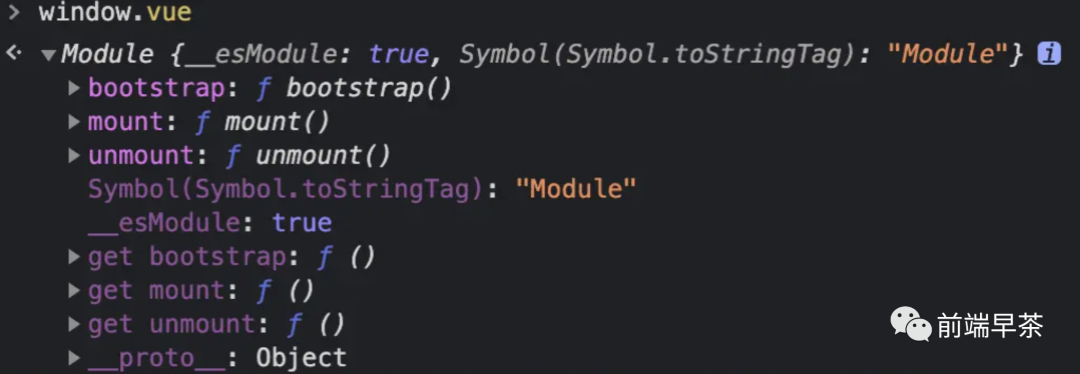
大家可以在上圖中看到導(dǎo)出的這些函數(shù)都是子應(yīng)用的生命周期,我們需要拿到這些函數(shù)去調(diào)用。
最后我們?cè)?nbsp;loadHTML 中調(diào)用一下 runJS 就完事了:
export const loadHTML = async (app: IInternalAppInfo) => {
  const { container, entry } = app

  const { template, getExternalScripts, getExternalStyleSheets } =
    await importEntry(entry)
  const dom = document.querySelector(container)

  if (!dom) {
    throw new Error('容器不存在 ')
  }

  dom.innerHTML = template

  await getExternalStyleSheets()
  const jsCode = await getExternalScripts()

  jsCode.forEach((script) => {
    const lifeCycle = runJS(script, app)
    if (lifeCycle) {
      app.bootstrap = lifeCycle.bootstrap
      app.mount = lifeCycle.mount
      app.unmount = lifeCycle.unmount
    }
  })

  return app
}
完成以上步驟后,我們就能看到子應(yīng)用被正常渲染出來(lái)了!

但是到這一步其實(shí)還不算完,我們考慮這樣一個(gè)問(wèn)題:子應(yīng)用改變?nèi)肿兞吭趺崔k? 我們目前所有應(yīng)用都可以獲取及改變 window 上的內(nèi)容,那么一旦應(yīng)用之間出現(xiàn)全局變量沖突就會(huì)引發(fā)問(wèn)題,因此我們接下來(lái)需要來(lái)解決這個(gè)事兒。
JS 沙箱
window 上的屬性又要能訪問(wèn) window 上的內(nèi)容,那么就只能做個(gè)假的 window 給子應(yīng)用了,也就是實(shí)現(xiàn)一個(gè) JS 沙箱。快照 Proxy
window 上的所有內(nèi)容,然后接下來(lái)就隨便讓子應(yīng)用去玩了,直到卸載子應(yīng)用時(shí)恢復(fù)掛載前的 window 即可。這種方案實(shí)現(xiàn)容易,唯一缺點(diǎn)就是性能慢點(diǎn),有興趣的讀者可以直接看看 qiankun 的實(shí)現(xiàn),這里就不再貼代碼了。export class ProxySandbox {
proxy: any
running = false
constructor() {
// 創(chuàng)建個(gè)假的 window
const fakeWindow = Object.create(null)
const proxy = new Proxy(fakeWindow, {
set: (target: any, p: string, value: any) => {
// 如果當(dāng)前沙箱在運(yùn)行,就直接把值設(shè)置到 fakeWindow 上
if (this.running) {
target[p] = value
}
return true
},
get(target: any, p: string): any {
// 防止用戶逃課
switch (p) {
case 'window':
case 'self':
case 'globalThis':
return proxy
}
// 假如屬性不存在 fakeWindow 上,但是存在于 window 上
// 從 window 上取值
if (
!window.hasOwnProperty.call(target, p) &&
window.hasOwnProperty(p)
) {
// @ts-ignore
const value = window[p]
if (typeof value === 'function') return value.bind(window)
return value
}
return target[p]
},
has() {
return true
},
})
this.proxy = proxy
}
// 激活沙箱
active() {
this.running = true
}
// 失活沙箱
inactive() {
this.running = false
}
}
window 出來(lái),如果用戶設(shè)置值的話就設(shè)置在 fakeWindow 上,這樣就不會(huì)影響全局變量了。如果用戶取值的話,就判斷屬性是存在于 fakeWindow 上還是 window 上。runJS 里的代碼以便使用沙箱:const runJS = (value: string, app: IInternalAppInfo) => {
if (!app.proxy) {
app.proxy = new ProxySandbox()
// 將沙箱掛在全局屬性上
// @ts-ignore
window.__CURRENT_PROXY__ = app.proxy.proxy
}
// 激活沙箱
app.proxy.active()
// 用沙箱替代全局環(huán)境調(diào)用 JS
const code = `
return (window => {
${value}
return window['${app.name}']
})(window.__CURRENT_PROXY__)
`
return new Function(code)()
}
至此,我們其實(shí)已經(jīng)完成了整個(gè)微前端的核心功能。
接下來(lái)我們會(huì)來(lái)做一些改善型功能。
改善型功能
prefetch
import-html-entry 就能馬上做完了:// src/start.ts
export const start = () => {
const list = getAppList()
if (!list.length) {
throw new Error('請(qǐng)先注冊(cè)應(yīng)用')
}
hijackRoute()
reroute(window.location.href)
// 判斷狀態(tài)為 NOT_LOADED 的子應(yīng)用才需要 prefetch
list.forEach((app) => {
if ((app as IInternalAppInfo).status === AppStatus.NOT_LOADED) {
prefetch(app as IInternalAppInfo)
}
})
}
// src/utils.ts
export const prefetch = async (app: IInternalAppInfo) => {
requestIdleCallback(async () => {
const { getExternalScripts, getExternalStyleSheets } = await importEntry(
app.entry
)
requestIdleCallback(getExternalStyleSheets)
requestIdleCallback(getExternalScripts)
})
}
接下來(lái)主要來(lái)聊下 requestIdleCallback 這個(gè)函數(shù)。
window.requestIdleCallback() 方法將在瀏覽器的空閑時(shí)段內(nèi)調(diào)用的函數(shù)排隊(duì)。這使開(kāi)發(fā)者能夠在主事件循環(huán)上執(zhí)行后臺(tái)和低優(yōu)先級(jí)工作,而不會(huì)影響延遲關(guān)鍵事件,如動(dòng)畫(huà)和輸入響應(yīng)。
prefetch,其實(shí)這個(gè)函數(shù)在 React 中也有用到,無(wú)非內(nèi)部實(shí)現(xiàn)了一個(gè) polyfill 版本。因?yàn)檫@個(gè) API 有一些問(wèn)題(最快 50ms 響應(yīng)一次)尚未解決,但是在我們的場(chǎng)景下不會(huì)有問(wèn)題,所以可以直接使用。資源緩存機(jī)制
當(dāng)我們加載過(guò)一次資源后,用戶肯定不希望下次再進(jìn)入該應(yīng)用的時(shí)候還需要再加載一次資源,因此我們需要實(shí)現(xiàn)資源的緩存機(jī)制。
上一小節(jié)我們因?yàn)槭褂玫搅?import-html-entry,內(nèi)部自帶了緩存機(jī)制。如果你想自己實(shí)現(xiàn)的話,可以參考內(nèi)部的實(shí)現(xiàn)方式。
簡(jiǎn)單來(lái)說(shuō)就是搞一個(gè)對(duì)象緩存下每次請(qǐng)求下來(lái)的文件內(nèi)容,下次請(qǐng)求的時(shí)候先判斷對(duì)象中存不存在值,存在的話直接拿出來(lái)用就行。
全局通信及狀態(tài)
這部分內(nèi)容在筆者的代碼中并未實(shí)現(xiàn),如果你有興趣自己做的話,筆者可以提供一些思路。
全局通信及狀態(tài)實(shí)際上完全都可以看做是發(fā)布訂閱模式的一種實(shí)現(xiàn),只要你自己手寫(xiě)過(guò) Event 的話,實(shí)現(xiàn)這個(gè)應(yīng)該不是什么難題。
另外你也可以閱讀下 qiankun 的全局狀態(tài)實(shí)現(xiàn),總共也就 100 行代碼。
五、總結(jié)
在看源碼前,我們先去官方文檔復(fù)習(xí)下框架設(shè)計(jì)理念、源碼分層設(shè)計(jì) 閱讀下框架官方開(kāi)發(fā)人員寫(xiě)的相關(guān)文章 借助框架的調(diào)用棧來(lái)進(jìn)行源碼的閱讀,通過(guò)這個(gè)執(zhí)行流程,我們就完整的對(duì)源碼進(jìn)行了一個(gè)初步的了解 接下來(lái)再對(duì)源碼執(zhí)行過(guò)程中涉及的所有函數(shù)邏輯梳理一遍
關(guān)注我,一起攜手進(jìn)階
歡迎關(guān)注前端早茶,與廣東靚仔攜手共同進(jìn)階~