
C#用6步實(shí)現(xiàn)語音聊天
一、前言
語音聊天 專業(yè)點(diǎn)就是即時語音,是一種基于網(wǎng)絡(luò)的快速傳遞語音信息的技術(shù),普遍應(yīng)用于各類社交軟件中,優(yōu)勢主要有以下幾點(diǎn):
1、時效性:視頻直播會因?yàn)閹拞栴}有時出現(xiàn)延遲高的問題,而語音直播相對來說會好很多,延遲低,并且能夠第·一時間與聽眾互動,時效性強(qiáng)。
2、隱私性:這一點(diǎn)體現(xiàn)在何處,如主播不想暴露自己的長相,或者進(jìn)行問題回答是,沒有視頻的話會讓主播感到更安心,所以語音直播隱私性更強(qiáng)。
3、內(nèi)容質(zhì)量高:因?yàn)檎Z音直播不靠"顏值"只有好的內(nèi)容才能夠吸引用戶,所以語音直播相對來說內(nèi)容質(zhì)量更高。
4、成本降低:語音直播相對視頻直播來說,帶寬流量等都會便宜許多,成本降低不少,更加實(shí)惠。
二、語音聊天
主要步驟:音頻采集、壓縮編碼、網(wǎng)絡(luò)傳輸、解碼還原、播放音頻,如下圖所示
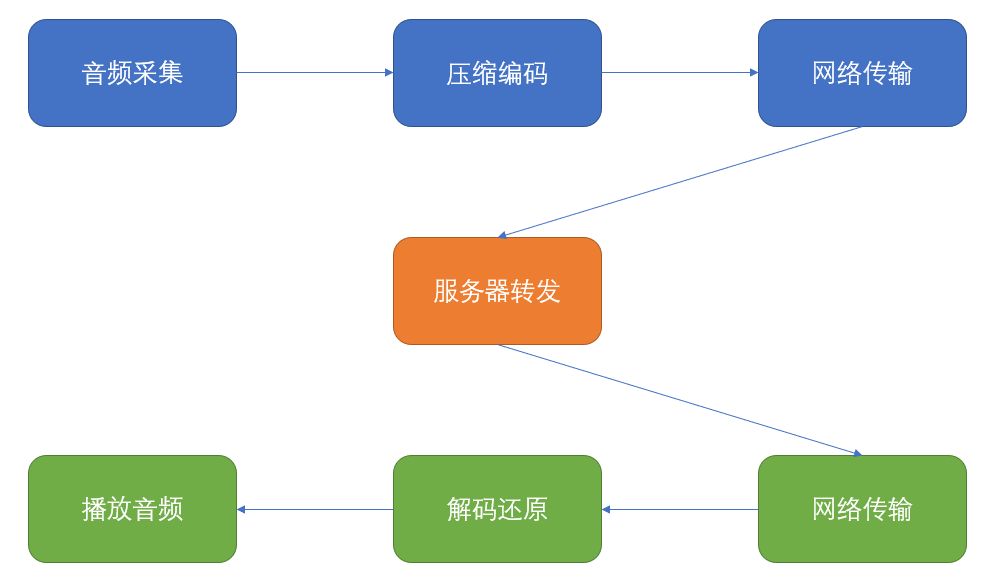
下面就從代碼的角度來詳說一下這幾個步驟。
1、音頻采集,讀取麥克風(fēng)設(shè)備數(shù)據(jù)
        private readonly WaveIn _waveIn;


        _waveIn = new WaveIn();


        _waveIn.BufferMilliseconds = 50;


        _waveIn.DeviceNumber = 0;


        _waveIn.DataAvailable += OnAudioCaptured;


        _waveIn.StartRecording();
2、音頻數(shù)據(jù)壓縮編碼,常見壓縮格式比較多,例如mp3、acc、speex等,這里以speex為例
        private readonly WideBandSpeexCodec _speexCodec;


        _speexCodec = new WideBandSpeexCodec();


        _waveIn.WaveFormat = _speexCodec.RecordFormat;


          void OnAudioCaptured(object sender, WaveInEventArgs e)


        {


             byte[] encoded = _speexCodec.Encode(e.Buffer, 0, e.BytesRecorded);


             _audioClient.Send(encoded);


        }
3、網(wǎng)絡(luò)傳輸,為了保證即時傳輸udp協(xié)議有著天然的優(yōu)點(diǎn)
        using SAEA.Sockets;


        using SAEA.Sockets.Base;


        using SAEA.Sockets.Model;


        using System;


        using System.Net;


        namespace GFF.Component.GAudio.Net


        {


            public class AudioClient


            {


                IClientSocket _udpClient;


                BaseUnpacker _baseUnpacker;


                public event Action<Byte[]> OnReceive;


                public AudioClient(IPEndPoint endPoint)


                {


                    var bContext = new BaseContext();


                    _udpClient = SocketFactory.CreateClientSocket(SocketOptionBuilder.Instance.SetSocket(SAEASocketType.Udp)


                        .SetIPEndPoint(endPoint)


                        .UseIocp(bContext)


                        .SetReadBufferSize(SocketOption.UDPMaxLength)


                        .SetWriteBufferSize(SocketOption.UDPMaxLength)


                        .Build());


                    _baseUnpacker = (BaseUnpacker)bContext.Unpacker;


                    _udpClient.OnReceive += _udpClient_OnReceive;


                }


                private void _udpClient_OnReceive(byte[] data)


                {


                    OnReceive?.Invoke(data);


                }


                public void Connect()


                {


                    _udpClient.Connect();


                }


                public void Send(byte[] data)


                {


                    _udpClient.SendAsync(data);


                }


                public void Disconnect()


                {


                    _udpClient.Disconnect();


                }


            }


        }
4、服務(wù)器轉(zhuǎn)發(fā),客戶端使用udp,服務(wù)器這里同樣也使用udp來轉(zhuǎn)發(fā)
        using SAEA.Sockets;


        using SAEA.Sockets.Base;


        using SAEA.Sockets.Interface;


        using SAEA.Sockets.Model;


        using System;


        using System.Collections.Concurrent;


        using System.Net;


        using System.Threading.Tasks;


        namespace GFF.Component.GAudio.Net


        {


            public class AudioServer


            {


                IServerSocket _udpServer;


                ConcurrentDictionary<string, IUserToken> _cache;


                public AudioServer(IPEndPoint endPoint)


                {


                    _cache = new ConcurrentDictionary<string, IUserToken>();


                    _udpServer = SocketFactory.CreateServerSocket(SocketOptionBuilder.Instance.SetSocket(SAEASocketType.Udp)


                        .SetIPEndPoint(endPoint)


                        .UseIocp<BaseContext>()


                        .SetReadBufferSize(SocketOption.UDPMaxLength)


                        .SetWriteBufferSize(SocketOption.UDPMaxLength)


                        .SetTimeOut(5000)


                        .Build());


                    _udpServer.OnAccepted += _udpServer_OnAccepted;


                    _udpServer.OnDisconnected += _udpServer_OnDisconnected;


                    _udpServer.OnReceive += _udpServer_OnReceive;


                }


                public void Start()


                {


                    _udpServer.Start();


                }


                public void Stop()


                {


                    _udpServer.Stop();


                }


                private void _udpServer_OnReceive(ISession currentSession, byte[] data)


                {


                    Parallel.ForEach(_cache.Keys, (id) =>


                    {


                        try


                        {


                            _udpServer.SendAsync(id, data);


                        }


                        catch { }


                    });


                }


                private void _udpServer_OnAccepted(object obj)


                {


                    var ut = (IUserToken)obj;


                    if (ut != null)


                    {


                        _cache.TryAdd(ut.ID, ut);


                    }


                }


                private void _udpServer_OnDisconnected(string ID, Exception ex)


                {


                    _cache.TryRemove(ID, out IUserToken _);


                }


            }


        }
5、解碼還原,客戶端將從服務(wù)器收到的數(shù)據(jù)按約定的壓縮格式,進(jìn)行解壓縮還原成音頻數(shù)據(jù)
        private readonly BufferedWaveProvider _waveProvider;


        _waveProvider = new BufferedWaveProvider(_speexCodec.RecordFormat);


        private void _audioClient_OnReceive(byte[] data)


        {


             byte[] decoded = _speexCodec.Decode(data, 0, data.Length);


             _waveProvider.AddSamples(decoded, 0, decoded.Length);


        }
6、播放音頻,使用播放設(shè)備來播放解碼后的音頻數(shù)據(jù)
        private readonly IWavePlayer _waveOut;


        _waveOut = new WaveOut();


        _waveOut.Init(_waveProvider);


        _waveOut.Play();
三、測試運(yùn)行
通過分析語音聊天的幾個關(guān)鍵問題點(diǎn)后,按步驟封裝好代碼,接下來就是用實(shí)例來測試一下效果了。
客戶端封裝在按鈕事件中:
        GAudioClient _gAudioClient = null;


          private void toolStripDropDownButton2_ButtonClick(object sender, EventArgs e)


        {


            if (_gAudioClient == null)


            {


                ClientConfig clientConfig = ClientConfig.Instance();


                _gAudioClient = new GAudioClient(clientConfig.IP, clientConfig.Port + 2);


                _gAudioClient.Start();


            }


            else


            {


                _gAudioClient.Dispose();


                _gAudioClient = null;


            }


        }
服務(wù)端封裝在main函數(shù)中:
        ConsoleHelper.WriteLine("正在初始化語音服務(wù)器...", ConsoleColor.DarkBlue);


        _gAudioServer = new GAudioServer(filePort + 1);


        ConsoleHelper.WriteLine("語音服務(wù)器初始化完畢...", ConsoleColor.DarkBlue);


        ConsoleHelper.WriteLine("正在啟動語音服務(wù)器...", ConsoleColor.DarkBlue);


        _gAudioServer.Start();


        ConsoleHelper.WriteLine("語音服務(wù)器初始化完畢", ConsoleColor.DarkBlue);
萬事俱備,現(xiàn)在F5跑起來試試。
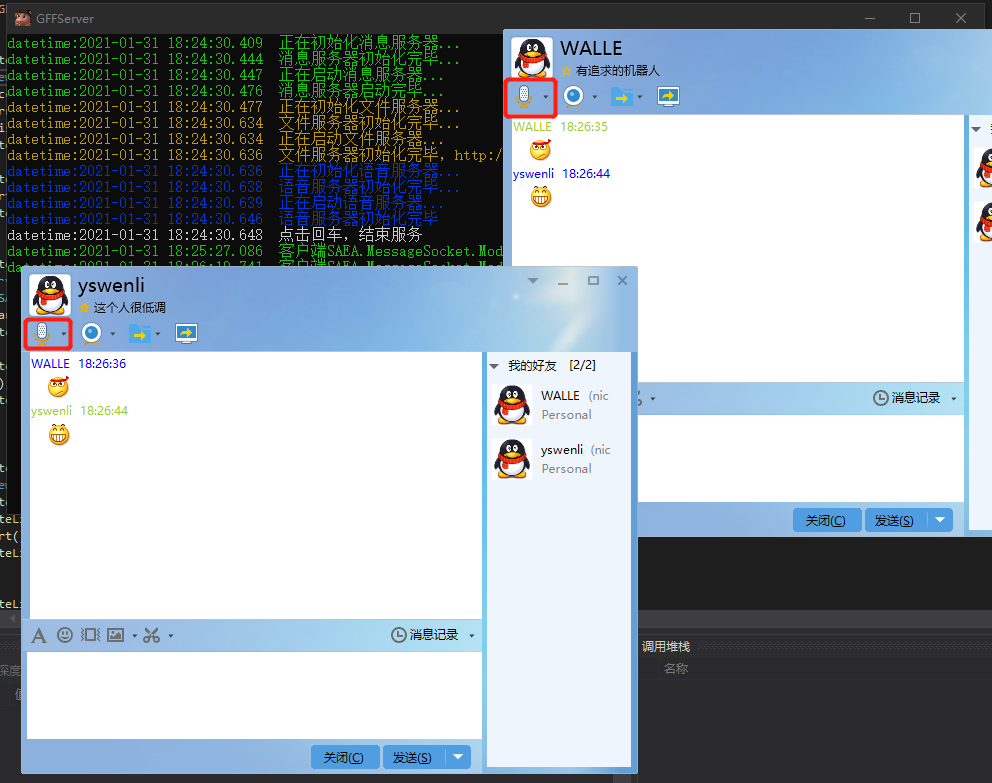
如上紅框所示,喊了幾句相當(dāng)于Hello World的Hello沒有問題,大功初步告成~
本文作者:yswenli信息來源:cnblogs.com yswenli
版權(quán)聲明:本文來源于網(wǎng)友收集或網(wǎng)友供稿,僅供學(xué)習(xí)交流之用,如果有侵權(quán),請轉(zhuǎn)告小編或者留言,本公眾號立即刪除。
 支持小薇
支持小薇
關(guān)注公眾號↑↑↑:DotNet開發(fā)跳槽?????
點(diǎn) 分 享

點(diǎn) 收 藏

點(diǎn) 點(diǎn) 贊

點(diǎn)在看