<kbd id="afajh"><form id="afajh"></form></kbd>
<strong id="afajh"><dl id="afajh"></dl></strong>
    <del id="afajh"><form id="afajh"></form></del>
        1. <th id="afajh"><progress id="afajh"></progress></th>
          <b id="afajh"><abbr id="afajh"></abbr></b>
          <th id="afajh"><progress id="afajh"></progress></th>

          記一次因 Redis 使用不當(dāng)導(dǎo)致應(yīng)用卡死 bug 的排查及解決!

          共 11330字,需瀏覽 23分鐘

           ·

          2021-06-14 13:07

          往期熱門文章:

          1、拜訪了這位小哥的GitHub后,我失眠了!

          2、還在寫大量 if 來判斷?試試用一個規(guī)則執(zhí)行器來替代它

          3、騰訊最大股東收購了 Stack Overflow,以后“抄代碼”都要付費了么?

          4、靈隱寺招聘:沒有KPI,佛系上班……

          5如何優(yōu)雅處理重復(fù)請求/并發(fā)請求?

          首先說下問題現(xiàn)象:內(nèi)網(wǎng)sandbox環(huán)境API持續(xù)1周出現(xiàn)應(yīng)用卡死,所有api無響應(yīng)現(xiàn)象
          剛開始當(dāng)測試抱怨環(huán)境響應(yīng)慢的時候 ,我們重啟一下應(yīng)用,應(yīng)用恢復(fù)正常,于是沒做處理。
          但是后來問題出現(xiàn)頻率越來越頻繁,越來越多的同事開始抱怨,于是感覺代碼可能有問題,開始排查。
          首先發(fā)現(xiàn)開發(fā)的本地ide沒有發(fā)現(xiàn)問題,應(yīng)用卡死時候數(shù)據(jù)庫,redis都正常,并且無特殊錯誤日志。開始懷疑是sandbox環(huán)境機器問題(測試環(huán)境本身就很脆!_!)
          于是ssh上了服務(wù)器 執(zhí)行以下命令
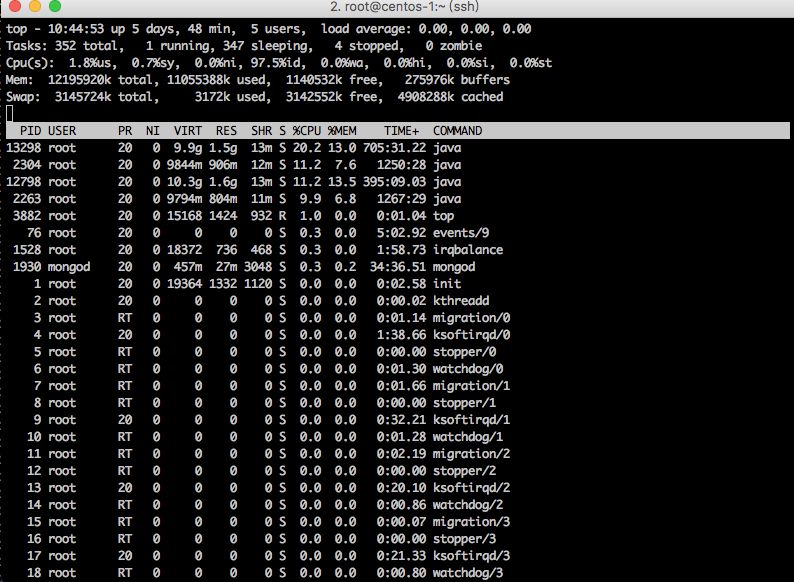
          top
          這時發(fā)現(xiàn)機器還算正常,于是打算看下jvm 堆棧信息
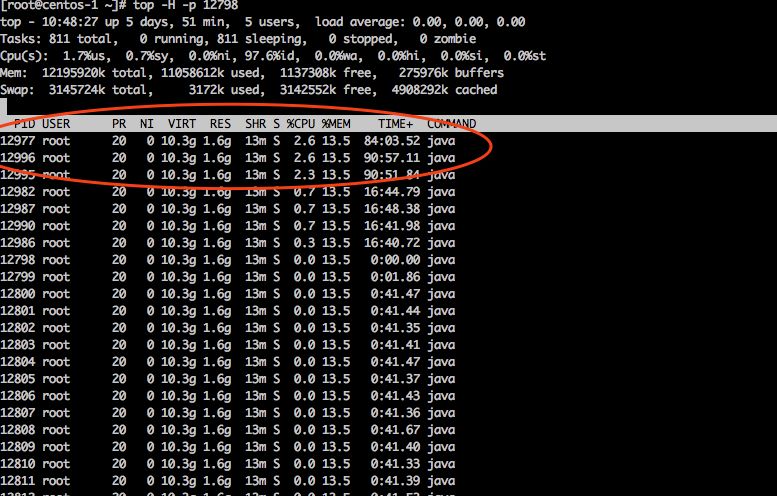
          先看下問題應(yīng)用比較耗資源的線程
          執(zhí)行 top -H -p 12798
          找到前3個相對比較耗資源的線程
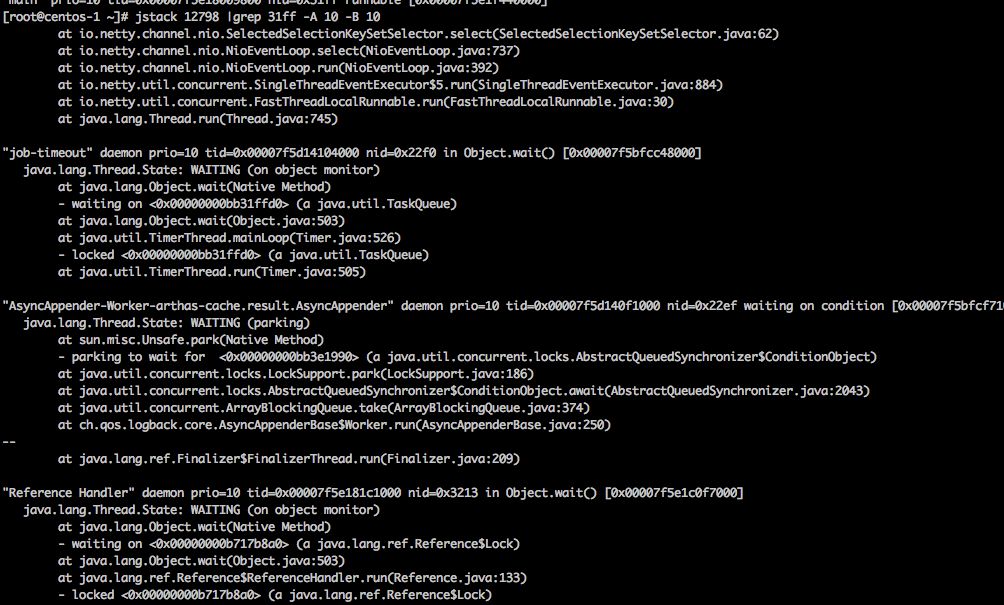
          jstack 查看堆內(nèi)存
          jstack 12798 |grep 1279916進(jìn)制 31ff
          沒看出什么問題,上下10行也看看,于是執(zhí)行
          看到一些線程都是處于lock狀態(tài)。但沒有出現(xiàn)業(yè)務(wù)相關(guān)的代碼,忽略了。這時候沒有什么頭緒。思考一番。決定放棄這次卡死狀態(tài)的機器
          為了保護(hù)事故現(xiàn)場 先 dump了問題進(jìn)程所有堆內(nèi)存,然后debug模式重啟測試環(huán)境應(yīng)用,打算問題再顯時直接遠(yuǎn)程debug問題機器
          第二天問題再現(xiàn),于是通知運維nginx轉(zhuǎn)發(fā)拿掉這臺問題應(yīng)用,自己遠(yuǎn)程debug tomcat。
          自己隨意找了一個接口,斷點在接口入口地方,悲劇開始,什么也沒有發(fā)生!API等待服務(wù)響應(yīng),沒進(jìn)斷點。
          這時候有點懵逼,冷靜了一會,在入口之前的aop地方下了個斷點,再debug一次,這次進(jìn)了斷點,f8 N次后發(fā)現(xiàn)在執(zhí)行redis命令的時候卡主了。
          繼續(xù)跟,最后在到j(luò)edis的一個地方發(fā)現(xiàn)問題:
          /**
           * Returns a Jedis instance to be used as a Redis connection. The instance can be newly created or retrieved from a
           * pool.
           * 
           * @return Jedis instance ready for wrapping into a {@link RedisConnection}.
           */

          protected Jedis fetchJedisConnector() {
             try {
                if (usePool && pool != null) {
                   return pool.getResource();
                }
                Jedis jedis = new Jedis(getShardInfo());
                // force initialization (see Jedis issue #82)
                jedis.connect();
                return jedis;
             } catch (Exception ex) {
                throw new RedisConnectionFailureException("Cannot get Jedis connection", ex);
             }
          }
          上面pool.getResource()后線程開始wait
          public T getResource() {
            try {
              return internalPool.borrowObject();
            } catch (Exception e) {
              throw new JedisConnectionException("Could not get a resource from the pool", e);
            }
          }
          return internalPool.borrowObject(); 這個代碼應(yīng)該是一個租賃的代碼,接著跟
          public T borrowObject(long borrowMaxWaitMillis) throws Exception {
              this.assertOpen();
              AbandonedConfig ac = this.abandonedConfig;
              if (ac != null && ac.getRemoveAbandonedOnBorrow() && this.getNumIdle() < 2 && this.getNumActive() > this.getMaxTotal() - 3) {
                  this.removeAbandoned(ac);
              }

              PooledObject p = null;
              boolean blockWhenExhausted = this.getBlockWhenExhausted();
              long waitTime = 0L;

              while(p == null) {
                  boolean create = false;
                  if (blockWhenExhausted) {
                      p = (PooledObject)this.idleObjects.pollFirst();
                      if (p == null) {
                          create = true;
                          p = this.create();
                      }

                      if (p == null) {
                          if (borrowMaxWaitMillis < 0L) {
                              p = (PooledObject)this.idleObjects.takeFirst();
                          } else {
                              waitTime = System.currentTimeMillis();
                              p = (PooledObject)this.idleObjects.pollFirst(borrowMaxWaitMillis, TimeUnit.MILLISECONDS);
                              waitTime = System.currentTimeMillis() - waitTime;
                          }
                      }

                      if (p == null) {
                          throw new NoSuchElementException("Timeout waiting for idle object");
                      }
          其中有段代碼
          if (p == null) {
              if (borrowMaxWaitMillis < 0L) {
                  p = (PooledObject)this.idleObjects.takeFirst();
              } else {
                  waitTime = System.currentTimeMillis();
                  p = (PooledObject)this.idleObjects.pollFirst(borrowMaxWaitMillis, TimeUnit.MILLISECONDS);
                  waitTime = System.currentTimeMillis() - waitTime;
              }
          }
          borrowMaxWaitMillis<0會一直執(zhí)行,然后一直循環(huán)了 開始懷疑這個值沒有配置
          找到redis pool配置,發(fā)現(xiàn)確實沒有配置MaxWaitMillis,配置后else代碼也是一個Exception 并不能解決問題
          繼續(xù)F8
          public E takeFirst() throws InterruptedException {
              this.lock.lock();

              Object var2;
              try {
                  Object x;
                  while((x = this.unlinkFirst()) == null) {
                      this.notEmpty.await();
                  }

                  var2 = x;
              } finally {
                  this.lock.unlock();
              }

              return var2;
          }
          到這邊 發(fā)現(xiàn)lock字眼,開始懷疑所有請求api都被阻塞了
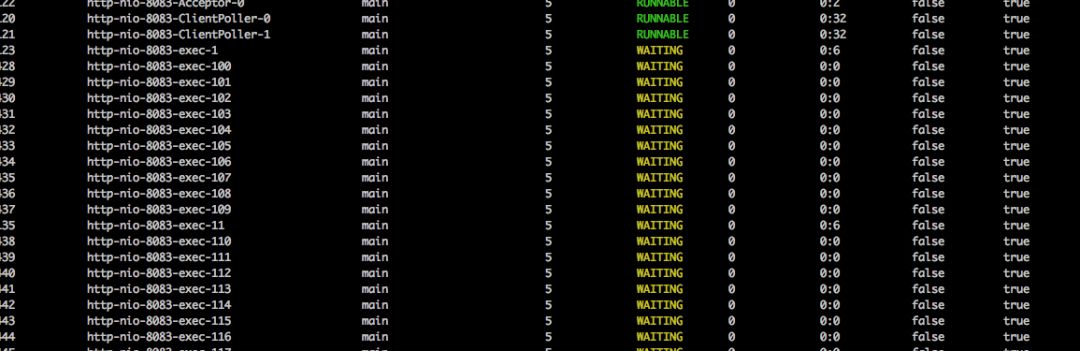
          于是再次ssh 服務(wù)器 安裝 arthas ,(Arthas 是Alibaba開源的Java診斷工具)
          執(zhí)行thread命令
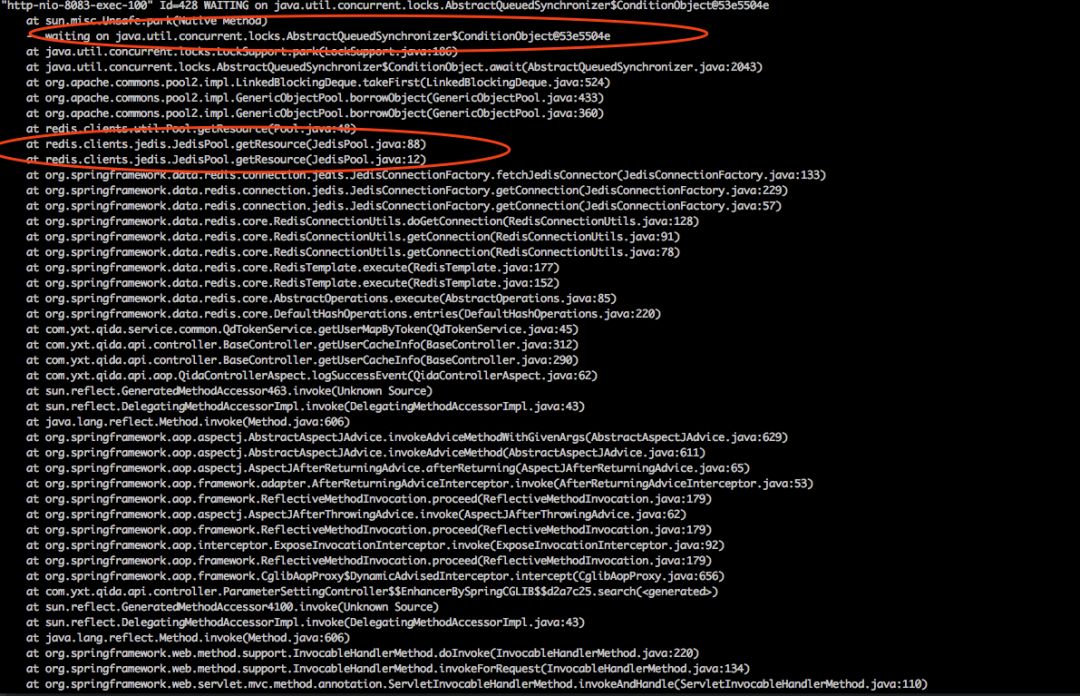
          發(fā)現(xiàn)大量http-nio的線程waiting狀態(tài),http-nio-8083-exec-這個線程其實就是出來http請求的tomcat線程
          隨意找一個線程查看堆內(nèi)存
          thread -428
          這是能確認(rèn)就是api一直轉(zhuǎn)圈的問題,就是這個redis獲取連接的代碼導(dǎo)致的,
          解讀這段內(nèi)存代碼  所有線程都在等 @53e5504e這個對象釋放鎖。于是jstack 全局搜了一把53e5504e ,沒有找到這個對象所在線程。
          自此。問題原因能確定是 redis連接獲取的問題。但是什么原因造成獲取不到連接的還不能確定
          再次執(zhí)行 arthas 的thread -b (thread -b, 找出當(dāng)前阻塞其他線程的線程)
          沒有結(jié)果。這邊和想的不一樣,應(yīng)該是能找到一個阻塞線程的,于是看了下這個命令的文檔,發(fā)現(xiàn)有下面的一句話
          好吧,我們剛好是后者。。。。
          再次整理下思路。這次修改redis pool 配置,將獲取連接超時時間設(shè)置為2s,然后等問題再次復(fù)現(xiàn)時觀察應(yīng)用最后正常時干過什么。
          添加一下配置
          JedisConnectionFactory jedisConnectionFactory = new JedisConnectionFactory();
          .......
          JedisPoolConfig config = new JedisPoolConfig();
          config.setMaxWaitMillis(2000);
          .......
          jedisConnectionFactory.afterPropertiesSet();
          重啟服務(wù),等待。。。。
          又過一天,再次復(fù)現(xiàn)
          ssh 服務(wù)器,檢查tomcat accesslog ,發(fā)現(xiàn)大量api 請求出現(xiàn)500,
          org.springframework.data.redis.RedisConnectionFailureException: Cannot get Jedis connection; nested exception is redis.clients.jedis.exceptions.JedisConnectionException: Could not get a resource fr
          om the pool
              at org.springframework.data.redis.connection.jedis.JedisConnectionFactory.fetchJedisConnector(JedisConnectionFactory.java:140)
              at org.springframework.data.redis.connection.jedis.JedisConnectionFactory.getConnection(JedisConnectionFactory.java:229)
              at org.springframework.data.redis.connection.jedis.JedisConnectionFactory.getConnection(JedisConnectionFactory.java:57)
              at org.springframework.data.redis.core.RedisConnectionUtils.doGetConnection(RedisConnectionUtils.java:128)
              at org.springframework.data.redis.core.RedisConnectionUtils.getConnection(RedisConnectionUtils.java:91)
              at org.springframework.data.redis.core.RedisConnectionUtils.getConnection(RedisConnectionUtils.java:78)
              at org.springframework.data.redis.core.RedisTemplate.execute(RedisTemplate.java:177)
              at org.springframework.data.redis.core.RedisTemplate.execute(RedisTemplate.java:152)
              at org.springframework.data.redis.core.AbstractOperations.execute(AbstractOperations.java:85)
              at org.springframework.data.redis.core.DefaultHashOperations.get(DefaultHashOperations.java:48)
          找到源頭第一次出現(xiàn)500地方,
          發(fā)現(xiàn)以下代碼
          .......
          Cursor c = stringRedisTemplate.getConnectionFactory().getConnection().scan(options);
          while (c.hasNext()) {
          .....,,
             }
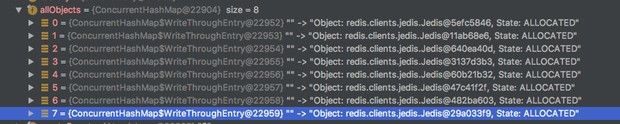
          分析這個代碼,stringRedisTemplate.getConnectionFactory().getConnection()獲取pool中的redisConnection后,并沒有后續(xù)操作
          也就是說此時redis 連接池中的鏈接被租賃后并沒有釋放或者退還到鏈接池中,雖然業(yè)務(wù)已處理完畢 redisConnection 已經(jīng)空閑,但是pool中的redisConnection的狀態(tài)還沒有回到idle狀態(tài)
          正常應(yīng)為
          自此問題已經(jīng)找到。
          總結(jié):spring stringRedisTemplate 對redis常規(guī)操作做了一些封裝,但還不支持像 Scan SetNx等命令,這時需要拿到j(luò)edis Connection進(jìn)行一些特殊的Commands
          使用
          stringRedisTemplate.getConnectionFactory().getConnection()
          是不被推薦的
          我們可以使用
          stringRedisTemplate.execute(new RedisCallback() {

               @Override
               public Cursor doInRedis(RedisConnection connection) throws DataAccessException {

                 return connection.scan(options);
               }
             });
          來執(zhí)行,或者使用完connection后 ,用
          RedisConnectionUtils.releaseConnection(conn, factory);
          來釋放connection.
          同時,redis中也不建議使用keys命令,redis pool的配置應(yīng)該合理配上,否則出現(xiàn)問題無錯誤日志,無報錯,定位相當(dāng)困難。
          End
          作者:小木-_-
          來源:
          https://my.oschina.net/xiaomu0082/blog/2990388
          本文版權(quán)歸作者所有

          往期熱門文章:

          1、歷史文章分類導(dǎo)讀列表!精選優(yōu)秀博文都在這里了!》

          2、為什么不建議你用a.equals(b)判斷對象相等
          3、為什么 Java 后端開發(fā)沒有大規(guī)模采用 Kotlin?
          4、為什么不推薦使用BeanUtils屬性轉(zhuǎn)換工具
          5、Top 16 的 Java 工具類,你用過幾個?
          6、分享幾個酷炫的 IDEA 主題
          7、Intellij IDEA 這樣配置注釋模板,讓你瞬間高出一個逼格!

          8、【建議收藏】面試官會問的位運算奇淫技巧
          9、到底可不可以用 kill -9 關(guān)閉程序?
          10、IDEA 2021首個大版本發(fā)布,新增了這幾個超實用功能!

          瀏覽 57
          點贊
          評論
          收藏
          分享

          手機掃一掃分享

          分享
          舉報
          評論
          圖片
          表情
          推薦
          點贊
          評論
          收藏
          分享

          手機掃一掃分享

          分享
          舉報
          <kbd id="afajh"><form id="afajh"></form></kbd>
          <strong id="afajh"><dl id="afajh"></dl></strong>
            <del id="afajh"><form id="afajh"></form></del>
                1. <th id="afajh"><progress id="afajh"></progress></th>
                  <b id="afajh"><abbr id="afajh"></abbr></b>
                  <th id="afajh"><progress id="afajh"></progress></th>
                  天堂国产在线观看 | 91精品国产99久久久久久 | 青青草视频在线免费看 | 日本一级黄色电影 | 国产三级在线观看 |