
Android 設(shè)備信息獲取詳解

和你一起終身學(xué)習(xí),這里是程序員Android
經(jīng)典好文推薦,通過閱讀本文,您將收獲以下知識(shí)點(diǎn):
一、獲取手機(jī)基本信息(廠商、型號等參數(shù))
二、設(shè)備信息獲取實(shí)現(xiàn)圖
三、獲取手機(jī)設(shè)備 寬、高、IMEI 信息
四、獲取手機(jī)廠商名、產(chǎn)品名、手機(jī)品牌、手機(jī)型號、主板名、設(shè)備名
五、獲取手機(jī)硬件名、SDK版本、android版本 、語言支持、默認(rèn)語言
六、獲取 SD 卡存儲(chǔ)信息
七、獲取手機(jī) RAM、ROM存儲(chǔ)信息
八、DeviceInfoUtils 封裝類
九、SDCardUtils 封裝類
下面將講解以上信息的獲取方法。
一、 獲取手機(jī)基本信息(廠商、型號等參數(shù))
以小米手機(jī)為例,手機(jī)常用的基本信息可以在Settings-->?About Phone中看到,
例如下圖:

小米手機(jī)設(shè)備信息圖
那么如何獲取這些設(shè)備信息呢??Android中 通常通過?android.os.Build類方法可以獲取更多手機(jī)設(shè)備信息。
二、 設(shè)備信息獲取實(shí)現(xiàn)圖
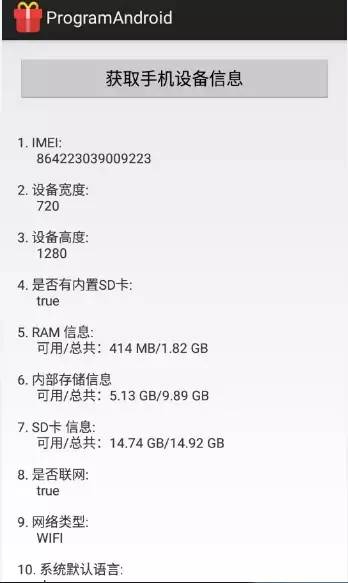
獲取手機(jī)IMEI、寬、高、是否有SD卡,RAM、ROM、SD卡、是否聯(lián)網(wǎng)、網(wǎng)絡(luò)類型
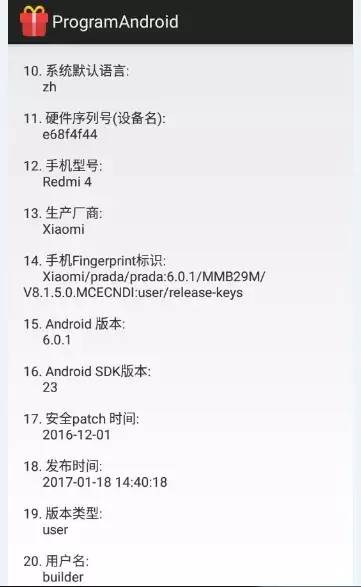
默認(rèn)語言,設(shè)備名,型號、廠商、Fingerprint、Android 版本、SDK版本、Google 安全patch、發(fā)布時(shí)間、版本類型、用戶名
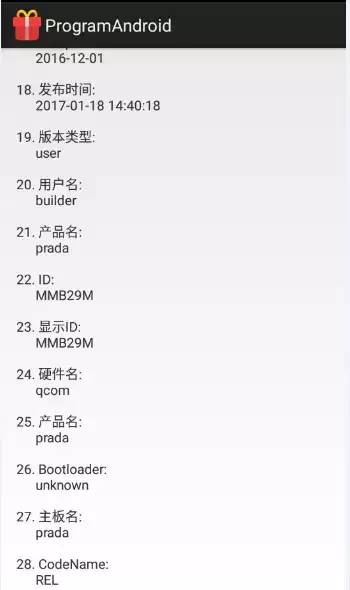
產(chǎn)品名、ID、產(chǎn)品名、主板名
三、 獲取手機(jī)設(shè)備 寬、高、IMEI 信息方法
獲取手機(jī)寬、高、IMEI信息方法如下:
    /**
     * 獲取設(shè)備寬度(px)
     *
     */
    public static int getDeviceWidth(Context context) {
        return context.getResources().getDisplayMetrics().widthPixels;
    }

    /**
     * 獲取設(shè)備高度(px)
     */
    public static int getDeviceHeight(Context context) {
        return context.getResources().getDisplayMetrics().heightPixels;
    }

    /**
     * 獲取設(shè)備的唯一標(biāo)識(shí), 需要 “android.permission.READ_Phone_STATE”權(quán)限
     */
    public static String getIMEI(Context context) {
        TelephonyManager tm = (TelephonyManager) context
                .getSystemService(Context.TELEPHONY_SERVICE);
        String deviceId = tm.getDeviceId();
        if (deviceId == null) {
            return "UnKnown";
        } else {
            return deviceId;
        }
    }
注意:獲取IMEI?需要獲取手機(jī)狀態(tài)權(quán)限
<uses-permission android:name="android.permission.READ_PHONE_STATE" />
如果是Android 6.0?之后的代碼請使用動(dòng)態(tài)申請權(quán)限的方法申請權(quán)限,否認(rèn)會(huì)報(bào)安全異常的錯(cuò)誤SecurityException,進(jìn)而導(dǎo)致運(yùn)行報(bào)錯(cuò)。
如需了解更多 系統(tǒng)安全權(quán)限的內(nèi)容,請看 之前寫的文章?Android 系統(tǒng)權(quán)限使用詳解
四、 獲取手機(jī)廠商名、產(chǎn)品名、手機(jī)品牌、手機(jī)型號、主板名、設(shè)備名的方法
獲取手機(jī)廠商名、產(chǎn)品名、手機(jī)品牌、手機(jī)型號、主板名、設(shè)備名的方法如下:
    /**
     * 獲取廠商名
     * **/
    public static String getDeviceManufacturer() {
        return android.os.Build.MANUFACTURER;
    }

    /**
     * 獲取產(chǎn)品名
     * **/
    public static String getDeviceProduct() {
        return android.os.Build.PRODUCT;
    }

    /**
     * 獲取手機(jī)品牌
     */
    public static String getDeviceBrand() {
        return android.os.Build.BRAND;
    }

    /**
     * 獲取手機(jī)型號
     */
    public static String getDeviceModel() {
        return android.os.Build.MODEL;
    }

    /**
     * 獲取手機(jī)主板名
     */
    public static String getDeviceBoard() {
        return android.os.Build.BOARD;
    }

    /**
     * 設(shè)備名
     * **/
    public static String getDeviceDevice() {
        return android.os.Build.DEVICE;
    }

    /**
     *
     *
     * fingerprit 信息
     * **/
    public static String getDeviceFubgerprint() {
        return android.os.Build.FINGERPRINT;
    }
五、 獲取手機(jī)硬件名、SDK版本、android版本 、語言支持、默認(rèn)語言等方法
獲取手機(jī)硬件名、SDK版本、android版本?、語言支持、默認(rèn)語言等方法如下:
    /**
     * 硬件名
     *
     * **/
    public static String getDeviceHardware() {
        return android.os.Build.HARDWARE;
    }

    /**
     * 主機(jī)
     *
     * **/
    public static String getDeviceHost() {
        return android.os.Build.HOST;
    }

    /**
     *
     * 顯示ID
     * **/
    public static String getDeviceDisplay() {
        return android.os.Build.DISPLAY;
    }

    /**
     * ID
     *
     * **/
    public static String getDeviceId() {
        return android.os.Build.ID;
    }

    /**
     * 獲取手機(jī)用戶名
     *
     * **/
    public static String getDeviceUser() {
        return android.os.Build.USER;
    }

    /**
     * 獲取手機(jī) 硬件序列號
     * **/
    public static String getDeviceSerial() {
        return android.os.Build.SERIAL;
    }

    /**
     * 獲取手機(jī)Android 系統(tǒng)SDK
     *
     * @return
     */
    public static int getDeviceSDK() {
        return android.os.Build.VERSION.SDK_INT;
    }

    /**
     * 獲取手機(jī)Android 版本
     *
     * @return
     */
    public static String getDeviceAndroidVersion() {
        return android.os.Build.VERSION.RELEASE;
    }

    /**
     * 獲取當(dāng)前手機(jī)系統(tǒng)語言。
     */
    public static String getDeviceDefaultLanguage() {
        return Locale.getDefault().getLanguage();
    }

    /**
     * 獲取當(dāng)前系統(tǒng)上的語言列表(Locale列表)
     */
    public static String getDeviceSupportLanguage() {
        Log.e("wangjie", "Local:" + Locale.GERMAN);
        Log.e("wangjie", "Local:" + Locale.ENGLISH);
        Log.e("wangjie", "Local:" + Locale.US);
        Log.e("wangjie", "Local:" + Locale.CHINESE);
        Log.e("wangjie", "Local:" + Locale.TAIWAN);
        Log.e("wangjie", "Local:" + Locale.FRANCE);
        Log.e("wangjie", "Local:" + Locale.FRENCH);
        Log.e("wangjie", "Local:" + Locale.GERMANY);
        Log.e("wangjie", "Local:" + Locale.ITALIAN);
        Log.e("wangjie", "Local:" + Locale.JAPAN);
        Log.e("wangjie", "Local:" + Locale.JAPANESE);
        return Locale.getAvailableLocales().toString();
    }
六、 獲取 SD 卡存儲(chǔ)信息

SD卡信息
1.判斷SD是否掛載方法
判斷SD是否掛載方法如下:
    /**
     * 判斷SD是否掛載
     */
    public static boolean isSDCardMount() {
        return Environment.getExternalStorageState().equals(
                Environment.MEDIA_MOUNTED);
    }
2. 獲取SD 存儲(chǔ)信息的方法
獲取SD?存儲(chǔ)信息的方法如下:
/**
     * 獲取手機(jī)存儲(chǔ) ROM 信息
     *
     * type:用于區(qū)分內(nèi)置存儲(chǔ)于外置存儲(chǔ)的方法
     *
     * 內(nèi)置SD卡 :INTERNAL_STORAGE = 0;
     *
     * 外置SD卡:EXTERNAL_STORAGE = 1;
     * **/
    public static String getStorageInfo(Context context, int type) {

        String path = getStoragePath(context, type);
        /**
         * 無外置SD 卡判斷
         * **/
        if (isSDCardMount() == false || TextUtils.isEmpty(path) || path == null) {
            return "無外置SD卡";
        }

        File file = new File(path);
        StatFs statFs = new StatFs(file.getPath());
        String stotageInfo;

        long blockCount = statFs.getBlockCountLong();
        long bloackSize = statFs.getBlockSizeLong();
        long totalSpace = bloackSize * blockCount;

        long availableBlocks = statFs.getAvailableBlocksLong();
        long availableSpace = availableBlocks * bloackSize;

        stotageInfo = "可用/總共:"
                + Formatter.formatFileSize(context, availableSpace) + "/"
                + Formatter.formatFileSize(context, totalSpace);

        return stotageInfo;

    }
3. 獲取手機(jī)ROM (內(nèi)置存儲(chǔ),外置存儲(chǔ))存儲(chǔ)路徑的方法
獲取手機(jī)ROM?存儲(chǔ)信息的方法如下:
/**
     * 使用反射方法 獲取手機(jī)存儲(chǔ)路徑
     *
     * **/
    public static String getStoragePath(Context context, int type) {

        StorageManager sm = (StorageManager) context
                .getSystemService(Context.STORAGE_SERVICE);
        try {
            Method getPathsMethod = sm.getClass().getMethod("getVolumePaths",
                    null);
            String[] path = (String[]) getPathsMethod.invoke(sm, null);

            switch (type) {
            case INTERNAL_STORAGE:
                return path[type];
            case EXTERNAL_STORAGE:
                if (path.length > 1) {
                    return path[type];
                } else {
                    return null;
                }

            default:
                break;
            }

        } catch (Exception e) {
            e.printStackTrace();
        }
        return null;
    }

    /**
     * 獲取 手機(jī) RAM 信息 方法 一
     * */
    public static String getTotalRAM(Context context) {
        long size = 0;
        ActivityManager activityManager = (ActivityManager) context
                .getSystemService(context.ACTIVITY_SERVICE);
        MemoryInfo outInfo = new MemoryInfo();
        activityManager.getMemoryInfo(outInfo);
        size = outInfo.totalMem;

        return Formatter.formatFileSize(context, size);
    }

    /**
     * 手機(jī) RAM 信息 方法 二
     * */
    public static String getTotalRAMOther(Context context) {
        String path = "/proc/meminfo";
        String firstLine = null;
        int totalRam = 0;
        try {
            FileReader fileReader = new FileReader(path);
            BufferedReader br = new BufferedReader(fileReader, 8192);
            firstLine = br.readLine().split("\\s+")[1];
            br.close();
        } catch (Exception e) {
            e.printStackTrace();
        }
        if (firstLine != null) {

            totalRam = (int) Math.ceil((new Float(Float.valueOf(firstLine)
                    / (1024 * 1024)).doubleValue()));

            long totalBytes = 0;

        }

        return Formatter.formatFileSize(context, totalRam);
    }

    /**
     * 獲取 手機(jī) 可用 RAM
     * */
    public static String getAvailableRAM(Context context) {
        long size = 0;
        ActivityManager activityManager = (ActivityManager) context
                .getSystemService(context.ACTIVITY_SERVICE);
        MemoryInfo outInfo = new MemoryInfo();
        activityManager.getMemoryInfo(outInfo);
        size = outInfo.availMem;

        return Formatter.formatFileSize(context, size);
    }
七、獲取手機(jī) RAM、ROM存儲(chǔ)信息
1.RAM:
運(yùn)行時(shí)內(nèi)存,此大小直接決定手機(jī)運(yùn)行的流暢度,相當(dāng)于電腦內(nèi)存。
2.ROM :
手機(jī)存儲(chǔ)(分內(nèi)置SD卡,外置SD卡),此大小直接決定著手機(jī)可以存儲(chǔ)資源的大小,相當(dāng)于電腦硬盤。
以紅米手機(jī)為例:RAM= 1904716KB= 1.82G
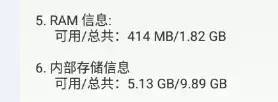
紅米4 手機(jī) RAM、ROM存儲(chǔ)信息

紅米4 memory 信息 meminfo
3.獲取?RAM存儲(chǔ)信息的方法如下:
    /**
     * 獲取 手機(jī) RAM 信息
     * */
    public static String getRAMInfo(Context context) {
        long totalSize = 0;
        long availableSize = 0;

        ActivityManager activityManager = (ActivityManager) context
                .getSystemService(context.ACTIVITY_SERVICE);

        MemoryInfo memoryInfo = new MemoryInfo();
        activityManager.getMemoryInfo(memoryInfo);
        totalSize = memoryInfo.totalMem;
        availableSize = memoryInfo.availMem;

        return "可用/總共:" + Formatter.formatFileSize(context, availableSize)
                + "/" + Formatter.formatFileSize(context, totalSize);
    }
4. 獲取手機(jī)ROM存儲(chǔ)信息的方法如下:
/**
     * 獲取手機(jī)存儲(chǔ) ROM 信息
     *
     * type:用于區(qū)分內(nèi)置存儲(chǔ)于外置存儲(chǔ)的方法
     *
     * 內(nèi)置SD卡 :INTERNAL_STORAGE = 0;
     *
     * 外置SD卡:EXTERNAL_STORAGE = 1;
     * **/
    public static String getStorageInfo(Context context, int type) {

        String path = getStoragePath(context, type);
        /**
         * 無外置SD 卡判斷
         * **/
        if (isSDCardMount() == false || TextUtils.isEmpty(path) || path == null) {
            return "無外置SD卡";
        }

        File file = new File(path);
        StatFs statFs = new StatFs(file.getPath());
        String stotageInfo;

        long blockCount = statFs.getBlockCountLong();
        long bloackSize = statFs.getBlockSizeLong();
        long totalSpace = bloackSize * blockCount;

        long availableBlocks = statFs.getAvailableBlocksLong();
        long availableSpace = availableBlocks * bloackSize;

        stotageInfo = "可用/總共:"
                + Formatter.formatFileSize(context, availableSpace) + "/"
                + Formatter.formatFileSize(context, totalSpace);

        return stotageInfo;

    }
八、DeviceInfoUtils 封裝類
為了方便查詢使用設(shè)備信息,小編已經(jīng)封裝成一個(gè)Utils類。代碼如下:
package com.programandroid.Utils;

import java.util.Locale;

import android.R.string;
import android.content.Context;
import android.telephony.TelephonyManager;
import android.util.Log;

/*
 * DeviceInfoUtils.java
 *
 *  Created on: 2017-11-16
 *      Author: wangjie
 *
 *  Welcome attention to weixin public number get more info
 *
 *  WeiXin Public Number : ProgramAndroid
 *  微信公眾號 :程序員Android
 *
 */
public class DeviceInfoUtils {

    /**
     * 獲取設(shè)備寬度(px)
     *
     */
    public static int getDeviceWidth(Context context) {
        return context.getResources().getDisplayMetrics().widthPixels;
    }

    /**
     * 獲取設(shè)備高度(px)
     */
    public static int getDeviceHeight(Context context) {
        return context.getResources().getDisplayMetrics().heightPixels;
    }

    /**
     * 獲取設(shè)備的唯一標(biāo)識(shí), 需要 “android.permission.READ_Phone_STATE”權(quán)限
     */
    public static String getIMEI(Context context) {
        TelephonyManager tm = (TelephonyManager) context
                .getSystemService(Context.TELEPHONY_SERVICE);
        String deviceId = tm.getDeviceId();
        if (deviceId == null) {
            return "UnKnown";
        } else {
            return deviceId;
        }
    }

    /**
     * 獲取廠商名
     * **/
    public static String getDeviceManufacturer() {
        return android.os.Build.MANUFACTURER;
    }

    /**
     * 獲取產(chǎn)品名
     * **/
    public static String getDeviceProduct() {
        return android.os.Build.PRODUCT;
    }

    /**
     * 獲取手機(jī)品牌
     */
    public static String getDeviceBrand() {
        return android.os.Build.BRAND;
    }

    /**
     * 獲取手機(jī)型號
     */
    public static String getDeviceModel() {
        return android.os.Build.MODEL;
    }

    /**
     * 獲取手機(jī)主板名
     */
    public static String getDeviceBoard() {
        return android.os.Build.BOARD;
    }

    /**
     * 設(shè)備名
     * **/
    public static String getDeviceDevice() {
        return android.os.Build.DEVICE;
    }

    /**
     *
     *
     * fingerprit 信息
     * **/
    public static String getDeviceFubgerprint() {
        return android.os.Build.FINGERPRINT;
    }

    /**
     * 硬件名
     *
     * **/
    public static String getDeviceHardware() {
        return android.os.Build.HARDWARE;
    }

    /**
     * 主機(jī)
     *
     * **/
    public static String getDeviceHost() {
        return android.os.Build.HOST;
    }

    /**
     *
     * 顯示ID
     * **/
    public static String getDeviceDisplay() {
        return android.os.Build.DISPLAY;
    }

    /**
     * ID
     *
     * **/
    public static String getDeviceId() {
        return android.os.Build.ID;
    }

    /**
     * 獲取手機(jī)用戶名
     *
     * **/
    public static String getDeviceUser() {
        return android.os.Build.USER;
    }

    /**
     * 獲取手機(jī) 硬件序列號
     * **/
    public static String getDeviceSerial() {
        return android.os.Build.SERIAL;
    }

    /**
     * 獲取手機(jī)Android 系統(tǒng)SDK
     *
     * @return
     */
    public static int getDeviceSDK() {
        return android.os.Build.VERSION.SDK_INT;
    }

    /**
     * 獲取手機(jī)Android 版本
     *
     * @return
     */
    public static String getDeviceAndroidVersion() {
        return android.os.Build.VERSION.RELEASE;
    }

    /**
     * 獲取當(dāng)前手機(jī)系統(tǒng)語言。
     */
    public static String getDeviceDefaultLanguage() {
        return Locale.getDefault().getLanguage();
    }

    /**
     * 獲取當(dāng)前系統(tǒng)上的語言列表(Locale列表)
     */
    public static String getDeviceSupportLanguage() {
        Log.e("wangjie", "Local:" + Locale.GERMAN);
        Log.e("wangjie", "Local:" + Locale.ENGLISH);
        Log.e("wangjie", "Local:" + Locale.US);
        Log.e("wangjie", "Local:" + Locale.CHINESE);
        Log.e("wangjie", "Local:" + Locale.TAIWAN);
        Log.e("wangjie", "Local:" + Locale.FRANCE);
        Log.e("wangjie", "Local:" + Locale.FRENCH);
        Log.e("wangjie", "Local:" + Locale.GERMANY);
        Log.e("wangjie", "Local:" + Locale.ITALIAN);
        Log.e("wangjie", "Local:" + Locale.JAPAN);
        Log.e("wangjie", "Local:" + Locale.JAPANESE);
        return Locale.getAvailableLocales().toString();
    }

    public static String getDeviceAllInfo(Context context) {

        return "\n\n1. IMEI:\n\t\t" + getIMEI(context)

        + "\n\n2. 設(shè)備寬度:\n\t\t" + getDeviceWidth(context)

        + "\n\n3. 設(shè)備高度:\n\t\t" + getDeviceHeight(context)

        + "\n\n4. 是否有內(nèi)置SD卡:\n\t\t" + SDCardUtils.isSDCardMount()

        + "\n\n5. RAM 信息:\n\t\t" + SDCardUtils.getRAMInfo(context)

        + "\n\n6. 內(nèi)部存儲(chǔ)信息\n\t\t" + SDCardUtils.getStorageInfo(context, 0)

        + "\n\n7. SD卡 信息:\n\t\t" + SDCardUtils.getStorageInfo(context, 1)

        + "\n\n8. 是否聯(lián)網(wǎng):\n\t\t" + Utils.isNetworkConnected(context)

        + "\n\n9. 網(wǎng)絡(luò)類型:\n\t\t" + Utils.GetNetworkType(context)

        + "\n\n10. 系統(tǒng)默認(rèn)語言:\n\t\t" + getDeviceDefaultLanguage()

        + "\n\n11. 硬件序列號(設(shè)備名):\n\t\t" + android.os.Build.SERIAL

        + "\n\n12. 手機(jī)型號:\n\t\t" + android.os.Build.MODEL

        + "\n\n13. 生產(chǎn)廠商:\n\t\t" + android.os.Build.MANUFACTURER

        + "\n\n14. 手機(jī)Fingerprint標(biāo)識(shí):\n\t\t" + android.os.Build.FINGERPRINT

        + "\n\n15. Android 版本:\n\t\t" + android.os.Build.VERSION.RELEASE

        + "\n\n16. Android SDK版本:\n\t\t" + android.os.Build.VERSION.SDK_INT

        + "\n\n17. 安全patch 時(shí)間:\n\t\t" + android.os.Build.VERSION.SECURITY_PATCH

        + "\n\n18. 發(fā)布時(shí)間:\n\t\t" + Utils.Utc2Local(android.os.Build.TIME)

        + "\n\n19. 版本類型:\n\t\t" + android.os.Build.TYPE

        + "\n\n20. 用戶名:\n\t\t" + android.os.Build.USER

        + "\n\n21. 產(chǎn)品名:\n\t\t" + android.os.Build.PRODUCT

        + "\n\n22. ID:\n\t\t" + android.os.Build.ID

        + "\n\n23. 顯示ID:\n\t\t" + android.os.Build.DISPLAY

        + "\n\n24. 硬件名:\n\t\t" + android.os.Build.HARDWARE

        + "\n\n25. 產(chǎn)品名:\n\t\t" + android.os.Build.DEVICE

        + "\n\n26. Bootloader:\n\t\t" + android.os.Build.BOOTLOADER

        + "\n\n27. 主板名:\n\t\t" + android.os.Build.BOARD

        + "\n\n28. CodeName:\n\t\t" + android.os.Build.VERSION.CODENAME
                + "\n\n29. 語言支持:\n\t\t" + getDeviceSupportLanguage();

    }
}
九、SDCardUtils 封裝類
為了方便查詢使用設(shè)備信息,小編已經(jīng)封裝成一個(gè)Utils類。代碼如下:
package com.programandroid.Utils;

import java.io.BufferedReader;
import java.io.File;
import java.io.FileReader;
import java.lang.reflect.Method;

import android.app.ActivityManager;
import android.app.ActivityManager.MemoryInfo;
import android.content.Context;
import android.os.Build;
import android.os.Environment;
import android.os.StatFs;
import android.os.storage.StorageManager;
import android.text.TextUtils;
import android.text.format.Formatter;

/*
 * SDCardUtils.java
 *
 *  Created on: 2017-11-22
 *      Author: wangjie
 *
 *  Welcome attention to weixin public number get more info
 *
 *  WeiXin Public Number : ProgramAndroid
 *  微信公眾號 :程序員Android
 *
 */
public class SDCardUtils {

    private static final int INTERNAL_STORAGE = 0;
    private static final int EXTERNAL_STORAGE = 1;

    /**
     * 獲取 手機(jī) RAM 信息
     * */
    public static String getRAMInfo(Context context) {
        long totalSize = 0;
        long availableSize = 0;

        ActivityManager activityManager = (ActivityManager) context
                .getSystemService(context.ACTIVITY_SERVICE);

        MemoryInfo memoryInfo = new MemoryInfo();
        activityManager.getMemoryInfo(memoryInfo);
        totalSize = memoryInfo.totalMem;
        availableSize = memoryInfo.availMem;

        return "可用/總共:" + Formatter.formatFileSize(context, availableSize)
                + "/" + Formatter.formatFileSize(context, totalSize);
    }

    /**
     * 判斷SD是否掛載
     */
    public static boolean isSDCardMount() {
        return Environment.getExternalStorageState().equals(
                Environment.MEDIA_MOUNTED);
    }

    /**
     * 獲取手機(jī)存儲(chǔ) ROM 信息
     *
     * type:用于區(qū)分內(nèi)置存儲(chǔ)于外置存儲(chǔ)的方法
     *
     * 內(nèi)置SD卡 :INTERNAL_STORAGE = 0;
     *
     * 外置SD卡:EXTERNAL_STORAGE = 1;
     * **/
    public static String getStorageInfo(Context context, int type) {

        String path = getStoragePath(context, type);
        /**
         * 無外置SD 卡判斷
         * **/
        if (isSDCardMount() == false || TextUtils.isEmpty(path) || path == null) {
            return "無外置SD卡";
        }

        File file = new File(path);
        StatFs statFs = new StatFs(file.getPath());
        String stotageInfo;

        long blockCount = statFs.getBlockCountLong();
        long bloackSize = statFs.getBlockSizeLong();
        long totalSpace = bloackSize * blockCount;

        long availableBlocks = statFs.getAvailableBlocksLong();
        long availableSpace = availableBlocks * bloackSize;

        stotageInfo = "可用/總共:"
                + Formatter.formatFileSize(context, availableSpace) + "/"
                + Formatter.formatFileSize(context, totalSpace);

        return stotageInfo;

    }

    /**
     * 使用反射方法 獲取手機(jī)存儲(chǔ)路徑
     *
     * **/
    public static String getStoragePath(Context context, int type) {

        StorageManager sm = (StorageManager) context
                .getSystemService(Context.STORAGE_SERVICE);
        try {
            Method getPathsMethod = sm.getClass().getMethod("getVolumePaths",
                    null);
            String[] path = (String[]) getPathsMethod.invoke(sm, null);

            switch (type) {
            case INTERNAL_STORAGE:
                return path[type];
            case EXTERNAL_STORAGE:
                if (path.length > 1) {
                    return path[type];
                } else {
                    return null;
                }

            default:
                break;
            }

        } catch (Exception e) {
            e.printStackTrace();
        }
        return null;
    }

    /**
     * 獲取 手機(jī) RAM 信息 方法 一
     * */
    public static String getTotalRAM(Context context) {
        long size = 0;
        ActivityManager activityManager = (ActivityManager) context
                .getSystemService(context.ACTIVITY_SERVICE);
        MemoryInfo outInfo = new MemoryInfo();
        activityManager.getMemoryInfo(outInfo);
        size = outInfo.totalMem;

        return Formatter.formatFileSize(context, size);
    }

    /**
     * 手機(jī) RAM 信息 方法 二
     * */
    public static String getTotalRAMOther(Context context) {
        String path = "/proc/meminfo";
        String firstLine = null;
        int totalRam = 0;
        try {
            FileReader fileReader = new FileReader(path);
            BufferedReader br = new BufferedReader(fileReader, 8192);
            firstLine = br.readLine().split("\\s+")[1];
            br.close();
        } catch (Exception e) {
            e.printStackTrace();
        }
        if (firstLine != null) {

            totalRam = (int) Math.ceil((new Float(Float.valueOf(firstLine)
                    / (1024 * 1024)).doubleValue()));

            long totalBytes = 0;

        }

        return Formatter.formatFileSize(context, totalRam);
    }

    /**
     * 獲取 手機(jī) 可用 RAM
     * */
    public static String getAvailableRAM(Context context) {
        long size = 0;
        ActivityManager activityManager = (ActivityManager) context
                .getSystemService(context.ACTIVITY_SERVICE);
        MemoryInfo outInfo = new MemoryInfo();
        activityManager.getMemoryInfo(outInfo);
        size = outInfo.availMem;

        return Formatter.formatFileSize(context, size);
    }

    /**
     * 獲取手機(jī)內(nèi)部存儲(chǔ)空間
     *
     * @param context
     * @return 以M,G為單位的容量
     */
    public static String getTotalInternalMemorySize(Context context) {
        File file = Environment.getDataDirectory();
        StatFs statFs = new StatFs(file.getPath());
        long blockSizeLong = statFs.getBlockSizeLong();
        long blockCountLong = statFs.getBlockCountLong();
        long size = blockCountLong * blockSizeLong;
        return Formatter.formatFileSize(context, size);
    }

    /**
     * 獲取手機(jī)內(nèi)部可用存儲(chǔ)空間
     *
     * @param context
     * @return 以M,G為單位的容量
     */
    public static String getAvailableInternalMemorySize(Context context) {
        File file = Environment.getDataDirectory();
        StatFs statFs = new StatFs(file.getPath());
        long availableBlocksLong = statFs.getAvailableBlocksLong();
        long blockSizeLong = statFs.getBlockSizeLong();
        return Formatter.formatFileSize(context, availableBlocksLong
                * blockSizeLong);
    }

    /**
     * 獲取手機(jī)外部存儲(chǔ)空間
     *
     * @param context
     * @return 以M,G為單位的容量
     */
    public static String getTotalExternalMemorySize(Context context) {
        File file = Environment.getExternalStorageDirectory();
        StatFs statFs = new StatFs(file.getPath());
        long blockSizeLong = statFs.getBlockSizeLong();
        long blockCountLong = statFs.getBlockCountLong();
        return Formatter
                .formatFileSize(context, blockCountLong * blockSizeLong);
    }

    /**
     * 獲取手機(jī)外部可用存儲(chǔ)空間
     *
     * @param context
     * @return 以M,G為單位的容量
     */
    public static String getAvailableExternalMemorySize(Context context) {
        File file = Environment.getExternalStorageDirectory();
        StatFs statFs = new StatFs(file.getPath());
        long availableBlocksLong = statFs.getAvailableBlocksLong();
        long blockSizeLong = statFs.getBlockSizeLong();
        return Formatter.formatFileSize(context, availableBlocksLong
                * blockSizeLong);
    }

    /**
     *
     * SD 卡信息
     * */

    public static String getSDCardInfo() {

        SDCardInfo sd = new SDCardInfo();
        if (!isSDCardMount())
            return "SD card 未掛載!";

        sd.isExist = true;
        StatFs sf = new StatFs(Environment.getExternalStorageDirectory()
                .getPath());

        sd.totalBlocks = sf.getBlockCountLong();
        sd.blockByteSize = sf.getBlockSizeLong();
        sd.availableBlocks = sf.getAvailableBlocksLong();
        sd.availableBytes = sf.getAvailableBytes();
        sd.freeBlocks = sf.getFreeBlocksLong();
        sd.freeBytes = sf.getFreeBytes();
        sd.totalBytes = sf.getTotalBytes();
        return sd.toString();
    }

    public static class SDCardInfo {
        boolean isExist;
        long totalBlocks;
        long freeBlocks;
        long availableBlocks;
        long blockByteSize;
        long totalBytes;
        long freeBytes;
        long availableBytes;

        @Override
        public String toString() {
            return "isExist=" + isExist + "\ntotalBlocks=" + totalBlocks
                    + "\nfreeBlocks=" + freeBlocks + "\navailableBlocks="
                    + availableBlocks + "\nblockByteSize=" + blockByteSize
                    + "\ntotalBytes=" + totalBytes + "\nfreeBytes=" + freeBytes
                    + "\navailableBytes=" + availableBytes;
        }
    }

    // add start by wangjie for SDCard TotalStorage
    public static String getSDCardTotalStorage(long totalByte) {

        double byte2GB = totalByte / 1024.00 / 1024.00 / 1024.00;
        double totalStorage;
        if (byte2GB > 1) {
            totalStorage = Math.ceil(byte2GB);
            if (totalStorage > 1 && totalStorage < 3) {
                return 2.0 + "GB";
            } else if (totalStorage > 2 && totalStorage < 5) {
                return 4.0 + "GB";
            } else if (totalStorage >= 5 && totalStorage < 10) {
                return 8.0 + "GB";
            } else if (totalStorage >= 10 && totalStorage < 18) {
                return 16.0 + "GB";
            } else if (totalStorage >= 18 && totalStorage < 34) {
                return 32.0 + "GB";
            } else if (totalStorage >= 34 && totalStorage < 50) {
                return 48.0 + "GB";
            } else if (totalStorage >= 50 && totalStorage < 66) {
                return 64.0 + "GB";
            } else if (totalStorage >= 66 && totalStorage < 130) {
                return 128.0 + "GB";
            }
        } else {
            // below 1G return get values
            totalStorage = totalByte / 1024.00 / 1024.00;

            if (totalStorage >= 515 && totalStorage < 1024) {
                return 1 + "GB";
            } else if (totalStorage >= 260 && totalStorage < 515) {
                return 512 + "MB";
            } else if (totalStorage >= 130 && totalStorage < 260) {
                return 256 + "MB";
            } else if (totalStorage > 70 && totalStorage < 130) {
                return 128 + "MB";
            } else if (totalStorage > 50 && totalStorage < 70) {
                return 64 + "MB";
            }
        }

        return totalStorage + "GB";
    }
    // add end by wangjie for SDCard TotalStorage

}
至此,本篇已結(jié)束。轉(zhuǎn)載網(wǎng)絡(luò)的文章,小編覺得很優(yōu)秀,歡迎點(diǎn)擊閱讀原文,支持原創(chuàng)作者,如有侵權(quán),懇請聯(lián)系小編刪除。同時(shí)感謝您的閱讀,期待您的關(guān)注。