
ES03# Elasticsearch性能調(diào)優(yōu)點(diǎn)梳理
引言
本文主要梳理了Elasticsearch集群常見(jiàn)優(yōu)化點(diǎn),就一些主要項(xiàng)能夠在實(shí)踐中指導(dǎo)使用,本文主要內(nèi)容有:
JVM參數(shù)調(diào)優(yōu) 系統(tǒng)參數(shù)調(diào)優(yōu) 寫(xiě)性能調(diào)優(yōu)點(diǎn) 讀性能調(diào)優(yōu)點(diǎn) 分片均衡優(yōu)化案例
1.參數(shù)設(shè)置
修改jvm參數(shù)可以通過(guò)config/jvm.options.d/jvm.options調(diào)整,不建議直接修改config/jvm.options,通過(guò)-Xms和-Xmx設(shè)置。
-Xms15g
-Xmx15g
2.參數(shù)大小
設(shè)置JVM堆內(nèi)存配置機(jī)器內(nèi)存一半,JVM內(nèi)存配置不超過(guò)32G
備注:參見(jiàn)官方文檔
https://www.elastic.co/guide/en/elasticsearch/reference/current/advanced-configuration.html#set-jvm-options
1.文件描述符限制
1.1 設(shè)置最大文件數(shù)
設(shè)置用戶的打開(kāi)的最多文件數(shù),將account換成實(shí)際用戶。
命令:vim /etc/security/limits.conf
內(nèi)容:如下修改
#?End?of?file
account?soft?nofile?65535
account?hard?nofile?65535
*?soft?nofile?65535
*?hard?nofile?65535
1.2 查看文件描述符
輸入:
GET?_nodes/stats/process?filter_path=**.max_file_descriptors
輸出:
{
??"nodes"?:?{
????"UsN0qcWUTC68THnK0N9wLA"?:?{
??????"process"?:?{
????????"max_file_descriptors"?:?1048576
??????}
????},
????//...
}
備注:參見(jiàn)官方文檔
https://www.elastic.co/guide/en/elasticsearch/reference/current/setting-system-settings.html

https://www.elastic.co/guide/en/elasticsearch/reference/current/file-descriptors.html
2.關(guān)閉系統(tǒng)交換區(qū)
2.1 執(zhí)行禁用命令
命令:sudo swapoff -a
2.2 設(shè)置swappiness
將swappiness設(shè)置為1,通常情況下不交換,只在緊急情況允許少量交換。
swappiness=0 ?僅在內(nèi)存不足的情況下,當(dāng)剩余空閑內(nèi)存低于vm.min_free_kbytes limit時(shí),使用交換空間 swappiness=1 ?內(nèi)核版本3.5及以上、Red Hat內(nèi)核版本2.6.32-303及以上,進(jìn)行最少量的交換,而不禁用交換
修改vim /etc/sysctl.conf,添加如下內(nèi)容,添加后執(zhí)行sysctl -p讓其生效。
vm.swappiness=1
2.3 鎖定地址空間
為了提高數(shù)據(jù)訪問(wèn)和操作效率,將進(jìn)程使用的地址空間鎖定在物理內(nèi)存中,防止交換到swap空間。
1.開(kāi)啟內(nèi)存鎖
修改config/elasticsearch.yml中的bootstrap.memory_lock參數(shù)
bootstrap.memory_lock:?true
2.檢查鎖是否開(kāi)啟
輸入:
GET?_nodes?filter_path=**.mlockall
輸出:
{
??"nodes"?:?{
????"m8c-TdL1RbK1M7goGTCTUQ"?:?{
??????"process"?:?{
????????"mlockall"?:?true
??????}
????},
????"-3lP6pM8SHq1-ulpGQybWQ"?:?{
??????"process"?:?{
????????"mlockall"?:?true
??????}
????},
????"6HCT0tLPQ7uKoJPnYPlO1A"?:?{
??????"process"?:?{
????????"mlockall"?:?true
??????}
????}
??}
}
3.給ES用戶授權(quán)
修改/etc/security/limits.conf,添加如下內(nèi)容。
#?allow?user?'elasticsearch'?mlockall
elasticsearch?soft?memlock?unlimited
elasticsearch?hard?memlock?unlimited
備注:參見(jiàn)官方文檔
https://www.elastic.co/guide/en/elasticsearch/reference/current/setup-configuration-memory.html
3.虛擬內(nèi)存限制
系統(tǒng)參數(shù)max_map_count限制一個(gè)進(jìn)程擁有的虛擬內(nèi)存數(shù)量,默認(rèn)值為65536。
修改vim /etc/sysctl.conf,添加如下內(nèi)容,添加后執(zhí)行sysctl -p讓其生效。
vm.max_map_count=262144
備注:參見(jiàn)官方文檔
https://www.elastic.co/guide/en/elasticsearch/reference/current/vm-max-map-count.html
4.進(jìn)程數(shù)量限制
操作系統(tǒng)對(duì)每個(gè)用戶創(chuàng)建進(jìn)程的限制, 官方建議為Elasticsearch user至少設(shè)置4096,可以調(diào)整的更大一些
命令:ulimit -u 655350
或
修改 vim /etc/security/limits.conf
*?soft?nproc?655350
5.系統(tǒng)優(yōu)化其他點(diǎn)
文件系統(tǒng)緩存會(huì)緩存I/O操作,確保至少物理內(nèi)存的一半 使用好的硬件,例如:SSD硬盤(pán) 單節(jié)點(diǎn)數(shù)據(jù)建議控制在2TB,最大不超過(guò)5TB 搜索性能要求搞得盡可能SSD,按照1:10配置內(nèi)存磁盤(pán)
備注:參見(jiàn)官方文檔
https://www.elastic.co/guide/en/elasticsearch/reference/current/max-number-of-threads.html1.多線程批量請(qǐng)求
批量寫(xiě)入: 具體一次寫(xiě)入多少document,需要測(cè)試給出。例如:建一個(gè)索引,單節(jié)點(diǎn)單分片,不斷調(diào)整寫(xiě)入數(shù)量測(cè)試100,200,800,1000...等
多線程: 需要關(guān)注服務(wù)端返回的TOO_MANY_REQUESTS (429) 異常
2.增加refresh_interval間隔
寫(xiě)入過(guò)程:數(shù)據(jù)寫(xiě)入時(shí),先保存在Index buffer,滿足refresh_interval為間隔時(shí)長(zhǎng)后,定期清空buffer,生成segment供檢索。
增加refresh_interval時(shí)長(zhǎng),比如:30秒,可以避免生成過(guò)多的segment。
{
??"index":?{
????"refresh_interval":?"30s",
}
3.增加indexing buffer緩存區(qū)
Indexing緩存區(qū)用于存儲(chǔ)新的document,當(dāng)緩存區(qū)滿了后會(huì)寫(xiě)入segment落盤(pán),index_buffer_size默認(rèn)為整個(gè)堆內(nèi)存的10%,min_index_buffer_size指定緩存區(qū)允許的最小值,默認(rèn)為48mb。
修改elasticsearch.yml添加參數(shù)
indices.memory.index_buffer_size:?30%
indices.memory.min_index_buffer_size:?96mb
4.設(shè)置副數(shù)量為零
在初始化第一次加載的時(shí)候設(shè)置副本為0,加載完成后再調(diào)整副本數(shù)量。如果日志類(lèi)場(chǎng)景可以考慮將副本設(shè)置為0,提升性能的同時(shí)會(huì)犧牲
可靠性。
{
??"index":?{
????"number_of_replicas":?"0"
??}
}
5.使用文檔自增ID
如果自己設(shè)置文檔ID,ElasticSearch會(huì)校驗(yàn)在分片中是否重復(fù),避免不必要的校驗(yàn)使用自增ID。
6.分區(qū)均衡
設(shè)置合理的分片數(shù)確保均勻分布到所有數(shù)據(jù)節(jié)點(diǎn)上,通過(guò)參數(shù)index.routing.allocation.total_share_per_node限定每個(gè)索引在每個(gè)節(jié)點(diǎn)上可分配的主分片數(shù),例如等于平均數(shù)或者略大于平均數(shù)。
{
??"index":?{
????"routing":?{
??????"allocation":?{
????????"total_shards_per_node":?"2"
??????}
????}
??}
}
7.Translog配置
降低寫(xiě)磁盤(pán)的頻率
Index.translog.durability:事務(wù)日志,默認(rèn)request每次請(qǐng)求都會(huì)落盤(pán),修改為async,異步寫(xiě)入 index.translog.sync_interval: 設(shè)置為60s,每分鐘執(zhí)行一次 Index.translog.flush_threshod_size: 默認(rèn)512M,可以適當(dāng)調(diào)大一些,當(dāng)translog超過(guò)該值觸發(fā)flush
8.Bulk/線程池/隊(duì)列設(shè)置
客戶端設(shè)置
單個(gè)bulk請(qǐng)求體不要太大,官方建議5~15M 單個(gè)bulk請(qǐng)求超時(shí)足夠長(zhǎng),建議60s以上 寫(xiě)入段盡量將數(shù)據(jù)輪訓(xùn)到不同的節(jié)點(diǎn),使用負(fù)載均衡
服務(wù)端設(shè)置
服務(wù)端線程池設(shè)置為核數(shù)+1 隊(duì)列大小適當(dāng)增加,也需要注意過(guò)大會(huì)成為 GC 的負(fù)擔(dān)
elasticsearch.yml配置
##?Threadpool?Settings?##

#?Search?pool
threadpool.search.type:?fixed
threadpool.search.size:?20
threadpool.search.queue_size:?100

#?Bulk?pool
threadpool.bulk.type:?fixed
threadpool.bulk.size:?60
threadpool.bulk.queue_size:?300

#?Index?pool
threadpool.index.type:?fixed
threadpool.index.size:?20
threadpool.index.queue_size:?100

#?Indices?settings
indices.memory.index_buffer_size:?30%
indices.memory.min_index_buffer_size:?96mb

#?Cache?Sizes
indices.fielddata.cache.size:?15%
indices.fielddata.cache.expire:?6h
indices.cache.filter.size:?15%
indices.cache.filter.expire:?6h

#?Indexing?Settings?for?Writes
index.refresh_interval:?30s
index.translog.flush_threshold_ops:?50000
9.額外優(yōu)化項(xiàng)
9.1 不檢索的字段
只聚合不搜索的字段,index設(shè)置為false。
{
??"mappings":?{
????"properties":?{
??????"foo":?{
????????"type":?"integer",
????????"index":?false
??????}
????}
??}
}
9.2 不適用dynamic mapping
對(duì)字符串不要使用默認(rèn)的dynamic mapping,字段數(shù)量過(guò)多,對(duì)性能產(chǎn)生比較大的影響
{
??"mappings":?{
????"dynamic":?false,
????"properties":?{}
??}
}
9.3 關(guān)閉_source
關(guān)閉_source,減少I(mǎi)O操作
"mappings":?{??
????"_source":?{??
????????"enabled":?false??
????}
}?
10.索引示例
{
??"index":?{
????"lifecycle":?{
??????"name":?"xxx_log_store"
????},
????"routing":?{
??????"allocation":?{
????????"total_shards_per_node":?"2"
??????}
????},
????"refresh_interval":?"30s",
????"number_of_shards":?"30",
????"translog":?{
??????"sync_interval":?"60s",
??????"durability":?"async"
????},
????"number_of_replicas":?"0",
????"mappings":?{
??????"dynamic":?false,
??????"properties":?{}
????}
??}
}
備注:參見(jiàn)官方文檔
Indexing?buffer?setting
https://www.elastic.co/guide/en/elasticsearch/reference/current/indexing-buffer.html
Tune?for?indexing?speed
https://www.elastic.co/guide/en/elasticsearch/reference/current/tune-for-indexing-speed.html
Tune?for?disk?usage
https://www.elastic.co/guide/en/elasticsearch/reference/current/tune-for-disk-usage.html
1.文檔建模
避免嵌套類(lèi)型的數(shù)據(jù),查詢速度會(huì)慢幾倍
避免父子類(lèi)型的數(shù)據(jù),查詢速度慢幾百倍
2.禁用腳本
盡量將數(shù)據(jù)先行計(jì)算,然后保存到ElasticSearch中,避免使用查詢腳本Script,可以使用ingest Pipeline并入需要的字段
3.禁用通配符
禁止使用*開(kāi)頭的通配符查詢,性能會(huì)很差
4.注意分片數(shù)量
一個(gè)查詢?cè)L問(wèn)每一個(gè)分片,分片過(guò)多,開(kāi)銷(xiāo)增加
5.基于時(shí)間的索引
在索引的名字中增加時(shí)間信息,按照每天/每周/每月的方式進(jìn)行劃分,將只讀的索引進(jìn)行force merge減少segment的數(shù)量
6.使用Filter Context
盡量使用Filter Context,利用緩存機(jī)制,減少不必要的算分
備注:參見(jiàn)官方文檔
https://www.elastic.co/guide/en/elasticsearch/reference/current/tune-for-search-speed.html
下面案例中ES集群中有15個(gè)節(jié)點(diǎn),索引只有30個(gè)主分片,沒(méi)有設(shè)置副本。通過(guò)設(shè)置total_shards_per_node(每個(gè)節(jié)點(diǎn)中最多分片數(shù))不同的值,觀察主分片在各個(gè)節(jié)點(diǎn)的均衡情況。
1.沒(méi)有設(shè)置total_shards_per_node
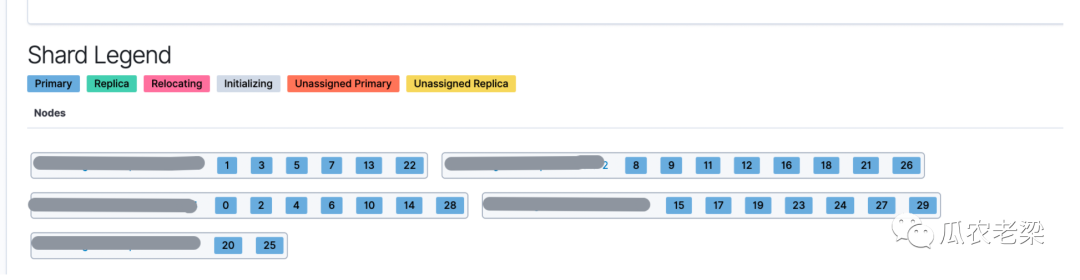
備注:上圖為沒(méi)有設(shè)置total_shards_per_node參數(shù),30個(gè)分片被分布在5個(gè)節(jié)點(diǎn)中,節(jié)點(diǎn)最多分片8,最少分片2,分片不均衡。
2.設(shè)置total_shards_per_node=3
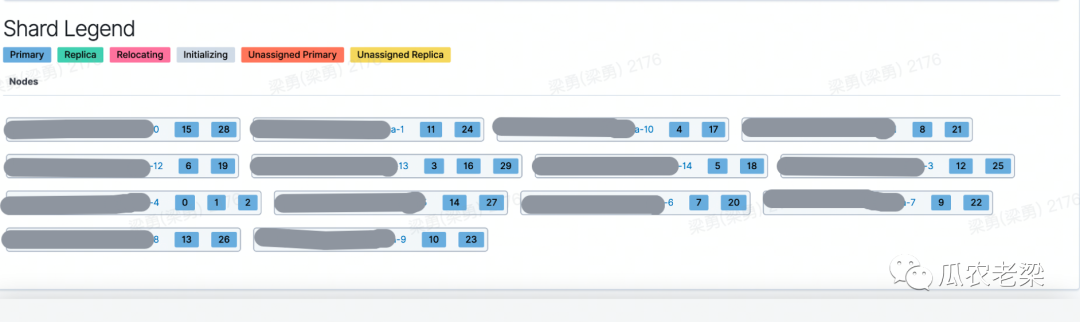
備注:當(dāng)設(shè)置total_shards_per_node=3時(shí),30個(gè)分片被分布在14個(gè)節(jié)點(diǎn)中,節(jié)點(diǎn)最多分片數(shù)3,最少分片數(shù)2,分片比較均衡。
3.設(shè)置total_shards_per_node=2
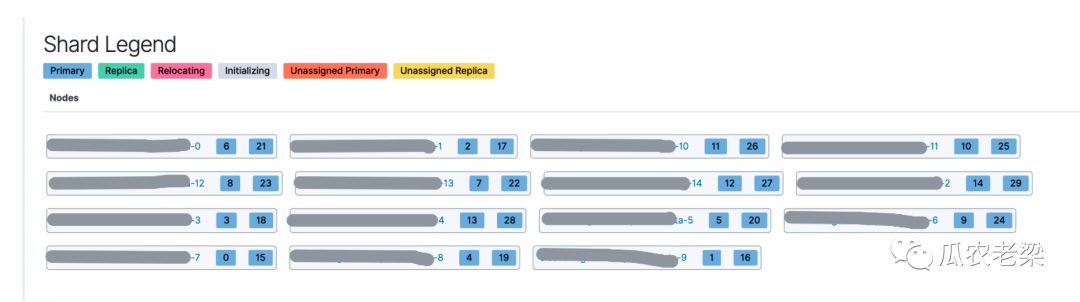
備注:當(dāng)設(shè)置total_shards_per_node=2時(shí),30個(gè)分片被分布在15個(gè)節(jié)點(diǎn)中,每個(gè)節(jié)點(diǎn)分片數(shù)均為2,分片均衡。
4.性能情況
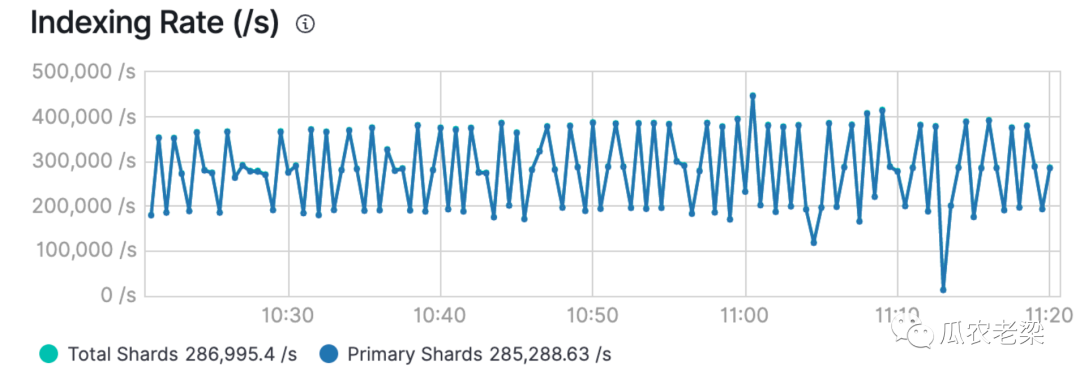
備注:當(dāng)分片分配均衡時(shí),寫(xiě)入性能也非常高,下圖為28.5萬(wàn)/秒。當(dāng)嚴(yán)重不均衡時(shí),性能不足其一半。