
基于 Nacos 配置中心的動(dòng)態(tài)日志配置方案
上面這兩篇文章只是從技術(shù)角度說了,可以實(shí)現(xiàn)動(dòng)態(tài)日志配置。但是并沒有形成適用生產(chǎn)環(huán)境使用的方案。今天介紹一種基于 Nacos 配置中心的動(dòng)態(tài)配置日志級(jí)別的方案。
0x01:安裝 Nacos 配置中心
配置中心 Nacos 的官網(wǎng)
官網(wǎng):https://nacos.io/zh-cn/docs/quick-start.html
下載安裝包
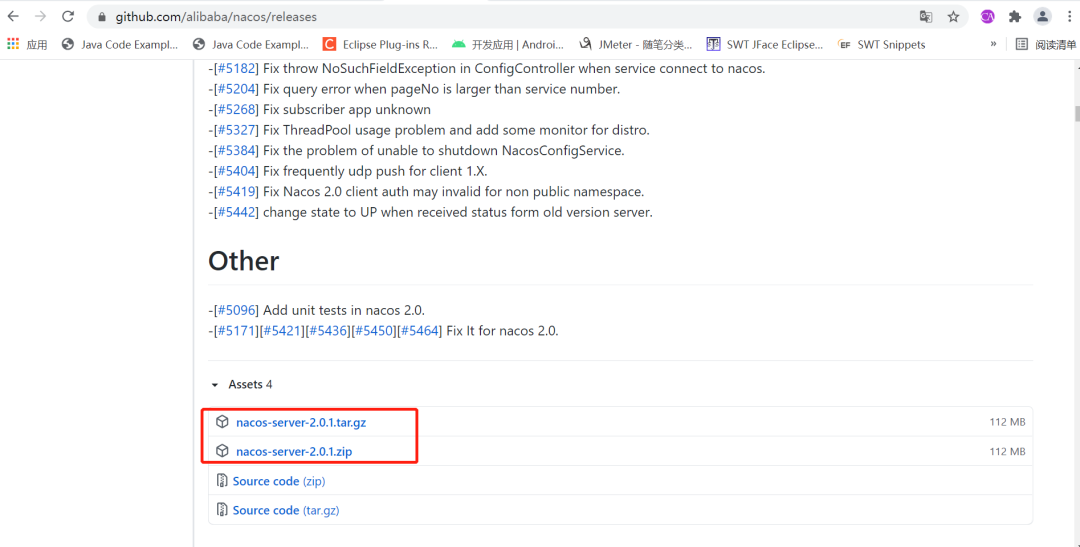
需要注意一下 Nacos 需要 64 位操作系統(tǒng)和 64 位的JDK,如果不是 64 位的啟動(dòng)時(shí)會(huì)出現(xiàn)以下異常。
 at com.alipay.sofa.jraft.core.NodeImpl.init(NodeImpl.java:138)
        at com.alipay.sofa.jraft.RaftServiceFactory.createAndInitRaftNode(RaftServiceFactory.java:47)
        at com.alipay.sofa.jraft.RaftGroupService.start(RaftGroupService.java:129)
        at com.alibaba.nacos.core.distributed.raft.JRaftServer.createMultiRaftGroup(JRaftServer.java:268)
        at com.alibaba.nacos.core.distributed.raft.JRaftProtocol.addRequestProcessors(JRaftProtocol.java:163)
        at com.alibaba.nacos.naming.core.v2.service.impl.PersistentClientOperationServiceImpl.<init>(PersistentClientOperationServiceImpl.java:92)
        at sun.reflect.NativeConstructorAccessorImpl.newInstance0(Native Method)
        at sun.reflect.NativeConstructorAccessorImpl.newInstance(NativeConstructorAccessorImpl.java:62)
        at sun.reflect.DelegatingConstructorAccessorImpl.newInstance(DelegatingConstructorAccessorImpl.java:45)
        at java.lang.reflect.Constructor.newInstance(Constructor.java:423)
        at org.springframework.beans.BeanUtils.instantiateClass(BeanUtils.java:175)
        ... 57 common frames omitted
Caused by: java.lang.UnsupportedOperationException: Cannot determine JNI library name for ARCH='x86' OS='windows 10' name='rocksdb'
        at org.rocksdb.util.Environment.getJniLibraryName(Environment.java:88)
        at org.rocksdb.NativeLibraryLoader.<clinit>(NativeLibraryLoader.java:19)
        ... 74 common frames omitted
啟動(dòng)命令
startup.cmd -m standalone
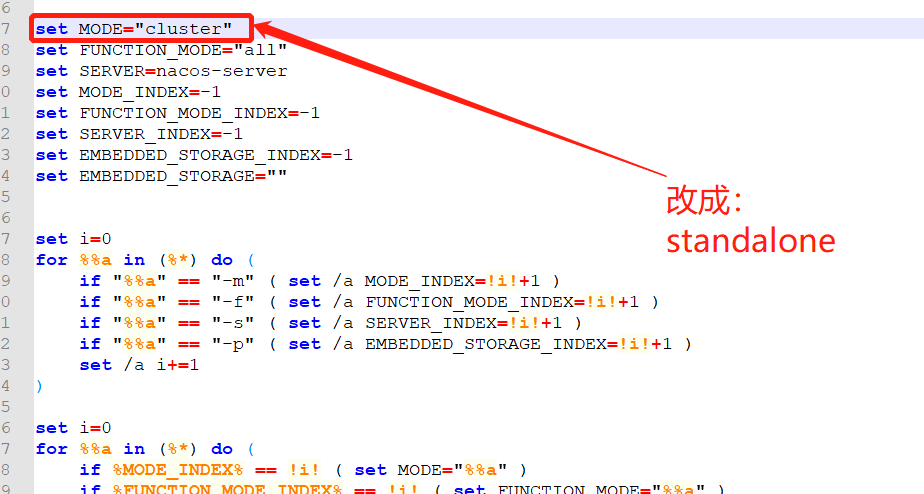
因?yàn)閱?dòng)腳本默認(rèn)使用集群模式啟動(dòng),為了不需要使用命令還,改動(dòng)一下啟動(dòng)腳本,修改如下
啟動(dòng)成功,顯示如下日志
2021-05-14 22:00:34,140 INFO Initializing ExecutorService 'taskScheduler'
2021-05-14 22:00:34,178 INFO Exposing 16 endpoint(s) beneath base path '/actuator'
2021-05-14 22:00:34,465 INFO Tomcat started on port(s): 8848 (http) with context path '/nacos'
2021-05-14 22:00:34,473 INFO Nacos started successfully in stand alone mode. use embedded storage
訪問 Nacos 配置中心,對(duì)應(yīng)的賬號(hào)和密碼 nacos / nacos
http://192.168.10.6:8848/nacos/index.html
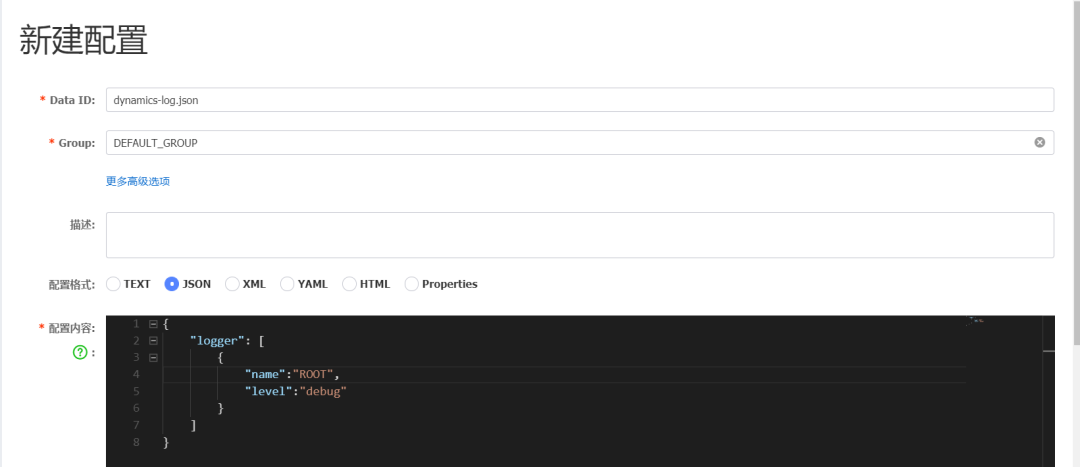
0x02: 在配置中心創(chuàng)建配置文件 dynamics-log.json
內(nèi)容如下
{
    "logger": [
        {
            "name":"ROOT",
            "level":"debug"
        }
    ]
}
0x03:pom.xml 文件引入依賴
<project xmlns="http://maven.apache.org/POM/4.0.0" xmlns:xsi="http://www.w3.org/2001/XMLSchema-instance"
    xsi:schemaLocation="http://maven.apache.org/POM/4.0.0 http://maven.apache.org/xsd/maven-4.0.0.xsd">
    <modelVersion>4.0.0</modelVersion>

    <groupId>com.olive</groupId>
    <artifactId>valid-demo</artifactId>
    <version>0.0.1-SNAPSHOT</version>
    <packaging>jar</packaging>
    <parent>
        <groupId>org.springframework.boot</groupId>
        <artifactId>spring-boot-starter-parent</artifactId>
        <version>2.1.8.RELEASE</version>
        <relativePath />
    </parent>
    <name>valid-demo</name>
    <url>http://maven.apache.org</url>
    <properties>
        <project.build.sourceEncoding>UTF-8</project.build.sourceEncoding>
    </properties>

    <dependencies>
        <dependency>
            <groupId>org.springframework.boot</groupId>
            <artifactId>spring-boot-starter-web</artifactId>
        </dependency>
        <dependency>
            <groupId>com.alibaba.nacos</groupId>
            <artifactId>nacos-client</artifactId>
            <version>0.5.0</version>
        </dependency>

    </dependencies>
</project>
主要多引入 Nacos 客戶端(nacos-client )依賴
0x04:編譯監(jiān)聽器
要達(dá)到動(dòng)態(tài)的效果,一般有 PUSH 和 PULL 兩種方式。Nacos 內(nèi)部提供了監(jiān)聽器,只要實(shí)現(xiàn)相關(guān)方法就可以對(duì)不同的 data-id 進(jìn)行監(jiān)聽。大致代碼如下:
import java.util.concurrent.Executor;

import javax.annotation.PostConstruct;

import org.springframework.context.annotation.Configuration;

import com.alibaba.nacos.api.NacosFactory;
import com.alibaba.nacos.api.config.ConfigService;
import com.alibaba.nacos.api.config.listener.Listener;
import com.alibaba.nacos.api.exception.NacosException;

@Configuration
public class LoggerDynamicsConfig {

    private String serverAddr = "127.0.0.1:";

    private String dataId = "dynamics-log.json";

    private String group = "DEFAULT_GROUP";

    private long timeoutMs = 50000L;

    @PostConstruct
    public void init() {
        try {
            ConfigService configService = NacosFactory.createConfigService(serverAddr);
            String configInfo = configService.getConfig(dataId, group, timeoutMs);
            System.out.println("configInfo = " + configInfo);
            configService.addListener(dataId, group, new Listener() {
                @Override
                public void receiveConfigInfo(String configInfo) {
                    System.out.println("recieve configInfo : " + configInfo);
                }

                @Override
                public Executor getExecutor() {
                    return null;
                }
            });
        } catch (NacosException e) {
            e.printStackTrace();
        }
    }
}
啟動(dòng)服務(wù),可以看到控制臺(tái)打印如下日志,說明可以獲取到 Nacos 配置中心的配置項(xiàng)。
2021-05-14 22:13:56.265 [main] INFO  c.alibaba.nacos.client.identify.CredentialWatcher - [] [] [] No credential found
configInfo = {
    "logger": [
        {
            "name":"ROOT",
            "level":"debug"
        }
    ]
}
recieve configInfo : {
    "logger": [
        {
            "name":"ROOT",
            "level":"debug"
        }
    ]
}
2021-05-14 22:13:56.563 [main] INFO  o.s.scheduling.concurrent.ThreadPoolTaskExecutor - Initializing ExecutorService 'applicationTaskExecutor'
動(dòng)態(tài)在 Nacos 配置中心修改一下,可以看到控制臺(tái)打印如下日志,說明服務(wù)是可以動(dòng)態(tài)監(jiān)聽到配置的改變的。
recieve configInfo : {
    "logger": [
        {
            "name":"ROOT",
            "level":"debug"
        }, {
            "name":"com.spring",
            "level":"info"
        }
    ]
}
0x05:動(dòng)態(tài)日志改造說明
在 receiveConfigInfo() 方法中,把拿到的配置 json 串構(gòu)造成一個(gè)對(duì)象數(shù)組,比如定義為 LoggerConfig[]。
基于 [ SpringBoot 動(dòng)態(tài)設(shè)置 logback 日志的級(jí)別 ] 改造,把 LoggerController 的 printAllLogger() 方法改成一個(gè)獲取所有日志對(duì)象的方法,比如
public List<Logger> getAllLogger(){
     //TODO

}
對(duì)配置動(dòng)態(tài)變化構(gòu)造的 LoggerConfig[] 數(shù)組與調(diào)用 getAllLogger() 獲取的所有日志對(duì)象進(jìn)行遍歷比較,進(jìn)行動(dòng)態(tài)更新

喜歡,在看