
Ingress 繼任者 Gateway API 使用

Gateway API(之前叫 Service API)是由 SIG-NETWORK 社區(qū)管理的開源項(xiàng)目,項(xiàng)目地址:https://gateway-api.sigs.k8s.io/。主要原因是 Ingress 資源對(duì)象不能很好的滿足網(wǎng)絡(luò)需求,很多場景下 Ingress 控制器都需要通過定義 annotations 或者 crd 來進(jìn)行功能擴(kuò)展,這對(duì)于使用標(biāo)準(zhǔn)和支持是非常不利的,新推出的 Gateway API 旨在通過可擴(kuò)展的面向角色的接口來增強(qiáng)服務(wù)網(wǎng)絡(luò)。
Gateway API?是 Kubernetes 中的一個(gè) API 資源集合,包括 GatewayClass、Gateway、HTTPRoute、TCPRoute、Service 等,這些資源共同為各種網(wǎng)絡(luò)用例構(gòu)建模型。
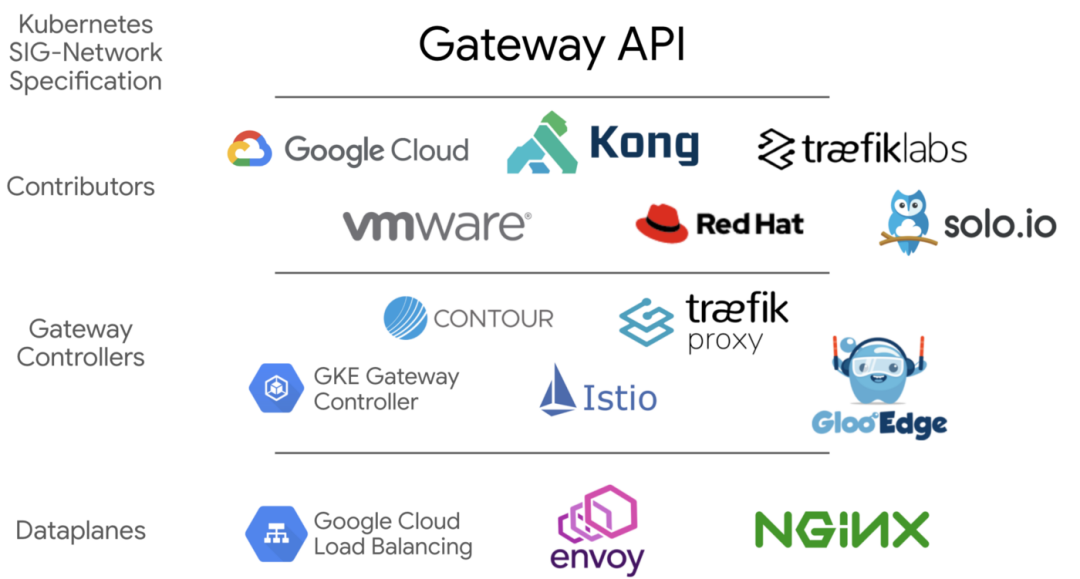
Gateway API的價(jià)值與定位
提供跨Namespace的一種Ingress機(jī)制:讓多個(gè)跨Namespace的服務(wù),可以分享一個(gè)L7 LoadBalancer 可實(shí)現(xiàn)多租戶的一種Ingress機(jī)制:提供HttpRoute與Gateway分離的抽象組件,讓設(shè)計(jì)路由(HttpRoute)的人,可以共享一個(gè)L7 LoadBalancer, 藍(lán)綠部署金絲雀部署時(shí)為使用同一個(gè)命名空間下的部署,可以簡單的定義在HttpRoute中 基于Hostname、Header、或Subpath的服務(wù),使用AB測試等等。
Gateway API 介紹
網(wǎng)關(guān)API主要分為以下幾個(gè)角色:
GatewayClass(由Cloud或K8s提供者提供), Gateway(由網(wǎng)管平臺(tái)公司自建GatewayClass), HTTPRoute(由開發(fā)者團(tuán)隊(duì)服務(wù)部署者選擇對(duì)應(yīng)的網(wǎng)關(guān)對(duì)接)
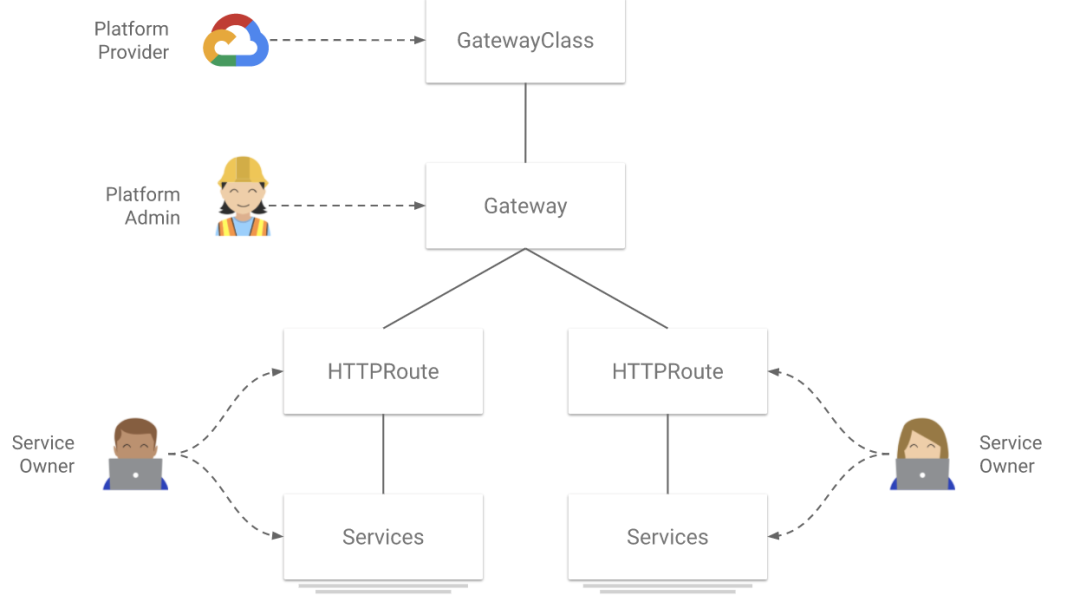
目前 GKE 提供了四種網(wǎng)關(guān)類,分別是:
gke-l7-rilb建立在內(nèi)部 HTTP(S) 負(fù)載均衡上的區(qū)域內(nèi)部 HTTP(S) 負(fù)載均衡器(單叢集Internal LoadBalancer)gke-l7-gxlb建立在外部 HTTP(S) 負(fù)載均衡之上的全球外部 HTTP(S) 負(fù)載均衡器(單叢集External LoadBalancer)gke-l7-rilb-mc基于Internal HTTP(S) Load Balancing的多集群區(qū)域負(fù)載均衡器(多叢集Internal LoadBalancer)gke-l7-gxlb-mc基于External HTTP(S) Load Balancing的多集群全局負(fù)載均衡器(多叢集External LoadBalancer)
網(wǎng)關(guān)部署
目前GKE的Gateway APIK8S 1.20以上的版本,如果使用GKE發(fā)布頻道需要捧油,現(xiàn)在需要使用RAPID區(qū)域,同時(shí)僅在以下提供公開Beta測試:
us-west1us-east1us-central1europe-west4europe-west3europe-west2europe-west1asia-southeast1
下面的測試,我們選擇先測試Interal-LoadBalancer并嘗試下面的拓?fù)鋱D:
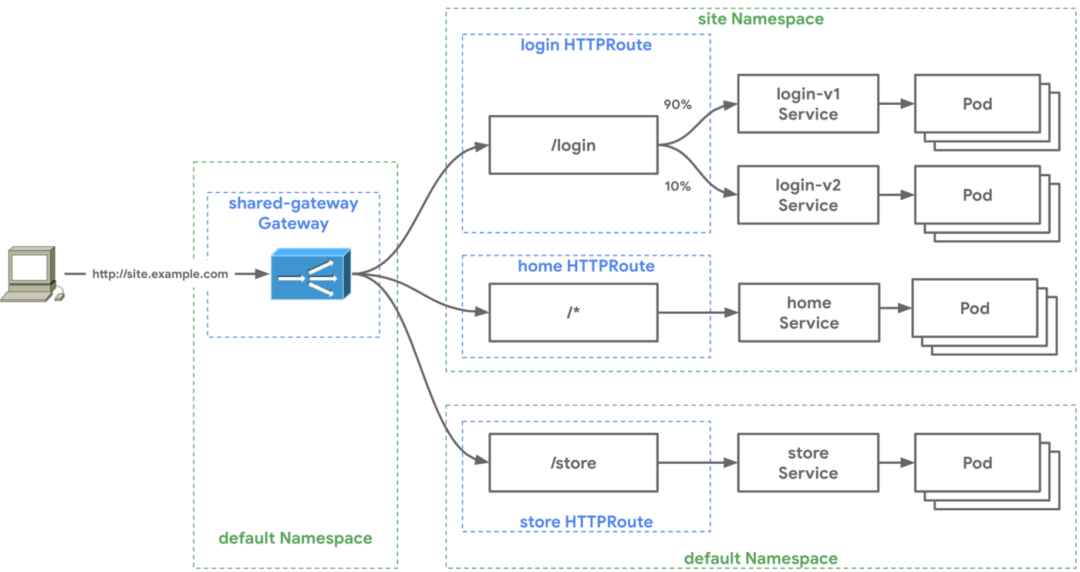
部署私有 GKE
我們先開發(fā)一個(gè)私人GKE集群,可以參照我提供的Terraform腳本,請(qǐng)直接將shawn.tfvars改為符合你集群的參數(shù),另外,由于我使用遠(yuǎn)端GCS也請(qǐng)?jiān)O(shè)置保存 tfstate,修改config.tf里面的bucket名稱。其他經(jīng)常設(shè)置和私有GKE類似,只需要使用內(nèi)部LB而增加了一個(gè)proxy-only的子網(wǎng)給Envoy使用。
部署網(wǎng)關(guān)
根據(jù)上述的第三個(gè)階段,我們先部署Gateway API的CRD檔案:
kubectl?kustomize?"github.com/kubernetes-sigs/gateway-api/config/crd?ref=v0.3.0"?\
|?kubectl?apply?-f?-
#?部署成功後,可使用下方命令檢視單叢集internal/external?GatewayClass
private-gke-tf?%?kubectl?get?gatewayclass
NAME??????????CONTROLLER??????????????????AGE
gke-l7-gxlb???networking.gke.io/gateway???23h
gke-l7-rilb???networking.gke.io/gateway???23h
下一步我們準(zhǔn)備部署網(wǎng)關(guān),使用?kubectl apply -f?部署底下YAML:
kind:?Gateway
apiVersion:?networking.x-k8s.io/v1alpha1
metadata:
??name:?internal-http
spec:
??gatewayClassName:?gke-l7-rilb
??listeners:
??-?protocol:?HTTP
????port:?80
????routes:
??????kind:?HTTPRoute
??????selector:
????????matchLabels:
??????????gateway:?internal-http
??????namespaces:
????????from:?"All"
因?yàn)镚ateway可以接受三個(gè)關(guān)聯(lián)模式,基于 kind,selector,以及namespace。
kind:以下可選任一種Route: HTTPRoute, TCPRoute, or customRoute 標(biāo)簽:通過選擇或選擇對(duì)應(yīng)的標(biāo)簽 namespaces:貫穿? namespaces.from?選擇Route所在的namespace,預(yù)設(shè)是跟Gateway在同一個(gè)namespace的Route
因?yàn)槲覀兿雱?chuàng)建一個(gè)跨命名空間的共享網(wǎng)關(guān),所以我們將?namespaces.from?改成?All。
部署成功后,可以通過以下命令來查看:
private-gke-tf?%?kubectl?describe?gateway?internal-http
Events:
??Type????Reason??Age????????????????????From???????????????????Message
??----????------??----???????????????????----???????????????????-------
??Normal??SYNC????4m59s?(x396?over?23h)??sc-gateway-controller??SYNC?on?default/internal-http?was?a?success
部署服務(wù)+HTTPRoute
接下來我們快速部署測試的兩個(gè)服務(wù),其中 store 服務(wù)部署在默認(rèn)命名空間,site 服務(wù)部署在 site 命名空間。部署對(duì)應(yīng)的 HTTPRoute,其中?http-route.yaml?適用于 store 服務(wù)的:
kind:?HTTPRoute
apiVersion:?networking.x-k8s.io/v1alpha1
metadata:
??name:?store
??labels:
????gateway:?internal-http
spec:
??hostnames:
??-?"store.example.com"
??rules:
??-?forwardTo:
????-?serviceName:?store-v1
??????port:?8080
??????weight:?50
????-?serviceName:?store-v2
??????port:?8080
??????weight:?50
??-?matches:
????-?headers:
????????type:?Exact
????????values:
??????????env:?canary
????forwardTo:
????-?serviceName:?store-v2
??????port:?8080
??-?matches:
????-?path:
????????type:?Prefix
????????value:?/de
????forwardTo:
????-?serviceName:?store-german
??????port:?8080
我們針對(duì) store 服務(wù),故意開發(fā)了三個(gè)不同的后端服務(wù),一次來測試HTTPRoute的不同能力
(1)主機(jī)名匹配:通過不同的主機(jī)名(如store.example.com or site.example.com)將用戶連接路由到指定的后臺(tái)服務(wù) (2.1) header match: 如果請(qǐng)求 header 中包含? env: canary?這樣的信息,就會(huì)被路由到?store-v2?服務(wù)(2.2)前綴匹配:若請(qǐng)求路徑前綴是? /de,則會(huì)被路由到?store-german?服務(wù)(3)默認(rèn)路由:根據(jù)權(quán)重,自動(dòng)均衡到指定的 store-v1 與 store-v2 的兩個(gè)后臺(tái)服務(wù)
而?http-service.yaml?是用于配置服務(wù)的,由于 HTTPRoute 與 Gateway 所在的命名空間不同,因此必須引入一個(gè)?gatewayRefs?參數(shù):
kind:?HTTPRoute
apiVersion:?networking.x-k8s.io/v1alpha1
metadata:
??name:?site
??namespace:?site
??labels:
????gateway:?internal-http
spec:
??gateways:
????allow:?FromList
????gatewayRefs:
????-?name:?internal-http
??????namespace:?default
??hostnames:
??-?"site.example.com"
??rules:
??-?forwardTo:
????-?serviceName:?site-v1
??????port:?8080
由于我們使用的是 Internal LoadBalancer,所以我們需要開一臺(tái) GCE VM 來進(jìn)行測試,由于我們使用的是 private cluster,所以要記得 GCE VM 和 private GKE cluster 在同一個(gè) VPC 中。
在 K8S client上,獲取 Internal LoadBalancer 的IP地址:
kubectl?get?gateway?internal-http?-o?jsonpath='{.status.addresses[0].value}'
10.81.68.140
在 GCE VM 上,我們來測試上面我們定義的 HttpRoute:
(1) 按照 Hostname 來路由服務(wù):通過定義 hostname 為?site.example.com?來路由到另一個(gè)?namespace 的K8S服務(wù)中:
shawnho@jumper2:~$?curl?-H?"host:?site.example.com"?10.81.68.140
{
??"cluster_name":?"pgke-1",
??"host_header":?"site.example.com",
??"metadata":?"site-v1",
??"node_name":?"gke-pgke-1-cluster-runtime-425beb23-vx9j.c.shawn-demo-2021.internal",
??"pod_name":?"site-v1-86dc4b4fbc-4g6jr",
??"pod_name_emoji":?"??",
??"project_id":?"shawn-demo-2021",
??"timestamp":?"2021-07-18T15:26:15",
??"zone":?"asia-southeast1-a"
}
(2) 基于Hostname: “store.example.com”,再分別測試 (2.1) Header 與 (2.2) Prefix 前綴機(jī)制:
#?測試header?match
shawnho@jumper2:~$?curl?-H?"host:?store.example.com"?-H?"env:?canary"?10.81.68.140
{
??"cluster_name":?"pgke-1",
??"host_header":?"store.example.com",
??"metadata":?"store-v2",
??"node_name":?"gke-pgke-1-cluster-runtime-425beb23-vx9j.c.shawn-demo-2021.internal",
??"pod_name":?"store-v2-6856f59f7f-49fv8",
??"pod_name_emoji":?"??",
??"project_id":?"shawn-demo-2021",
??"timestamp":?"2021-07-18T15:33:04",
??"zone":?"asia-southeast1-a"
}
#?測試prefix?match
shawnho@jumper2:~$?curl?-H?"host:?store.example.com"?10.81.68.140/de
{
??"cluster_name":?"pgke-1",
??"host_header":?"store.example.com",
??"metadata":?"Gutentag!",
??"node_name":?"gke-pgke-1-cluster-runtime-425beb23-vx9j.c.shawn-demo-2021.internal",
??"pod_name":?"store-german-66dcb75977-ttngz",
??"pod_name_emoji":?"?????♀",
??"project_id":?"shawn-demo-2021",
??"timestamp":?"2021-07-18T15:32:15",
??"zone":?"asia-southeast1-a"
}
(3) 通過基于?Host: store.example.com?下的 Default Route 按權(quán)重(1:1)路由服務(wù):
#?測試default?route
?shawnho@jumper2:~$?curl?-H?"host:?store.example.com"?10.81.68.140?
{?
??"cluster_name":?"pgke-1",?
??"host_header":?"store.example.com",?
??"metadata?":?"store-v1",?
??"node_name":?"gke-pgke-1-cluster-runtime-425beb23-vx9j.c.shawn-demo-2021.internal",?
??"pod_name":?"store-v1-65b47557df-rv65j?",?
??"pod_name_emoji":?"?????♂?",?
??"project_id":?"shawn-demo-2021",?
??"timestamp":?"2021-07-18T15:32:09",?
??"zone":?"asia-southeast1-a”?
}
shawnho@jumper2:~$?curl?-H?"host:?store.example.com"?10.81.68.140?
{?
??"cluster_name":?"pgke-2",?
??"host_header":?"store.example.com",?
??"metadata":?"store?-v2",?
??"node_name":?"gke-pgke-2-cluster-runtime-e7f1b4b7-wg5a.c.shawn-demo-2021.internal",?
??"pod_name":?"store-v2-6856f59f7f-gkkct",?
??"pod_name_emoji?":?"????",?
??"project_id":?"shawn-demo-2021",?
??"timestamp":?"2021-07-18T15:32:29",?
??"zone":?"asia-southeast1-a"?
}
到這里可以看到測試成功了!
原文鏈接:https://medium.com/%E8%BC%95%E9%AC%86%E5%B0%8F%E5%93%81-pks%E8%88%87k8s%E7%9A%84%E9%BB%9E%E6%BB%B4/k8s-gateway-api-contour%E7%9A%84%E9%80%B2%E5%8C%96%E7%89%88-44476e59135e
文章轉(zhuǎn)載:k8s技術(shù)圈
(版權(quán)歸原作者所有,侵刪)


點(diǎn)擊下方“閱讀原文”查看更多