<kbd id="afajh"><form id="afajh"></form></kbd>
<strong id="afajh"><dl id="afajh"></dl></strong>
    <del id="afajh"><form id="afajh"></form></del>
        1. <th id="afajh"><progress id="afajh"></progress></th>
          <b id="afajh"><abbr id="afajh"></abbr></b>
          <th id="afajh"><progress id="afajh"></progress></th>

          Android實(shí)現(xiàn)繪制發(fā)光效果

          共 2051字,需瀏覽 5分鐘

           ·

          2022-05-22 18:30

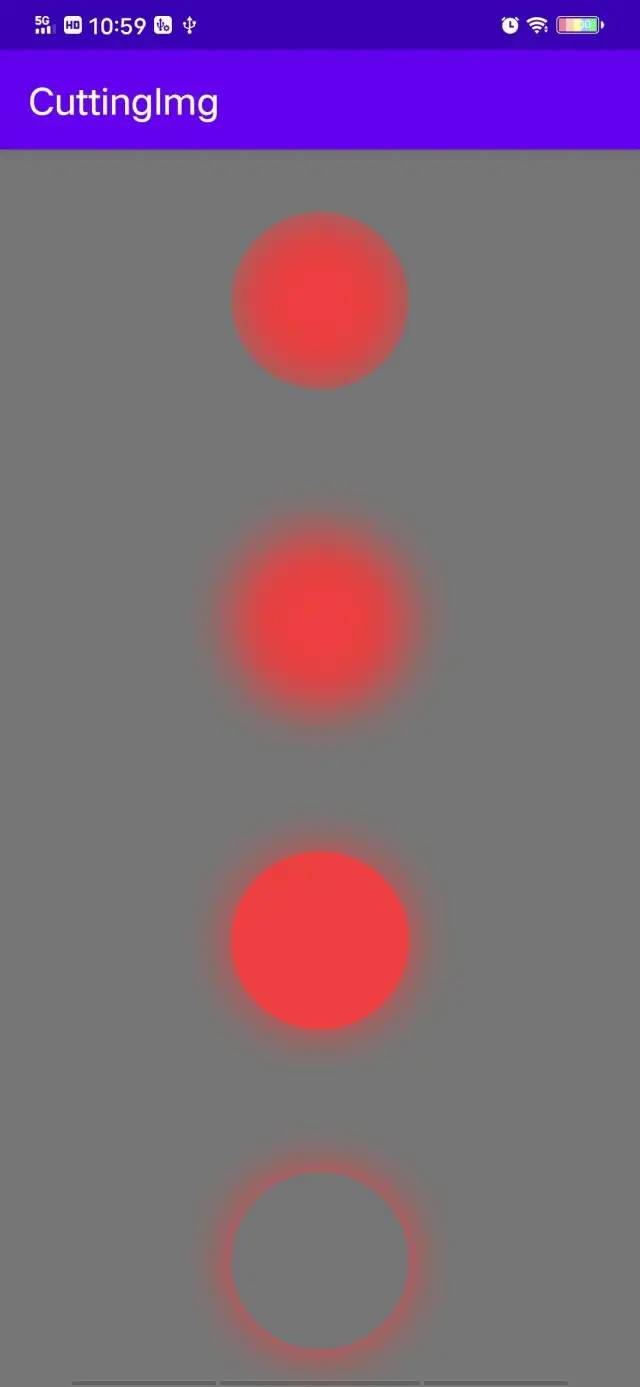
          之前在看別人寫自定義view作繪制的時(shí)候,看到別人家的view自帶發(fā)光效果,看起來(lái)也是蠻炫酷的,于是自己也抽出時(shí)間來(lái)試用一下,這里做了一個(gè)模仿太陽(yáng)的各種狀態(tài)樣式。

          先上效果先上效果:


          實(shí)現(xiàn)方式:
          public?BlurMaskFilter(float?radius,?Blur?style)?


          實(shí)現(xiàn)是使用的Paint類的setMaskFilter()方法,傳入BlurMaskFilter對(duì)象實(shí)現(xiàn)高斯模糊發(fā)光。

          • float radius ?設(shè)置模糊半徑


          • Blur style ? 設(shè)置發(fā)光樣式,包括
            Blur.INNER(內(nèi)發(fā)光),Blur.NORMAL(內(nèi)外發(fā)光)
            Blur.SOLID(外發(fā)光),Blur.OUTER(僅外發(fā)光可見)


          貼上代碼:
          public class MaskFilterView extends View {    private Paint lightPaint;    private int centerX, centerY;    /** 發(fā)光范圍 */    private int radioRadius = 70;
          public MaskFilterView(Context context) { super(context); init(); }
          public MaskFilterView(Context context, @Nullable AttributeSet attrs) { super(context, attrs); init(); }
          private void init() { lightPaint = new Paint(); setLayerType(LAYER_TYPE_SOFTWARE, null); lightPaint.setColor(Color.parseColor("#EC3E3E")); lightPaint.setMaskFilter(new BlurMaskFilter(radioRadius, BlurMaskFilter.Blur.INNER)); }
          @Override protected void onMeasure(int widthMeasureSpec, int heightMeasureSpec) { centerX = getLeft() + getMeasuredWidth()/2; centerY = getTop() + getMeasuredHeight()/2; super.onMeasure(widthMeasureSpec, widthMeasureSpec); }
          public void setBlurType(int blurType) { switch (blurType) { case 0: lightPaint.setMaskFilter(new BlurMaskFilter(radioRadius, BlurMaskFilter.Blur.INNER)); break; case 1: lightPaint.setMaskFilter(new BlurMaskFilter(radioRadius, BlurMaskFilter.Blur.NORMAL)); break; case 2: lightPaint.setMaskFilter(new BlurMaskFilter(radioRadius, BlurMaskFilter.Blur.SOLID)); break; case 3: lightPaint.setMaskFilter(new BlurMaskFilter(radioRadius, BlurMaskFilter.Blur.OUTER)); break; }
          invalidate(); }
          @Override protected void onDraw(Canvas canvas) { super.onDraw(canvas);
          canvas.drawCircle(centerX, centerY, 150, lightPaint); }}


          到這里就結(jié)束啦。
          瀏覽 96
          點(diǎn)贊
          評(píng)論
          收藏
          分享

          手機(jī)掃一掃分享

          分享
          舉報(bào)
          評(píng)論
          圖片
          表情
          推薦
          點(diǎn)贊
          評(píng)論
          收藏
          分享

          手機(jī)掃一掃分享

          分享
          舉報(bào)
          <kbd id="afajh"><form id="afajh"></form></kbd>
          <strong id="afajh"><dl id="afajh"></dl></strong>
            <del id="afajh"><form id="afajh"></form></del>
                1. <th id="afajh"><progress id="afajh"></progress></th>
                  <b id="afajh"><abbr id="afajh"></abbr></b>
                  <th id="afajh"><progress id="afajh"></progress></th>
                  国产乱婬片视频 | 西西4444WWW无码精品 | 无性码一区二区 | 无码在线中文字幕 | 奇米影视狠狠色 |