SpringBoot默認(rèn)日志配置輸出級(jí)別
點(diǎn)擊關(guān)注公眾號(hào),Java干貨及時(shí)送達(dá)
牛逼!又發(fā)現(xiàn)了一款面試題庫(kù),太全了!!
(點(diǎn)擊查看)
來(lái)源:blog.csdn.net/csdn18740599042
/article/details/109031005
Springboot默認(rèn)配置
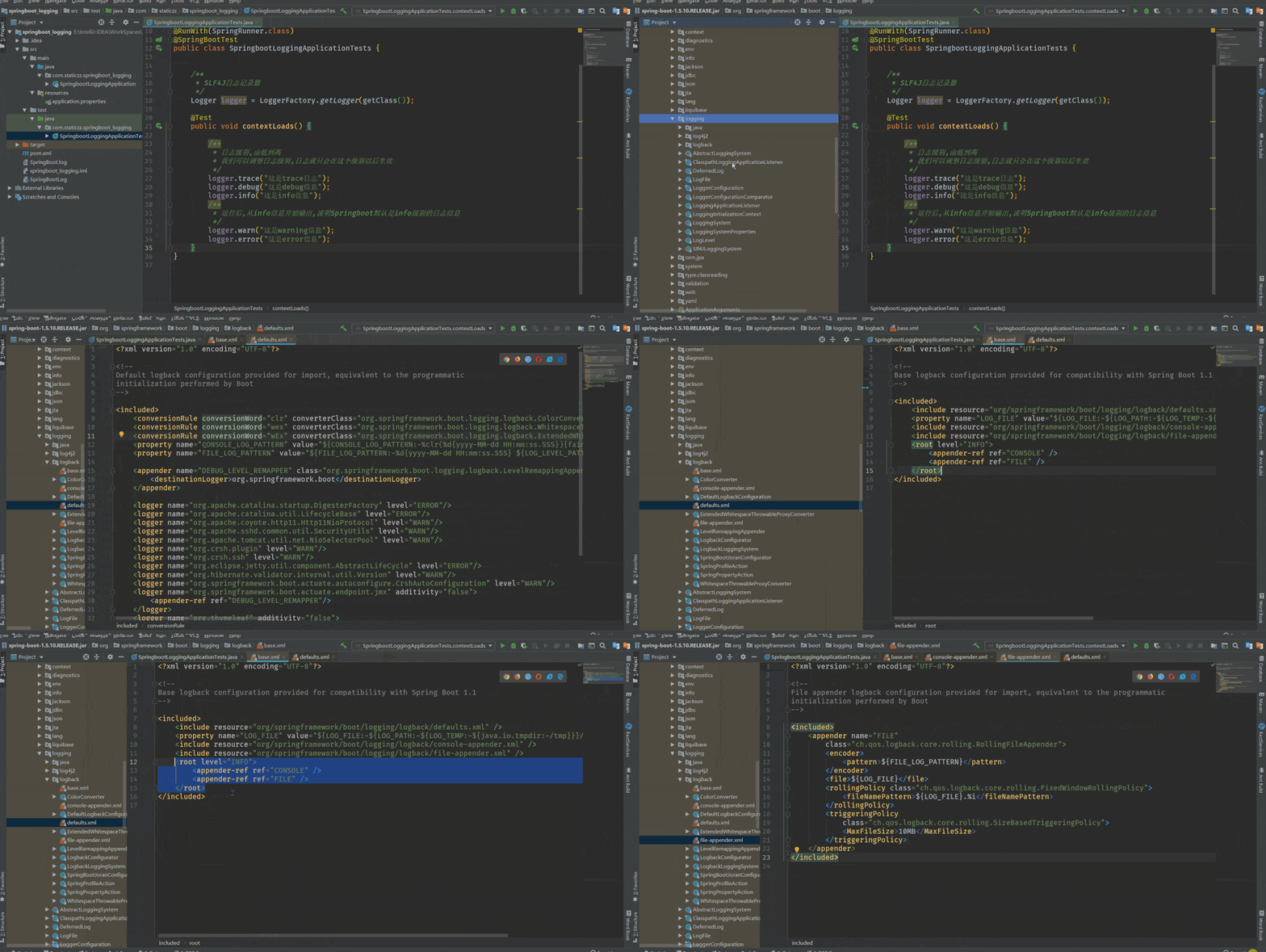
我們?cè)跍y(cè)試類(lèi)中來(lái)進(jìn)行演示
package com.staticzz.springboot_logging;

import org.junit.Test;
import org.junit.runner.RunWith;
import org.slf4j.Logger;
import org.slf4j.LoggerFactory;
import org.springframework.boot.test.context.SpringBootTest;
import org.springframework.test.context.junit4.SpringRunner;

@RunWith(SpringRunner.class)
@SpringBootTest
public class SpringbootLoggingApplicationTests {


    /**
     * SLF4J日志記錄器
     */
    Logger logger = LoggerFactory.getLogger(getClass());

    @Test
    public void contextLoads() {

        /**
         * 日志級(jí)別,由低到高
         * 我們可以調(diào)整日志級(jí)別,日志就只會(huì)在這個(gè)級(jí)別以后生效
         */
        logger.trace("這是trace日志");
        logger.debug("這是debug信息");
        logger.info("這是info信息");
        /**
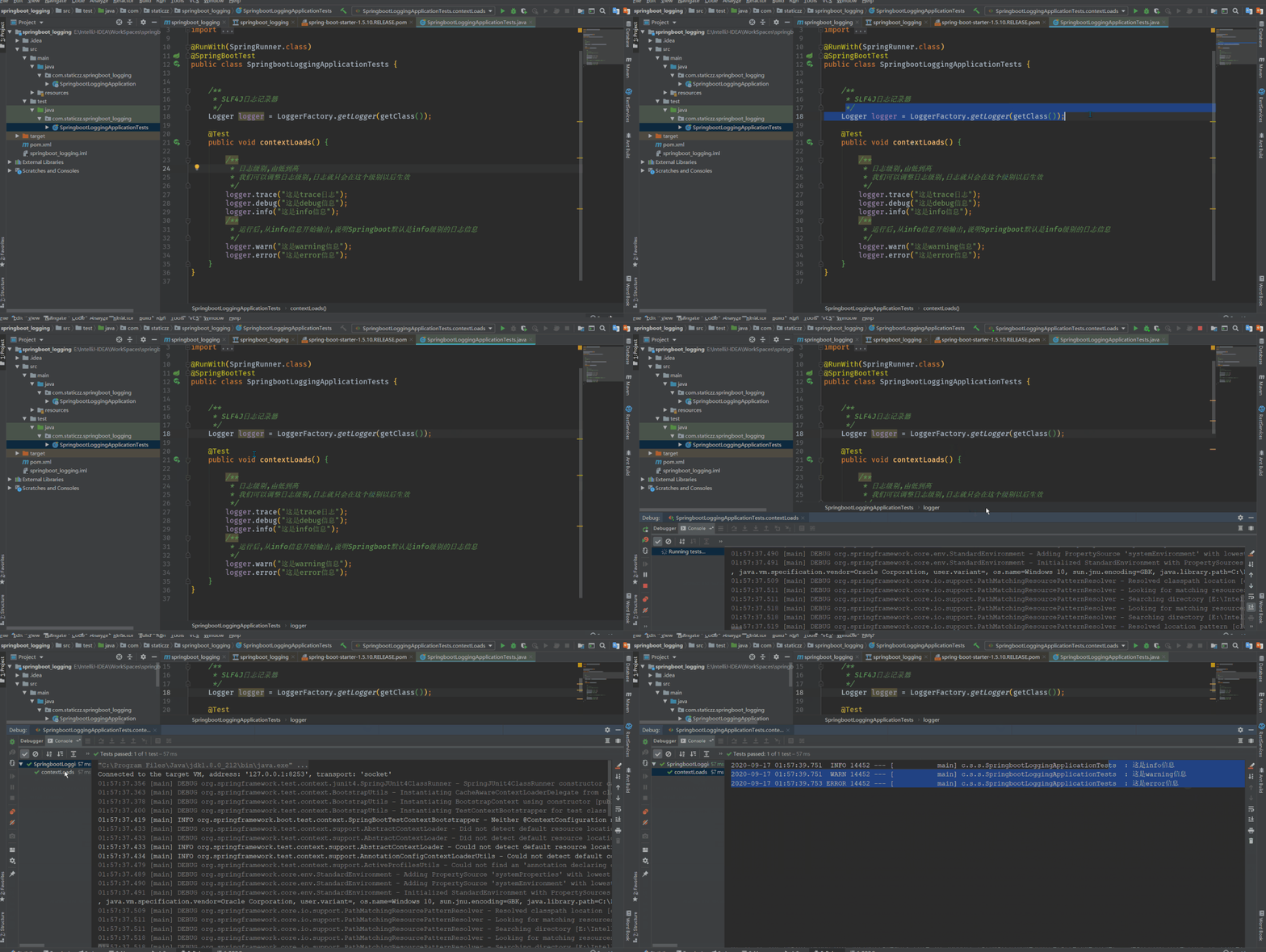
         * 運(yùn)行后,從info信息開(kāi)始輸出,說(shuō)明Springboot默認(rèn)是info級(jí)別的日志信息
         */
        logger.warn("這是warning信息");
        logger.error("這是error信息");
    }
}
動(dòng)態(tài)演示:
那我們要是需要修改默認(rèn)的日志級(jí)別怎樣修改?
可以在SpringBoot的配置文件中寫(xiě)入
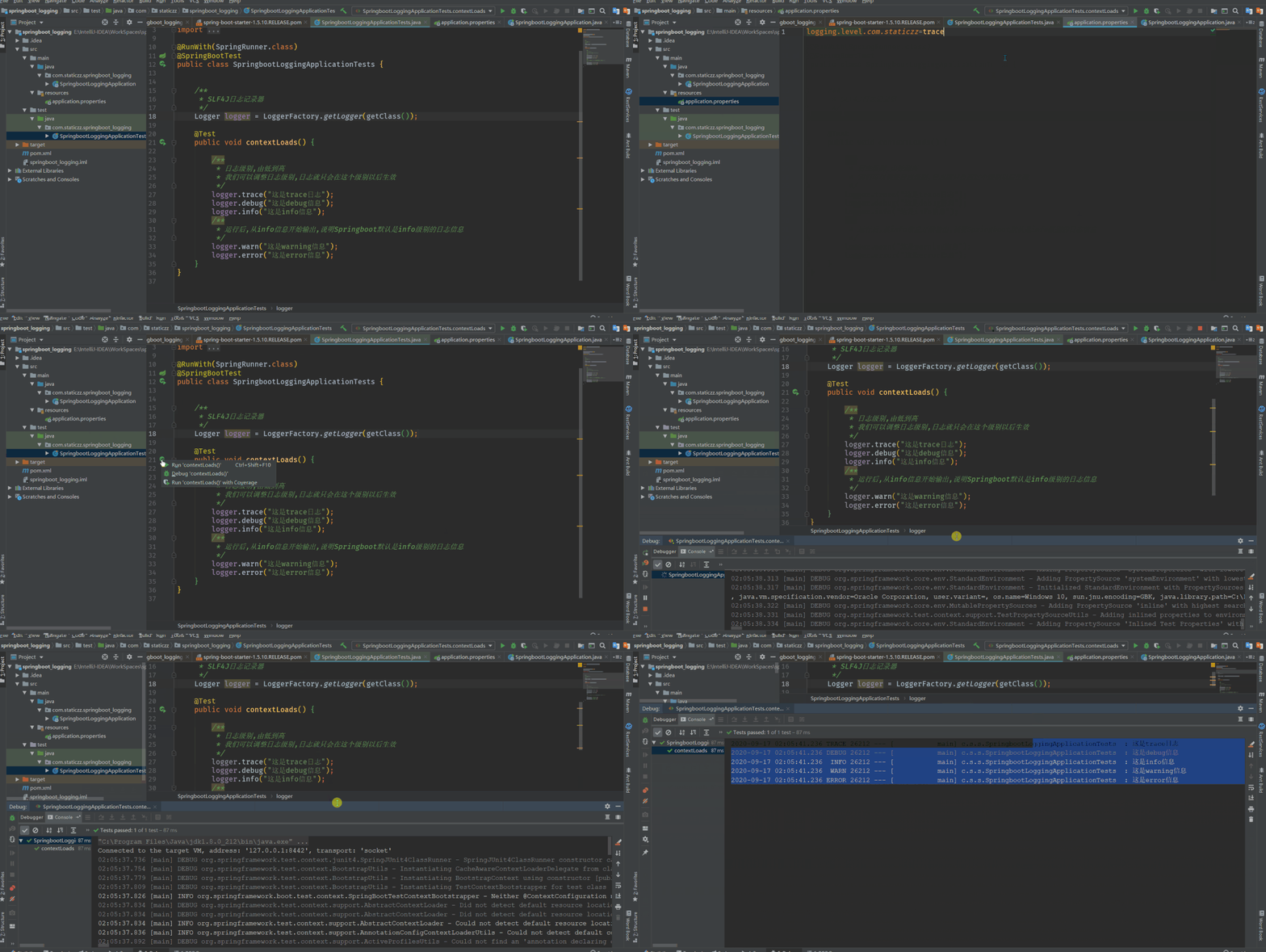
logging.level.com.staticzz=trace
這句代碼的意思是我將com.staticzz包下的所有類(lèi)的日志級(jí)別都設(shè)置為trace級(jí)別
動(dòng)態(tài)演示:
那我們可以在application.properties配置文件中指定logging.level,那能不能指定其他參數(shù)呢?
答案是可以的
#指定某個(gè)包下的日志級(jí)別
logging.level.com.staticzz=trace
#指定log文件名
#logging.file=SpringBoot.log
#指定log輸出路徑,如果不指定,默認(rèn)輸出到控制臺(tái)
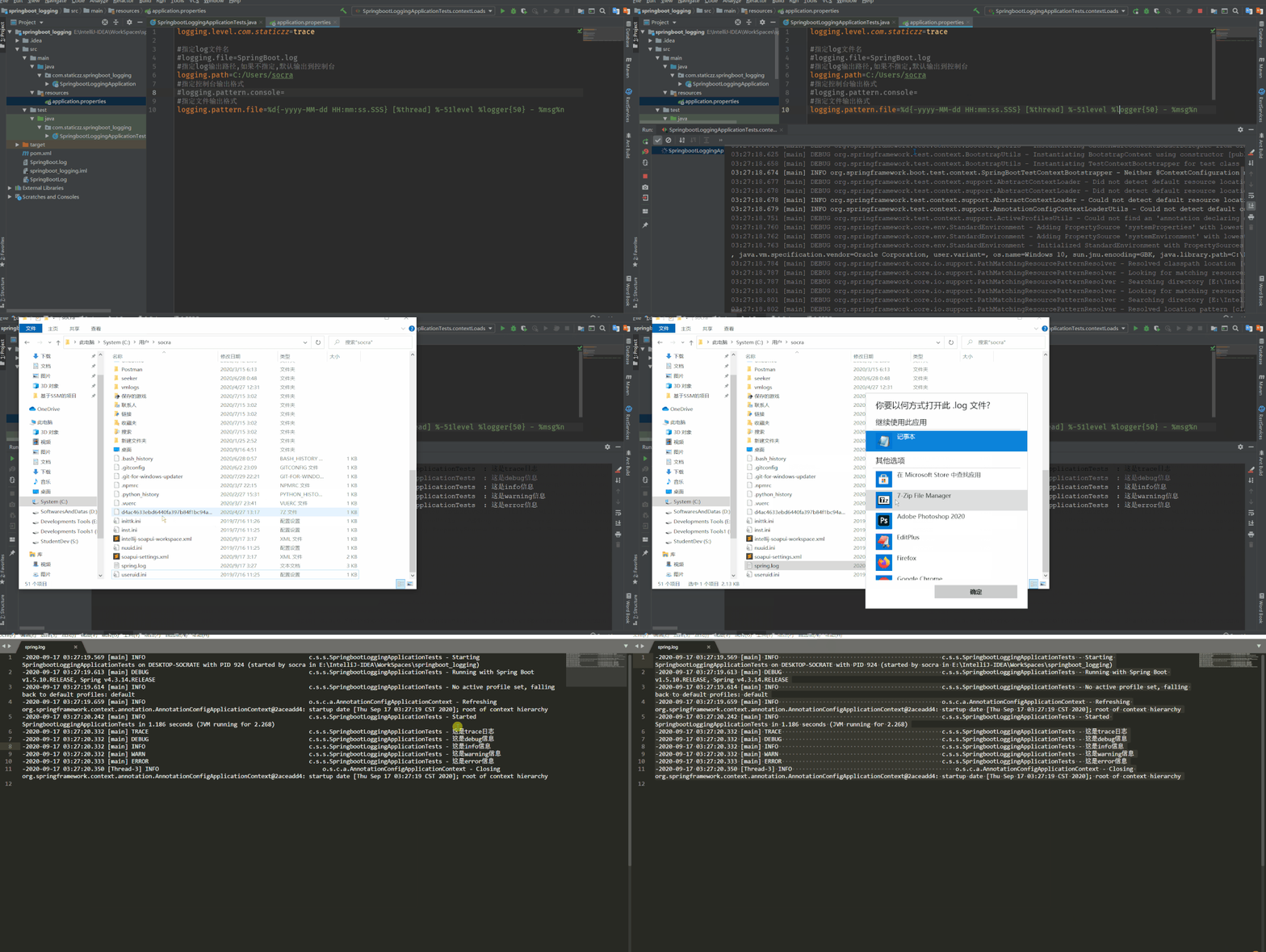
logging.path=C:/Users/socra
#指定控制臺(tái)輸出格式
#logging.pattern.console=
#指定文件輸出格式
logging.pattern.file=%d{-yyyy-MM-dd HH:mm:ss.SSS} [%thread] %-51level %logger{50} - %msg%n
這里要注意一個(gè)問(wèn)題,logging.file與logging.path不能同時(shí)使用,會(huì)出現(xiàn)沖突,我們只需要二選一配置就行!
演示:
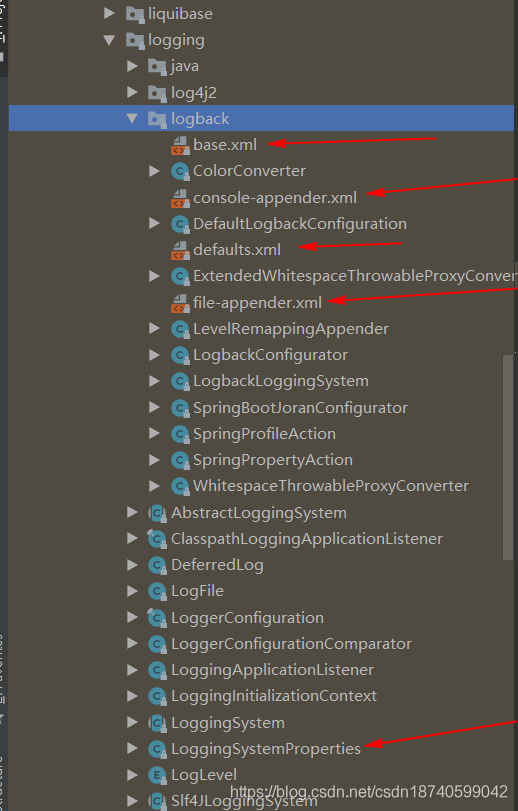
base.xml defaults.xml console-appender.xml file-appender.xml LoggingSystemProperties
這里我把這些文件內(nèi)容全部列舉出來(lái),并說(shuō)明它們的作用!
base.xml
<?xml version="1.0" encoding="UTF-8"?>

<!--
Base logback configuration provided for compatibility with Spring Boot 1.1
-->

<included>
    <!--引入了默認(rèn)配置的xml文件-->
   <include resource="org/springframework/boot/logging/logback/defaults.xml" />
   <property name="LOG_FILE" value="${LOG_FILE:-${LOG_PATH:-${LOG_TEMP:-${java.io.tmpdir:-/tmp}}}/spring.log}"/>

    <!--引入了控制臺(tái)輸出格式的xml文件-->
    <include resource="org/springframework/boot/logging/logback/console-appender.xml" />

    <!--引入了文件輸出格式的xml文件-->
    <include resource="org/springframework/boot/logging/logback/file-appender.xml" />

    <!-- 這里就是Springboot日志默認(rèn)級(jí)別的配置-->
    <root level="INFO">
      <appender-ref ref="CONSOLE" />
      <appender-ref ref="FILE" />
   </root>
</included>
defaults.xml
<?xml version="1.0" encoding="UTF-8"?>

<!--
Default logback configuration provided for import, equivalent to the programmatic
initialization performed by Boot
-->

<included>
   <conversionRule conversionWord="clr" converterClass="org.springframework.boot.logging.logback.ColorConverter" />
   <conversionRule conversionWord="wex" converterClass="org.springframework.boot.logging.logback.WhitespaceThrowableProxyConverter" />
   <conversionRule conversionWord="wEx" converterClass="org.springframework.boot.logging.logback.ExtendedWhitespaceThrowableProxyConverter" />

    <!--控制默認(rèn)輸出的格式->
   <property name="CONSOLE_LOG_PATTERN" value="${CONSOLE_LOG_PATTERN:-%clr(%d{yyyy-MM-dd HH:mm:ss.SSS}){faint} %clr(${LOG_LEVEL_PATTERN:-%5p}) %clr(${PID:- }){magenta} %clr(---){faint} %clr([%15.15t]){faint} %clr(%-40.40logger{39}){cyan} %clr(:){faint} %m%n${LOG_EXCEPTION_CONVERSION_WORD:-%wEx}}"/>

    <!--文件默認(rèn)輸出的格式->
  <property name="FILE_LOG_PATTERN" value="${FILE_LOG_PATTERN:-%d{yyyy-MM-dd HH:mm:ss.SSS} ${LOG_LEVEL_PATTERN:-%5p} ${PID:- } --- [%t] %-40.40logger{39} : %m%n${LOG_EXCEPTION_CONVERSION_WORD:-%wEx}}"/>

   <appender name="DEBUG_LEVEL_REMAPPER" class="org.springframework.boot.logging.logback.LevelRemappingAppender">
      <destinationLogger>org.springframework.boot</destinationLogger>
   </appender>
   <!--默認(rèn)規(guī)定好的級(jí)別->
   <logger name="org.apache.catalina.startup.DigesterFactory" level="ERROR"/>
   <logger name="org.apache.catalina.util.LifecycleBase" level="ERROR"/>
   <logger name="org.apache.coyote.http11.Http11NioProtocol" level="WARN"/>
   <logger name="org.apache.sshd.common.util.SecurityUtils" level="WARN"/>
   <logger name="org.apache.tomcat.util.net.NioSelectorPool" level="WARN"/>
   <logger name="org.crsh.plugin" level="WARN"/>
   <logger name="org.crsh.ssh" level="WARN"/>
   <logger name="org.eclipse.jetty.util.component.AbstractLifeCycle" level="ERROR"/>
   <logger name="org.hibernate.validator.internal.util.Version" level="WARN"/>
   <logger name="org.springframework.boot.actuate.autoconfigure.CrshAutoConfiguration" level="WARN"/>
   <logger name="org.springframework.boot.actuate.endpoint.jmx" additivity="false">
      <appender-ref ref="DEBUG_LEVEL_REMAPPER"/>
   </logger>
   <logger name="org.thymeleaf" additivity="false">
      <appender-ref ref="DEBUG_LEVEL_REMAPPER"/>
   </logger>
</included>
${CONSOLE_LOG_PATTERN:-%clr(%d{yyyy-MM-dd HH:mm:ss.SSS}){faint} %clr(${LOG_LEVEL_PATTERN:-%5p}) %clr(${PID:- }){magenta} %clr(---){faint} %clr([%15.15t]){faint} %clr(%-40.40logger{39}){cyan} %clr(:){faint} %m%n${LOG_EXCEPTION_CONVERSION_WORD:-%wEx}}"/>
答案:在以下這個(gè)類(lèi)中
LoggingSystemProperties.java
/*
 * Copyright 2012-2016 the original author or authors.
 *
 * Licensed under the Apache License, Version 2.0 (the "License");
 * you may not use this file except in compliance with the License.
 * You may obtain a copy of the License at
 *
 *      http://www.apache.org/licenses/LICENSE-2.0
 *
 * Unless required by applicable law or agreed to in writing, software
 * distributed under the License is distributed on an "AS IS" BASIS,
 * WITHOUT WARRANTIES OR CONDITIONS OF ANY KIND, either express or implied.
 * See the License for the specific language governing permissions and
 * limitations under the License.
 */

package org.springframework.boot.logging;

import org.springframework.boot.ApplicationPid;
import org.springframework.boot.bind.RelaxedPropertyResolver;
import org.springframework.core.env.Environment;

/**
 * Utility to set system properties that can later be used by log configuration files.
 *
 * @author Andy Wilkinson
 * @author Phillip Webb
 */
class LoggingSystemProperties {

   static final String PID_KEY = LoggingApplicationListener.PID_KEY;

   static final String EXCEPTION_CONVERSION_WORD =          LoggingApplicationListener.EXCEPTION_CONVERSION_WORD;

   static final String CONSOLE_LOG_PATTERN = LoggingApplicationListener.CONSOLE_LOG_PATTERN;

   static final String FILE_LOG_PATTERN = LoggingApplicationListener.FILE_LOG_PATTERN;

   static final String LOG_LEVEL_PATTERN = LoggingApplicationListener.LOG_LEVEL_PATTERN;

   private final Environment environment;

   LoggingSystemProperties(Environment environment) {
      this.environment = environment;
   }

   public void apply() {
      apply(null);
   }

   public void apply(LogFile logFile) {
      RelaxedPropertyResolver propertyResolver = RelaxedPropertyResolver
            .ignoringUnresolvableNestedPlaceholders(this.environment, "logging.");
      setSystemProperty(propertyResolver, EXCEPTION_CONVERSION_WORD,
            "exception-conversion-word");
      setSystemProperty(PID_KEY, new ApplicationPid().toString());
      setSystemProperty(propertyResolver, CONSOLE_LOG_PATTERN, "pattern.console");
      setSystemProperty(propertyResolver, FILE_LOG_PATTERN, "pattern.file");
      setSystemProperty(propertyResolver, LOG_LEVEL_PATTERN, "pattern.level");
      if (logFile != null) {
         logFile.applyToSystemProperties();
      }
   }

   private void setSystemProperty(RelaxedPropertyResolver propertyResolver,
         String systemPropertyName, String propertyName) {
      setSystemProperty(systemPropertyName, propertyResolver.getProperty(propertyName));
   }

   private void setSystemProperty(String name, String value) {
      if (System.getProperty(name) == null && value != null) {
         System.setProperty(name, value);
      }
   }

}
關(guān)于控制臺(tái)輸出的格式 console-appender.xml
<?xml version="1.0" encoding="UTF-8"?>

<!--
Console appender logback configuration provided for import, equivalent to the programmatic
initialization performed by Boot
-->

<included>
   <appender name="CONSOLE" class="ch.qos.logback.core.ConsoleAppender">
      <encoder>
         <pattern>${CONSOLE_LOG_PATTERN}</pattern>
         <charset>utf8</charset>
      </encoder>
   </appender>
</included>
關(guān)于日志文件輸出的格式 file-appender.xml
<?xml version="1.0" encoding="UTF-8"?>

<!--
File appender logback configuration provided for import, equivalent to the programmatic
initialization performed by Boot
-->

<included>
   <appender name="FILE"
      class="ch.qos.logback.core.rolling.RollingFileAppender">
      <encoder>
         <pattern>${FILE_LOG_PATTERN}</pattern>
      </encoder>
      <file>${LOG_FILE}</file>
      <rollingPolicy class="ch.qos.logback.core.rolling.FixedWindowRollingPolicy">
         <fileNamePattern>${LOG_FILE}.%i</fileNamePattern>
      </rollingPolicy>
      <triggeringPolicy
         class="ch.qos.logback.core.rolling.SizeBasedTriggeringPolicy">
         <MaxFileSize>10MB</MaxFileSize>
      </triggeringPolicy>
   </appender>
</included>
那我們已經(jīng)看見(jiàn)了SpringBoot日志的默認(rèn)配置文件,如果去自定義日志的配置文件呢?
方法是:
給類(lèi)路徑下,放上每個(gè)日志框架的配置文件即可

官方推薦使用logback-spring.xml這種格式

logback.xml時(shí),日志框架直接加載該配置文件,就不能使用高級(jí)功能
<springProfile name="profile屬性">
 <!-- configuration to be enabled when the "staging" profile is active -->
    指定日志的某個(gè)配置只在設(shè)置的環(huán)境下生效
</springProfile>
如有文章對(duì)你有幫助,
歡迎關(guān)注??、點(diǎn)贊??、轉(zhuǎn)發(fā)??!
推薦, Java面試題庫(kù),詳情點(diǎn)擊: 牛逼!又發(fā)現(xiàn)了一款牛逼的Java面試題庫(kù),史上最強(qiáng)! 點(diǎn)擊文末“閱讀原文”可直達(dá)