
保姆式教學(xué)|尤雨溪的5KB petite-vue源碼解析
寫(xiě)在開(kāi)頭
近期尤雨溪發(fā)布了5kb的petite-vue,好奇的我,clone了他的源碼,給大家解析一波。 最近由于工作事情多,所以放緩了原創(chuàng)的腳步!大家諒解 想看我往期手寫(xiě)源碼+各種源碼解析的可以關(guān)注我公眾號(hào)看我的 GitHub,基本上前端的框架源碼都有解析過(guò)
正式開(kāi)始
petite-vue是只有5kb的vue,我們先找到倉(cāng)庫(kù),克隆下來(lái)
https://github.com/vuejs/petite-vue
克隆下來(lái)后發(fā)現(xiàn),用的是vite + petite-vue + 多頁(yè)面形式啟動(dòng)的
啟動(dòng)命令:
git clone https://github.com/vuejs/petite-vue
cd /petite-vue
npm i
npm run dev
然后打開(kāi) http://localhost:3000/即可看到頁(yè)面:
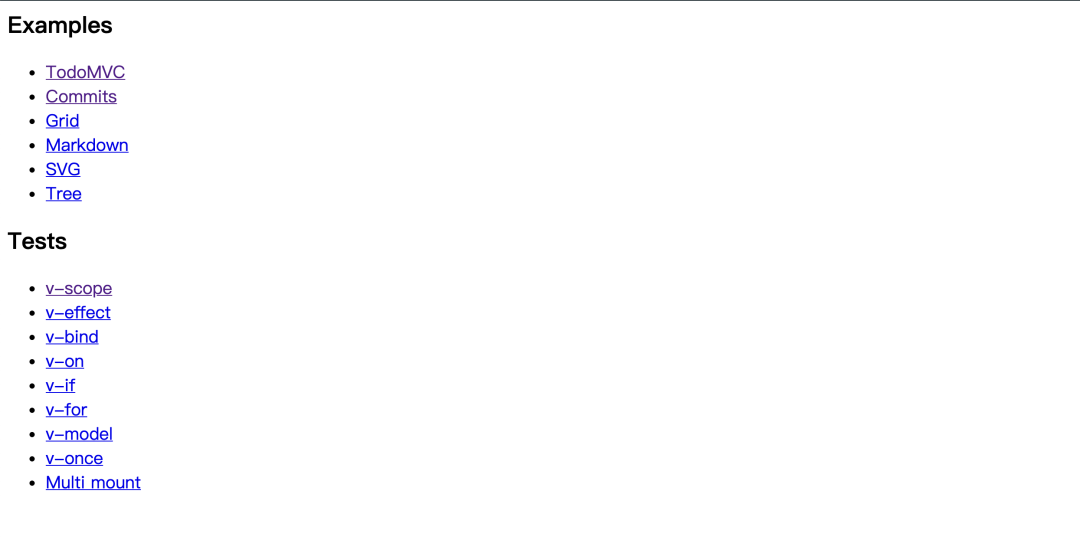
保姆式教學(xué)
項(xiàng)目已經(jīng)啟動(dòng)了,接下來(lái)我們先解析下項(xiàng)目入口,由于使用的構(gòu)建工具是 vite,從根目錄下的index.html人口找起:
<h2>Examples</h2>
<ul>
  <li><a href="/examples/todomvc.html">TodoMVC</a></li>
  <li><a href="/examples/commits.html">Commits</a></li>
  <li><a href="/examples/grid.html">Grid</a></li>
  <li><a href="/examples/markdown.html">Markdown</a></li>
  <li><a href="/examples/svg.html">SVG</a></li>
  <li><a href="/examples/tree.html">Tree</a></li>
</ul>

<h2>Tests</h2>
<ul>
  <li><a href="/tests/scope.html">v-scope</a></li>
  <li><a href="/tests/effect.html">v-effect</a></li>
  <li><a href="/tests/bind.html">v-bind</a></li>
  <li><a href="/tests/on.html">v-on</a></li>
  <li><a href="/tests/if.html">v-if</a></li>
  <li><a href="/tests/for.html">v-for</a></li>
  <li><a href="/tests/model.html">v-model</a></li>
  <li><a href="/tests/once.html">v-once</a></li>
  <li><a href="/tests/multi-mount.html">Multi mount</a></li>
</ul>

<style>
  a {
    font-size: 18px;
  }
</style>
這就是多頁(yè)面模式+vue+vite的一個(gè)演示項(xiàng)目,我們找到一個(gè)簡(jiǎn)單的演示頁(yè) commits:
<script type="module">
  import { createApp, reactive } from '../src'

  const API_URL = `https://api.github.com/repos/vuejs/vue-next/commits?per_page=3&sha=`

  createApp({
    branches: ['master', 'v2-compat'],
    currentBranch: 'master',
    commits: null,

    truncate(v) {
      const newline = v.indexOf('\n')
      return newline > 0 ? v.slice(0, newline) : v
    },

    formatDate(v) {
      return v.replace(/T|Z/g, ' ')
    },

    fetchData() {
      fetch(`${API_URL}${this.currentBranch}`)
        .then((res) => res.json())
        .then((data) => {
          this.commits = data
        })
    }
  }).mount()
</script>

<div v-scope v-effect="fetchData()">
  <h1>Latest Vue.js Commits</h1>
  <template v-for="branch in branches">
    <input
      type="radio"
      :id="branch"
      :value="branch"
      name="branch"
      v-model="currentBranch"
    />
    <label :for="branch">{{ branch }}</label>
  </template>
  <p>vuejs/vue@{{ currentBranch }}</p>
  <ul>
    <li v-for="{ html_url, sha, author, commit } in commits">
      <a :href="html_url" target="_blank" class="commit"
        >{{ sha.slice(0, 7) }}</a
      >
      - <span class="message">{{ truncate(commit.message) }}</span><br />
      by
      <span class="author"
        ><a :href="author.html_url" target="_blank"
          >{{ commit.author.name }}</a
        ></span
      >
      at <span class="date">{{ formatDate(commit.author.date) }}</span>
    </li>
  </ul>
</div>

<style>
  body {
    font-family: 'Helvetica', Arial, sans-serif;
  }
  a {
    text-decoration: none;
    color: #f66;
  }
  li {
    line-height: 1.5em;
    margin-bottom: 20px;
  }
  .author, .date {
    font-weight: bold;
  }
</style>
可以看到頁(yè)面頂部引入了
import { createApp, reactive } from '../src'
開(kāi)始從源碼啟動(dòng)函數(shù)入手
啟動(dòng)函數(shù)為 createApp,找到源碼:
//index.ts
export { createApp } from './app'
...
import { createApp } from './app'

let s
if ((s = document.currentScript) && s.hasAttribute('init')) {
  createApp().mount()
}
Document.currentScript 屬性返回當(dāng)前正在運(yùn)行的腳本所屬的
<script>元素。調(diào)用此屬性的腳本不能是 JavaScript 模塊,模塊應(yīng)當(dāng)使用 import.meta 對(duì)象。
上面這段代碼意思是,創(chuàng)建
s變量記錄當(dāng)前運(yùn)行的腳本元素,如果存在制定屬性init,那么就調(diào)用createApp和mount方法.但是這里項(xiàng)目里面是主動(dòng)調(diào)用了暴露的
createApp方法,我們?nèi)タ纯?code style="font-size: 14px;overflow-wrap: break-word;padding: 2px 4px;border-radius: 4px;margin-right: 2px;margin-left: 2px;background-color: rgba(27, 31, 35, 0.05);font-family: "Operator Mono", Consolas, Monaco, Menlo, monospace;word-break: break-all;color: rgb(239, 112, 96);">createApp這個(gè)方法的源碼,有大概80行代碼
import { reactive } from '@vue/reactivity'
import { Block } from './block'
import { Directive } from './directives'
import { createContext } from './context'
import { toDisplayString } from './directives/text'
import { nextTick } from './scheduler'

export default function createApp(initialData?: any){
...
}
createApp方法接收一個(gè)初始數(shù)據(jù),可以是任意類(lèi)型,也可以不傳。這個(gè)方法是入口函數(shù),依賴(lài)的函數(shù)也比較多,我們要靜下心來(lái)。這個(gè)函數(shù)進(jìn)來(lái)就搞了一堆東西
createApp(initialData?: any){
   // root context
  const ctx = createContext()
  if (initialData) {
    ctx.scope = reactive(initialData)
  }

  // global internal helpers
  ctx.scope.$s = toDisplayString
  ctx.scope.$nextTick = nextTick
  ctx.scope.$refs = Object.create(null)

  let rootBlocks: Block[]

}
上面這段代碼,是創(chuàng)建了一個(gè)ctx上下文對(duì)象,并且給它上面賦予了很多屬性和方法。然后提供給createApp返回的對(duì)象使用 createContext創(chuàng)建上下文:
export const createContext = (parent?: Context): Context => {
  const ctx: Context = {
    ...parent,
    scope: parent ? parent.scope : reactive({}),
    dirs: parent ? parent.dirs : {},
    effects: [],
    blocks: [],
    cleanups: [],
    effect: (fn) => {
      if (inOnce) {
        queueJob(fn)
        return fn as any
      }
      const e: ReactiveEffect = rawEffect(fn, {
        scheduler: () => queueJob(e)
      })
      ctx.effects.push(e)
      return e
    }
  }
  return ctx
}
根據(jù)傳入的父對(duì)象,做一個(gè)簡(jiǎn)單的繼承,然后返回一個(gè)新的 ctx對(duì)象。
我一開(kāi)始差點(diǎn)掉進(jìn)誤區(qū),我寫(xiě)這篇文章,是想讓大家明白簡(jiǎn)單的
vue原理,像上次我寫(xiě)的掘金編輯器源碼解析,寫(xiě)得太細(xì),太累了。這次簡(jiǎn)化下,讓大家都能懂,上面這些東西不重要。這個(gè)createApp函數(shù)返回了一個(gè)對(duì)象:
return {
  directive(name: string, def?: Directive) {
      if (def) {
        ctx.dirs[name] = def
        return this
      } else {
        return ctx.dirs[name]
      }
    },
mount(el?: string | Element | null){}...,
unmount(){}...
}
對(duì)象上有三個(gè)方法,例如
directive指令就會(huì)用到ctx的屬性和方法。所以上面一開(kāi)始搞一大堆東西掛載到ctx上,是為了給下面的方法使用重點(diǎn)看
mount方法:
     mount(el?: string | Element | null) {
     if (typeof el === 'string') {
        el = document.querySelector(el)
        if (!el) {
          import.meta.env.DEV &&
            console.error(`selector ${el} has no matching element.`)
          return
        }
      }
     ...

     }
首先會(huì)判斷如果傳入的是string,那么就回去找這個(gè)節(jié)點(diǎn),否則就會(huì)找 document
el = el || document.documentElement
定義 roots,一個(gè)節(jié)點(diǎn)數(shù)組
let roots: Element[]
     if (el.hasAttribute('v-scope')) {
       roots = [el]
     } else {
       roots = [...el.querySelectorAll(`[v-scope]`)].filter(
         (root) => !root.matches(`[v-scope] [v-scope]`)
       )
     }
     if (!roots.length) {
       roots = [el]
     }
如果有 v-scope這個(gè)屬性,就把el存入數(shù)組中,賦值給roots,否則就要去這個(gè)el下面找到所以的帶v-scope屬性的節(jié)點(diǎn),然后篩選出這些帶v-scope屬性下面的不帶v-scope屬性的節(jié)點(diǎn),塞入roots數(shù)組
此時(shí)如果
roots還是為空,那么就把el放進(jìn)去。這里在開(kāi)發(fā)模式下有個(gè)警告:Mounting on documentElement - this is non-optimal as petite-vue,意思是用document不是最佳選擇。
在把 roots處理完畢后,開(kāi)始行動(dòng)。
  rootBlocks = roots.map((el) => new Block(el, ctx, true))
      // remove all v-cloak after mount
      ;[el, ...el.querySelectorAll(`[v-cloak]`)].forEach((el) =>
        el.removeAttribute('v-cloak')
      )
這個(gè) Block構(gòu)造函數(shù)是重點(diǎn),將節(jié)點(diǎn)和上下文傳入以后,外面就只是去除掉'v-cloak'屬性,這個(gè)mount函數(shù)就調(diào)用結(jié)束了,那么怎么原理就隱藏在Block里面。
這里帶著一個(gè)問(wèn)題,我們目前僅僅拿到了
el這個(gè)dom節(jié)點(diǎn),但是vue里面都是模板語(yǔ)法,那些模板語(yǔ)法是怎么轉(zhuǎn)化成真的dom呢?
Block原來(lái)不是一個(gè)函數(shù),而是一個(gè)class.
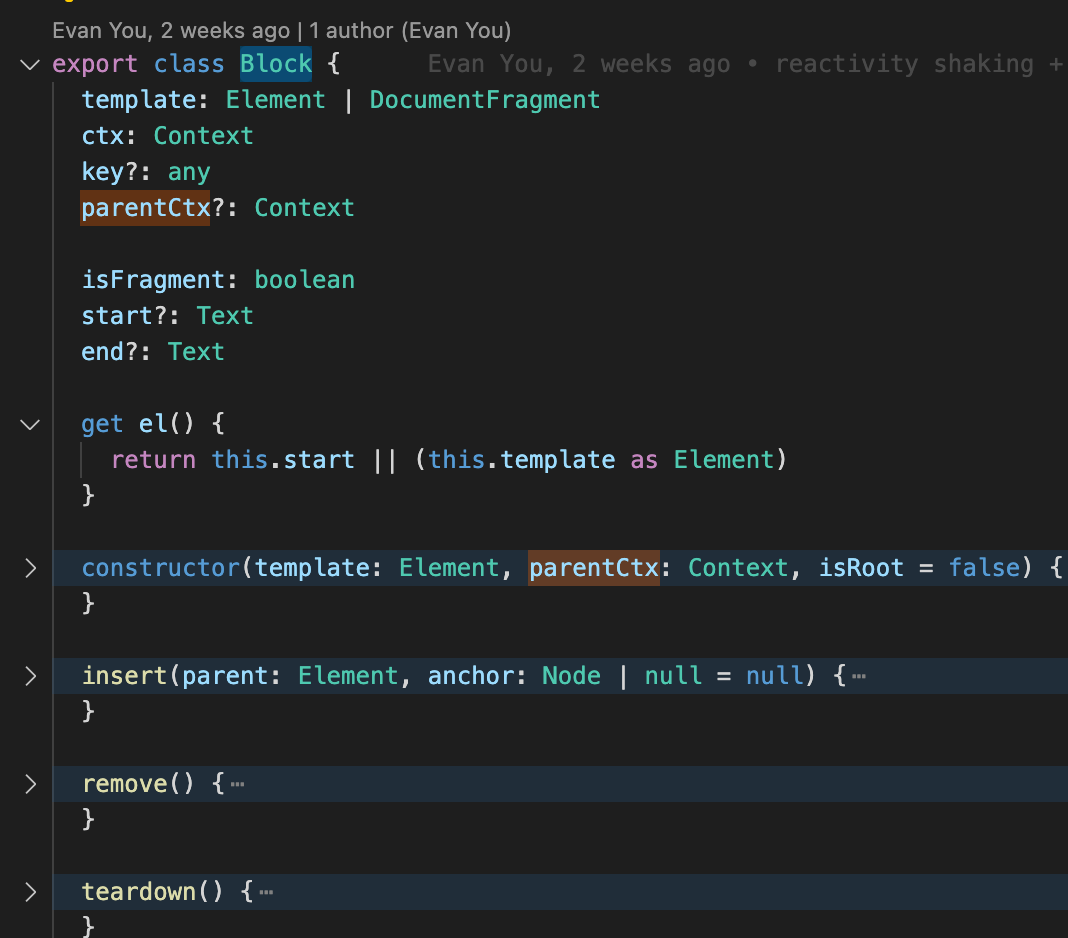
在constructor構(gòu)造函數(shù)中可以看到
  constructor(template: Element, parentCtx: Context, isRoot = false) {
    this.isFragment = template instanceof HTMLTemplateElement

    if (isRoot) {
      this.template = template
    } else if (this.isFragment) {
      this.template = (template as HTMLTemplateElement).content.cloneNode(
        true
      ) as DocumentFragment
    } else {
      this.template = template.cloneNode(true) as Element
    }

    if (isRoot) {
      this.ctx = parentCtx
    } else {
      // create child context
      this.parentCtx = parentCtx
      parentCtx.blocks.push(this)
      this.ctx = createContext(parentCtx)
    }

    walk(this.template, this.ctx)
  }
以上代碼可以分為三個(gè)邏輯 創(chuàng)建模板 template(使用clone節(jié)點(diǎn)的方式,由于dom節(jié)點(diǎn)獲取到以后是一個(gè)對(duì)象,所以做了一層clone)如果不是根節(jié)點(diǎn)就遞歸式的繼承 ctx上下文在處理完ctx和Template后,調(diào)用 walk函數(shù)walk函數(shù)解析:

會(huì)先根據(jù)nodetype進(jìn)行判斷,然后做不同的處理
如果是一個(gè)
element節(jié)點(diǎn),就要處理不同的指令,例如v-if
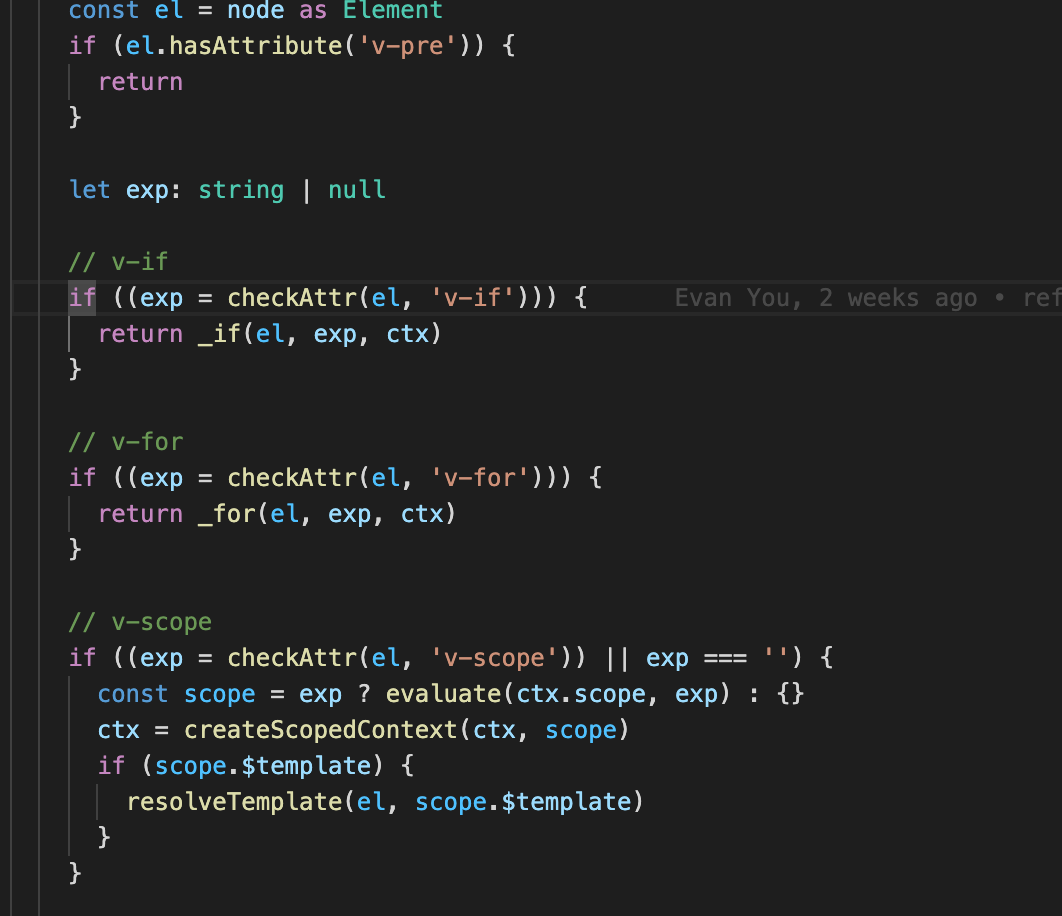
這里有一個(gè)工具函數(shù)要先看看
export const checkAttr = (el: Element, name: string): string | null => {
  const val = el.getAttribute(name)
  if (val != null) el.removeAttribute(name)
  return val
}
這個(gè)函數(shù)意思是檢測(cè)下這個(gè)節(jié)點(diǎn)是否包含
v-xx的屬性,然后返回這個(gè)結(jié)果并且刪除這個(gè)屬性拿
v-if舉例,當(dāng)判斷這個(gè)節(jié)點(diǎn)有v-if屬性后,那么就去調(diào)用方法處理它,并且刪除掉這個(gè)屬性(作為標(biāo)識(shí)已經(jīng)處理過(guò)了)
這里本了我想12點(diǎn)前睡覺(jué)的,別人告訴我只有5kb,我想著找個(gè)最簡(jiǎn)單的指令解析下,結(jié)果每個(gè)指令代碼都有一百多行,今晚加班到九點(diǎn)多,剛把微前端改造的上了生產(chǎn),還是想著堅(jiān)持下給大家寫(xiě)完吧。現(xiàn)在已經(jīng)凌晨了
v-if處理函數(shù)大概60行
export const _if = (el: Element, exp: string, ctx: Context) => {
...
}
首先_if函數(shù)先拿到el節(jié)點(diǎn)和exp這個(gè)v-if的值,以及ctx上下文對(duì)象
  if (import.meta.env.DEV && !exp.trim()) {
    console.warn(`v-if expression cannot be empty.`)
  }
如果為空的話報(bào)出警告 然后拿到el節(jié)點(diǎn)的父節(jié)點(diǎn),并且根據(jù)這個(gè)exp的值創(chuàng)建一個(gè)comment注釋節(jié)點(diǎn)(暫存)并且插入到el之前,同時(shí)創(chuàng)建一個(gè)branches數(shù)組,儲(chǔ)存exp和el
 const parent = el.parentElement!
  const anchor = new Comment('v-if')
  parent.insertBefore(anchor, el)

  const branches: Branch[] = [
    {
      exp,
      el
    }
  ]

  // locate else branch
  let elseEl: Element | null
  let elseExp: string | null
Comment 接口代表標(biāo)簽(markup)之間的文本符號(hào)(textual notations)。盡管它通常不會(huì)顯示出來(lái),但是在查看源碼時(shí)可以看到它們。在 HTML 和 XML 里,注釋?zhuān)–omments)為
'<!--' 和 '-->'之間的內(nèi)容。在 XML 里,注釋中不能出現(xiàn)字符序列 '--'。
接著創(chuàng)建 elseEl和elseExp的變量,并且循環(huán)遍歷搜集了所有的else分支,并且存儲(chǔ)在了branches里面
  while ((elseEl = el.nextElementSibling)) {
    elseExp = null
    if (
      checkAttr(elseEl, 'v-else') === '' ||
      (elseExp = checkAttr(elseEl, 'v-else-if'))
    ) {
      parent.removeChild(elseEl)
      branches.push({ exp: elseExp, el: elseEl })
    } else {
      break
    }
  }
這樣Branches里面就有了v-if所有的分支啦,這里可以看成是一個(gè)樹(shù)的遍歷(廣度優(yōu)先搜索)
接下來(lái)根據(jù)副作用函數(shù)的觸發(fā),每次都去branches里面遍歷尋找到需要激活的那個(gè)分支,將節(jié)點(diǎn)插入到parentNode中,并且返回nextNode即可實(shí)現(xiàn) v-if的效果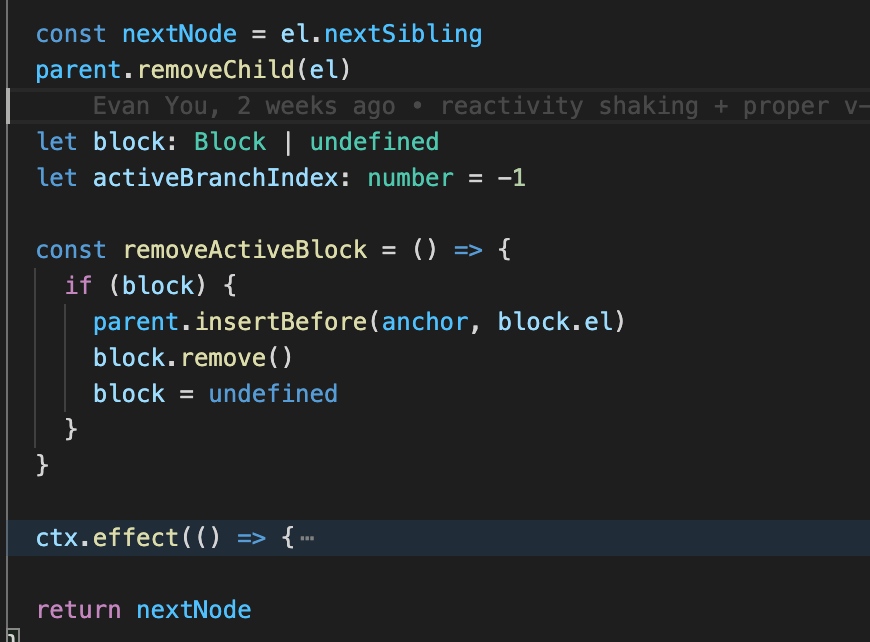
這里由于都是html,給我們省去了虛擬dom這些東西,可是上面僅僅是處理單個(gè)節(jié)點(diǎn),如果是深層級(jí)的
dom節(jié)點(diǎn),就要用到后面的深度優(yōu)先搜索了
 // process children first before self attrs
    walkChildren(el, ctx)


const walkChildren = (node: Element | DocumentFragment, ctx: Context) => {
  let child = node.firstChild
  while (child) {
    child = walk(child, ctx) || child.nextSibling
  }
}
當(dāng)節(jié)點(diǎn)上沒(méi)有 v-if之類(lèi)的屬性時(shí),這個(gè)時(shí)候就去取他們的第一個(gè)子節(jié)點(diǎn)去做上述的動(dòng)作,匹配每個(gè)v-if v-for之類(lèi)的指令
如果是文本節(jié)點(diǎn)
else if (type === 3) {
    // Text
    const data = (node as Text).data
    if (data.includes('{{')) {
      let segments: string[] = []
      let lastIndex = 0
      let match
      while ((match = interpolationRE.exec(data))) {
        const leading = data.slice(lastIndex, match.index)
        if (leading) segments.push(JSON.stringify(leading))
        segments.push(`$s(${match[1]})`)
        lastIndex = match.index + match[0].length
      }
      if (lastIndex < data.length) {
        segments.push(JSON.stringify(data.slice(lastIndex)))
      }
      applyDirective(node, text, segments.join('+'), ctx)
    }
這個(gè)地方很經(jīng)典,是通過(guò)正則匹配,然后一系列操作匹配,最終返回了一個(gè)文本字符串。這個(gè)代碼是挺精髓的,但是由于時(shí)間關(guān)系這里不細(xì)講了
applyDirective函數(shù)
const applyDirective = (
  el: Node,
  dir: Directive<any>,
  exp: string,
  ctx: Context,
  arg?: string,
  modifiers?: Record<string, true>
) => {
  const get = (e = exp) => evaluate(ctx.scope, e, el)
  const cleanup = dir({
    el,
    get,
    effect: ctx.effect,
    ctx,
    exp,
    arg,
    modifiers
  })
  if (cleanup) {
    ctx.cleanups.push(cleanup)
  }
}
接下來(lái) nodeType是11意味著是一個(gè)Fragment節(jié)點(diǎn),那么直接從它的第一個(gè)子節(jié)點(diǎn)開(kāi)始即可
} else if (type === 11) {
    walkChildren(node as DocumentFragment, ctx)
  }
nodeType 說(shuō) 明
此屬性只讀且傳回一個(gè)數(shù)值。
有效的數(shù)值符合以下的型別:
1-ELEMENT
2-ATTRIBUTE
3-TEXT
4-CDATA
5-ENTITY REFERENCE
6-ENTITY
7-PI (processing instruction)
8-COMMENT
9-DOCUMENT
10-DOCUMENT TYPE
11-DOCUMENT FRAGMENT
12-NOTATION
梳理總結(jié)
拉取代碼 啟動(dòng)項(xiàng)目 找到入口createApp函數(shù) 定義ctx以及層層繼承 發(fā)現(xiàn)block方法 根據(jù)節(jié)點(diǎn)是element還是text分開(kāi)做處理 如果是text就去通過(guò)正則匹配,拿到數(shù)據(jù)返回字符串 如果是element就去做一個(gè)遞歸處理,解析所有的 v-if等模板語(yǔ)法,返回真實(shí)的節(jié)點(diǎn)
這里所有的dom節(jié)點(diǎn)改變,都是直接通過(guò)js操作dom
有趣的源碼補(bǔ)充
這里的nextTick實(shí)現(xiàn),是直接通過(guò) promise.then
const p = Promise.resolve()

export const nextTick = (fn: () => void) => p.then(fn)
往期推薦

Vite 太快了,煩死了,是時(shí)候該小睡一會(huì)了。

如何實(shí)現(xiàn)比 setTimeout 快 80 倍的定時(shí)器?

萬(wàn)字長(zhǎng)文!總結(jié)Vue 性能優(yōu)化方式及原理

90 行代碼的 webpack,你確定不學(xué)嗎?
如果你覺(jué)得這篇內(nèi)容對(duì)你挺有啟發(fā),我想邀請(qǐng)你幫我三個(gè)小忙:
點(diǎn)個(gè)「在看」,讓更多的人也能看到這篇內(nèi)容(喜歡不點(diǎn)在看,都是耍流氓 -_-)
歡迎加我微信「huab119」拉你進(jìn)技術(shù)群,長(zhǎng)期交流學(xué)習(xí)...
關(guān)注公眾號(hào)「前端勸退師」,持續(xù)為你推送精選好文,也可以加我為好友,隨時(shí)聊騷。
