
記一次elasticsearch 跨機(jī)房遷移
目標(biāo)將A機(jī)房的ES集群遷移到B機(jī)房的ES集群
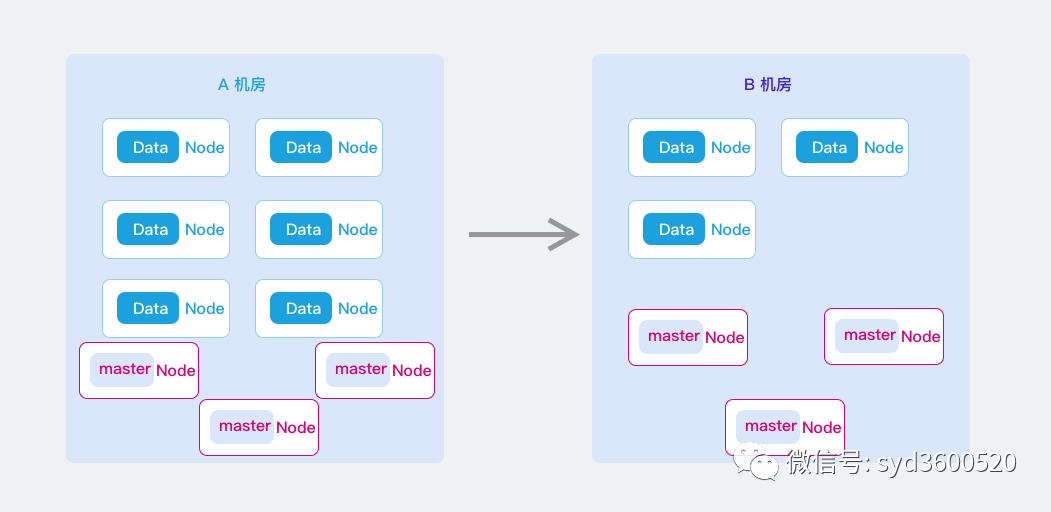
調(diào)研了在線和離線遷移兩種比較有代表性的方案,兩種方案都進(jìn)行了測試演練,不過最終選擇了離線的方式,原因有幾點(diǎn):
在線遷移方式仍然會存在短暫的服務(wù)不可用 數(shù)據(jù)丟失無法容忍 雖然可以配以輔助方案解決 但是增加了復(fù)雜度 在線遷移方式操作相對復(fù)雜 集群數(shù)據(jù)量幾百G并不大 離線操作可以到達(dá)穩(wěn)定 快速
在線遷移
思路:通過集群擴(kuò)容的方式加入B機(jī)房ES節(jié)點(diǎn),通過縮容的方式去掉A機(jī)房節(jié)點(diǎn),始終保持一個集群原則,分片在集群內(nèi)部進(jìn)行遷移,集群及索引配置不更改,對業(yè)務(wù)友好;
影響:存在兩次master選舉 短暫時間集群不可用 每次選舉時長 網(wǎng)上都說不超過2分鐘(但是實(shí)測超過2min);
1.在A機(jī)房ES集群擴(kuò)容節(jié)點(diǎn),將新節(jié)點(diǎn)全部加入到A機(jī)房ES集群,此時B機(jī)房和A機(jī)房共同組成新的跨機(jī)房集群;
限制已有索引數(shù)據(jù)的分布范圍,暫時只容許分布在舊的數(shù)據(jù)節(jié)點(diǎn)上
curl -H "Content-Type: application/json" -XPUT http://localhost:9200/_cluster/settings -d '{
  "transient" : {
    "cluster.routing.allocation.enable":"none"
     "cluster.routing.rebalance.enable":"none"
     "cluster.routing.allocation.include._name" : "A機(jī)房節(jié)點(diǎn)"
  }
}'
cluster.routing.allocation.enable 設(shè)置成none,主要是影響集群中新創(chuàng)建的索引無法進(jìn)行分片分配(把分片分配到某個節(jié)點(diǎn)上去)。cluster.routing.rebalance.enable設(shè)置成none, 主要是影響集群中已有索引的分片不會rebalance到(遷移)其他節(jié)點(diǎn)上去
B機(jī)房的ES配置 elasticsearch.yml
cluster.name: xxx #A B機(jī)房集群保持一致
discovery.seed_hosts: ["A機(jī)房IP", "B機(jī)房IP"]
啟動B機(jī)房ES節(jié)點(diǎn)
2.在集群內(nèi)部遷移A機(jī)房data節(jié)點(diǎn)上的分片到B機(jī)房的data節(jié)點(diǎn)上,此時集群中所有數(shù)據(jù)分片都在B機(jī)房的data節(jié)點(diǎn)上; 執(zhí)行RESTful API遷移分片:
curl -H "Content-Type: application/json" -XPUT http://localhost:9200/_cluster/settings -d '{
  "transient" : {
     "cluster.routing.allocation.include._name" : "B機(jī)房節(jié)點(diǎn)"
  }
}'
3.更改ES客戶端配置文件中“data.elasticsearch.cluster-nodes”,去掉A機(jī)房的節(jié)點(diǎn)配置,改成B機(jī)房的master節(jié)點(diǎn)(tcp端口),然后客戶端實(shí)例灰度重啟并生效配置;
4.下線A機(jī)房的節(jié)點(diǎn),再下線A機(jī)房的副master節(jié)點(diǎn),最后下線A機(jī)房的主master節(jié)點(diǎn),此時集群會進(jìn)入master節(jié)點(diǎn)重新選舉,且新的主master節(jié)點(diǎn)一定會在B機(jī)房的master節(jié)點(diǎn)中產(chǎn)生,此時集群會有短暫的不可訪問;
5.去掉B機(jī)房master、data節(jié)點(diǎn)配置文件中的A機(jī)房節(jié)點(diǎn)配置,逐個重啟data節(jié)點(diǎn),再重啟副master節(jié)點(diǎn),最后重啟主master節(jié)點(diǎn)(集群也會短暫不可訪問時間)后全部生效,等待ES集群再次恢復(fù);
discovery.seed_hosts: ["B機(jī)房IP"]
只留B機(jī)房的master節(jié)點(diǎn)
6.B機(jī)房的客戶端訪問均正常后,下線A機(jī)房的master、data節(jié)點(diǎn)
7.重新啟動集群平衡
#禁用集群新創(chuàng)建索引分配
cluster.routing.allocation.enable:true
#禁用集群自動平衡
cluster.routing.rebalance.enable:true
此時整個遷移任務(wù)完畢。
檢查node中的切片數(shù)量
$ curl http://localhost:9200/_cat/allocation?v
shards disk.indices disk.used disk.avail disk.total disk.percent host       ip         node
     3      622.5mb   655.4mb      1.7tb      1.7tb            0 10.1.11.43 10.1.11.43 node-e
     3      932.3mb   965.4mb      1.7tb      1.7tb            0 10.1.11.44 10.1.11.44 node-f
     0           0b    32.5mb      1.7tb      1.7tb            0 10.1.11.25 10.1.11.25 node-a
     2      309.8mb   394.4mb      1.7tb      1.7tb            0 10.1.11.27 10.1.11.27 node-d
確認(rèn)分片數(shù)量為0后,即可登入到需要擴(kuò)容節(jié)點(diǎn)的系統(tǒng)中停止elasticsearch服務(wù)并關(guān)機(jī)。
離線遷移
1.創(chuàng)建索引
因動態(tài)配置無法生效 需采用手動創(chuàng)建索引
curl -H "Content-Type: application/json" -XPUT 'http://localhost:9200/my_index' -d '{
   "settings":{
    "index" : {
        "search" : {
          "slowlog" : {
            "level" : "info",
            "threshold" : {
              "fetch" : {
                "warn" : "1s",
                "trace" : "2000ms",
                "debug" : "5000ms",
                "info" : "20ms"
              },
              "query" : {
                "warn" : "10s",
                "trace" : "5000ms",
                "debug" : "2s",
                "info" : "5000ms"
              }
            }
          }
        },
        "refresh_interval" : "10s",
        "sort" : {
          "field" : "ActiveTime",
          "order" : "desc"
        },
        "store" : {
          "preload" : [
            "nvd",
            "dvd",
            "tim",
            "dim"
          ]
        },
        "number_of_replicas" : "1"
      }
      },
      "mappings":{"properties":{"ActiveTime":{"type":"integer"}}}
  }'
數(shù)據(jù)同步
#mappings
./node-v10.13.0-linux-x64/bin/elasticdump --input=http://A機(jī)房IP:9200/index_1 --output=http://B機(jī)房IP:9200/index_1 --type=mapping
#data
 ./node-v10.13.0-linux-x64/bin/elasticdump --input=http://A機(jī)房IP:9200/index_1 --output=http://B機(jī)房IP:9200/index_1 --type=data --limit=10000
#alias
./node-v10.13.0-linux-x64/bin/elasticdump --input=http://A機(jī)房IP:9200/new_index_3/alias_index_1 --output=http://B機(jī)房IP:9200 --type=alias
需要注意的是,這里我們A,B機(jī)房網(wǎng)絡(luò)打通了 所以不用將數(shù)據(jù)導(dǎo)出,然后再導(dǎo)入,直接進(jìn)行數(shù)據(jù)搬遷
數(shù)據(jù)遷移時可以通過指定--limit來進(jìn)行加速,但如果數(shù)據(jù)量過大可能會遇到413 Request Entity Too Large的異常,不過不用擔(dān)心:
在elasticsearch.yml配置文件加入http.max_content_length: 300mb來調(diào)整數(shù)據(jù)傳輸大小限制。注意此配置需要重啟實(shí)例才能生效