
SpringCloud 基于 Nacos 的注冊中心
所謂注冊中心,其實(shí)是分布式架構(gòu)演進(jìn)過程中的產(chǎn)物,在系統(tǒng)中充當(dāng)一個協(xié)調(diào)者的角色。
Nacos 結(jié)合 Spring
0x01:添加 maven 依賴
<dependency>
    <groupId>com.alibaba.nacos</groupId>
    <artifactId>nacos-spring-context</artifactId>
    <version>0.2.2-RC1</version>
</dependency>
0x02:開啟服務(wù)發(fā)現(xiàn)功能
使用 @EnableNacosDiscovery 開啟 Nacos Spring 的服務(wù)發(fā)現(xiàn)功能
@Configuration
@EnableNacosDiscovery(globalProperties = @NacosProperties(serverAddr = "127.0.0.1:8848"))
public class NacosDiscovery {

}
使用 @NacosInjected 注入 Nacos 的NamingService實(shí)例,通過 NamingService的 registerInstance() 向 Nacos Server 注冊一個名稱為 applicationName 的服務(wù),當(dāng)然也可以通過 Nacos Open API 方式注冊:
curl -X PUT 'http://127.0.0.1:8848/nacos/v1/ns/instance?serviceName=XXX&ip=XXX&port=XXX'
這里介紹使用代碼的方式
@Configuration
@EnableNacosDiscovery(globalProperties = @NacosProperties(serverAddr = "127.0.0.1:8848"))
public class NacosDiscovery {

    @NacosInjected
    private NamingService namingService;

    @Value("${server.port}")
    private int serverPort;

    @Value("${spring.application.name}")
    private String applicationName;

    @PostConstruct
    public void registerInstance() throws NacosException {
        namingService.registerInstance(applicationName, "127.0.0.1", serverPort);
    }
}
0x03:編寫Controller
編寫一個 Controller 來驗(yàn)證服務(wù)是否再 Nacos Server 上注冊了,代碼如下:
@RestController
@RequestMapping(value = "discovery")
public class NacosDiscoveryController {

    @NacosInjected
    private NamingService namingService;

    @RequestMapping(value = "/get", method = GET)
    @ResponseBody
    public List<Instance> getInstance(@RequestParam String serviceName) throws NacosException {
        return namingService.getAllInstances(serviceName);
    }
}
啟動 Nacos Server,安裝及啟動方式可以參考【 Nacos源碼編譯 】
然后啟動 Tomcat,我們先來看看 Nacos 控制臺有什么變化
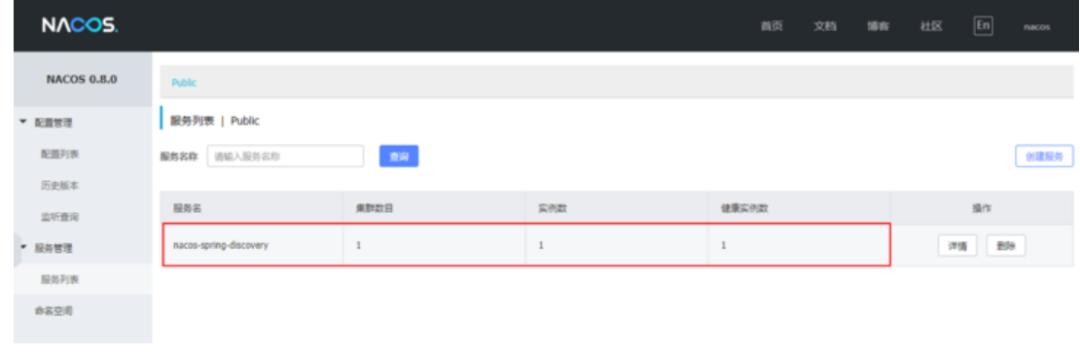
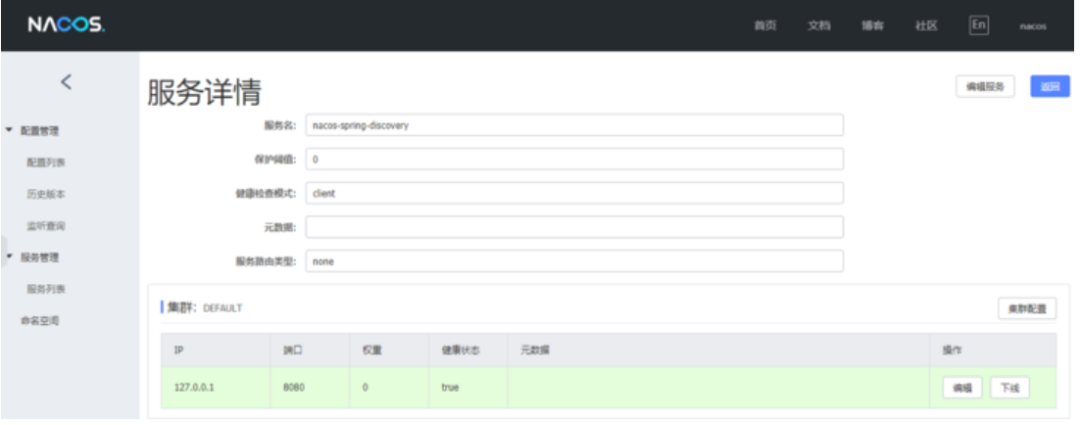
在控制臺上,可以看到名為 nacos-spring-discovery 服務(wù)實(shí)例,點(diǎn)擊詳情按鈕查看實(shí)例的詳細(xì)信息:
在瀏覽器上訪問
http://127.0.0.1:8080/discovery/get?serviceName=nacos-spring-discovery
返回結(jié)果如下
[{
    "instanceId": "127.0.0.1#8080#{\"defaultCheckPort\":80,\"defaultPort\":80,\"healthChecker\":{\"type\":\"TCP\"},\"metadata\":{},\"name\":\"\",\"useIPPort4Check\":true}#nacos-spring-discovery",
    "ip": "127.0.0.1",
    "port": 8080,
    "weight": 1.0,
    "healthy": true,
    "cluster": {
        "serviceName": null,
        "name": "",
        "healthChecker": {
            "type": "TCP"
        },
        "defaultPort": 80,
        "defaultCheckPort": 80,
        "useIPPort4Check": true,
        "metadata": {}
    },
    "service": null,
    "metadata": {}
}]
和剛才在控制臺看到的數(shù)據(jù)是一致的。以上就是 Nacos 結(jié)合 Spring 的實(shí)現(xiàn)方式,那么 Nacos 結(jié)合 Spring Boot 呢?其實(shí)沒什么太大區(qū)別。
Nacos 結(jié)合 Spring Boot
0x01:添加 Starter 依賴
<dependency>
    <groupId>com.alibaba.boot</groupId>
    <artifactId>nacos-discovery-spring-boot-starter</artifactId>
    <version>0.2.1</version>
</dependency>
注意,版本 0.2.x.RELEASE 對應(yīng)的是 Spring Boot 2.x 版本,版本 0.1.x.RELEASE 對應(yīng)的是 Spring Boot 1.x 版本。
0x02:在 application.properties 中添加如下配置信息
server.port=8080
spring.application.name=nacos-springboot-discovery
nacos.discovery.server-addr=127.0.0.1:8848
0x03:添加 NacosDiscoveryApplication 啟動類
使用 @NacosInjected 注入 Nacos 的 NamingService 實(shí)例,通過 NamingService 的registerInstance() 向 Nacos Server 注冊一個名稱為 applicationName 的服務(wù)
@SpringBootApplication
public class NacosDiscoveryApplication {

    @NacosInjected
    private NamingService namingService;

    @Value("${server.port}")
    private int serverPort;

    @Value("${spring.application.name}")
    private String applicationName;

    @PostConstruct
    public void registerInstance() throws NacosException {
        namingService.registerInstance(applicationName, "127.0.0.1", serverPort);
    }

    public static void main(String[] args) {
        SpringApplication.run(NacosDiscoveryApplication.class, args);
    }

}
添加 NacosDiscoveryController 類
@RestController
@RequestMapping(value = "discovery")
public class NacosDiscoveryController {

    @NacosInjected
    private NamingService namingService;

    @RequestMapping(value = "/get", method = GET)
    @ResponseBody
    public List<Instance> getInstance(@RequestParam String serviceName) throws NacosException {
        return namingService.getAllInstances(serviceName);
    }
}
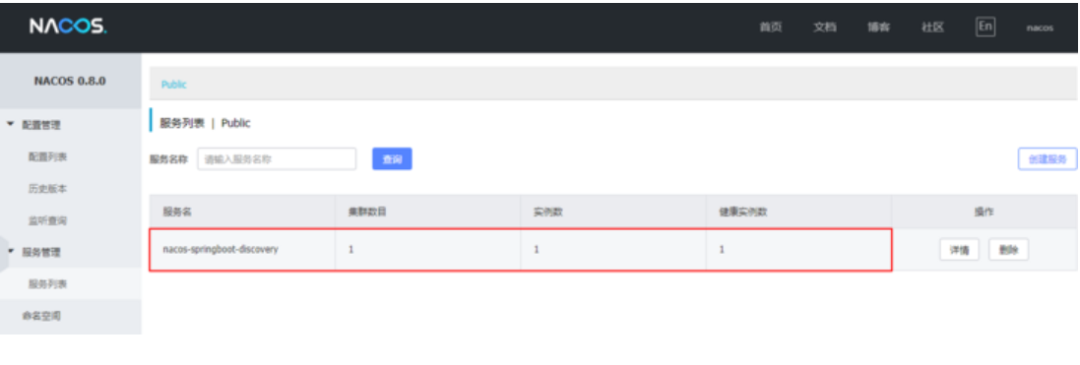
啟動 NacosDiscoveryApplication,觀察 Nacos 控制臺
在瀏覽器上訪問
http://127.0.0.1:8080/discovery/get?serviceName=nacos-springboot-discovery
返回結(jié)果如下
[{
    "instanceId": "127.0.0.1#8080#{\"defaultCheckPort\":80,\"defaultPort\":80,\"healthChecker\":{\"type\":\"TCP\"},\"metadata\":{},\"name\":\"\",\"useIPPort4Check\":true}#nacos-springboot-discovery",
    "ip": "127.0.0.1",
    "port": 8080,
    "weight": 1.0,
    "healthy": true,
    "cluster": {
        "serviceName": null,
        "name": "",
        "healthChecker": {
            "type": "TCP"
        },
        "defaultPort": 80,
        "defaultCheckPort": 80,
        "useIPPort4Check": true,
        "metadata": {}
    },
    "service": null,
    "metadata": {}
}]

喜歡,在看