
C# 代碼生成二維碼方法及代碼示例(QRCoder)

背景
二維碼是越來越流行了,很多地方都有可能是使用到。如果是靜態(tài)的二維碼還是比較好處理的,通過在線工具就可以直接生成一張二維碼圖片,比如:草料二維碼。但有的時候是需要動態(tài)生成的(根據(jù)動態(tài)數(shù)據(jù)生成),這個使用在線就工具就無法實現(xiàn)了。最好是能在代碼中直接生成一個二維碼圖片,這里我就介紹下使用QRCoder類庫在代碼中生成二維碼。
網(wǎng)上生成二維碼的組件還是挺多的,但是真正好用且快速的卻不多。QRCoder就是我在眾多中找到的,它的生成速度快、而且使用也相當方便。
開始編碼
1、安裝 QRCoder組件。在項目上通過NuGet包管理器來安裝,搜索名稱:QRCoder
2、在代碼中添加引用:using QRCoder;
3、編碼生成
private void RenderQrCode(){string level = comboBoxECC.SelectedItem.ToString();QRCodeGenerator.ECCLevel eccLevel = (QRCodeGenerator.ECCLevel)(level == "L" ? 0 : level == "M" ? 1 : level == "Q" ? 2 : 3);using (QRCodeGenerator qrGenerator = new QRCodeGenerator()){using (QRCodeData qrCodeData = qrGenerator.CreateQrCode(textBoxQRCode.Text, eccLevel)){using (QRCode qrCode = new QRCode(qrCodeData)){pictureBoxQRCode.BackgroundImage = qrCode.GetGraphic(20, Color.Black, Color.White,GetIconBitmap(), (int) iconSize.Value);this.pictureBoxQRCode.Size = new System.Drawing.Size(pictureBoxQRCode.Width, pictureBoxQRCode.Height);//Set the SizeMode to center the image.this.pictureBoxQRCode.SizeMode = PictureBoxSizeMode.CenterImage;pictureBoxQRCode.SizeMode = PictureBoxSizeMode.StretchImage;}}}}
運行效果
上面代碼運行的結(jié)果
加個Logo吧
還可以加上logo
private Bitmap GetIconBitmap(){Bitmap img = null;if (iconPath.Text.Length > 0){try{img = new Bitmap(iconPath.Text);}catch (Exception){}}return img;}
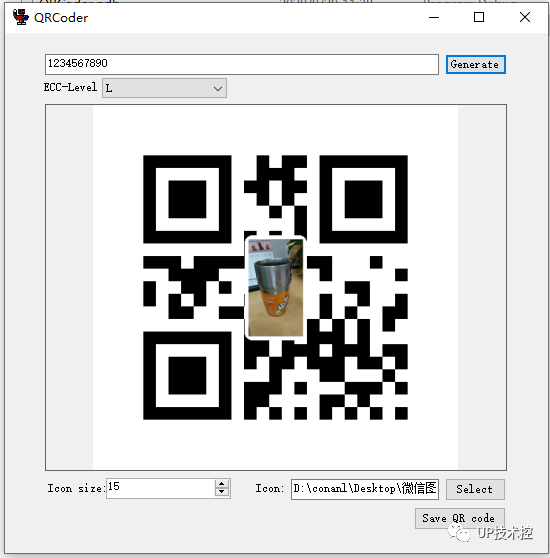
完整代碼
using System;using System.Collections.Generic;using System.ComponentModel;using System.Data;using System.Drawing;using System.Linq;using System.Text;using System.Windows.Forms;using QRCoder;using System.Drawing.Imaging;using System.IO;namespace QRCoderDemo{public partial class Form1 : Form{public Form1(){InitializeComponent();}private void Form1_Load(object sender, EventArgs e){comboBoxECC.SelectedIndex = 0; //Pre-select ECC level "L"RenderQrCode();}private void buttonGenerate_Click(object sender, EventArgs e){RenderQrCode();}private void RenderQrCode(){string level = comboBoxECC.SelectedItem.ToString();QRCodeGenerator.ECCLevel eccLevel = (QRCodeGenerator.ECCLevel)(level == "L" ? 0 : level == "M" ? 1 : level == "Q" ? 2 : 3);using (QRCodeGenerator qrGenerator = new QRCodeGenerator()){using (QRCodeData qrCodeData = qrGenerator.CreateQrCode(textBoxQRCode.Text, eccLevel)){using (QRCode qrCode = new QRCode(qrCodeData)){pictureBoxQRCode.BackgroundImage = qrCode.GetGraphic(20, Color.Black, Color.White,GetIconBitmap(), (int) iconSize.Value);this.pictureBoxQRCode.Size = new System.Drawing.Size(pictureBoxQRCode.Width, pictureBoxQRCode.Height);//Set the SizeMode to center the image.this.pictureBoxQRCode.SizeMode = PictureBoxSizeMode.CenterImage;pictureBoxQRCode.SizeMode = PictureBoxSizeMode.StretchImage;}}}}private Bitmap GetIconBitmap(){Bitmap img = null;if (iconPath.Text.Length > 0){try{img = new Bitmap(iconPath.Text);}catch (Exception){}}return img;}private void selectIconBtn_Click(object sender, EventArgs e){OpenFileDialog openFileDlg = new OpenFileDialog();openFileDlg.Title = "Select icon";openFileDlg.Multiselect = false;openFileDlg.CheckFileExists = true;if (openFileDlg.ShowDialog() == System.Windows.Forms.DialogResult.OK){iconPath.Text = openFileDlg.FileName;if (iconSize.Value == 0){iconSize.Value = 15;}}else{iconPath.Text = "";}}private void btn_save_Click(object sender, EventArgs e){// Displays a SaveFileDialog so the user can save the ImageSaveFileDialog saveFileDialog1 = new SaveFileDialog();saveFileDialog1.Filter = "Bitmap Image|*.bmp|PNG Image|*.png|JPeg Image|*.jpg|Gif Image|*.gif";saveFileDialog1.Title = "Save an Image File";saveFileDialog1.ShowDialog();// If the file name is not an empty string open it for saving.if (saveFileDialog1.FileName != ""){// Saves the Image via a FileStream created by the OpenFile method.using (FileStream fs = (System.IO.FileStream) saveFileDialog1.OpenFile()){// Saves the Image in the appropriate ImageFormat based upon the// File type selected in the dialog box.// NOTE that the FilterIndex property is one-based.ImageFormat imageFormat = null;switch (saveFileDialog1.FilterIndex){case 1:imageFormat = ImageFormat.Bmp;break;case 2:imageFormat = ImageFormat.Png;break;case 3:imageFormat = ImageFormat.Jpeg;break;case 4:imageFormat = ImageFormat.Gif;break;default:throw new NotSupportedException("File extension is not supported");}pictureBoxQRCode.BackgroundImage.Save(fs, imageFormat);fs.Close();}}}public void ExportToBmp(string path){}private void textBoxQRCode_TextChanged(object sender, EventArgs e){RenderQrCode();}private void comboBoxECC_SelectedIndexChanged(object sender, EventArgs e){RenderQrCode();}}}
【推薦】.NET Core開發(fā)實戰(zhàn)視頻課程?★★★
.NET Core實戰(zhàn)項目之CMS 第一章 入門篇-開篇及總體規(guī)劃
【.NET Core微服務(wù)實戰(zhàn)-統(tǒng)一身份認證】開篇及目錄索引
Redis基本使用及百億數(shù)據(jù)量中的使用技巧分享(附視頻地址及觀看指南)
.NET Core中的一個接口多種實現(xiàn)的依賴注入與動態(tài)選擇看這篇就夠了
用abp vNext快速開發(fā)Quartz.NET定時任務(wù)管理界面
在ASP.NET Core中創(chuàng)建基于Quartz.NET托管服務(wù)輕松實現(xiàn)作業(yè)調(diào)度
現(xiàn)身說法:實際業(yè)務(wù)出發(fā)分析百億數(shù)據(jù)量下的多表查詢優(yōu)化
評論
圖片
表情