
SpringBoot 2.0實現(xiàn)基于Restful風格的文件上傳與下載
來源:ramostear.com/blog/2020/04/28/n1k2gc12.html

文件上傳與下載在Web應用中是一個比較常見的功能。在本教程中,我將基于Spring 2.2.6版本實現(xiàn)一個基于Restful風格的文件上傳與下載APIs。
基于Spring Boot 2.0實戰(zhàn)系列源碼已經(jīng)Push到Github倉庫:https://github.com/ramostear/springboot2.0-action 。感興趣朋友歡迎Star/Fork。
Part1環(huán)境
JDK: Java 1.8 Framework: Spring Boot 2.2.6(Only Using Spring Web MVC) Maven: Maven 3.5.0+ IDE: IntelliJ IDEA 2019.2 Test: Postman 7.23.0
推薦下自己做的 Spring Boot 的實戰(zhàn)項目:
https://github.com/YunaiV/ruoyi-vue-pro
Part2功能
本教程中,使用Spring 2.2.6實現(xiàn)Restful風格的APIs并提供以下的功能:
客戶端上傳文件到服務端 對客戶端上傳文件大小進行限制(50MB) 點擊鏈接地址下載文件 獲得已上傳文件列表(文件名和下載地址)
下面是教程所實現(xiàn)的APIs列表(服務端請求端口默認8080):
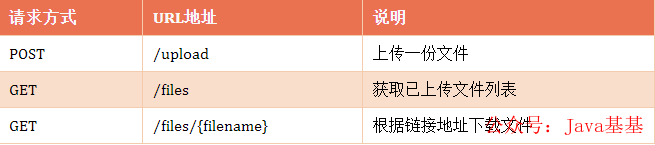
推薦下自己做的 Spring Cloud 的實戰(zhàn)項目:
https://github.com/YunaiV/onemall
Part3工程結(jié)構
 圖片
圖片
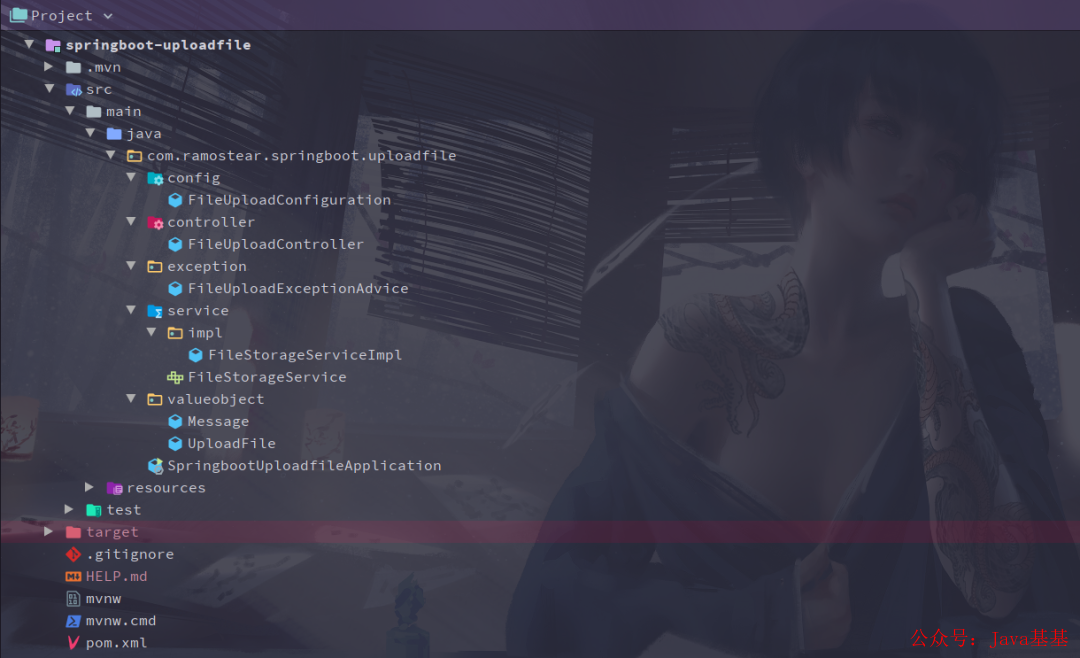
工程目錄結(jié)構說明如下:
config/FileUploadConfiguration.java: 常規(guī)組件,主要在重啟應用時清理歷史文件; controller/FileUploadController.java: 主要的控制器,負責處理文件的上傳,下載,瀏覽等請求; exception/FileUploadExceptionAdvice.java: 全局的異常處理類,提供用戶友好的異常提示信息; service/FileStorageService.java: 文件上傳接口類,提供存儲地址初始化,保存文件,加載文件,清理文件等操作; service/impl/FileStorageServiceImpl.java: 文件上傳接口實現(xiàn)類; valueobject/UploadFile.java: 封裝了文件名和存儲地址的POJO類; valueobject/Message.java: 請求/響應的消息對象; resources/application.yml: 項目配置文件,主要配置了文件上傳大小限制; pom.xml:Maven依賴配置文件。
Part4創(chuàng)建Spring Boot項目
本教程是基于IntelliJ IDEA創(chuàng)建Spring Boot項目的,你也可以選擇自己喜歡的IDE創(chuàng)建項目。創(chuàng)建完項目后,請檢查pom.xml文件中是否包含如下配置:
<dependency>
    <groupId>org.springframework.boot</groupId>
    <artifactId>spring-boot-starter-web</artifactId>
</dependency>
本教程只使用到Spring Web MVC的功能,因此只需添加spring-boot-starter-web依賴。
4.1 文件上傳接口
按照面向接口編程的約定(規(guī)范),創(chuàng)建一個用于操作上傳文件的接口類FileStorageService.java,并提供相應的方法。
service/FileStorageService.java
package com.ramostear.springboot.uploadfile.service;

import org.springframework.core.io.Resource;
import org.springframework.web.multipart.MultipartFile;

import java.nio.file.Path;
import java.util.stream.Stream;

/**
 * @ClassName FileStorageService
 * @Description TODO
 * @Author 樹下魅狐
 * @Date 2020/4/28 0028 18:35
 * @Version since 1.0
 **/
public interface FileStorageService {

    void init();

    void save(MultipartFile multipartFile);

    Resource load(String filename);

    Stream<Path> load();

    void clear();

}
在啟動應用時,先調(diào)用clear()方法清理歷史文件,再調(diào)用init()方法初始化文件上傳地址。
4.2 實現(xiàn)文件上傳接口
文件上傳接口實現(xiàn)類比較簡單,這里直接給出代碼:
service/impl/FileStorageServiceImpl.java
/**
 * @ClassName FileStorageServiceImpl
 * @Description TODO
 * @Author 樹下魅狐
 * @Date 2020/4/28 0028 18:38
 * @Version since 1.0
 **/
@Service("fileStorageService")
public class FileStorageServiceImpl implements FileStorageService {

    private final Path path = Paths.get("fileStorage");


    @Override
    public void init() {
        try {
            Files.createDirectory(path);
        } catch (IOException e) {
            throw new RuntimeException("Could not initialize folder for upload!");
        }
    }

    @Override
    public void save(MultipartFile multipartFile) {
        try {
            Files.copy(multipartFile.getInputStream(),this.path.resolve(multipartFile.getOriginalFilename()));
        } catch (IOException e) {
            throw new RuntimeException("Could not store the file. Error:"+e.getMessage());
        }
    }

    @Override
    public Resource load(String filename) {
        Path file = path.resolve(filename);
        try {
            Resource resource = new UrlResource(file.toUri());
            if(resource.exists() || resource.isReadable()){
                return resource;
            }else{
                throw new RuntimeException("Could not read the file.");
            }
        } catch (MalformedURLException e) {
            throw new RuntimeException("Error:"+e.getMessage());
        }
    }

    @Override
    public Stream<Path> load() {
        try {
            return Files.walk(this.path,1)
                    .filter(path -> !path.equals(this.path))
                    .map(this.path::relativize);
        } catch (IOException e) {
            throw new RuntimeException("Could not load the files.");
        }
    }

    @Override
    public void clear() {
        FileSystemUtils.deleteRecursively(path.toFile());
    }
}
其中,F(xiàn)iles、Path和Paths是java.nio.file提供的類,Resource是org.springframework.core.io包中提供的類。
4.3 定義值對象
本教程中,定義了兩個簡單的對象UploadFile.java和Message.java,分別封裝了上傳文件信息和響應消息,代碼如下:
valueobject/UploadFile.java
/**
 * @ClassName UploadFile
 * @Description TODO
 * @Author 樹下魅狐
 * @Date 2020/4/28 0028 18:48
 * @Version since 1.0
 **/
public class UploadFile {

    private String fileName;
    private String url;

    public UploadFile(String fileName, String url) {
        this.fileName = fileName;
        this.url = url;
    }

    public String getFileName() {
        return fileName;
    }

    public void setFileName(String fileName) {
        this.fileName = fileName;
    }

    public String getUrl() {
        return url;
    }

    public void setUrl(String url) {
        this.url = url;
    }
}
valueobject/Message.java
/**
 * @ClassName Message
 * @Description TODO
 * @Author 樹下魅狐
 * @Date 2020/4/28 0028 19:21
 * @Version since 1.0
 **/
public class Message {

    private String message;

    public Message(String message) {
        this.message = message;
    }

    public String getMessage() {
        return message;
    }

    public void setMessage(String message) {
        this.message = message;
    }
}
4.4 控制器
在controller包下創(chuàng)建文件上傳控制器,用于處理客戶端的請求。代碼如下:
controller/FileUploadController.java
/**
 * @ClassName FileUploadController
 * @Description TODO
 * @Author 樹下魅狐
 * @Date 2020/4/28 0028 18:52
 * @Version since 1.0
 **/
@RestController
public class FileUploadController {

    @Autowired
    FileStorageService fileStorageService;

    @PostMapping("/upload")
    public ResponseEntity<Message> upload(@RequestParam("file")MultipartFile file){
        try {
            fileStorageService.save(file);
            return ResponseEntity.ok(new Message("Upload file successfully: "+file.getOriginalFilename()));
        }catch (Exception e){
            return ResponseEntity.badRequest()
                    .body(new Message("Could not upload the file:"+file.getOriginalFilename()));
        }
    }

    @GetMapping("/files")
    public ResponseEntity<List<UploadFile>> files(){
        List<UploadFile> files = fileStorageService.load()
                .map(path -> {
                    String fileName = path.getFileName().toString();
                    String url = MvcUriComponentsBuilder
                            .fromMethodName(FileUploadController.class,
                                    "getFile",
                                    path.getFileName().toString()
                            ).build().toString();
                    return new UploadFile(fileName,url);
                }).collect(Collectors.toList());
        return ResponseEntity.ok(files);
    }

    @GetMapping("/files/{filename:.+}")
    public ResponseEntity<Resource> getFile(@PathVariable("filename")String filename){
        Resource file = fileStorageService.load(filename);
        return ResponseEntity.ok()
                .header(HttpHeaders.CONTENT_DISPOSITION,
                        "attachment;filename=\""+file.getFilename()+"\"")
                .body(file);
    }
}
在控制器中,使用
@RestController組合注解替換了@Controller+@ResponseBody的注解方式,并采用@RequestMapping的快捷方式注解方法。
4.5 配置上傳文件大小
通常,出于安全和性能考慮,我們需要限定客戶端上傳文件的大小,本教程限定的文件大小最大為50MB。在application.yml(application.properties)文件中添加如下配置:
application.yml
spring:
  servlet:
    multipart:
      max-request-size: 50MB
      max-file-size: 50MB
application.properties
spring.servlet.multipart.max-request-size=50MB
spring.servlet.multipart.max-file-size=50MB
spring.servlet.multipart.max-request-size=50MB: 單次請求所能上傳文件的總文件大小 spring.servlet.multipart.max-file-size=50MB:單個文件所能上傳的文件大小
4.6 全局異常處理
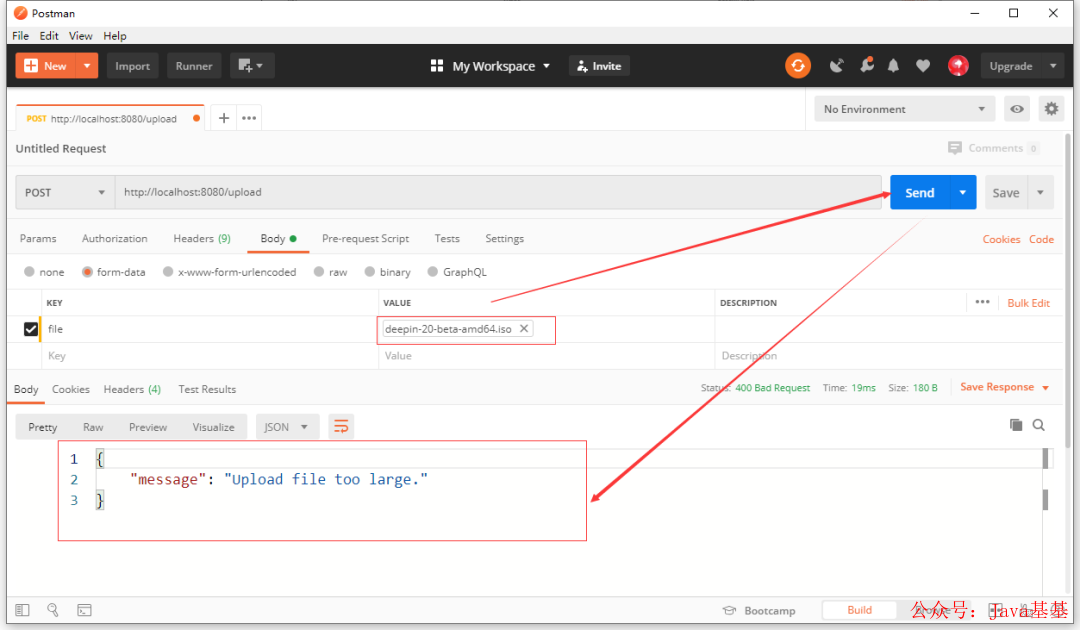
在控制器中,文件上傳過程中可能產(chǎn)生的異常我們使用try-catch語句進行了用戶友好處理,但當客戶端上傳文件大小超過50MB時,應用會拋出MaxUploadSizeExceededException 異常信息,我們需要對此異常信息做處理。最簡單的方式是使用@ControllerAdvice+@ExceptionHandler組合方式處理異常。在exception包下創(chuàng)建異常處理類,代碼如下:
exception/FileUploadExceptionAdvice.java
/**
 * @ClassName FileUploadExceptionAdvice
 * @Description TODO
 * @Author 樹下魅狐
 * @Date 2020/4/28 0028 19:10
 * @Version since 1.0
 **/
@ControllerAdvice
public class FileUploadExceptionAdvice extends ResponseEntityExceptionHandler {

    @ExceptionHandler(MaxUploadSizeExceededException.class)
    public ResponseEntity<Message> handleMaxUploadSizeExceededException(MaxUploadSizeExceededException e){
       return ResponseEntity.badRequest().body(new Message("Upload file too large."));
    }
}
4.7 初始化文件存儲空間
為了在測試時獲得干凈的測試數(shù)據(jù),同時也為了在應用啟動后分配好上傳文件存儲地址,我們需要在config包下創(chuàng)建一個配置類,在應用啟動時調(diào)用FileStorageService中的clear()方法和init()方法。實現(xiàn)該功能,最快的方式是配置類實現(xiàn)CommandLineRunner接口類的run()方法,代碼如下:
config/FileUploadConfiguration.java
@Service
public class FileUploadConfiguration implements CommandLineRunner {

    @Autowired
    FileStorageService fileStorageService;

    @Override
    public void run(String... args) throws Exception {
        fileStorageService.clear();
        fileStorageService.init();
    }
}
使用
@Autowired注解將FileStorageService注入到FileUploadConfiguration.java中。
Part5運行程序并測試
運行Spring Boot應用程序的方式有很多,例如:
命令方式:mvn spring-boot:run IntelliJ IDEA:點擊IntelliJ IDEA的“Run”按鈕 main()方法:直接運行主類中的main()方法 運行jar包:java -jar springboot-fileupload.jar
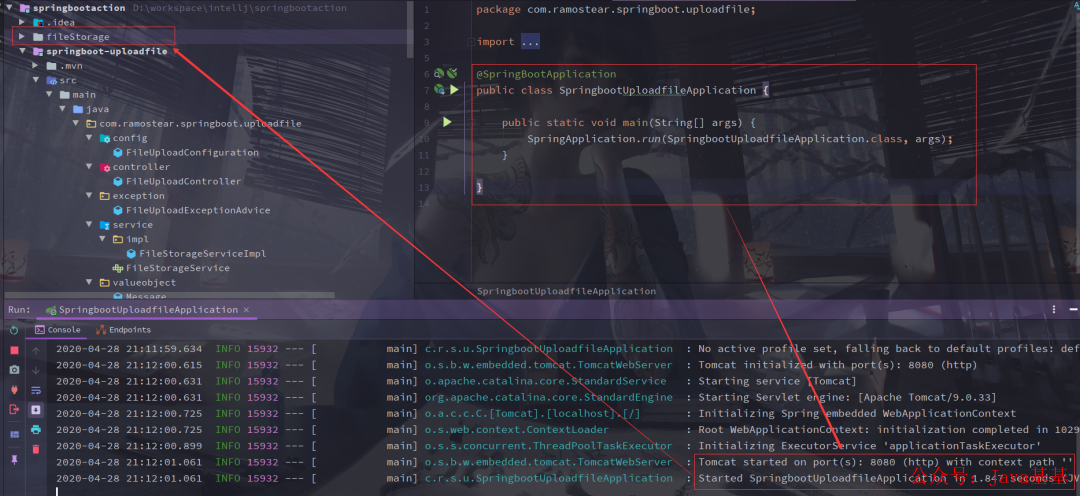
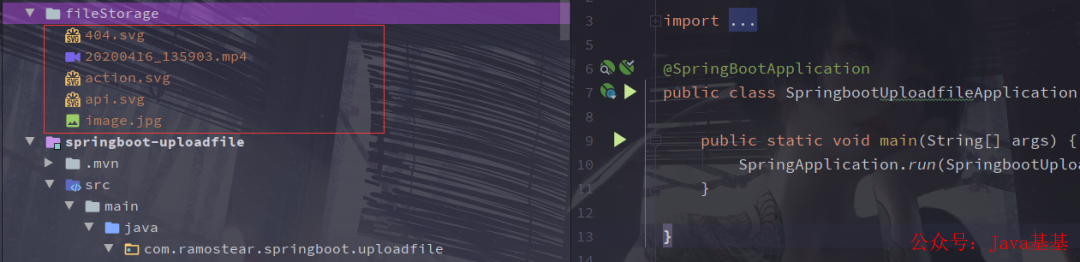
選擇一種你比較熟悉的方式運行Spring Boot應用程序。當應用程序啟動成功后,在項目的根目錄會創(chuàng)建一個名為fileStorage 的文件夾,該文件夾將用于存放客戶端上傳的文件。
 圖片
圖片
5.1 使用Postman對APIs進行測試
應用程序啟動成功后,我們使用Postman對應用程序中的APIs進行測試。
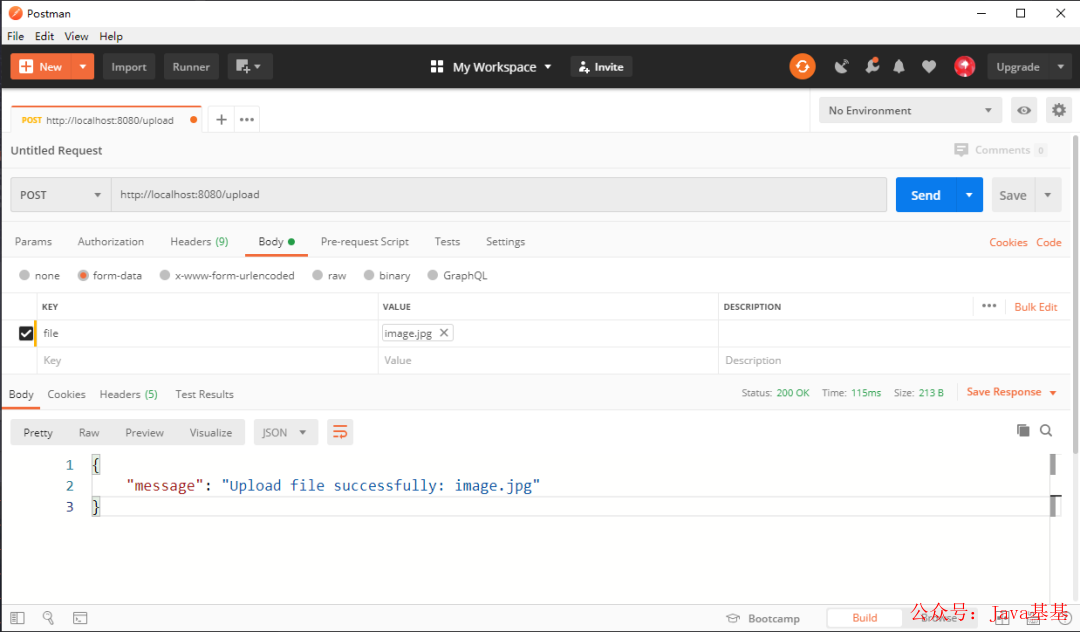
調(diào)用/upload接口上傳文件:
 圖片
圖片
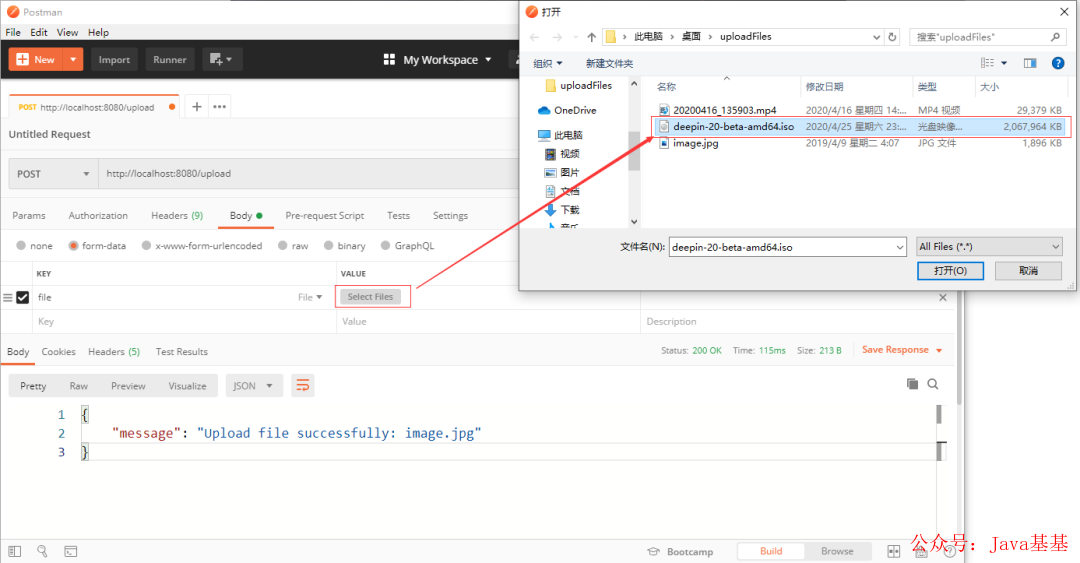
上傳一個大小超過50MB的文件
 圖片
圖片
執(zhí)行結(jié)果:
 圖片
圖片
檢查文件存儲文件夾
文件上傳成功后,我們可以查看項目根目錄下的fileStorage文件夾,檢查是否有文件被存儲到當中:
 圖片
圖片
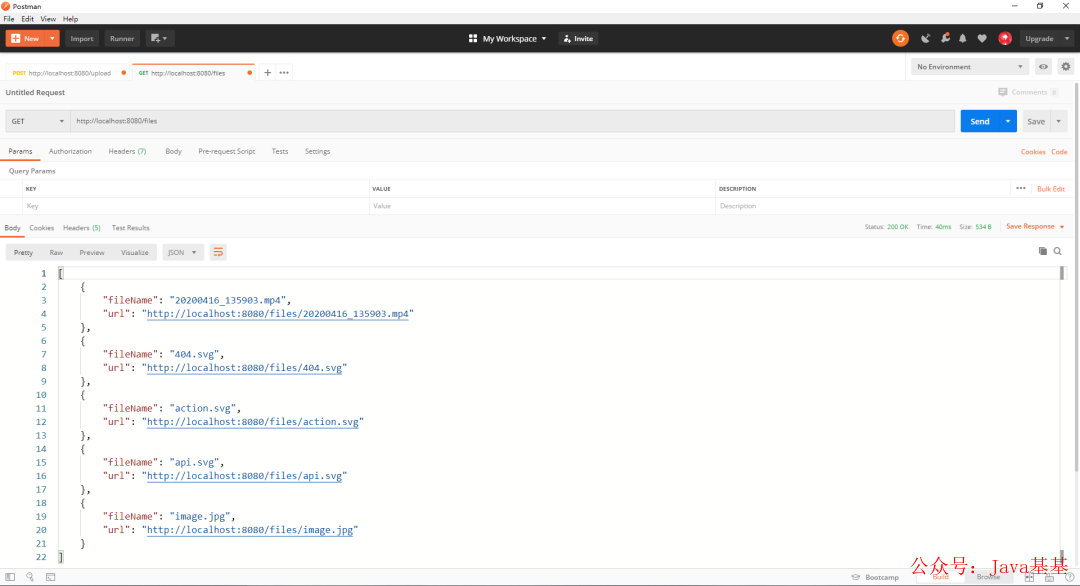
調(diào)用/files接口,獲取所有已上傳文件列表
 圖片
圖片
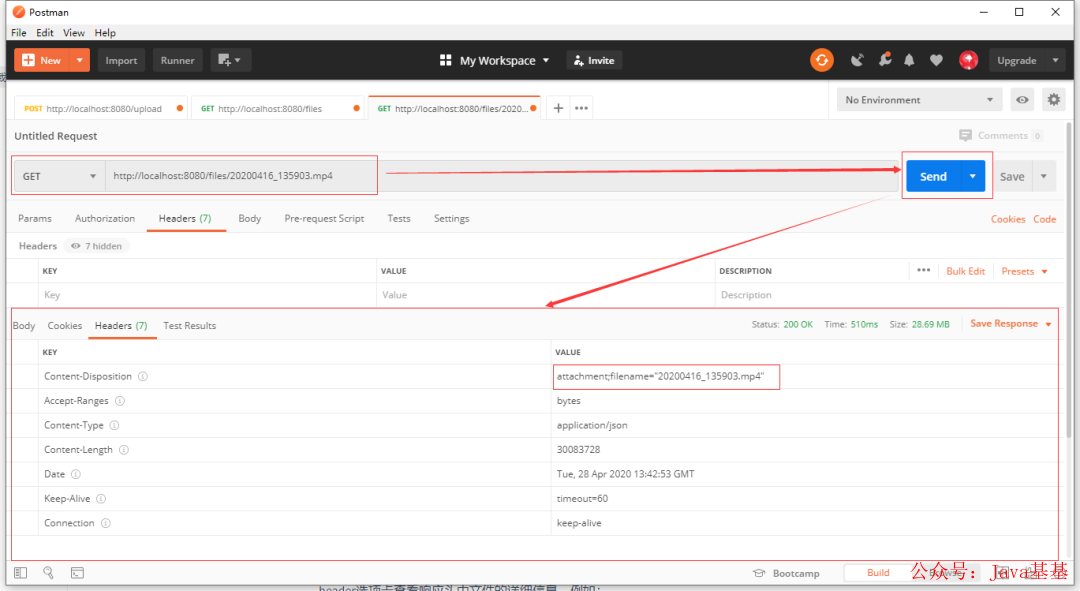
/files接口將返回所有已上傳的文件信息,我們可以點擊其中任意一個鏈接地址下載文件。在Postman中,可以通過header選項卡查看響應頭中文件的詳細信息,例如:
 圖片
圖片
你也可以復制列表中的鏈接地址,并在瀏覽器中訪問該地址,瀏覽器會彈出一個下載詢問對話框,點擊確定按鈕進行下載。
Part6 總結(jié)
本章節(jié)介紹了Spring Boot 2.0實現(xiàn)基于Restful風格的文件上傳和下載APIs,并使用Postman工具對APIs進行測試,達到了設計的預期結(jié)果。你可以通過下面的鏈接地址獲取本次教程的相關源代碼。
https://github.com/ramostear/springboot2.0-action
-- end --
喜歡就三連呀
關注 Stephen,一起學習,一起成長。