
JetBrains 又出了一款新神器,一套代碼適應(yīng)多端!
相關(guān)閱讀:2T架構(gòu)師學(xué)習(xí)資料干貨分享
看到一款基于多端的 UI 調(diào)試工具,一套代碼適應(yīng)多端,真的是太棒了,下面分享給大家。
前言
該工具是大名鼎鼎的 JetBrains 公司新推出的,名曰:“Jetpack Compose for Web”,官方介紹稱此項(xiàng)目基于 Google 現(xiàn)代 UI 工具包 Jetpack Compose,支持使用 Kotlin 編寫響應(yīng)式 Web UI。
Jetpack Compose 是用于構(gòu)建原生界面的新款 Android 工具包。它可簡(jiǎn)化并加快 Android 上的界面開發(fā)。使用更少的代碼、強(qiáng)大的工具和直觀的 Kotlin API,快速讓應(yīng)用生動(dòng)而精彩。
UI 代碼和預(yù)覽如下圖所示:
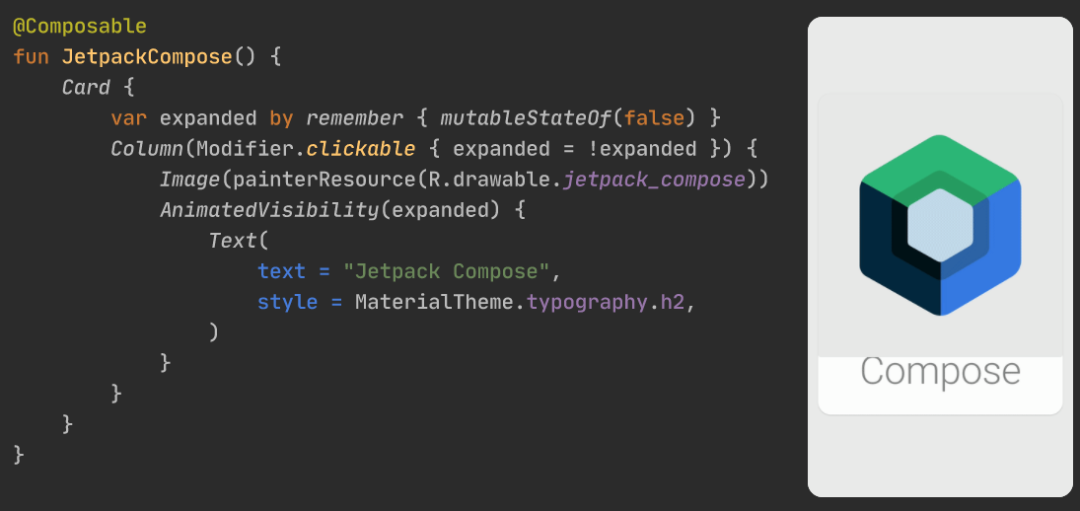
據(jù)介紹,Jetpack Compose for Web 可簡(jiǎn)化并加速 Web 應(yīng)用的 UI 開發(fā),目標(biāo)是在 Web、桌面和 Android APP 之間實(shí)現(xiàn) UI 代碼共享,一套代碼適應(yīng)多端。目前處于技術(shù)預(yù)覽階段。
fun greet() = listOf("Hello", "Hallo", "Hola", "Servus").random()

renderComposable("greetingContainer") {
    var greeting by remember { mutableStateOf(greet()) }
    Button(attrs = { onClick { greeting = greet() } }) {
        Text(greeting)
    }
}
Result: Servus

使用 Compose for Web 構(gòu)建用戶界面
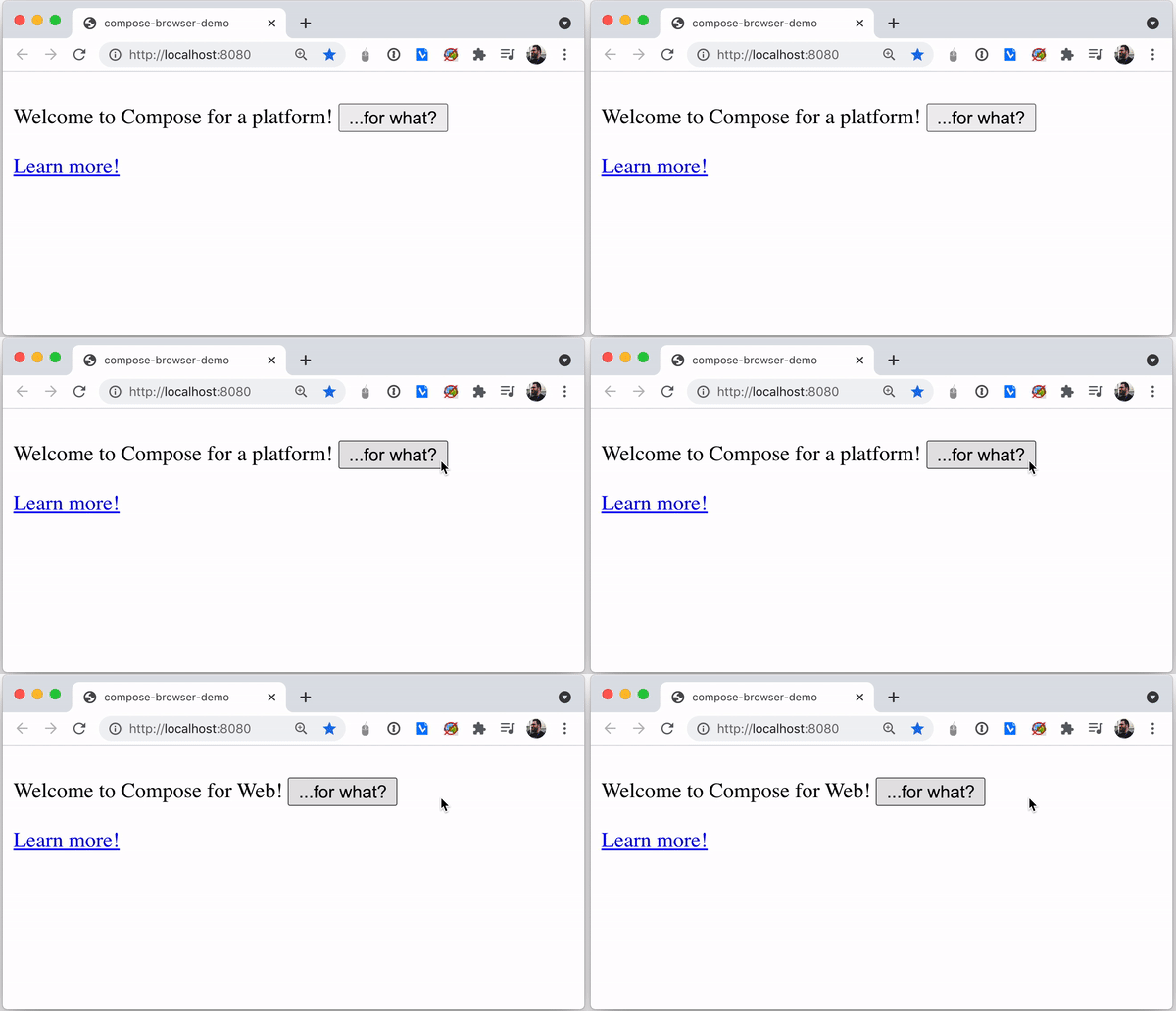
可組合的 DOM API
通過(guò) DOM 元素和 HTML 標(biāo)簽表達(dá)設(shè)計(jì)和布局 使用類型安全的 HTML DSL 構(gòu)建 UI 表示形式 通過(guò)使用類型安全的 CSS DSL 創(chuàng)建樣式表來(lái)完全控制應(yīng)用程序的外觀 通過(guò) DOM 子樹與其他 JavaScript 庫(kù)集成 關(guān)注公眾號(hào)互聯(lián)網(wǎng)架構(gòu)師,在后臺(tái)回復(fù):2T,獲取全套架構(gòu)資料,非常齊全。
fun main() {
    renderComposable("root") {
        var platform by remember { mutableStateOf("a platform") }
        P {
            Text("Welcome to Compose for $platform! ")
            Button(attrs = { onClick { platform = "Web" } }) {
                Text("...for what?")
            }
        }
        A("https://www.jetbrains.com/lp/compose-web") {
            Text("Learn more!")
        }
    }
}
具有 Web 支持的多平臺(tái)小部件
通過(guò)利用 Kotlin 的 Expect-actual 機(jī)制來(lái)提供特定于平臺(tái)的實(shí)現(xiàn),從而使用和構(gòu)建可在 Android、桌面和 Web 上運(yùn)行的 Compose 小部件 處于實(shí)驗(yàn)性階段的一組布局原語(yǔ) (layout primitives) 和API,這些原語(yǔ)和 API 與 Compose for Desktop/Android 的功能相似
示例代碼
使用 Composable DOM 編寫簡(jiǎn)單的計(jì)數(shù)器
fun main() {
    val count = mutableStateOf(0)
    renderComposable(rootElementId = "root") {
        Button(attrs = {
            onClick { count.value = count.value - 1 }
        }) {
            Text("-")
        }
        Span(style = { padding(15.px) }) { /* we use inline style here */
            Text("${count.value}")
        }
        Button(attrs = {
            onClick { count.value = count.value + 1 }
        }) {
            Text("+")
        }
    }
}
聲明和使用樣式表
object MyStyleSheet : StyleSheet() {
    val container by style { /* define a class `container` */
        border(1.px, LineStyle.Solid, Color.RGB(255, 0, 0))
    }
}

@Composable
fun MyComponent() {
    Div(attrs = {
        classes(MyStyleSheet.container) /* use `container` class */
    }) {
        Text("Hello world!")
    }
}

fun main() {
    renderComposable(rootElementId = "root") {
        Style(MyStyleSheet) /* mount the stylesheet */
        MyComponent()
    }
}
聲明和使用 CSS 變量
object MyVariables : CSSVariables {
    val contentBackgroundColor by variable<Color>() /* declare a variable */
}

object MyStyleSheet: StyleSheet() {
    val container by style {
        MyVariables.contentBackgroundColor(Color("blue")) /* set its value */
    }

    val content by style {
        backgroundColor(MyVariables.contentBackgroundColor.value()) /* use it */
    }
}

@Composable
fun MyComponent() {
    Div(attrs = {
        classes(MyStyleSheet.container)
    }) {
        Span(attrs = {
            classes(MyStyleSheet.content)
        }) {
            Text("Hello world!")
        }
    }
}來(lái)源:https://mp.weixin.qq.com/s/8iabDTcw99kEa4i52w-XCQ
-End-
2、心態(tài)崩了!稅前2萬(wàn)4,到手1萬(wàn)4,年終獎(jiǎng)扣稅方式1月1日起施行~
3、雷軍做程序員時(shí)寫的博客,很強(qiáng)大!