
Android實(shí)現(xiàn)彈出菜單背景模糊效果
效果圖:
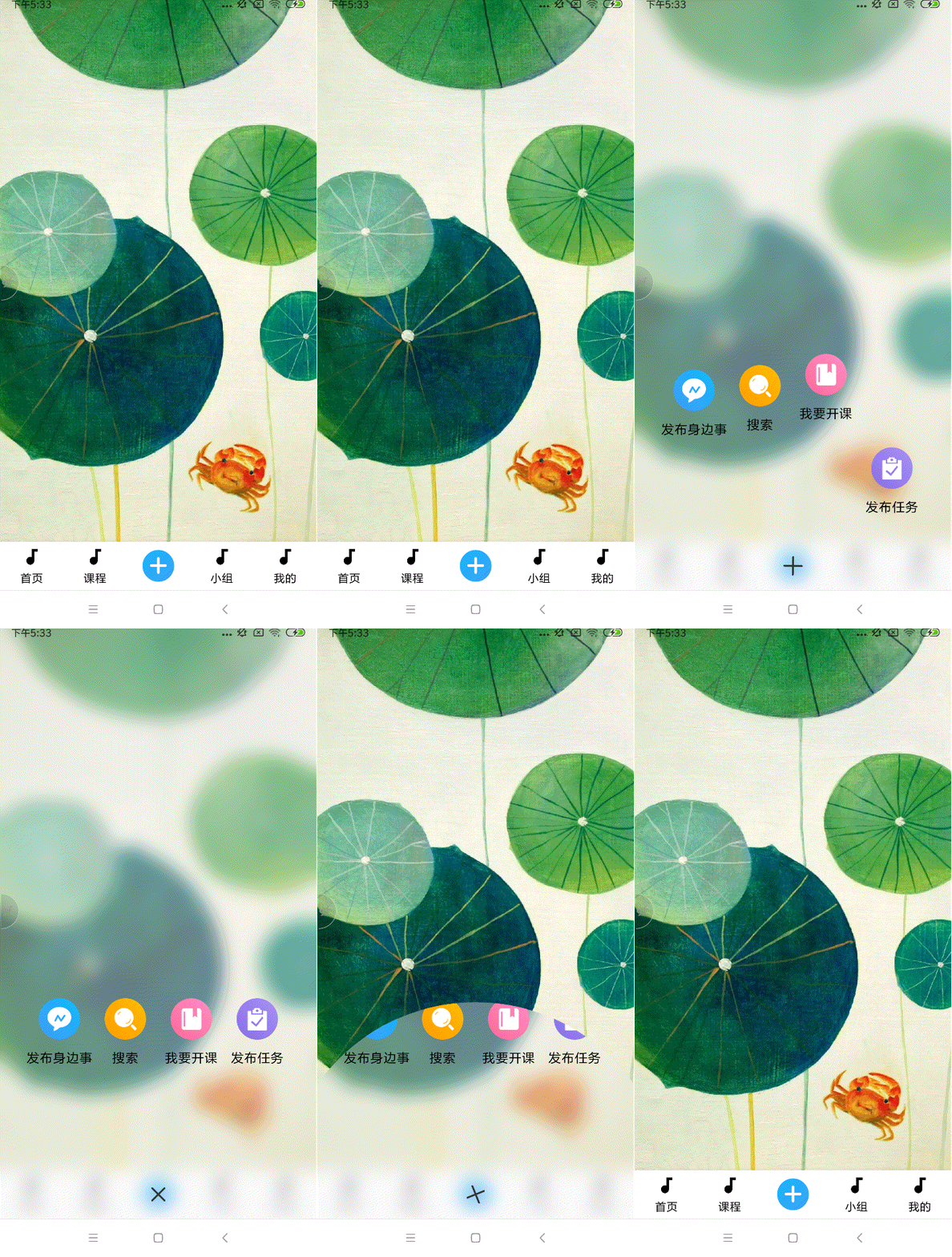
使用的PopupWindow實(shí)現(xiàn)的,主要部分有:
背景揭露動(dòng)畫+ 旋轉(zhuǎn)動(dòng)畫,菜單項(xiàng)彈出動(dòng)畫。
先看pop的布局文件:
xmlns:app="http://schemas.android.com/apk/res-auto"android:id="@+id/rel"android:layout_width="match_parent"android:layout_height="match_parent">android:id="@id/blurring_view"android:layout_width="match_parent"app:radius="17"app:overlayColor="#66eeeeee"android:layout_height="match_parent"/>android:id="@+id/lin"android:layout_width="match_parent"android:layout_height="300dp"android:layout_alignParentBottom="true"android:paddingLeft="30dp"android:paddingRight="30dp"android:orientation="horizontal">android:id="@+id/tv_sbs"android:layout_width="0dp"android:layout_height="wrap_content"android:layout_weight="1"android:clickable="true"android:gravity="center_horizontal"android:layout_marginTop="50dp"android:drawablePadding="10dp"android:drawableTop="@mipmap/ic_more_sbs"android:text="發(fā)布身邊事"android:textColor="@color/col_text2"android:textSize="15sp" />android:id="@+id/tv_search"android:layout_width="0dp"android:layout_weight="1"android:layout_height="wrap_content"android:layout_marginTop="50dp"android:clickable="true"android:drawablePadding="10dp"android:drawableTop="@mipmap/ic_more_search"android:gravity="center_horizontal"android:text="搜索"android:textColor="@color/col_text2"android:textSize="15sp" />android:id="@+id/tv_course"android:layout_width="0dp"android:layout_weight="1"android:layout_marginTop="50dp"android:layout_height="wrap_content"android:clickable="true"android:drawablePadding="10dp"android:drawableTop="@mipmap/ic_more_open_course"android:gravity="center_horizontal"android:text="我要開課"android:textColor="@color/col_text2"android:textSize="15sp" />android:id="@+id/tv_task"android:layout_width="0dp"android:layout_height="wrap_content"android:layout_marginTop="50dp"android:layout_weight="1"android:clickable="true"android:drawablePadding="10dp"android:drawableTop="@mipmap/ic_more_task"android:gravity="center_horizontal"android:text="發(fā)布任務(wù)"android:textColor="@color/col_text2"android:textSize="15sp" />android:id="@+id/rel_close"android:layout_width="wrap_content"android:layout_height="55dp"android:layout_alignParentBottom="true"android:layout_centerHorizontal="true">android:id="@+id/iv_close"android:layout_width="wrap_content"android:layout_height="wrap_content"android:layout_centerInParent="true"android:layout_marginLeft="10dp"android:layout_marginRight="10dp"android:background="?attr/selectableItemBackgroundBorderless"android:padding="15dp"android:src="@mipmap/ic_more_close" />?
java代碼實(shí)現(xiàn):
public class MoreWindow extends PopupWindow implements OnClickListener {private Activity mContext;private RelativeLayout layout;private ImageView close;private View bgView;private BlurringView blurringView;private int mWidth;private int mHeight;private int statusBarHeight;private Handler mHandler = new Handler();public MoreWindow(Activity context) {mContext = context;}/*** 初始化* @param view 要顯示的模糊背景View,一般選擇跟布局layout*/public void init(View view) {Rect frame = new Rect();mContext.getWindow().getDecorView().getWindowVisibleDisplayFrame(frame);statusBarHeight = frame.top;DisplayMetrics metrics = new DisplayMetrics();mContext.getWindowManager().getDefaultDisplay().getMetrics(metrics);mWidth = metrics.widthPixels;mHeight = metrics.heightPixels;setWidth(mWidth);setHeight(mHeight);layout = (RelativeLayout) LayoutInflater.from(mContext).inflate(R.layout.center_music_more_window, null);setContentView(layout);close = (ImageView) layout.findViewById(R.id.iv_close);close.setOnClickListener(new OnClickListener() {@Overridepublic void onClick(View v) {if (isShowing()) {closeAnimation();}}});blurringView = (BlurringView) layout.findViewById(R.id.blurring_view);blurringView.blurredView(view);//模糊背景bgView = layout.findViewById(R.id.rel);setOutsideTouchable(true);setFocusable(true);setClippingEnabled(false);//使popupwindow全屏顯示}public int getNavigationBarHeight(Activity activity) {Resources resources = activity.getResources();int resourceId = resources.getIdentifier("navigation_bar_height", "dimen", "android");//獲取NavigationBar的高度int height = resources.getDimensionPixelSize(resourceId);return height;}/*** 顯示window動(dòng)畫* @param anchor*/public void showMoreWindow(View anchor) {showAtLocation(anchor, Gravity.TOP | Gravity.START, 0, 0);mHandler.post(new Runnable() {@Overridepublic void run() {try {//圓形擴(kuò)展的動(dòng)畫if (android.os.Build.VERSION.SDK_INT >= android.os.Build.VERSION_CODES.LOLLIPOP) {int x = mWidth / 2;int y = (int) (mHeight - DensityUtils.fromDpToPx(25));Animator animator = ViewAnimationUtils.createCircularReveal(bgView, x,y, 0, bgView.getHeight());animator.addListener(new AnimatorListenerAdapter() {@Overridepublic void onAnimationStart(Animator animation) {// bgView.setVisibility(View.VISIBLE);}@Overridepublic void onAnimationEnd(Animator animation) {// layout.setVisibility(View.VISIBLE);}});animator.setDuration(300);animator.start();}} catch (Exception e) {e.printStackTrace();}}});showAnimation(layout);}private void showAnimation(ViewGroup layout) {try {LinearLayout linearLayout = layout.findViewById(R.id.lin);mHandler.post(new Runnable() {@Overridepublic void run() {//+ 旋轉(zhuǎn)動(dòng)畫close.animate().rotation(90).setDuration(400);}});//菜單項(xiàng)彈出動(dòng)畫for (int i = 0; i < linearLayout.getChildCount(); i++) {final View child = linearLayout.getChildAt(i);child.setOnClickListener(this);child.setVisibility(View.INVISIBLE);mHandler.postDelayed(new Runnable() {@Overridepublic void run() {child.setVisibility(View.VISIBLE);ValueAnimator fadeAnim = ObjectAnimator.ofFloat(child, "translationY", 600, 0);fadeAnim.setDuration(200);KickBackAnimator kickAnimator = new KickBackAnimator();kickAnimator.setDuration(150);fadeAnim.setEvaluator(kickAnimator);fadeAnim.start();}}, i * 50 + 100);}} catch (Exception e) {e.printStackTrace();}}/*** 關(guān)閉window動(dòng)畫*/private void closeAnimation() {mHandler.post(new Runnable() {@Overridepublic void run() {close.animate().rotation(-90).setDuration(400);}});try {if (android.os.Build.VERSION.SDK_INT >= android.os.Build.VERSION_CODES.LOLLIPOP) {int x = mWidth / 2;int y = (int) (mHeight - DensityUtils.fromDpToPx(25));Animator animator = ViewAnimationUtils.createCircularReveal(bgView, x,y, bgView.getHeight(), 0);animator.addListener(new AnimatorListenerAdapter() {@Overridepublic void onAnimationStart(Animator animation) {// layout.setVisibility(View.GONE);}@Overridepublic void onAnimationEnd(Animator animation) {// bgView.setVisibility(View.GONE);dismiss();}});animator.setDuration(300);animator.start();}} catch (Exception e) {}}/*** 點(diǎn)擊事件處理* @param v*/@Overridepublic void onClick(View v) {if (isShowing()) {closeAnimation();}switch (v.getId()) {case R.id.tv_sbs:break;case R.id.tv_search:break;case R.id.tv_course:break;case R.id.tv_task:break;????????}??????}}
還有一個(gè)菜單項(xiàng)回彈的插值器:
import android.animation.TypeEvaluator;public class KickBackAnimator implements TypeEvaluator{ private final float s = 1.70158f;float mDuration = 0f;public void setDuration(float duration) {mDuration = duration;}public Float evaluate(float fraction, Float startValue, Float endValue) {float t = mDuration * fraction;float b = startValue.floatValue();float c = endValue.floatValue() - startValue.floatValue();float d = mDuration;float result = calculate(t, b, c, d);return result;}public Float calculate(float t, float b, float c, float d) {return c * ((t = t / d - 1) * t * ((s + 1) * t + s) + 1) + b;}}
使用:
初始化
mMoreWindow = new MoreWindow(this);mMoreWindow.init(idContainer);
點(diǎn)擊+按鈕時(shí)彈出
private void showMoreWindow() {if (null == mMoreWindow) {mMoreWindow = new MoreWindow(this);mMoreWindow.init(idContainer);}mMoreWindow.showMoreWindow(idContainer );}
其中的idContainer為當(dāng)前Activity的跟布局layout。
源碼地址:
https://github.com/DuShuYuan/PlusMenu
到這里就結(jié)束啦。
評(píng)論
圖片
表情