
Cocos Creator 3D 搖桿控制器一種簡(jiǎn)單實(shí)現(xiàn)!
一個(gè)控制移動(dòng)和視角的遙感控制器3D示例項(xiàng)目。
效果
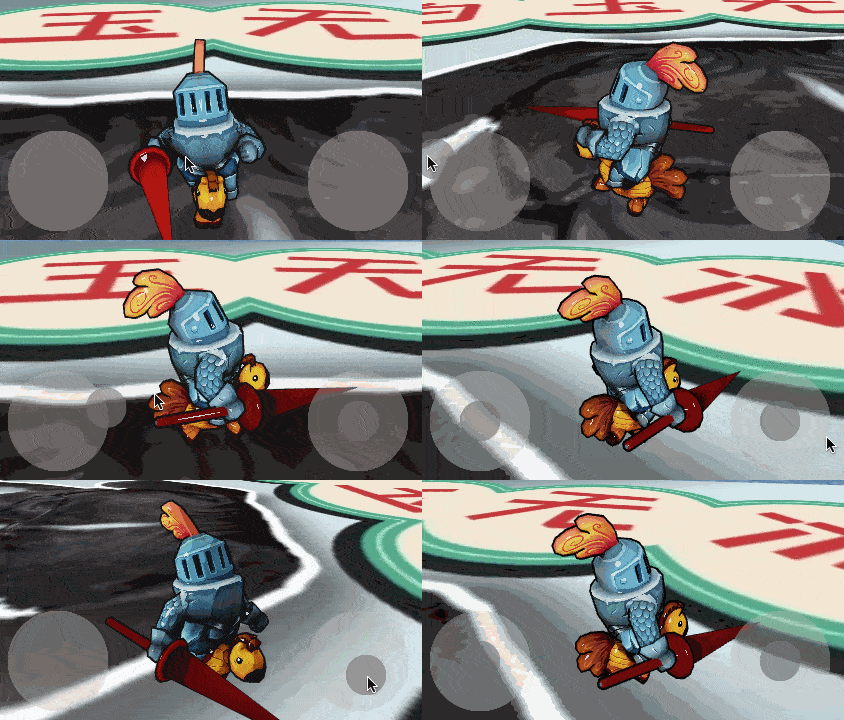
原理
在貪吃蛇大作戰(zhàn)!蛇移動(dòng)的思考與實(shí)現(xiàn)!中使用到一個(gè)搖桿控制器,不過(guò)這是在2D層面上,這次把它改到3D上。
搖桿
搖桿的原理大致是把觸摸點(diǎn)的位置傳給需要的組件。(參考KUOKUO的搖桿組件改的)
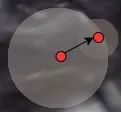
監(jiān)聽(tīng)觸摸事件后,需要做一次坐標(biāo)轉(zhuǎn)換。在Cocos 3D中 ,坐標(biāo)轉(zhuǎn)換要用UITransformComponent組件。
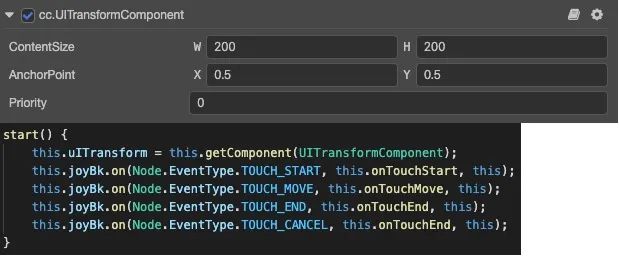
接著把坐標(biāo)和角度以事件的形式發(fā)送出去就可以了。
onTouchMove(e:?EventTouch)?{
????const?location?=?e.getUILocation();
????//?坐標(biāo)轉(zhuǎn)換
????let?pos?=?this.uITransform.convertToNodeSpaceAR(new?Vec3(location.x,?location.y));
????//?根據(jù)半徑限制位置
????this.clampPos(pos);
????//?設(shè)置中間點(diǎn)的位置
????this.midNode.setPosition(pos.x,?pos.y,?0);
????//?算出與(1,0)的夾角
????let?angle?=?this.covertToAngle(pos);
????//?觸發(fā)回調(diào)
????this.joyCallBack.forEach(c?=>?c.emit([pos,?angle]));
}
移動(dòng)與視角
這里分了三個(gè)節(jié)點(diǎn)去分別控制節(jié)點(diǎn)移動(dòng),角色旋轉(zhuǎn),視角旋轉(zhuǎn)。
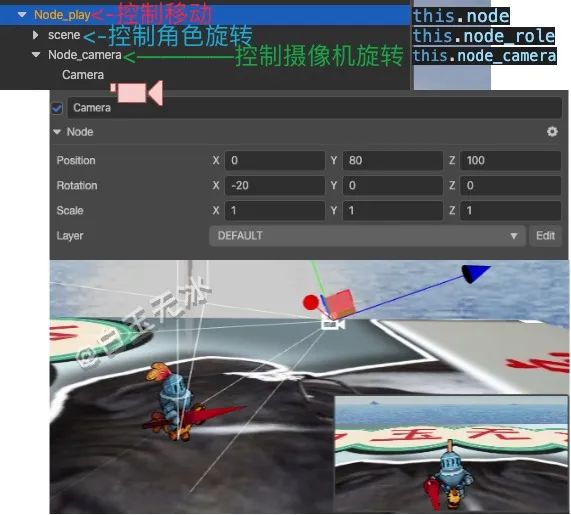
使用搖桿返回的結(jié)果,根據(jù)模型初始狀態(tài)和攝像機(jī)的角度,可以算出移動(dòng)的速度和旋轉(zhuǎn)的速度。
/**?移動(dòng)搖桿觸發(fā)回調(diào)?*/
joysitckCallback(vector:?Vec3,?angle:?number)?{
????//?根據(jù)攝像機(jī)的角度旋轉(zhuǎn)
????Vec3.rotateZ(vector,?vector,?Vec3.ZERO,?this.node_camera.eulerAngles.y?*?macro.RAD);
????this._vector?=?vector.normalize();
????if?(angle)?{
????????//?模型初始朝前,補(bǔ)個(gè)90度
????????this.node_role.eulerAngles?=?new?Vec3(0,?angle?+?90?+?this.node_camera.eulerAngles.y,?0);
????}
}

/**?旋轉(zhuǎn)搖桿觸發(fā)回調(diào)?*/
joysitckAngleCallback(vector:?Vec3,?angle:?number)?{
????this._vectorAngle?=?vector.normalize();
}
根據(jù)速度,每幀刷新位置和角度就可以了。
fix_update(dt:?number)?{
????if?(this._vector.lengthSqr()?>?0)?{
????????this.node.setPosition(this.node.position.add3f(this._vector.x?*?SPEED?*?dt,?0,?-this._vector.y?*?SPEED?*?dt));
????}??

????if?(this._vectorAngle.lengthSqr()?>?0)?{
????????this.node_camera.eulerAngles?=?this.node_camera.eulerAngles.add3f(0,?-this._vectorAngle.x,?0);
????}
}
小結(jié)
坐標(biāo)轉(zhuǎn)換!旋轉(zhuǎn)!跳躍!不停歇!
以上為白玉無(wú)冰使用Cocos Creator 3D v1.1.1實(shí)現(xiàn)"搖桿控制器!"的技術(shù)分享。歡迎分享給身邊的朋友!
那些不能激勵(lì)自己的人一定是甘于平庸的人,無(wú)論他們的其他才能有多么令人印象深刻。
"在看"鼓勵(lì)一下么~
評(píng)論
圖片
表情