
R-ggTimeSeries | ggplot2: 熱力日歷圖

我們平常的日歷也可以當(dāng)作可視化工具,適用于顯示不同時間段,以及活動事件的組織情況。時間段通常以不同單位顯示,例如日、周、月和年。今天我們最常用的日歷形式是公歷,每個月份的月歷由7個垂直列組成(代表每周7天),如圖所示。

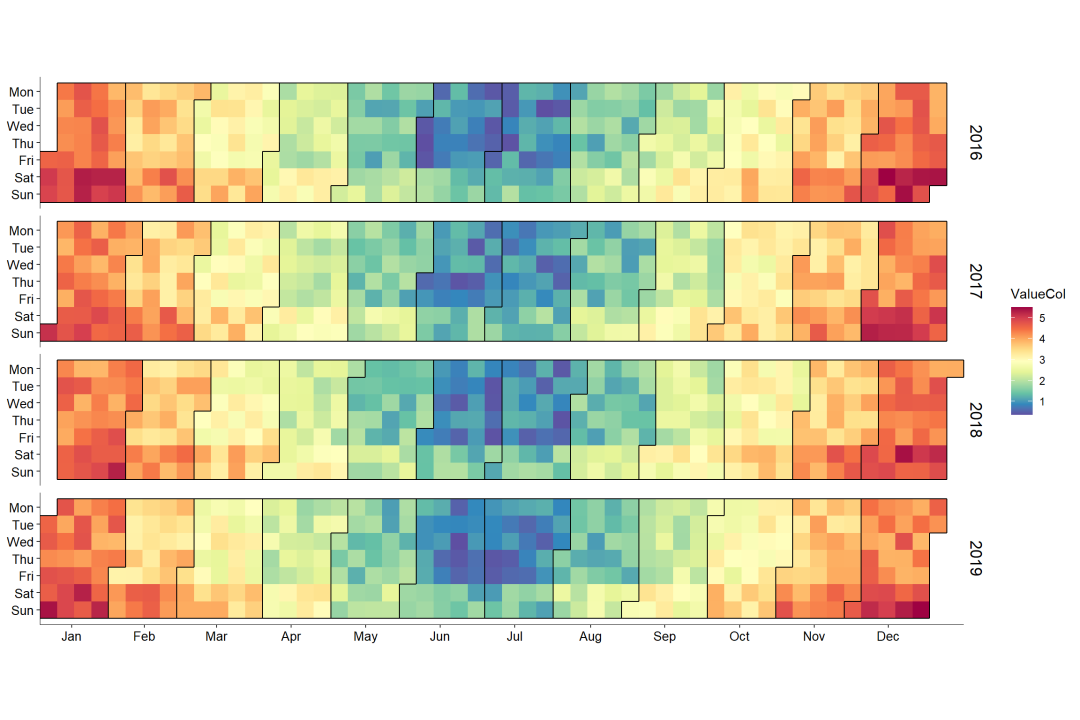
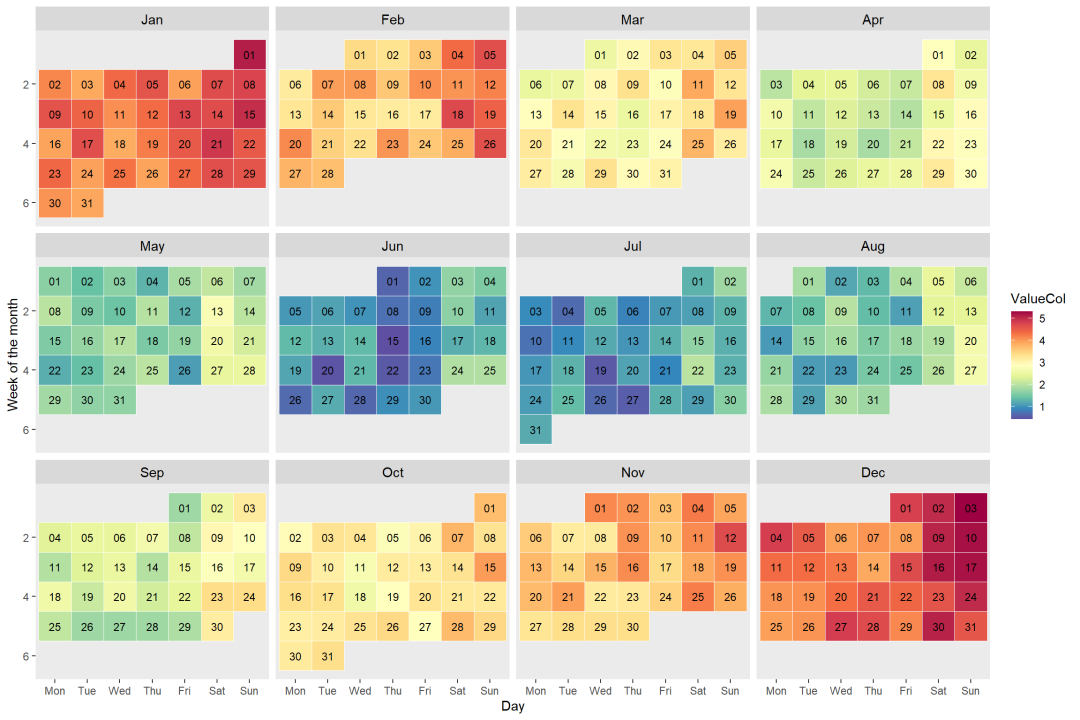
日歷圖的主要可視化形式有如圖6-2-2所示的兩種:以年為單位的日歷圖(見圖6-2-2 (a))和以月為單位的日歷圖(見圖6-2-2 (b))。日歷圖的數(shù)據(jù)結(jié)構(gòu)一般為(Date,Value),將Value按照Date(日期)在日歷上展示,其中Value映射到顏色。
1. ggTimeSeries繪圖
R中g(shù)gTimeSeries 包[1]的ggplot_calendar_heatmap()函數(shù)可以繪制如圖6-2-2(a)所示的日歷圖,但是不能設(shè)定日歷圖每個時間單元的邊框格式。
使用stat_calendar_heatmap()函數(shù)和ggplot2包的ggplot()函數(shù)可以調(diào)整日歷圖每個時間單元的邊框格式,具體代碼如下所示。其關(guān)鍵是使用as.integer(strftime())日期型處理組合函數(shù)獲取某天對應(yīng)所在的年份、月份、周數(shù)等數(shù)據(jù)信息。
#setwd("D:/R/working_documents1")library(ggplot2)library(data.table) # 數(shù)據(jù)格式依賴library(ggTimeSeries)library(RColorBrewer)
#?構(gòu)造隨機數(shù)據(jù)set.seed(2134)dat <- data.table(date = seq(as.Date("2016-01-01"), as.Date("2019-12-31"), "days"),ValueCol = runif(1461))dat[, ValueCol := ValueCol + (strftime(date, "%u") %in% c(6,7)*runif(1)*0.75)][, ValueCol := ValueCol + (abs(as.numeric(strftime(date, "%m")) - 6.5))*runif(1)*0.75][, ':='(Year = as.integer(strftime(date, "%Y")), # add new columnmonth = as.integer(strftime(date, "%m")),week = as.integer(strftime(date, "%W")))] # 添加列MonthLabels <- dat[, list(meanWkofYr = mean(week)), by = c("month")???????????????????][,?month?:=?month.abb[month]]
ggplot(data = dat, aes(date = date, fill = ValueCol)) +stat_calendar_heatmap() +scale_fill_gradientn(colours = rev(brewer.pal(11, "Spectral"))) +scale_y_continuous(name = NULL,breaks = seq(7, 1, -1),labels = c("Mon", "Tue", "Wed","Thu", "Fri", "Sat", "Sun")) +scale_x_continuous(name = NULL,breaks = MonthLabels$meanWkofYr,labels = MonthLabels$month,expand = c(0,0)) +facet_wrap(~Year, ncol = 1, strip.position = "right") +theme(panel.background = element_blank(),panel.border = element_blank(),strip.background = element_blank(),strip.text = element_text(size = 13, face = "plain", color = "black"),axis.line = element_line(colour = "black", size = 0.25),axis.title = element_text(size = 10, face = "plain", color = "black"),axis.text = element_text(size = 10, face = "plain", color = "black"))
2.geom_tile()
使用R中g(shù)gplot2包的geom_tile()函數(shù),借助facet_wrap()函數(shù)分面,就可以繪制如圖6-2-2(b)所示的以月為單位的日歷圖,具體代碼如下所示。
label_mons <- c("Jan", "Feb", "Mar", "Apr", "May", "Jun", "Jul","Aug", "Sep", "Oct", "Nov", "Dec")label_wik <- c("Mon", "Tue", "Wed", "Thu", "Fri", "Sat", "Sun")dat19 <- dat[Year == 2017, list(date, ValueCol, month, week)][, ':='(weekday = as.integer(strftime(date, "%u")), # 周數(shù)yearmonth = strftime(date, "%m%Y"), # 月數(shù)day = strftime(date, "%d")) # 天數(shù)][, ':='(monthf = factor(x = month, levels = as.character(1:12),labels = label_mons, ordered = TRUE),weekdayf = factor(x = weekday, levels = 1:7,labels = label_wik, ordered = TRUE),yearmonthf = factor(x = yearmonth))][, ':='(monthweek = 1 + week - min(week)), by = .(monthf)] # 分組聚合
label_mons <- c("Jan", "Feb", "Mar", "Apr", "May", "Jun", "Jul","Aug", "Sep", "Oct", "Nov", "Dec")label_wik <- c("Mon", "Tue", "Wed", "Thu", "Fri", "Sat", "Sun")dat19 <- dat[Year == 2017, list(date, ValueCol, month, week)][, ':='(weekday = as.integer(strftime(date, "%u")), # 周數(shù)day = strftime(date, "%d")) # 天數(shù)][, ':='(monthf = factor(x = month, levels = as.character(1:12),labels = label_mons, ordered = TRUE),weekdayf = factor(x = weekday, levels = 1:7,labels = label_wik, ordered = TRUE))][, ':='(monthweek = 1 + week - min(week)), by = .(monthf)] # 分組聚合
ggplot(dat19, aes(weekdayf, monthweek, fill = ValueCol)) +geom_tile(color = "white") +geom_text(aes(label = day), size = 3) +scale_fill_gradientn(colours = rev(brewer.pal(11, "Spectral"))) +facet_wrap(~monthf, nrow = 3) +scale_y_reverse(name = "Week of the month") +xlab("Day") +theme(strip.text = element_text(size = 11, face = "plain", color = "black"),panel.grid = element_blank())
感謝譽輝優(yōu)化《R語言數(shù)據(jù)可視化之美》關(guān)于熱力日歷圖的代碼
參考:
[1]?ggTimeSeries?包的參考網(wǎng)址:http://www.ggplot2-exts.org/ggTimeSeries.html

如需聯(lián)系EasyShu團隊
請加微信:EasyCharts
微信公眾號【EasyShu】博文代碼集合地址
https://github.com/Easy-Shu/EasyShu-WeChat
《R語言數(shù)據(jù)可視化之美》增強版

增強版配套源代碼下載地址
Github
https://github.com/Easy-Shu/Beautiful-Visualization-with-R
百度云下載
https://pan.baidu.com/s/1ZBKQCXW9TDnpM_GKRolZ0w?
提取碼:jpou