
Linux 下 CPU 監(jiān)控工具
01. top
1.1 /proc/loadavg
9.53 9.12 8.37 3/889 28165
1.2 top使用
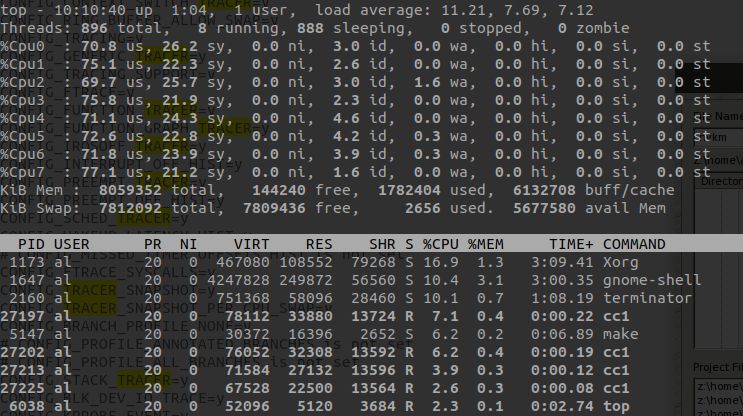
us:user,統(tǒng)計(jì)nice小于等于0的用戶空間進(jìn)程,也即優(yōu)先級為100~120。ni:nice,統(tǒng)計(jì)nice大于0的用戶空間進(jìn)程,也即優(yōu)先級為121~139。sys:system,統(tǒng)計(jì)內(nèi)核態(tài)運(yùn)行時間,不包括中斷。id:idle,幾系統(tǒng)處于空閑態(tài)。wa:iowait,統(tǒng)計(jì)io等待時間。hi:hardware interrupt,統(tǒng)計(jì)硬件中斷時間。si:software interrupt,統(tǒng)計(jì)軟中斷時間。st:steal
02. perf

03. sar和ksar
# 將 ENABLED=“false“ 改為ENABLED=“true“$ sudo gedit /etc/default/sysstat# 修改sar的周期等配置$ sudo gedit /etc/cron.d/sysstat# 重啟sar服務(wù)$ sudo /etc/init.d/sysstat restart# sar log存放目錄$ ls -l /var/log/sysstat/
LC_ALL=C sar -A > sar.txt
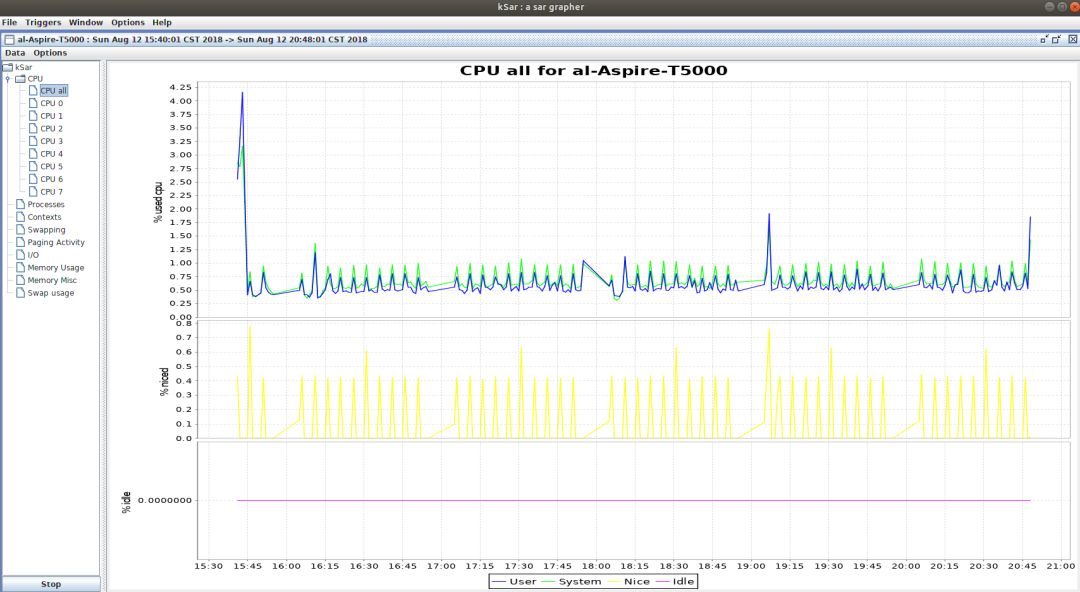
sar 1 100-----------------所有cpu合一的統(tǒng)計(jì)信息sar -P ALL 1 100--------包括cpu合一以及單個cpu的統(tǒng)計(jì)信息sar -B 1 100---------------paging統(tǒng)計(jì)信息sar -b 1 100---------------塊設(shè)備IO統(tǒng)計(jì)信息sar -d 1 100---------------塊設(shè)備活動統(tǒng)計(jì)信息sar -F 1 100----------------掛載的文件系統(tǒng)統(tǒng)計(jì)信息sar -r ALL------------------ 顯示詳細(xì)的內(nèi)存使用統(tǒng)計(jì)信息sar -S ------------------------顯示swap空間使用情況統(tǒng)計(jì)信息sar -w----------------------- 顯示進(jìn)程創(chuàng)建以及進(jìn)程切換統(tǒng)計(jì)信息sar -W-----------------------顯示swap換入換出統(tǒng)計(jì)信息。
04. mpstat
$ mpstat -P ALL 10 20

05. uptime
11:15:41 up 82 days, 20:34, 8 users, load average: 0.28, 0.40, 0.43
06. vmstat
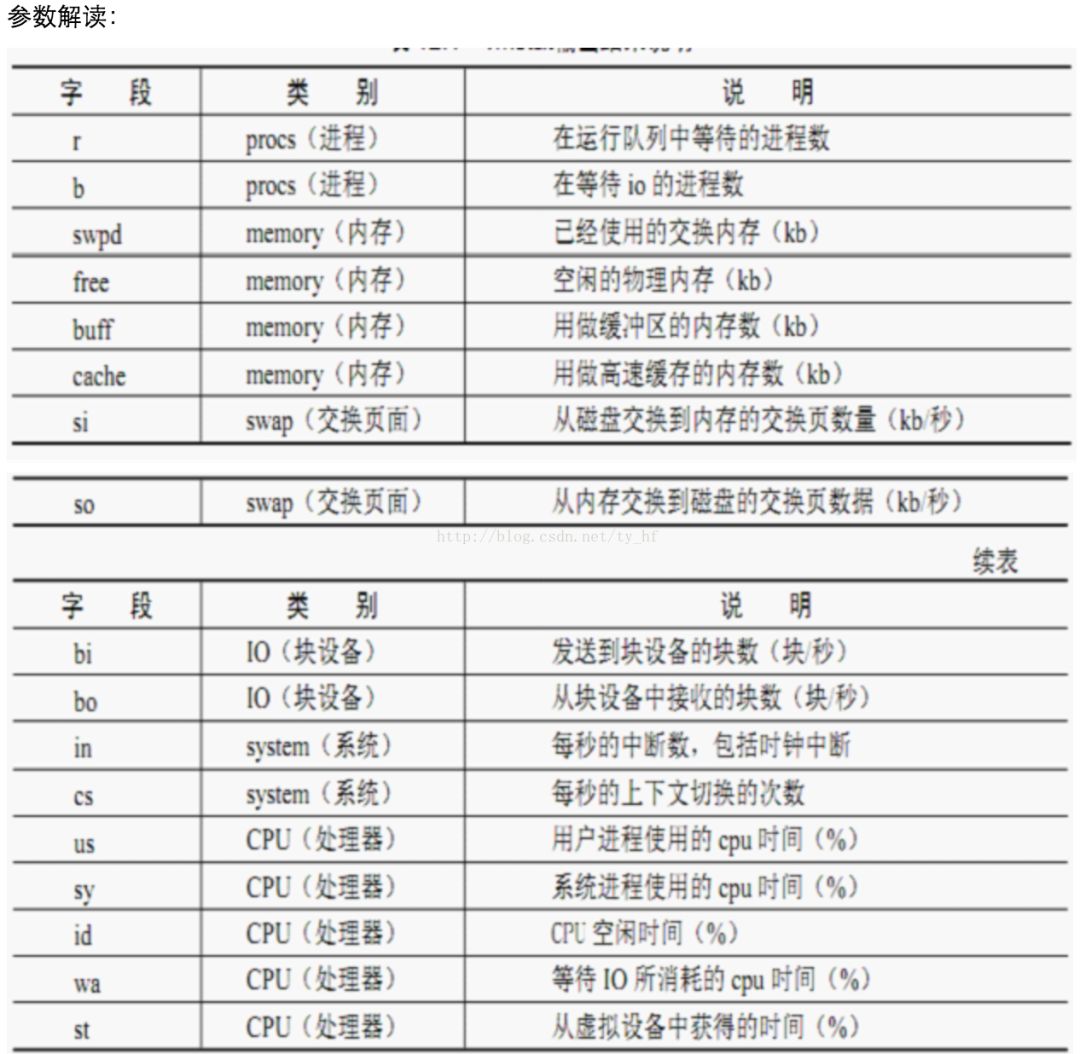
procs -----------memory---------- ---swap-- -----io---- -system-- ------cpu-----r b swpd free buff cache si so bi bo in cs us sy id wa st1 0 472576 228688 559092 1061756 0 0 9 39 1 0 8 4 87 0 01 0 472576 228184 559100 1061756 0 0 0 13 1532 3395 10 6 84 0 01 0 472576 229308 559100 1061616 0 0 0 0 1446 3449 10 5 85 0 00 0 472576 229592 559108 1061616 0 0 0 6 1419 3474 10 5 85 0 01 0 472576 229804 559108 1061616 0 0 0 0 1446 3439 10 5 85 0 0

07. pidstat
7.1 查看CPU使用情況
# 顯示所有的進(jìn)程統(tǒng)計(jì)信息,包括idle進(jìn)程。pidstat -p ALL# 更加詳細(xì)的顯示了線程統(tǒng)計(jì)信息。pidstat -p ALL -t# 周期采樣和采樣次數(shù)pidstat [option] interval [count]
7.2 查看內(nèi)存使用情況
15時18分21秒 UID PID minflt/s majflt/s VSZ RSS %MEM Command15時18分21秒 0 1 0.02 0.00 185316 3028 0.08 systemd15時18分21秒 0 2 0.00 0.00 0 0 0.00 kthreadd15時18分21秒 0 4 0.00 0.00 0 0 0.00 kworker/0:0H15時18分21秒 0 6 0.00 0.00 0 0 0.00 mm_percpu_wq15時18分21秒 0 7 0.00 0.00 0 0 0.00 ksoftirqd/015時18分21秒 0 8 0.00 0.00 0 0 0.00 rcu_sched
7.3 查看磁盤使用情況
15時20分40秒 UID PID kB_rd/s kB_wr/s kB_ccwr/s iodelay Command15時20分40秒 0 1 -1.00 -1.00 -1.00 243523129 systemd15時20分40秒 0 2 -1.00 -1.00 -1.00 0 kthreadd15時20分40秒 0 4 -1.00 -1.00 -1.00 0 kworker/0:0H15時20分40秒 0 6 -1.00 -1.00 -1.00 0 mm_percpu_wq15時20分40秒 0 7 -1.00 -1.00 -1.00 714512328679 ksoftirqd/015時20分40秒 0 8 -1.00 -1.00 -1.00 417757303594 rcu_sched
08. time
2401940638 32606752 nomachine_6.0.80_1.exe# 整個操作總耗時,0.263-0.094-0.011=0.158是IO等待耗時。real 0m0.263s# 用戶態(tài)耗時user 0m0.094s# 內(nèi)核態(tài)耗時sys 0m0.011s2401940638 32606752 nomachine_6.0.80_1.exe# 第二次執(zhí)行就可以看出等待IO操作的時間基本上沒有了。real 0m0.098suser 0m0.097ssys 0m0.000s
09. cpustat
# 顯示Load Avg信息和平均頻率等Load Avg 0.66 0.54 0.49, Freq Avg. 1.46 GHz, 4 CPUs online# 進(jìn)程切換次數(shù)、硬中斷、軟中斷等等統(tǒng)計(jì)信息。# CPU占用率、用戶空間和內(nèi)核空間占用率等。3791.1 Ctxt/s, 1709.9 IRQ/s, 1800.0 softIRQ/s, 0.0 new tasks/s, 1 running, 0 blocked%CPU %USR %SYS PID S CPU Time Task25.74 25.74 0.00 11435 R 3 2.29w /usr/bin/python315.84 15.84 0.00 9445 S 0 1.49w /usr/lib/xorg/Xorg10.89 9.90 0.99 2722 S 1 1.05w compiz7.92 0.00 7.92 32352 S 2 16.60s [kworker/2:1]0.99 0.00 0.99 32397 R 1 0.01s cpustat0.99 0.99 0.00 11046 S 2 16.20h compiz0.99 0.99 0.00 1317 S 0 8.76h /usr/NX/bin/nxnode.bin0.99 0.00 0.99 10293 S 1 1.24m [kworker/1:2]64.36 53.47 10.89 TotalLoad Avg 0.66 0.54 0.49, Freq Avg. 1.75 GHz, 4 CPUs online2834.8 Ctxt/s, 1190.9 IRQ/s, 1183.3 softIRQ/s, 0.0 new tasks/s, 4 running, 0 blocked%CPU %USR %SYS PID S CPU Time Task25.76 25.76 0.00 11435 R 3 2.29w /usr/bin/python318.18 18.18 0.00 9445 S 0 1.49w /usr/lib/xorg/Xorg7.58 7.58 0.00 2722 S 1 1.05w compiz6.06 0.00 6.06 32352 S 2 16.64s [kworker/2:1]1.52 0.00 1.52 32397 R 1 0.02s cpustat1.52 0.00 1.52 8 S 0 3.00h [rcu_sched]1.52 0.00 1.52 18409 S 0 1.16m update-notifier62.12 51.52 10.61 TotalDistribution of CPU utilisation (per Task):% CPU Utilisation Count (%)0.00 - 1.97 706 98.881.97 - 3.94 0 0.003.94 - 5.91 0 0.005.91 - 7.88 2 0.287.88 - 9.85 0 0.009.85 - 11.82 0 0.0011.82 - 13.79 1 0.1413.79 - 15.76 0 0.0015.76 - 17.73 1 0.1417.73 - 19.70 1 0.1419.70 - 21.67 0 0.0021.67 - 23.64 0 0.0023.64 - 25.61 2 0.2825.61 - 27.57 0 0.0027.58 - 29.54 0 0.0029.55 - 31.51 0 0.0031.52 - 33.48 0 0.0033.48 - 35.45 0 0.0035.45 - 37.42 0 0.0037.42 - 39.39 1 0.14Distribution of CPU utilisation (per CPU):----------------------------------------------各CPU占用率,分用戶空間和內(nèi)核空間。CPU# USR% SYS%0 17.37 1.201 8.98 2.402 0.60 7.193 25.75 0.00
10. htop
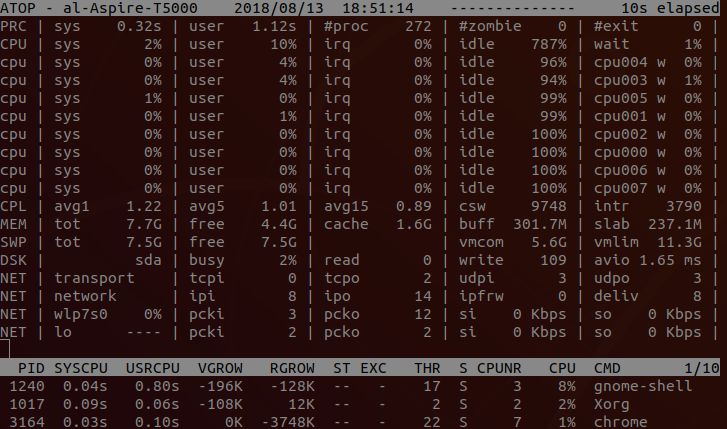
11. atop
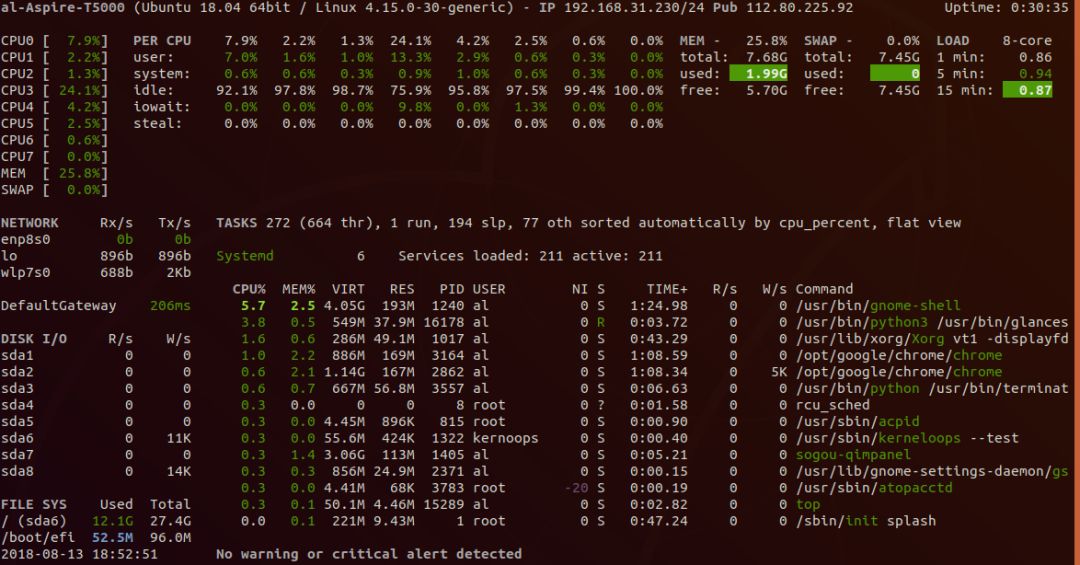
12. glances
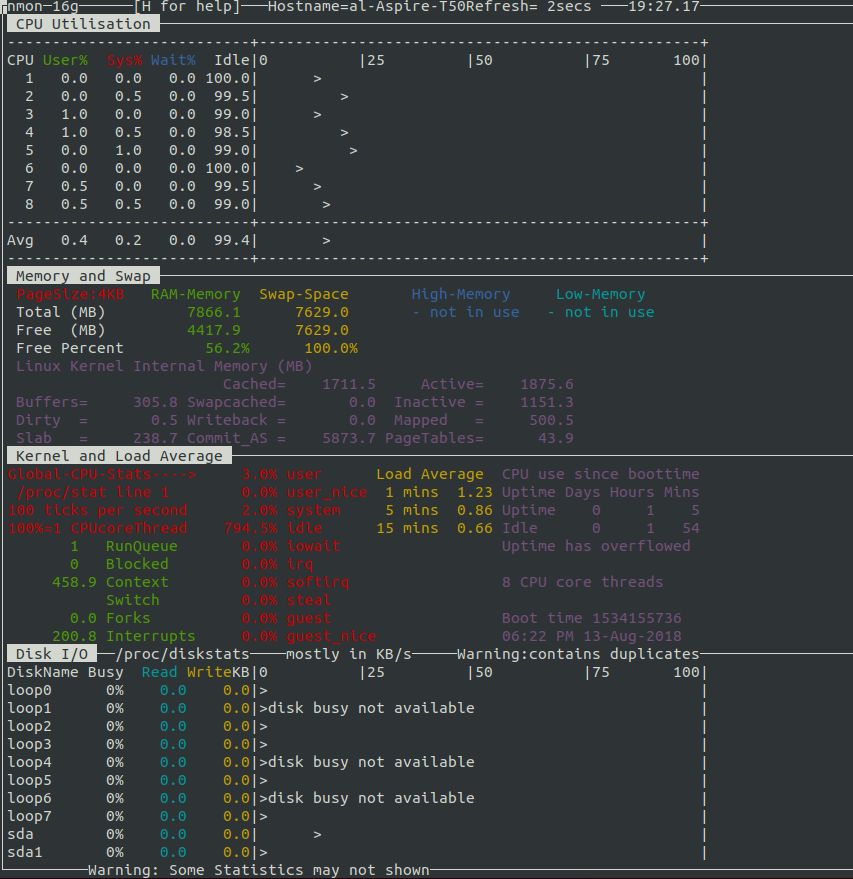
13. nmon
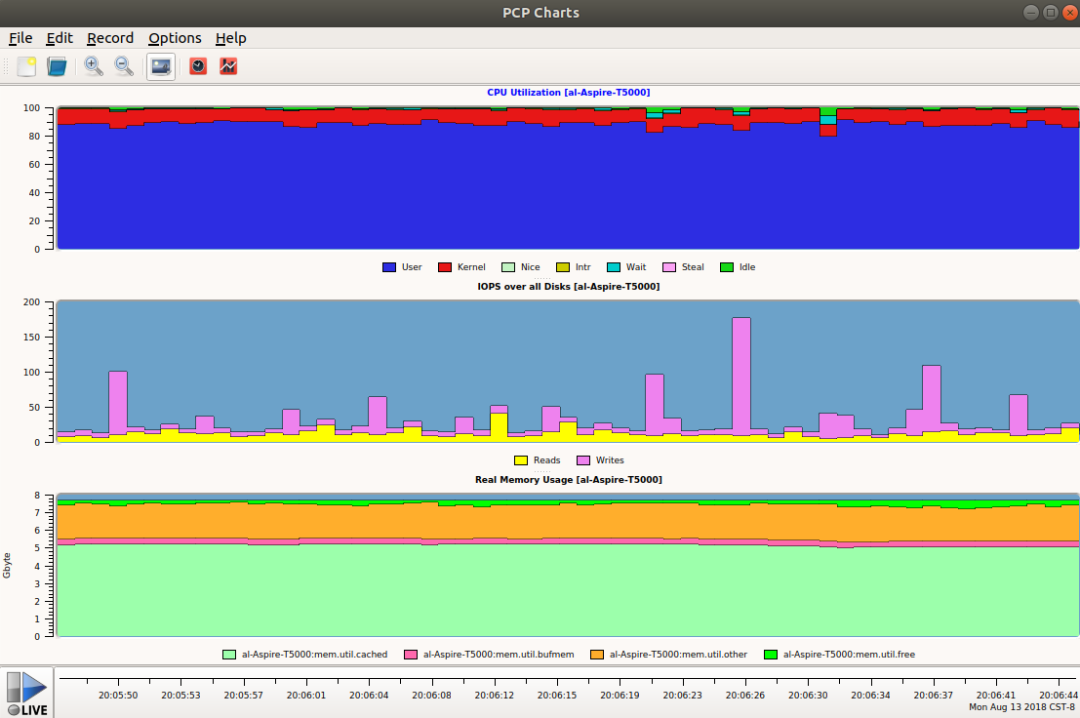
13. pcp-gui
$ sudo apt install pcp pcp-gui
14. collectl和colplot
14.1 collectl使用
sudo apt-get install collectl

b – buddy info (內(nèi)存碎片)c – 所有CPU的合一統(tǒng)計(jì)信息;C - 單個CPU的統(tǒng)計(jì)信息。d – 整個文件系統(tǒng)Disk合一統(tǒng)計(jì)信息;C - 單個磁盤的統(tǒng)計(jì)信息。f – NFS V3 Datai – Inode and File Systemj – 顯示每個CPU的Interrupts觸發(fā)情況;J - 顯示每個中斷詳細(xì)觸發(fā)情況。l – Lustrem – 顯示整個系統(tǒng)Memory使用情況;M - 按node顯示內(nèi)存使用情況。n – 顯示整個系統(tǒng)的Networks使用情況;N - 分網(wǎng)卡顯示網(wǎng)絡(luò)使用情況。s – Socketst – TCPx – Interconnecty – 對系統(tǒng)所有Slabs (系統(tǒng)對象緩存)使用統(tǒng)計(jì)信息;Y - 每個slab使用的詳細(xì)信息。



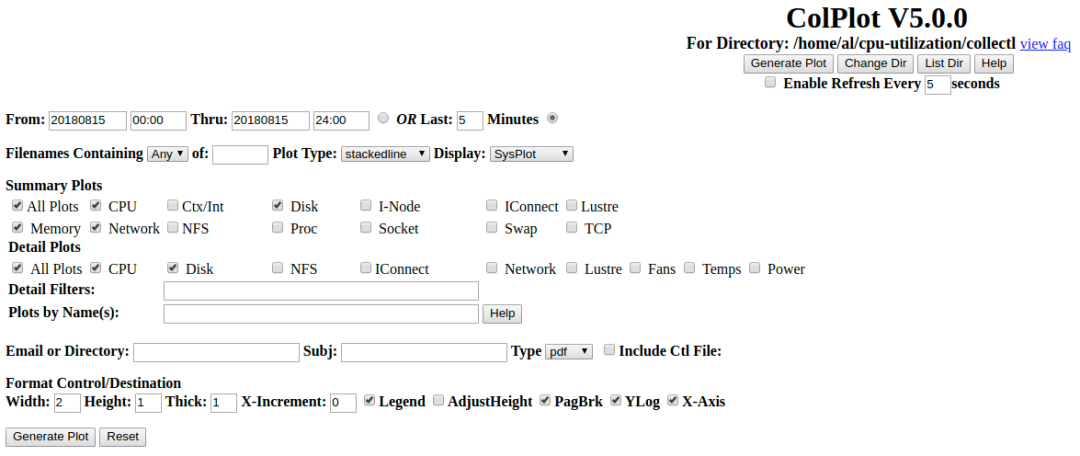
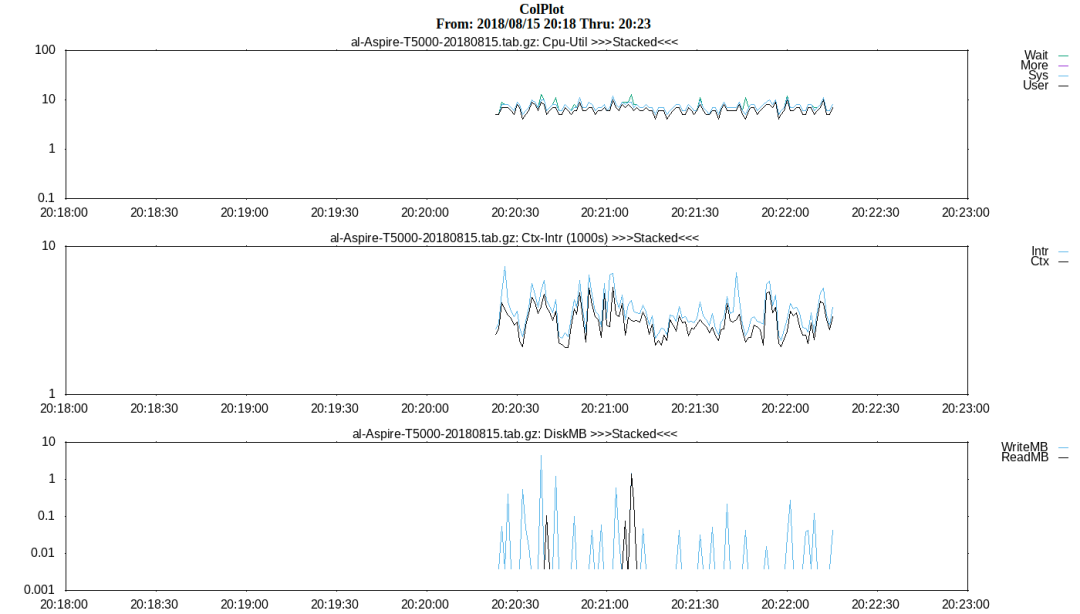
14.2 colplot使用
$suod systemctl reload apache2$ sudo systemctl restart apache2
References
[1]?/proc/stat:?https://www.cnblogs.com/arnoldlu/p/9187775.html#system_proc_stat[2]?/proc//stat:?https://www.cnblogs.com/arnoldlu/p/9187775.html#process_proc_stat[3]?系統(tǒng)級性能分析工具perf的介紹與使用:?https://www.cnblogs.com/arnoldlu/p/6241297.html[4]?ksar:?https://sourceforge.net/projects/ksar/[5]?How To Create sar Graphs With kSar To Identifying Linux Bottlenecks:?https://www.cyberciti.biz/tips/identifying-linux-bottlenecks-sar-graphs-with-ksar.html[6]?Collect and report Linux System Activity Information with sar:?https://www.thomas-krenn.com/en/wiki/Collect_and_report_Linux_System_Activity_Information_with_sar[7]?Linux Performance Measurements using vmstat:?https://www.thomas-krenn.com/en/wiki/Linux_Performance_Measurements_using_vmstat[8]?Collectl: Linux 性能監(jiān)控的全能冠軍:?https://linux.cn/article-3154-1.html[9]?Collectl Documentation:?http://collectl.sourceforge.net/Documentation.html[10]?Collectl Examples - An Awesome Performance Analysis Tool in Linux:?https://linoxide.com/monitoring-2/collectl-tool-install-examples/【墻裂推薦】
最近熱門內(nèi)容回顧? ?#技術(shù)人系列

往期推薦
下方二維碼關(guān)注我

互聯(lián)網(wǎng)草根,堅(jiān)持分享技術(shù)、創(chuàng)業(yè)、產(chǎn)品等心得和總結(jié)~
點(diǎn)擊“閱讀原文”,領(lǐng)取 2020 年最新免費(fèi)技術(shù)資料大全
評論
圖片
表情