
Thinkphp6的日志問題怎么解決

一、Thinkphp6的日志問題
1.日志級別 debug, info, notice, warning, error, critical, alert, emergency其中有一個特別的級別:sql,專門用來記錄sql語句的
2.設(shè)置日志記錄級別
對于程序比較重要的業(yè)務(wù)模塊可以進(jìn)行埋點(diǎn)(進(jìn)行日志記錄)
可以通過設(shè)置日志記錄級別來開啟和關(guān)閉記錄
有助于排除錯誤(比每次出現(xiàn)錯誤去代碼里增加記錄日志好多了
        #?修改?config/log.php
#?配置?'level'?=>?['notice','warning']
#?level?不為空時(shí),只記錄level中指定的錯誤級別
#?level?為空時(shí),記錄所有級別
$user?=?UserService::getInstance()->findByUsername('xieruixiang');
Log::warning("warning:{user}",?compact('user'));
#?info?不再?level?中?則不會記錄
Log::info("I'm?info");
3.單一日志
默認(rèn)的tp日志是寫在當(dāng)前日期(年月)目錄下的,如( runtime/admin/log/202304/30_info.log )
單一日志設(shè)置 修改config/log.php 中通道single屬性為true
設(shè)置單一日志后,將不再寫在時(shí)間目錄下(一直寫一個固定目錄),如( runtime/admin/log/single_info.log )
        #?開啟單一日志
#?channels.file.single
#?這里給file通道開啟單一日志
'single'?=>?true
4.獨(dú)立日志
每一種日志級別的日志都?xì)w類到一個文件之中(推薦開啟獨(dú)立日志)
設(shè)置 config/log.php 中通道apart_level屬性
        #??設(shè)置?file?通道?info,notice,warning?級別開啟獨(dú)立日志
#??channels.file.apart_level
#?'apart_level'?=>?['info',?'notice',?'warning']
#?在?apart_level中的級別會獨(dú)立寫到一個文件中去

#?write?to?runtime/admin/log/202204/30_info.log
?Log::info("I'm?info");

#?write?to?runtime/admin/log/202204/30_notice.log
Log::notice("I'm?notice");

#?write?to?runtime/admin/log/202204/30_warning.log
Log::warning("I'm?");
二、日志的寫入時(shí)機(jī)
日志寫入時(shí)機(jī)提供兩種(實(shí)時(shí)寫入,程序執(zhí)行完后寫入) 通過設(shè)置config/log.php中通道 realtime_write 屬性
        #?這里中斷程序的執(zhí)行
#?如果?realtime_write?=?false?則無法寫到日志中去
#?realtime_write?=?true?可以寫入日志中去
Log::warning("寫入日志:碼農(nóng)編程進(jìn)階筆記");

#?如果?realtime_write?=?false
#?又想實(shí)時(shí)寫入
#?可以通過?Log::write($msg,?$type)?實(shí)時(shí)寫入
#?$msg?信息
#?$type?日志級別
Log::write("不會寫入:碼農(nóng)編程進(jìn)階筆記",?'warning');
die("日志將不會寫入");
三、日志通道
1、可以自定義通道 以增加郵件通道為例 將config/log.php 中通道type 改成自定義驅(qū)動類即可
        #?config/log.php?channels?添加
'email'?=>?[
?????'type'?=>?appadmindriverEmailDriver::class,
??????#?調(diào)試發(fā)送郵件時(shí)將其設(shè)置成實(shí)時(shí)比較好調(diào)試
?????'realtime_write'?=>?true,
]

#?EmailDriver?需要實(shí)現(xiàn)?thinkcontractLogHandlerInterface
?class?EmailDriver?implements?LogHandlerInterface
?{
????public?function?save(array?$log):?bool
????{
??????#?這里進(jìn)行發(fā)送郵件邏輯
??????#?想知道郵件發(fā)送邏輯的可以參考?《php發(fā)送郵件》
???????#?不想知道的?可以調(diào)用第三方封裝好的php發(fā)送郵件組件
??????return?true;
????}
?}
2、使用郵件通道
        ?#?channel($channelName)?指定發(fā)送通道
?#?不指定則使用默認(rèn)發(fā)送通道
?#?config/log.php
?#?'default'?=>?env('log.channel',?'file'),
?Log::channel('email')->info("this?is?info");
?#?就能以郵件形式通知了
三、Thinkphp6異常處理與日志
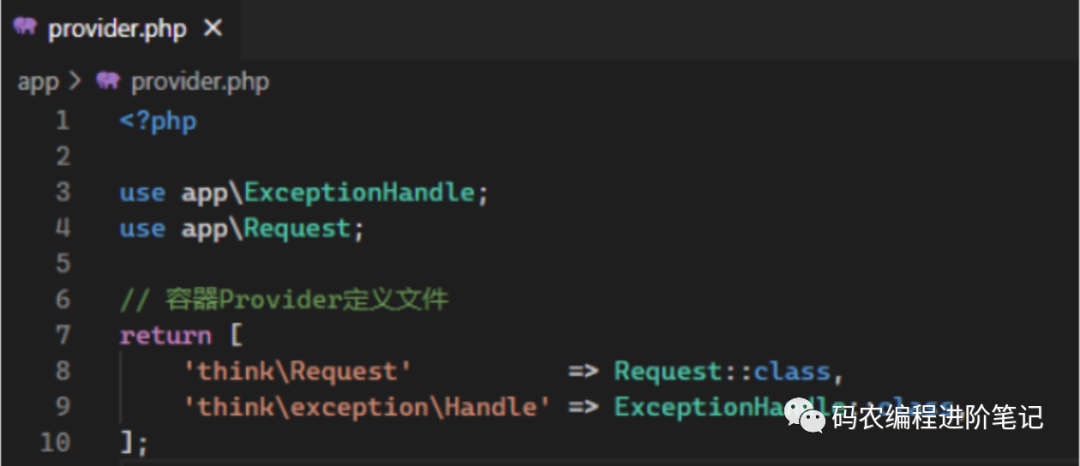
appExceptionHandle.php 異常處理類,重新定義render方法即可
        #appExceptionHandle.php?
public?function?render($request,?Throwable?$e):?Response
{
????????//?app_debug模式下按原thinkphp6異常模式處理異常
????????if?(env('app_debug'))?{
????????????return?parent::render($request,?$e);
????????}
????????//?自定義json返回錯誤
????????if?($e?instanceof?ValidateException)?{
????????????return?json($e->getError(),?422);
????????????return?json(['code'?=>?0,?'msg'?=>?$e->getError()],?422);
????????}

????????//?自定義json返回異常
????????if?($e?instanceof?HttpException?&&?$request->isAjax())?{
????????????return?json(['code'?=>?0,?'msg'?=>?$e->getMessage()],?$e->getStatusCode());
????????}
????????//?自定義json返回異常
????????if?($e?instanceof?HttpException)?{
????????????return?json(['code'?=>?0,?'msg'?=>?$e->getMessage()]);
????????}
????????//?自定義json返回異常
????????return?json(['code'?=>?0,?'msg'?=>?'Biny服務(wù)器錯誤']);
}
目標(biāo):訪問未定義的路由時(shí)返回json格式的信息 # url_route_must:false 非強(qiáng)制路由模式下
        ????public?function?index()
????{
????????return?json([
????????????'code'?=>?0,
????????????'data'?=>?'Route?is?Not?Found',
????????????'msg'?=>?'success'
????????]);
????}

????public?function?__call($name,?$arguments)
????{
????????return?json([
????????????'code'?=>?0,
????????????'data'?=>?'Route?is?Not?Found',
????????????'msg'?=>?'success'
????????]);
????}
2、日志
-
DEBUG模式下默認(rèn)記錄error級別和sql執(zhí)行語句日志
-
非DEBUG模式默認(rèn)僅記錄error級別日志
-
DEBUG模式在根目錄增加.env文件 設(shè)置APP_DEBUG = false/true

???Log::close();?//手動關(guān)閉本次請求的日志寫入