
SwaggerUI看煩了,這個工具幫你換個新皮膚
背景
好像是上周四,看到微信群有人說java有輪子swagger-bootstrap-ui,而c#,就是找不到。
于是我一看,就說大話:“這個只是一套UI,他這個有開源地址么”
被@at說:你試試...
當(dāng)天晚上就把swagger-ui, Knife4j,Swashbuckle.AspNetCore項目的源碼都下載下來研究下,看看能不能集成到AspNETCore下,這樣我們就能給Swagger UI換套新皮膚。
knife4j
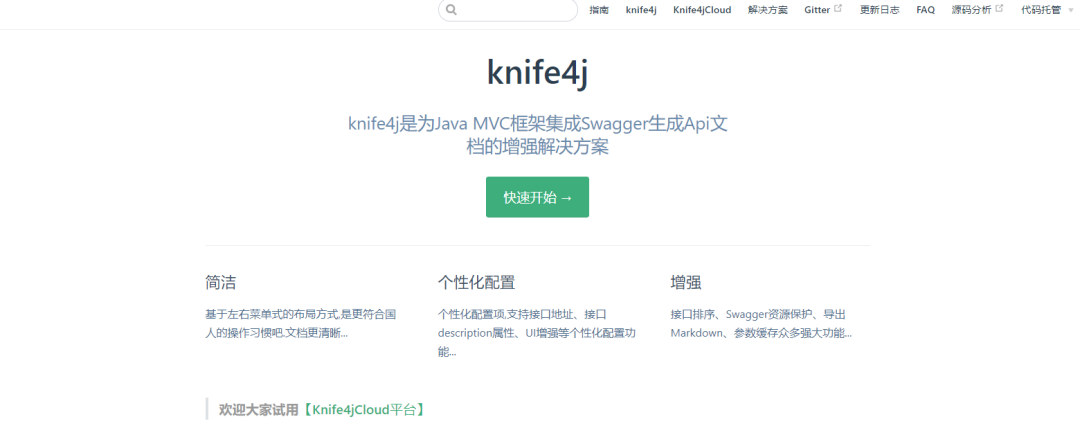
knife4j 是swagger-bootstrap-ui庫的升級版,作者已全面升級,全部以knife4j命名。
Gitee上也有2.8K
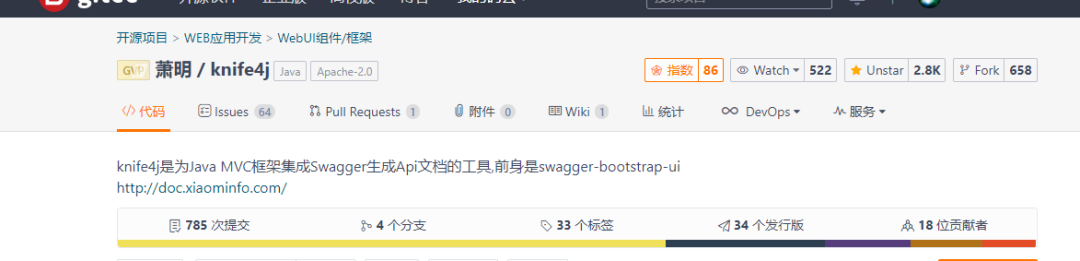
效果圖 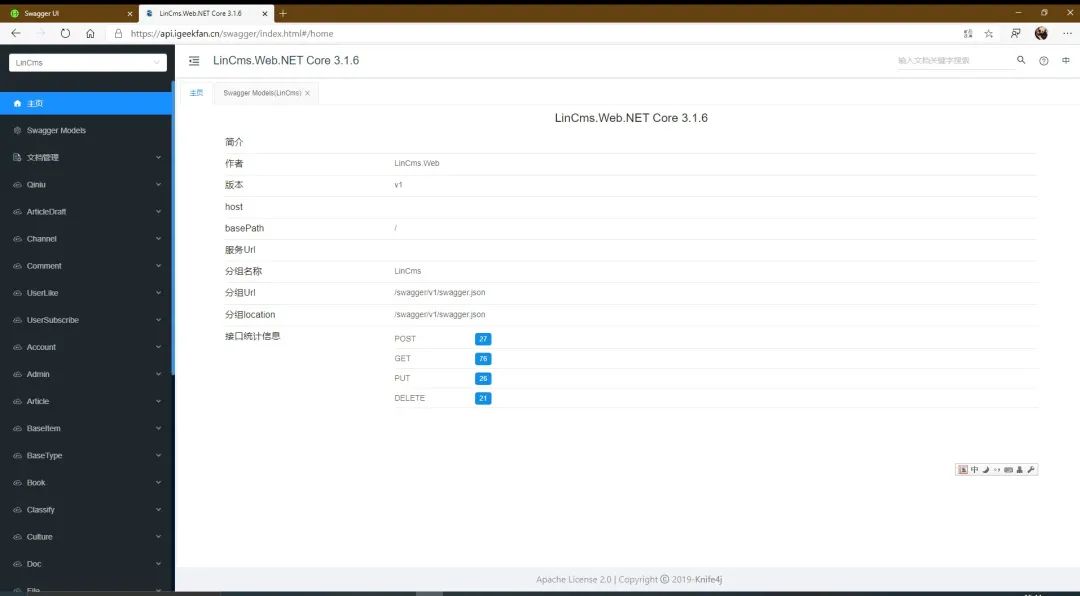
IGeekFan.AspNetCore.Knife4jUI
他是swagger ui 庫:knife4j UI 的.NET Core封裝,支持 .NET Core3.0+或.NET Standard2.0。
https://github.com/luoyunchong/IGeekFan.AspNetCore.Knife4jUI
概念對應(yīng)關(guān)系如下
| 功能 | c# | java |
|---|---|---|
| 實現(xiàn)swagger規(guī)范 | Swashbuckle.AspNetCore | spring-fox |
| 封裝成nuget包/maven包的UI庫 | Swashbuckle.AspNetCore.SwaggerUI | knife4j-v3-spring-ui |
| UI庫 | swagger-ui-dist | knife4j-vue-v3(swagger v3版本) |
注意
swagger v2和v3版本不一樣,我只實現(xiàn)了swagger v3版本的封裝。
源碼下載
https://gitee.com/xiaoym/knife4j https://github.com/domaindrivendev/Swashbuckle.AspNetCore
Swashbuckle.AspNetCore.SwaggerUI源碼分析。
通過中間件SwaggerUI中間件Middleware,Invoke方法中,替換了Index.html中的%(DocumentTitle) %(HeadContent),%(ConfigObject)等等 。
private?readonly?SwaggerUIOptions?_options;
//xxx
??
public?async?Task?Invoke(HttpContext?httpContext)
{?
//xxx
????if?(httpMethod?==?"GET"?&&?Regex.IsMatch(path,?$"^/{Regex.Escape(_options.RoutePrefix)}/?index.html$"))
????{
????????await?RespondWithIndexHtml(httpContext.Response);
????????return;
????}
//xxx
??}

private?async?Task?RespondWithIndexHtml(HttpResponse?response)
{
????response.StatusCode?=?200;
????response.ContentType?=?"text/html;charset=utf-8";

????using?(var?stream?=?_options.IndexStream())
????{
????????//?Inject?arguments?before?writing?to?response
????????var?htmlBuilder?=?new?StringBuilder(new?StreamReader(stream).ReadToEnd());
????????foreach?(var?entry?in?GetIndexArguments())
????????{
????????????htmlBuilder.Replace(entry.Key,?entry.Value);
????????}

????????await?response.WriteAsync(htmlBuilder.ToString(),?Encoding.UTF8);
????}
}

private?IDictionary?GetIndexArguments()
{
????return?new?Dictionary()
????{
????????{?"%(DocumentTitle)",?_options.DocumentTitle?},
????????{?"%(HeadContent)",?_options.HeadContent?},
????????{?"%(ConfigObject)",?JsonSerializer.Serialize(_options.ConfigObject,?_jsonSerializerOptions)?},
????????{?"%(OAuthConfigObject)",?JsonSerializer.Serialize(_options.OAuthConfigObject,?_jsonSerializerOptions)?}
????};
}
在index.html中。
%(DocumentTitle)
var?configObject?=?JSON.parse('%(ConfigObject)');
var?oauthConfigObject?=?JSON.parse('%(OAuthConfigObject)');
當(dāng)我們寫的aspnetcore項目集成swagger組件后,只會有一個ajax的異步請求
knife4j-v3-spring-ui
效果(2.X版):http://knife4j.xiaominfo.com/doc.html
由于官方也沒有v3的demo,我們可以暫時通過v2分析,發(fā)現(xiàn)他有3個異步請求,有一個請求返回相似的。另一個則是swagger的配置項,可以發(fā)現(xiàn),返回值與SwaggerUIOptions一致。
| 功能 | c# (swagger v3) | java(swagger v2) |
|---|---|---|
| 獲取分組配置 | 無 | /swagger-resources |
| swagger配置項 | 無 | /swagger-resources/configuration/ui |
| api文檔 | https://api.igeekfan.cn/swagger/v1/swagger.json | /v2/api-docs?group=2.X版本 |
結(jié)構(gòu)如下。
版本分組配置 http://knife4j.xiaominfo.com/swagger-resources
[
????{
????????"name":"2.X版本",
????????"url":"/v2/api-docs?group=2.X版本",
????????"swaggerVersion":"2.0",
????????"location":"/v2/api-docs?group=2.X版本"
????},
????{
????????"name":"分組接口",
????????"url":"/v2/api-docs?group=分組接口",
????????"swaggerVersion":"2.0",
????????"location":"/v2/api-docs?group=分組接口"
????},
????{
????????"name":"默認(rèn)接口",
????????"url":"/v2/api-docs?group=默認(rèn)接口",
????????"swaggerVersion":"2.0",
????????"location":"/v2/api-docs?group=默認(rèn)接口"
????}
]
swagger 配置項 http://knife4j.xiaominfo.com/swagger-resources/configuration/ui 請求方法: GET
{
????"deepLinking":true,
????"displayOperationId":false,
????"defaultModelsExpandDepth":1,
????"defaultModelExpandDepth":1,
????"defaultModelRendering":"example",
????"displayRequestDuration":false,
????"docExpansion":"none",
????"filter":false,
????"operationsSorter":"alpha",
????"showExtensions":false,
????"tagsSorter":"alpha",
????"validatorUrl":"",
????"apisSorter":"alpha",
????"jsonEditor":false,
????"showRequestHeaders":false,
????"supportedSubmitMethods":[
????????"get",
????????"put",
????????"post",
????????"delete",
????????"options",
????????"head",
????????"patch",
????????"trace"
????]
}
api 文檔 http://knife4j.xiaominfo.com/v2/api-docs?group=2.X%E7%89%88%E6%9C%AC
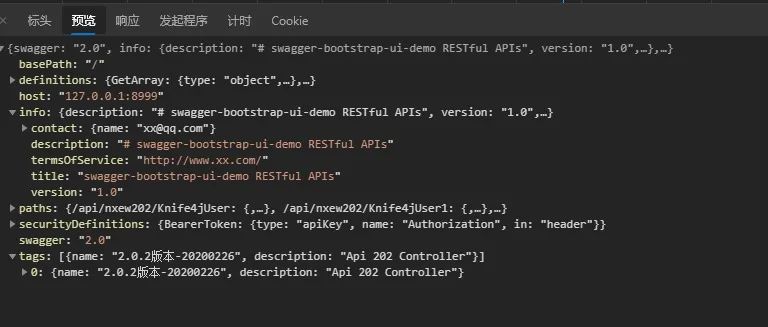
接下來我們看下knife4j,可以看到,他有knife4j-vue-v3項目,這個是swagger v3版本的vue實現(xiàn)。
我們打開knife4j-vue-v3項目,修改配置項vue.config.js,devServer 反向代理的地址(后臺地址)
proxy:?{
??"/":?{
????target:?'http://localhost:5000/',
????ws:?true,
????changeOrigin:?true
??}
}
安裝依賴,并運行他
yarn?install
yarn?serve
我們會看到一個請求錯誤。Knife4j文檔請求異常,因為后臺并沒有:'/v3/api-docs/swagger-config'。
也就是上文中的/swagger-resources/configuration/ui,我們可以在SwaggerUIMiddleware中間件獲取這些參數(shù),原本是通過替換字符串,現(xiàn)在,我們可以寫一個api。怎么寫呢。
下載Swashbuckle.AspNetCore的源碼,打開Swashbuckle.AspNetCore.sln。
我們嘗試修改Swashbuckle.AspNetCore.SwaggerUI項目中,SwaggerUIMiddleware中的源碼。
Invoke方法增加如下處理,將配置項直接返回json串。
if?(httpMethod?==?"GET"?&&?Regex.IsMatch(path,?$"^/v3/api-docs/swagger-config$"))
{
?????await?httpContext.Response.WriteAsync(JsonSerializer.Serialize(_options.ConfigObject,?_jsonSerializerOptions));
????return;
}
在swagger v3 版本中,/v3/api-docs/swagger-config,返回了分組信息,urls字段。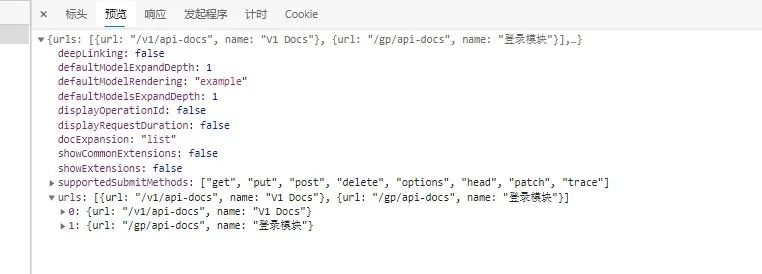
效果如下
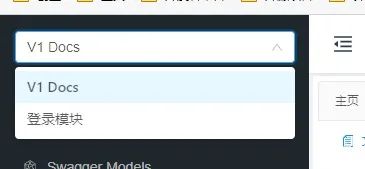
設(shè)置test/WebSites/Basic項目為啟動項目,運行后,打開了http://localhost:5000/index.html,這個還是原本的swagger ui,我們打開http://localhost:8080/#/home,前臺依舊提示有問題。
AddSwaggerGen 需要增加Server,前臺判斷有BUG,非空。
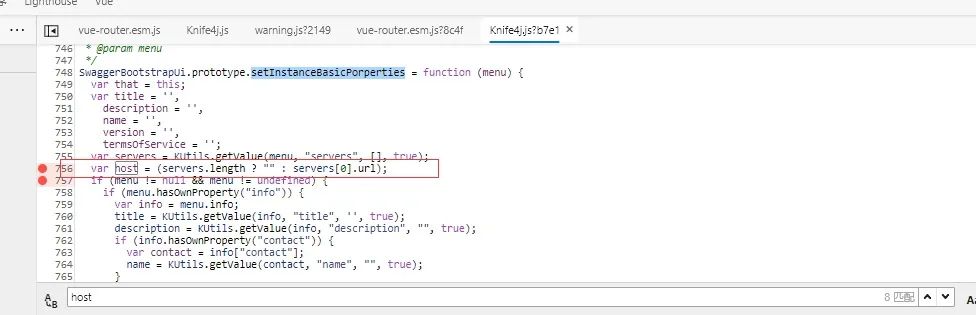
servers.length得到的是0,問號表達式就會執(zhí)行后面的servers[0].url,

臨時方案
services.AddSwaggerGen(c?=>
{

????c.AddServer(new?OpenApiServer()
????{
????????Url?=?"",
????????Description?=?"v1"
????});
});
但還有一個問題,前臺根據(jù)operationId生成的路由, ? ?[HttpPost(Name = "CreateProduct")]比如CreateProduct。有些沒有設(shè)置 Name的,點擊后就會出現(xiàn)空白界面。
增加CustomOperationIds的配置,通過反射獲取方法名。
services.AddSwaggerGen(c?=>
{
????//xx
?????c.CustomOperationIds(apiDesc?=>
????{
????????return?apiDesc.TryGetMethodInfo(out?MethodInfo?methodInfo)???methodInfo.Name?:?null;
????});
});
解決了這些問題。
我們創(chuàng)建一個新類庫,起名IGeekFan.AspNetCore.Knife4jUI
將前端打包。修改打包文件配置,vue.config.js
assetsDir:?"knife4j",
indexPath:?"index.html"
打包
yarn?run?build
復(fù)制到根目錄,設(shè)置為嵌入文件,刪除不需要的images和txt文本。
?"knife4j/**/*"?/>
?"favicon.ico"?/>
?"index.html"?/>
將后臺Swashbuckle.AspNetCore.SwaggerUI的代碼復(fù)制過來,全部重命名。比如中間件名字為
SwaggerUIMiddleware -> Knife4jUIMiddleware。即SwaggerUI都改成Knife4jUI。
Knife4jUIMiddleware修改位置
private?const?string?EmbeddedFileNamespace?=?"IGeekFan.AspNetCore.Knife4jUI";
刪除無用的替換變量,增加
Knife4UIOptions 修改
public?Func?IndexStream?{?get;?set;?}?=?()?=>?typeof(Knife4UIOptions).GetTypeInfo().Assembly
????????????.GetManifestResourceStream("IGeekFan.AspNetCore.Knife4jUI.index.html");
Startup 中的Configure中間件
將UseSwaggerUI()改成UseKnife4UI()
app.UseKnife4UI(c?=>
{
????c.RoutePrefix?=?"";?//?serve?the?UI?at?root
????c.SwaggerEndpoint("/v1/api-docs",?"V1?Docs");
????c.SwaggerEndpoint("/gp/api-docs",?"登錄模塊");
});
不用IGeekFan.AspNetCore.Knife4jUI也能實現(xiàn)?
當(dāng)然,可以。
我們也能通過其他方式,在SwaggerUI的基礎(chǔ)上,替換比如替換Index.html頁面,自己打包前端UI,復(fù)制到項目中等。
將knife4j-vue-v3項目打包,放到wwwwroot目錄中。
需要配置靜態(tài)文件。
????app.UseStaticFiles();
app.UseSwaggerUI(c?=>
{
????????c.RoutePrefix?=?"";?//?serve?the?UI?at?root
????????c.SwaggerEndpoint("/v1/api-docs",?"V1?Docs");//這個配置無效。
????????c.IndexStream?=?()?=>?new?PhysicalFileProvider(Path.Combine(Directory.GetCurrentDirectory(),?"wwwroot")).GetFileInfo("index.html").CreateReadStream();
});
重寫/v3/api-docs/swagger-config路由
app.UseEndpoints(endpoints?=>
{
????endpoints.MapControllers();
????endpoints.MapSwagger("{documentName}/api-docs");
????endpoints.MapGet("/v3/api-docs/swagger-config",?async?(httpContext)?=>
????{

????????JsonSerializerOptions?_jsonSerializerOptions?=?new?JsonSerializerOptions();
????????_jsonSerializerOptions.PropertyNamingPolicy?=?JsonNamingPolicy.CamelCase;
????????_jsonSerializerOptions.IgnoreNullValues?=?true;
????????_jsonSerializerOptions.Converters.Add(new?JsonStringEnumConverter(JsonNamingPolicy.CamelCase,?false));

????????SwaggerUIOptions?_options?=?new?SwaggerUIOptions()
????????{
????????????ConfigObject?=?new?ConfigObject()
????????????{
????????????????Urls?=?new?List
????????????????{
????????????????????new?UrlDescriptor()
????????????????????{
????????????????????????Url="/v1/api-docs",
????????????????????????Name="V1?Docs"
????????????????????}
????????????????}
????????????}
????????};

????????await?httpContext.Response.WriteAsync(JsonSerializer.Serialize(_options.ConfigObject,?_jsonSerializerOptions));
????});
});
IGeekFan.AspNetCore.Knife4jUI指南
相關(guān)依賴項
knife4j
knife4j-vue-v3(不是vue3,而是swagger-ui-v3版本)
Swashbuckle.AspNetCore
Swashbuckle.AspNetCore.Swagger Swashbuckle.AspNetCore.SwaggerGen
Demo
Basic Knife4jUIDemo
? 快速開始
?安裝包
1.Install the standard Nuget package into your ASP.NET Core application.
Package?Manager?:?Install-Package?IGeekFan.AspNetCore.Knife4jUI
CLI?:?dotnet?add?package?IGeekFan.AspNetCore.Knife4jUI
2.In the ConfigureServices method of Startup.cs, register the Swagger generator, defining one or more Swagger documents.
using?System.Reflection;
using?Microsoft.OpenApi.Models;
using?Swashbuckle.AspNetCore.SwaggerGen;
using?IGeekFan.AspNetCore.Knife4jUI;
? ConfigureServices
3.服務(wù)配置,CustomOperationIds和AddServer是必須的。
???services.AddSwaggerGen(c?=>
????{
????????c.SwaggerDoc("v1",new?OpenApiInfo{Title?=?"API?V1",Version?=?"v1"});
????????c.AddServer(new?OpenApiServer()
????????{
????????????Url?=?"",
????????????Description?=?"vvv"
????????});
????????c.CustomOperationIds(apiDesc?=>
????????{
????????????return?apiDesc.TryGetMethodInfo(out?MethodInfo?methodInfo)???methodInfo.Name?:?null;
????????});
????});
? Configure
中間件配置
app.UseSwagger();

app.UseKnife4UI(c?=>
{
????c.RoutePrefix?=?"";?//?serve?the?UI?at?root
????c.SwaggerEndpoint("/v1/api-docs",?"V1?Docs");
});

app.UseEndpoints(endpoints?=>
{
????endpoints.MapControllers();
????endpoints.MapSwagger("{documentName}/api-docs");
});
? 效果圖
運行項目,打開 https://localhost:5001/index.html#/home
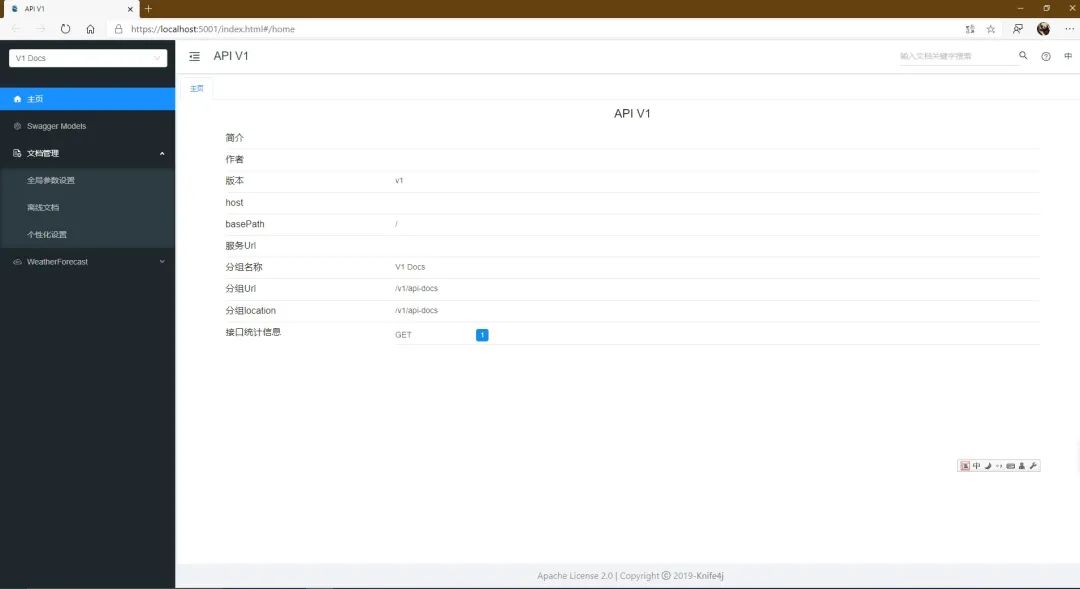
更多配置請參考
https://github.com/domaindrivendev/Swashbuckle.AspNetCore
更多項目


為什么不能在代碼中使用「User」這個單詞?
刷知乎摸魚?推薦這個VSCode神器

推薦:3款爬蟲神器插件

最全C#自學(xué)資源匯總