
使用 Go 和 ReactJS 構(gòu)建聊天系統(tǒng)(三):前端實現(xiàn)
本節(jié)完整代碼:GitHub[1]
本文是關(guān)于使用 ReactJS 和 Go 構(gòu)建聊天應(yīng)用程序的系列文章的第 3 部分。你可以在這里找到第 2 部分 - 后端實現(xiàn)[2]
Header 組件
我們先來創(chuàng)建一個非常簡單的 Header 組件。我們需要在 frontend/src/ 目錄下 創(chuàng)建一個叫 components/ 的新目錄,并在其中添加一個 Header/ 目錄,它將容納 Header 組件的所有文件。
- src/
- - components/
- - - Header/
- - - - Header.jsx
- - - - index.js
- - - - Header.scss
注意 - 每當我們創(chuàng)建一個新組件時,我們將在
components/目錄中創(chuàng)建一個新目錄,我們會在該目錄中創(chuàng)建這三個文件(.jsx,.js,*.scss)。
Header.jsx
我們需要在 Header.jsx 文件中實現(xiàn)函數(shù)組件。這將用于呈現(xiàn)網(wǎng)站的標題:
import?React?from?"react";
import?"./Header.scss";

const?Header?=?()?=>?(
?<div?className="header">
??<h2>Realtime?Chat?Apph2>
?div>
);

export?default?Header;
Header.scss
接下來,我們需要加上一些樣式。由于 ReactJS 項目沒有處理 scss 文件的能力,因此我們首先需要在 frontend/ 目錄中運行以下命令來安裝 node-sass:
$?yarn?add?node-sass
安裝完成后,我們就可以添加樣式了:
.header?{
?background-color:?#15223b;
?width:?100%;
?margin:?0;
?padding:?10px;
?color:?white;

?h2?{
??margin:?0;
??padding:?0;
?}
}
index.js
最后,我們要導(dǎo)出 Header 組件以至于其他組件可以導(dǎo)入它并在它們自己的 render() 函數(shù)中展示它:
import?Header?from?"./header.jsx";

export?default?Header;
更新 App.js
現(xiàn)在已經(jīng)創(chuàng)建好了 Header 組件,我們需要將它導(dǎo)入 App.js,然后通過將它添加到我們的 render() 函數(shù)中來展示它,如下所示:
//?App.js
//?從相對路徑導(dǎo)入組件
import?Header?from?'./components/Header/Header';
//?...
render()?{
?return?(
??<div?className="App">
???<Header?/>
???<button?onClick={this.send}>Hitbutton>
??div>
?);
}
保存這個文件后,我們的前端應(yīng)用程序需要重新編譯,然后可以看到 Header 組件成功展示在瀏覽器頁面的頂部。
恭喜 - 你已經(jīng)成功創(chuàng)建了第一個 React 組件!
歷史聊天記錄組件
我們已經(jīng)構(gòu)建并渲染了一個非常簡單的組件,所以我們再來構(gòu)建一個更復(fù)雜一點的組件。
在這個小節(jié)中,我們將創(chuàng)建一個歷史聊天記錄組件,它用來顯示我們從 WebSocket 服務(wù)收到的所有消息。
我們將在 components/ 目錄中創(chuàng)建一個新文件夾叫 ChatHistory/。同樣,我們需要為這個組件創(chuàng)建三個文件。
ChatHistory.jsx
我們從 ChatHistory.jsx 文件開始吧。它比之前的要稍微復(fù)雜一些,因為我們將構(gòu)建一個 Class 組件,而不是我們上面 Header 組件的 Function 組件。
注意 - 我們可以使用
ES6 calss定義類組件。如果你想了解更多有關(guān)信息,建議查看官方文檔:功能和類組件[3]
在這個組件中,你會注意到有一個 render() 函數(shù)。?render() 函數(shù)返回一個用于展示此特定組件的 jsx。
該組件將通過 props 從 App.js 函數(shù)中接收一組聊天消息,然后將它們按列表由上往下展示。
import?React,?{?Component?}?from?"react";
import?"./ChatHistory.scss";

class?ChatHistory?extends?Component?{
?render()?{
??const?messages?=?this.props.chatHistory.map((msg,?index)?=>?(
???<p?key={index}>{msg.data}p>
??));

??return?(
???<div?className="ChatHistory">
????<h2>Chat?Historyh2>
????{messages}
???div>
??);
?}
}

export?default?ChatHistory;
ChatHistory.scss
我們在 ChatHistory.scss 中來為 ChatHistory 組件添加一個小樣式,只是簡單的修改一下背景顏色和填充及邊距:
.ChatHistory?{
?background-color:?#f7f7f7;
?margin:?0;
?padding:?20px;
?h2?{
??margin:?0;
??padding:?0;
?}
}
Index.js
最后,我們需要導(dǎo)出新組件,就像使用 Header 組件一樣,這樣它就可以在 App.js 中被導(dǎo)入并展示:
import?ChatHistory?from?"./ChatHistory.jsx";

export?default?ChatHistory;
更新 App.js 和 api/index.js
現(xiàn)在我們又添加了 ChatHistory 組件,我們需要實際提供一些消息。
在本系列的前一部分中,我們建立了雙向通信,回顯發(fā)送給它的任何內(nèi)容,因此每當我們點擊應(yīng)用程序中的發(fā)送消息按鈕時,都會收到一個新消息。
來更新一下 api/index.js 文件和 connect() 函數(shù),以便它從 WebSocket 連接收到新消息時用于回調(diào):
let?connect?=?cb?=>?{
?console.log("connecting");

?socket.onopen?=?()?=>?{
??console.log("Successfully?Connected");
?};

?socket.onmessage?=?msg?=>?{
??console.log(msg);
??cb(msg);
?};

?socket.onclose?=?event?=>?{
??console.log("Socket?Closed?Connection:?",?event);
?};

?socket.onerror?=?error?=>?{
??console.log("Socket?Error:?",?error);
?};
};
因此,我們在函數(shù)中添加了一個 cb 參數(shù)。每當我們收到消息時,都會在第 10 行調(diào)用此 cb 會調(diào)函數(shù)。
當我們完成這些修改,就可以通過 App.js 來添加此回調(diào)函數(shù),并在獲取新消息時使用 setState 來更新狀態(tài)。
我們將把 constructor 函數(shù) connect() 移動到 componentDidMount() 函數(shù)中調(diào)用,該函數(shù)將作為組件生命周期的一部分自動調(diào)用(譯者注:在 render() 方法之后調(diào)用)。
//?App.js
componentDidMount()?{
?connect((msg)?=>?{
??console.log("New?Message")
??this.setState(prevState?=>?({
???chatHistory:?[...this.state.chatHistory,?msg]
??}))
??console.log(this.state);
?});
}
然后更新 App.js 的 render() 函數(shù)并展示 ChatHistory 組件:
render()?{
?return?(
??<div?className="App">
???<Header?/>
???<ChatHistory?chatHistory={this.state.chatHistory}?/>
???<button?onClick={this.send}>Hitbutton>
??div>
?);
}
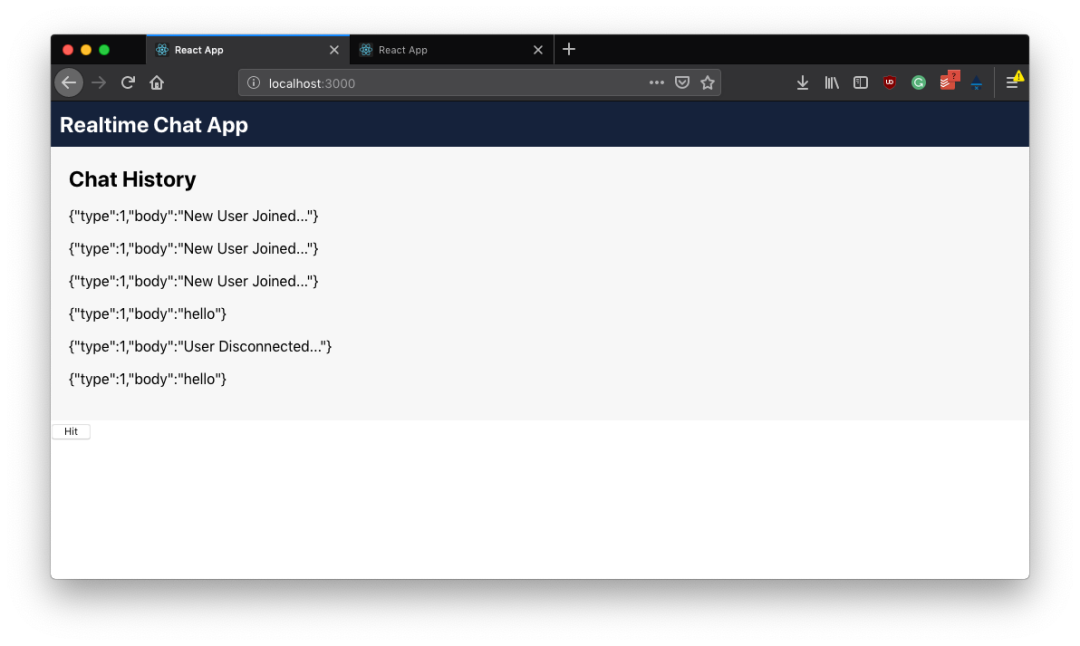
當我們編譯并運行前端和后端項目時,可以看到每當點擊前端的發(fā)送消息按鈕時,它會繼續(xù)通過 WebSocket 連接向后端發(fā)送消息,然后后端將其回傳給前端,最終在 ChatHistory 組件中成功展示!
總結(jié)
我們成功地改進了前端應(yīng)用程序,并將其視為聊天應(yīng)用程序。在本系列的下一部分中,將重點關(guān)注以下內(nèi)容:
改進前端:添加新的發(fā)送消息組件以允許我們發(fā)送自定義消息 改進后端:處理多個客戶端以及跨客戶端的通信。
下一節(jié):Part 4 - 處理多客戶端[4]
via: https://tutorialedge.net/projects/chat-system-in-go-and-react/part-3-designing-our-frontend/
作者:Elliot Forbes[5]譯者:咔嘰咔嘰[6]校對:polaris1119[7]
本文由 GCTT[8] 原創(chuàng)編譯,Go 中文網(wǎng)[9] 榮譽推出
參考資料
GitHub: https://github.com/watermelo/realtime-chat-go-react/tree/part-3
[2]后端實現(xiàn): https://studygolang.com/articles/22426
[3]功能和類組件: https://reactjs.org/docs/components-and-props.html#function-and-class-components
[4]處理多客戶端: https://studygolang.com/articles/22430
[5]Elliot Forbes: https://twitter.com/elliot_f
[6]咔嘰咔嘰: https://github.com/watermelo
[7]polaris1119: https://github.com/polaris1119
[8]GCTT: https://github.com/studygolang/GCTT
[9]Go 中文網(wǎng): https://studygolang.com/
推薦閱讀