
【Python】pandas 變量類型轉(zhuǎn)換的 6 種方法
本篇繼續(xù)更新pandas系列,感興趣可以關(guān)注這個話題,第一時間更新。
所有數(shù)據(jù)和代碼可在我的GitHub獲取:
https://github.com/xiaoyusmd/PythonDataScience
一、變量類型及轉(zhuǎn)換
對于變量的數(shù)據(jù)類型而言,Pandas除了數(shù)值型的int 和 float類型外,還有object ,category,bool,datetime類型。
另外,空值類型作為一種特殊類型,需要單獨(dú)處理,這個在pandas缺失值處理一文中已詳細(xì)介紹。
數(shù)據(jù)處理的過程中,經(jīng)常需要將這些類型進(jìn)行互相轉(zhuǎn)換,下面介紹一些變量類型轉(zhuǎn)換的常用方法。
1、查詢變量類型
在數(shù)據(jù)處理的過程中,針對不同的數(shù)據(jù)類型會有不同的處理方法,比如數(shù)值型可以做加減乘除,但是字符型、時間類型就需要其它處理方法。為此,我們首先需要將各種數(shù)據(jù)類型進(jìn)行區(qū)分,然后再分別處理。
pandas中select_dtype函數(shù)可以特征變量進(jìn)行快速分類,具體用法如下:
DataFrame.select_dtypes(include=None, exclude=None)
include:列表,想要留下的數(shù)據(jù)類型,比如
float64,int64,bool,object等exclude:列表,需要排除的數(shù)據(jù)類型,同上。
df = pd.DataFrame({'a': [1, 2] * 3,
                   'b': [True, False] * 3,
                   'c': [1.0, 2.0] * 3,
                   'd': ['a','b']*3})
# 篩選float和int的數(shù)值類型變量
num_list = df.select_dtypes(include=['float','int64']).columns.tolist()
# 篩選ojbect字符型的數(shù)值類型變量
obj_list = df.select_dtypes(include=['object']).columns.tolist()

print(obj_list)
print(num_list)

>> ['d']
>> ['a', 'c']
include和exclude也可以組合使用篩選。
如果想要查看所有變量的數(shù)據(jù)類型,可以通過info快速查看,如下:
df.info()
>><class 'pandas.core.frame.DataFrame'>
RangeIndex: 6 entries, 0 to 5
Data columns (total 4 columns):
 #   Column  Non-Null Count  Dtype
---  ------  --------------  -----
 0   a       6 non-null      int64
 1   b       6 non-null      bool
 2   c       6 non-null      float64
 3   d       6 non-null      object
dtypes: bool(1), float64(1), int64(1), object(1)
memory usage: 278.0+ bytes
2、轉(zhuǎn)換數(shù)值類型
數(shù)值類型包括int和float。
轉(zhuǎn)換數(shù)據(jù)類型比較通用的方法可以用astype進(jìn)行轉(zhuǎn)換。
pandas中有種非常便利的方法to_numeric()可以將其它數(shù)據(jù)類型轉(zhuǎn)換為數(shù)值類型。
pandas.to_numeric(arg, errors='raise', downcast=None)
arg:被轉(zhuǎn)換的變量,格式可以是
list,tuple,1-d array,Serieserrors:轉(zhuǎn)換時遇到錯誤的設(shè)置,
ignore,raise,coerce,下面例子中具體講解downcast:轉(zhuǎn)換類型降級設(shè)置,比如整型的有無符號
signed/unsigned,和浮點(diǎn)float
下面例子中,s是一列數(shù)據(jù),具有多種數(shù)據(jù)類型,現(xiàn)在想把它轉(zhuǎn)換為數(shù)值類型。
import pandas as pd
import numpy as np

s = pd.Series(['boy', '1.0', '2019-01-02', 1, False, None, pd.Timestamp('2018-01-05')])

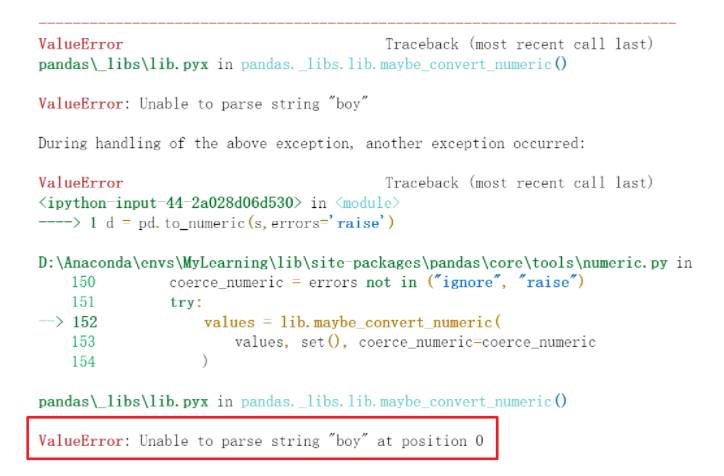
# 默認(rèn)錯位格式為raise,遇到非數(shù)字字符串類型報錯
pd.to_numeric(s, errors='raise')
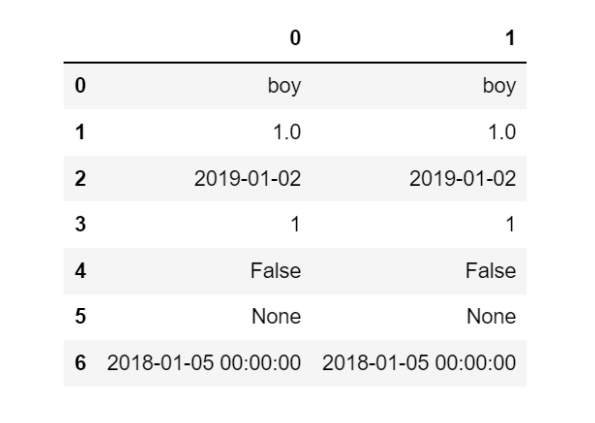
# 錯位格式為ignore,只對數(shù)字字符串轉(zhuǎn)換, 其他類型一律忽視不轉(zhuǎn)換, 包含時間類型
pd.to_numeric(s, errors='ignore')
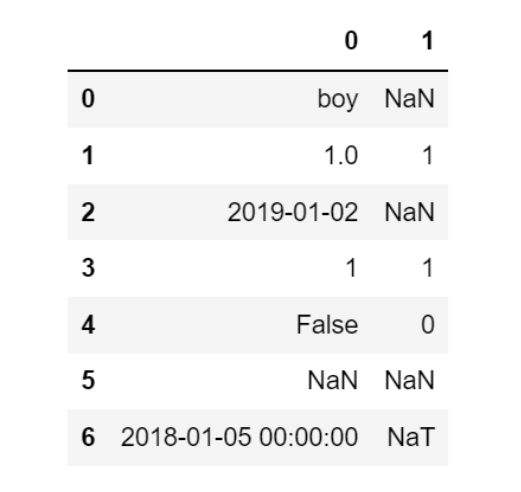
# 將時間字符串和bool類型強(qiáng)制轉(zhuǎn)換為數(shù)字, 其他均轉(zhuǎn)換為NaN
pd.to_numeric(s, errors='coerce')
# downcast 可以進(jìn)一步轉(zhuǎn)化為int或者float
pd.to_numeric(s) # 默認(rèn)float64類型
pd.to_numeric(s, downcast='signed') # 轉(zhuǎn)換為整型
4、轉(zhuǎn)換字符類型
數(shù)字轉(zhuǎn)字符類型非常簡單,可以簡單的使用str直接轉(zhuǎn)換。
df = pd.DataFrame({'year': [2015, 2016],
                   'month': [2, 3],
                   'day': [4, 5]})
df['month'] = df['month'].map(str)
df.info()
>><class 'pandas.core.frame.DataFrame'>
RangeIndex: 2 entries, 0 to 1
Data columns (total 3 columns):
 #   Column  Non-Null Count  Dtype
---  ------  --------------  -----
 0   year    2 non-null      int64
 1   month   2 non-null      object
 2   day     2 non-null      int64
dtypes: int64(2), object(1)
memory usage: 176.0+ bytes
此外這里再延伸一下,去掉字符類型的方法eval。
比如,當(dāng)我們遇到'[1,2,3]'這種情況的時候,我們實際想獲取里面的列表,但是現(xiàn)在卻是個字符串類型,我們可以使用eval函數(shù)將''這個外套直接去掉,去掉后自動轉(zhuǎn)換成里面數(shù)據(jù)類型。
a = '[1,2,3]'
type(a)
>> str

eval(a)
>> [1, 2, 3]
5、轉(zhuǎn)換時間類型
使用to_datetime函數(shù)將數(shù)據(jù)轉(zhuǎn)換為日期類型,用法如下:
pandas.to_datetime(arg, errors='raise', dayfirst=False, yearfirst=False, utc=None, box=True, format=None, exact=True, unit=None, infer_datetime_format=False, origin='unix')
參數(shù)比較多,常用的就是format,按照指定的字符串strftime格式解析日期,一般情況下該函數(shù)可以直接自動解析成日期類型。
# 對整個dataframe轉(zhuǎn)換,將年月日幾列自動合并為日期
df = pd.DataFrame({'year': [2015, 2016],
                   'month': [2, 3],
                   'day': [4, 5]})
df
>> year month day
0 2015 2 4
1 2016 3 5

pd.to_datetime(df)
>>
0   2015-02-04
1   2016-03-05
dtype: datetime64[n
s]

# 對單列轉(zhuǎn)換日期類型
df1 = pd.DataFrame({'appl_tm':['20220401','20220402','20220403'],
                    'appl_tm1':['2012.03.04','2021.09.04','2031.06.05']})
>>df1
    appl_tm     appl_tm1
0 20220401 2012.03.04
1 20220402 2021.09.04
2 20220403 2031.06.05

df1['appl_tm'] = pd.to_datetime(df1['appl_tm'])
df1['appl_tm1'] = pd.to_datetime(df1['appl_tm1'], format='%Y.%m.%d')
>>df1
    appl_tm     appl_tm1
0 2022-04-01 2012-03-04
1 2022-04-02 2021-09-04
2 2022-04-03 2031-06-05
轉(zhuǎn)換為日期類型后,就可以對日期使用series.dt.方法進(jìn)行更復(fù)雜的篩選和查詢了。
# 篩選2021年的日期,month和day也是同理
df1['appl_tm1'].dt.year == 2021
>>
0    False
1     True
2    False
Name: appl_tm1, dtype: bool

df1[df1['appl_tm1'].dt.year == 2021]
>>
    appl_tm     appl_tm1
1 2022-04-02 2021-09-04
6、轉(zhuǎn)換category類型
category類型在pandas中的出場率并不是很高,一般在不考慮優(yōu)化效率時,會用其它類型替代。但如果需要轉(zhuǎn)換category類型,可以直接使用astype完成。
df = pd.DataFrame({'year': [2015, 2016],
                   'month': [2, 3],
                   'day': [4, 5]})
df['year'] = df['year'].astype('category')
df.info()
>><class 'pandas.core.frame.DataFrame'>
RangeIndex: 2 entries, 0 to 1
Data columns (total 3 columns):
 #   Column  Non-Null Count  Dtype
---  ------  --------------  -----
 0   year    2 non-null      category
 1   month   2 non-null      int64
 2   day     2 non-null      int64
dtypes: category(1), int64(2)
memory usage: 258.0 byte
對于category類型的具體使用方法,可以參考這篇文章:category分類變量的使用方法
7、智能類型轉(zhuǎn)換convert_dtypes
上面介紹的均為手動一對一的變量類型轉(zhuǎn)換,pandas中還提供了一種智能轉(zhuǎn)換的方法convert_dtypes,使用它可以無腦自動完成轉(zhuǎn)換。
默認(rèn)情況下,convert_dtypes將嘗試將Series或DataFrame中的每個Series轉(zhuǎn)換為支持的dtypes,它可以對Series和DataFrame都直接使用。
該方法的參數(shù)如下:
infer_objects:默認(rèn)為True,是否應(yīng)將對象dtypes轉(zhuǎn)換為最佳類型convert_string:默認(rèn)為True,對象dtype是否應(yīng)轉(zhuǎn)換為StringDtype()convert_integer:默認(rèn)為True,如果可能,是否可以轉(zhuǎn)換為整數(shù)擴(kuò)展類型convert_boolean:默認(rèn)為True,對象dtype是否應(yīng)轉(zhuǎn)換為BooleanDtypes()convert_floating:默認(rèn)為True,如果可能,是否可以轉(zhuǎn)換為浮動擴(kuò)展類型。如果convert_integer也為True,則如果可以將浮點(diǎn)數(shù)忠實地轉(zhuǎn)換為整數(shù),則將優(yōu)先考慮整數(shù)dtype
下面看一組示例。
通過結(jié)果可以看到,變量都是是創(chuàng)建時默認(rèn)的類型。但其實變量是有整數(shù)、字符串、布爾的,其中有的還存在空值。
# 對整個dataframe直接轉(zhuǎn)換
>>> dfn = df.convert_dtypes()
>>> dfn
   a  b      c     d     e      f
0  1  x   True     h    10   <NA>
1  2  y  False     i  <NA>  100.5
2  3  z   <NA>  <NA>    20  200.0

>>> dfn.dtypes
a      Int32

b     string
c    boolean
d     string
e      Int64
f    Float64
dtype: object
忽略了空值的影響,變量類型已經(jīng)自動轉(zhuǎn)換為我們想要的了。
對Series的轉(zhuǎn)換也是一樣的。下面的Seires中由于存在nan空值所以類型為object。
# Series 變量類型轉(zhuǎn)換
s = pd.Series(["a", "b", np.nan])

>>> s
0      a
1      b
2    NaN
dtype: object

# 通過convert_dtypes成功轉(zhuǎn)換為String
>>> s.convert_dtypes()
0       a
1       b
2    <NA>
dtype: string
如果未來增加了新類型,convert_dtypes方法也會同步更新,并支持新的變量類型。
往期精彩回顧