
一不小心,我爬取了100萬條微博評論


鄭重聲明:本項目及所有相關(guān)文章,僅用于經(jīng)驗技術(shù)交流,禁止將相關(guān)技術(shù)應(yīng)用到不正當途徑,因為濫用技術(shù)產(chǎn)生的風險與本人無關(guān)
大家好,我是朱小五
今天給大家分享一篇文章用來學(xué)習(xí),是關(guān)于微博評論的爬蟲。
作者月小水長,已經(jīng)在源碼關(guān)鍵處做了注釋。
(溫馨提醒:完整代碼地址在文末!文末!)
下面見證奇跡的時刻:
1、引入庫
import time
import base64
import rsa
import binascii
import requests
import re
from PIL import Image
import random
from urllib.parse import quote_plus
import http.cookiejar as cookielib
import csv
import os
2、一些全局變量的設(shè)置
comment_path = 'comment'
agent = 'mozilla/5.0 (windowS NT 10.0; win64; x64) appLewEbkit/537.36 (KHTML, likE gecko) chrome/71.0.3578.98 safari/537.36'
headers = {'User-Agent': agent}
3、創(chuàng)立目錄作為存放數(shù)據(jù)的
if not os.path.exists(comment_path):
    os.mkdir(comment_path)
4、登陸類的創(chuàng)立
class WeiboLogin(object):
    """
    通過登錄 weibo.com 然后跳轉(zhuǎn)到 m.weibo.cn
    """

    # 初始化數(shù)據(jù)
    def __init__(self, user, password, cookie_path):
        super(WeiboLogin, self).__init__()
        self.user = user
        self.password = password
        self.session = requests.Session()
        self.cookie_path = cookie_path
        # LWPCookieJar是python中管理cookie的工具,可以將cookie保存到文件,或者在文件中讀取cookie數(shù)據(jù)到程序
        self.session.cookies = cookielib.LWPCookieJar(filename=self.cookie_path)
        self.index_url = "http://weibo.com/login.php"
        self.session.get(self.index_url, headers=headers, timeout=2)
        self.postdata = dict()

    def get_su(self):
        """
        對 email 地址和手機號碼 先 javascript 中 encodeURIComponent
        對應(yīng) Python 3 中的是 urllib.parse.quote_plus
        然后在 base64 加密后decode
        """
        username_quote = quote_plus(self.user)
        username_base64 = base64.b64encode(username_quote.encode("utf-8"))
        return username_base64.decode("utf-8")

    # 預(yù)登陸獲得 servertime, nonce, pubkey, rsakv
    def get_server_data(self, su):
        """與原來的相比,微博的登錄從 v1.4.18 升級到了 v1.4.19
        這里使用了 URL 拼接的方式,也可以用 Params 參數(shù)傳遞的方式
        """
        pre_url = "http://login.sina.com.cn/sso/prelogin.php?entry=weibo&callback=sinaSSOController.preloginCallBack&su="
        pre_url = pre_url + su + "&rsakt=mod&checkpin=1&client=ssologin.js(v1.4.19)&_="
        pre_url = pre_url + str(int(time.time() * 1000))
        pre_data_res = self.session.get(pre_url, headers=headers)
        # print("*"*50)
        # print(pre_data_res.text)
        # print("*" * 50)
        sever_data = eval(pre_data_res.content.decode("utf-8").replace("sinaSSOController.preloginCallBack", ''))

        return sever_data

    def get_password(self, servertime, nonce, pubkey):
        """對密碼進行 RSA 的加密"""
        rsaPublickey = int(pubkey, 16)
        key = rsa.PublicKey(rsaPublickey, 65537)  # 創(chuàng)建公鑰
        message = str(servertime) + '\t' + str(nonce) + '\n' + str(self.password)  # 拼接明文js加密文件中得到
        message = message.encode("utf-8")
        passwd = rsa.encrypt(message, key)  # 加密
        passwd = binascii.b2a_hex(passwd)  # 將加密信息轉(zhuǎn)換為16進制。
        return passwd

    def get_cha(self, pcid):
        """獲取驗證碼,并且用PIL打開,
        1. 如果本機安裝了圖片查看軟件,也可以用 os.subprocess 的打開驗證碼
        2. 可以改寫此函數(shù)接入打碼平臺。
        """
        cha_url = "https://login.sina.com.cn/cgi/pin.php?r="
        cha_url = cha_url + str(int(random.random() * 100000000)) + "&s=0&p="
        cha_url = cha_url + pcid
        cha_page = self.session.get(cha_url, headers=headers)
        with open("cha.jpg", 'wb') as f:
            f.write(cha_page.content)
            f.close()
        try:
            im = Image.open("cha.jpg")
            im.show()
            im.close()
        except Exception as e:
            print(u"請到當前目錄下,找到驗證碼后輸入")

    def pre_login(self):
        # su 是加密后的用戶名
        su = self.get_su()
        sever_data = self.get_server_data(su)
        servertime = sever_data["servertime"]
        nonce = sever_data['nonce']
        rsakv = sever_data["rsakv"]
        pubkey = sever_data["pubkey"]
        showpin = sever_data["showpin"]  # 這個參數(shù)的意義待探索
        password_secret = self.get_password(servertime, nonce, pubkey)

        self.postdata = {
            'entry': 'weibo',
            'gateway': '1',
            'from': '',
            'savestate': '7',
            'useticket': '1',
            'pagerefer': "https://passport.weibo.com",
            'vsnf': '1',
            'su': su,
            'service': 'miniblog',
            'servertime': servertime,
            'nonce': nonce,
            'pwencode': 'rsa2',
            'rsakv': rsakv,
            'sp': password_secret,
            'sr': '1366*768',
            'encoding': 'UTF-8',
            'prelt': '115',
            "cdult": "38",
            'url': 'http://weibo.com/ajaxlogin.php?framelogin=1&callback=parent.sinaSSOController.feedBackUrlCallBack',
            'returntype': 'TEXT'  # 這里是 TEXT 和 META 選擇,具體含義待探索
        }
        return sever_data

    def login(self):
        # 先不輸入驗證碼登錄測試
        try:
            sever_data = self.pre_login()
            login_url = 'https://login.sina.com.cn/sso/login.php?client=ssologin.js(v1.4.19)&_'
            login_url = login_url + str(time.time() * 1000)
            login_page = self.session.post(login_url, data=self.postdata, headers=headers)
            ticket_js = login_page.json()
            ticket = ticket_js["ticket"]
        except Exception as e:
            sever_data = self.pre_login()
            login_url = 'https://login.sina.com.cn/sso/login.php?client=ssologin.js(v1.4.19)&_'
            login_url = login_url + str(time.time() * 1000)
            pcid = sever_data["pcid"]
            self.get_cha(pcid)
            self.postdata['door'] = input(u"請輸入驗證碼")
            login_page = self.session.post(login_url, data=self.postdata, headers=headers)
            ticket_js = login_page.json()
            ticket = ticket_js["ticket"]
        # 以下內(nèi)容是 處理登錄跳轉(zhuǎn)鏈接
        save_pa = r'==-(\d+)-'
        ssosavestate = int(re.findall(save_pa, ticket)[0]) + 3600 * 7
        jump_ticket_params = {
            "callback": "sinaSSOController.callbackLoginStatus",
            "ticket": ticket,
            "ssosavestate": str(ssosavestate),
            "client": "ssologin.js(v1.4.19)",
            "_": str(time.time() * 1000),
        }
        jump_url = "https://passport.weibo.com/wbsso/login"
        jump_headers = {
            "Host": "passport.weibo.com",
            "Referer": "https://weibo.com/",
            "User-Agent": headers["User-Agent"]
        }
        jump_login = self.session.get(jump_url, params=jump_ticket_params, headers=jump_headers)
        uuid = jump_login.text

        uuid_pa = r'"uniqueid":"(.*?)"'
        uuid_res = re.findall(uuid_pa, uuid, re.S)[0]
        web_weibo_url = "http://weibo.com/%s/profile?topnav=1&wvr=6&is_all=1" % uuid_res
        weibo_page = self.session.get(web_weibo_url, headers=headers)

        # print(weibo_page.content.decode("utf-8")

        Mheaders = {
            "Host": "login.sina.com.cn",
            "User-Agent": agent
        }

        # m.weibo.cn 登錄的 url 拼接
        _rand = str(time.time())
        mParams = {
            "url": "https://m.weibo.cn/",
            "_rand": _rand,
            "gateway": "1",
            "service": "sinawap",
            "entry": "sinawap",
            "useticket": "1",
            "returntype": "META",
            "sudaref": "",
            "_client_version": "0.6.26",
        }
        murl = "https://login.sina.com.cn/sso/login.php"
        mhtml = self.session.get(murl, params=mParams, headers=Mheaders)
        mhtml.encoding = mhtml.apparent_encoding
        mpa = r'replace\((.*?)\);'
        mres = re.findall(mpa, mhtml.text)

        # 關(guān)鍵的跳轉(zhuǎn)步驟,這里不出問題,基本就成功了。
        Mheaders["Host"] = "passport.weibo.cn"
        self.session.get(eval(mres[0]), headers=Mheaders)
        mlogin = self.session.get(eval(mres[0]), headers=Mheaders)
        # print(mlogin.status_code)
        # 進過幾次 頁面跳轉(zhuǎn)后,m.weibo.cn 登錄成功,下次測試是否登錄成功
        Mheaders["Host"] = "m.weibo.cn"
        Set_url = "https://m.weibo.cn"
        pro = self.session.get(Set_url, headers=Mheaders)
        pa_login = r'isLogin":true,'
        login_res = re.findall(pa_login, pro.text)
        # print(login_res)

        # 可以通過 session.cookies 對 cookies 進行下一步相關(guān)操作
        self.session.cookies.save()
        # print("*"*50)
        # print(self.cookie_path)
5、定義cookie的加載和信息的重定義
def get_cookies():
    # 加載cookie
    cookies = cookielib.LWPCookieJar("Cookie.txt")
    cookies.load(ignore_discard=True, ignore_expires=True)
    # 將cookie轉(zhuǎn)換成字典
    cookie_dict = requests.utils.dict_from_cookiejar(cookies)
    return cookie_dict

def info_parser(data):
    id,time,text =  data['id'],data['created_at'],data['text']
    user = data['user']
    uid,username,following,followed,gender = \
        user['id'],user['screen_name'],user['follow_count'],user['followers_count'],user['gender']
    return {
        'wid':id,
        'time':time,
        'text':text,
        'uid':uid,
        'username':username,
        'following':following,
        'followed':followed,
        'gender':gender
    }
6、開始爬
def start_crawl(cookie_dict,id):
    base_url = 'https://m.weibo.cn/comments/hotflow?id={}&mid={}&max_id_type=0'
    next_url = 'https://m.weibo.cn/comments/hotflow?id={}&mid={}&max_id={}&max_id_type={}'
    page = 1
    id_type = 0
    comment_count = 0
    requests_count = 1
    res = requests.get(url=base_url.format(id,id), headers=headers,cookies=cookie_dict)
    while True:
        print('parse page {}'.format(page))
        page += 1
        try:
            data = res.json()['data']
            wdata = []
            max_id = data['max_id']
            for c in data['data']:
                comment_count += 1
                row = info_parser(c)
                wdata.append(info_parser(c))
                if c.get('comments', None):
                    temp = []
                    for cc in c.get('comments'):
                        temp.append(info_parser(cc))
                        wdata.append(info_parser(cc))
                        comment_count += 1
                    row['comments'] = temp
                print(row)
            with open('{}/{}.csv'.format(comment_path, id), mode='a+', encoding='utf-8-sig', newline='') as f:
                writer = csv.writer(f)
                for d in wdata:
                    writer.writerow([d['wid'],d['time'],d['text'],d['uid'],d['username'],d['following'],d['followed'],d['gender']])

            time.sleep(3)
        except:
            print(res.text)
            id_type += 1
            print('評論總數(shù): {}'.format(comment_count))

        res = requests.get(url=next_url.format(id, id, max_id,id_type), headers=headers,cookies=cookie_dict)
        requests_count += 1
        if requests_count%50==0:
            print(id_type)
        print(res.status_code)
7、主函數(shù)
if __name__ == '__main__':
    username = "18100000000"  # 用戶名(注冊的手機號)
    password = "123456"  # 密碼
    cookie_path = "Cookie.txt"  # 保存cookie 的文件名稱
    id = '4477416430959369'     # 爬取微博的 id
    WeiboLogin(username, password, cookie_path).login()
    with open('{}/{}.csv'.format(comment_path, id), mode='w', encoding='utf-8-sig', newline='') as f:
        writer = csv.writer(f)
        writer.writerow(['wid', 'time', 'text', 'uid', 'username', 'following', 'followed', 'gender'])
    start_crawl(get_cookies(), id)
8、獲取id
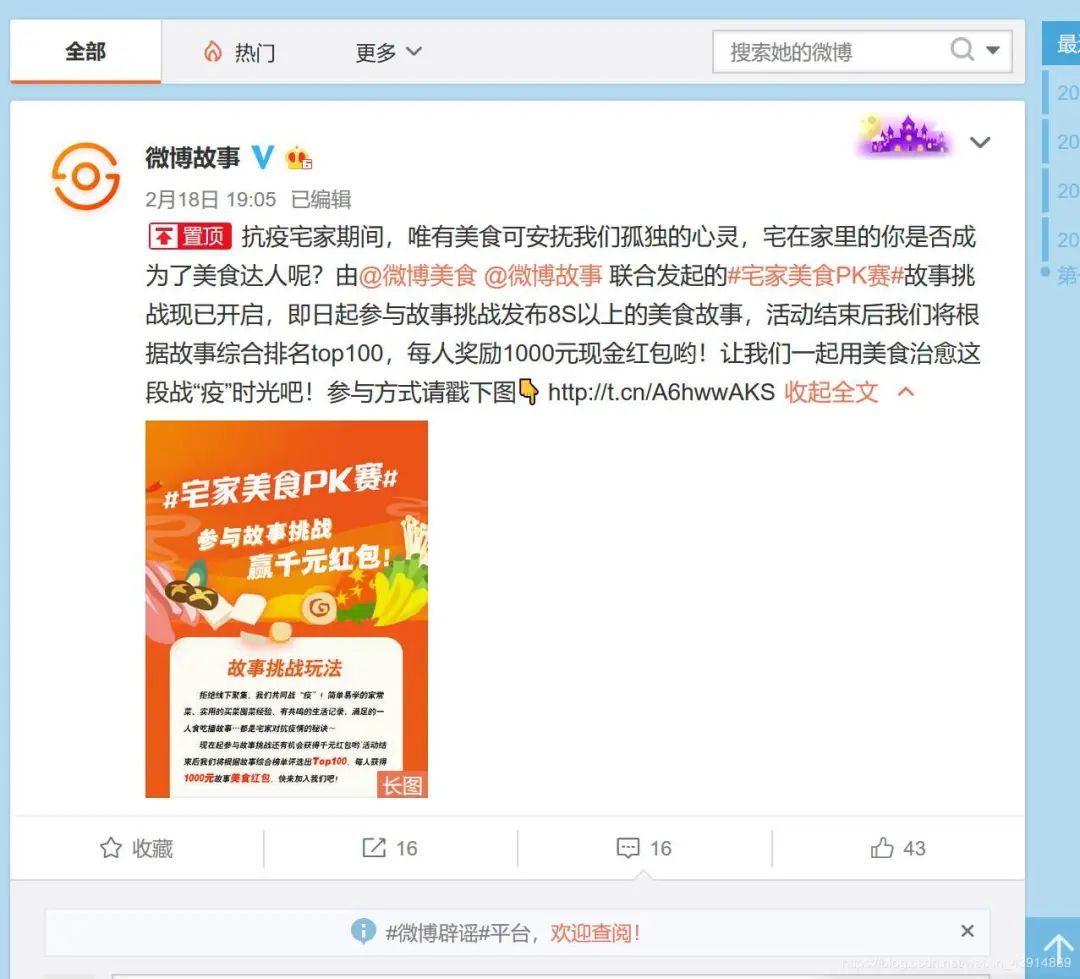
你需要獲得想要找的微博id,那么對于小白來說怎么找id呢?看圖說話
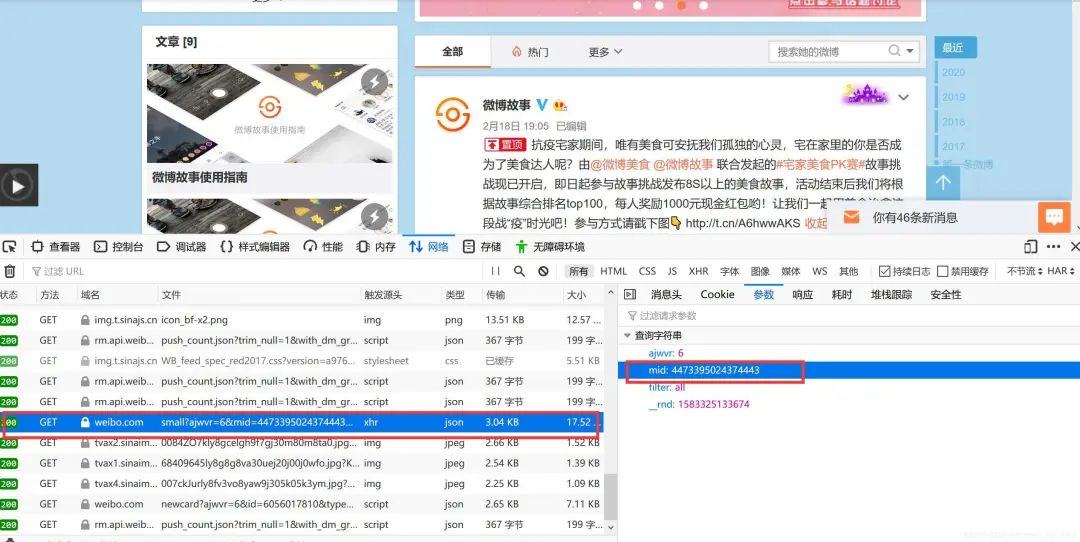
首先找到你想爬的微博,這里以微博故事為例,在瀏覽器內(nèi)按下F12,并且點擊評論按鈕
點擊‘網(wǎng)絡(luò)’,找到一條像圖中的get請求。查看它的參數(shù),mid就是它的id
代碼獲取:
微信公眾號發(fā)送“微博”獲取。

評論
圖片
表情