
Android從0到1實(shí)現(xiàn)流布局控件
演示效果:
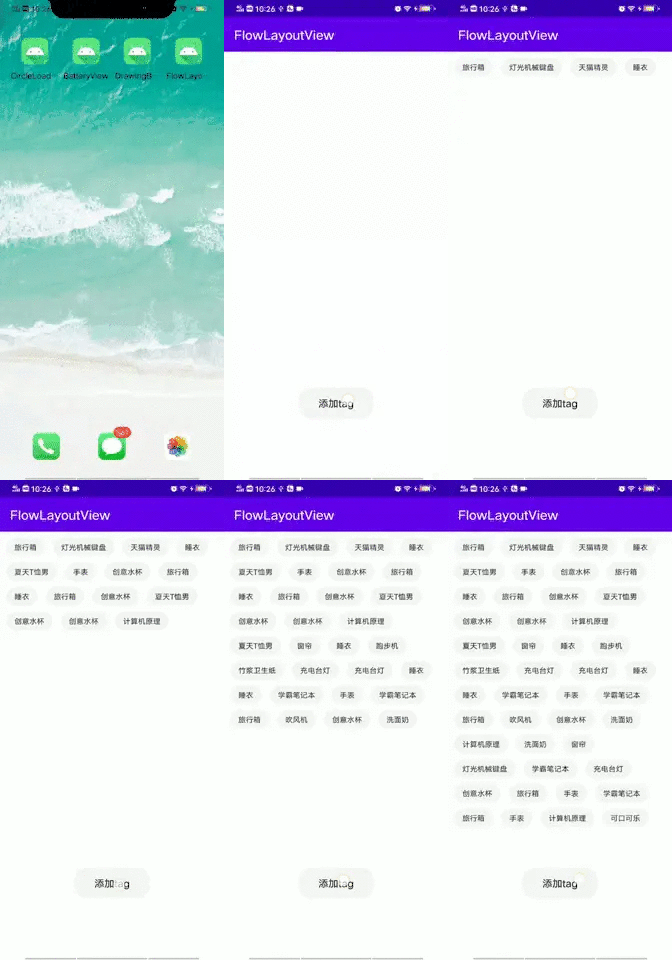
實(shí)現(xiàn)步驟:
2、在onMeasure方法中遍歷子view,通過簡(jiǎn)單計(jì)算剩余寬度,用集合存儲(chǔ)當(dāng)前行的幾個(gè)子view,再根據(jù)子view的累加高度設(shè)置自己的最終尺寸。
3、在onLayout方法中,遍歷每一行,遍歷該行的子view,依次調(diào)動(dòng)layout設(shè)置子view位置。
核心點(diǎn):
主要代碼:
/*** description 流布局viewGroup*/public class FlowLayoutView extends ViewGroup {private List<Row> rows = new ArrayList<>();private int usedWidth;/*** 當(dāng)前需要操作的行*/private Row curRow;private int verticalPadding = 30;private int horizontalPadding = 40;public FlowLayoutView(Context context) {super(context);}public FlowLayoutView(Context context, AttributeSet attrs) {super(context, attrs);}@Overrideprotected void onMeasure(int widthMeasureSpec, int heightMeasureSpec) {restoreLine(); //每次重新布局,屬性要初始化,避免onMeasure重復(fù)調(diào)用混亂問題//子view設(shè)置寬高為父view大小減去padding值int width = MeasureSpec.getSize(widthMeasureSpec);int height = MeasureSpec.getSize(heightMeasureSpec);int widthMode = MeasureSpec.getMode(widthMeasureSpec);int heightMode = MeasureSpec.getMode(heightMeasureSpec);//設(shè)置每個(gè)子view寬高,并且將每個(gè)子View歸到自己的行for (int i = 0; i < getChildCount(); i++) {View childView = getChildAt(i);//設(shè)置子view設(shè)置AT_MOST模式,即布局屬性為wrap_contentint childWidthSpec = MeasureSpec.makeMeasureSpec(width, widthMode == MeasureSpec.EXACTLY ? MeasureSpec.AT_MOST : widthMode);int childHeightSpec = MeasureSpec.makeMeasureSpec(height, heightMode == MeasureSpec.EXACTLY ? MeasureSpec.AT_MOST : heightMode);childView.measure(childWidthSpec, childHeightSpec);if (curRow == null) {curRow = new Row();}//根據(jù)當(dāng)前childview寬度和剩余寬度判斷是否能放進(jìn)當(dāng)前行,放不了就要換行if (childView.getMeasuredWidth() + horizontalPadding > width - usedWidth) {//先換行,再放入nextLine();}usedWidth += childView.getMeasuredWidth() + horizontalPadding;curRow.addView(childView);}//將最后一個(gè)row加入到rows中rows.add(curRow);//根據(jù)子view組成的高度重設(shè)自己高度int finalHeight = 0;for (Row row : rows) {finalHeight += row.height + verticalPadding;}setMeasuredDimension(width, finalHeight);}@Overrideprotected void onLayout(boolean changed, int l, int t, int r, int b) {int top = 0;//遍歷每一行,將每一行子view布局for (Row row : rows) {row.layout(top);top = top + row.height + verticalPadding;}}/*** 換行,需要將當(dāng)前row存儲(chǔ),并且創(chuàng)建新的row,新的行使用空間置0*/private void nextLine() {rows.add(curRow);curRow = new Row();usedWidth = 0;}/*** 每次onmeasure需要重置信息*/private void restoreLine() {rows.clear();curRow = new Row();usedWidth = 0;}/*** 用于記錄每一行放置子View的信息*/class Row {/*** 該行放置的子view*/private List<View> childViews = new ArrayList<>();private int height;public void addView(View view) {childViews.add(view);height = view.getMeasuredHeight() > height ? view.getMeasuredHeight() : height; //高度取最高子view的高度}public int getSize() {return childViews.size();}/*** 將當(dāng)前childViews進(jìn)行布局* top 當(dāng)前hang處于的頂部高度*/public void layout(int top) {int leftMargin = 0;for (int i = 0; i < childViews.size(); i++) {View view = childViews.get(i);view.layout(leftMargin, top, leftMargin + view.getMeasuredWidth(), top + view.getMeasuredHeight());leftMargin = leftMargin + view.getMeasuredWidth() + horizontalPadding;}}}}
MainActivity代碼:
public class MainActivity extends AppCompatActivity {private FlowLayoutView flowLayoutView;private String[] tagTextArray = new String[]{"天貓精靈", "充電臺(tái)燈", "睡衣", "手表", "創(chuàng)意水杯", "夏天T恤男", "燈光機(jī)械鍵盤","計(jì)算機(jī)原理", "學(xué)霸筆記本", "可口可樂", "跑步機(jī)", "旅行箱", "竹漿衛(wèi)生紙", "吹風(fēng)機(jī)", "洗面奶", "窗簾"};protected void onCreate(Bundle savedInstanceState) {super.onCreate(savedInstanceState);setContentView(R.layout.activity_main);init();}private void init() {flowLayoutView = findViewById(R.id.flowlayout);TextView tvAddTag = findViewById(R.id.tv_addtag);tvAddTag.setOnClickListener(new View.OnClickListener() {public void onClick(View v) {View view = LayoutInflater.from(getApplicationContext()).inflate(R.layout.item_tagview, null);TextView tvContent = view.findViewById(R.id.tv_content);tvContent.setText(tagTextArray[(int) (Math.random()*tagTextArray.length)]);flowLayoutView.addView(view);}});}}
評(píng)論
圖片
表情