
Etcd 分布式鎖內(nèi)存泄露
背景
通過監(jiān)控看到云平臺后端程序的內(nèi)存使用量在穩(wěn)定增加,每次上線完又會恢復(fù),基本可以斷定程序存在內(nèi)存泄漏問題(可以用memleak檢測,memleak是基于ebpf的一個bcc工具)
排查過程
golang程序的問題排查,無論CPU還是Memory問題都可以用官方提供的pprof工具,最簡單的辦法就是在代碼加入如下包net/http/pprof,上線到了測試環(huán)境,然后通過go tool pprof httpaddress的方式查看內(nèi)存消耗,網(wǎng)上也有很多pprof使用方法的文章,可以自行搜索,知道怎么用了之后看下圖
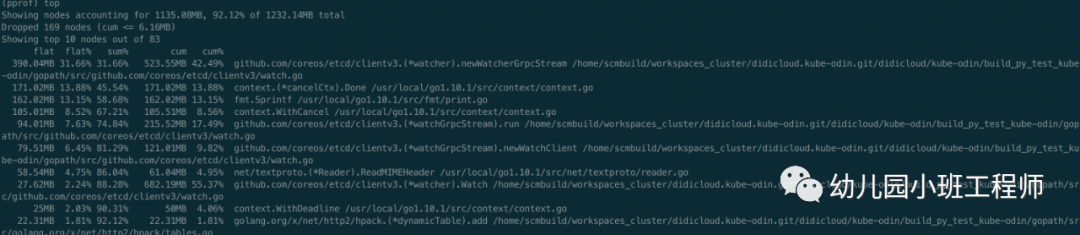
由于是測試環(huán)境,對接測試集群,本身數(shù)據(jù)量就不大,程序剛啟動時占用內(nèi)存也就百十來M,現(xiàn)在已經(jīng)用了1G多,占用內(nèi)存最多的是newWatcherGrpcStream函數(shù),還有一些其他的函數(shù),占用的內(nèi)存也在逐步增加,先看newWatcherGrpcStream函數(shù),可以通過list查看其具體內(nèi)存使用情況,如下圖
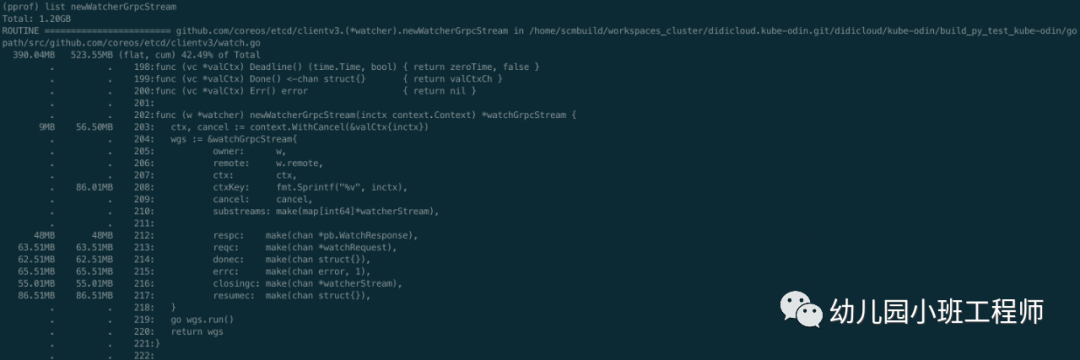
fmt.Sprintf居然都占用了86.01M內(nèi)存,還有幾個chan占用的也比較多,但是基本都是無緩存的chan,正常不會占用這么多的。一般內(nèi)存泄露可能是流未關(guān)閉,這種情況一般文件描述符也會泄露,另外就是用到緩存時也容易造成泄露,如果緩存的內(nèi)容得不到釋放且一直增加內(nèi)容,內(nèi)存就會越來越高。去看etcd相關(guān)代碼,在代碼中找問題,發(fā)現(xiàn)了一處很可疑的代碼,去掉了無關(guān)內(nèi)容,且增加了fmt.Println相關(guān)函數(shù),方便觀察每次運行到此處的緩存的結(jié)果,如下
// Watch posts a watch request to run() and waits for a new watcher channelfunc (w *watcher) Watch(ctx context.Context, key string, opts ...OpOption) WatchChan {...ctxKey := fmt.Sprintf("%v", ctx)// find or allocate appropriate grpc watch streamw.mu.Lock()if w.streams == nil {// closedw.mu.Unlock()ch := make(chan WatchResponse)close(ch)return ch}fmt.Println(ctxKey) // 打印緩存的keyfmt.Println(len(w.streams)) //打印緩存數(shù)量wgs := w.streams[ctxKey]if wgs == nil {fmt.Println("new watcher stream") //緩存里沒有對應(yīng)的keywgs = w.newWatcherGrpcStream(ctx)w.streams[ctxKey] = wgs}else{fmt.Println("use exist watcher stream") //緩存里有key,復(fù)用緩存}...}// watcher implements the Watcher interfacetype watcher struct {remote pb.WatchClient// mu protects the grpc streams mapmu sync.RWMutex// streams holds all the active grpc streams keyed by ctx value.streams map[string]*watchGrpcStream}
這里出現(xiàn)了上面的fmt.Sprintf、newWatcherGrpcStream等函數(shù),而且出現(xiàn)了緩存,即w.streams,每次watch時都是先調(diào)用fmt.Sprintf獲取到key,再從緩存中取,如果有則復(fù)用,沒有則新建,問題很有可能出現(xiàn)在這里,然后再找一下緩存刪除數(shù)據(jù)的邏輯,如下
func (w *watcher) Close() (err error) {w.mu.Lock()fmt.Println("begin close watcher")streams := w.streamsw.streams = nilw.mu.Unlock()for _, wgs := range streams {if werr := wgs.Close(); werr != nil {err = werr}}return err}func (w *watcher) closeStream(wgs *watchGrpcStream) {w.mu.Lock()fmt.Println("delete watch stream") //開始刪除緩存close(wgs.donec)wgs.cancel()if w.streams != nil {fmt.Println("before delete:",len(w.streams)) //刪除前緩存數(shù)量fmt.Println(wgs.ctxKey)if _,ok:=w.streams[wgs.ctxKey];ok{fmt.Println("delete key exist") //刪除的key在緩存里存在} else{fmt.Println("delete key NOT exist") //刪除的key在緩存里不存在}delete(w.streams, wgs.ctxKey)fmt.Println("after delete:",len(w.streams)) //刪除后緩存的數(shù)量}w.mu.Unlock()}
和刪除緩存相關(guān)的函數(shù)有兩個,第一個Close函數(shù)只有在etcdclient的關(guān)閉鏈接時才會調(diào)用,而我們在不斷的lock,unlock時其實用的是同一份etcdclient,所以不會是第一個函數(shù)。還剩一個closeStream函數(shù),這里我也加了一些打印信息,用來查看緩存相關(guān)信息,closeStream調(diào)用如下
func (w *watcher) newWatcherGrpcStream(inctx context.Context) *watchGrpcStream {...go wgs.run()return wgs}// run is the root of the goroutines for managing a watcher clientfunc (w *watchGrpcStream) run() {...defer func() {...w.owner.closeStream(w)}()...}
整個過程從插入緩存到刪除緩存看起來都沒有問題,只能寫個demo測試一下了,demo大致如下
func main() {client := instance.GetEtcdClient()locker := lock.New(client, lock.WithTTL(1*time.Second))go foo(locker)http.HandleFunc("/gc", func(writer http.ResponseWriter, request *http.Request) {runtime.GC()})http.ListenAndServe(":8080", nil)}func foo(locker lock.Locker) {ticker := time.NewTicker(1 * time.Second)ids := []string{"1", "2", "3", "4", "5", "6", "7", "8", "9", "10"}for range ticker.C {for _, v := range ids {go func(i string) {unlock, _, err := locker.Trylock(context.TODO(), fmt.Sprintf("%s/%s", "/kaku/test/etcd/lock", i))if err != nil {if err != context.DeadlineExceeded {fmt.Println("lock task failed:%s", err)}return}//fmt.Println("task has been locked")defer func() {time.Sleep(time.Second)unlock()//fmt.Println("task has been unlocked")}()}(v)}}}
特別簡單,就是不斷的去lock,unlock,結(jié)合之前增加的一些緩存打印信息,運行demo,結(jié)果如下
 context.TODO.WithCancel.WithDeadline(2019-01-27 12:03:04.293267 +0800 CST m=+3.078016721 [750.274218ms]).WithCancel
 0
 new watcher stream
 context.TODO.WithCancel.WithDeadline(2019-01-27 12:03:04.293375 +0800 CST m=+3.078124824 [704.968531ms]).WithCancel
 1
 new watcher stream
 context.TODO.WithCancel.WithDeadline(2019-01-27 12:03:04.293271 +0800 CST m=+3.078020710 [704.72989ms]).WithCancel
 2
 new watcher stream
 context.TODO.WithCancel.WithDeadline(2019-01-27 12:03:04.293342 +0800 CST m=+3.078090947 [704.058853ms]).WithCancel
 3
 new watcher stream
 context.TODO.WithCancel.WithDeadline(2019-01-27 12:03:04.293275 +0800 CST m=+3.078023966 [703.750266ms]).WithCancel
 4
 new watcher stream
 context.TODO.WithCancel.WithDeadline(2019-01-27 12:03:04.293282 +0800 CST m=+3.078031664 [703.519141ms]).WithCancel
 5
 new watcher stream
 context.TODO.WithCancel.WithDeadline(2019-01-27 12:03:04.293339 +0800 CST m=+3.078088098 [702.930648ms]).WithCancel
 6
 new watcher stream
 context.TODO.WithCancel.WithDeadline(2019-01-27 12:03:04.293454 +0800 CST m=+3.078203813 [688.620812ms]).WithCancel
 7
 new watcher stream
 context.TODO.WithCancel.WithDeadline(2019-01-27 12:03:04.293371 +0800 CST m=+3.078120807 [688.102422ms]).WithCancel
 8
 new watcher stream
 context.TODO.WithCancel.WithDeadline(2019-01-27 12:03:04.293341 +0800 CST m=+3.078090285 [688.007852ms]).WithCancel
 9
 new watcher stream
 delete watch stream
 before delete: 10
 context.TODO.WithCancel.WithDeadline(2019-01-27 12:03:04.293282 +0800 CST m=+3.078031664 [703.500369ms]).WithCancel
 delete key NOT exist
 after delete: 10
 delete watch stream
 before delete: 10
 context.TODO.WithCancel.WithDeadline(2019-01-27 12:03:04.293371 +0800 CST m=+3.078120807 [688.080708ms]).WithCancel
 delete key NOT exist
 after delete: 10
 delete watch stream
 before delete: 10
 context.TODO.WithCancel.WithDeadline(2019-01-27 12:03:04.293275 +0800 CST m=+3.078023966 [703.729632ms]).WithCancel
 delete key NOT exist
 after delete: 10
 delete watch stream
 before delete: 10
 context.TODO.WithCancel.WithDeadline(2019-01-27 12:03:04.293342 +0800 CST m=+3.078090947 [704.033358ms]).WithCancel
 delete key NOT exist
 after delete: 10
 delete watch stream
 before delete: 10
 context.TODO.WithCancel.WithDeadline(2019-01-27 12:03:04.293375 +0800 CST m=+3.078124824 [704.880537ms]).WithCancel
 delete key NOT exist
 after delete: 10
 delete watch stream
 before delete: 10
 context.TODO.WithCancel.WithDeadline(2019-01-27 12:03:04.293341 +0800 CST m=+3.078090285 [687.986963ms]).WithCancel
 delete key NOT exist
 after delete: 10
 delete watch stream
 before delete: 10
 context.TODO.WithCancel.WithDeadline(2019-01-27 12:03:04.293339 +0800 CST m=+3.078088098 [702.908025ms]).WithCancel
 delete key NOT exist
 after delete: 10
 delete watch stream
 before delete: 10
 context.TODO.WithCancel.WithDeadline(2019-01-27 12:03:04.293267 +0800 CST m=+3.078016721 [750.193256ms]).WithCancel
 delete key NOT exist
 after delete: 10
 delete watch stream
 before delete: 10
 context.TODO.WithCancel.WithDeadline(2019-01-27 12:03:04.293271 +0800 CST m=+3.078020710 [704.644318ms]).WithCancel
 delete key NOT exist
 after delete: 10
看到每次復(fù)用緩存都會失敗,而且刪除緩存的key時,key都不存在,導(dǎo)致緩存的數(shù)量一直在增加,從而導(dǎo)致使用的內(nèi)存越來越大。那為什么每次復(fù)用緩存和刪除時都找不到對應(yīng)的key呢,其實問題就出現(xiàn)在的緩存key的計算方法上
ctxKey := fmt.Sprintf("%v", ctx)簡單,粗暴,直接格式化ctx作為緩存的key,那問題就來了,我們傳入的ctx其實是context.WithTimeout后得到的,這個ctx格式化后會帶時間輸出,如上面的輸出結(jié)果,同一個ctx,每次格式化輸出得到的string其實是不一樣的,而且這個key是每次用到的時候都去獲取一次,并沒有在第一次獲取完就保存下來,所以就會導(dǎo)致每次獲取緩存都沒有這個key,刪除時也沒有,這就是問題所在了,也可以解釋為什么fmt.Sprintf居然還會占用那么多內(nèi)存的現(xiàn)象了。
目前用的3.1.3的etcd代碼,直到3.2.20版本時獲取key的方式才改變,但是當(dāng)初要改變的獲取key的方式的原因并非是發(fā)現(xiàn)了上述問題,而是之前的設(shè)計還存在另一個問題,即競態(tài)問題,見https://github.com/etcd-io/etcd/issues/8275。無心插柳柳成蔭,3.2.20版本解決了競態(tài)問題后,上面分析的問題也就解決了。
解決方案
升級etcd包版本至少到3.2.20
K8S 進階訓(xùn)練營

 點擊屏末 | 閱讀原文 | 即刻學(xué)習(xí)