
Java如何實(shí)現(xiàn)二維碼?【附源碼】
點(diǎn)擊上方[全棧開(kāi)發(fā)者社區(qū)]→右上角[...]→[設(shè)為星標(biāo)?]

來(lái)源:http://suo.im/5R6ewH
步驟1
第一步首先創(chuàng)建一個(gè)普通的 Maven 項(xiàng)目,然后要實(shí)現(xiàn)二維碼功能,我們肯定要使用別人提供好的 Jar 包,這里我用的是 google 提供的 jar,pom.xml 文件配置如下:
<project xmlns="http://maven.apache.org/POM/4.0.0"xmlns:xsi="http://www.w3.org/2001/XMLSchema-instance"xsi:schemaLocation="http://maven.apache.org/POM/4.0.0 http://maven.apache.org/xsd/maven-4.0.0.xsd"><modelVersion>4.0.0modelVersion><groupId>org.javaboygroupId><artifactId>QRCodeartifactId><version>1.0-SNAPSHOTversion><dependencies><dependency><groupId>com.google.zxinggroupId><artifactId>coreartifactId><version>3.3.0version>dependency>dependencies>project>
步驟2
然后使用 google 提供的工具類,在項(xiàng)目根目錄下創(chuàng)建一個(gè) util 包,將所需要的工具類放進(jìn)去。
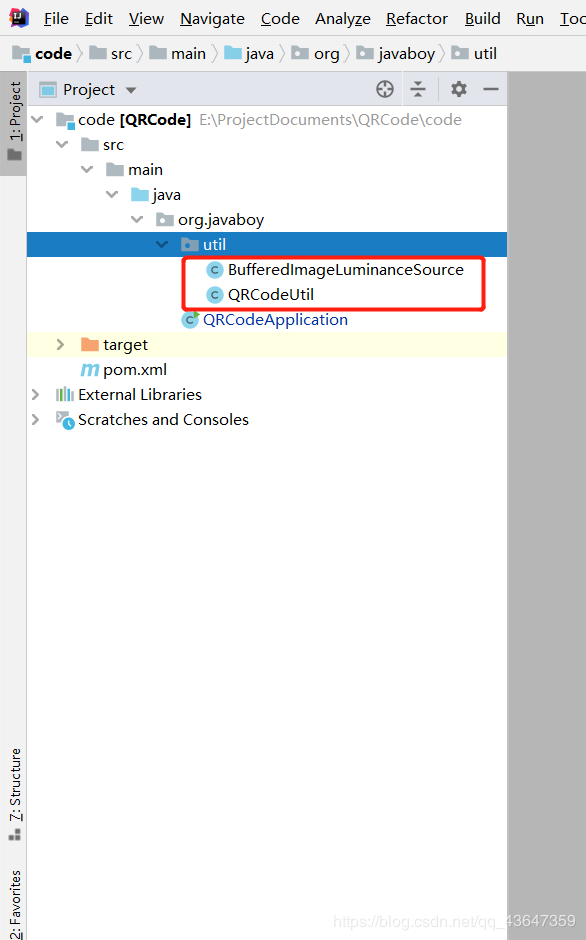
工具類1 (BufferedImageLuminanceSource)
不廢話,直接上代碼
package org.javaboy.util;import java.awt.Graphics2D;import java.awt.geom.AffineTransform;import java.awt.image.BufferedImage;import com.google.zxing.LuminanceSource;/*** @author bai* @date 2020/7/1 9:27*/public class BufferedImageLuminanceSource extends LuminanceSource {private final BufferedImage image;private final int left;private final int top;public BufferedImageLuminanceSource(BufferedImage image) {this(image, 0, 0, image.getWidth(), image.getHeight());}public BufferedImageLuminanceSource(BufferedImage image, int left, int top, int width, int height) {super(width, height);int sourceWidth = image.getWidth();int sourceHeight = image.getHeight();if (left + width > sourceWidth || top + height > sourceHeight) {throw new IllegalArgumentException("Crop rectangle does not fit within image data.");}for (int y = top; y < top + height; y++) {for (int x = left; x < left + width; x++) {if ((image.getRGB(x, y) & 0xFF000000) == 0) {image.setRGB(x, y, 0xFFFFFFFF); // = white}}}this.image = new BufferedImage(sourceWidth, sourceHeight, BufferedImage.TYPE_BYTE_GRAY);this.image.getGraphics().drawImage(image, 0, 0, null);this.left = left;this.top = top;}public byte[] getRow(int y, byte[] row) {if (y < 0 || y >= getHeight()) {throw new IllegalArgumentException("Requested row is outside the image: " + y);}int width = getWidth();if (row == null || row.length < width) {row = new byte[width];}image.getRaster().getDataElements(left, top + y, width, 1, row);return row;}public byte[] getMatrix() {int width = getWidth();int height = getHeight();int area = width * height;byte[] matrix = new byte[area];image.getRaster().getDataElements(left, top, width, height, matrix);return matrix;}public boolean isCropSupported() {return true;}public LuminanceSource crop(int left, int top, int width, int height) {return new BufferedImageLuminanceSource(image, this.left + left, this.top + top, width, height);}public boolean isRotateSupported() {return true;}public LuminanceSource rotateCounterClockwise() {int sourceWidth = image.getWidth();int sourceHeight = image.getHeight();AffineTransform transform = new AffineTransform(0.0, -1.0, 1.0, 0.0, 0.0, sourceWidth);BufferedImage rotatedImage = new BufferedImage(sourceHeight, sourceWidth, BufferedImage.TYPE_BYTE_GRAY);Graphics2D g = rotatedImage.createGraphics();g.drawImage(image, transform, null);g.dispose();int width = getWidth();return new BufferedImageLuminanceSource(rotatedImage, top, sourceWidth - (left + width), getHeight(), width);}}
工具類2 (QRCodeUtil)
這里面可以修改一些參數(shù),例如二維碼的尺寸,寬高等等。
package org.javaboy.util;import java.awt.BasicStroke;import java.awt.Graphics;import java.awt.Graphics2D;import java.awt.Image;import java.awt.Shape;import java.awt.geom.RoundRectangle2D;import java.awt.image.BufferedImage;import java.io.File;import java.io.OutputStream;import java.util.Hashtable;import javax.imageio.ImageIO;import com.google.zxing.BarcodeFormat;import com.google.zxing.BinaryBitmap;import com.google.zxing.DecodeHintType;import com.google.zxing.EncodeHintType;import com.google.zxing.MultiFormatReader;import com.google.zxing.MultiFormatWriter;import com.google.zxing.Result;import com.google.zxing.common.BitMatrix;import com.google.zxing.common.HybridBinarizer;import com.google.zxing.qrcode.decoder.ErrorCorrectionLevel;/*** @author bai* @date 2020/7/1 9:29*/public class QRCodeUtil {private static final String CHARSET = "utf-8";private static final String FORMAT_NAME = "JPG";// 二維碼尺寸private static final int QRCODE_SIZE = 300;// LOGO寬度private static final int WIDTH = 60;// LOGO高度private static final int HEIGHT = 60;private static BufferedImage createImage(String content, String imgPath, boolean needCompress) throws Exception {Hashtable hints = new Hashtable();hints.put(EncodeHintType.ERROR_CORRECTION, ErrorCorrectionLevel.H);hints.put(EncodeHintType.CHARACTER_SET, CHARSET);hints.put(EncodeHintType.MARGIN, 1);BitMatrix bitMatrix = new MultiFormatWriter().encode(content, BarcodeFormat.QR_CODE, QRCODE_SIZE, QRCODE_SIZE,hints);int width = bitMatrix.getWidth();int height = bitMatrix.getHeight();BufferedImage image = new BufferedImage(width, height, BufferedImage.TYPE_INT_RGB);for (int x = 0; x < width; x++) {for (int y = 0; y < height; y++) {image.setRGB(x, y, bitMatrix.get(x, y) ? 0xFF000000 : 0xFFFFFFFF);}}if (imgPath == null || "".equals(imgPath)) {return image;}// 插入圖片QRCodeUtil.insertImage(image, imgPath, needCompress);return image;}private static void insertImage(BufferedImage source, String imgPath, boolean needCompress) throws Exception {File file = new File(imgPath);if (!file.exists()) {System.err.println("" + imgPath + " 該文件不存在!");return;}Image src = ImageIO.read(new File(imgPath));int width = src.getWidth(null);int height = src.getHeight(null);if (needCompress) { // 壓縮LOGOif (width > WIDTH) {width = WIDTH;}if (height > HEIGHT) {height = HEIGHT;}Image image = src.getScaledInstance(width, height, Image.SCALE_SMOOTH);BufferedImage tag = new BufferedImage(width, height, BufferedImage.TYPE_INT_RGB);Graphics g = tag.getGraphics();g.drawImage(image, 0, 0, null); // 繪制縮小后的圖g.dispose();src = image;}// 插入LOGOGraphics2D graph = source.createGraphics();int x = (QRCODE_SIZE - width) / 2;int y = (QRCODE_SIZE - height) / 2;graph.drawImage(src, x, y, width, height, null);Shape shape = new RoundRectangle2D.Float(x, y, width, width, 6, 6);graph.setStroke(new BasicStroke(3f));graph.draw(shape);graph.dispose();}public static void encode(String content, String imgPath, String destPath, boolean needCompress) throws Exception {BufferedImage image = QRCodeUtil.createImage(content, imgPath, needCompress);mkdirs(destPath);// String file = new Random().nextInt(99999999)+".jpg";// ImageIO.write(image, FORMAT_NAME, new File(destPath+"/"+file));ImageIO.write(image, FORMAT_NAME, new File(destPath));}public static BufferedImage encode(String content, String imgPath, boolean needCompress) throws Exception {BufferedImage image = QRCodeUtil.createImage(content, imgPath, needCompress);return image;}public static void mkdirs(String destPath) {File file = new File(destPath);// 當(dāng)文件夾不存在時(shí),mkdirs會(huì)自動(dòng)創(chuàng)建多層目錄,區(qū)別于mkdir.(mkdir如果父目錄不存在則會(huì)拋出異常)if (!file.exists() && !file.isDirectory()) {file.mkdirs();}}public static void encode(String content, String imgPath, String destPath) throws Exception {QRCodeUtil.encode(content, imgPath, destPath, false);}// 被注釋的方法/** public static void encode(String content, String destPath, boolean* needCompress) throws Exception { QRCodeUtil.encode(content, null, destPath,* needCompress); }*/public static void encode(String content, String destPath) throws Exception {QRCodeUtil.encode(content, null, destPath, false);}public static void encode(String content, String imgPath, OutputStream output, boolean needCompress)throws Exception {BufferedImage image = QRCodeUtil.createImage(content, imgPath, needCompress);ImageIO.write(image, FORMAT_NAME, output);}public static void encode(String content, OutputStream output) throws Exception {QRCodeUtil.encode(content, null, output, false);}public static String decode(File file) throws Exception {BufferedImage image;image = ImageIO.read(file);if (image == null) {return null;}BufferedImageLuminanceSource source = new BufferedImageLuminanceSource(image);BinaryBitmap bitmap = new BinaryBitmap(new HybridBinarizer(source));Result result;Hashtable hints = new Hashtable();hints.put(DecodeHintType.CHARACTER_SET, CHARSET);result = new MultiFormatReader().decode(bitmap, hints);String resultStr = result.getText();return resultStr;}public static String decode(String path) throws Exception {return QRCodeUtil.decode(new File(path));}}
啟動(dòng)類
這一步就是調(diào)用方法,一般大家使用這種功能都是為了實(shí)現(xiàn)業(yè)務(wù),例如常見(jiàn)的掃描二維碼跳轉(zhuǎn)鏈接(頁(yè)面),掃描二維碼出現(xiàn)文字等等。有些二維碼中間還帶有 Logo 這種圖片,將需要嵌入二維碼的圖片路徑準(zhǔn)備好就沒(méi)有問(wèn)題。
package org.javaboy;import org.javaboy.util.QRCodeUtil;/*** @author bai* @date 2020/7/1 9:31*/public class QRCodeApplication {public static void main(String[] args) throws Exception {// 存放在二維碼中的內(nèi)容// 二維碼中的內(nèi)容可以是文字,可以是鏈接等String text = "http://www.baidu.com";// 嵌入二維碼的圖片路徑//String imgPath = "C:\\Users\\Administrator\\Pictures\\img\\dog.jpg";// 生成的二維碼的路徑及名稱String destPath = "C:\\Users\\bai\\Pictures\\img\\code" + System.currentTimeMillis() + ".jpg";//生成二維碼QRCodeUtil.encode(text, null, destPath, true);// 解析二維碼String str = QRCodeUtil.decode(destPath);// 打印出解析出的內(nèi)容System.out.println(str);}}
效果截圖
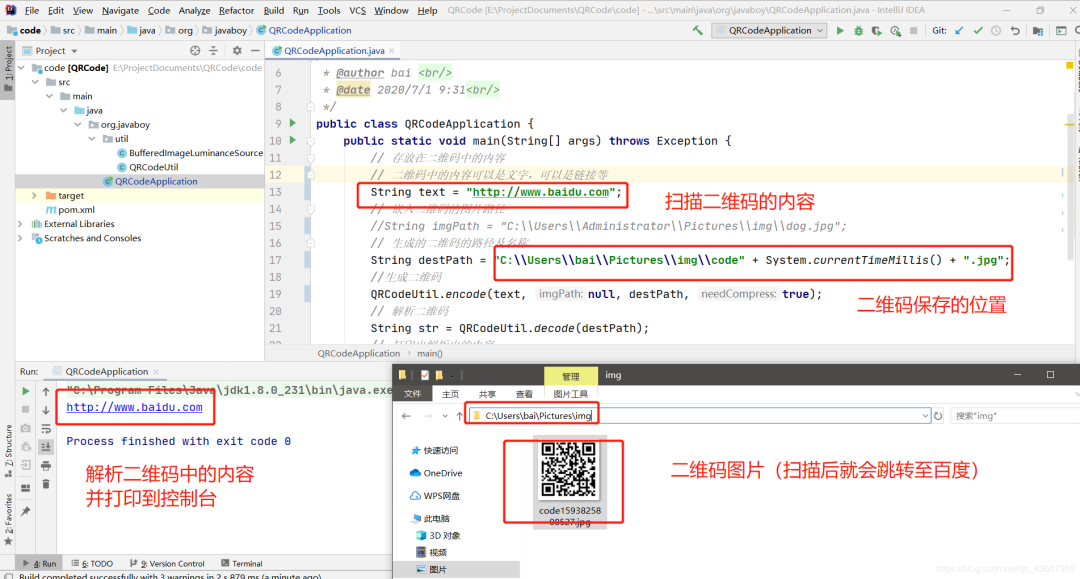
源碼奉上
碼云:https://gitee.com/jian_bo_bai/QRCode
覺(jué)得本文對(duì)你有幫助?請(qǐng)分享給更多人
關(guān)注「全棧開(kāi)發(fā)者社區(qū)」加星標(biāo),提升全棧技能
本公眾號(hào)會(huì)不定期給大家發(fā)福利,包括送書(shū)、學(xué)習(xí)資源等,敬請(qǐng)期待吧!
如果感覺(jué)推送內(nèi)容不錯(cuò),不妨右下角點(diǎn)個(gè)在看轉(zhuǎn)發(fā)朋友圈或收藏,感謝支持。
好文章,留言、點(diǎn)贊、在看和分享一條龍吧??