
Android實(shí)現(xiàn)帶浮動(dòng)標(biāo)簽的輸入框
現(xiàn)在帶浮動(dòng)標(biāo)簽的輸入框也是一個(gè)很常見的東西了,在材料設(shè)計(jì)里面有一個(gè) TextInputLayout 的控件,我們可以用它實(shí)現(xiàn)這個(gè)效果。但是材料設(shè)計(jì)控件的樣式比較固定,并不能滿足我們產(chǎn)品設(shè)計(jì)的腦洞。這里提供一個(gè)用屬性動(dòng)畫實(shí)現(xiàn)的方法。
還是先看看效果吧:
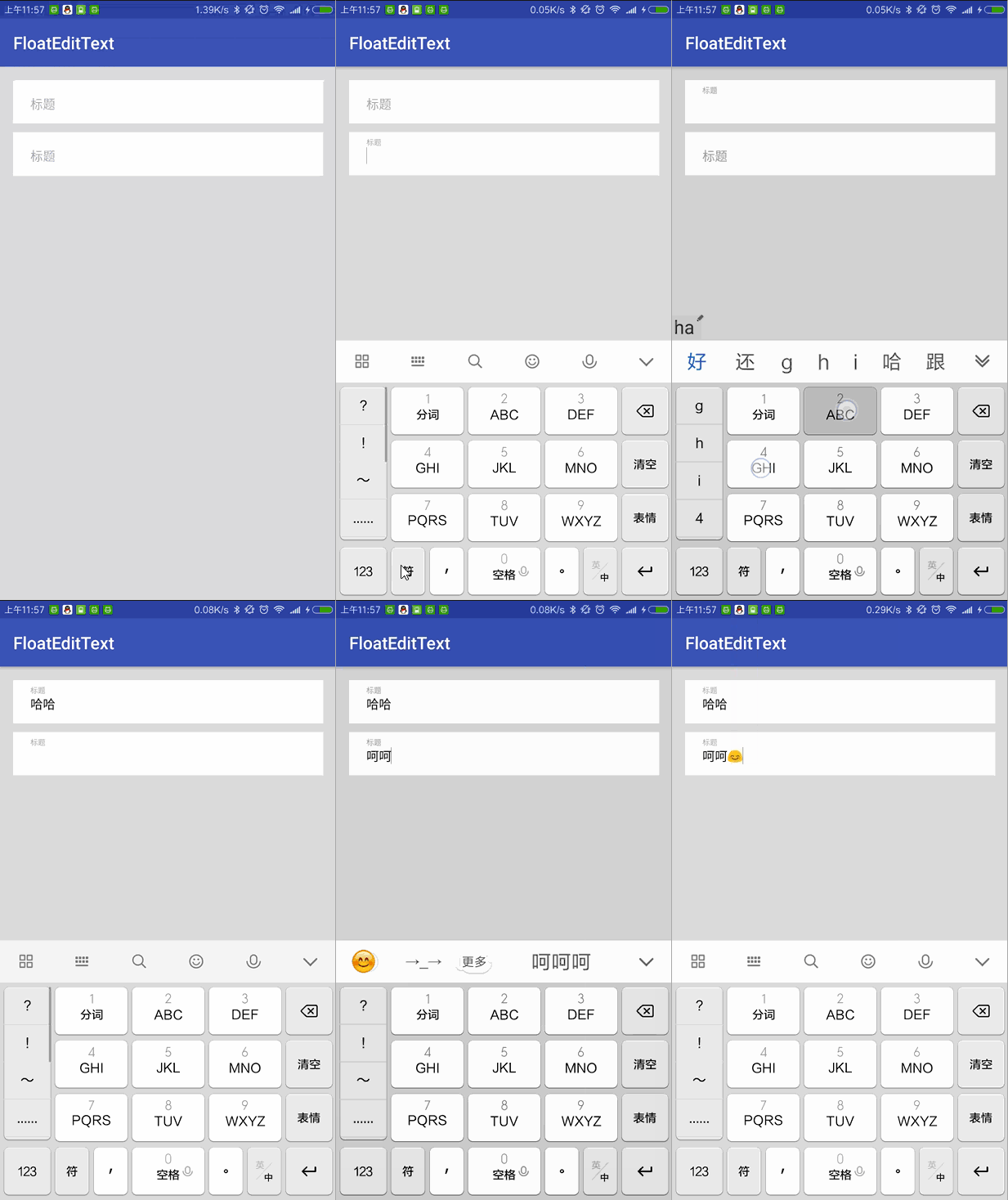
大概的思路是這樣的:
控件有兩層,一層是浮動(dòng)的標(biāo)簽,一層是輸入框。
當(dāng)點(diǎn)擊控件后,標(biāo)簽同時(shí)執(zhí)行一個(gè)橫向和縱向的縮放動(dòng)畫,還有一個(gè)向上移動(dòng)的動(dòng)畫,讓輸入框獲取到焦點(diǎn)并彈出鍵盤。
當(dāng)輸入框失去焦點(diǎn)時(shí),判斷是否有內(nèi)容,如果沒有則讓標(biāo)簽執(zhí)行一個(gè)復(fù)原的動(dòng)畫。
下面看看控件的布局:
android:id="@+id/fl_content"android:layout_width="match_parent"android:layout_height="55dp"android:background="@color/white"android:orientation="vertical"android:paddingLeft="20dp">android:id="@+id/et_content_name"android:layout_width="match_parent"android:layout_height="30dp"android:layout_gravity="center_vertical"android:background="@color/white"android:textColor="@color/black"android:textCursorDrawable="@null"android:textSize="14sp"android:visibility="gone" />android:id="@+id/tv_content_hint"android:layout_width="match_parent"android:layout_height="wrap_content"android:layout_gravity="center_vertical"android:text="標(biāo)題"android:textColor="@color/text_gray"android:textSize="14sp"android:transformPivotX="0dp"android:transformPivotY="-30dp" />
由于 EditText 會(huì)默認(rèn)獲取到焦點(diǎn),所以我先把它隱藏了。這里面值得注意的是 transformPivotXY 這個(gè)參數(shù),等下會(huì)講到。
然后我們創(chuàng)建標(biāo)簽向上縮放的方法,代碼如下:
public void animationUp() {ObjectAnimator scaleX = ObjectAnimator.ofFloat(tvHint, "scaleX", 0.6f);ObjectAnimator scaleY = ObjectAnimator.ofFloat(tvHint, "scaleY", 0.6f);AnimatorSet animatorSet = new AnimatorSet();animatorSet.setDuration(100);animatorSet.setInterpolator(new DecelerateInterpolator());animatorSet.play(scaleX).with(scaleY); //兩個(gè)動(dòng)畫同時(shí)開始animatorSet.start();animatorSet.addListener(new Animator.AnimatorListener() {@Overridepublic void onAnimationStart(Animator animation) {}@Overridepublic void onAnimationEnd(Animator animation) {etContent.setVisibility(View.VISIBLE);etContent.requestFocus();//彈出鍵盤InputMethodManager imm = (InputMethodManager) getContext().getSystemService(Context.INPUT_METHOD_SERVICE);imm.showSoftInput(etContent, 0);}@Overridepublic void onAnimationCancel(Animator animation) {}@Overridepublic void onAnimationRepeat(Animator animation) {}});}
代碼不難理解,就是同時(shí)執(zhí)行了橫向和縱向的縮放動(dòng)畫,讓標(biāo)簽縮小到 60%。動(dòng)畫執(zhí)行完后顯示EditText,讓它獲取到焦點(diǎn)并彈出鍵盤,如果
animatorSet.setInterpolator(new DecelerateInterpolator());這句不懂的話,看看下面這張圖就明白了:
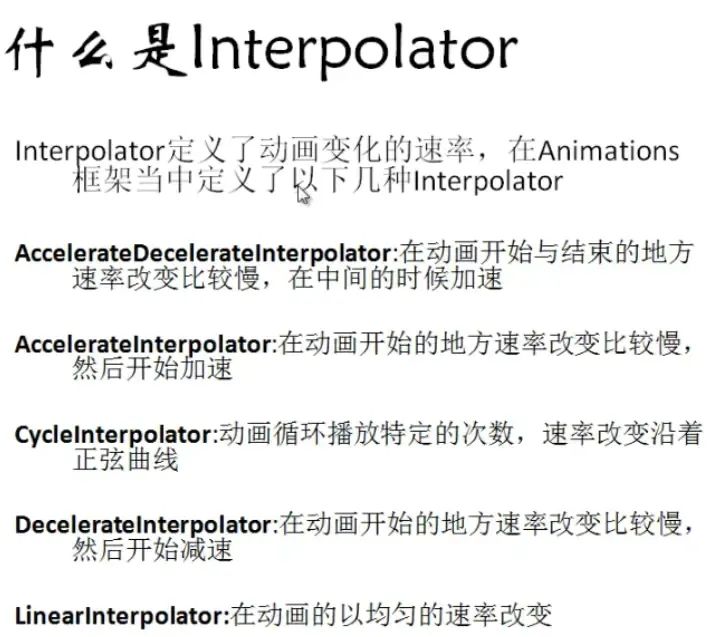
到這里,你可能還有的一個(gè)疑問就是,向上移動(dòng)的動(dòng)畫呢?
縮放動(dòng)畫是根據(jù)控件的基準(zhǔn)坐標(biāo)來進(jìn)行縮放的。也就是說,當(dāng)我們把基準(zhǔn)坐標(biāo)設(shè)在控件上方時(shí),縮放的時(shí)候也會(huì)有一個(gè)移動(dòng)的效果,所以在布局里面用
android:transformPivotX="0dp"android:transformPivotY="-30dp"
將標(biāo)簽的基準(zhǔn)點(diǎn)設(shè)為 (0dp, -30dp),這樣我們就省去了移動(dòng)動(dòng)畫。
至于復(fù)原的動(dòng)畫,就更簡(jiǎn)單了:
public void animationDown() {etContent.setVisibility(View.GONE);ObjectAnimator scaleX = ObjectAnimator.ofFloat(tvHint, "scaleX", 1);ObjectAnimator scaleY = ObjectAnimator.ofFloat(tvHint, "scaleY", 1);AnimatorSet animatorSet = new AnimatorSet();animatorSet.setDuration(100);animatorSet.setInterpolator(new DecelerateInterpolator());animatorSet.play(scaleX).with(scaleY); //兩個(gè)動(dòng)畫同時(shí)開始animatorSet.start();}
為了實(shí)現(xiàn)失去焦點(diǎn),標(biāo)簽復(fù)原,我們需要監(jiān)聽輸入框是否有焦點(diǎn):
etContent.setOnFocusChangeListener(new OnFocusChangeListener() {public void onFocusChange(View view, boolean b) {if (!b && TextUtils.isEmpty(etContent.getText())) {animationDown();}}});
這樣就已經(jīng)完成了一個(gè)帶浮動(dòng)標(biāo)簽的輸入框,妥妥的。