
用Keras寫出像PyTorch一樣的DataLoader方法
點(diǎn)擊上方“小白學(xué)視覺”,選擇加"星標(biāo)"或“置頂”
重磅干貨,第一時(shí)間送達(dá)

???? 數(shù)據(jù)導(dǎo)入、網(wǎng)絡(luò)構(gòu)建和模型訓(xùn)練永遠(yuǎn)是深度學(xué)習(xí)代碼的主要模塊。筆者此前曾寫過PyTorch數(shù)據(jù)導(dǎo)入的pipeline標(biāo)準(zhǔn)結(jié)構(gòu)總結(jié)PyTorch數(shù)據(jù)Pipeline標(biāo)準(zhǔn)化代碼模板,本文參考PyTorch的DataLoader,給Keras也總結(jié)一套自定義的DataLoader框架。

Keras常規(guī)用法
???? 按照正常人使用Keras的方法,大概就像如下代碼一樣:
import numpy as npfrom keras.models import Sequential# 導(dǎo)入全部數(shù)據(jù)X, y = np.load('some_training_set_with_labels.npy')# Design modelmodel = Sequential()[...] # 網(wǎng)絡(luò)結(jié)構(gòu)model.compile()# 模型訓(xùn)練model.fit(x=X, y=y)
???? 雖然一次性導(dǎo)入訓(xùn)練數(shù)據(jù)一定程度上能夠提高訓(xùn)練速度,但隨著數(shù)據(jù)量增多,這種將數(shù)據(jù)一次性讀入內(nèi)存的方法很容易造成顯存溢出的問題。所以,在開啟一個(gè)深度學(xué)習(xí)項(xiàng)目時(shí),一個(gè)較為明智的做法就是分批次讀取訓(xùn)練數(shù)據(jù)。
數(shù)據(jù)存放方式
???? 常規(guī)情況下,我們的訓(xùn)練數(shù)據(jù)要么是按照分類和階段有組織的存放在硬盤目錄下(多見于比賽和標(biāo)準(zhǔn)數(shù)據(jù)集),要么以csv格式將數(shù)據(jù)路徑和對應(yīng)標(biāo)簽給出(多見于深度學(xué)習(xí)項(xiàng)目情形)。
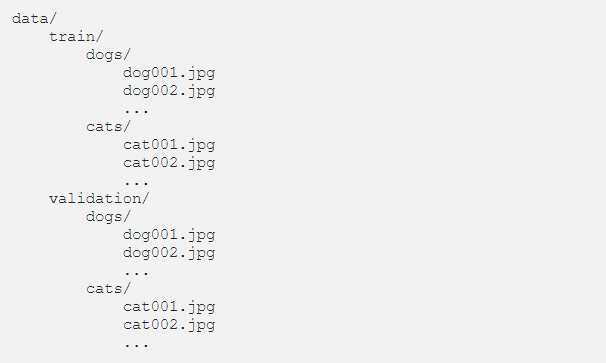
數(shù)據(jù)按照類別和使用階段存放(kaggle貓狗分類數(shù)據(jù)集)
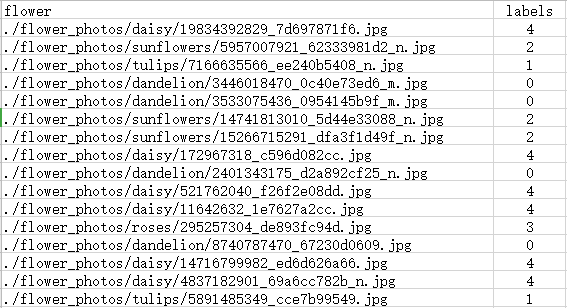
數(shù)據(jù)按照csv文件形式給出(花朵分類數(shù)據(jù)集)
ImageDataGenerator
???? Keras早就考慮到了按批次導(dǎo)入數(shù)據(jù)的需求,所以ImageDataGenerator模塊提供了按批次導(dǎo)入的數(shù)據(jù)生成器方法,包括數(shù)據(jù)增強(qiáng)和分批訓(xùn)練等方法。如下所示,分別對訓(xùn)練集和驗(yàn)證集調(diào)用ImageDataGenerator函數(shù),然后從目錄下按批次導(dǎo)入。
from?tensorflow.keras.preprocessing.image?import?ImageDataGenerator#?數(shù)據(jù)增強(qiáng)train_datagen?=?ImageDataGenerator(rescale=1./255,shear_range=0.2,zoom_range=0.2,horizontal_flip=True)test_datagen?=?ImageDataGenerator(rescale=1./255)#?從目錄下按批次讀取train_generator?=?train_datagen.flow_from_directory('data/train',target_size=(150,?150),batch_size=32,class_mode='binary')validation_generator?=?test_datagen.flow_from_directory('data/validation',target_size=(150,?150),batch_size=32,class_mode='binary')
最后對模型調(diào)用fit_generator方法進(jìn)行訓(xùn)練:
model.fit_generator(train_generator,steps_per_epoch=2000,epochs=50,validation_data=validation_generator,validation_steps=800)
???? 以上Keras提供的數(shù)據(jù)生成器的方法讀入數(shù)據(jù)雖然好,但還不夠靈活,實(shí)際深度學(xué)習(xí)項(xiàng)目會碰到各種不同的數(shù)據(jù)存放情況,根據(jù)實(shí)際情況來自定義一套類似于PyTorch的DataLoader非常有必要。
Keras Sequence
???? Keras Sequence方法用于擬合一個(gè)數(shù)據(jù)序列,每一個(gè)Sequence必須提供__getitem__和__len__方法,這跟Torch的Dataset模塊類似。Sequence是進(jìn)行多進(jìn)程處理的更安全的方法,這種結(jié)構(gòu)保證網(wǎng)絡(luò)在每個(gè)時(shí)期每個(gè)樣本只訓(xùn)練一次,這與生成器不同。使用示例如下:
from?skimage.io?import?imreadfrom?skimage.transform?import?resize?import numpy as npfrom?keras.utils import Sequence#?x_set是圖像的路徑列表?#?y_set是對應(yīng)的類別class?CIFAR10Sequence(Sequence):?????def?__init__(self,?x_set,?y_set,?batch_size):?????????self.x,?self.y?=?x_set,?y_set?self.batch_size = batch_size????def?__len__(self):?return int(np.ceil(len(self.x) / float(self.batch_size)))????def?__getitem__(self,?idx):?????????batch_x?=?self.x[idx?*?self.batch_size:(idx?+?1)?*?self.batch_size]?????????batch_y?=?self.y[idx?*?self.batch_size:(idx?+?1)?*?self.batch_size]?return np.array([ resize(imread(file_name), (200, 200)) for file_name in batch_x]), np.array(batch_y)
Torch風(fēng)格的Keras DataLoader
???? 現(xiàn)在我們針對一個(gè)13分類的多標(biāo)簽圖像分類問題來自定義Torch風(fēng)格的DataLoader。數(shù)據(jù)以csv的形式存放圖片路徑和對應(yīng)標(biāo)簽,具體如下:
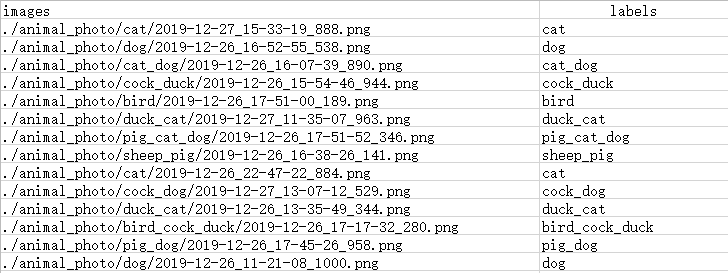
???? 可以看到,每張圖像都有至少一個(gè)、至多三個(gè)的動(dòng)物標(biāo)簽。所以標(biāo)簽在處理的時(shí)候需要進(jìn)行轉(zhuǎn)化。首先定義繼承Sequence的DataGenerator類和一些初始化方法。
class?DataGenerator(Sequence):????"""????基于Sequence的自定義Keras數(shù)據(jù)生成器????"""????def?__init__(self,?df,?list_IDs,?????????????????to_fit=True,?batch_size=8,?dim=(256,?472),?????????????????n_channels=3,?n_classes=13,?shuffle=True):????????""" 初始化方法????????:param?df:?存放數(shù)據(jù)路徑和標(biāo)簽的數(shù)據(jù)框????????:param?list_IDs:?數(shù)據(jù)索引列表????????:param?to_fit:?設(shè)定是否返回標(biāo)簽y????????:param?batch_size:?batch?size?????????:param?dim:?圖像大小????????:param?n_channels:?圖像通道????????:param?n_classes:?標(biāo)簽類別????????:param?shuffle:?每一個(gè)epoch后是否打亂數(shù)據(jù)????????"""????????self.df?=?df????????self.list_IDs?=?list_IDs????????self.to_fit?=?to_fit????????self.batch_size?=?batch_size????????self.dim?=?dim????????self.n_channels?=?n_channels????????self.n_classes?=?n_classes????????self.shuffle?=?shuffleself.on_epoch_end()
???? 然后定義on_epoch_end方法來在每個(gè)epoch之后shuffle數(shù)據(jù),以及底層數(shù)據(jù)讀取和標(biāo)簽編碼方法。
def?on_epoch_end(self):????"""每個(gè)epoch之后更新索引????"""????self.indexes?=?np.arange(len(self.list_IDs))????if?self.shuffle?==?True:np.random.shuffle(self.indexes)
???? 圖像讀取方法:
def?_load_image(self,?image_path):????"""cv2讀取圖像????"""????#?img?=?cv2.imread(image_path)????img?=?cv2.imdecode(np.fromfile(image_path,?dtype=np.uint8),?cv2.IMREAD_COLOR)????w,?h,?_?=?img.shape????if?w>h:????????img?=?np.rot90(img)????img?=?cv2.resize(img,?(472,?256))return img
???? 標(biāo)簽編碼轉(zhuǎn)換方法:
def?_labels_encode(self,?s,?keys):????"""標(biāo)簽one-hot編碼轉(zhuǎn)換????"""????cs?=?s.split('_')????y?=?np.zeros(13)????for?i?in?range(len(cs)):????????for?j?in?range(len(keys)):????????????for?c?in?cs:????????????????if?c?==?keys[j]:????????????????????y[j]?=?1return y
???? 然后定義每個(gè)批次生成圖片和標(biāo)簽的方法:
def?_generate_X(self,?list_IDs_temp):????"""生成每一批次的圖像????:param?list_IDs_temp:?批次數(shù)據(jù)索引列表????:return:?一個(gè)批次的圖像????"""????#?初始化????X?=?np.empty((self.batch_size,?*self.dim,?self.n_channels))????#?生成數(shù)據(jù)????for?i,?ID?in?enumerate(list_IDs_temp):????????#?存儲一個(gè)批次????????X[i,]?=?self._load_image(self.df.iloc[ID].images)return Xdef?_generate_y(self,?list_IDs_temp):????"""生成每一批次的標(biāo)簽????:param?list_IDs_temp:?批次數(shù)據(jù)索引列表????:return:?一個(gè)批次的標(biāo)簽????"""????y?=?np.empty((self.batch_size,?self.n_classes),?dtype=int)????#?Generate?data????for?i,?ID?in?enumerate(list_IDs_temp):????????#?Store?sample????????y[i,]?=?self._labels_encode(self.df.iloc[ID].labels,?config.LABELS)return y
???? 底層讀取和生成方法定義完成后,即可定義__getitem__和__len__方法:
def?__getitem__(self,?index):????"""生成每一批次訓(xùn)練數(shù)據(jù)????:param?index:?批次索引????:return:?訓(xùn)練圖像和標(biāo)簽????"""????#?生成批次索引????indexes?=?self.indexes[index?*?self.batch_size:(index?+?1)?*?self.batch_size]????#?索引列表????list_IDs_temp?=?[self.list_IDs[k]?for?k?in?indexes]????#?生成數(shù)據(jù)????X?=?self._generate_X(list_IDs_temp)????if?self.to_fit:????????y?=?self._generate_y(list_IDs_temp)????????return?X,?y????else:????????return?X????????def?__len__(self):????"""每個(gè)epoch下的批次數(shù)量????"""return int(np.floor(len(self.list_IDs) / self.batch_size))
????完整的Keras DataLoader代碼如下:
class DataGenerator(Sequence):"""基于Sequence的自定義Keras數(shù)據(jù)生成器"""def __init__(self, df, list_IDs,to_fit=True, batch_size=8, dim=(256, 472),n_channels=3, n_classes=13, shuffle=True):""" 初始化方法:param df: 存放數(shù)據(jù)路徑和標(biāo)簽的數(shù)據(jù)框:param list_IDs: 數(shù)據(jù)索引列表:param to_fit: 設(shè)定是否返回標(biāo)簽y:param batch_size: batch size:param dim: 圖像大小:param n_channels: 圖像通道:param n_classes: 標(biāo)簽類別:param shuffle: 每一個(gè)epoch后是否打亂數(shù)據(jù)"""self.df = dfself.list_IDs = list_IDsself.to_fit = to_fitself.batch_size = batch_sizeself.dim = dimself.n_channels = n_channelsself.n_classes = n_classesself.shuffle = shuffleself.on_epoch_end()???def __getitem__(self, index):"""生成每一批次訓(xùn)練數(shù)據(jù):param index: 批次索引:return: 訓(xùn)練圖像和標(biāo)簽"""# 生成批次索引indexes = self.indexes[index * self.batch_size:(index + 1) * self.batch_size]# 索引列表list_IDs_temp = [self.list_IDs[k] for k in indexes]# 生成數(shù)據(jù)X = self._generate_X(list_IDs_temp)if self.to_fit:y = self._generate_y(list_IDs_temp)return X, yelse:return Xdef __len__(self):"""每個(gè)epoch下的批次數(shù)量"""return int(np.floor(len(self.list_IDs) / self.batch_size))????????????def _generate_X(self, list_IDs_temp):"""生成每一批次的圖像:param list_IDs_temp: 批次數(shù)據(jù)索引列表:return: 一個(gè)批次的圖像"""# 初始化X = np.empty((self.batch_size, *self.dim, self.n_channels))# 生成數(shù)據(jù)for i, ID in enumerate(list_IDs_temp):# 存儲一個(gè)批次X[i,] = self._load_image(self.df.iloc[ID].images)return Xdef _generate_y(self, list_IDs_temp):"""生成每一批次的標(biāo)簽:param list_IDs_temp: 批次數(shù)據(jù)索引列表:return: 一個(gè)批次的標(biāo)簽"""y = np.empty((self.batch_size, self.n_classes), dtype=int)# Generate datafor i, ID in enumerate(list_IDs_temp):# Store sampley[i,] = self._labels_encode(self.df.iloc[ID].labels, config.LABELS)return y?????def on_epoch_end(self):"""每個(gè)epoch之后更新索引"""self.indexes = np.arange(len(self.list_IDs))if self.shuffle == True:np.random.shuffle(self.indexes)?????def _load_image(self, image_path):"""cv2讀取圖像"""# img = cv2.imread(image_path)img = cv2.imdecode(np.fromfile(image_path, dtype=np.uint8), cv2.IMREAD_COLOR)w, h, _ = img.shapeif w>h:img = np.rot90(img)img = cv2.resize(img, (472, 256))return img?????def _labels_encode(self, s, keys):"""標(biāo)簽one-hot編碼轉(zhuǎn)換"""cs = s.split('_')y = np.zeros(13)for i in range(len(cs)):for j in range(len(keys)):for c in cs:if c == keys[j]:y[j] = 1return y
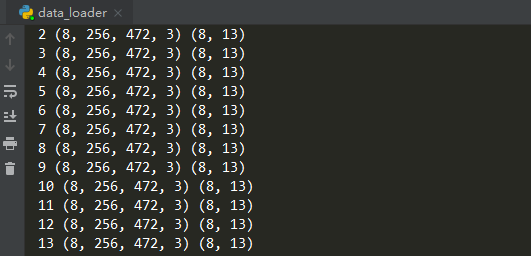
???? 使用效果如下(打印每一批次輸入輸出的shape):
???? 實(shí)際訓(xùn)練時(shí),我們可以大致編寫如下訓(xùn)練代碼框架:
import?numpy?as?npfrom keras.models import Sequentialimport?DataGenerator# Parametersparams?=?{'batch_size':?64,'n_classes': 6,'n_channels': 1,'shuffle': True}# Generatorstraining_generator?=?DataGenerator(train_df,?train_idx,?**params)validation_generator?=?DataGenerator(val_df,?val_idx, **params)# Design modelmodel = Sequential()[...] # Architecturemodel.compile()# Train model on datasetmodel.fit_generator(generator=training_generator,validation_data=validation_generator,use_multiprocessing=True,workers=4)
???? 以上就是本文主要內(nèi)容。本文提供的Keras DataLoader方法僅供參考使用,自定義Keras DataLoader還應(yīng)根據(jù)具體數(shù)據(jù)組織形式來靈活決定。
? 參考資料:
https://towardsdatascience.com/keras-data-generators-and-how-to-use-them-b69129ed779c
小白團(tuán)隊(duì)出品:零基礎(chǔ)精通語義分割↓↓↓

交流群
歡迎加入公眾號讀者群一起和同行交流,目前有SLAM、三維視覺、傳感器、自動(dòng)駕駛、計(jì)算攝影、檢測、分割、識別、醫(yī)學(xué)影像、GAN、算法競賽等微信群(以后會逐漸細(xì)分),請掃描下面微信號加群,備注:”昵稱+學(xué)校/公司+研究方向“,例如:”張三?+?上海交大?+?視覺SLAM“。請按照格式備注,否則不予通過。添加成功后會根據(jù)研究方向邀請進(jìn)入相關(guān)微信群。請勿在群內(nèi)發(fā)送廣告,否則會請出群,謝謝理解~