springboot整合ueditor
點擊上方藍色字體,選擇“標星公眾號”
優(yōu)質文章,第一時間送達
作者 | dubuxiaoxiao
來源 | urlify.cn/3ARrMf
也許并不是最簡單的方法,僅記錄自己成功的步驟
1.pom文件
ueditor用到了這三個依賴
<dependency>
        <groupId>commons-fileupload</groupId>
        <artifactId>commons-fileupload</artifactId>
        <version>1.4</version>
    </dependency>
    <dependency>
        <groupId>org.json</groupId>
        <artifactId>json</artifactId>
        <version>20140107</version>
    </dependency>
    <dependency>
        <groupId>commons-codec</groupId>
        <artifactId>commons-codec</artifactId>
        <version>1.9</version>
    </dependency>
2.下載ueditor
github下載了ueditor-1.4.3.3的壓縮包,下載這個版本是因為有jsp文件,后面要用
3.前端配置
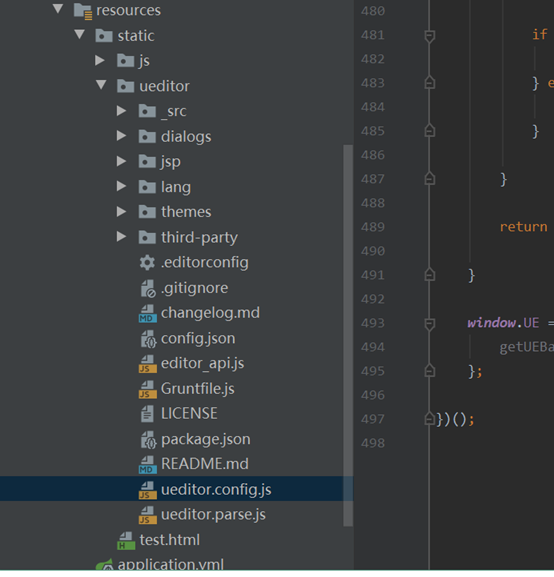
解壓后放在項目可訪問的路徑,我直接放在了resources/static文件下,同時在static文件下添加test.html文件,內容如下
<!doctype html>
<html lang="en">
<head>
    <meta charset="UTF-8">
    <title>富文本部署測試</title>
    <script type="text/javascript" src="ueditor/ueditor.config.js"></script>
    <script type="text/javascript" src="ueditor/editor_api.js"></script>
</head>
<body>
<script id="container" name="content" type="text/plain">默認文本</script>
<script type="text/javascript">
    var ue = UE.getEditor('container')
</script>
</body>
</html>
其中有兩個引入文件,ueditor.config.js本來就有,editor_api.js是從ueditor/_examples文件夾下復制來的(網上查到的是需要editor.all.js文件,需要執(zhí)行命令生成,有人指出editor_api.js文件與editor.all.js相同,于是我直接用了editor_api.js文件),同時將editor_api.js文件中baseURL改為baseURL = 'ueditor/_src/'
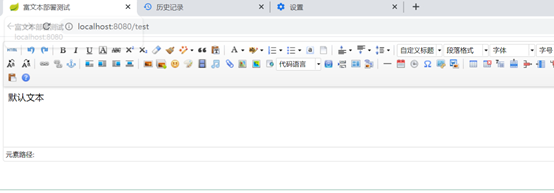
隨后添加test.html的controller,啟動項目,訪問test.html,看到富文本的編輯頁面,表示這一步成功(失敗大概是靜態(tài)文件沒找到,f12好好看下,確定有的話刪除target,重新編譯)
4.后端配置
上傳下載功能不能用,f12查看,有l(wèi)ocalhost:8080/ueditor/php/controller.php?action=config&&noCache=1619763509006請求是失敗的,這個請求是獲取上傳下載的一些配置信息的
解決:
(1)在ueditor.config.js中修改請求路徑,serverUrl值改為fwbcontroller,同時controller文件中添加該請求路徑與處理代碼,如下:
@RequestMapping("/fwbcontroller")
@ResponseBody
public String uController(HttpServletRequest request) throws IOException, URISyntaxException {
    request.setCharacterEncoding( "utf-8" );
    return new ActionEnter( request, "" ).exec();
}
這是抄襲的ueditor/jsp/controller.jsp,因為后面修改了一些代碼,new ActionEnter( request, "" )中的第二個參數就沒有用了,直接寫空字符串即可,同時復制引入ueditor/jso/src中的代碼,ActionEnter的類描述就在這些代碼里。
(2)改ueditor/jso/src文件的代碼
引入還不行,代碼有問題,要改,找到ConfigManager.java文件,readFile方法重寫為:
private String readFile ( String path ) throws IOException {

   StringBuilder builder = new StringBuilder();

   try {
      ClassPathResource classPathResource = new ClassPathResource("static/ueditor/config.json");
      InputStream inputStream = classPathResource.getInputStream();
      InputStreamReader reader = new InputStreamReader( inputStream, "UTF-8" );
      BufferedReader bfReader = new BufferedReader( reader );

      String tmpContent = null;

      while ( ( tmpContent = bfReader.readLine() ) != null ) {
         builder.append( tmpContent );
      }

      bfReader.close();

   } catch ( UnsupportedEncodingException e ) {
      // 忽略
   }
   return this.filter( builder.toString() );
}
代碼需要讀取config.json文件,這個文件在ueditor/jsp中有,將其移動到ueditor/下(原先代碼有缺陷,在將項目打包為jar之后config.json獲取不到,不打包的話不會有影響)
之后是重頭戲,網上很多人提這個問題,進入富文本后,上傳圖片,提示未找到數據,網上說這是ueditor和spring不兼容的原因,我最終debug到了ueditor的代碼,發(fā)現BinaryUploader文件中的save方法存在問題(其中Iterator.hasNext()一開始就為false,按理說應該獲取到request數據保存的,為什么沒獲取到呢...),修改save方法即可
try {
   MultipartHttpServletRequest multipartRequest = (MultipartHttpServletRequest) request;
   MultipartFile multipartFile = multipartRequest.getFile(conf.get("fieldName").toString());

   String savePath = (String) conf.get("savePath");
   String originFileName = multipartFile.getOriginalFilename();
   String suffix = FileType.getSuffixByFilename(originFileName);

   originFileName = originFileName.substring(0,originFileName.length() - suffix.length());
   savePath = savePath + suffix;

   long maxSize = ((Long) conf.get("maxSize")).longValue();

   if (!validType(suffix, (String[]) conf.get("allowFiles"))) {
      return new BaseState(false, AppInfo.NOT_ALLOW_FILE_TYPE);
   }
   /***********/
   //自定義
   savePath = PathFormat.parse(savePath, originFileName);

   String [] savePathBySplit_temp = savePath.split("/");
   String temp = "";
   String fileName = savePathBySplit_temp[savePathBySplit_temp.length-1];
   for(int i = 1;i < savePathBySplit_temp.length-1; i++){
      if(i!=savePathBySplit_temp.length-1){
         temp+=savePathBySplit_temp[i]+"/";
      }else{
         temp+=savePathBySplit_temp[i];
      }
   }
   String pathTemp = System.getProperty("java.io.tmpdir")+temp;
   System.out.println(pathTemp+","+fileName);
   System.out.println(new File(pathTemp).exists());
   File targetFile = new File(pathTemp);
   if(!targetFile.exists()){
      targetFile.mkdirs();
   }
   System.out.println(new File(pathTemp).exists());
   /************/
   //State storageState = StorageManager.saveFileByInputStream(multipartFile.getInputStream(),savePath, maxSize);
   State storageState = StorageManager.saveFileByInputStream(multipartFile.getInputStream(),pathTemp+"/"+fileName, maxSize);

   if (storageState.isSuccess()) {
      storageState.putInfo("url", PathFormat.format(savePath.substring(1)));
      storageState.putInfo("type", suffix);
      storageState.putInfo("original", originFileName + suffix);
   }

   return storageState;

}catch (Exception e) {
   e.printStackTrace();
   System.out.println(e.getMessage());
}
return new BaseState(false, AppInfo.IO_ERROR);
其中System.getProperty("java.io.tmpdir")獲取到的是c:/users/用戶名/Appdata/Local/Temp目錄,將圖片保存在這里(其他路徑也可),同時在yml文件中添加這部分目錄的映射,不然訪問不到(紅色是新添的,黑色是原先默認,都要寫上)
spring:
  resources:
    static-locations: file:${java.io.tmpdir},classpath:/META-INF/resources/,classpath:/resources/,classpath:/static/,classpath:/public/
這下既可以保存到,又可以訪問到了,重啟項目,圖片上傳成功
另:config.json文件有上傳文件的一些配置,如保存路徑(指子路徑,比如上面代碼保存路徑在Temp文件夾下,那么子路徑從Temp開始,為"/ueditor/jsp/upload/image/{yyyy}{mm}{dd}/{time}{rand:6}"
),圖片大小限制等。
學習到的一些東西:
1.打包后的jar包無法使用普通的(普通指通過File或InputStream流等讀取文件的方法)方法來獲取其中的靜態(tài)文件(因為jar包本身就只是一個文件),但可以使用類似如下方法:
ClassPathResource classPathResource = new ClassPathResource("static/ueditor/config.json");
InputStream inputStream = classPathResource.getInputStream();
從上面代碼看出,默認目錄好像是源代碼中的resources目錄,具體怎樣還沒有深入了解,另外網上也可以找到其他的一些方法,都可以在jar包中獲取靜態(tài)資源。