
ConstraintLayout使用場(chǎng)景必知必會(huì)
ConstraintLayout的布局優(yōu)越性已經(jīng)不用再?gòu)?qiáng)調(diào)了,通過(guò)ConstraintLayout的約束思想,可以很方便的解決一些之前需要寫(xiě)很復(fù)雜的動(dòng)態(tài)代碼才能完成的效果。
早在2016年,我就已經(jīng)逐漸將項(xiàng)目中的布局進(jìn)行約束化,采用ConstraintLayout來(lái)替換原有布局,同時(shí)對(duì)ConstraintLayout的基礎(chǔ)使用,進(jìn)行了總結(jié),感興趣的入門(mén)開(kāi)發(fā)者可以參考下面的文章。
https://blog.csdn.net/eclipsexys/article/details/52609367
國(guó)際慣例,官網(wǎng)鎮(zhèn)樓,這是入門(mén)ConstraintLayout最好的資料。
https://developer.android.com/training/constraint-layout?hl=zh-cn
當(dāng)然,ConstraintLayout并不是解決所有布局問(wèn)題的銀彈,在下面的這些場(chǎng)景下使用,可以算得上ConstraintLayout的最佳實(shí)踐,可以達(dá)到事半功倍的效果。
固定比例視圖
考慮下面這個(gè)場(chǎng)景,組件寬度撐滿(mǎn)屏幕,高度按「寬度x固定比例」計(jì)算。
這樣的布局,在以往的布局方式下,都需要通過(guò)動(dòng)態(tài)計(jì)算后修改高度來(lái)實(shí)現(xiàn),但是通過(guò)ConstraintLayout,則可以直接在XML中實(shí)現(xiàn)。
????android:layout_width="match_parent"
????android:layout_height="@dimen/length_0"
????app:layout_constraintDimensionRatio="1:0.34"
????app:layout_constraintStart_toStartOf="parent"
????app:layout_constraintTop_toTopOf="parent"?/>
通過(guò)DimensionRatio,可以很方便的實(shí)現(xiàn)比例視圖的控制,同時(shí),比例可以設(shè)置的很靈活,滿(mǎn)足各種條件的需要。
N等分布局
常見(jiàn)的N等分布局,例如三等分布局,通常都需要進(jìn)行動(dòng)態(tài)計(jì)算,根據(jù)屏幕寬度,減去間距后得到每部分的寬度,再動(dòng)態(tài)設(shè)置給每個(gè)元素,而通過(guò)ConstraintLayout,則可以直接實(shí)現(xiàn)這樣的效果。
"1.0"?encoding="utf-8"?>
"http://schemas.android.com/apk/res/android"
????xmlns:app="http://schemas.android.com/apk/res-auto"
????xmlns:tools="http://schemas.android.com/tools"
????android:layout_width="match_parent"
????android:layout_height="wrap_content"
????android:layout_marginLeft="@dimen/length_16"
????android:layout_marginRight="@dimen/length_16">

????????????android:id="@+id/bookCover1"
????????android:layout_width="0dp"
????????android:layout_height="0dp"
????????app:layout_constraintDimensionRatio="0.74:1"
????????app:layout_constraintEnd_toStartOf="@+id/bookCover2"
????????app:layout_constraintHorizontal_chainStyle="spread_inside"
????????app:layout_constraintStart_toStartOf="parent"
????????app:layout_constraintTop_toTopOf="parent"
????????app:layout_constraintWidth_percent="0.30"
????????tools:srcCompat="@tools:sample/avatars"?/>

????????????android:id="@+id/bookCover2"
????????android:layout_width="0dp"
????????android:layout_height="0dp"
????????android:visibility="invisible"
????????app:layout_constraintDimensionRatio="0.74:1"
????????app:layout_constraintEnd_toStartOf="@+id/bookCover3"
????????app:layout_constraintStart_toEndOf="@+id/bookCover1"
????????app:layout_constraintTop_toTopOf="@+id/bookCover1"
????????app:layout_constraintWidth_percent="0.30"
????????tools:srcCompat="@tools:sample/avatars"?/>

????????????android:id="@+id/bookCover3"
????????android:layout_width="0dp"
????????android:layout_height="0dp"
????????app:layout_constraintDimensionRatio="0.74:1"
????????app:layout_constraintEnd_toEndOf="parent"
????????app:layout_constraintStart_toEndOf="@+id/bookCover2"
????????app:layout_constraintTop_toTopOf="@+id/bookCover2"
????????app:layout_constraintWidth_percent="0.30"
????????tools:srcCompat="@tools:sample/avatars"?/>
效果如下圖所示。
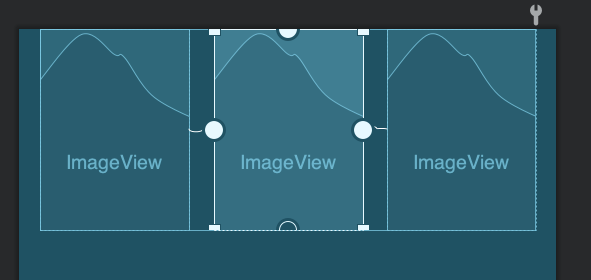
這其中的間距,主要是通過(guò)layout_constraintWidth_percent來(lái)設(shè)置在當(dāng)前容器尺寸下所占百分比來(lái)進(jìn)一步約束大小。
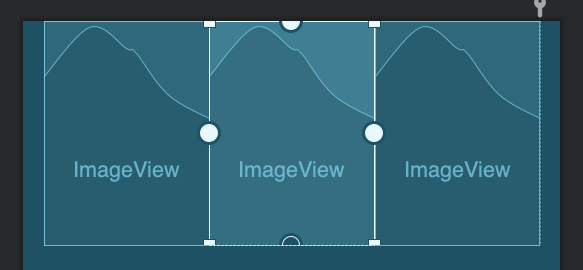
如果去掉這個(gè)屬性,那么會(huì)直接等分父容器尺寸。
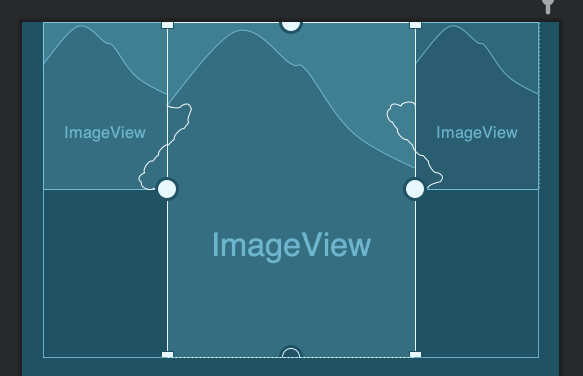
另外,還可以通過(guò)layout_constraintHorizontal_weight屬性來(lái)控制類(lèi)似LinearLayout的weight屬性的效果,實(shí)現(xiàn)按權(quán)重進(jìn)行分配。
復(fù)雜的元素相對(duì)居中
在整個(gè)View中,針對(duì)某個(gè)固定元素,其它的元素圍繞它做的各種對(duì)齊方式,在之前是很難直接完成的,即使是使用-margin的方式,也很難實(shí)現(xiàn)動(dòng)態(tài)可變尺寸的居中,而在ConstraintLayout中,這就變得很簡(jiǎn)單了。
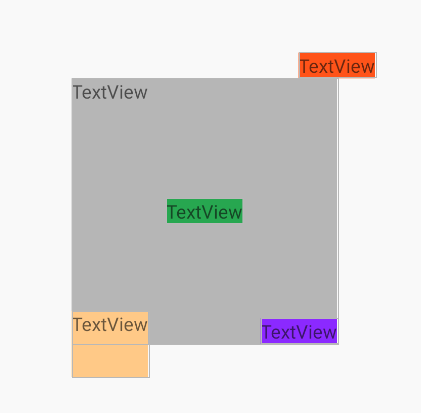
代碼就不貼了,ConstraintLayout基操。
百分比對(duì)齊
在ConstraintLayout中,雖然不能使用-margin的方式來(lái)完成傳統(tǒng)布局中的一些錯(cuò)位的效果,但是可以借助Space來(lái)實(shí)現(xiàn)類(lèi)似的功能,例如借助Space來(lái)實(shí)現(xiàn)左邊TextView在右邊TextView某一百分比(或者是dp)對(duì)齊的場(chǎng)景。
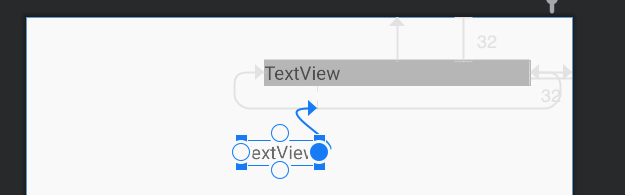
代碼如下所示。
"1.0"?encoding="utf-8"?>
"http://schemas.android.com/apk/res/android"
????xmlns:app="http://schemas.android.com/apk/res-auto"
????xmlns:tools="http://schemas.android.com/tools"
????android:layout_width="match_parent"
????android:layout_height="match_parent">

????????????android:id="@+id/textView2"
????????android:layout_width="200dp"
????????android:layout_height="wrap_content"
????????android:layout_marginTop="32dp"
????????android:layout_marginEnd="32dp"
????????android:background="#bebebe"
????????android:text="TextView"
????????app:layout_constraintEnd_toEndOf="parent"
????????app:layout_constraintTop_toTopOf="parent"?/>

????????????android:id="@+id/space"
????????android:layout_width="wrap_content"
????????android:layout_height="wrap_content"
????????app:layout_constraintEnd_toEndOf="@+id/textView2"
????????app:layout_constraintHorizontal_bias="0.2"
????????app:layout_constraintStart_toStartOf="@+id/textView2"
????????tools:layout_editor_absoluteY="68dp"?/>

????????????android:id="@+id/textView3"
????????android:layout_width="wrap_content"
????????android:layout_height="wrap_content"
????????android:text="TextView"
????????app:layout_constraintEnd_toStartOf="@+id/space"
????????tools:layout_editor_absoluteY="92dp"?/>
????
由于ConstraintLayout不支持-Margin,所以很多場(chǎng)景下,我們都可以借助Space等輔助元素來(lái)實(shí)現(xiàn)中轉(zhuǎn),完成傳統(tǒng)布局下通過(guò)-Margin實(shí)現(xiàn)的效果。
角度布局
通過(guò)角度的方式來(lái)對(duì)元素進(jìn)行排列,在傳統(tǒng)布局中,只能通過(guò)FrameLayout,并通過(guò)動(dòng)態(tài)計(jì)算的方式,將角度換算為邊距的方式來(lái)布局,但通過(guò)ConstraintLayout,則變的非常簡(jiǎn)單。
"1.0"?encoding="utf-8"?>
"http://schemas.android.com/apk/res/android"
????xmlns:app="http://schemas.android.com/apk/res-auto"
????android:layout_width="match_parent"
????android:layout_height="match_parent">

????????????android:id="@+id/textView1"
????????android:layout_width="wrap_content"
????????android:layout_height="wrap_content"
????????android:text="Center"
????????app:layout_constraintBottom_toBottomOf="parent"
????????app:layout_constraintEnd_toEndOf="parent"
????????app:layout_constraintStart_toStartOf="parent"
????????app:layout_constraintTop_toTopOf="parent"?/>

????????????android:id="@+id/textView2"
????????android:layout_width="wrap_content"
????????android:layout_height="wrap_content"
????????android:text="30"
????????app:layout_constraintBottom_toTopOf="@+id/textView1"
????????app:layout_constraintCircle="@id/textView1"
????????app:layout_constraintCircleAngle="30"
????????app:layout_constraintCircleRadius="100dp"
????????app:layout_constraintStart_toEndOf="@+id/textView1"?/>

????????????android:id="@+id/textView3"
????????android:layout_width="wrap_content"
????????android:layout_height="wrap_content"
????????android:text="60"
????????app:layout_constraintBottom_toTopOf="@+id/textView1"
????????app:layout_constraintCircle="@id/textView1"
????????app:layout_constraintCircleAngle="60"
????????app:layout_constraintCircleRadius="100dp"
????????app:layout_constraintStart_toEndOf="@+id/textView1"?/>

????????????android:id="@+id/textView4"
????????android:layout_width="wrap_content"
????????android:layout_height="wrap_content"
????????android:text="90"
????????app:layout_constraintBottom_toTopOf="@+id/textView1"
????????app:layout_constraintCircle="@id/textView1"
????????app:layout_constraintCircleAngle="90"
????????app:layout_constraintCircleRadius="100dp"
????????app:layout_constraintStart_toEndOf="@+id/textView1"?/>
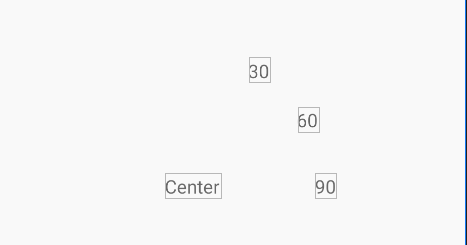
這種布局的方式,涉及的屬性如下。
layout_constraintCircleAngle
layout_constraintCircleRadius
layout_constraintStart_toEndOf
通過(guò)這幾個(gè)屬性就可以很方便的按照角度坐標(biāo)來(lái)進(jìn)行布局。
整體居中
通過(guò)Chain可以實(shí)現(xiàn)多個(gè)元素在邊緣約束的場(chǎng)景下居中的效果,如圖所示。
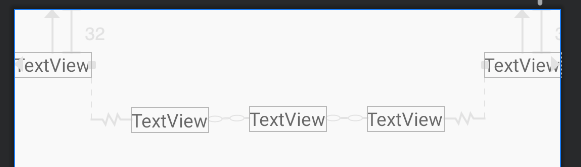
這也是ConstraintLayout基操,不細(xì)說(shuō)了。
超長(zhǎng)限制強(qiáng)制約束
考慮下面這個(gè)場(chǎng)景,最下面的TextView最大不會(huì)超過(guò)第一個(gè)TextView的寬度。
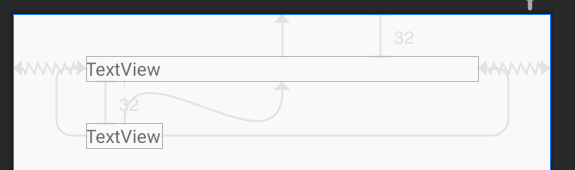
"1.0"?encoding="utf-8"?>
"http://schemas.android.com/apk/res/android"
????xmlns:app="http://schemas.android.com/apk/res-auto"
????android:layout_width="match_parent"
????android:layout_height="match_parent">

????????????android:id="@+id/textView2"
????????android:layout_width="300dp"
????????android:layout_height="wrap_content"
????????android:layout_marginTop="32dp"
????????android:text="TextView"
????????app:layout_constraintEnd_toEndOf="parent"
????????app:layout_constraintStart_toStartOf="parent"
????????app:layout_constraintTop_toTopOf="parent"?/>

????????????android:id="@+id/textView3"
????????android:layout_width="wrap_content"
????????android:layout_height="wrap_content"
????????android:layout_marginTop="32dp"
????????android:ellipsize="end"
????????android:singleLine="true"
????????android:text="TextViewTextViewTextViewTextViewTextViewTextViewTextViewTextViewTextViewTextView"
????????app:layout_constrainedWidth="true"
????????app:layout_constraintEnd_toEndOf="@+id/textView2"
????????app:layout_constraintHorizontal_bias="0.0"
????????app:layout_constraintStart_toStartOf="@+id/textView2"
????????app:layout_constraintTop_toBottomOf="@+id/textView2"?/>
????
效果如下所示。
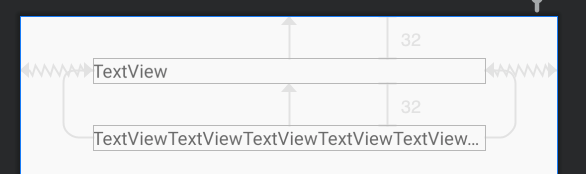
這時(shí)候就需要通過(guò)使用constrainedWidth來(lái)使其寬度約束強(qiáng)制生效。
類(lèi)似的,再考慮下面這個(gè)場(chǎng)景。
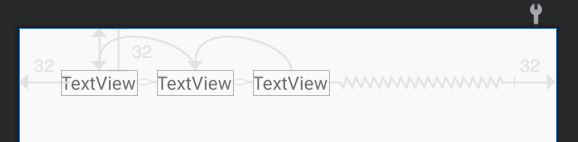
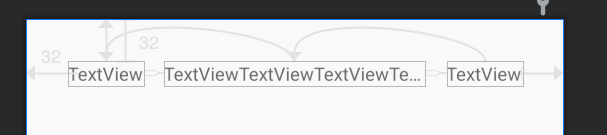
當(dāng)?shù)诙€(gè)TextView文字超長(zhǎng)的時(shí)候,希望它截?cái)啵粫?huì)影響左右的TextView。這個(gè)場(chǎng)景非常常用,在很多業(yè)務(wù)場(chǎng)景下都會(huì)使用到這樣的功能,傳統(tǒng)布局下,只能在布局時(shí)動(dòng)態(tài)計(jì)算文字寬度來(lái)進(jìn)行動(dòng)態(tài)修改,但通過(guò)ConstraintLayout,則可以非常方便的實(shí)現(xiàn)。
"1.0"?encoding="utf-8"?>
"http://schemas.android.com/apk/res/android"
????xmlns:app="http://schemas.android.com/apk/res-auto"
????android:layout_width="match_parent"
????android:layout_height="match_parent">

????????????android:id="@+id/textView4"
????????android:layout_width="wrap_content"
????????android:layout_height="wrap_content"
????????android:layout_marginStart="32dp"
????????android:layout_marginTop="32dp"
????????android:text="TextView"
????????app:layout_constraintEnd_toStartOf="@+id/textView5"
????????app:layout_constraintHorizontal_bias="0.0"
????????app:layout_constraintHorizontal_chainStyle="packed"
????????app:layout_constraintStart_toStartOf="parent"
????????app:layout_constraintTop_toTopOf="parent"?/>

????????????android:id="@+id/textView5"
????????android:layout_width="wrap_content"
????????android:layout_height="wrap_content"
????????android:layout_marginStart="16dp"
????????android:layout_marginEnd="16dp"
????????android:ellipsize="end"
????????android:singleLine="true"
????????android:text="TextView"
????????app:layout_constrainedWidth="true"
????????app:layout_constraintEnd_toStartOf="@+id/textView6"
????????app:layout_constraintHorizontal_bias="0.5"
????????app:layout_constraintStart_toEndOf="@+id/textView4"
????????app:layout_constraintTop_toTopOf="@+id/textView4"?/>

????????????android:id="@+id/textView6"
????????android:layout_width="wrap_content"
????????android:layout_height="wrap_content"
????????android:layout_marginEnd="32dp"
????????android:text="TextView"
????????app:layout_constraintEnd_toEndOf="parent"
????????app:layout_constraintHorizontal_bias="0.5"
????????app:layout_constraintStart_toEndOf="@+id/textView5"
????????app:layout_constraintTop_toTopOf="@+id/textView5"?/>
????
多組件協(xié)同約束
考慮下面這個(gè)場(chǎng)景,多個(gè)組件的寬度不定,需要取最大寬度的組件在布局中展示,例如下面這個(gè)例子。
Email和Password兩個(gè)TextView的寬度可能因?yàn)槲淖值牟灰粯佣煌枰麄冋w取最大寬度后,與右邊元素進(jìn)行對(duì)齊,如下所示。
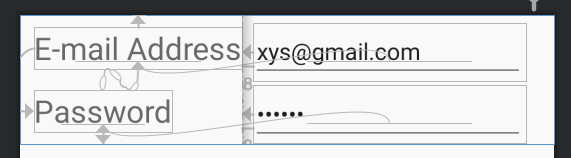
這時(shí)候,就需要使用Barrier。Barrier可以理解為一個(gè)柵欄,Barrier和Group一樣,通過(guò)constraint_referenced_ids來(lái)組合需要作用的組件,代碼如下。
"1.0"?encoding="utf-8"?>
"http://schemas.android.com/apk/res/android"
????xmlns:app="http://schemas.android.com/apk/res-auto"
????xmlns:tools="http://schemas.android.com/tools"
????android:layout_width="match_parent"
????android:layout_height="wrap_content">

????????????android:id="@+id/email"
????????android:layout_width="wrap_content"
????????android:layout_height="wrap_content"
????????android:layout_marginBottom="8dp"
????????android:textSize="24sp"
????????app:layout_constraintBottom_toTopOf="@+id/password"
????????app:layout_constraintStart_toStartOf="@+id/password"
????????app:layout_constraintTop_toTopOf="parent"
????????app:layout_constraintVertical_chainStyle="packed"
????????tools:text="E-mail?Address"?/>

????????????android:id="@+id/emailInput"
????????android:layout_width="wrap_content"
????????android:layout_height="wrap_content"
????????android:layout_marginStart="8dp"
????????android:ems="10"
????????android:inputType="textEmailAddress"
????????android:text="[email protected]"
????????app:layout_constraintBaseline_toBaselineOf="@+id/email"
????????app:layout_constraintStart_toEndOf="@+id/barrier"?/>

????????????android:id="@+id/password"
????????android:layout_width="wrap_content"
????????android:layout_height="wrap_content"
????????android:layout_marginTop="8dp"
????????android:text="Password"
????????android:textSize="24sp"
????????app:layout_constraintBottom_toBottomOf="parent"
????????app:layout_constraintTop_toBottomOf="@+id/email"
????????tools:layout_editor_absoluteX="11dp"?/>

????????????android:id="@+id/passwordInput"
????????android:layout_width="wrap_content"
????????android:layout_height="wrap_content"
????????android:layout_marginStart="8dp"
????????android:ems="10"
????????android:inputType="textPassword"
????????android:text="666666"
????????app:layout_constraintBaseline_toBaselineOf="@+id/password"
????????app:layout_constraintStart_toEndOf="@+id/barrier"?/>

????????????android:id="@+id/barrier"
????????android:layout_width="wrap_content"
????????android:layout_height="wrap_content"
????????app:barrierDirection="right"
????????app:constraint_referenced_ids="email,password"?/>
其中barrierDirection設(shè)置為right,即右側(cè)不超過(guò)Barrier,再讓剩余組件與Barrier進(jìn)行約束即可。
容器約束下的邊界約束
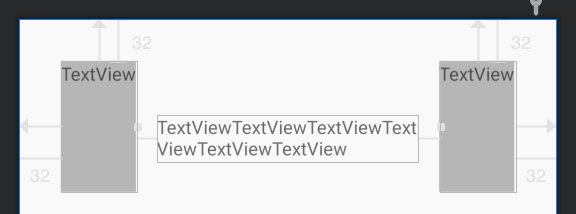
考慮下面這個(gè)場(chǎng)景,中間的TextView被約束在兩邊的組件中,如下所示。
"1.0"?encoding="utf-8"?>
"http://schemas.android.com/apk/res/android"
????xmlns:app="http://schemas.android.com/apk/res-auto"
????xmlns:tools="http://schemas.android.com/tools"
????android:layout_width="match_parent"
????android:layout_height="match_parent">

????????????android:id="@+id/textView4"
????????android:layout_width="wrap_content"
????????android:layout_height="100dp"
????????android:layout_marginStart="32dp"
????????android:layout_marginTop="32dp"
????????android:background="#bebebe"
????????android:text="TextView"
????????app:layout_constraintStart_toStartOf="parent"
????????app:layout_constraintTop_toTopOf="parent"?/>

????????????android:id="@+id/textView5"
????????android:layout_width="wrap_content"
????????android:layout_height="100dp"
????????android:layout_marginTop="32dp"
????????android:layout_marginEnd="32dp"
????????android:background="#bebebe"
????????android:text="TextView"
????????app:layout_constraintEnd_toEndOf="parent"
????????app:layout_constraintTop_toTopOf="parent"?/>

????????????android:id="@+id/textView6"
????????android:layout_width="0dp"
????????android:layout_height="wrap_content"
????????android:layout_marginStart="16dp"
????????android:layout_marginEnd="16dp"
????????android:text="TextViewTextViewTextViewTextViewTextViewTextView"
????????app:layout_constraintEnd_toStartOf="@+id/textView5"
????????app:layout_constraintStart_toEndOf="@+id/textView4"
????????tools:layout_editor_absoluteY="73dp"?/>
在個(gè)例子的重點(diǎn)是將layout_width設(shè)置為0dp,即MATCH_CONSTRAINT,即可實(shí)現(xiàn)這樣的效果。
下面進(jìn)一步思考下這個(gè)場(chǎng)景。
當(dāng)TextView文字較少時(shí),可以發(fā)現(xiàn)其尺寸是默認(rèn)占據(jù)了整個(gè)約束空間,這時(shí)候,如果要求TextView只顯示文字大小,類(lèi)似設(shè)置wrap_content的效果,但是在文字長(zhǎng)的時(shí)候,又必須被邊緣約束,所以又不能設(shè)置wrap_content,這種場(chǎng)景下,可以通過(guò)layout_constraintWidth_default屬性來(lái)解決,它提供了邊緣約束下默認(rèn)的尺寸設(shè)置方式。
前面說(shuō)的類(lèi)似wrap_content的效果,就可以使用wrap來(lái)設(shè)置。
app:layout_constraintWidth_default="wrap"
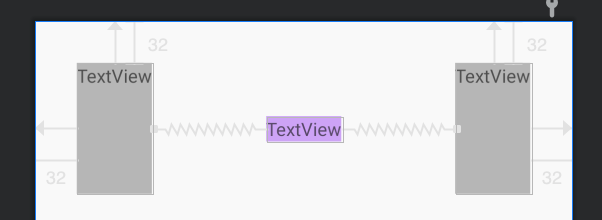
當(dāng)然,不設(shè)置這個(gè)屬性,將TextView的寬度設(shè)置為wrap_content,也是可以實(shí)現(xiàn)這個(gè)效果的,這就需要使用到前面講的constrainedWidth屬性了。
layout_constraintWidth_default的默認(rèn)值為spread,即占據(jù)邊緣約束下的所有空間。
總結(jié)
ConstraintLayout的學(xué)習(xí)曲線(xiàn)比較陡峭,入門(mén)很簡(jiǎn)單,想要寫(xiě)好,卻是很難的,大部分的開(kāi)發(fā)者在經(jīng)過(guò)一段時(shí)間的學(xué)習(xí)后,都可以上手進(jìn)行布局,但是遇到一些比較復(fù)雜的業(yè)務(wù)場(chǎng)景時(shí),就很難將ConstraintLayout的這些特性融會(huì)貫通了,所以,使用ConstraintLayout,有下面這些準(zhǔn)則。
找準(zhǔn)布局基準(zhǔn)元素,一般是界面的固定不變的業(yè)務(wù)元素,其它組件,根據(jù)其約束來(lái)進(jìn)行布局 使用Group等虛擬布局組件來(lái)簡(jiǎn)化布局代碼 對(duì)ConstraintLayout的特性需要掌握熟練,特別是上面這些場(chǎng)景,需要手到擒來(lái) 修改ConstraintLayout時(shí),先理清約束關(guān)系再下手,避免上手就拖組件,導(dǎo)致剪不斷理還亂
再次重申,ConstraintLayout并不是Android布局的銀彈,合適的場(chǎng)景選擇合適的布局方式,才是最重要的。
向大家推薦下我的網(wǎng)站?https://xuyisheng.top/??點(diǎn)擊原文一鍵直達(dá)
專(zhuān)注 Android-Kotlin-Flutter 歡迎大家訪問(wèn)