
Android實(shí)現(xiàn)翻轉(zhuǎn)卡片的動(dòng)畫(huà)效果
效果圖:
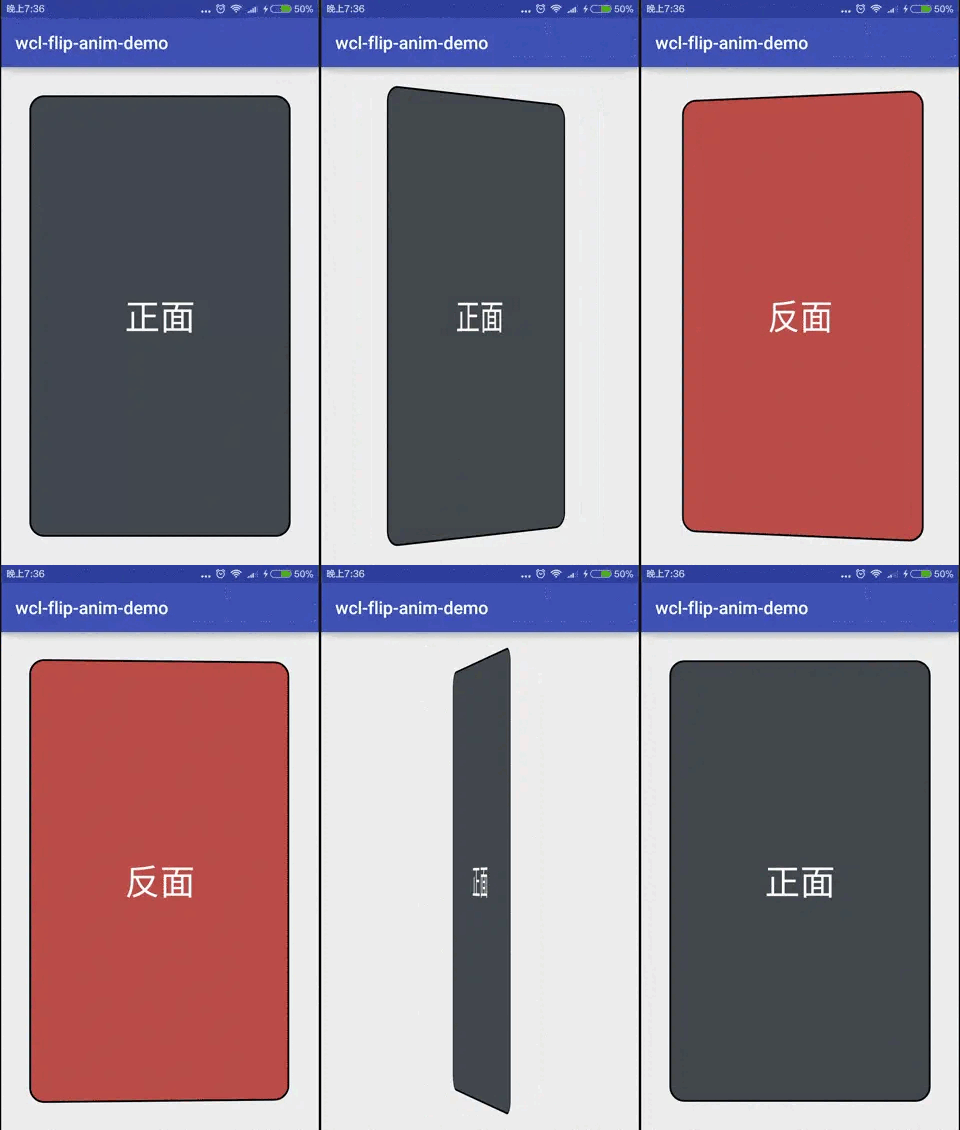
在Android設(shè)計(jì)中, 經(jīng)常會(huì)使用卡片元素, 正面顯示圖片或主要信息, 背面顯示詳細(xì)內(nèi)容, 如網(wǎng)易有道詞典的單詞翻轉(zhuǎn)和海底撈的食譜展示. 實(shí)現(xiàn)卡片視圖非常容易, 那么如何實(shí)現(xiàn)翻轉(zhuǎn)動(dòng)畫(huà)呢?
1. 首頁(yè)
首頁(yè)由正面和背面兩張卡片組成, 同時(shí), 設(shè)置點(diǎn)擊事件flipCard.
<?xml version="1.0" encoding="utf-8"?><FrameLayoutandroid:id="@+id/main_fl_container"xmlns:android="http://schemas.android.com/apk/res/android"xmlns:tools="http://schemas.android.com/tools"android:layout_width="match_parent"android:layout_height="match_parent"android:onClick="flipCard"android:paddingBottom="@dimen/activity_vertical_margin"android:paddingLeft="@dimen/activity_horizontal_margin"android:paddingRight="@dimen/activity_horizontal_margin"android:paddingTop="@dimen/activity_vertical_margin"tools:context="me.chunyu.spike.wcl_flip_anim_demo.MainActivity"><includelayout="@layout/cell_card_back"/><includelayout="@layout/cell_card_front"/></FrameLayout>
邏輯, 初始化動(dòng)畫(huà)和鏡頭距離.
@Overrideprotected void onCreate(Bundle savedInstanceState) {super.onCreate(savedInstanceState);setContentView(R.layout.activity_main);ButterKnife.bind(this);setAnimators(); // 設(shè)置動(dòng)畫(huà)setCameraDistance(); // 設(shè)置鏡頭距離}
2. 動(dòng)畫(huà)
初始化右出(RightOut)和左入(LeftIn)動(dòng)畫(huà), 使用動(dòng)畫(huà)集合AnimatorSet.
當(dāng)右出動(dòng)畫(huà)開(kāi)始時(shí), 點(diǎn)擊事件無(wú)效, 當(dāng)左入動(dòng)畫(huà)結(jié)束時(shí), 點(diǎn)擊事件恢復(fù).
// 設(shè)置動(dòng)畫(huà)private void setAnimators() {mRightOutSet = (AnimatorSet) AnimatorInflater.loadAnimator(this, R.animator.anim_out);mLeftInSet = (AnimatorSet) AnimatorInflater.loadAnimator(this, R.animator.anim_in);// 設(shè)置點(diǎn)擊事件mRightOutSet.addListener(new AnimatorListenerAdapter() {@Override public void onAnimationStart(Animator animation) {super.onAnimationStart(animation);mFlContainer.setClickable(false);}});mLeftInSet.addListener(new AnimatorListenerAdapter() {@Override public void onAnimationEnd(Animator animation) {super.onAnimationEnd(animation);mFlContainer.setClickable(true);}});}
右出動(dòng)畫(huà)
<?xml version="1.0" encoding="utf-8"?><set xmlns:android="http://schemas.android.com/apk/res/android"><!--旋轉(zhuǎn)--><objectAnimatorandroid:duration="@integer/anim_length"android:propertyName="rotationY"android:valueFrom="0"android:valueTo="180"/><!--消失--><objectAnimatorandroid:duration="0"android:propertyName="alpha"android:startOffset="@integer/anim_half_length"android:valueFrom="1.0"android:valueTo="0.0"/></set>
旋轉(zhuǎn)180°, 當(dāng)旋轉(zhuǎn)一半時(shí), 卡片消失.左入動(dòng)畫(huà)
<?xml version="1.0" encoding="utf-8"?><set xmlns:android="http://schemas.android.com/apk/res/android"><!--消失--><objectAnimatorandroid:duration="0"android:propertyName="alpha"android:valueFrom="1.0"android:valueTo="0.0"/><!--旋轉(zhuǎn)--><objectAnimatorandroid:duration="@integer/anim_length"android:propertyName="rotationY"android:valueFrom="-180"android:valueTo="0"/><!--出現(xiàn)--><objectAnimatorandroid:duration="0"android:propertyName="alpha"android:startOffset="@integer/anim_half_length"android:valueFrom="0.0"android:valueTo="1.0"/></set>
在開(kāi)始時(shí)是隱藏, 逆向旋轉(zhuǎn), 當(dāng)旋轉(zhuǎn)一半時(shí), 顯示卡片.3. 鏡頭視角
改變視角, 涉及到旋轉(zhuǎn)卡片的Y軸, 即rotationY, 需要修改視角距離.
如果不修改, 則會(huì)超出屏幕高度, 影響視覺(jué)體驗(yàn).
// 改變視角距離, 貼近屏幕private void setCameraDistance() {int distance = 16000;float scale = getResources().getDisplayMetrics().density * distance;mFlCardFront.setCameraDistance(scale);mFlCardBack.setCameraDistance(scale);}
4. 旋轉(zhuǎn)控制
設(shè)置右出和左入動(dòng)畫(huà)的目標(biāo)控件, 兩個(gè)動(dòng)畫(huà)同步進(jìn)行, 并區(qū)分正反面朝上.
// 翻轉(zhuǎn)卡片public void flipCard(View view) {// 正面朝上if (!mIsShowBack) {mRightOutSet.setTarget(mFlCardFront);mLeftInSet.setTarget(mFlCardBack);mRightOutSet.start();mLeftInSet.start();mIsShowBack = true;} else { // 背面朝上mRightOutSet.setTarget(mFlCardBack);mLeftInSet.setTarget(mFlCardFront);mRightOutSet.start();mLeftInSet.start();mIsShowBack = false;}}
動(dòng)畫(huà)效果非常簡(jiǎn)單, 全部邏輯都不足50行, 這么好玩的動(dòng)畫(huà), 用起來(lái)吧.
評(píng)論
圖片
表情