
建議收藏,22個Python迷你項目(附源碼)

在使用Python的過程中,我最喜歡的就是Python的各種第三方庫,能夠完成很多操作。
下面就給大家介紹22個通過Python構(gòu)建的項目,以此來學(xué)習(xí)Python編程。
大家也可根據(jù)項目的目的及提示,自己構(gòu)建解決方法,提高編程水平。
① 骰子模擬器
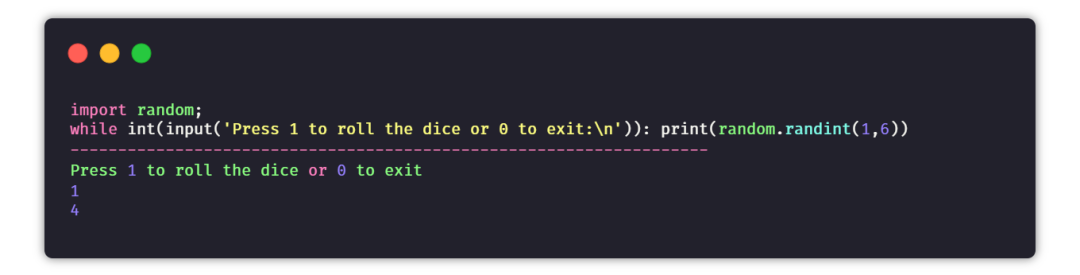
目的:創(chuàng)建一個程序來模擬擲骰子。
提示:當(dāng)用戶詢問時,使用random模塊生成一個1到6之間的數(shù)字。
② 石頭剪刀布游戲
目標(biāo):創(chuàng)建一個命令行游戲,游戲者可以在石頭、剪刀和布之間進(jìn)行選擇,與計算機(jī)PK。如果游戲者贏了,得分就會添加,直到結(jié)束游戲時,最終的分?jǐn)?shù)會展示給游戲者。
提示:接收游戲者的選擇,并且與計算機(jī)的選擇進(jìn)行比較。計算機(jī)的選擇是從選擇列表中隨機(jī)選取的。如果游戲者獲勝,則增加1分。
import random
choices = ["Rock", "Paper", "Scissors"]
computer = random.choice(choices)
player = False
cpu_score = 0
player_score = 0
while True:
    player = input("Rock, Paper or  Scissors?").capitalize()
    # 判斷游戲者和電腦的選擇
    if player == computer:
        print("Tie!")
    elif player == "Rock":
        if computer == "Paper":
            print("You lose!", computer, "covers", player)
            cpu_score+=1
        else:
            print("You win!", player, "smashes", computer)
            player_score+=1
    elif player == "Paper":
        if computer == "Scissors":
            print("You lose!", computer, "cut", player)
            cpu_score+=1
        else:
            print("You win!", player, "covers", computer)
            player_score+=1
    elif player == "Scissors":
        if computer == "Rock":
            print("You lose...", computer, "smashes", player)
            cpu_score+=1
        else:
            print("You win!", player, "cut", computer)
            player_score+=1
    elif player=='E':
        print("Final Scores:")
        print(f"CPU:{cpu_score}")
        print(f"Plaer:{player_score}")
        break
    else:
        print("That's not a valid play. Check your spelling!")
    computer = random.choice(choices)
③ 隨機(jī)密碼生成器
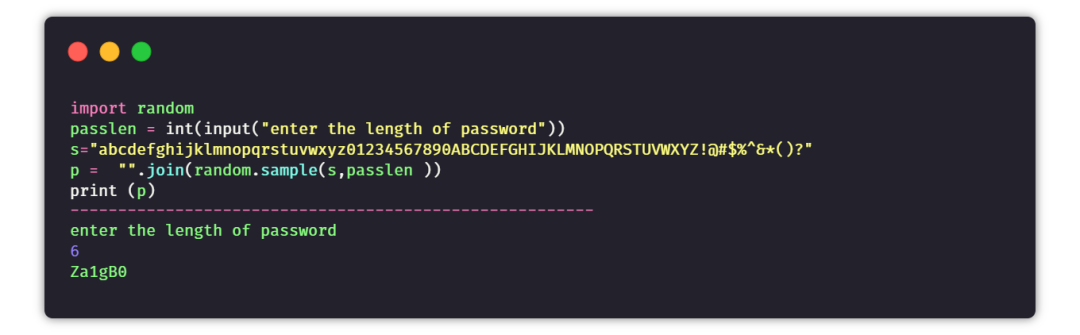
目標(biāo):創(chuàng)建一個程序,可指定密碼長度,生成一串隨機(jī)密碼。
提示:創(chuàng)建一個數(shù)字+大寫字母+小寫字母+特殊字符的字符串。根據(jù)設(shè)定的密碼長度隨機(jī)生成一串密碼。
④ 句子生成器
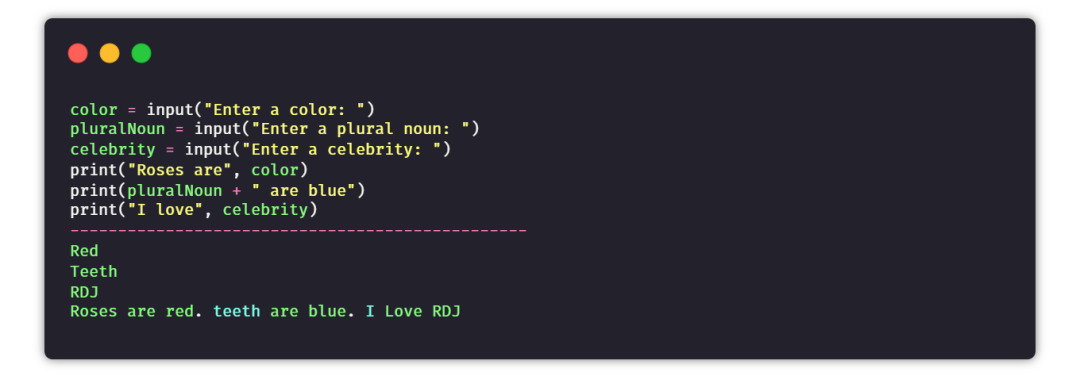
目的:通過用戶提供的輸入,來生成隨機(jī)且唯一的句子。
提示:以用戶輸入的名詞、代詞、形容詞等作為輸入,然后將所有數(shù)據(jù)添加到句子中,并將其組合返回。
⑤ 猜數(shù)字游戲
目的:在這個游戲中,任務(wù)是創(chuàng)建一個腳本,能夠在一個范圍內(nèi)生成一個隨機(jī)數(shù)。如果用戶在三次機(jī)會中猜對了數(shù)字,那么用戶贏得游戲,否則用戶輸。
提示:生成一個隨機(jī)數(shù),然后使用循環(huán)給用戶三次猜測機(jī)會,根據(jù)用戶的猜測打印最終的結(jié)果。

⑥ 故事生成器
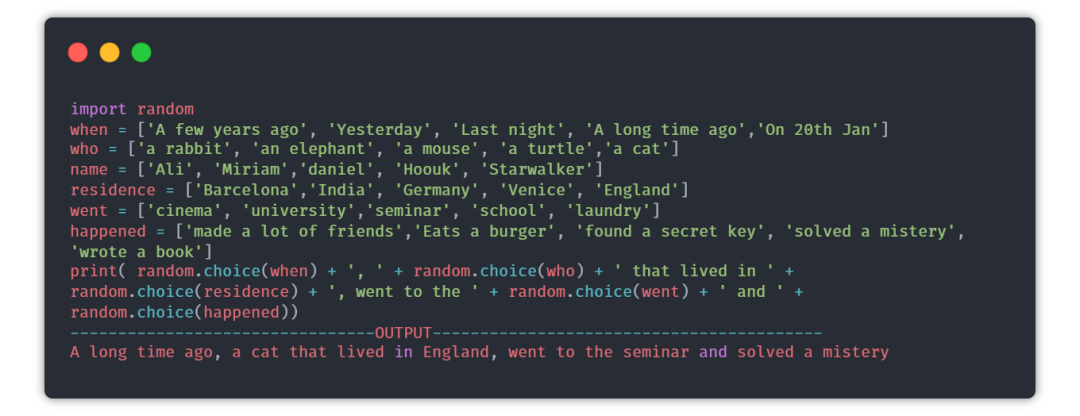
目的:每次用戶運(yùn)行程序時,都會生成一個隨機(jī)的故事。
提示:random模塊可以用來選擇故事的隨機(jī)部分,內(nèi)容來自每個列表里。
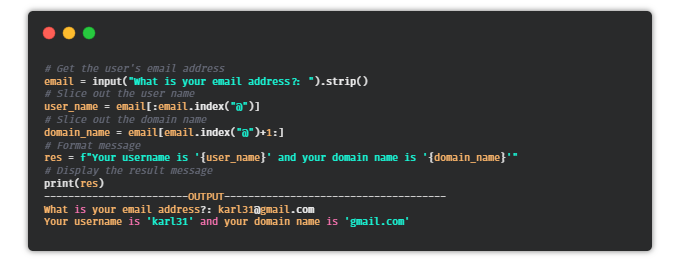
⑦ 郵件地址切片器
目的:編寫一個Python腳本,可以從郵件地址中獲取用戶名和域名。
提示:使用@作為分隔符,將地址分為分為兩個字符串。
⑧ 自動發(fā)送郵件
目的:編寫一個Python腳本,可以使用這個腳本發(fā)送電子郵件。
提示:email庫可用于發(fā)送電子郵件。
import smtplib
from email.message import EmailMessage
email = EmailMessage() ## Creating a object for EmailMessage
email['from'] = 'xyz name'   ## Person who is sending
email['to'] = 'xyz id'       ## Whom we are sending
email['subject'] = 'xyz subject'  ## Subject of email
email.set_content("Xyz content of email") ## content of email
with smtlib.SMTP(host='smtp.gmail.com',port=587)as smtp:
## sending request to server
    smtp.ehlo()          ## server object
smtp.starttls()      ## used to send data between server and client
smtp.login("email_id","Password") ## login id and password of gmail
smtp.send_message(email)   ## Sending email
print("email send")    ## Printing success message
⑨ 縮寫詞
目的:編寫一個Python腳本,從給定的句子生成一個縮寫詞。
提示:你可以通過拆分和索引來獲取第一個單詞,然后將其組合。
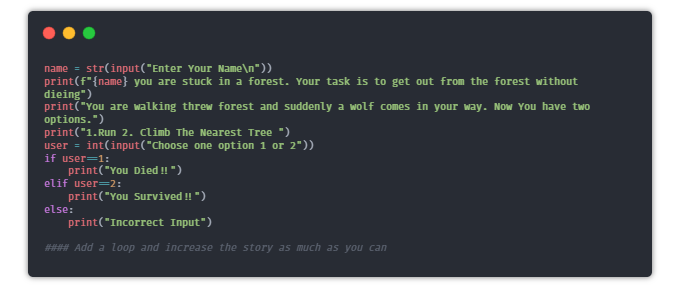
⑩ 文字冒險游戲
目的:編寫一個有趣的Python腳本,通過為路徑選擇不同的選項讓用戶進(jìn)行有趣的冒險。
? Hangman
目的:創(chuàng)建一個簡單的命令行hangman游戲。
提示:創(chuàng)建一個密碼詞的列表并隨機(jī)選擇一個單詞。現(xiàn)在將每個單詞用下劃線“_”表示,給用戶提供猜單詞的機(jī)會,如果用戶猜對了單詞,則將“_”用單詞替換。
import time
import random
name = input("What is your name? ")
print ("Hello, " + name, "Time to play hangman!")
time.sleep(1)
print ("Start guessing...\n")
time.sleep(0.5)
## A List Of Secret Words
words = ['python','programming','treasure','creative','medium','horror']
word = random.choice(words)
guesses = ''
turns = 5
while turns > 0:
    failed = 0
    for char in word:
        if char in guesses:
            print (char,end="")
        else:
            print ("_",end=""),
            failed += 1
    if failed == 0:
        print ("\nYou won")
        break
    guess = input("\nguess a character:")
    guesses += guess
    if guess not in word:
        turns -= 1
        print("\nWrong")
        print("\nYou have", + turns, 'more guesses')
        if turns == 0:
            print ("\nYou Lose")
? 鬧鐘
目的:編寫一個創(chuàng)建鬧鐘的Python腳本。
提示:你可以使用date-time模塊創(chuàng)建鬧鐘,以及playsound庫播放聲音。
from datetime import datetime
from playsound import playsound
alarm_time = input("Enter the time of alarm to be set:HH:MM:SS\n")
alarm_hour=alarm_time[0:2]
alarm_minute=alarm_time[3:5]
alarm_seconds=alarm_time[6:8]
alarm_period = alarm_time[9:11].upper()
print("Setting up alarm..")
while True:
    now = datetime.now()
    current_hour = now.strftime("%I")
    current_minute = now.strftime("%M")
    current_seconds = now.strftime("%S")
    current_period = now.strftime("%p")
    if(alarm_period==current_period):
        if(alarm_hour==current_hour):
            if(alarm_minute==current_minute):
                if(alarm_seconds==current_seconds):
                    print("Wake Up!")
                    playsound('audio.mp3') ## download the alarm sound from link
                    break
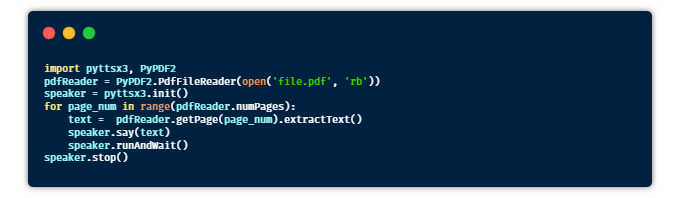
? 有聲讀物
目的:編寫一個Python腳本,用于將Pdf文件轉(zhuǎn)換為有聲讀物。
提示:借助pyttsx3庫將文本轉(zhuǎn)換為語音。
安裝:pyttsx3,PyPDF2
? 天氣應(yīng)用
目的:編寫一個Python腳本,接收城市名稱并使用爬蟲獲取該城市的天氣信息。
提示:你可以使用Beautifulsoup和requests庫直接從谷歌主頁爬取數(shù)據(jù)。
安裝:requests,BeautifulSoup
from bs4 import BeautifulSoup
import requests
headers = {'User-Agent': 'Mozilla/5.0 (Windows NT 10.0; Win64; x64) AppleWebKit/537.36 (KHTML, like Gecko) Chrome/58.0.3029.110 Safari/537.3'}

def weather(city):
    city=city.replace(" ","+")
    res = requests.get(f'https://www.google.com/search?q={city}&oq={city}&aqs=chrome.0.35i39l2j0l4j46j69i60.6128j1j7&sourceid=chrome&ie=UTF-8',headers=headers)
    print("Searching in google......\n")
    soup = BeautifulSoup(res.text,'html.parser')
    location = soup.select('#wob_loc')[0].getText().strip()
    time = soup.select('#wob_dts')[0].getText().strip()
    info = soup.select('#wob_dc')[0].getText().strip()
    weather = soup.select('#wob_tm')[0].getText().strip()
    print(location)
    print(time)
    print(info)
    print(weather+"°C")

print("enter the city name")
city=input()
city=city+" weather"
weather(city)
? 人臉檢測
目的:編寫一個Python腳本,可以檢測圖像中的人臉,并將所有的人臉保存在一個文件夾中。
提示:可以使用haar級聯(lián)分類器對人臉進(jìn)行檢測。它返回的人臉坐標(biāo)信息,可以保存在一個文件中。
安裝:OpenCV。
下載:haarcascade_frontalface_default.xml
https://raw.githubusercontent.com/opencv/opencv/master/data/haarcascades/haarcascade_frontalface_default.xml
import cv2
# Load the cascade
face_cascade = cv2.CascadeClassifier('haarcascade_frontalface_default.xml')
# Read the input image
img = cv2.imread('images/img0.jpg')
# Convert into grayscale
gray = cv2.cvtColor(img, cv2.COLOR_BGR2GRAY)
# Detect faces
faces = face_cascade.detectMultiScale(gray, 1.3, 4)
# Draw rectangle around the faces
for (x, y, w, h) in faces:
    cv2.rectangle(img, (x, y), (x+w, y+h), (255, 0, 0), 2)
    crop_face = img[y:y + h, x:x + w]
    cv2.imwrite(str(w) + str(h) + '_faces.jpg', crop_face)
# Display the output
cv2.imshow('img', img)
cv2.imshow("imgcropped",crop_face)
cv2.waitKey()
? 提醒應(yīng)用
目的:創(chuàng)建一個提醒應(yīng)用程序,在特定的時間提醒你做一些事情(桌面通知)。
提示:Time模塊可以用來跟蹤提醒時間,toastnotifier庫可以用來顯示桌面通知。
安裝:win10toast
from win10toast import ToastNotifier
import time
toaster = ToastNotifier()
try:
    print("Title of reminder")
    header = input()
    print("Message of reminder")
    text = input()
    print("In how many minutes?")
    time_min = input()
    time_min=float(time_min)
except:
    header = input("Title of reminder\n")
    text = input("Message of remindar\n")
    time_min=float(input("In how many minutes?\n"))
time_min = time_min * 60
print("Setting up reminder..")
time.sleep(2)
print("all set!")
time.sleep(time_min)
toaster.show_toast(f"{header}",
f"{text}",
duration=10,
threaded=True)
while toaster.notification_active(): time.sleep(0.005)
? 維基百科文章摘要
目的:使用一種簡單的方法從用戶提供的文章鏈接中生成摘要。
提示:你可以使用爬蟲獲取文章數(shù)據(jù),通過提取生成摘要。
from bs4 import BeautifulSoup
import re
import requests
import heapq
from nltk.tokenize import sent_tokenize,word_tokenize
from nltk.corpus import stopwords

url = str(input("Paste the url"\n"))
num = int(input("Enter the Number of Sentence you want in the summary"))
num = int(num)
headers = {'User-Agent': 'Mozilla/5.0 (Windows NT 10.0; Win64; x64) AppleWebKit/537.36 (KHTML, like Gecko) Chrome/58.0.3029.110 Safari/537.3'}
#url = str(input("Paste the url......."))
res = requests.get(url,headers=headers)
summary = ""
soup = BeautifulSoup(res.text,'html.parser')
content = soup.findAll("p")
for text in content:
    summary +=text.text
def clean(text):
    text = re.sub(r"\[[0-9]*\]"," ",text)
    text = text.lower()
    text = re.sub(r'\s+'," ",text)
    text = re.sub(r","," ",text)
    return text
summary = clean(summary)

print("Getting the data......\n")


##Tokenixing
sent_tokens = sent_tokenize(summary)

summary = re.sub(r"[^a-zA-z]"," ",summary)
word_tokens = word_tokenize(summary)
## Removing Stop words

word_frequency = {}
stopwords =  set(stopwords.words("english"))

for word in word_tokens:
    if word not in stopwords:
        if word not in word_frequency.keys():
            word_frequency[word]=1
        else:
            word_frequency[word] +=1
maximum_frequency = max(word_frequency.values())
print(maximum_frequency)
for word in word_frequency.keys():
    word_frequency[word] = (word_frequency[word]/maximum_frequency)
print(word_frequency)
sentences_score = {}
for sentence in sent_tokens:
    for word in word_tokenize(sentence):
        if word in word_frequency.keys():
            if (len(sentence.split(" "))) <30:
                if sentence not in sentences_score.keys():
                    sentences_score[sentence] = word_frequency[word]
                else:
                    sentences_score[sentence] += word_frequency[word]

print(max(sentences_score.values()))
def get_key(val):
    for key, value in sentences_score.items():
        if val == value:
            return key
key = get_key(max(sentences_score.values()))
print(key+"\n")
print(sentences_score)
summary = heapq.nlargest(num,sentences_score,key=sentences_score.get)
print(" ".join(summary))
summary = " ".join(summary)
? 獲取谷歌搜索結(jié)果
目的:創(chuàng)建一個腳本,可以根據(jù)查詢條件從谷歌搜索獲取數(shù)據(jù)。
from bs4 import BeautifulSoup
import requests

headers = {'User-Agent': 'Mozilla/5.0 (Windows NT 10.0; Win64; x64) AppleWebKit/537.36 (KHTML, like Gecko) Chrome/58.0.3029.110 Safari/537.3'}
def google(query):
    query = query.replace(" ","+")
    try:
        url = f'https://www.google.com/search?q={query}&oq={query}&aqs=chrome..69i57j46j69i59j35i39j0j46j0l2.4948j0j7&sourceid=chrome&ie=UTF-8'
        res = requests.get(url,headers=headers)
        soup = BeautifulSoup(res.text,'html.parser')
    except:
        print("Make sure you have a internet connection")
    try:
        try:
            ans = soup.select('.RqBzHd')[0].getText().strip()

        except:
            try:
                title=soup.select('.AZCkJd')[0].getText().strip()
                try:
                    ans=soup.select('.e24Kjd')[0].getText().strip()
                except:
                    ans=""
                ans=f'{title}\n{ans}'

            except:
                try:
                    ans=soup.select('.hgKElc')[0].getText().strip()
                except:
                    ans=soup.select('.kno-rdesc span')[0].getText().strip()

    except:
        ans = "can't find on google"
    return ans

result = google(str(input("Query\n")))
print(result)
獲取結(jié)果如下。

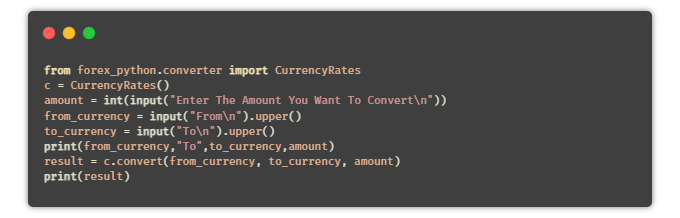
? 貨幣換算器
目的:編寫一個Python腳本,可以將一種貨幣轉(zhuǎn)換為其他用戶選擇的貨幣。
提示:使用Python中的API,或者通過forex-python模塊來獲取實時的貨幣匯率。
安裝:forex-python
? 鍵盤記錄器
目的:編寫一個Python腳本,將用戶按下的所有鍵保存在一個文本文件中。
提示:pynput是Python中的一個庫,用于控制鍵盤和鼠標(biāo)的移動,它也可以用于制作鍵盤記錄器。簡單地讀取用戶按下的鍵,并在一定數(shù)量的鍵后將它們保存在一個文本文件中。
from pynput.keyboard import Key, Controller,Listener
import time
keyboard = Controller()


keys=[]
def on_press(key):
    global keys
    #keys.append(str(key).replace("'",""))
    string = str(key).replace("'","")
    keys.append(string)
    main_string = "".join(keys)
    print(main_string)
    if len(main_string)>15:
      with open('keys.txt', 'a') as f:
          f.write(main_string)
          keys= []
def on_release(key):
    if key == Key.esc:
        return False

with listener(on_press=on_press,on_release=on_release) as listener:
    listener.join()
? 文章朗讀器
目的:編寫一個Python腳本,自動從提供的鏈接讀取文章。
import pyttsx3
import requests
from bs4 import BeautifulSoup
url = str(input("Paste article url\n"))

def content(url):
  res = requests.get(url)
  soup = BeautifulSoup(res.text,'html.parser')
  articles = []
  for i in range(len(soup.select('.p'))):
    article = soup.select('.p')[i].getText().strip()
    articles.append(article)
    contents = " ".join(articles)
  return contents
engine = pyttsx3.init('sapi5')
voices = engine.getProperty('voices')
engine.setProperty('voice', voices[0].id)

def speak(audio):
  engine.say(audio)
  engine.runAndWait()

contents = content(url)
## print(contents)      ## In case you want to see the content

#engine.save_to_file
#engine.runAndWait() ## In case if you want to save the article as a audio file
? 短網(wǎng)址生成器
目的:編寫一個Python腳本,使用API縮短給定的URL。
from __future__ import with_statement
import contextlib
try:
    from urllib.parse import urlencode
except ImportError:
    from urllib import urlencode
try:
    from urllib.request import urlopen
except ImportError:
    from urllib2 import urlopen
import sys

def make_tiny(url):
    request_url = ('http://tinyurl.com/api-create.php?' +
    urlencode({'url':url}))
    with contextlib.closing(urlopen(request_url)) as response:
        return response.read().decode('utf-8')

def main():
    for tinyurl in map(make_tiny, sys.argv[1:]):
        print(tinyurl)

if __name__ == '__main__':
    main()
-----------------------------OUTPUT------------------------
python url_shortener.py https://www.wikipedia.org/
https://tinyurl.com/buf3qt3
以上就是今天分享的內(nèi)容,針對上面這些項目,有的可以適當(dāng)調(diào)整。
比如自動發(fā)送郵件,可以選擇使用自己的QQ郵箱。
天氣信息也可使用國內(nèi)一些免費的API,維基百科可以對應(yīng)百度百科,谷歌搜索可以對應(yīng)百度搜索等等。
這些都是大伙可以思考的~
萬水千山總是情,點個 ?? 行不行。
推薦閱讀



··· END ···