
YoloV5實(shí)戰(zhàn):手把手教物體檢測
點(diǎn)擊下方卡片,關(guān)注“新機(jī)器視覺”公眾號(hào)
重磅干貨,第一時(shí)間送達(dá)
0、摘要
YOLOV5嚴(yán)格意義上說并不是YOLO的第五個(gè)版本,因?yàn)樗]有得到Y(jié)OLO之父Joe Redmon的認(rèn)可,但是給出的測試數(shù)據(jù)總體表現(xiàn)還是不錯(cuò)。詳細(xì)數(shù)據(jù)如下:
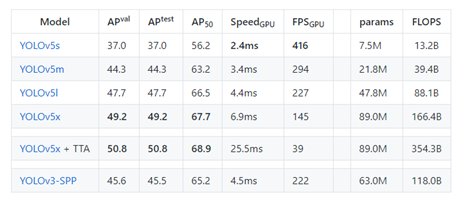
YOLOv5并不是一個(gè)單獨(dú)的模型,而是一個(gè)模型家族,包括了YOLOv5s、YOLOv5m、YOLOv5l、YOLOv5x、YOLOv5x+TTA,這點(diǎn)有點(diǎn)兒像EfficientDet。
由于沒有找到V5的論文,我們也只能從代碼去學(xué)習(xí)它。總體上和YOLOV4差不多,可以認(rèn)為是YOLOV5的加強(qiáng)版。
項(xiàng)目地址:
https://github.com/ultralytics/YOLOv5
1、下載代碼
項(xiàng)目地址:https://github.com/ultralytics/YOLOv5
最近作者又更新了一些代碼。
2、配置環(huán)境
matplotlib>=3.2.2numpy>=1.18.5opencv-python>=4.1.2pillowPyYAML>=5.3scipy>=1.4.1tensorboard>=2.2torch>=1.6.0torchvision>=0.7.0tqdm>=4.41.0
3、準(zhǔn)備數(shù)據(jù)集
數(shù)據(jù)集采用Labelme標(biāo)注的數(shù)據(jù)格式,數(shù)據(jù)集從RSOD數(shù)據(jù)集中獲取了飛機(jī)和油桶兩類數(shù)據(jù)集,并將其轉(zhuǎn)為Labelme標(biāo)注的數(shù)據(jù)集。
數(shù)據(jù)集的地址:
https://pan.baidu.com/s/1iTUpvA9_cwx1qiH8zbRmDg
提取碼:gr6g
或者:
https://download.csdn.net/download/hhhhhhhhhhwwwwwwwwww/14003627
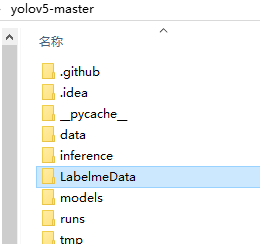
將下載的數(shù)據(jù)集解壓后放到工程的根目錄。為下一步生成測試用的數(shù)據(jù)集做準(zhǔn)備。
如下圖:
4、生成數(shù)據(jù)集
YoloV5的數(shù)據(jù)集和以前版本的數(shù)據(jù)集并不相同,我們先看一下轉(zhuǎn)換后的數(shù)據(jù)集。
數(shù)據(jù)結(jié)構(gòu)如下圖:
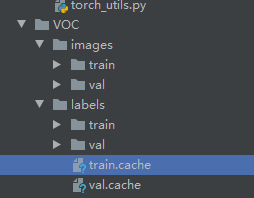
images文件夾存放train和val的圖片
labels里面存放train和val的物體數(shù)據(jù),里面的每個(gè)txt文件和images里面的圖片是一一對(duì)應(yīng)的。
txt文件的內(nèi)容如下:
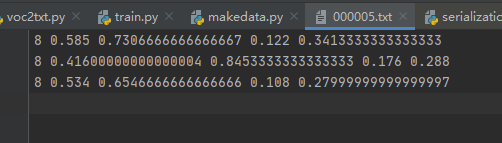
格式:物體類別 x y w h ?
坐標(biāo)是不是真實(shí)的坐標(biāo),是將坐標(biāo)除以寬高后的計(jì)算出來的,是相對(duì)于寬和高的比例。
下面我們編寫生成數(shù)據(jù)集的代碼,新建LabelmeToYoloV5.py,然后寫入下面的代碼。
import osimport numpy as npimport jsonfrom glob import globimport cv2from sklearn.model_selection import train_test_splitfrom os import getcwdclasses = ["aircraft", "oiltank"]# 1.標(biāo)簽路徑labelme_path = "LabelmeData/"isUseTest = True ?# 是否創(chuàng)建test集# 3.獲取待處理文件files = glob(labelme_path + "*.json")files = [i.replace("\\", "/").split("/")[-1].split(".json")[0] for i in files]print(files)if isUseTest:? ?trainval_files, test_files = train_test_split(files, test_size=0.1, random_state=55)else:? ?trainval_files = filestrain_files, val_files = train_test_split(trainval_files, test_size=0.1, random_state=55)def convert(size, box):? ?dw = 1. / (size[0])? ?dh = 1. / (size[1])? ?x = (box[0] + box[1]) / 2.0 - 1? ?y = (box[2] + box[3]) / 2.0 - 1? ?w = box[1] - box[0]? ?h = box[3] - box[2]? ?x = x * dw? ?w = w * dw? ?y = y * dh? ?h = h * dh? ?return (x, y, w, h)wd = getcwd()print(wd)def ChangeToYolo5(files, txt_Name):? ?if not os.path.exists('tmp/'):? ? ? ?os.makedirs('tmp/')? ?list_file = open('tmp/%s.txt' % (txt_Name), 'w')? ?for json_file_ in files:? ? ? ?json_filename = labelme_path + json_file_ + ".json"? ? ? ?imagePath = labelme_path + json_file_ + ".jpg"? ? ? ?list_file.write('%s/%s\n' % (wd, imagePath))? ? ? ?out_file = open('%s/%s.txt' % (labelme_path, json_file_), 'w')? ? ? ?json_file = json.load(open(json_filename, "r", encoding="utf-8"))? ? ? ?height, width, channels = cv2.imread(labelme_path + json_file_ + ".jpg").shape? ? ? ?for multi in json_file["shapes"]:? ? ? ? ? ?points = np.array(multi["points"])? ? ? ? ? ?xmin = min(points[:, 0]) if min(points[:, 0]) > 0 else 0? ? ? ? ? ?xmax = max(points[:, 0]) if max(points[:, 0]) > 0 else 0? ? ? ? ? ?ymin = min(points[:, 1]) if min(points[:, 1]) > 0 else 0? ? ? ? ? ?ymax = max(points[:, 1]) if max(points[:, 1]) > 0 else 0? ? ? ? ? ?label = multi["label"]? ? ? ? ? ?if xmax <= xmin:? ? ? ? ? ? ? ?pass? ? ? ? ? ?elif ymax <= ymin:? ? ? ? ? ? ? ?pass? ? ? ? ? ?else:? ? ? ? ? ? ? ?cls_id = classes.index(label)? ? ? ? ? ? ? ?b = (float(xmin), float(xmax), float(ymin), float(ymax))? ? ? ? ? ? ? ?bb = convert((width, height), b)? ? ? ? ? ? ? ?out_file.write(str(cls_id) + " " + " ".join([str(a) for a in bb]) + '\n')? ? ? ? ? ? ? ?print(json_filename, xmin, ymin, xmax, ymax, cls_id)ChangeToYolo5(train_files, "train")ChangeToYolo5(val_files, "val")ChangeToYolo5(test_files, "test")
這段代碼執(zhí)行完成會(huì)在LabelmeData生成每個(gè)圖片的txt標(biāo)注數(shù)據(jù),同時(shí)在tmp文件夾下面生成訓(xùn)練集、驗(yàn)證集和測試集的txt,txt記錄的是圖片的路徑,為下一步生成YoloV5訓(xùn)練和測試用的數(shù)據(jù)集做準(zhǔn)備。
在tmp文件夾下面新建MakeData.py文件,生成最終的結(jié)果,目錄結(jié)構(gòu)如下圖:
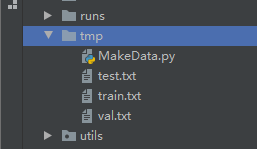
打開MakeData.py,寫入下面的代碼。
import shutilimport osfile_List = ["train", "val", "test"]for file in file_List:? ?if not os.path.exists('../VOC/images/%s' % file):? ? ? ?os.makedirs('../VOC/images/%s' % file)? ?if not os.path.exists('../VOC/labels/%s' % file):? ? ? ?os.makedirs('../VOC/labels/%s' % file)? ?print(os.path.exists('../tmp/%s.txt' % file))? ?f = open('../tmp/%s.txt' % file, 'r')? ?lines = f.readlines()? ?for line in lines:? ? ? ?print(line)? ? ? ?line = "/".join(line.split('/')[-5:]).strip()? ? ? ?shutil.copy(line, "../VOC/images/%s" % file)? ? ? ?line = line.replace('JPEGImages', 'labels')? ? ? ?line = line.replace('jpg', 'txt')? ? ? ?shutil.copy(line, "../VOC/labels/%s/" % file)
執(zhí)行完成后就可以生成YoloV5訓(xùn)練使用的數(shù)據(jù)集了。結(jié)果如下:
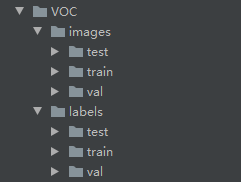
5、修改配置參數(shù)
打開voc.yaml文件,修改里面的配置參數(shù)train: VOC/images/train/ # 訓(xùn)練集圖片的路徑val: VOC/images/val/ # 驗(yàn)證集圖片的路徑nc: 2 #檢測的類別,本次數(shù)據(jù)集有兩個(gè)類別所以寫2names: ["aircraft", "oiltank"]#類別的名稱,和轉(zhuǎn)換數(shù)據(jù)集時(shí)的list對(duì)應(yīng)
6、修改train.py的參數(shù)
cfg參數(shù)是YoloV5 模型的配置文件,模型的文件存放在models文件夾下面,按照需求填寫不同的文件。weights參數(shù)是YoloV5的預(yù)訓(xùn)練模型,和cfg對(duì)應(yīng),例:cfg配置的是yolov5s.yaml,weights就要配置yolov5s.ptdata是配置數(shù)據(jù)集的配置文件,我們選用的是voc.yaml,所以配置data/voc.yaml修改上面三個(gè)參數(shù)就可以開始訓(xùn)練了,其他的參數(shù)根據(jù)自己的需求修改。修改后的參數(shù)配置如下:parser.add_argument('--weights', type=str, default='yolov5s.pt', help='initial weights path')parser.add_argument('--cfg', type=str, default='yolov5s.yaml', help='model.yaml path')parser.add_argument('--data', type=str, default='data/voc.yaml', help='data.yaml path')
?修改完成后,就可以開始訓(xùn)練了。如下圖所示:
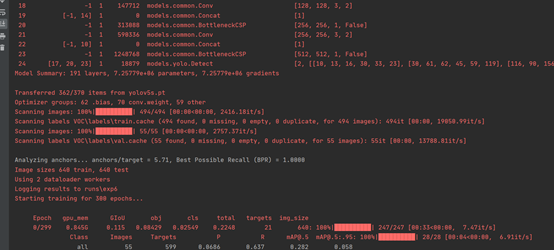
7、查看訓(xùn)練結(jié)果
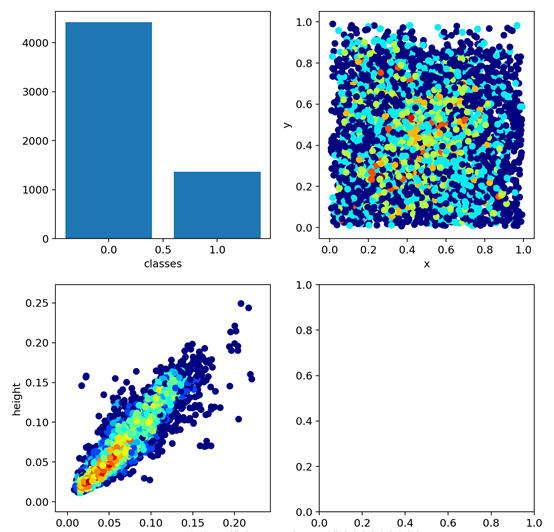
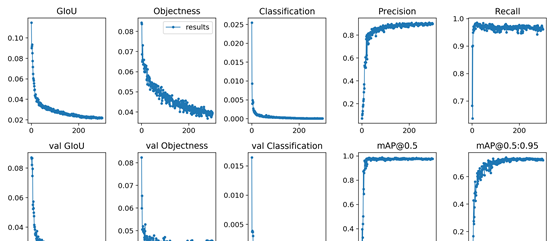
在經(jīng)歷了300epoch訓(xùn)練之后,我們會(huì)在runs文件夾下面找到訓(xùn)練好的權(quán)重文件和訓(xùn)練過程的一些文件。如圖:
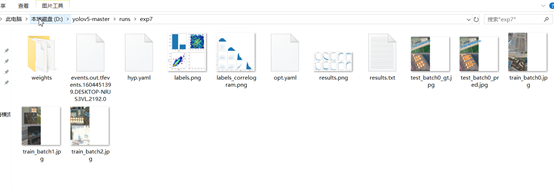
8、測試
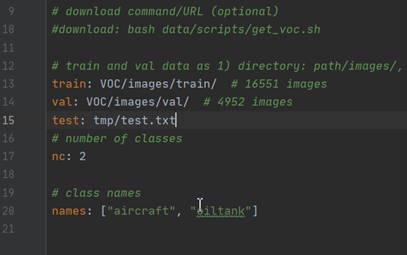
首先需要在voc.yaml中增加測試集的路徑,打開voc.yaml,在val字段后面增加test: tmp/test.txt這行代碼,如圖:
修改test.py中的參數(shù),下面的這幾個(gè)參數(shù)要修改。
parser = argparse.ArgumentParser(prog='test.py')parser.add_argument('--weights', nargs='+', type=str, default='runs/exp7/weights/best.pt', help='model.pt path(s)')parser.add_argument('--data', type=str, default='data/voc.yaml', help='*.data path')parser.add_argument('--batch-size', type=int, default=2, help='size of each image batch')parser.add_argument('--save-txt', default='True', action='store_true', help='save results to *.txt')
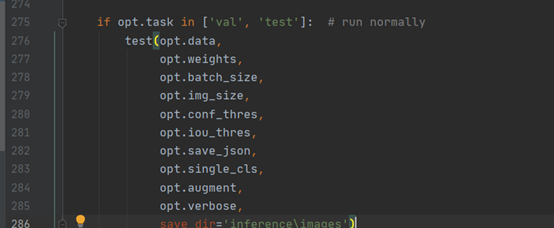
在275行?修改test的方法,增加保存測試結(jié)果的路徑。這樣測試完成后就可以在inference\images查看到測試的圖片,在inference\output中查看到保存的測試結(jié)果。
如圖:
下面是運(yùn)行的結(jié)果:
代碼和模型:
https://download.csdn.net/download/hhhhhhhhhhwwwwwwwwww/13094352
本文僅做學(xué)術(shù)分享,如有侵權(quán),請(qǐng)聯(lián)系刪文。