
如何讓iOS推送播放語音?
作者丨王徳亮
來源丨搜狐技術(shù)產(chǎn)品
本文字?jǐn)?shù):4293字
預(yù)計(jì)閱讀時(shí)間:33分鐘
一:背景
iOS 推送播放語音的需求調(diào)研,即收到推送后,播放推送的文案,文案的內(nèi)容不固定。類似于支付寶和微信的收款到賬語音。
只有iOS10以上才支持app被喚醒后在后臺(tái)/鎖屏狀態(tài)下播放音頻。所以iOS10以下的設(shè)備,在收到VoIP Push后只能在local push上設(shè)定一段固定鈴聲,這也是為什么iOS10以下只有“微信支付收款到賬”。 iOS 12.0之前,后臺(tái)播放音頻未被限制,直接使用Notification Service Extension (iOS 10.0以后才支持) 功能使用系統(tǒng)提供的功能AVSpeechSynthesizer即可。 iOS 12.0之后,Notification Service Extension后臺(tái)播放音頻功能被限制,所以播放實(shí)現(xiàn)起來比較困難。 如果要上架商店,只有播放固定的音頻,或固定拼接的音頻,通過設(shè)置通知的聲音或者發(fā)送本地通知設(shè)置本地通知的聲音來播放。 如果無需上架商店,可以手動(dòng)打開Notification Service Extension的后臺(tái)播放。
二:開發(fā)過程
a. Notification Service Extension
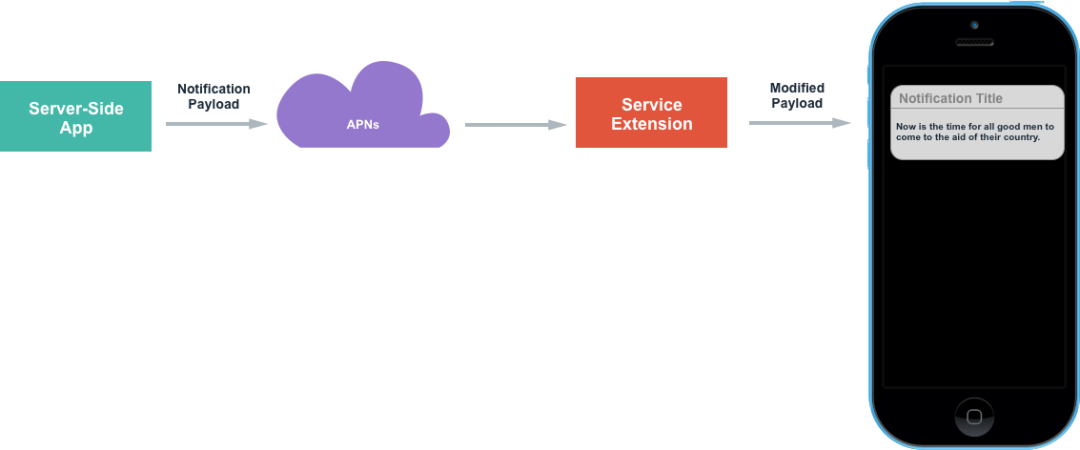
項(xiàng)目添加了Notification Service Extension之后的邏輯,和沒添加之前有所不同。如下圖:添加了之后,接受到推送時(shí),會(huì)觸發(fā)Notification Service Extension中的方法,在這個(gè)方法中,可以修改推送的標(biāo)題、內(nèi)容、聲音。然后把修改后的推送展示出來。
通知欄的生命周期:
從通知叮一下展示(觸發(fā)代碼:self.contentHandler(self.bestAttemptContent);)出來到通知被收起(系統(tǒng)控制),大概有6秒左右的時(shí)間。 如果收到通知后,沒有呼出通知欄,最多30s系統(tǒng)會(huì)調(diào)用serviceExtensionTimeWillExpire方法中的self.contentHandler(self.bestAttemptContent)來呼出通知欄。
要注意的是,Notification Service Extension和主項(xiàng)目不是同一個(gè)Target,所以主項(xiàng)目的文件和這個(gè)Target文件是不共享的。
創(chuàng)建新文件的時(shí)候要注意勾選要添加到的Target 比如添加推送播放語音的類,需要勾選到Notification Service Extension Target下; 拷貝播放語音的第三方SDK,需要勾選到Notification Service Extension Target下; 在第三方平臺(tái)創(chuàng)建新應(yīng)用時(shí),要填寫的bundleID也應(yīng)該是Notification Service Extension Target對(duì)應(yīng)的bundleID。,這點(diǎn)尤其要注意,因?yàn)榘俣鹊臏y(cè)試賬號(hào)離線SDK的添加只能添加一次,錯(cuò)了的話,就要用新的賬號(hào)再去注冊(cè),血淚的教訓(xùn),??。 bundle目錄的訪問也不是同一個(gè),可以通過App Group共享數(shù)據(jù)。 打開后臺(tái)播放時(shí),其實(shí)也應(yīng)該是Notification Service Extension Target下的后臺(tái)播放,這個(gè)后面詳細(xì)說明。
創(chuàng)建步驟如下:
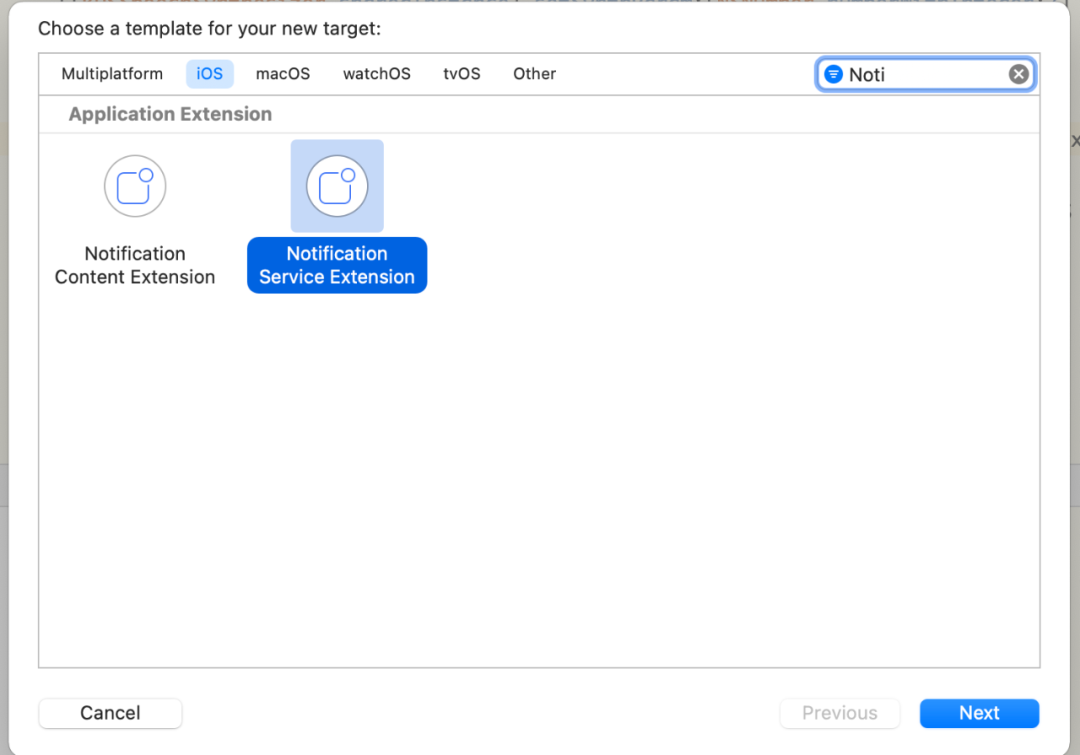
創(chuàng)建Notificaiton Service Extension Target,選中Xcode項(xiàng)目,點(diǎn)擊File -> New -> Target,選中Notification Service Extension Target。有兩個(gè)很相似的,注意選對(duì),如下圖:
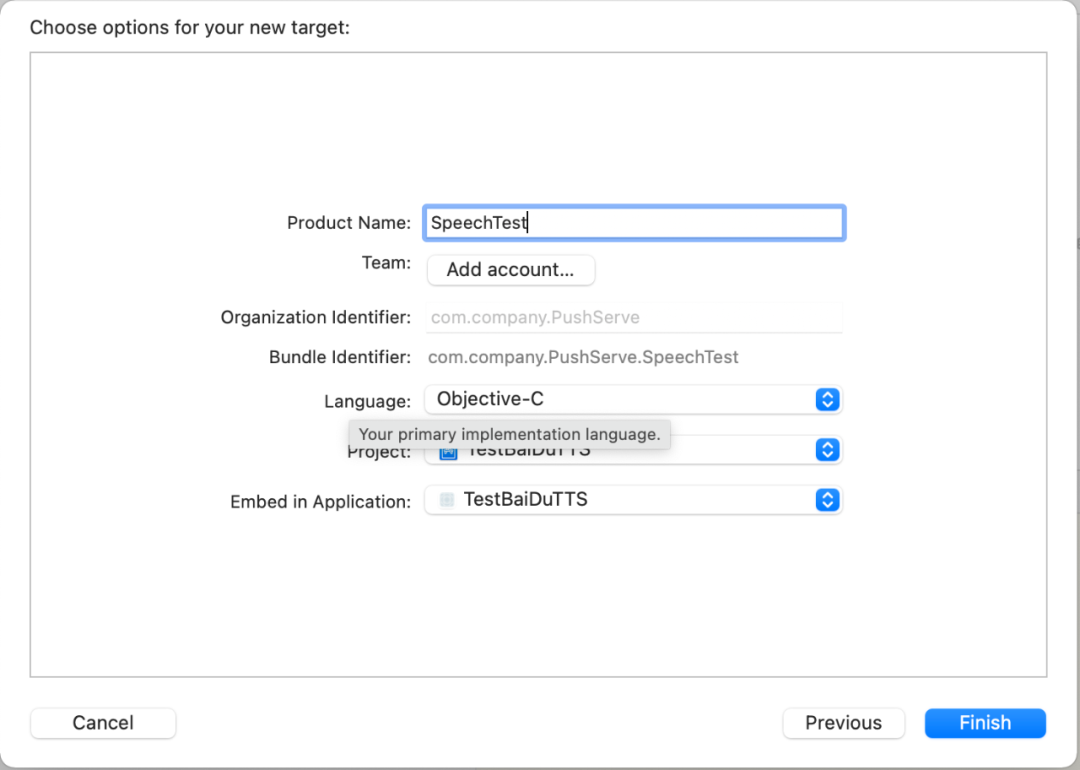
點(diǎn)擊Next,輸入Product Name
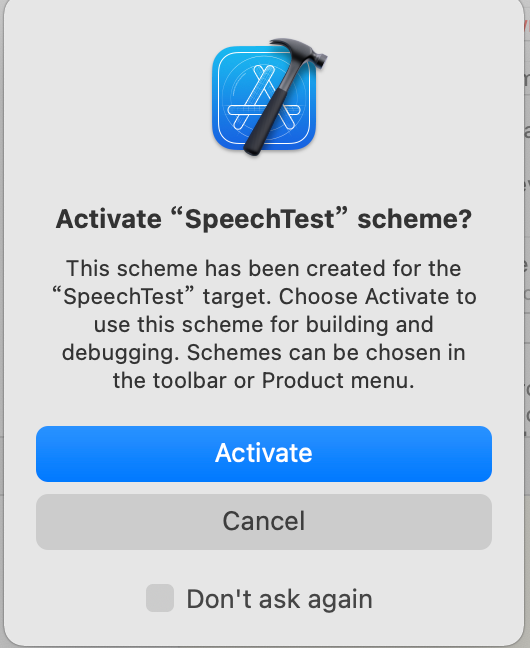
點(diǎn)擊完成,點(diǎn)擊Activate
打開NotificationService.m中的文件,這個(gè)類就是Notificaiton Service Extension添加后自動(dòng)創(chuàng)建的類,添加了之后,接受到推送的處理都可以在這個(gè)位置修改
其中修改推送鈴聲時(shí)要注意: 多條推送處理的問題,在didReceiveNotificationRequest:withContentHandler:方法中調(diào)用self.contentHandler(self.bestAttemptContent);,即會(huì)展示對(duì)應(yīng)的通知,如果不調(diào)用此方法,最多30s系統(tǒng)會(huì)自動(dòng)調(diào)用此方法,假設(shè)一次性來了10條通知,會(huì)發(fā)現(xiàn),通知并沒有彈出10次,也沒有按順序一次次展示,所以多條推送如果沒有處理,播放語音時(shí)就會(huì)出現(xiàn)問題。 語音的文件類型:自定義鈴聲支持的聲音格式包括,aiff、wav以及wav格式,鈴聲的長(zhǎng)度必須小于30s,否則系統(tǒng)會(huì)播放默認(rèn)的鈴聲。 音頻文件存儲(chǔ)的目錄和讀取的優(yōu)先級(jí),主應(yīng)用中的Library/Sounds文件夾中、AppGroups共享目錄中的Library/Sounds文件夾中、main bundle 在系統(tǒng)播放類AVSpeechSynthesizer的代理方法中,有播放完成的回掉speechSynthesizer:didFinishSpeechUtterance:,把呼出通知欄的代碼self.contentHandler(self.bestAttemptContent)從didReceiveNotificationRequest:withContentHandler:方法中,移到播放完成的回掉方法中調(diào)用,即可保證語音按順序一條條展示。(或者添加到數(shù)組或著OperationQueue中,播放完成繼續(xù)下一條) didReceiveNotificationRequest:withContentHandler:方法,其中的bestAttemptContent中的userInfo即包含了推送的詳細(xì)信息。如果想要修改展示的標(biāo)題和內(nèi)容或者推送的語音,都在這個(gè)方法最后回掉前操作,
@interface NotificationService ()

@property (nonatomic, strong) void (^contentHandler)(UNNotificationContent *contentToDeliver);
@property (nonatomic, strong) UNMutableNotificationContent *bestAttemptContent;

@end

@implementation NotificationService

- (void)didReceiveNotificationRequest:(UNNotificationRequest *)request withContentHandler:(void (^)(UNNotificationContent * _Nonnull))contentHandler {
    self.contentHandler = contentHandler;
    self.bestAttemptContent = [request.content mutableCopy];

    // Modify the notification content here...
    // 修改推送的標(biāo)題
    //    self.bestAttemptContent.title = [NSString stringWithFormat:@"%@ [modified]", self.bestAttemptContent.title];

    // 修改推送的聲音,自定義鈴聲支持的聲音格式包括,aiff、wav以及wav格式,鈴聲的長(zhǎng)度必須小于30s,否則系統(tǒng)會(huì)播放默認(rèn)的鈴聲。
    //    self.bestAttemptContent.sound = [UNNotificationSound soundNamed:@"a.wav"];

    // 播放處理
    [self playVoiceWithInfo:self.bestAttemptContent.userInfo];

    self.contentHandler(self.bestAttemptContent);
}

- (void)serviceExtensionTimeWillExpire {
    // Called just before the extension will be terminated by the system.
    // Use this as an opportunity to deliver your "best attempt" at modified content, otherwise the original push payload will be used.
    self.contentHandler(self.bestAttemptContent);
}

- (void)playVoiceWithInfo:(NSDictionary *)userInfo {
    NSLog(@"NotificationExtension content : %@",userInfo);

    NSString *title = userInfo[@"aps"][@"alert"][@"title"];
    NSString *subTitle = userInfo[@"aps"][@"alert"][@"subtitle"];
    NSString *subMessage = userInfo[@"aps"][@"alert"][@"body"];
    NSString *isRead = userInfo[@"isRead"];
    NSString *isUseBaiDu = userInfo[@"isBaiDu"];

    [[AVAudioSession sharedInstance] setCategory:AVAudioSessionCategoryPlayback
                                     withOptions:AVAudioSessionCategoryOptionDuckOthers error:nil];
    [[AVAudioSession sharedInstance] setActive:YES
                                   withOptions:AVAudioSessionSetActiveOptionNotifyOthersOnDeactivation
                                         error:nil];

    // Ps: 下面代碼示例并沒有多條播放的處理,還請(qǐng)注意

    if ([isRead isEqual:@"1"]) {
        // 播放語音
        if ([isUseBaiDu isEqual:@"1"]) {
            // 使用百度離線語音播放
            [[BaiDuTtsUtils shared] playBaiDuTTSVoiceWithContent:title];
        }
        else {
            // 使用系統(tǒng)語音播放
            [[AppleTtsUtils shared] playAppleTTSVoiceWithContent:title];
        }
    }
    else {
        // 無需播放語音
    }

}

@end
其中AppleTtsUtils中實(shí)現(xiàn)如下,大致就是使用AVSpeechSynthesizer直接播放,設(shè)置音量和語速,需要注意的是,
音量的設(shè)置 靜音時(shí)是不會(huì)播放的 實(shí)際播放的音量大小=設(shè)置的音量大小*系統(tǒng)音量的大小。所以即使設(shè)置了大音量,但是系統(tǒng)音量很小,播放的聲音也很小。(比如系統(tǒng)volume是0.5,AVAudioPlayer的音量是0.6,則最終的音量為0.5*0.6 =0.3)。解決方案是:最終的解決方案借鑒了進(jìn)入收付款展示二維碼時(shí)自動(dòng)調(diào)節(jié)屏幕亮度的方案:如果屏幕亮度未達(dá)到閾值,則調(diào)高屏幕亮度到閾值,離開頁(yè)面時(shí),將亮度設(shè)回原亮度。同理,播放提示音時(shí),若用戶設(shè)置的系統(tǒng)音量小于閾值,則調(diào)節(jié)到閾值。提示音播放完畢后,將提示音調(diào)回原音量,大致意思是: 數(shù)字的處理 數(shù)字轉(zhuǎn)語音,采用zh-CN的voice后,數(shù)字的播放方式是幾萬幾千幾百幾十幾這種,可采用數(shù)字后面拼接空格的方式來處理;遍歷內(nèi)容的每一個(gè)字符串,如果是數(shù)字,則拼接一個(gè)空格到后面,最后播放時(shí)數(shù)字就會(huì)一個(gè)個(gè)讀出來。
#import "AppleTtsUtils.h"
#import <AVFoundation/AVFoundation.h>
#import <AVKit/AVKit.h>

@interface AppleTtsUtils ()<AVSpeechSynthesizerDelegate>

@property (nonatomic, strong) AVSpeechSynthesizer *speechSynthesizer;
@property (nonatomic, strong) AVSpeechSynthesisVoice *speechSynthesisVoice;

@end

@implementation AppleTtsUtils

+ (instancetype)shared {
    static id instance = nil;
    static dispatch_once_t onceToken;
    dispatch_once(&onceToken, ^{
        instance = [[self class] new];
    });

    return instance;
}

- (BOOL)isNumber:(NSString *)str
{
   if (str.length == 0) {
        return NO;
    }
    NSString *regex = @"[0-9]*";
    NSPredicate *pred = [NSPredicate predicateWithFormat:@"SELF MATCHES %@",regex];
    if ([pred evaluateWithObject:str]) {
        return YES;
    }
    return NO;
}

- (void)playAppleTtsVoiceWithContent:(NSString *)content {

    if ((content == nil) || (content.length <= 0)) {
        return;
    }
    // 數(shù)字轉(zhuǎn)語音,采用zh-CN的voice后,數(shù)字的播放方式是幾萬幾千幾百幾十幾這種,故而采用數(shù)字后面拼接空格的方式來處理;遍歷內(nèi)容的每一個(gè)字符串,如果是數(shù)字,則拼接一個(gè)空格到后面,最后播放時(shí)數(shù)字就會(huì)一個(gè)個(gè)讀出來。
    NSString *newResult = @"";
    for (int i = 0; i < content.length; i++) {
        NSString *tempStr = [content substringWithRange:NSMakeRange(i, 1)];
        newResult = [newResult stringByAppendingString:tempStr];
        if ([self deptNumInputShouldNumber:tempStr] ) {
            newResult = [newResult stringByAppendingString:@" "];
        }
    }
    // Todo: 英文轉(zhuǎn)語音

    AVSpeechUtterance *utterance = [AVSpeechUtterance speechUtteranceWithString:newResult];
    utterance.rate = AVSpeechUtteranceDefaultSpeechRate;
    utterance.voice = self.speechSynthesisVoice;
    utterance.volume = 1.0;
    utterance.rate = AVSpeechUtteranceDefaultSpeechRate;
    [self.speechSynthesizer speakUtterance:utterance];
}

- (AVSpeechSynthesizer *)speechSynthesizer {
    if (!_speechSynthesizer) {
        _speechSynthesizer = [[AVSpeechSynthesizer alloc] init];
        _speechSynthesizer.delegate = self;
    }
    return _speechSynthesizer;
}

- (AVSpeechSynthesisVoice *)speechSynthesisVoice {
    if (!_speechSynthesisVoice) {
        _speechSynthesisVoice = [AVSpeechSynthesisVoice voiceWithLanguage:@"zh-CN"];
    }
    return _speechSynthesisVoice;
}


- (void)speechSynthesizer:(AVSpeechSynthesizer *)synthesizer didStartSpeechUtterance:(AVSpeechUtterance *)utterance {
    NSLog(@"didStartSpeechUtterance");
}

- (void)speechSynthesizer:(AVSpeechSynthesizer *)synthesizer didCancelSpeechUtterance:(AVSpeechUtterance *)utterance {
    NSLog(@"didCancelSpeechUtterance");
}

- (void)speechSynthesizer:(AVSpeechSynthesizer *)synthesizer didPauseSpeechUtterance:(AVSpeechUtterance *)utterance {
    NSLog(@"didPauseSpeechUtterance");
}

- (void)speechSynthesizer:(AVSpeechSynthesizer *)synthesizer didFinishSpeechUtterance:(AVSpeechUtterance *)utterance {
    NSLog(@"didFinishSpeechUtterance");
    [self.speechSynthesizer stopSpeakingAtBoundary:AVSpeechBoundaryWord];

//    // 每一條語音播放完成后,我們調(diào)用此代碼,用來呼出通知欄
// 可通過Block回掉暴露給上層
//    self.contentHandler(self.bestAttemptContent);
}
b. 百度TTS離線SDK添加
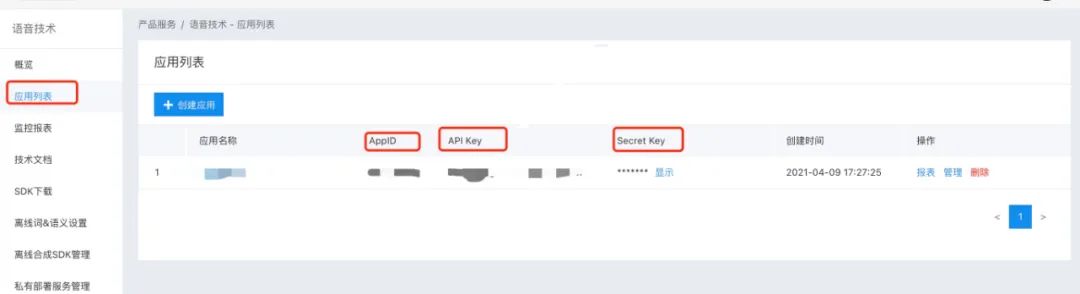
打開百度智能控制臺(tái),選中應(yīng)用列表,創(chuàng)建新的要測(cè)試的應(yīng)用,創(chuàng)建后會(huì)有,這里bundleId要寫創(chuàng)建的對(duì)應(yīng)的Notification Service Extension的bundleId,而不是主項(xiàng)目的bundleId,一定要注意!!!如下圖
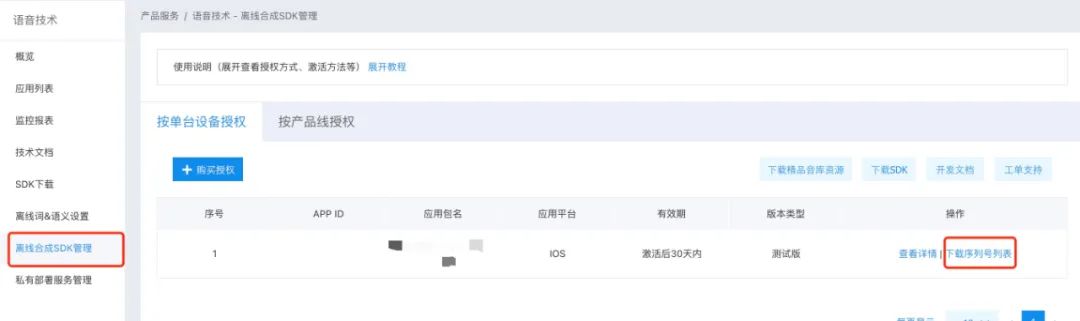
左側(cè)選中離線SDK管理,點(diǎn)擊添加,然后選中剛剛創(chuàng)建的應(yīng)用,點(diǎn)擊完成后,點(diǎn)擊下載序列號(hào)列表,然后把AppId、AppKey、SecretKey、以及序列號(hào)存儲(chǔ),用于初始化離線SDK。如下圖
左側(cè)選中離線SDK管理時(shí),點(diǎn)擊右邊的下載SDK,以及開發(fā)文檔,按照SDK的說法
?
集成指南: 強(qiáng)烈建議用戶首先運(yùn)行SDK包中的Demo工程,Demo工程中詳細(xì)說明了語音合成的使用方法,并提供了完整的示例。一般情況下,您只需參照demo工程即可完成所有的集成和配置工作。
所以,把SDK下載好了之后,打開BDSClientSample項(xiàng)目,然后把TTSViewController.mm文件中的APP_ID、API_KEY、SECRET_KEY和SN改為剛剛申請(qǐng)的,然后運(yùn)行測(cè)試,看能否正常播放語音,播放成功說明申請(qǐng)的沒有問題,就可以繼續(xù)往項(xiàng)目中集成,要不然,集成到項(xiàng)目中發(fā)現(xiàn)不播放,會(huì)懷疑是SDK的問題。??,以為集成后調(diào)試確實(shí)很容易讓人懷疑人生。
把SDK解壓后的BDSClientHeaders、BDSClientLib、BDSClientResource文件夾拖拽到Notification Service Extension的target下,注意勾選copy選項(xiàng),然后把BDSClientLib文件夾下的.gitignore刪除,要不然編譯會(huì)失敗,真的,不騙人,??,踩坑指南
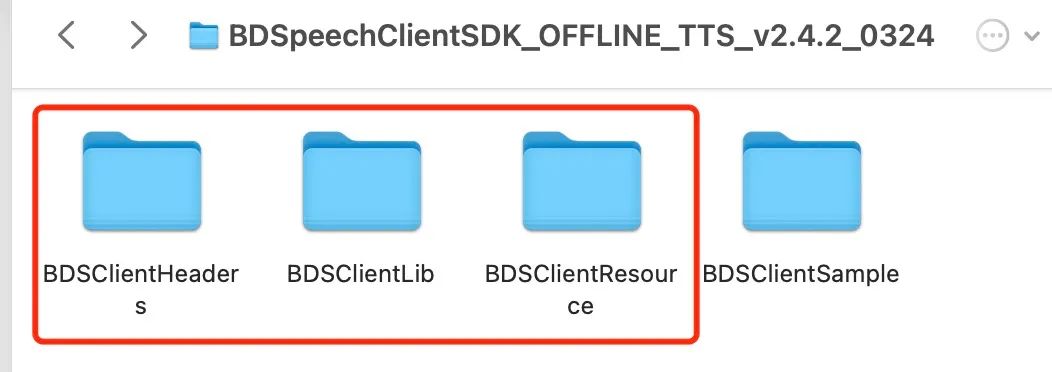
添加依賴的系統(tǒng)庫(kù),參考BDSClientSample項(xiàng)目中的依賴,注意添加到Notification Service Extension的target下,如下圖:

done,編譯Notification Service Extension的target,注意選對(duì)target,噢噢,這個(gè)地方還有個(gè)問題,新創(chuàng)建的target是根據(jù)Xcode的版本來的,所以還需要修改一下這個(gè)target兼容的最低target,要不然默認(rèn)可能是14.4,然后運(yùn)行調(diào)試不報(bào)錯(cuò),能正常運(yùn)行,但是斷點(diǎn)不走,驚不驚喜,??。
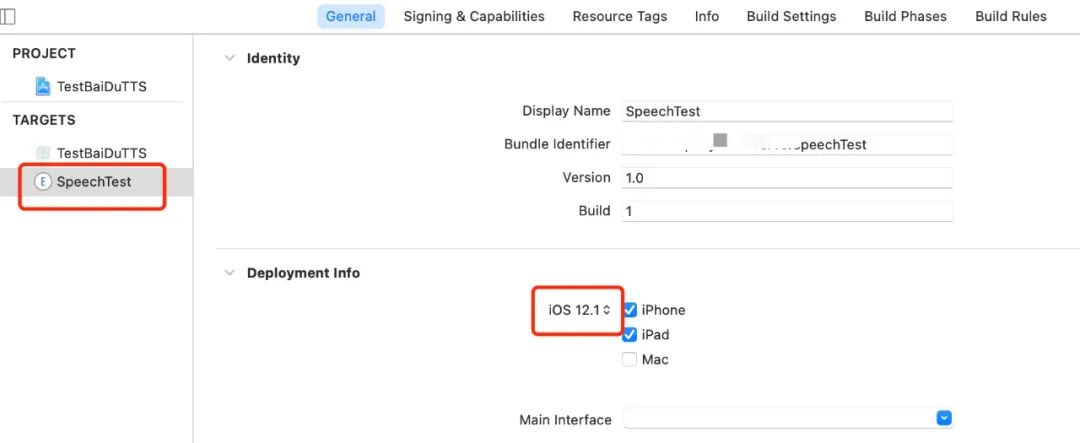
添加百度語音處理代碼到Notification Service Extension的target下,如上面寫的,BaiDuTtsUtils代碼如下
這里要注意的是, configureOfflineTTS方法中,offlineSpeechData和offlineTextData資源的加載,默認(rèn)和Demo中寫的一致即可,其實(shí)是BDSClientResource文件夾下TTS文件夾中的內(nèi)容,如果下載的有別的語音文件,這里就加載自己下載的語音文件。
#import "BaiDuTtsUtils.h"
#import "BDSSpeechSynthesizer.h"

// 百度TTS
NSString* BaiDuTTSAPP_ID = @"Your_APP_ID";
NSString* BaiDuTTSAPI_KEY = @"Your_APP_KEY";
NSString* BaiDuTTSSECRET_KEY = @"Your_SECRET_KEY";
NSString* BaiDuTTSSN = @"Your_SN";

@interface BaiDuTtsUtils ()<BDSSpeechSynthesizerDelegate>

@end

@implementation BaiDuTtsUtils

+ (instancetype)shared {
    static id instance = nil;
    static dispatch_once_t onceToken;
    dispatch_once(&onceToken, ^{
        instance = [[self class] new];
    });

    return instance;
}

#pragma mark - baidu tts

-(void)configureOfflineTTS{

    NSError *err = nil;
    NSString* offlineSpeechData = [[NSBundle mainBundle] pathForResource:@"bd_etts_common_speech_m15_mand_eng_high_am-mgc_v3.6.0_20190117" ofType:@"dat"];
    NSString* offlineTextData = [[NSBundle mainBundle] pathForResource:@"bd_etts_common_text_txt_all_mand_eng_middle_big_v3.4.2_20210319" ofType:@"dat"];
//    #error "set offline engine license"
    if (offlineSpeechData == nil || offlineTextData == nil) {
        NSLog(@"離線合成 資源文件為空!");
        return;
    }

    err = [[BDSSpeechSynthesizer sharedInstance] loadOfflineEngine:offlineTextData speechDataPath:offlineSpeechData licenseFilePath:nil withAppCode:BaiDuTTSAPP_ID withSn:BaiDuTTSSN];
    if(err){
        NSLog(@"Offline TTS init failed");
        return;
    }
}

- (void)playBaiDuTTSVoiceWithContent:(NSString *)voiceText {
    NSLog(@"TTS version info: %@", [BDSSpeechSynthesizer version]);

    [BDSSpeechSynthesizer setLogLevel:BDS_PUBLIC_LOG_VERBOSE];
    // 設(shè)置委托對(duì)象
    [[BDSSpeechSynthesizer sharedInstance] setSynthesizerDelegate:self];


    [self configureOfflineTTS];

    [[BDSSpeechSynthesizer sharedInstance] setPlayerVolume:10];
    [[BDSSpeechSynthesizer sharedInstance] setSynthParam:[NSNumber numberWithInteger:5] forKey:BDS_SYNTHESIZER_PARAM_SPEED];

    // 開始合成并播放
    NSError* speakError = nil;
    NSInteger sentenceID = [[BDSSpeechSynthesizer sharedInstance] speakSentence:voiceText withError:&speakError];
    if (speakError) {
        NSLog(@"錯(cuò)誤: %ld, %@", (long)speakError.code, speakError.localizedDescription);
    }
}

- (void)synthesizerStartWorkingSentence:(NSInteger)SynthesizeSentence
{
    NSLog(@"Began synthesizing sentence %ld", (long)SynthesizeSentence);
}

- (void)synthesizerFinishWorkingSentence:(NSInteger)SynthesizeSentence
{
    NSLog(@"Finished synthesizing sentence %ld", (long)SynthesizeSentence);
}

- (void)synthesizerSpeechStartSentence:(NSInteger)SpeakSentence
{
    NSLog(@"Began playing sentence %ld", (long)SpeakSentence);
}

- (void)synthesizerSpeechEndSentence:(NSInteger)SpeakSentence
{
    NSLog(@"Finished playing sentence %ld", (long)SpeakSentence);
}


@end
c. 調(diào)試
刺激的部分來了,上面都編譯通過了沒問題,使用推送調(diào)試,先運(yùn)行一次主項(xiàng)目,然后選中Notification Service Extension Target運(yùn)行,didReceiveNotificationRequest:withContentHandler:方法中添加斷點(diǎn),,給自己推送消息,會(huì)發(fā)現(xiàn)斷點(diǎn)走到了這里,說明target的創(chuàng)建沒有問題。
然后控制推送參數(shù)的,isRead和isBaiDu參數(shù),決定推送過來的語音是否走百度的語音播放。噢,說到推送參數(shù),這個(gè)地方還需要在payload推送參數(shù)中添加"mutable-content = 1"字段,eg:
{
  "aps": {
  "alert": {
      "title":"標(biāo)題",
      "subtitle: "副標(biāo)題",
      "body": "內(nèi)容"
  },
  "badge": 1,
  "sound": "default",
  "mutable-content": "1",
  }
}
推送調(diào)試,會(huì)發(fā)現(xiàn)運(yùn)行正常,但是語音沒有播放,不管是系統(tǒng)的還是百度的,哈哈哈,崩潰不。仔細(xì)看控制臺(tái),會(huì)發(fā)現(xiàn),報(bào)錯(cuò)如下
Ps: iOS 12.0之后,在Notification Service Extension調(diào)用系統(tǒng)播放AVSpeechSynthesizer時(shí)報(bào)的錯(cuò)誤。
[AXTTSCommon] Failure starting audio queue alp!
[AXTTSCommon] _BeginSpeaking: couldn't begin playback
Ps: iOS 12.0之后,在Notification Service Extension調(diào)用百度的SDK直接播放時(shí)報(bào)的錯(cuò)誤。
[ERROR][AudioBufPlayer.mm:1088]AudioQueue start errored error: 561015905 (!pla)
[ERROR][AudioBufPlayer.mm:1099]Can't begin playback while in background!
都是一個(gè)意思,即不能在后臺(tái)播放音頻。怎么解決呢,當(dāng)然是添加backgroundMode字段了,打開主工程的Signing&Capabilities,添加backgrondModes,勾選Audio, Airplay, and Picture in Picture,如下圖
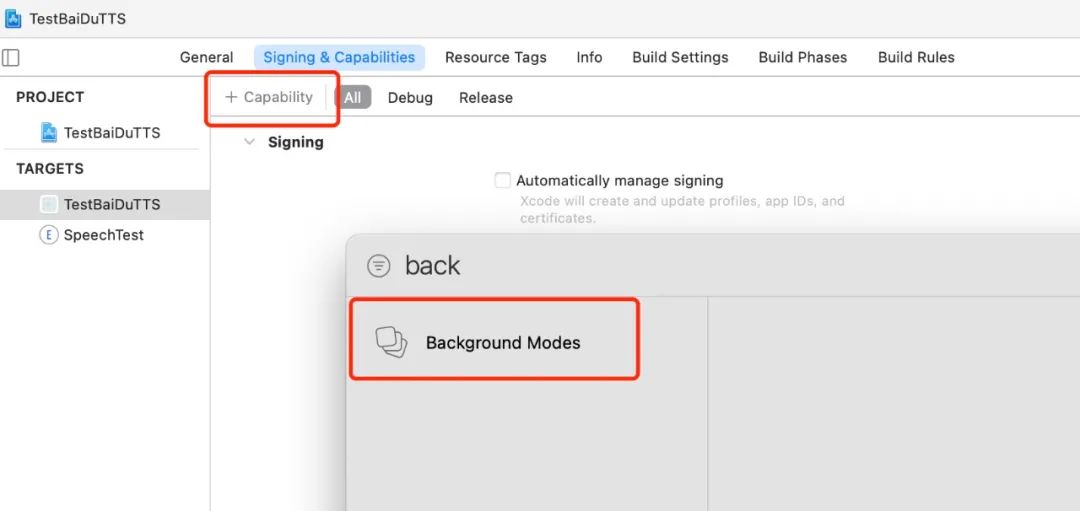
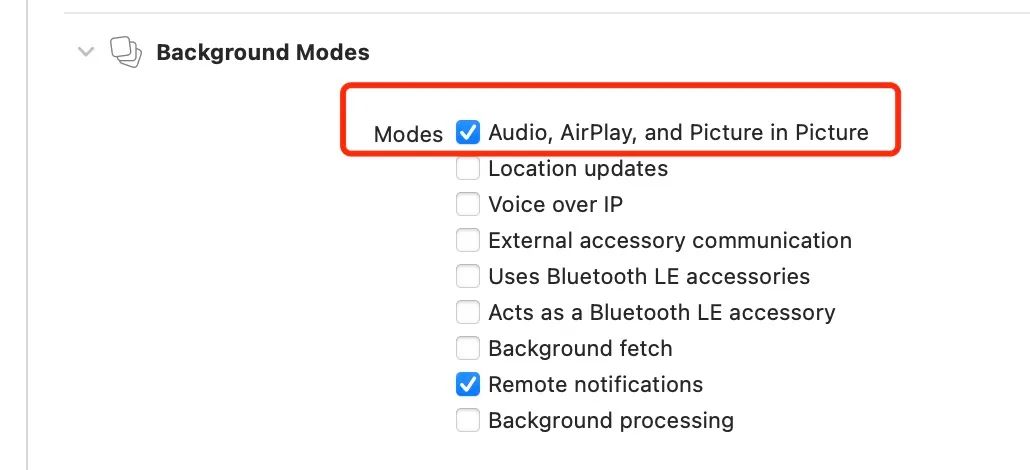
OK,try again! 再次推送,會(huì)發(fā)現(xiàn)————還是不行,同樣的報(bào)錯(cuò),哈哈哈,絕望不,不好意思,我收斂一下,這個(gè)地方其實(shí)添加的沒錯(cuò),只不過要注意
?
在Notification Service Extension配置了之后,發(fā)現(xiàn)收到通知后還是不會(huì)播放聲音,在這個(gè)Extension的Target下打開plist,添加Required background modes字段,里面item0寫上App plays audio or streams audio/video using AirPlay后,再次調(diào)試,發(fā)現(xiàn)百度的語音即可播放。 這種方式審核時(shí)不被通過,因?yàn)檫@個(gè)Extension的target其實(shí)是沒有backgroundMode的設(shè)置的,從Signing&Capabilities中可以看出,直接添加backgroundMode是沒有的。故而如果不是上線到蘋果商店的,只是公司內(nèi)部分發(fā),可以用這種方式。
添加了之后,再次推送,就會(huì)發(fā)現(xiàn)百度的語音就可以播放了,而且數(shù)字和英文、中文播放都十分完美,除了價(jià)格有些感人,其他的沒毛病。而系統(tǒng)的播放語音,如果先推送系統(tǒng)的,會(huì)發(fā)現(xiàn)不能播放,還是同樣的報(bào)錯(cuò);但是如果先推送了走百度的,百度播放了之后,再推送系統(tǒng)的,就會(huì)發(fā)現(xiàn)系統(tǒng)的也能播報(bào),但是系統(tǒng)播報(bào)的英文和數(shù)字會(huì)有問題,記得處理,可以聽一下英文字母E的發(fā)音,發(fā)音額。。。解決方案——暫無,還沒找到,建議走第三方合成的語音。
由于項(xiàng)目不需要上線商店,所以到這里其實(shí)就結(jié)束了。但是對(duì)于上線到商店到應(yīng)用來說,這種處理方法是不行的,上線到商店的應(yīng)用其實(shí)只有播放固定格式的音頻一種解決方法,即替換推送的聲音。使用固定格式的音頻、或者固定格式的合成音頻替換掉推送的聲音,或者采用遠(yuǎn)程推送靜音,發(fā)送多個(gè)本地通知,各個(gè)本地通知的聲音替換掉這種方法。這些是從末尾的參考中得到的啟示。
三、結(jié)論
直接上圖,整理后的思維導(dǎo)圖如下,大部分比較復(fù)雜的處理邏輯其實(shí)是iOS 12.0之后的處理。
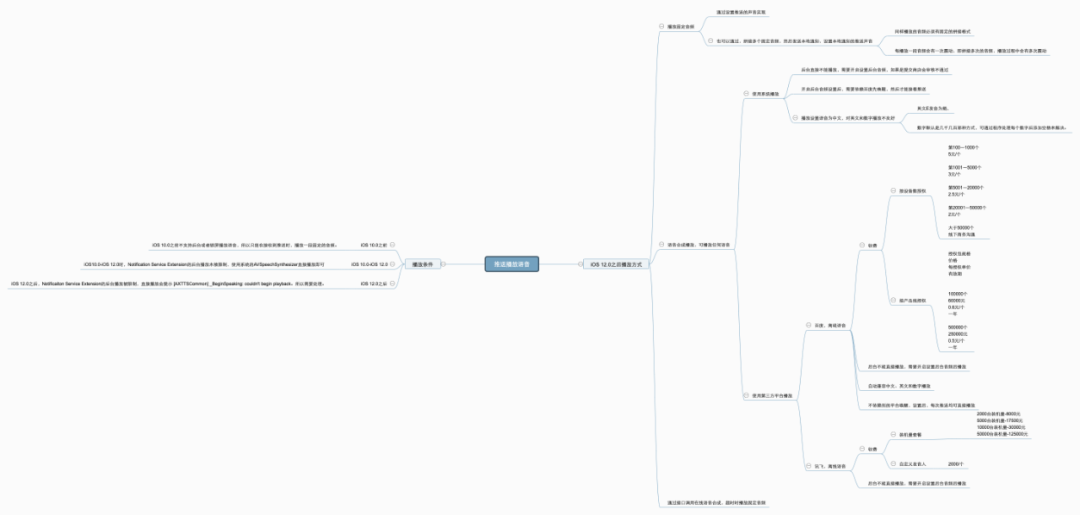
引用
iOS 語音播報(bào)解決方案(實(shí)現(xiàn)支付寶/微信語音收款提示功能) iOS極光推送+語音播報(bào)(支付寶收款播報(bào)) 百度離線合成iOS-SDK集成文檔 百度智能控制臺(tái) iOS12.1之后語音播報(bào)問題解決,以及對(duì)Notification Service Extension的一些探索 iOS12.1使用百度語音無法播報(bào) 微信iOS收款到賬語音提醒開發(fā)總結(jié) iOS13微信收款到賬語音提醒開發(fā)總結(jié)
-End-
最近有一些小伙伴,讓我?guī)兔φ乙恍?nbsp;面試題 資料,于是我翻遍了收藏的 5T 資料后,匯總整理出來,可以說是程序員面試必備!所有資料都整理到網(wǎng)盤了,歡迎下載!
面試題】即可獲取 好文分享給更多人↓↓