
「GoCN酷Go推薦」sql 發(fā)布管理工具 gopg-migrations
1. gopg-migrations 是什么?
gopg-migrations 在我們使用數(shù)據(jù)庫時,每次發(fā)布都要改一些表結(jié)構(gòu),或者修改數(shù)據(jù)之類的操作。
這些操作,手動執(zhí)行既危險,又容易忘記;當(dāng)新人看到奇怪的表結(jié)構(gòu),感覺到很詫異。如果我們能將所有操作管理起來,本地測試好之后再發(fā)布上去,那么就不會有上述這些問題。
因此,gopg-migrations 這個庫,給我們帶來非常大的便利。當(dāng)然,這里是對 postgres 數(shù)據(jù)庫的支持。
2. 怎么使用
下載擴(kuò)展庫 github.com/go-pg/migrations/v7即可使用。
2.1 假如我們先創(chuàng)建一個數(shù)據(jù)庫 students,然后調(diào)用 migrations 去執(zhí)行代碼。
步驟如下:
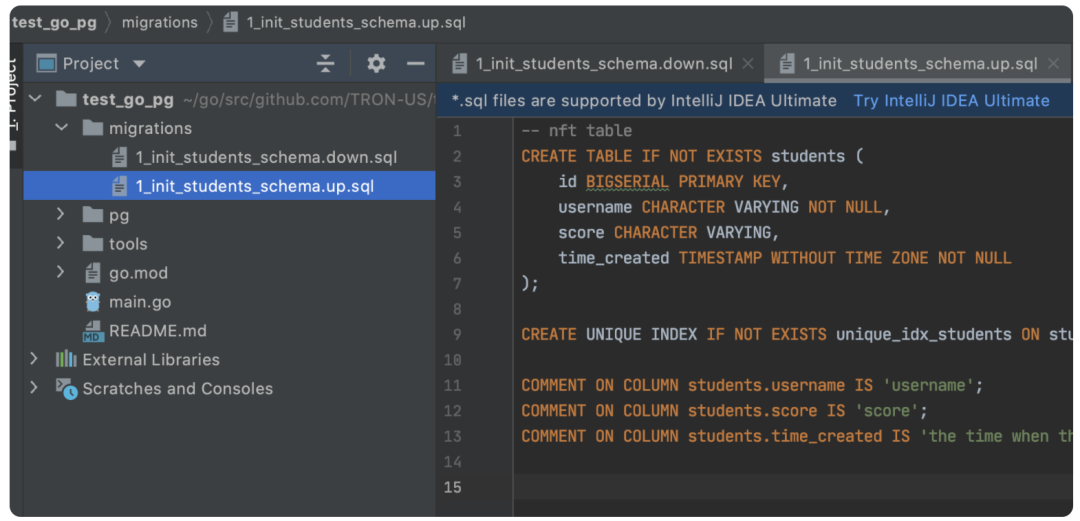
編寫創(chuàng)建表的 sql,使用 migrations 目錄管理起來,num_xxx 表示按照 num 順序執(zhí)行 主邏輯 main.go 主邏輯如下:
package?main

import?(
????"fmt"
????"time"

????pg?"github.com/test_go_pg/pg"

????"go.uber.org/zap"
)

func?main()?{
????fmt.Println("Starting?go-pg-migrations...")

????//?Bootstrap?check?pg
????if?err?:=?pg.PGDBWrite.Ping();?err?!=?nil?{
????????fmt.Println(pg.DBWriteConnectionError,?zap.Error(err))
????????return
????}
????fmt.Println("PostgreSQL?is?running",
????????zap.String("user",?pg.PGDBWrite.Options().User),
????????zap.String("addr",?pg.PGDBWrite.Options().Addr),
????????zap.String("db",?pg.PGDBWrite.Options().Database))

????//?Migrate?to?latest?pg?schema
????if?err?:=?pg.PGDBWrite.Migrate();?err?!=?nil?{
????????fmt.Println(pg.DBMigrationError,?zap.Error(err))
????????return
????}

????time.Sleep(time.Hour)
????fmt.Println("go-pg-migrations?is?stopping...")
}
gopg-migrations 相關(guān)函數(shù)編碼如下:
package?pg

import?(
????"context"
????"fmt"
????"time"

????"github.com/go-pg/migrations/v7"
????"github.com/go-pg/pg/v9"
????"go.uber.org/zap"
)

type?TGPGDB?struct?{
????*pg.DB
}

func?NewTGPGDB(db?*pg.DB)?*TGPGDB?{
????return?&TGPGDB{db}
}

type?TGPGDBOptions?struct?{
????Url?string

????DisableBeforeQueryLog?bool
????DisableAfterQueryLog??bool
}

func?CreateTGPGDB(url?string)?*TGPGDB?{
????return?CreateTGPGDBWithOptions(&TGPGDBOptions{Url:?url})
}

func?CreateTGPGDBWithOptions(dbOpts?*TGPGDBOptions)?*TGPGDB?{
????opts,?err?:=?pg.ParseURL(dbOpts.Url)
????if?err?!=?nil?{
????????fmt.Println(DBURLParseError,?zap.String("URL",?dbOpts.Url),?zap.Error(err))
????????return?nil
????}
????opts.ReadTimeout?=?DBReadTimeout
????opts.WriteTimeout?=?DBWriteTimeout
????opts.TLSConfig?=?nil?//?disabled?for?faster?local?connection?(even?in?production)
????if?DBNumConns?>?0?{
????????opts.PoolSize?=?DBNumConns
????}

????db?:=?NewTGPGDB(pg.Connect(opts))
????return?db
}

//?Ping?simulates?a?"blank?query"?behavior?similar?to?lib/pq's
//?to?check?if?the?db?connection?is?alive.
func?(db?*TGPGDB)?Ping()?error?{
????_,?err?:=?db.ExecOne("SELECT?1")
????return?err
}

//?Migrate?check?and?migrate?to?lastest?db?version.
func?(db?*TGPGDB)?Migrate()?error?{
????//?Make?sure?to?only?search?specified?migrations?dir
????cl?:=?migrations.NewCollection()
????cl.DisableSQLAutodiscover(true)
????err?:=?cl.DiscoverSQLMigrations(DBMigrationsDir)
????if?err?!=?nil?{
????????return?err
????}

????var?oldVersion,?newVersion?int64
????//?Run?all?migrations?in?a?transaction?so?we?rollback?if?migrations?fail?anywhere
????err?=?db.RunInTransaction(func(tx?*pg.Tx)?error?{
????????//?Intentionally?ignore?harmless?errors?on?initializing?gopg_migrations
????????_,?_,?err?=?cl.Run(db,?"init")
????????//if?err?!=?nil?&&?!DBMigrationsAlreadyInit(err)?{
????????if?err?!=?nil{
????????????return?err
????????}
????????oldVersion,?newVersion,?err?=?cl.Run(db,?"up")
????????return?err
????})
????if?err?!=?nil?{
????????return?err
????}
????if?newVersion?==?oldVersion?{
????????fmt.Println("db?schema?up?to?date")
????}?else?{
????????fmt.Println("db?schema?migrated?successfully",?zap.Int64("from",?oldVersion),?zap.Int64("to",?newVersion))
????}
????return?nil
}

//?WithContextTimeout
func?WithContextTimeout(ctx?context.Context,?f?func(ctx?context.Context))?{
????WithContextTimeoutValue(ctx,?DBStmtTimeout,?f)
}

//?WithContextTimeoutValue
func?WithContextTimeoutValue(ctx?context.Context,?timeout?time.Duration,?f?func(ctx?context.Context))?{
????//?check?context?timeout?setting?with?upper?bound?read/write?limit
????if?timeout?>?DBReadTimeout?&&?timeout?>?DBWriteTimeout?{
????????fmt.Println(DBContextTimeoutExceedUpperBound,
????????????zap.Error(fmt.Errorf("query?timeout?%s?exceed?upper?bound?(%s|%s)",?timeout,?DBReadTimeout,?DBWriteTimeout)))
????}
????newCtx,?cancel?:=?context.WithTimeout(ctx,?timeout)
????f(newCtx)
????cancel()
}
直接運(yùn)行 go run main.go,此時代碼運(yùn)行,會生成 students 數(shù)據(jù)表:
sql 如下:
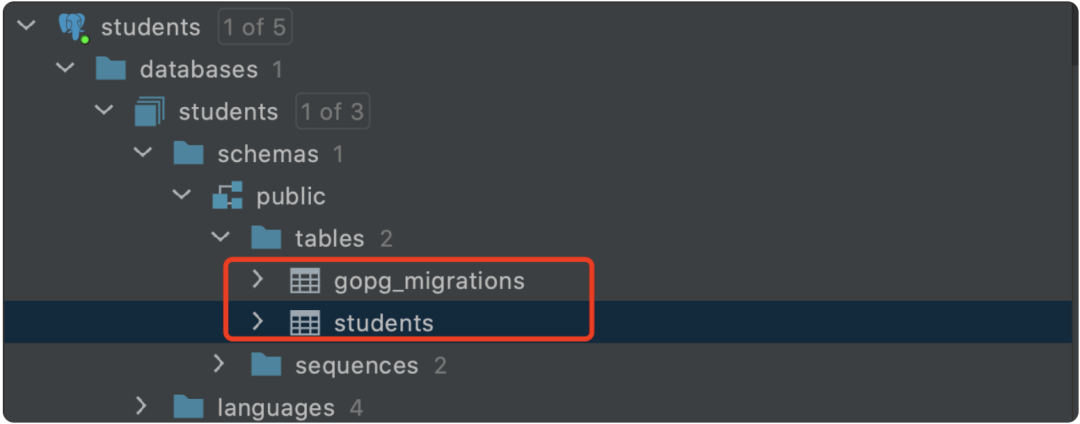
執(zhí)行后,會創(chuàng)建號數(shù)據(jù)表:students 和 gopg-migrations。
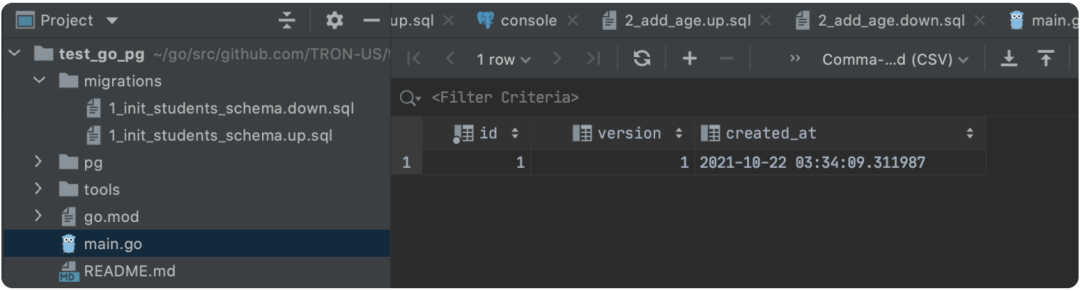
查看 gopg-migrations 如下:
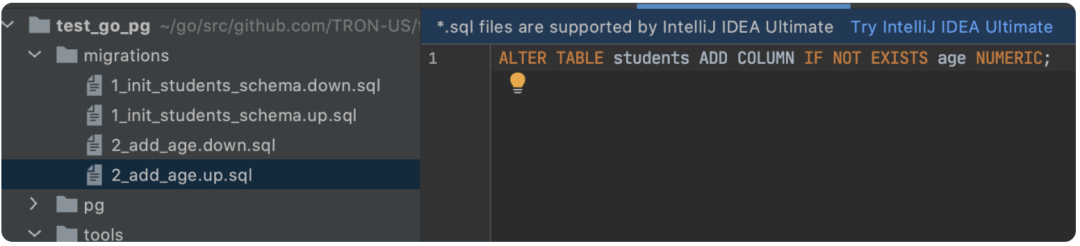
2.2 假設(shè)我們要增加 sql 語句,怎么做呢?
直接添加 sql 重新運(yùn)行 sql 如下:
執(zhí)行如下:
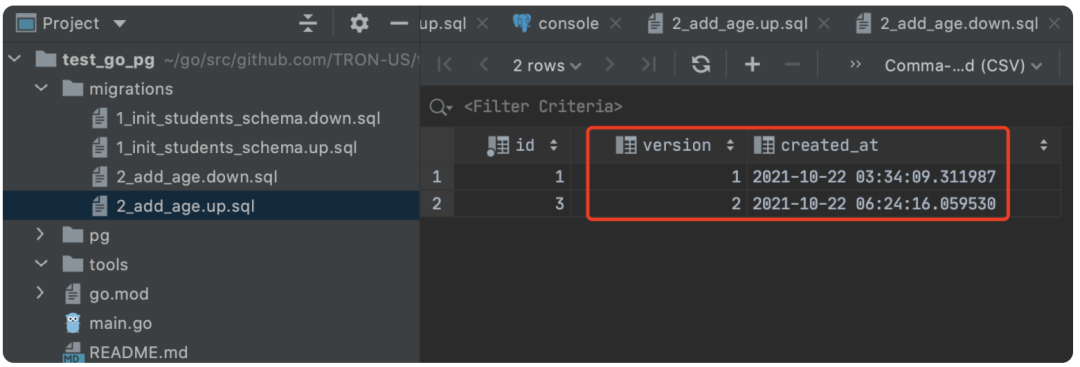
查看 students 數(shù)據(jù)表,發(fā)現(xiàn) 1,2 操作都已經(jīng)執(zhí)行了:

2.3.管理 sql 語句
類似 1,2 中的方式,我們可以添加更多的 sql 語句,把 sql 管理起來。
總結(jié)
gopg-migrations 這個庫,能夠把數(shù)據(jù)庫所有的操作 sql 全部管理起來,一方面可以讓我們清晰的看到 sql 項(xiàng)目的發(fā)展歷程,另一方面本地測試后發(fā)布更加安全!
以上所有內(nèi)容均采用最新官方案例做示例
參考資料
查看全部代碼 (https://github.com/turingczz/test_go_pg)
圖片上傳及查看,使用 swarm 網(wǎng)關(guān)實(shí)現(xiàn)(https://swarm-gateways.net/)
《酷Go推薦》招募:
各位Gopher同學(xué),最近我們社區(qū)打算推出一個類似GoCN每日新聞的新欄目《酷Go推薦》,主要是每周推薦一個庫或者好的項(xiàng)目,然后寫一點(diǎn)這個庫使用方法或者優(yōu)點(diǎn)之類的,這樣可以真正的幫助到大家能夠?qū)W習(xí)到
新的庫,并且知道怎么用。
大概規(guī)則和每日新聞類似,如果報(bào)名人多的話每個人一個月輪到一次,歡迎大家報(bào)名!戳「閱讀原文」,即可報(bào)名
掃碼也可以加入 GoCN 的大家族喲~