
統(tǒng)計(jì)、可視化兩不誤,多達(dá)19種可視化技能你一定要掌握~~
今日小編繼續(xù)給大家推薦優(yōu)質(zhì)繪圖工具,幫助小伙伴們更好的是實(shí)現(xiàn)不同領(lǐng)域中可視化作品的快速繪制。今天的主角為R-grafify包,其包含5大類共19種可視化圖表,舒適和符合出版要求的配色更是為這個(gè)可視化包填色,下面就通過以下兩個(gè)方面介紹下整個(gè)優(yōu)質(zhì)可視化工具。
R-grafify介紹 R-grafify樣例介紹
R-grafify介紹
這一部分小編重點(diǎn)放在R-grafify可繪制的5大類可視化圖表和顏色搭配上,內(nèi)容如下:
5大類可視化圖表
R-grafify包可繪制的19種圖表主要可分為以下5個(gè)小類:
Two variables、 Three or four variables、 Numeric X-Y Plots、 Before-after Plots Data distributions
下面的樣例介紹部分,小編將進(jìn)行具體介紹~~
顏色搭配
R-grafify 包有其自己獨(dú)有的顏色搭配設(shè)計(jì),這里直接列出其所有的顏色條,如下圖所示:
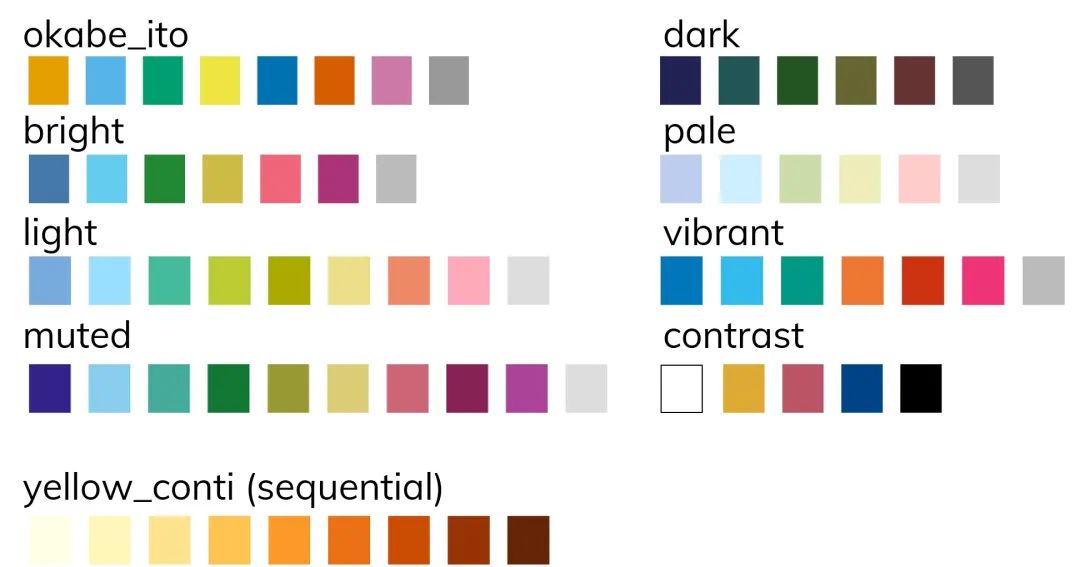
你可以像使用ggplot2種的scale_fill... 和scale_colour... 函數(shù)一樣使用R-grafify包的顏色名稱進(jìn)行顏色選擇和設(shè)置。
R-grafify樣例介紹
這一部分小編將對上述列舉過的5大類圖表進(jìn)行一一介紹(有的類樣例較多,將介紹幾個(gè)典型的圖表類型),詳細(xì)內(nèi)容如下:
Two variables
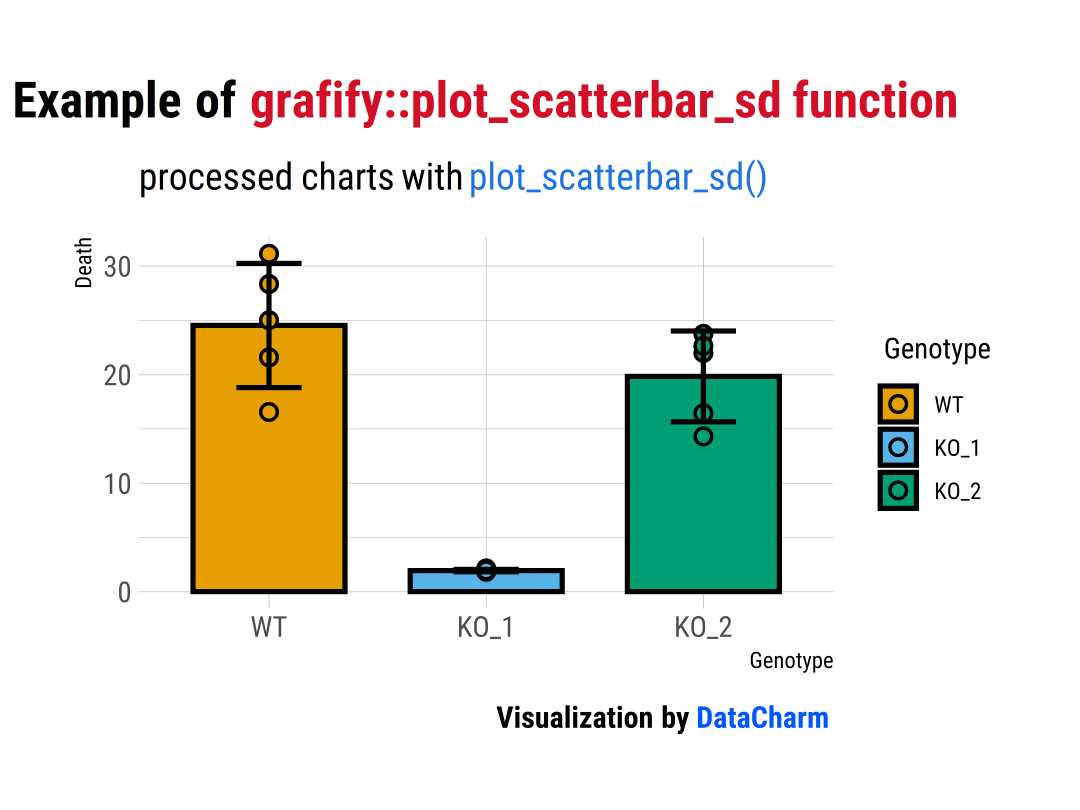
這一小類所含圖表類型較多,這里小編簡單列舉3個(gè)樣例,如下:
plot_scatterbar_sd()
plot_scatterbar_sd(data?=?data_1w_death,?#data?table
?????????????????????????????xcol?=?Genotype,??????#X?variable
?????????????????????????????ycol?=?Death)+????????#Y?variable
??hrbrthemes::theme_ipsum(base_family?=?"Roboto?Condensed")?+
??labs(
????title?=?"Example?of?grafify::plot_scatterbar_sd?function",
????subtitle?=?"processed?charts?with?plot_scatterbar_sd()",
????caption?=?"Visualization?by?DataCharm")?+
??theme(
????plot.title?=?element_markdown(hjust?=?0.5,vjust?=?.5,color?=?"black",
??????????????????????????????????size?=?20,?margin?=?margin(t?=?1,?b?=?12)),
????plot.subtitle?=?element_markdown(hjust?=?0,vjust?=?.5,size=15),
????plot.caption?=?element_markdown(hjust?=?1,face?=?'bold',size?=?12))
plot_scatterbox()
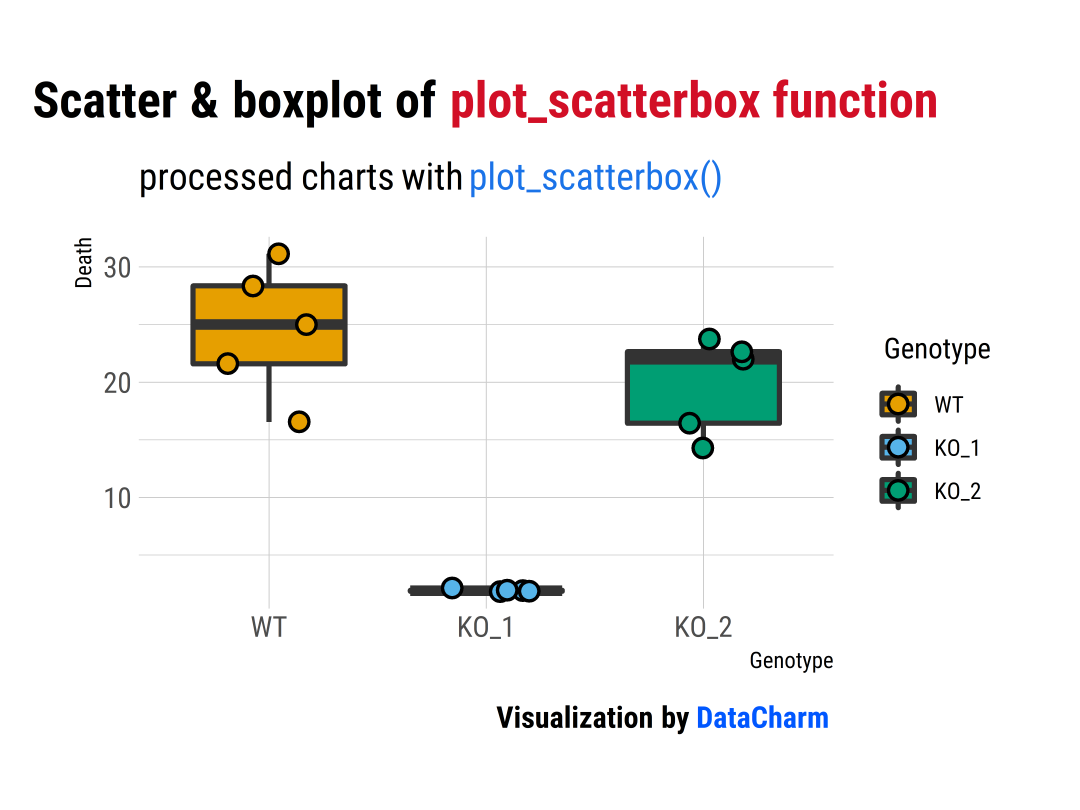
plot_scatterbox(data_1w_death,????#data?table
????????????Genotype,?????????#X?variable
????????????Death,????????????#Y?variable
????????????symsize?=?3,??????#larger?symbols
????????????jitter?=?0.2)
plot_point_sd()
plot_point_sd(data_1w_death,
????????????Genotype,
????????????Death,
????????????symsize?=?6,?????#larger?symbols
????????????ewid?=?0.2,??????#narrower?error?bars
????????????ColPal?=?"bright",?#"bright"?palette
????????????ColRev?=?F)?+
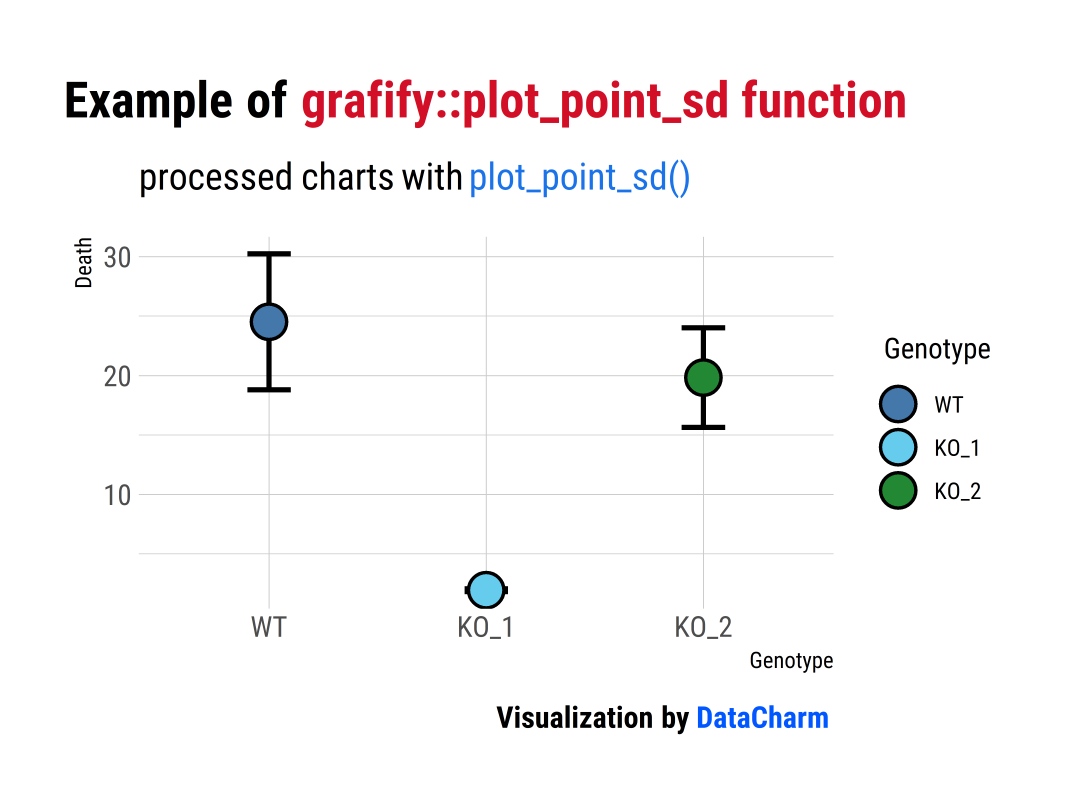
「注意」:這里更改了顏色條:ColPal = "bright",且ColRev設(shè)置成False。
Three or four variables
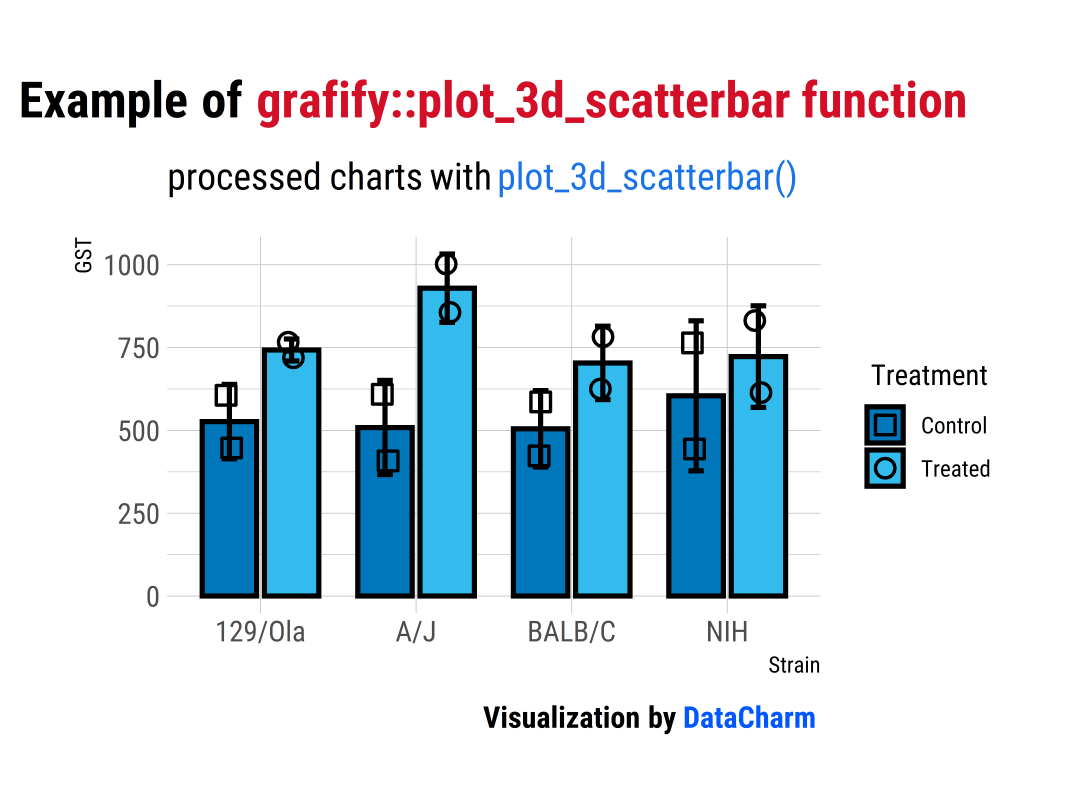
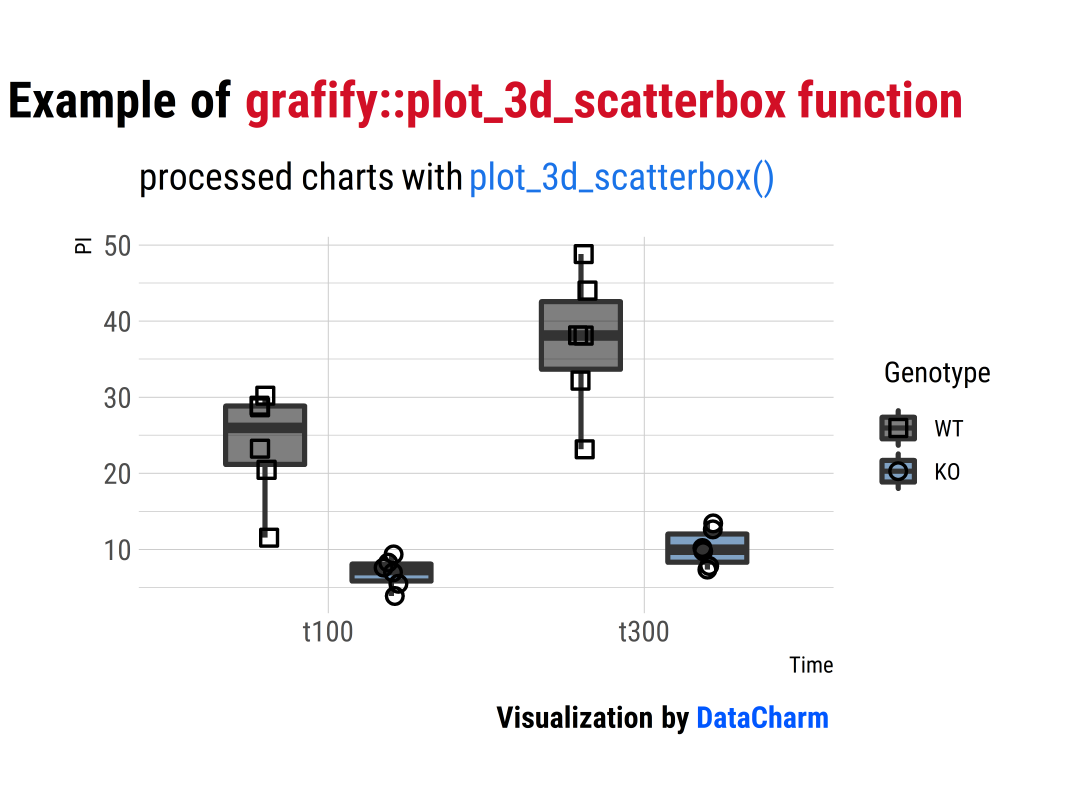
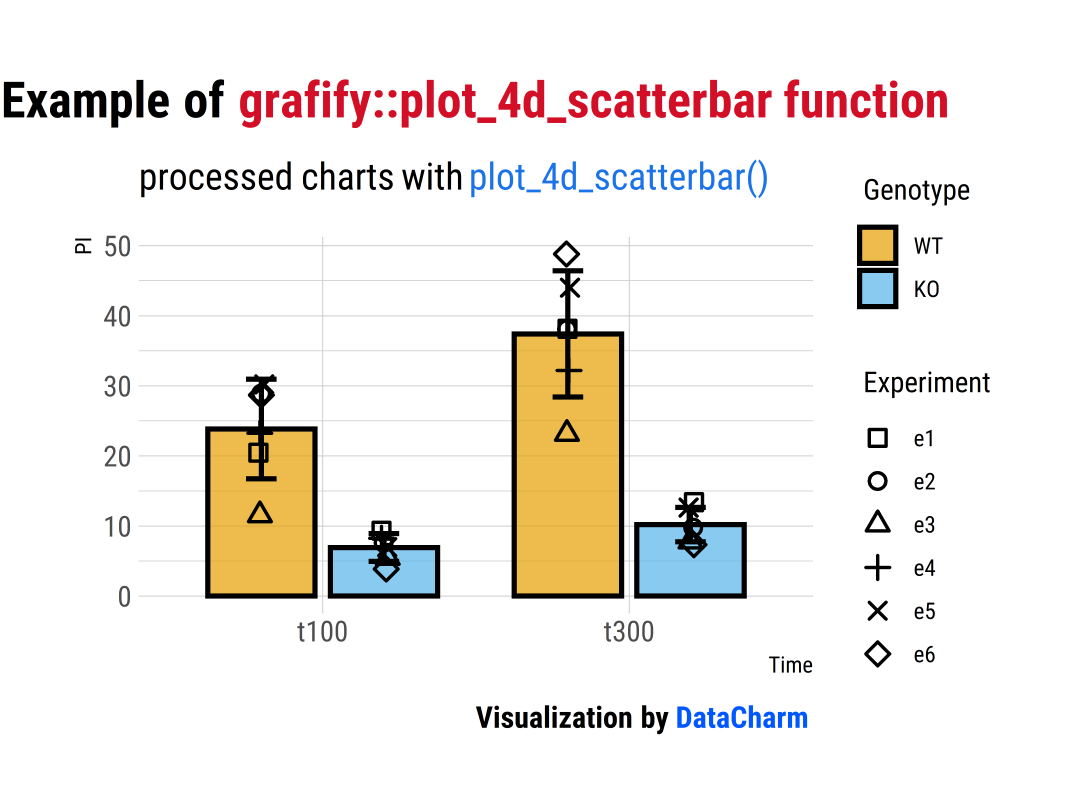
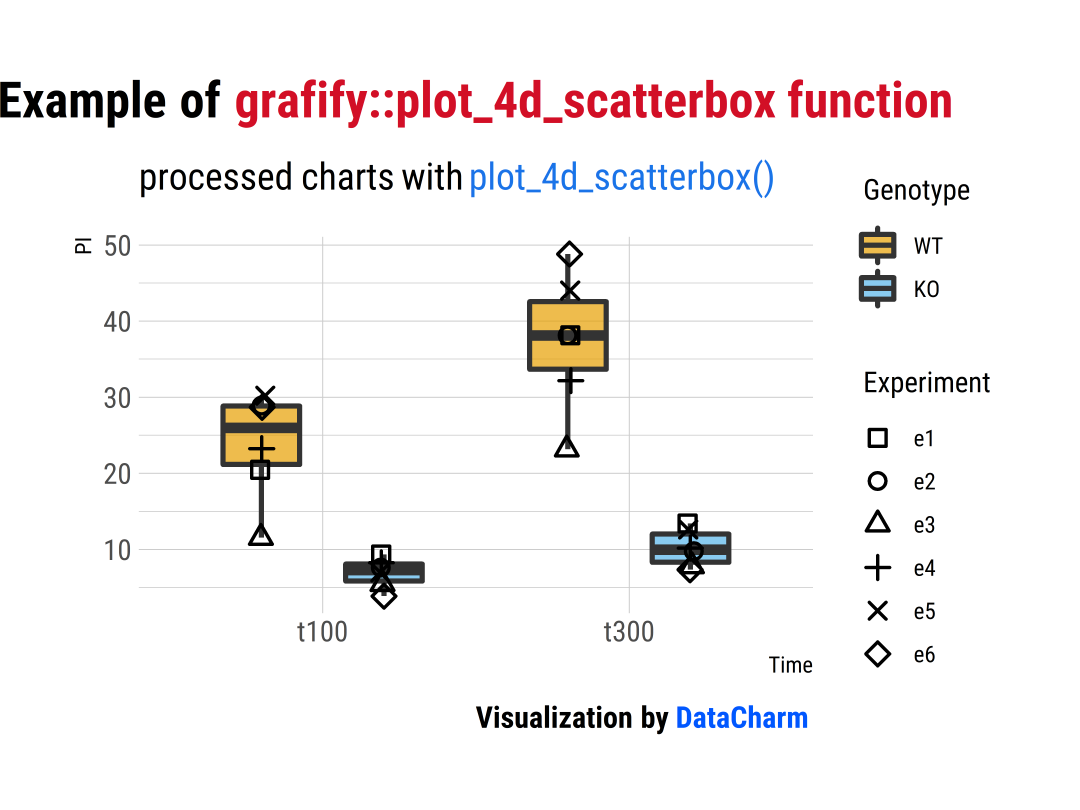
這類圖表包含plot_3d_scatterbar(), plot_3d_scatterbox(), plot_4d_scatterbar(), plot_4d_scatterbox() 函數(shù),具體如下:
plot_3d_scatterbar()
plot_3d_scatterbar(data_2w_Festing,?????#data?table
???????????????????Strain,???????????#X?variable
???????????????????GST,?????????????????#Y?variable
???????????????????shapes?=?Treatment,?
???????????????????symsize?=?3,?????????#grouping?factor?for?shapes
???????????????????ColPal?=?"vibrant")?+?#"vibrant"?palette
hrbrthemes::theme_ipsum(base_family?=?"Roboto?Condensed")?+
??labs(
????title?=?"Example?of?grafify::plot_3d_scatterbar?function",
????subtitle?=?"processed?charts?with?plot_3d_scatterbar()",
????caption?=?"Visualization?by?DataCharm")?+
??theme(
????plot.title?=?element_markdown(hjust?=?0.5,vjust?=?.5,color?=?"black",
??????????????????????????????????size?=?20,?margin?=?margin(t?=?1,?b?=?12)),
????plot.subtitle?=?element_markdown(hjust?=?0,vjust?=?.5,size=15),
????plot.caption?=?element_markdown(hjust?=?1,face?=?'bold',size?=?12))
plot_3d_scatterbox()
plot_3d_scatterbox(data_2w_Tdeath,
???????????????????Time,?
???????????????????PI,
???????????????????Genotype,
???????????????????b_alpha?=?0.5,??????????#reduced?opacity
???????????????????ColPal?=?"contrast",??#"contrast"?palette
???????????????????ColRev?=?T)
plot_4d_scatterbar()
plot_4d_scatterbar(data_2w_Tdeath,?
???????????????????Time,?
???????????????????PI,
???????????????????Genotype,
???????????????????Experiment,
???????????????????b_alpha?=?0.7,
???????????????????ColPal?=?"okabe_ito")+
??scale_colour_manual(values?=?c("black",?"grey20"))
plot_4d_scatterbox()
plot_4d_scatterbox(data_2w_Tdeath,?
???????????????????Time,?
???????????????????PI,
???????????????????Genotype,
???????????????????Experiment,
???????????????????b_alpha?=?0.7,
???????????????????ColPal?=?"okabe_ito")+
??scale_colour_manual(values?=?c("black",?"grey20"))??#manual?colour?scale
Numeric X-Y Plots
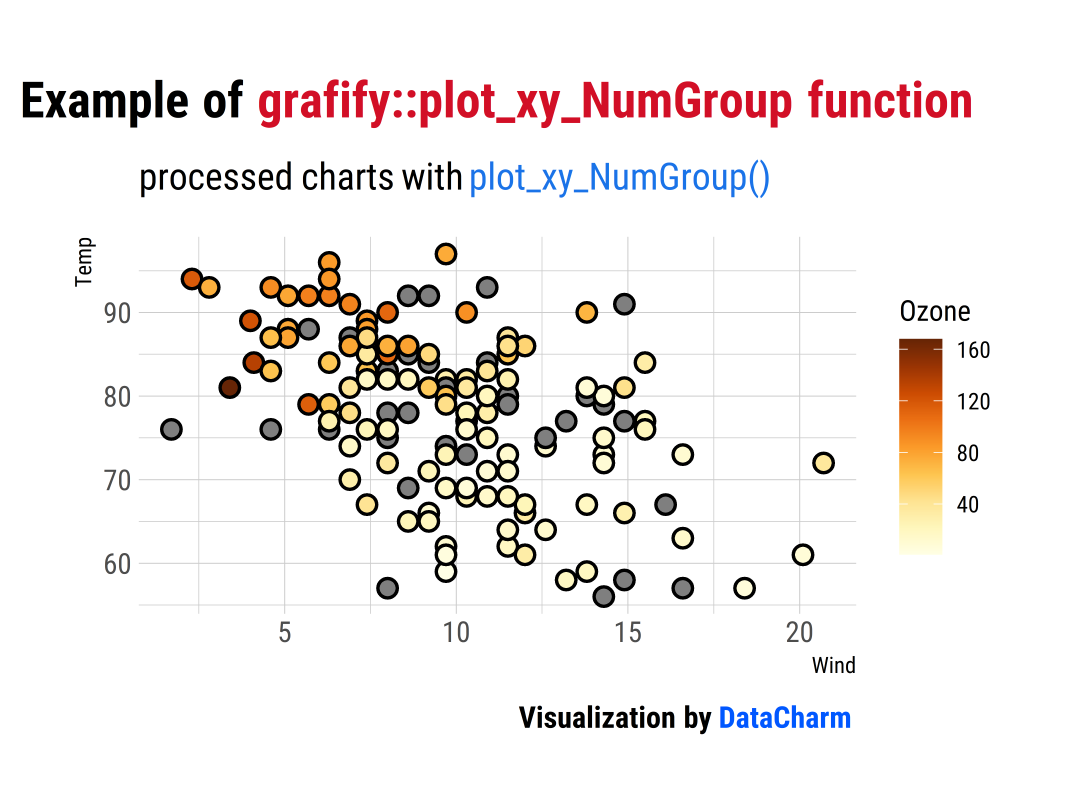
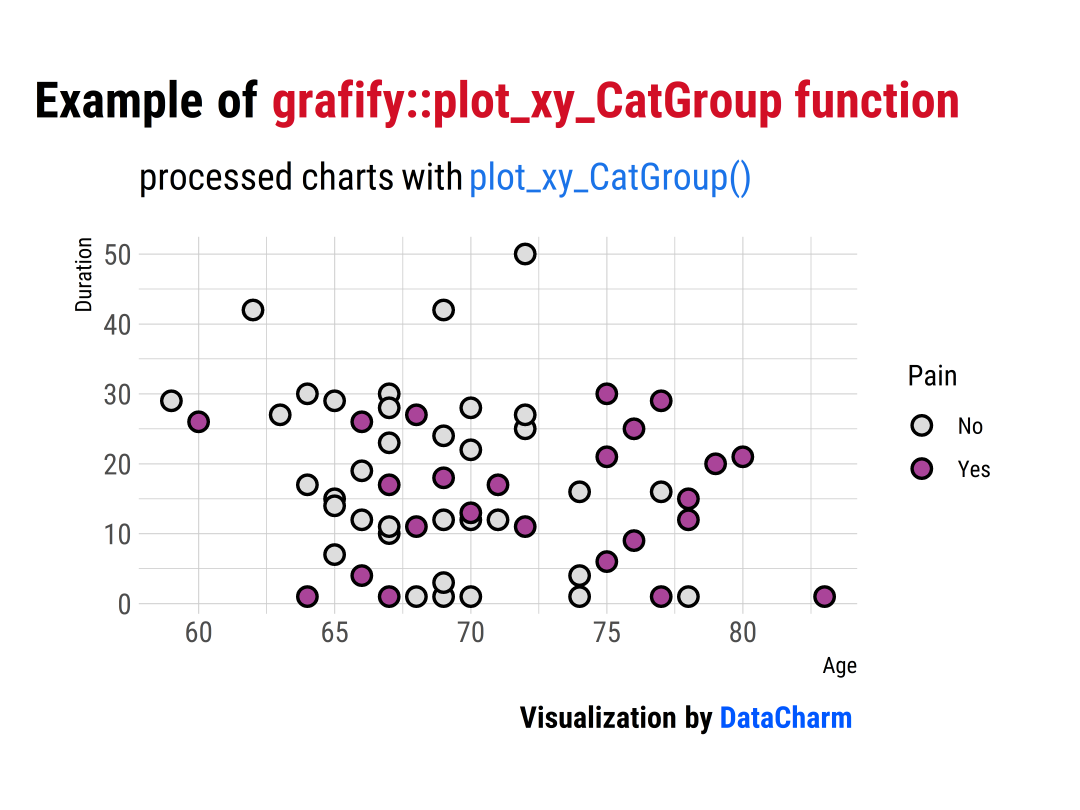
此類圖表包含plot_xy_NumGroup(), plot_xy_CatGroup() 函數(shù),具體如下:
plot_xy_NumGroup()
plot_xy_NumGroup(airquality,?
?????????????????Wind,?
?????????????????Temp,?
?????????????????Ozone,
?????????????????symsize?=?3)
plot_xy_CatGroup()
plot_xy_CatGroup(neuralgia,
?????????????????Age,
?????????????????Duration,
?????????????????Pain,
?????????????????symsize?=?3,
?????????????????ColPal?=?"muted",?????#palette
?????????????????ColRev?=?T)
Before-after Plots
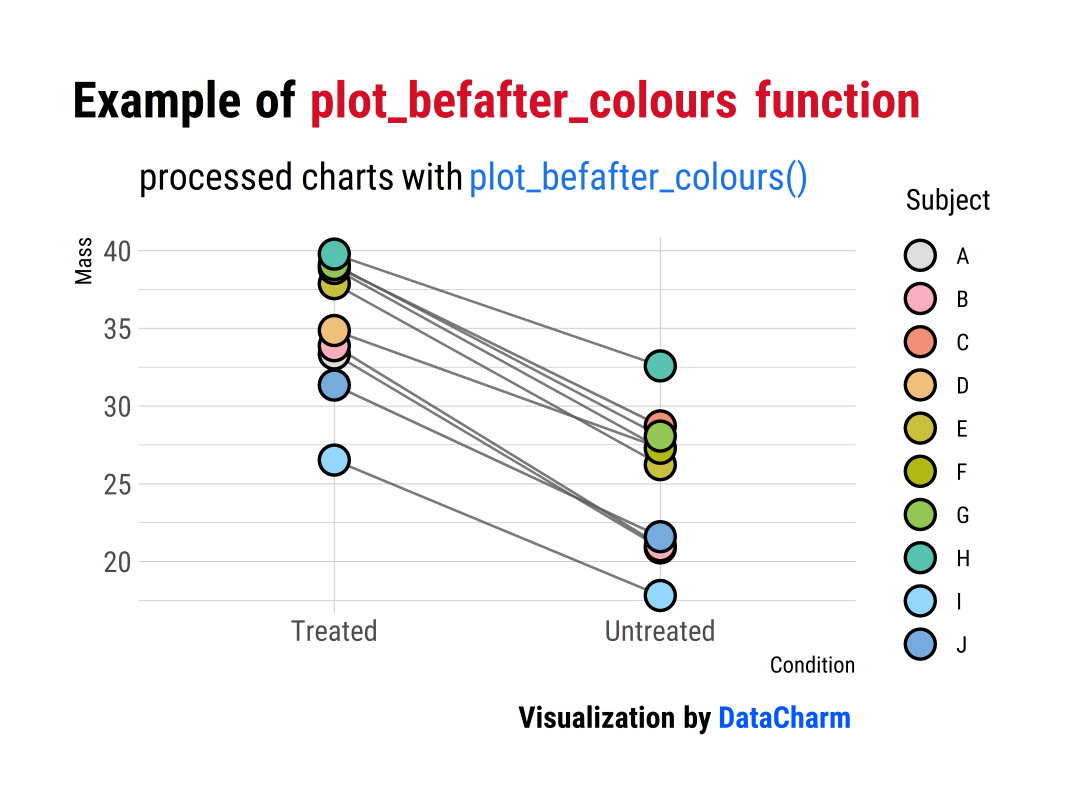
此類圖表包含plot_befafter_colours() , plot_befafter_shapes() 函數(shù),具體如下:
plot_befafter_colours()
plot_befafter_colours(data?=?data_t_pdiff,
??????????????????????xcol?=?Condition,
??????????????????????ycol?=?Mass,
??????????????????????groups?=?Subject,
??????????????????????symsize?=?5,
??????????????????????ColPal?=?"light",
??????????????????????ColRev?=?T)
Data distributions
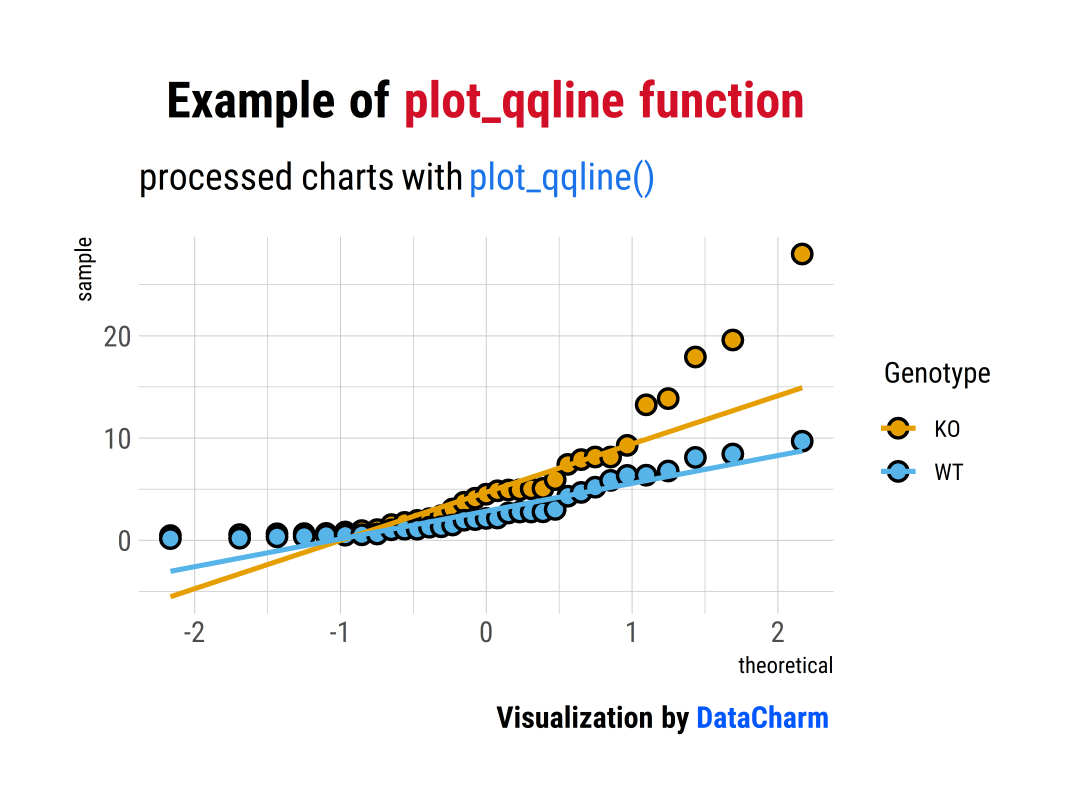
此類圖表包含plot_qqline(), plot_density() 和plot_histogram() 函數(shù),具體如下:
lot_qqline()
plot_qqline(data?=?data_t_pratio,?
????????????ycol?=?Cytokine,
????????????xcol?=?Genotype)
以上就是小編關(guān)于R-grafify包的簡單介紹,特別是對每種繪圖函數(shù)所需數(shù)據(jù)的數(shù)據(jù)形式理解。更多關(guān)于該包參數(shù)和使用方法等介紹可參考R-grafify包官網(wǎng)[1]
總結(jié)
今天的推文小編簡單介紹了R-grafify包的各種圖表類型和顏色搭配,希望感興趣的小伙伴可以進(jìn)行相關(guān)科研圖表 的繪制和對其顏色搭配 的參考~~
參考資料
R-grafify包官網(wǎng): https://grafify-vignettes.netlify.app/。
E?N?D
各位伙伴們好,詹帥本帥假期搭建了一個(gè)個(gè)人博客和小程序,匯集各種干貨和資源,也方便大家閱讀,感興趣的小伙伴請移步小程序體驗(yàn)一下哦!(歡迎提建議)
推薦閱讀
牛逼!Python常用數(shù)據(jù)類型的基本操作(長文系列第①篇)
牛逼!Python的判斷、循環(huán)和各種表達(dá)式(長文系列第②篇)

