
10種React組件之間通信的方法

來源 |?https://segmentfault.com/a/1190000023585646
這兩天被臨時抽調到別的項目組去做一個小項目的迭代。這個項目前端是用React,只是個小型項目所以并沒有使用Redux等狀態(tài)管理的庫。剛好遇到了一個小問題:兩個不太相關的組件到底該怎么進行通信。
我覺得這個問題還挺有趣的,所以把我的思考過程寫下來,大家也可以一起討論討論。
雖然重點是要講兩個不相關的組件間的通信,但我還是從最常見的父子組件通信講起,大家就當溫故而知新了。先把完整的總結列出來,然后再詳細展開。
組件間通信方式總結
父組件 => 子組件:
Props
Instance Methods
子組件 => 父組件:
Callback Functions
Event Bubbling
兄弟組件之間:
Parent Component
不太相關的組件之間:
Context
Portals
Global Variables
Observer Pattern
Redux等
1、Props
這是最常見的react組件之間傳遞信息的方法了吧,父組件通過props把數據傳給子組件,子組件通過this.props去使用相應的數據。
const Child = ({ name }) => {}class Parent extends React.Component {constructor(props) {super(props)this.state = {name: 'zach'}}render() {return (this .state.name} />)}}
2、Instance Methods
第二種父組件向子組件傳遞信息的方式有些同學可能會比較陌生,但這種方式非常有用,請務必掌握。原理就是:父組件可以通過使用refs來直接調用子組件實例的方法,看下面的例子:
class Child extends React.Component {myFunc() {return "hello"}}class Parent extends React.Component {componentDidMount() {var x = this.foo.myFunc() // x is now 'hello'}render() {return (<Childref={foo => {this.foo = foo}}/>)}}
大致的過程:
首先子組件有一個方法myFunc。
父組件給子組件傳遞一個ref屬性,并且采用callback-refs的形式。這個callback函數接收react組件實例/原生dom元素作為它的參數。當父組件掛載時,react會去執(zhí)行這個ref回調函數,并將子組件實例作為參數傳給回調函數,然后我們把子組件實例賦值給this.foo。
最后我們在父組件當中就可以使用this.foo來調用子組件的方法咯
了解了這個方法的原理后,我們要考慮的問題就是為啥我們要用這種方法,它的使用場景是什么?最常見的一種使用場景:比如子組件是一個modal彈窗組件,子組件里有顯示/隱藏這個modal彈窗的各種方法,我們就可以通過使用這個方法,直接在父組件上調用子組件實例的這些方法來操控子組件的顯示/隱藏。
這種方法比起你傳遞一個控制modal顯示/隱藏的props給子組件要美觀多了。
class Modal extends React.Component {show = () => {// do something to show the modal}hide = () => {// do something to hide the modal}render() {return <div>I'm a modaldiv>}}class Parent extends React.Component {componentDidMount() {if(// some condition) {this.modal.show()}}render() {return (<Modalref={el => {this.modal = el}}/>)}}
3、Callback Functions
講完了父組件給子組件傳遞信息的兩種方式,我們再來講子組件給父組件傳遞信息的方法。
回調函數這個方法也是react最常見的一種方式,子組件通過調用父組件傳來的回調函數,從而將數據傳給父組件。
const Child = ({ onClick }) => {}class Parent extends React.Component {handleClick = (data) => {console.log("Parent received value from child: " + data)}render() {return ()}}
4、?Event Bubbling
這種方法其實跟react本身沒有關系,我們利用的是原生dom元素的事件冒泡機制。
class Parent extends React.Component {render() {return (<div onClick={this.handleClick}><Child />div>);}handleClick = () => {console.log('clicked')}}function Child {return (<button>Clickbutton>);}
巧妙的利用下事件冒泡機制,我們就可以很方便的在父組件的元素上接收到來自子組件元素的點擊事件
5、Parent Component
講完了父子組件間的通信,再來看非父子組件之間的通信方法。一般來說,兩個非父子組件想要通信,首先我們可以看看它們是否是兄弟組件,即它們是否在同一個父組件下。
如果不是的話,考慮下用一個組件把它們包裹起來從而變成兄弟組件是否合適。這樣一來,它們就可以通過父組件作為中間層來實現數據互通了。
class Parent extends React.Component {constructor(props) {super(props)this.state = {count: 0}}setCount = () => {this.setState({count: this.state.count + 1})}render() {return (count={this.state.count}/>onClick={this.setCount}/>);}}
6、Context
通常一個前端應用會有一些"全局"性質的數據,比如當前登陸的用戶信息、ui主題、用戶選擇的語言等等。
這些全局數據,很多組件可能都會用到,當組件層級很深時,用我們之前的方法,就得通過props一層一層傳遞下去,這顯然太麻煩了,看下面的示例:
class App extends React.Component {render() {return"dark" />;}}function Toolbar(props) {return ();}class ThemedButton extends React.Component {render() {return ;}}
上面的例子,為了讓我們的Button元素拿到主題色,我們必須把theme作為props,從App傳到Toolbar,再從Toolbar傳到ThemedButton,最后Button從父組件ThemedButton的props里終于拿到了主題theme。
假如我們不同組件里都有用到Button,就得把theme向這個例子一樣到處層層傳遞,麻煩至極。
因此react為我們提供了一個新api:Context,我們用Context改寫下上例:
const ThemeContext = React.createContext('light');class App extends React.Component {render() {return ("dark" >);}}function Toolbar() {return ();}class ThemedButton extends React.Component {static contextType = ThemeContext;render() {return ;}}
簡單的解析一下:
1、React.createContext創(chuàng)建了一個Context對象,假如某個組件訂閱了這個對象,當react去渲染這個組件時,會從離這個組件最近的一個Provider組件中讀取當前的context值
2、Context.Provider: 每一個Context對象都有一個Provider屬性,這個屬性是一個react組件。
在Provider組件以內的所有組件都可以通過它訂閱context值的變動。具體來說,Provider組件有一個叫value的prop傳遞給所有內部組件,每當value的值發(fā)生變化時,Provider內部的組件都會根據新value值重新渲染
3、那內部的組件該怎么使用這個context對象里的東西呢?
a、假如內部組件是用class聲明的有狀態(tài)組件:我們可以把Context對象賦值給這個類的屬性contextType,如上面所示的ThemedButton組件
class ThemedButton extends React.Component {static contextType = ThemeContext;render() {const value = this.contextreturn <Button theme={value} />;}}
b、假如內部組件是用function創(chuàng)建的無狀態(tài)組件:我們可以使用Context.Consumer,這也是Context對象直接提供給我們的組件,這個組件接受一個函數作為自己的child,這個函數的入參就是context的value,并返回一個react組件。可以將上面的ThemedButton改寫下:
function ThemedButton { return ( <ThemeContext.Consumer>{value => <Button theme={value} />} ThemeContext.Consumer>)}
最后提一句,context對于解決react組件層級很深的props傳遞很有效,但也不應該被濫用。只有像theme、language等這種全局屬性(很多組件都有可能依賴它們)時,才考慮用context。如果只是單純?yōu)榱私鉀Q層級很深的props傳遞,可以直接用component composition。
7、Portals
Portals也是react提供的新特性,雖然它并不是用來解決組件通信問題的,但因為它也涉及到了組件通信的問題,所以我也把它列在我們的十種方法里面。
Portals的主要應用場景是:當兩個組件在react項目中是父子組件的關系,但在HTML DOM里并不想是父子元素的關系。
舉個例子,有一個父組件Parent,它里面包含了一個子組件Tooltip,雖然在react層級上它們是父子關系,但我們希望子組件Tooltip渲染的元素在DOM中直接掛載在body節(jié)點里,而不是掛載在父組件的元素里。這樣就可以避免父組件的一些樣式(如overflow:hidden、z-index、position等)導致子組件無法渲染成我們想要的樣式。
如下圖所示,父組件是這個紅色框的范圍,并且設置了overflow:hidden,這時候我們的Tooltip元素超出了紅色框的范圍就被截斷了。
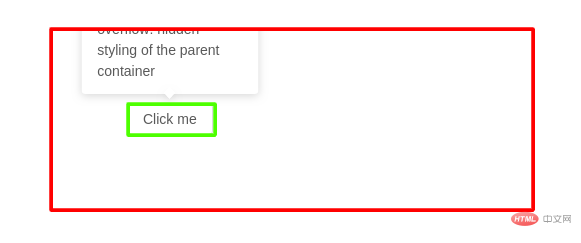
怎么用portals解決呢?
首先,修改html文件,給portals增加一個節(jié)點。
<html><body><div id="react-root">div><div id="portal-root">div>body>html>
然后我們創(chuàng)建一個可復用的portal容器,這里使用了react hooks的語法,看不懂的先過去看下我另外一篇講解react hooks的文章:30分鐘精通React今年最勁爆的新特性——React Hooks
import { useEffect } from "react";import { createPortal } from "react-dom";const Portal = ({children}) => {const mount = document.getElementById("portal-root");const el = document.createElement("div");useEffect(() => {mount.appendChild(el);return () => mount.removeChild(el);}, [el, mount]);return createPortal(children, el)};export default Portal;
最后在父組件中使用我們的portal容器組件,并將Tooltip作為children傳給portal容器組件。
const Parent = () => {const [coords, setCoords] = useState({});return <div style={{overflow: "hidden"}}><Button>Hover meButton><Portal><Tooltip coords={coords}>Awesome content that is never cut off by its parent container!Tooltip>Portal>div>}
這樣就ok啦,雖然父組件仍然是overflow: hidden,但我們的Tooltip再也不會被截斷了,因為它直接超脫了,它渲染到body節(jié)點下的里去了。
總結下適用的場景: Tooltip、Modal、Popup、Dropdown等等
8、Global Variables
哈哈,這也不失為一個可行的辦法啊。當然你最好別用這種方法。
class ComponentA extends React.Component {handleClick = () => window.a = 'test'...}class ComponentB extends React.Component {render() {return <div>{window.a}div>}}
9、Observer Pattern
觀察者模式是軟件設計模式里很常見的一種,它提供了一個訂閱模型,假如一個對象訂閱了某個事件,當那個事件發(fā)生的時候,這個對象將收到通知。
這種模式對于我們前端開發(fā)者來說是最不陌生的了,因為我們經常會給某些元素添加綁定事件,會寫很多的event handlers,比如給某個元素添加一個點擊的響應事件elm.addEventListener('click', handleClickEvent),每當elm元素被點擊時,這個點擊事件會通知elm元素,然后我們的回調函數handleClickEvent會被執(zhí)行。
這個過程其實就是一個觀察者模式的實現過程。
那這種模式跟我們討論的react組件通信有什么關系呢?當我們有兩個完全不相關的組件想要通信時,就可以利用這種模式,其中一個組件負責訂閱某個消息,而另一個元素則負責發(fā)送這個消息。
javascript提供了現成的api來發(fā)送自定義事件:?CustomEvent,我們可以直接利用起來。
首先,在ComponentA中,我們負責接受這個自定義事件:
class ComponentA extends React.Component {componentDidMount() {document.addEventListener('myEvent', this.handleEvent)}componentWillUnmount() {document.removeEventListener('myEvent', this.handleEvent)}handleEvent = (e) => {console.log(e.detail.log) //i'm zach}}
然后,ComponentB中,負責在合適的時候發(fā)送該自定義事件:
class ComponentB extends React.Component {sendEvent = () => {document.dispatchEvent(new CustomEvent('myEvent', {detail: {log: "i'm zach"}}))}render() {return <button onClick={this.sendEvent}>Sendbutton>}}
這樣我們就用觀察者模式實現了兩個不相關組件之間的通信。當然現在的實現有個小問題,我們的事件都綁定在了document上,這樣實現起來方便,但很容易導致一些沖突的出現,所以我們可以小小的改良下,獨立一個小模塊EventBus專門這件事:
class EventBus {constructor() {this.bus = document.createElement('fakeelement');}addEventListener(event, callback) {this.bus.addEventListener(event, callback);}removeEventListener(event, callback) {this.bus.removeEventListener(event, callback);}dispatchEvent(event, detail = {}){this.bus.dispatchEvent(new CustomEvent(event, { detail }));}}export default new EventBus
然后我們就可以愉快的使用它了,這樣就避免了把所有事件都綁定在document上的問題:
import EventBus from './EventBus'class ComponentA extends React.Component {componentDidMount() {EventBus.addEventListener('myEvent', this.handleEvent)}componentWillUnmount() {EventBus.removeEventListener('myEvent', this.handleEvent)}handleEvent = (e) => {console.log(e.detail.log) //i'm zach}}class ComponentB extends React.Component {sendEvent = () => {EventBus.dispatchEvent('myEvent', {log: "i'm zach"}))}render() {return <button onClick={this.sendEvent}>Sendbutton>}}
最后我們也可以不依賴瀏覽器提供的api,手動實現一個觀察者模式,或者叫pub/sub,或者就叫EventBus。
function EventBus() {const subscriptions = {};this.subscribe = (eventType, callback) => {const id = Symbol('id');if (!subscriptions[eventType]) subscriptions[eventType] = {};subscriptions[eventType][id] = callback;return {unsubscribe: function unsubscribe() {delete subscriptions[eventType][id];if (Object.getOwnPropertySymbols(subscriptions[eventType]).length === 0) {delete subscriptions[eventType];}},};};this.publish = (eventType, arg) => {if (!subscriptions[eventType]) return;Object.getOwnPropertySymbols(subscriptions[eventType]).forEach(key => subscriptions[eventType][key](arg));};}export default EventBus;
10、Redux等
最后終于來到了大家喜聞樂見的Redux等狀態(tài)管理庫,當大家的項目比較大,前面講的9種方法已經不能很好滿足項目需求時,才考慮下使用redux這種狀態(tài)管理庫。這里就先不展開講解redux了...否則我花這么大力氣講解前面9種方法的意義是什么???
總結
十種方法,每種方法都有對應的適合它的場景,大家在設計自己的組件前,一定要好好考慮清楚采用哪種方式來解決通信問題。
文初提到的那個小問題,最后我采用方案9,因為既然是小迭代項目,又是改別人的代碼,當然最好避免對別人的代碼進行太大幅度的改造。
而pub/sub這種方式就挺小巧精致的,既不需要對別人的代碼結構進行大改動,又可以滿足產品需求。
