
如何給 GitHub Actions 添加自己的超大資源 Runner 主機(jī)

更多奇技淫巧歡迎訂閱博客:https://fuckcloudnative.io
前言
1. 什么是 GitHub Actions
在前面的文檔中,我對 GitLab 提供的 CI 功能進(jìn)行了實(shí)踐,點(diǎn)擊查看[1] 。使用 GitLab 的好處是可以私有化部署、無限的私有倉庫數(shù)量、CI 配置簡單、能接入自建的 Runner 。但隨著 GitHub 越來越開放,GitLab 的這些優(yōu)勢在逐步喪失。
從 CICD 的角度看,越接近 Git 倉庫的功能,越貼近開發(fā)者。未來的開發(fā)者市場上,GitHub、GitLab、Coding、Gitee 這樣的 SaaS 平臺將具有很頑強(qiáng)的生命力。
GitHub Actions 是一個類似 GitLab CI 的服務(wù)。GitLab 默認(rèn)使用的是 .gitlab-ci.yml 文件,描述 CICD 流程。而 GitHub 使用的是 .github/workflows 目錄下的 yaml 文件。最大的不同在于,GitHub 提供了一個 Actions 市場,開發(fā)者可以基于這些原子快速編排流程。
我在文檔 使用鏡像部署 Hexo 靜態(tài)頁面[2] 中,使用下面的 yaml 配置進(jìn)行編譯和推送鏡像:
name:?build

on:?[push]

jobs:
??build:
????runs-on:?ubuntu-latest
????steps:
??????-?name:?Checkout
????????uses:?actions/checkout@v2

??????-?name:?Build?image
????????run:?make?build

??????-?name:?Login?Registry
????????uses:?docker/login-action@v1
????????with:
??????????registry:?ghcr.io
??????????username:?${{?github.repository_owner?}}
??????????password:?${{?secrets.GHCR_TOKEN?}}

??????-?name:?Push?image
????????run:
??????????docker?push?ghcr.io/shaowenchen/documents:latest
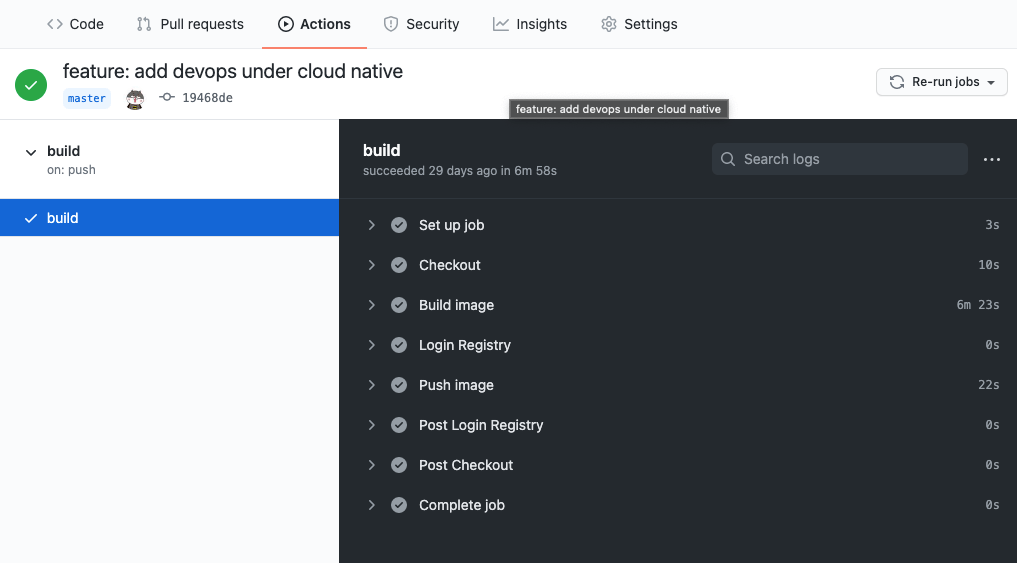
每次 push 代碼之后,Actions 就會自動運(yùn)行,如下圖:
這種方式對開發(fā)者十分友好,如果網(wǎng)絡(luò)通暢,GitHub Actions 能夠滿足很多團(tuán)隊的 CICD 需求。
2. 什么時候需要接入自己 Runner
對構(gòu)建機(jī)器有要求
目前,GitHub 只提供了下面幾類運(yùn)行環(huán)境:
windows ubuntu macos
但并不是每個版本的系統(tǒng)都支持,目前只能使用指定的版本,也無法指定 CPU 架構(gòu)。
另一方面,在構(gòu)建過程當(dāng)中,GitHub 提供的構(gòu)建機(jī),對物理資源也有所限制。構(gòu)建虛擬機(jī)的配置如下:
2 core CPUs 7 GB of RAM memory 14 GB of SSD disk space
可能在未來,相關(guān)的物理資源配置會有所提升,但始終會有限制。當(dāng)需要構(gòu)建某些大型項目,特別是 C++ 項目時,這樣的物理資源配置是不能夠滿足要求的。
私有倉庫需要大量構(gòu)建
下圖是目前 GitHub 官方給出的構(gòu)建報價:

非常幸運(yùn)的是公開倉庫免費(fèi)使用,只有私有倉庫的額度有限制。不同付費(fèi)級別的用戶,具有不同的構(gòu)建時長。需要注意的是,這里的時長指的是 Linux 的構(gòu)建時長。Windows 使用一分鐘,折算為 Linux 的兩分鐘。MacOS 使用一分鐘,折算為 Linux 的十分鐘。
對私有倉庫有大量構(gòu)建需求的項目,使用 GitHub Actions 提供的構(gòu)建機(jī)性價比不高。
3. 添加主機(jī) Runner
這里的 Runner 指的是 GitHub Actions 的運(yùn)行環(huán)境,也就是 .github/workflows 文件夾下 yaml 中指令的運(yùn)行環(huán)境。這里主要添加主機(jī) Runner,如果是添加容器或者 Kubernetes Runner ,需要將 actions-runner 打包到鏡像中,然后運(yùn)行接入 GitHub Actions,在其他方面沒有差別。
首先進(jìn)入項目,在 Settings 頁面中,找到 Actions 。
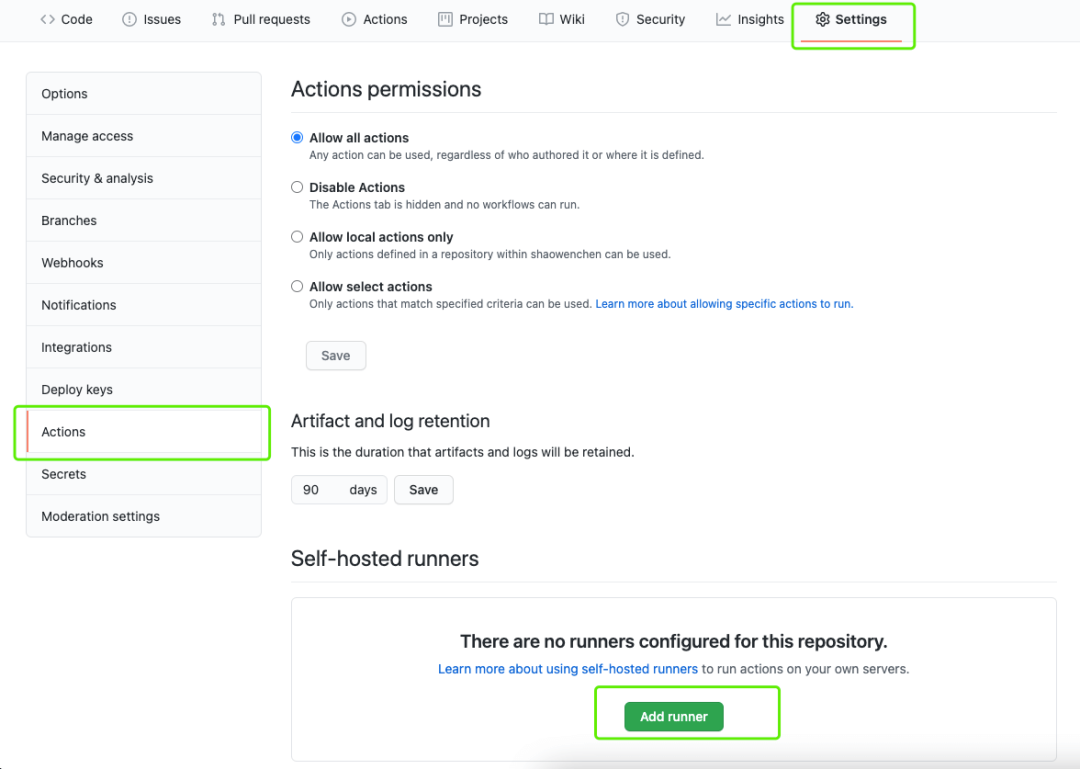
點(diǎn)擊上圖的 Add runner 進(jìn)入下圖的添加主機(jī)頁面,同樣支持三種操作系統(tǒng),macOS、Linux、Windows。
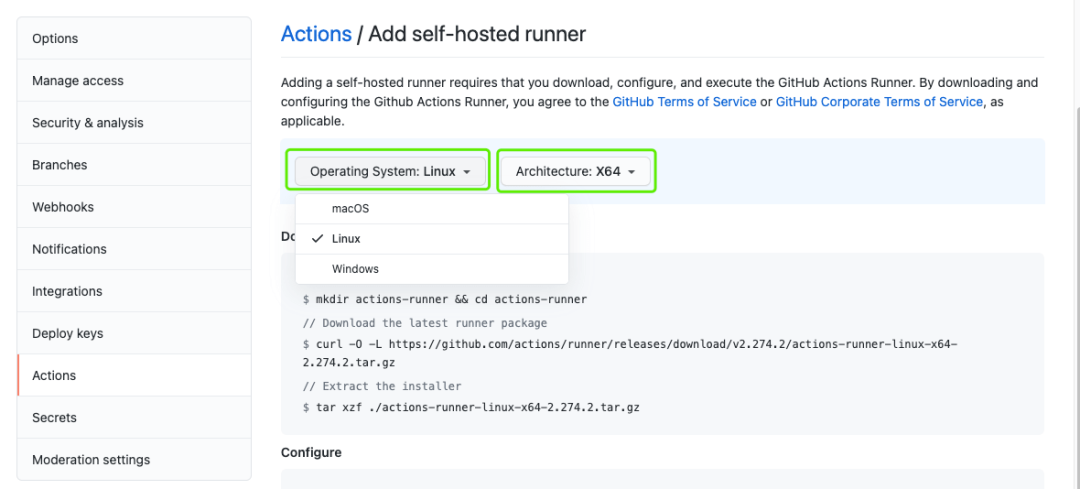
在頁面選擇操作系統(tǒng)和架構(gòu)之后,按照安裝提示操作即可。
新建用戶 runner:runner
$?groupadd?-g?1234?runner
$?useradd?runner?-u?1234?-g?1234
$?su?runner
$?cd?~
下載 Runner
$?mkdir?actions-runner?&&?cd?actions-runner
$?curl?-O?-L?https://github.com/actions/runner/releases/download/v2.274.2/actions-runner-linux-x64-2.274.2.tar.gz
$?tar?xzf?./actions-runner-linux-x64-2.274.2.tar.gz
配置 Runner
在這一步中,可能需要根據(jù)提示。執(zhí)行命令
su root,切換到 root 用戶,執(zhí)行./bin/installdependencies.sh安裝依賴。
執(zhí)行 config.sh 開始配置:
$?./config.sh?--url?https://github.com/shaowenchen/pipeline-test?--token?AKNLJON6JWRTO35GV3PXGVS7ZHPZO
根據(jù)命令的提示,進(jìn)行如下交互:
Enter?the?name?of?runner:?[press?Enter?for?node1]?mycentos

This?runner?will?have?the?following?labels:?'self-hosted',?'Linux',?'X64'
Enter?any?additional?labels?(ex.?label-1,label-2):?[press?Enter?to?skip]?centos

√?Runner?successfully?added
√?Runner?connection?is?good

#?Runner?settings

Enter?name?of?work?folder:?[press?Enter?for?_work]?/home/runner/workspaces

√?Settings?Saved.
運(yùn)行 Runner
$?./run.sh
頁面查看 Runner
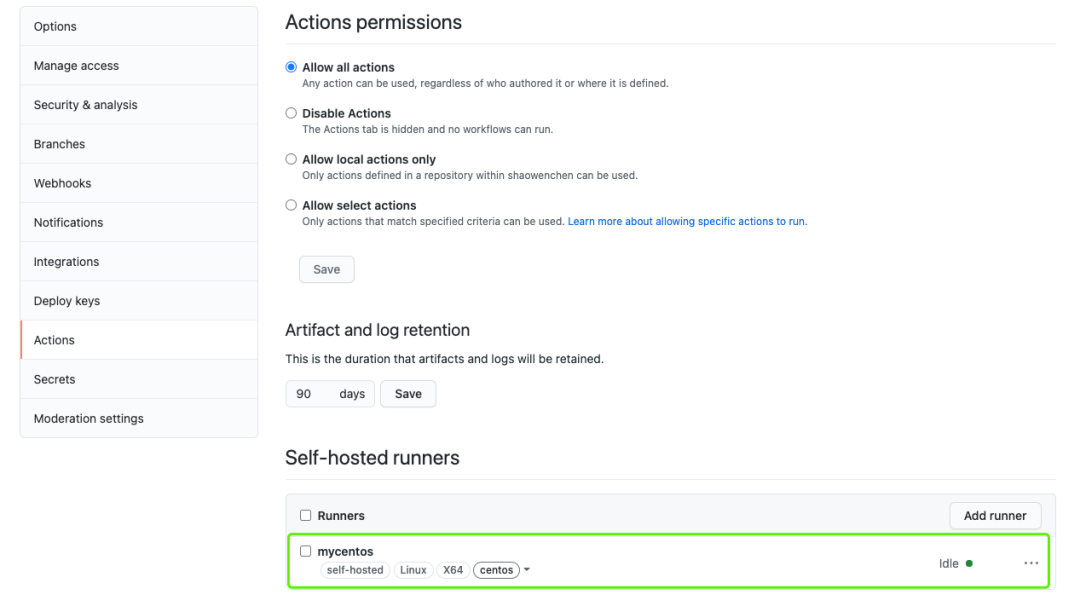
在 GitHub 的 Actions 頁面可以看到新增加的 Runner。
4. 使用測試
添加 workflows 文件
在項目 master 分支,增加文件 .github/workflows/blank.yml ,內(nèi)容如下:
name:?CI
on:
??push:
????branches:?[?master?]

jobs:
??hello:
????runs-on:?self-hosted
????steps:
??????-?uses:?actions/checkout@v2

??????-?name:?Run?a?multi-line?script
????????run:?|
??????????date
??????????uname?-a
查看運(yùn)行結(jié)果
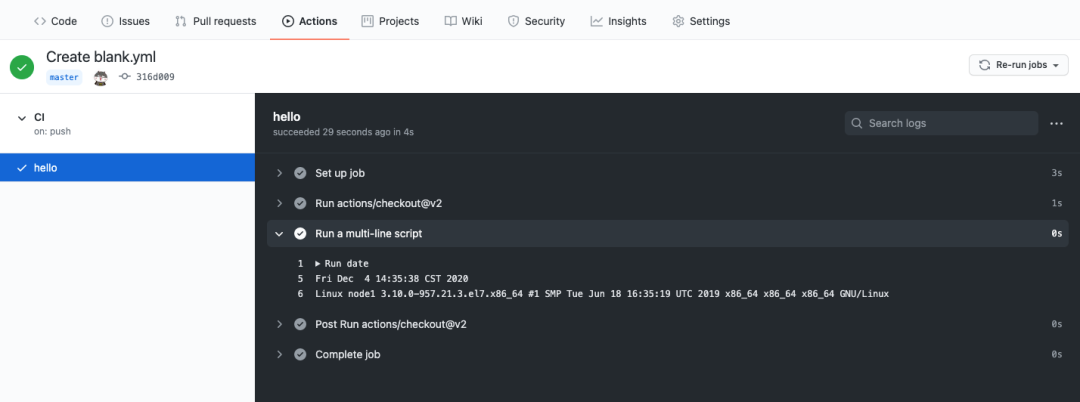
提交文件之后,Actions 馬上就會開始運(yùn)行,執(zhí)行結(jié)果如下圖:
查看節(jié)點(diǎn)上的 workspaces
$?tree?-L?3?/home/runner/workspaces/

/home/runner/workspaces/
|--?_actions
|???`--?actions
|???????`--?checkout
|--?_PipelineMapping
|???`--?shaowenchen
|???????`--?pipeline-test
|--?pipeline-test
|???`--?pipeline-test
|???????|--?a
|???????|--?choice
|???????|--?deploy
|???????|--?Jenkinsfile
|???????|--?plain-credential
|???????`--?readme.md
|--?_temp
`--?_tool
從 workspaces 中的文件可以看到,Actions 將代碼 checkout 到主機(jī)上,然后在主機(jī)上執(zhí)行了編排命令。
參考
https://github.com/features/actions https://docs.github.com/en/free-pro-team@latest/actions/hosting-your-own-runners/about-self-hosted-runners
參考資料
點(diǎn)擊查看: https://www.chenshaowen.com/blog/tag/GitLab/
[2]使用鏡像部署 Hexo 靜態(tài)頁面: https://www.chenshaowen.com/blog/deploy-static-server-by-docker-image.html


你可能還喜歡
點(diǎn)擊下方圖片即可閱讀


云原生是一種信仰??
掃碼關(guān)注公眾號
后臺回復(fù)?k8s?獲取史上最方便快捷的 Kubernetes 高可用部署工具,只需一條命令,連 ssh 都不需要!


點(diǎn)擊?"閱讀原文"?獲取更好的閱讀體驗(yàn)!
??給個「在看」,是對我最大的支持??