
5款強(qiáng)大的JVM 性能調(diào)優(yōu)監(jiān)控工具 !
上一篇: Java日志體系權(quán)威總結(jié)!
OutOfMemoryError,內(nèi)存不足 內(nèi)存泄露 線程死鎖 鎖爭(zhēng)用(Lock Contention) Java進(jìn)程消耗CPU過(guò)高 ......
jps [options] [hostid]如果不指定hostid就默認(rèn)為當(dāng)前主機(jī)或服務(wù)器。
命令行參數(shù)選項(xiàng)說(shuō)明如下:
-q 不輸出類名、Jar名和傳入main方法的參數(shù)

-m 輸出傳入main方法的參數(shù)

-l 輸出main類或Jar的全限名

-v 輸出傳入JVM的參數(shù)
比如下面:
root@ubuntu:/# jps -m -l
2458 org.artifactory.standalone.main.Main /usr/local/artifactory-2.2.5/etc/jetty.xml
29920 com.sun.tools.hat.Main -port 9998 /tmp/dump.dat
3149 org.apache.catalina.startup.Bootstrap start
30972 sun.tools.jps.Jps -m -l
8247 org.apache.catalina.startup.Bootstrap start
25687 com.sun.tools.hat.Main -port 9999 dump.dat
21711 mrf-center.jar
二、 jstack????
jstack主要用來(lái)查看某個(gè)Java進(jìn)程內(nèi)的線程堆棧信息。語(yǔ)法格式如下:
jstack [option] pid
jstack [option] executable core
jstack [option] [server-id@]remote-hostname-or-ip
命令行參數(shù)選項(xiàng)說(shuō)明如下:
-l long listings,會(huì)打印出額外的鎖信息,在發(fā)生死鎖時(shí)可以用jstack -l pid來(lái)觀察鎖持有情況-m mixed mode,不僅會(huì)輸出Java堆棧信息,還會(huì)輸出C/C++堆棧信息(比如Native方法)root@ubuntu:/# ps -ef | grep mrf-center | grep -v grep
root 21711 1 1 14:47 pts/3 00:02:10 java -jar mrf-center.jar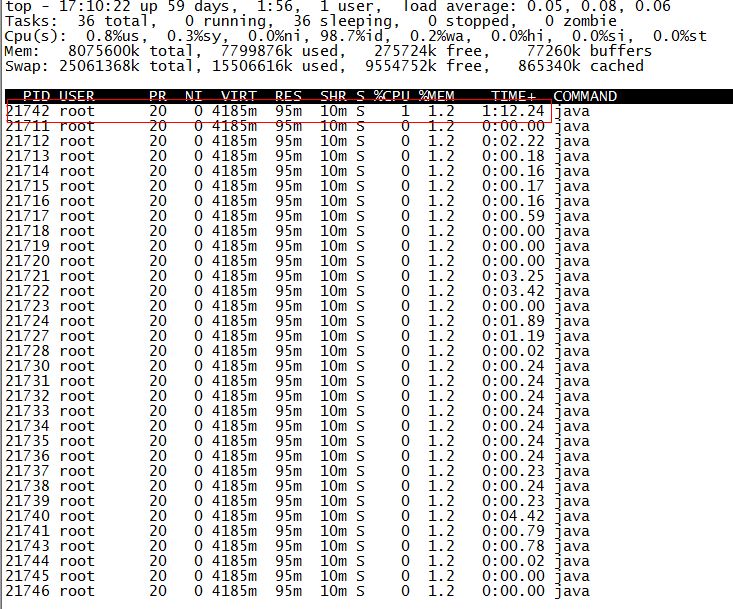
printf "%x
" 21742root@ubuntu:/# jstack 21711 | grep 54ee
"PollIntervalRetrySchedulerThread" prio=10 tid=0x00007f950043e000 nid=0x54ee in Object.wait() [0x00007f94c6eda000]// Idle wait
getLog().info("Thread [" + getName() + "] is idle waiting...");
schedulerThreadState = PollTaskSchedulerThreadState.IdleWaiting;
long now = System.currentTimeMillis();
long waitTime = now + getIdleWaitTime();
long timeUntilContinue = waitTime - now;
synchronized(sigLock) {try {
if(!halted.get()) {
sigLock.wait(timeUntilContinue);
}
} catch (InterruptedException ignore) {
}
}jmap [option] pid
jmap [option] executable core
jmap [option] [server-id@]remote-hostname-or-ip如果運(yùn)行在64位JVM上,可能需要指定-J-d64命令選項(xiàng)參數(shù)。
jmap -permstat pid
root@ubuntu:/# jmap -heap 21711
Attaching to process ID 21711, please wait...
Debugger attached successfully.
Server compiler detected.
JVM version is 20.10-b01

using thread-local object allocation.
Parallel GC with 4 thread(s)

Heap Configuration:
MinHeapFreeRatio = 40
MaxHeapFreeRatio = 70
MaxHeapSize      = 2067791872 (1972.0MB)
NewSize          = 1310720 (1.25MB)
MaxNewSize       = 17592186044415 MB
OldSize          = 5439488 (5.1875MB)
NewRatio         = 2
SurvivorRatio    = 8
PermSize         = 21757952 (20.75MB)
MaxPermSize      = 85983232 (82.0MB)

Heap Usage:
PS Young Generation
Eden Space:
   capacity = 6422528 (6.125MB)
   used     = 5445552 (5.1932830810546875MB)
   free     = 976976 (0.9317169189453125MB)
   84.78829520089286% used
From Space:
   capacity = 131072 (0.125MB)
   used     = 98304 (0.09375MB)
   free     = 32768 (0.03125MB)
   75.0% used
To Space:
   capacity = 131072 (0.125MB)
   used     = 0 (0.0MB)
   free     = 131072 (0.125MB)
   0.0% used
PS Old Generation
   capacity = 35258368 (33.625MB)
   used     = 4119544 (3.9287033081054688MB)
   free     = 31138824 (29.69629669189453MB)
   11.683876009235595% used
PS Perm Generation
   capacity = 52428800 (50.0MB)
   used     = 26075168 (24.867218017578125MB)
   free     = 26353632 (25.132781982421875MB)
   49.73443603515625% used
....root@ubuntu:/# jmap -histo:live 21711 | more
num #instances #bytes class name----------------------------------------------
1: 38445 5597736
2: 38445 5237288
3: 3500 3749504
4: 60858 3242600
5: 3500 2715264
6: 2796 2131424
7: 5543 1317400 [I
8: 13714 1010768 [C
9: 4752 1003344 [B
10: 1225 639656
11: 14194 454208 java.lang.String
12: 3809 396136 java.lang.Class
13: 4979 311952 [S
14: 5598 287064 [[I
15: 3028 266464 java.lang.reflect.Method
16: 280 163520
17: 4355 139360 java.util.HashMap$Entry
18: 1869 138568 [Ljava.util.HashMap$Entry;
19: 2443 97720 java.util.LinkedHashMap$Entry
20: 2072 82880 java.lang.ref.SoftReference
21: 1807 71528 [Ljava.lang.Object;
22: 2206 70592 java.lang.ref.WeakReference
23: 934 52304 java.util.LinkedHashMap
24: 871 48776 java.beans.MethodDescriptor
25: 1442 46144 java.util.concurrent.ConcurrentHashMap$HashEntry
26: 804 38592 java.util.HashMap
27: 948 37920 java.util.concurrent.ConcurrentHashMap$Segment
28: 1621 35696 [Ljava.lang.Class;
29: 1313 34880 [Ljava.lang.String;
30: 1396 33504 java.util.LinkedList$Entry
31: 462 33264 java.lang.reflect.Field
32: 1024 32768 java.util.Hashtable$Entry
33: 948 31440 [Ljava.util.concurrent.ConcurrentHashMap$HashEntry;class name是對(duì)象類型,說(shuō)明如下:
B  byte
C  char
D  double
F  float
I  int
J  long
Z  boolean
[  數(shù)組,如[I表示int[]
[L+類名 其他對(duì)象jmap -dump:format=b,file=dumpFileName pid我一樣地對(duì)上面進(jìn)程ID為21711進(jìn)行Dump:
root@ubuntu:/# jmap -dump:format=b,file=/tmp/dump.dat 21711
Dumping heap to /tmp/dump.dat ...
Heap dump file created
dump出來(lái)的文件可以用MAT、VisualVM等工具查看,這里用jhat查看:
root@ubuntu:/# jhat -port 9998 /tmp/dump.dat
Reading from /tmp/dump.dat...
Dump file created Tue Jan 28 17:46:14 CST 2014Snapshot read, resolving...
Resolving 132207 objects...
Chasing references, expect 26 dots..........................
Eliminating duplicate references..........................
Snapshot resolved.
Started HTTP server on port 9998Server is ready.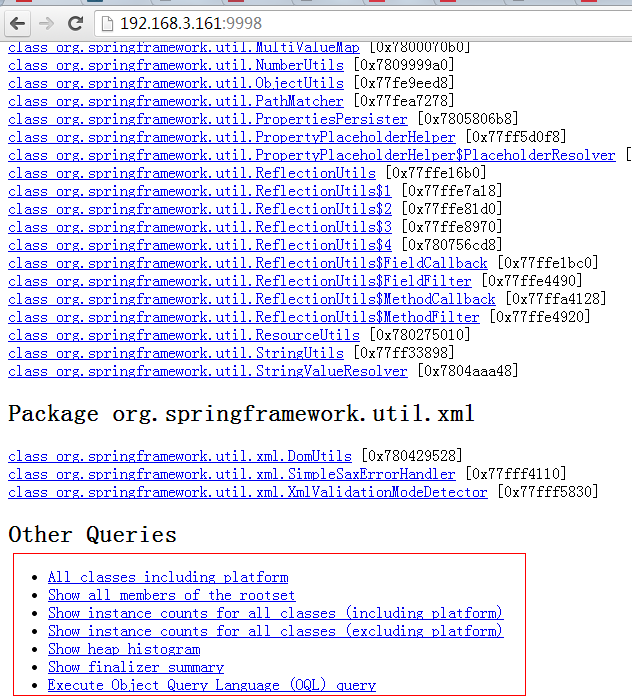
jstat [ generalOption | outputOptions vmid [interval[s|ms] [count]] ]root@ubuntu:/# jstat -gc 21711 250 4
S0C S1C S0U S1U EC EU OC OU PC PU YGC YGCT FGC FGCT GCT
192.0 192.0 64.0 0.0 6144.0 1854.9 32000.0 4111.6 55296.0 25472.7 702 0.431 3 0.218 0.649
192.0 192.0 64.0 0.0 6144.0 1972.2 32000.0 4111.6 55296.0 25472.7 702 0.431 3 0.218 0.649
192.0 192.0 64.0 0.0 6144.0 1972.2 32000.0 4111.6 55296.0 25472.7 702 0.431 3 0.218 0.649
192.0 192.0 64.0 0.0 6144.0 2109.7 32000.0 4111.6 55296.0 25472.7 702 0.431 3 0.218 0.649要明白上面各列的意義,先看JVM堆內(nèi)存布局:
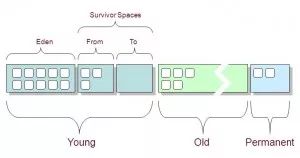
可以看出:
堆內(nèi)存 = 年輕代 + 年老代 + 永久代
年輕代 = Eden區(qū) + 兩個(gè)Survivor區(qū)(From和To)
現(xiàn)在來(lái)解釋各列含義:
S0C、S1C、S0U、S1U:Survivor 0/1區(qū)容量(Capacity)和使用量(Used)
EC、EU:Eden區(qū)容量和使用量
OC、OU:年老代容量和使用量
PC、PU:永久代容量和使用量
YGC、YGT:年輕代GC次數(shù)和GC耗時(shí)
FGC、FGCT:Full GC次數(shù)和Full GC耗時(shí)
GCT:GC總耗時(shí)
五、hprof(Heap/CPU Profiling Tool):? ??
hprof能夠展現(xiàn)CPU使用率,統(tǒng)計(jì)堆內(nèi)存使用情況。
語(yǔ)法格式如下:
java -agentlib:hprof[=options] ToBeProfiledClass
java -Xrunprof[:options] ToBeProfiledClass
javac -J-agentlib:hprof[=options] ToBeProfiledClass
完整的命令選項(xiàng)如下:
Option Name and Value  Description                    Default
---------------------  -----------                    -------
heap=dump|sites|all    heap profiling                 all
cpu=samples|times|old  CPU usage                      off
monitor=y|n            monitor contention             n
format=a|b             text(txt) or binary output     a
file=            write data to file             java.hprof[.txt]
net=:      send data over a socket        off
depth=           stack trace depth              4
interval=          sample interval in ms          10
cutoff=         output cutoff point            0.0001
lineno=y|n             line number in traces?         y
thread=y|n             thread in traces?              n
doe=y|n                dump on exit?                  y
msa=y|n                Solaris micro state accounting n
force=y|n              force output to          y
verbose=y|n            print messages about dumps     y
來(lái)幾個(gè)官方指南上的實(shí)例。
CPU Usage Sampling Profiling(cpu=samples)的例子:
java -agentlib:hprof=cpu=samples,interval=20,depth=3 Hellojavac -J-agentlib:hprof=cpu=times Hello.javaHeap Allocation Profiling(heap=sites)的例子:
javac -J-agentlib:hprof=heap=sites Hello.javajavac -J-agentlib:hprof=heap=dump Hello.java作者:Josh_Persistence 本文來(lái)源:www.iteye.com/blog/josh-persistence-2161848
最近熬夜給大家準(zhǔn)備了515套Java代碼,有一些是業(yè)務(wù)類的小項(xiàng)目,比如Java博客項(xiàng)目,也有腳手架、也有平時(shí)用一些的工具類、21套小程序代碼,也有一些游戲類的項(xiàng)目。
掃以下二維碼并回復(fù)“828”即可獲取
或者在本公眾號(hào)對(duì)話框回復(fù)【828】馬上獲取
評(píng)論
圖片
表情