
async/await 使用方式
async function timeout() {
  return 'hello world';
}async function timeout() {
return 'hello world'
}
timeout();
console.log('雖然在后面,但是我先執(zhí)行');
async 函數(shù) timeout 調(diào)用了,但是沒有任何輸出,它不是應(yīng)該返回 'hello world', 先不要著急, 看一看timeout()執(zhí)行返回了什么?把上面的 timeout() 語句改為console.log(timeout())
async function timeout() {
    return 'hello world'
}
console.log(timeout());
console.log('雖然在后面,但是我先執(zhí)行');

原來async 函數(shù)返回的是一個(gè)promise 對(duì)象,如果要獲取到promise 返回值,我們應(yīng)該用then 方法, 繼續(xù)修改代碼
async function timeout() {
    return 'hello world'
}
timeout().then(result => {
    console.log(result);
})
console.log('雖然在后面,但是我先執(zhí)行');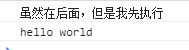
async function timeout(flag) {
    if (flag) {
        return 'hello world'
    } else {
        throw 'my god, failure'
    }
}
console.log(timeout(true))  // 調(diào)用Promise.resolve() 返回promise 對(duì)象。
console.log(timeout(false)); // 調(diào)用Promise.reject() 返回promise 對(duì)象。

如果函數(shù)內(nèi)部拋出錯(cuò)誤, promise 對(duì)象有一個(gè)catch 方法進(jìn)行捕獲。
timeout(false).catch(err => {
    console.log(err)
})
// 2s 之后返回雙倍的值
function doubleAfter2seconds(num) {
    return new Promise((resolve, reject) => {
        setTimeout(() => {
            resolve(2 * num)
        }, 2000);
    } )
}
async function testResult() {
    let result = await doubleAfter2seconds(30);
    console.log(result);
}
testResult();
async function testResult() {
    let first = await doubleAfter2seconds(30);
    let second = await doubleAfter2seconds(50);
    let third = await doubleAfter2seconds(30);
    console.log(first + second + third);
}
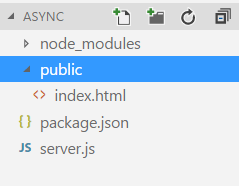
const express = require('express');
const app = express();// express.static 提供靜態(tài)文件,就是html, css, js 文件
app.use(express.static('public'));

app.listen(3000, () => {
    console.log('server start');
})
<!DOCTYPE html>
<html lang="en">
<head>
    <meta charset="UTF-8">
    <title>Async/await</title>
    <!-- CDN 引入vue 和 axios -->
    <script src="https://cdn.jsdelivr.net/npm/vue"></script>
    <script src="https://unpkg.com/axios/dist/axios.min.js"></script>
</head>
<body>
    <div id="app">

        <!-- 輸入框區(qū)域 -->
        <div style="height:50px">
            <input type="text" placeholder="請(qǐng)輸入電話號(hào)碼" v-model="phoneNum">
            <button @click="getFaceResult">確定</button>
        </div>

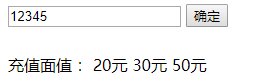
        <!-- 充值面值 顯示區(qū)域 -->
        <div>
            充值面值:
            <span v-for="item in faceList" :key='item'>
                {{item}}
            </span>
        </div>
    </div>

    <!-- js 代碼區(qū)域 -->
    <script>
        new Vue({
            el: '#app',
            data: {
                phoneNum: '12345',
                faceList: ["20元", "30元", "50元"]
            },
            methods: {
                getFaceResult() {

                }
            }
        })
    </script>
</body>
</html>
methods: {
   //獲取到城市信息
   getLocation(phoneNum) {
      return axios.post('phoneLocation', {
          phoneNum
      })
   },
   // 獲取面值
   getFaceList(province, city) {
      return axios.post('/faceList', {
          province,
          city
      })
   },
   // 點(diǎn)擊確定按鈕時(shí),獲取面值列表
   getFaceResult () {

   }
}
// 電話號(hào)碼返回省和市,為了模擬延遲,使用了setTimeout
app.post('/phoneLocation', (req, res) => {
    setTimeout(() => {
        res.json({
            success: true,
            obj: {
                province: '廣東',
                city: '深圳'
            }
        })
    }, 1000);
})

// 返回面值列表
app.post('/faceList', (req, res) => {
    setTimeout(() => {
        res.json(
            {
                success: true,
                obj:['20元', '30元', '50元']
            }

        )
    }, 1000);
})
// 點(diǎn)擊確定按鈕時(shí),獲取面值列表
getFaceResult () {
   this.getLocation(this.phoneNum).then(res => {
       if (res.status === 200 && res.data.success) {
           let province = res.data.obj.province;
           let city = res.data.obj.city;

           this.getFaceList(province, city).then(res => {
               if(res.status === 200 && res.data.success) {
                 this.faceList = res.data.obj
               }
           })
        }
   }).catch(err => {
      console.log(err)
   })
}
// 點(diǎn)擊確定按鈕時(shí),獲取面值列表
async getFaceResult () {
   let location = await this.getLocation(this.phoneNum);
   if (location.data.success) {
      let province = location.data.obj.province;
      let city = location.data.obj.city;
      let result = await this.getFaceList(province, city);
      if (result.data.success) {
         this.faceList = result.data.obj;
      }
   }
 }
async getFaceResult () {
  try {
    let location = await this.getLocation(this.phoneNum);
    if (location.data.success) {
       let province = location.data.obj.province;
       let city = location.data.obj.city;
       let result = await this.getFaceList(province, city);
          if (result.data.success) {
             this.faceList = result.data.obj;
          }
     }
   } catch(err) {
      console.log(err);
   }
}

評(píng)論
圖片
表情