Spring Boot 集成 Seata 解決分布式事務(wù)問題
seata 簡介
Seata 是 阿里巴巴2019年開源的分布式事務(wù)解決方案,致力于在微服務(wù)架構(gòu)下提供高性能和簡單易用的分布式事務(wù)服務(wù)。在 Seata 開源之前,Seata 對應(yīng)的內(nèi)部版本在阿里內(nèi)部一直扮演著分布式一致性中間件的角色,幫助阿里度過歷年的雙11,對各業(yè)務(wù)進(jìn)行了有力的支撐。經(jīng)過多年沉淀與積累,2019.1 Seata 正式宣布對外開源 。目前 Seata 1.0 已經(jīng) GA。
微服務(wù)中的分布式事務(wù)問題
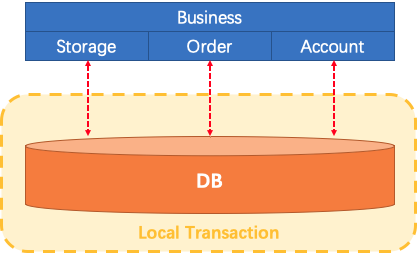
讓我們想象一下傳統(tǒng)的單片應(yīng)用程序,它的業(yè)務(wù)由3個(gè)模塊組成,他們使用單個(gè)本地?cái)?shù)據(jù)源。自然,本地事務(wù)將保證數(shù)據(jù)的一致性。
微服務(wù)架構(gòu)已發(fā)生了變化。上面提到的3個(gè)模塊被設(shè)計(jì)為3種服務(wù)。本地事務(wù)自然可以保證每個(gè)服務(wù)中的數(shù)據(jù)一致性。但是整個(gè)業(yè)務(wù)邏輯范圍如何?
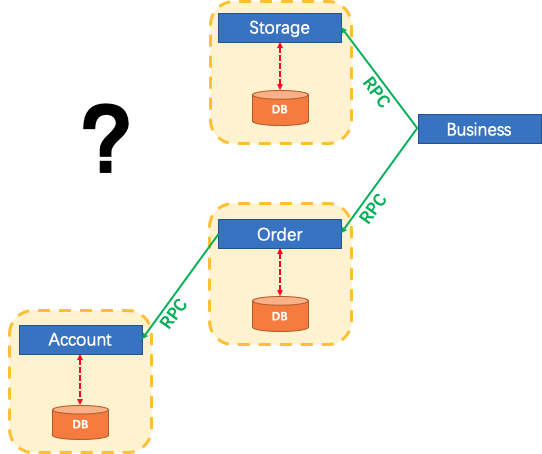
Seata怎么辦?

我們說,分布式事務(wù)是由一批分支事務(wù)組成的全局事務(wù),通常分支事務(wù)只是本地事務(wù)。
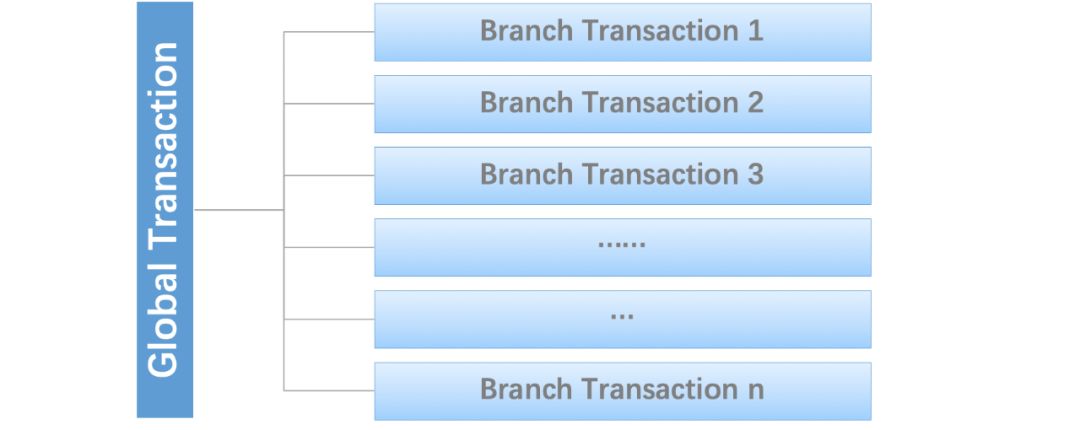
Seata有3個(gè)基本組成部分:
事務(wù)協(xié)調(diào)器(TC):維護(hù)全局事務(wù)和分支事務(wù)的狀態(tài),驅(qū)動全局提交或回滾。
事務(wù)管理器TM:定義全局事務(wù)的范圍:開始全局事務(wù),提交或回滾全局事務(wù)。
資源管理器(RM):管理正在處理的分支事務(wù)的資源,與TC對話以注冊分支事務(wù)并報(bào)告分支事務(wù)的狀態(tài),并驅(qū)動分支事務(wù)的提交或回滾。
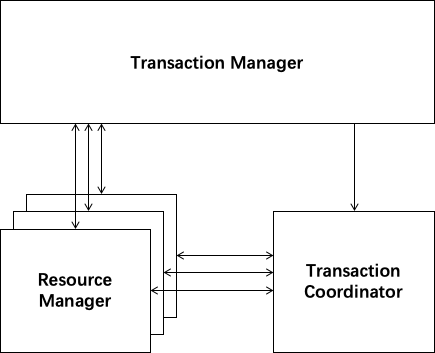
Seata管理的分布式事務(wù)的典型生命周期:
TM要求TC開始一項(xiàng)新的全局事務(wù)。TC生成代表全局事務(wù)的XID。
XID通過微服務(wù)的調(diào)用鏈傳播。
RM將本地事務(wù)注冊為XID到TC的相應(yīng)全局事務(wù)的分支。
TM要求TC提交或回退相應(yīng)的XID全局事務(wù)。
TC驅(qū)動XID的相應(yīng)全局事務(wù)下的所有分支事務(wù)以完成分支提交或回滾。

快速開始
用例
用戶購買商品的業(yè)務(wù)邏輯。整個(gè)業(yè)務(wù)邏輯由3個(gè)微服務(wù)提供支持:
倉儲服務(wù):對給定的商品扣除倉儲數(shù)量。
訂單服務(wù):根據(jù)采購需求創(chuàng)建訂單。
賬戶服務(wù):從用戶帳戶中扣除余額。
環(huán)境準(zhǔn)備
步驟 1:建立數(shù)據(jù)庫
# db_seata
DROP SCHEMA IF EXISTS db_seata;
CREATE SCHEMA db_seata;
USE db_seata;
# Account
CREATE TABLE `account_tbl` (
`id` INT(11) NOT NULL AUTO_INCREMENT,
`user_id` VARCHAR(255) DEFAULT NULL,
`money` INT(11) DEFAULT 0,
PRIMARY KEY (`id`)
) ENGINE = InnoDB DEFAULT CHARSET = utf8;
INSERT INTO account_tbl (id, user_id, money)
VALUES (1, '1001', 10000);
INSERT INTO account_tbl (id, user_id, money)
VALUES (2, '1002', 10000);
# Order
CREATE TABLE `order_tbl`
(
`id` INT(11) NOT NULL AUTO_INCREMENT,
`user_id` VARCHAR(255) DEFAULT NULL,
`commodity_code` VARCHAR(255) DEFAULT NULL,
`count` INT(11) DEFAULT '0',
`money` INT(11) DEFAULT '0',
PRIMARY KEY (`id`)
) ENGINE = InnoDB DEFAULT CHARSET = utf8;
# Storage
CREATE TABLE `storage_tbl` (
`id` INT(11) NOT NULL AUTO_INCREMENT,
`commodity_code` VARCHAR(255) DEFAULT NULL,
`count` INT(11) DEFAULT '0',
PRIMARY KEY (`id`),
UNIQUE KEY `commodity_code` (`commodity_code`)
) ENGINE = InnoDB DEFAULT CHARSET = utf8;
INSERT INTO storage_tbl (id, commodity_code, count)
VALUES (1, '2001', 1000);
CREATE TABLE `undo_log` (
`id` bigint(20) NOT NULL AUTO_INCREMENT,
`branch_id` bigint(20) NOT NULL,
`xid` varchar(100) NOT NULL,
`context` varchar(128) NOT NULL,
`rollback_info` longblob NOT NULL,
`log_status` int(11) NOT NULL,
`log_created` datetime NOT NULL,
`log_modified` datetime NOT NULL,
PRIMARY KEY (`id`),
UNIQUE KEY `ux_undo_log` (`xid`,`branch_id`)
) ENGINE=InnoDB AUTO_INCREMENT=1 DEFAULT CHARSET=utf8;
seata AT 模式需要 undo_log 表,另外三張是業(yè)務(wù)表。
步驟 2: 啟動 Seata Server
Server端存儲模式(store.mode)現(xiàn)有file、db兩種(后續(xù)將引入raft),file模式無需改動,直接啟動即可。db模式需要導(dǎo)入用于存儲全局事務(wù)回話信息的三張表。
注:file模式為單機(jī)模式,全局事務(wù)會話信息內(nèi)存中讀寫并持久化本地文件root.data,性能較高; db模式為高可用模式,全局事務(wù)會話信息通過db共享,相應(yīng)性能差些
可以直接通過bash 腳本啟動 Seata Server,也可以通過 Docker 鏡像啟動,但是 Docker 方式目前只支持使用 file 模式,不支持將 Seata-Server 注冊到 Eureka 或 Nacos 等注冊中心。
通過腳本啟動
在 https://github.com/seata/seata/releases 下載相應(yīng)版本的 Seata Server,解壓后執(zhí)行以下命令啟動,這里使用 file 配置
通過 Docker 啟動
docker run --name seata-server -p 8091:8091 seataio/seata-server:latest
項(xiàng)目介紹
| 項(xiàng)目名 | 地址 | 說明 |
|---|---|---|
| sbm-account-service | 127.0.0.1:8081 | 賬戶服務(wù) |
| sbm-order-service | 127.0.0.1:8082 | 訂單服務(wù) |
| sbm-storage-service | 127.0.0.1:8083 | 倉儲服務(wù) |
| sbm-business-service | 127.0.0.1:8084 | 主業(yè)務(wù) |
| seata-server | 172.16.2.101:8091 | seata-server |
核心代碼
為了不讓篇幅太長,這里只給出部分代碼,詳細(xì)代碼文末會給出源碼地址
maven 引入 seata 的依賴 eata-spring-boot-starter
io.seata
seata-spring-boot-starter
1.0.0
倉儲服務(wù)
application.properties
spring.application.name=account-service
server.port=8081
spring.datasource.url=jdbc:mysql://172.16.2.101:3306/db_seata?useSSL=false&serverTimezone=UTC
spring.datasource.username=root
spring.datasource.password=123456
seata.tx-service-group=my_test_tx_group
mybatis.mapper-locations=classpath*:mapper/*Mapper.xml
seata.service.grouplist=172.16.2.101:8091
logging.level.io.seata=info
logging.level.io.seata.samples.account.persistence.AccountMapper=debug
StorageService
public interface StorageService {
/**
* 扣除存儲數(shù)量
*/
void deduct(String commodityCode, int count);
}
訂單服務(wù)
public interface OrderService {
/**
* 創(chuàng)建訂單
*/
Order create(String userId, String commodityCode, int orderCount);
}
賬戶服務(wù)
public interface AccountService {
/**
* 從用戶賬戶中借出
*/
void debit(String userId, int money);
}
主要業(yè)務(wù)邏輯
只需要使用一個(gè) @GlobalTransactional 注解在業(yè)務(wù)方法上。
@GlobalTransactional
public void purchase(String userId, String commodityCode, int orderCount) {
LOGGER.info("purchase begin ... xid: " + RootContext.getXID());
storageClient.deduct(commodityCode, orderCount);
orderClient.create(userId, commodityCode, orderCount);
}
XID 的傳遞
全局事務(wù)ID的跨服務(wù)傳遞,需要我們自己實(shí)現(xiàn),這里通過攔截器的方式。每個(gè)服務(wù)都需要添加下面兩個(gè)類。
SeataFilter
@Component
public class SeataFilter implements Filter {
@Override
public void init(FilterConfig filterConfig) throws ServletException {
}
@Override
public void doFilter(ServletRequest servletRequest, ServletResponse servletResponse, FilterChain filterChain) throws IOException, ServletException {
HttpServletRequest req = (HttpServletRequest) servletRequest;
String xid = req.getHeader(RootContext.KEY_XID.toLowerCase());
boolean isBind = false;
if (StringUtils.isNotBlank(xid)) {
RootContext.bind(xid);
isBind = true;
}
try {
filterChain.doFilter(servletRequest, servletResponse);
} finally {
if (isBind) {
RootContext.unbind();
}
}
}
@Override
public void destroy() {
}
}
SeataRestTemplateAutoConfiguration
@Configuration
public class SeataRestTemplateAutoConfiguration {
@Autowired(
required = false
)
private Collection<RestTemplate> restTemplates;
@Autowired
private SeataRestTemplateInterceptor seataRestTemplateInterceptor;
public SeataRestTemplateAutoConfiguration() {
}
@Bean
public SeataRestTemplateInterceptor seataRestTemplateInterceptor() {
return new SeataRestTemplateInterceptor();
}
@PostConstruct
public void init() {
if (this.restTemplates != null) {
Iterator var1 = this.restTemplates.iterator();
while (var1.hasNext()) {
RestTemplate restTemplate = (RestTemplate) var1.next();
List<ClientHttpRequestInterceptor> interceptors = new ArrayList(restTemplate.getInterceptors());
interceptors.add(this.seataRestTemplateInterceptor);
restTemplate.setInterceptors(interceptors);
}
}
}
}
測試
測試成功場景:
curl -X POST http://127.0.0.1:8084/api/business/purchase/commit
此時(shí)返回結(jié)果為:true
測試失敗場景:
UserId 為1002 的用戶下單,sbm-account-service會拋出異常,事務(wù)會回滾
http://127.0.0.1:8084/api/business/purchase/rollback
此時(shí)返回結(jié)果為:false
查看 undo_log 的日志或者主鍵,可以看到在執(zhí)行過程中有保存數(shù)據(jù)。如查看主鍵自增的值,在執(zhí)行前后的值會發(fā)生變化,在執(zhí)行前是 1,執(zhí)行后是 7 。
源碼地址
https://github.com/gf-huanchupk/SpringBootLearning/tree/master/springboot-seata
參考
http://seata.io/zh-cn/docs/overview/what-is-seata.html
推薦閱讀:
 喜歡我可以給我設(shè)為星標(biāo)哦