
干貨分享 | Shader 實(shí)現(xiàn) PPT 轉(zhuǎn)場效果(附源碼)
知乎上看到一位大佬用 Shader 實(shí)現(xiàn)了 PPT 里面的轉(zhuǎn)場效果,轉(zhuǎn)載大佬的文章,一起圍觀膜拜一下。
原文分為上下兩篇,詳細(xì)闡述了每個(gè)效果的實(shí)現(xiàn)。
上篇:https://zhuanlan.zhihu.com/p/378967288
下篇:https://zhuanlan.zhihu.com/p/380968758
兩篇文章實(shí)現(xiàn)了 PPT 里面大部分切換效果,如下圖所示:

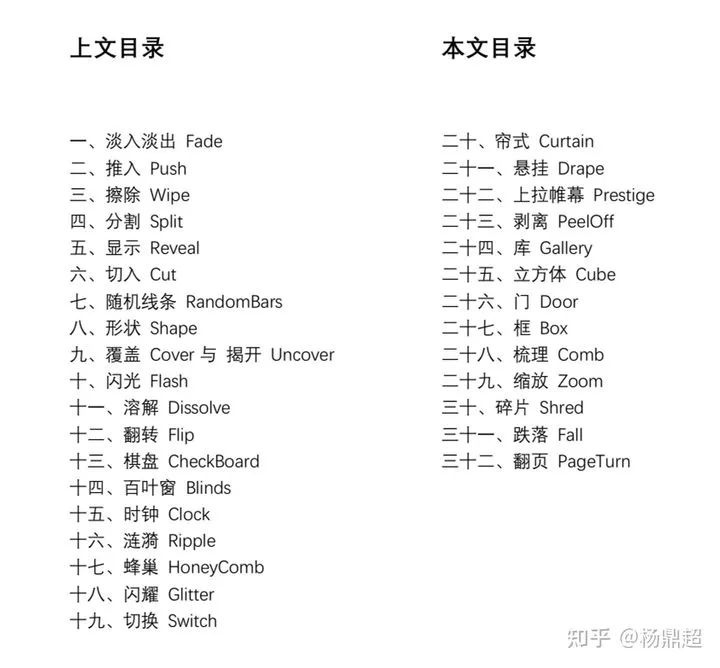
并且還提供了源碼,除了兩張轉(zhuǎn)場圖片之外,沒有用到其他紋理,所有形狀都是 shader 生成,并且沒有開 FBO,保證單次 drawcall 完成。
源碼地址如下:
https://github.com/ydc258ttbaby/PPT_transtions_with_shader
摘錄了幾個(gè)效果供大家參考:
擦除效果
現(xiàn)象:從右往左將上面一張圖片擦除。
思路:主要還是依賴于 mix 函數(shù)進(jìn)行混合,只不過在邊緣處實(shí)現(xiàn)漸變,漸變的實(shí)現(xiàn)可簡單用線性插值實(shí)現(xiàn),如下圖所示:
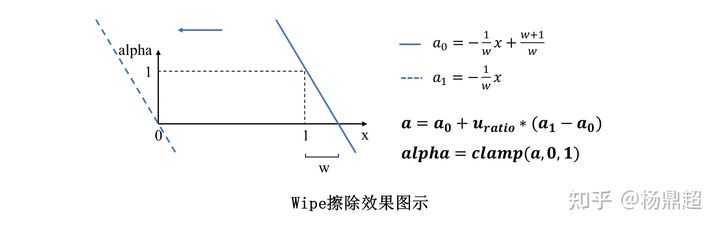
從右往左的擦除就好比將一條斜線從右往左移動(dòng),隨后 clamp 就成為了透明度 alpha 。
代碼:
void main()
{
 vec4 texColor1 = texture(u_ourTexture1, texCoord);
 vec4 texColor2 = texture(u_ourTexture2, texCoord);
 float w = 0.5;
 float alpha = clamp(-1.0 / w * texCoord.x + (1.0 + w) / w + u_ratio * (-(1.0 + w) / w), 0.0, 1.0);
 FragColor = mix(texColor1, texColor2, alpha);
};
剝離效果
現(xiàn)象:一張圖片像一張紙一樣被揭開,顯示出另一張圖 。
要點(diǎn):此實(shí)現(xiàn)類似于(十九-懸掛),假想有一根斜直線,如 y = x – 1,圖片背面通過鏡像得到,直線右邊顯示底圖,左邊顯示上面的圖。
代碼實(shí)現(xiàn):
// 斜直線對于 x 的表達(dá)式
float fx(float x)
{
 return x - u_width + u_ratio * (u_height + u_width + 100.0);
}
// 斜直線對于 y 的表達(dá)式
float gy(float y)
{
 return y + u_width - u_ratio * (u_height + u_width + 100.0);
}
void main()
{
 vec4 resColor = vec4(u_ratio, 0.0, 0.0, 1.0);
 vec4 texColor1 = texture(u_ourTexture1, texCoord);
 vec4 texColor2 = texture(u_ourTexture2, texCoord);

 // 轉(zhuǎn)到畫布真實(shí)的像素坐標(biāo)系進(jìn)行變換
 vec2 coordRealScale = texCoord * vec2(u_width, u_height);

 // 用二次函數(shù),對揭開的邊緣添加偏移
 float xNor = (coordRealScale.x - gy(0.0)) / (u_width - gy(0.0));
 float yNor = (coordRealScale.y - 0.0) / (fx(u_width) - 0.0);
 if (coordRealScale.x > gy(0.0) && coordRealScale.x < u_width)
 coordRealScale.y = coordRealScale.y + 70.0 * xNor * (1.0 - xNor);
 if (coordRealScale.y > 0.0 && coordRealScale.y < fx(u_width))
 coordRealScale.x = coordRealScale.x - 70.0 * yNor * (1.0 - yNor);

 // 沿 y = f(x) 翻轉(zhuǎn)
 coordRealScale = vec2(gy(coordRealScale.y), fx(coordRealScale.x));
 vec2 coord = coordRealScale / vec2(u_width, u_height);
 // 添加光影變化
 float intensityOffset = (1.0 - (1.0 - coord.x) * u_width / u_height - coord.y) + 2.0 * u_ratio - 0.1;
 // 揭開的背面的部分
 resColor = texture(u_ourTexture1, coord) * intensityOffset;
 if (coord.x < 0.0 || coord.x > 1.0 || coord.y < 0.0 || coord.y > 1.0)
 resColor = texColor1;
 if (coordRealScale.y > fx(coordRealScale.x))
 resColor = texColor2;
 FragColor = resColor;
};
這種剝離效果在其他地方也是可以用到的,很有參考意義。
關(guān)于其他更多的效果,歡迎到原作者的文章上去看,有著詳細(xì)代碼講解和技術(shù)總結(jié),受益匪淺~~

技術(shù)交流,歡迎加我微信:ezglumes ,拉你入技術(shù)交流群。
推薦閱讀:
開通專輯 | 細(xì)數(shù)那些年寫過的技術(shù)文章專輯
NDK 學(xué)習(xí)進(jìn)階免費(fèi)視頻來了
推薦幾個(gè)堪稱教科書級別的 Android 音視頻入門項(xiàng)目
覺得不錯(cuò),點(diǎn)個(gè)在看唄~
