
如何快速定位 Python 運(yùn)行最慢的代碼?

來源|Python七號
天下武功,唯快不破。
編程也不例外,你的代碼跑的快,你能快速找出代碼慢的原因,你的碼功就高。
今天分享一個(gè)超級實(shí)用的 Python 性能分析工具 pyinstrument ,可以快速找到代碼運(yùn)行最慢的部分,幫助提高代碼的性能。支持 Python 3.7+ 且能夠分析異步代碼,僅需一條命令即可顯示具體代碼的耗時(shí)。經(jīng)常寫 Python 的小伙伴一定要用一下。
安裝
pip install pyinstrument
簡單的使用
在程序的開始,啟動 pyinstrument 的 Profiler,結(jié)束時(shí)關(guān)閉 Profiler 并打印分析結(jié)果如下:
from pyinstrument import Profiler

profiler = Profiler()
profiler.start()

# 這里是你要分析的代碼

profiler.stop()

profiler.print()
比如這段代碼 123.py,我們可以清楚的看到是列表推導(dǎo)式比較慢:
from pyinstrument import Profiler

profiler = Profiler()
profiler.start()

# 這里是你要分析的代碼
a = [i for i in range(100000)]
b = (i for i in range(100000))

profiler.stop()
profiler.print()
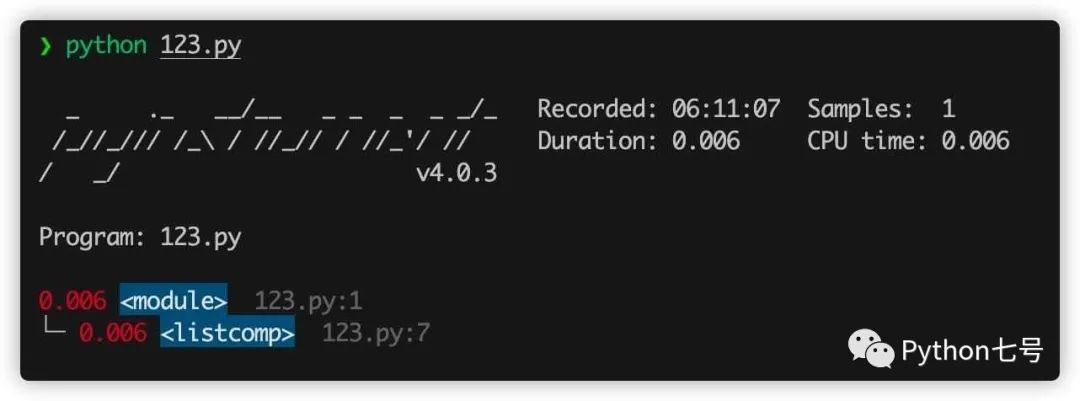
上述分析需要修改源代碼,如果你使用命令行工具,就不需要修改源代碼,只需要執(zhí)行 pyinstrument xxxx.py 即可:
比如有這樣一段排序的程序 c_sort.py:
import sys
import time

import numpy as np

arr = np.random.randint(0, 10, 10)

def slow_key(el):
    time.sleep(0.01)
    return el

arr = list(arr)

for i in range(10):
    arr.sort(key=slow_key)

print(arr)
這段代碼里面故意放了一句 time.sleep(0.01) 來延遲性能,看看 pyinstrument 能否識別,命令行執(zhí)行 pyinstrument c_sort.py:
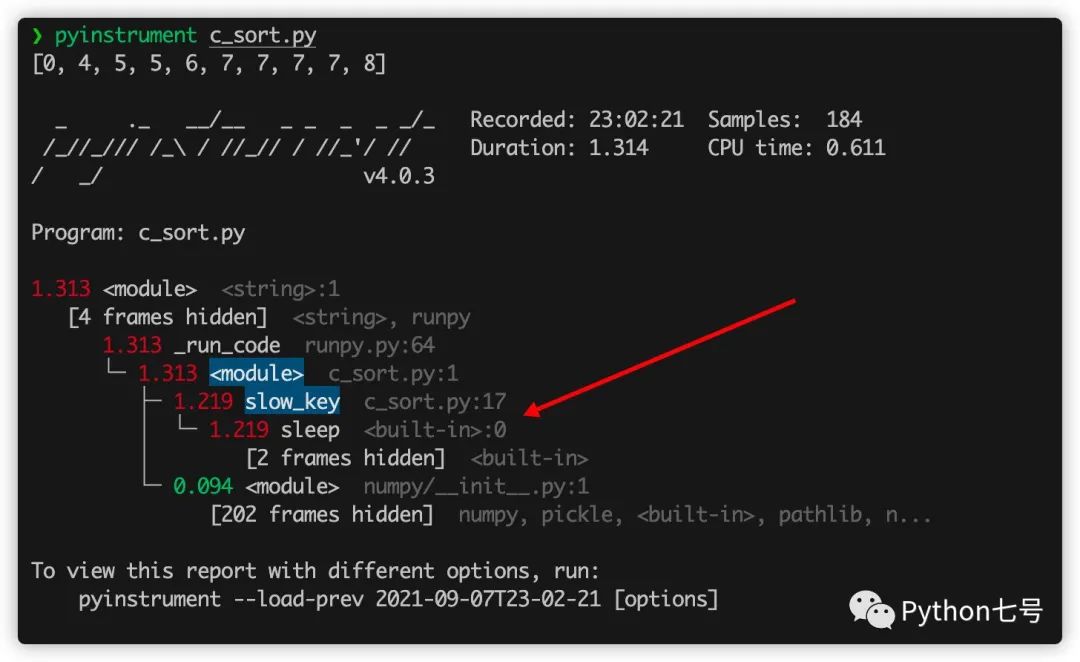
從結(jié)果來看,程序運(yùn)行了 1.313 秒,而 sleep 就運(yùn)行了 1.219 秒,很明顯是瓶頸,現(xiàn)在我們把它刪除,再看看結(jié)果:
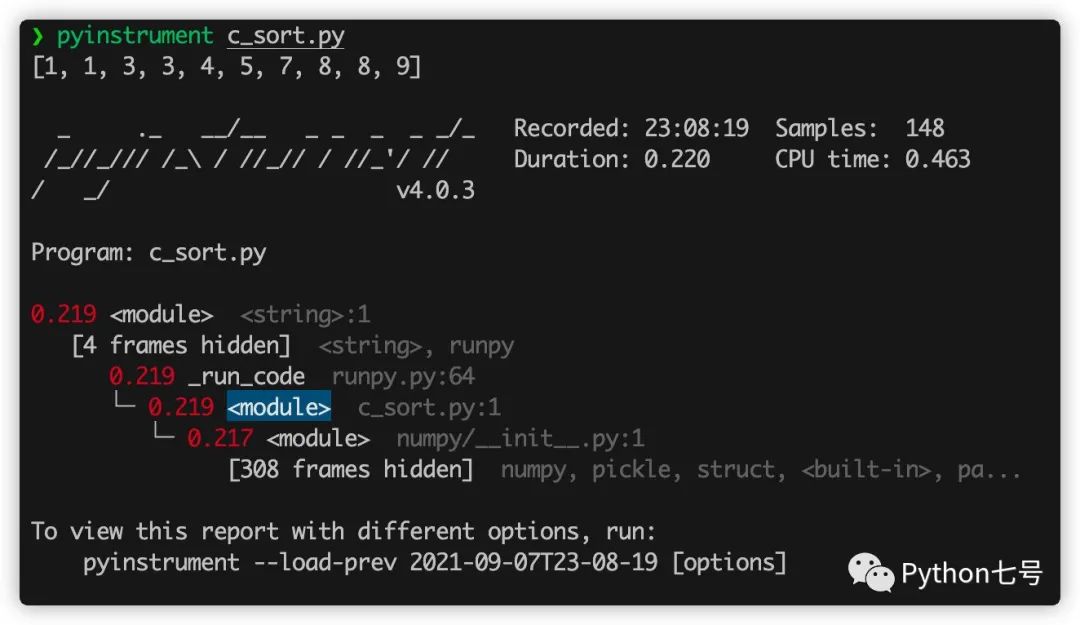
刪除之后,性能最慢的就是 numpy 模塊的初始化代碼 __init__.py了,不過這些代碼不是自己寫的,而且并不是特別慢,就不需要去關(guān)心了。
分析 Flask 代碼
Web 應(yīng)用也可以使用這個(gè)來找出性能瓶頸,比如 flask,只需要在請求之前記錄時(shí)間,在請求之后統(tǒng)計(jì)時(shí)間,只需要在 flask 的請求攔截器里面這樣寫:
from flask import Flask, g, make_response, request
app = Flask(__name__)

@app.before_request
def before_request():
    if "profile" in request.args:
        g.profiler = Profiler()
        g.profiler.start()


@app.after_request
def after_request(response):
    if not hasattr(g, "profiler"):
        return response
    g.profiler.stop()
    output_html = g.profiler.output_html()
    return make_response(output_html)
假如有這樣一個(gè) API:
@app.route("/dosomething")
def do_something():
    import requests
    requests.get("http://google.com")
    return "Google says hello!"
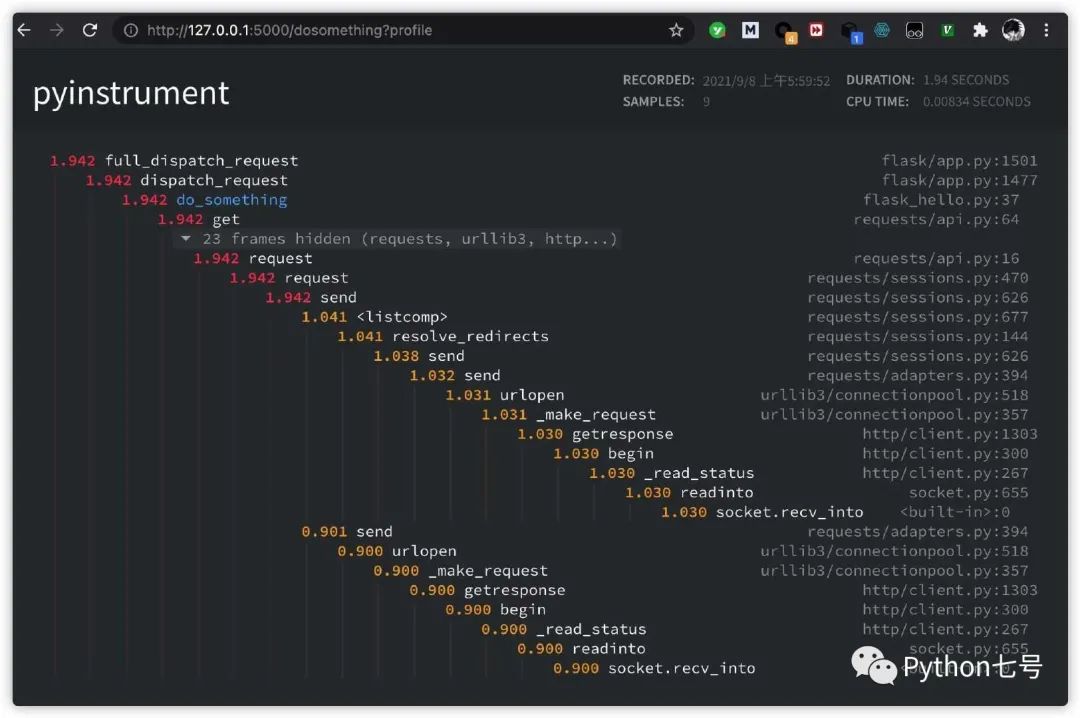
為了測試這個(gè) API 的瓶頸,我們可以在 url 上加一個(gè)參數(shù) profile 就可以:http://127.0.0.1:5000/dosomething?profile,哪一行代碼執(zhí)行比較慢,結(jié)果清晰可見:
分析 Django 代碼
分析 Django 代碼也非常簡單,只需要在 Django 的配置文件的 MIDDLEWARE 中添加
"pyinstrument.middleware.ProfilerMiddleware",
然后就可以在 url 上加一個(gè)參數(shù) profile 就可以:
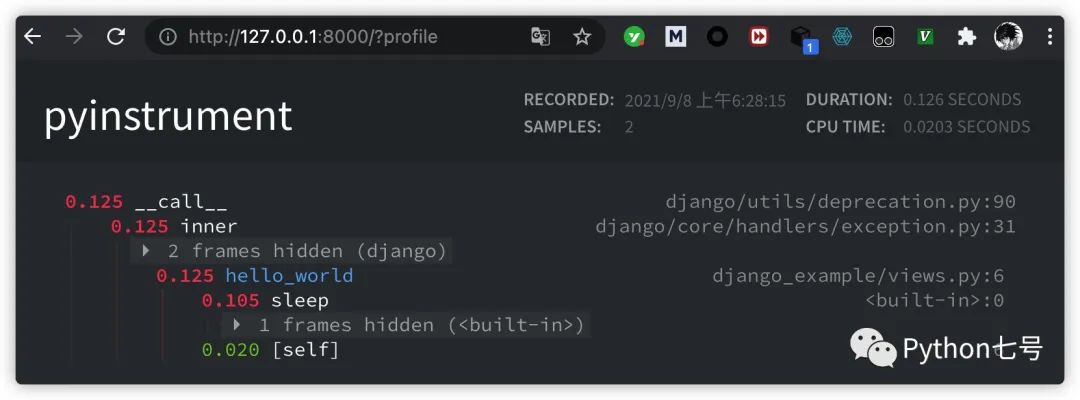
如果你不希望所有人都能看到,只希望管理員可以看到,settings.py 可以添加這樣的代碼:
def custom_show_pyinstrument(request):
    return request.user.is_superuser

PYINSTRUMENT_SHOW_CALLBACK = "%s.custom_show_pyinstrument" % __name__
如果不想通過 url 后面加參數(shù)的方式查看性能分析,可以在 settings.py 文件中添加:
PYINSTRUMENT_PROFILE_DIR = 'profiles'
這樣,每次訪問一次 Django 接口,就會將分析結(jié)果以 html 文件形式保存在 項(xiàng)目目錄下的 profiles 文件夾中。
分析異步代碼
簡單的異步代碼分析:
async_example_simple.py:
import asyncio

from pyinstrument import Profiler


async def main():
    p = Profiler()
    with p:
        print("Hello ...")
        await asyncio.sleep(1)
        print("... World!")
    p.print()


asyncio.run(main())
復(fù)雜一些的異步代碼分析:
import asyncio
import time

import pyinstrument


def do_nothing():
    pass


def busy_wait(duration):
    end_time = time.time() + duration

    while time.time() < end_time:
        do_nothing()


async def say(what, when, profile=False):
    if profile:
        p = pyinstrument.Profiler()
        p.start()

    busy_wait(0.1)
    sleep_start = time.time()
    await asyncio.sleep(when)
    print(f"slept for {time.time() - sleep_start:.3f} seconds")
    busy_wait(0.1)

    print(what)
    if profile:
        p.stop()
        p.print(show_all=True)


loop = asyncio.get_event_loop()

loop.create_task(say("first hello", 2, profile=True))
loop.create_task(say("second hello", 1, profile=True))
loop.create_task(say("third hello", 3, profile=True))

loop.run_forever()
loop.close()
工作原理
Pyinstrument 每 1ms 中斷一次程序,并在該點(diǎn)記錄整個(gè)堆棧。它使用 C 擴(kuò)展名和 PyEval_SetProfile 來做到這一點(diǎn),但只每 1 毫秒讀取一次讀數(shù)。你可能覺得報(bào)告的樣本數(shù)量有點(diǎn)少,但別擔(dān)心,它不會降低準(zhǔn)確性。默認(rèn)間隔 1ms 是記錄堆棧幀的下限,但如果在單個(gè)函數(shù)調(diào)用中花費(fèi)了很長時(shí)間,則會在該調(diào)用結(jié)束時(shí)進(jìn)行記錄。如此有效地將這些樣本“打包”并在最后記錄。
Pyinstrument 是一個(gè)統(tǒng)計(jì)分析器,并不跟蹤,它不會跟蹤您的程序進(jìn)行的每個(gè)函數(shù)調(diào)用。相反,它每 1 毫秒記錄一次調(diào)用堆棧。與其他分析器相比,統(tǒng)計(jì)分析器的開銷比跟蹤分析器低得多。
比如說,我想弄清楚為什么 Django 中的 Web 請求很慢。如果我使用 cProfile,我可能會得到這個(gè):
151940 function calls (147672 primitive calls) in 1.696 seconds

   Ordered by: cumulative time

   ncalls  tottime  percall  cumtime  percall filename:lineno(function)
        1    0.000    0.000    1.696    1.696 profile:0(<code object <module> at 0x1053d6a30, file "./manage.py", line 2>)
        1    0.001    0.001    1.693    1.693 manage.py:2(<module>)
        1    0.000    0.000    1.586    1.586 __init__.py:394(execute_from_command_line)
        1    0.000    0.000    1.586    1.586 __init__.py:350(execute)
        1    0.000    0.000    1.142    1.142 __init__.py:254(fetch_command)
       43    0.013    0.000    1.124    0.026 __init__.py:1(<module>)
      388    0.008    0.000    1.062    0.003 re.py:226(_compile)
      158    0.005    0.000    1.048    0.007 sre_compile.py:496(compile)
        1    0.001    0.001    1.042    1.042 __init__.py:78(get_commands)
      153    0.001    0.000    1.036    0.007 re.py:188(compile)
  106/102    0.001    0.000    1.030    0.010 __init__.py:52(__getattr__)
        1    0.000    0.000    1.029    1.029 __init__.py:31(_setup)
        1    0.000    0.000    1.021    1.021 __init__.py:57(_configure_logging)
        2    0.002    0.001    1.011    0.505 log.py:1(<module>)
看完是不是還是一臉懵逼,通常很難理解您自己的代碼如何與這些跟蹤相關(guān)聯(lián)。Pyinstrument 記錄整個(gè)堆棧,因此跟蹤昂貴的調(diào)用要容易得多。它還默認(rèn)隱藏庫框架,讓您專注于影響性能的應(yīng)用程序/模塊:
  _     ._   __/__   _ _  _  _ _/_   Recorded: 14:53:35  Samples:  131
 /_//_/// /_\ / //_// / //_'/ //    Duration: 3.131     CPU time: 0.195
/   _/                    v3.0.0b3

Program: examples/django_example/manage.py runserver --nothreading --noreload

3.131 <module>  manage.py:2
└─ 3.118 execute_from_command_line  django/core/management/__init__.py:378
      [473 frames hidden]  django, socketserver, selectors, wsgi...
         2.836 select  selectors.py:365
         0.126 _get_response  django/core/handlers/base.py:96
         └─ 0.126 hello_world  django_example/views.py:4
最后的話
本文分享了 pyinstrument 的用法,有了這個(gè)性能分析神器,以后優(yōu)化代碼可以節(jié)省很多時(shí)間了,這樣的效率神器很值得分享,畢竟人生苦短,能多點(diǎn)時(shí)間干點(diǎn)有意思的不香么?如果覺得對你有用,還請關(guān)注、點(diǎn)贊、在看支持。