
診斷日志知多少 | DiagnosticSource 在.NET上的應(yīng)用


1. 引言
最近為了解決ABP集成CAP時無法通過攔截器啟用工作單元的問題,從小伙伴那里學(xué)了一招。借助DiagnossticSource,可以最小改動完成需求。關(guān)于DiagnosticSource曉東大佬18年在文章 在 .NET Core 中使用 Diagnostics (Diagnostic Source) 記錄跟蹤信息就有介紹,文章開頭就說明了Diagnostics 一直是一個被大多數(shù)開發(fā)者忽視的東西。是的,我也忽略了,這個好東西,有必要學(xué)習(xí)一下,下面就和大家簡單聊一聊System.Diagnostics.DiagnosticSource在.NET上的應(yīng)用。
2. System.Diagnostics.DiagnosticSource
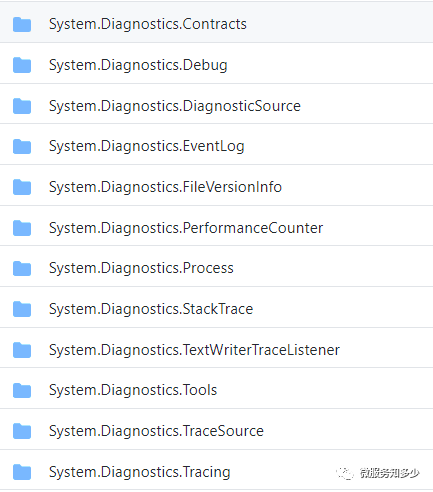
Diagnostics位于System命名空間下,由此可見Diagnostics在.NET 運行時中的地位不可小覷。其中System.Diagnostics命名空間下又包含不同類庫,提供了允許與系統(tǒng)進(jìn)程,事件日志和性能計數(shù)器進(jìn)行交互的類。如下圖所示:
其中System.Diagnostics.DiagnosticSource模塊,它允許對代碼進(jìn)行檢測,以在生產(chǎn)時記錄豐富的數(shù)據(jù)負(fù)載(可以傳遞不可序列化的數(shù)據(jù)類型),以便在進(jìn)程內(nèi)進(jìn)行消耗。消費者可以在運行時動態(tài)發(fā)現(xiàn)數(shù)據(jù)源并訂閱感興趣的數(shù)據(jù)源。
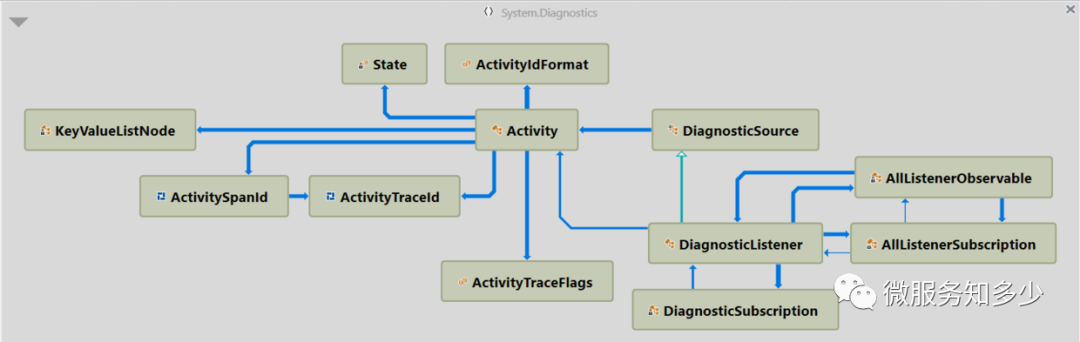
在展開之前,有必要先梳理下涉及的以下核心概念:
IObservable:可觀測對象 IObserver:觀察者 DiagnosticSource :診斷來源 DiagnosticListener:診斷監(jiān)聽器 Activity:活動
3. 觀察者模式(IObservable & IObserver)
IObservable?和IObserver位于System命名空間下,是.NET中對觀察者模式的抽象。
觀察者設(shè)計模式使觀察者能夠從可觀察對象訂閱并接收通知。?它適用于需要基于推送通知的任何方案。?此模式定義可觀察對象,以及零個、一個或多個觀察者。?觀察者訂閱可觀察對象,并且每當(dāng)預(yù)定義的條件、事件或狀態(tài)發(fā)生更改時,該可觀察對象會通過調(diào)用其方法之一來自動通知所有觀察者。?在此方法調(diào)用中,該可觀察對象還可向觀察者提供當(dāng)前狀態(tài)信息。?在 .NET Framework 中,通過實現(xiàn)泛型 System.IObservable 和 System.IObserver 接口來應(yīng)用觀察者設(shè)計模式。泛型類型參數(shù)表示提供通知信息的類型。?泛型類型參數(shù)表示提供通知信息的類型。
第一次學(xué)習(xí)觀察者模式,應(yīng)該是大學(xué)課本中基于事件燒水的例子,咱們就基于此實現(xiàn)個簡單的Demo吧。首先執(zhí)行dotnet new web -n Dotnet.Diagnostic.Demo創(chuàng)建示例項目。
3.1. 定義可觀察對象(實現(xiàn)IObservable接口)
對于燒水的示例,主要關(guān)注水溫的變化,因此先定義Temperature來表示溫度變化:
public?class?Temperature
{
????public?Temperature(decimal?temperature,?DateTime?date)
????{
????????Degree?=?temperature;
????????Date?=?date;
????}
????public?decimal?Degree?{?get;??}
????public?DateTime?Date?{?get;??}
}
接下來通過實現(xiàn)IObservable接口來定義可觀察對象。
public?interface?IObservable
{
??IDisposable?Subscribe(IObserver?observer);
}
從接口申明來看,只定義了一個Subscribe方法,從觀察者模式講,觀察者應(yīng)該既能訂閱又能取消訂閱消息。為什么沒有定義一個UnSubscribe方法呢?其實這里方法申明已經(jīng)說明,期望通過返回IDisposable對象的Dispose方法來達(dá)到這個目的。
///?
///?熱水壺
///?
public?class?Kettle?:?IObservable
{
????private?List>?observers;
????private?decimal?temperature?=?0;

????public?Kettle()
????{
????????observers?=?new?List>();
????}

????public?decimal?Temperature
????{
????????get?=>?temperature;
????????private?set
????????{
????????????temperature?=?value;
????????????observers.ForEach(observer?=>?observer.OnNext(new?Temperature(temperature,?DateTime.Now)));
????????????
????????????if?(temperature?==?100)
????????????????observers.ForEach(observer?=>?observer.OnCompleted());
????????}
????}
????public?IDisposable?Subscribe(IObserver?observer)
????{
????????if?(!observers.Contains(observer))
????????{
????????????Console.WriteLine("Subscribed!");
????????????observers.Add(observer);
????????}
????????//使用UnSubscriber包裝,返回IDisposable對象,用于觀察者取消訂閱
????????return?new?UnSubscriber(observers,?observer);
????}
????///?
????///?燒水方法
????///?
????public?async?Task?StartBoilWaterAsync()
????{
????????var?random?=?new?Random(DateTime.Now.Millisecond);
????????while?(Temperature?????????{
????????????Temperature?+=?10;
????????????await?Task.Delay(random.Next(5000));
????????}
????}
}

//定義泛型取消訂閱對象,用于取消訂閱
internal?class?UnSubscriber?:?IDisposable
{
????private?List>?_observers;
????private?IObserver?_observer;
????internal?UnSubscriber(List>?observers,?IObserver?observer)
????{
????????this._observers?=?observers;
????????this._observer?=?observer;
????}
????public?void?Dispose()
????{
????????if?(_observers.Contains(_observer))
????????{
????????????Console.WriteLine("Unsubscribed!");
????????????_observers.Remove(_observer);
????????}
????}
}
以上代碼中List
3.2. 定義觀察者(實現(xiàn)IObserver接口)
比如定義一個報警器,實時播報溫度。
public?class?Alter?:?IObserver
{
????public?void?OnCompleted()
????{
????????Console.WriteLine("du?du?du?!!!");
????}
????public?void?OnError(Exception?error)
????{
????????//Nothing?to?do
????}
????public?void?OnNext(Temperature?value)
????{
????????Console.WriteLine($"{value.Date.ToString()}:?Current?temperature?is?{value.Degree}.");
????}
}
添加測試代碼,訪問localhost:5000/subscriber控制臺輸出結(jié)果如下:
endpoints.MapGet("/subscriber",?async?context?=>
{
????var?kettle?=?new?Kettle();//初始化熱水壺
????var?subscribeRef?=?kettle.Subscribe(new?Alter());//訂閱
????
????var?boilTask?=?kettle.StartBoilWaterAsync();//啟動開始燒水任務(wù)
????var?timoutTask?=?Task.Delay(TimeSpan.FromSeconds(15));//定義15s超時任務(wù)
????//等待,如果超時任務(wù)先返回則取消訂閱
????var?firstReturnTask?=?await?Task.WhenAny(boilTask,?timoutTask);
????if?(firstReturnTask?==?timoutTask)
????????subscribeRef.Dispose();
????await?context.Response.WriteAsync("Hello?subscriber!");
});

------------------------------------------------------------------

Subscribed!
10/2/2020?4:53:20?PM:?Current?temperature?is?10.
10/2/2020?4:53:20?PM:?Current?temperature?is?20.
10/2/2020?4:53:21?PM:?Current?temperature?is?30.
10/2/2020?4:53:21?PM:?Current?temperature?is?40.
10/2/2020?4:53:24?PM:?Current?temperature?is?50.
10/2/2020?4:53:25?PM:?Current?temperature?is?60.
10/2/2020?4:53:26?PM:?Current?temperature?is?70.
10/2/2020?4:53:30?PM:?Current?temperature?is?80.
Unsubscribed!
4. DiagnosticSource & DiagnosticListener
4.1. 概念講解
DiagnosticSource直譯就是診斷源,也就是它是診斷日志的來源入口。DiagnosticSource是一個抽象類主要定義了以下方法:
//Provides?a?generic?way?of?logging?complex?payloads
public?abstract?void?Write(string?name,?object?value);
//Verifies?if?the?notification?event?is?enabled.
public?abstract?bool?IsEnabled(string?name);
DiagnosticListener直譯就是診斷監(jiān)聽器,繼承自DiagnosticSource,同時實現(xiàn)了IObservable接口,因此其本質(zhì)是一個可觀察對象。小結(jié)以下:
DiagnosticSource?作為診斷日志來源,提供接口,用于寫入診斷日志。診斷日志的可觀察數(shù)據(jù)類型為 KeyValuePair。DiagnosticListener?繼承自DiagnosticSource,作為可觀察對象,可由其他觀察者訂閱,以獲取診斷日志。
DiagnosticListener?其構(gòu)造函數(shù)接收一個name參數(shù)。
private?static?DiagnosticSource?httpLogger?=?new?DiagnosticListener("System.Net.Http");
可以通過下面這種方式記錄診斷日志:
if?(httpLogger.IsEnabled("RequestStart"))
????httpLogger.Write("RequestStart",?new?{?Url="http://clr",?Request=aRequest?});
然后需要實現(xiàn)IObserver接口,以便消費診斷數(shù)據(jù)。定義DiagnosticObserver,進(jìn)行診斷日志消費:
public?class?DiagnosticObserver?:?IObserver>
{
????public?void?OnCompleted()
????{
????????//Noting?to?do
????}
????public?void?OnError(Exception?error)
????{
????????Console.WriteLine($"{error.Message}");
????}
????public?void?OnNext(KeyValuePair?pair)
????{?
????????//?這里消費診斷數(shù)據(jù)
????????Console.WriteLine($"{pair.Key}-{pair.Value}");
????}
}
ASP.NET Core 項目中默認(rèn)就依賴了System.Diagnostics.DiagnosticSourceNuget包,同時在構(gòu)建通用Web主機(jī)時,就注入了名為Microsoft.AspNetCore的DiagnosticListener。
//GenericWebHostBuilder.cs
DiagnosticListener?instance?=?new?DiagnosticListener("Microsoft.AspNetCore");
services.TryAddSingleton(instance);
services.TryAddSingleton((DiagnosticSource)?instance);
因此我們可以直接通過注入DiagnosticListener進(jìn)行診斷日志的訂閱:
public?void?Configure(IApplicationBuilder?app,?IWebHostEnvironment?env,?DiagnosticListener?diagnosticListener)
{
????diagnosticListener.Subscribe(new?DiagnosticObserver());//訂閱診斷日志
}
當(dāng)然也可以直接使用DiagnosticListener.AllListeners.Subscribe(IObserver進(jìn)行訂閱,不過區(qū)別是,接收的參數(shù)類型為IObserver。
運行項目輸出:
Microsoft.AspNetCore.Hosting.HttpRequestIn.Start-Microsoft.AspNetCore.Http.DefaultHttpContext
Microsoft.AspNetCore.Hosting.BeginRequest-{?httpContext?=?Microsoft.AspNetCore.Http.DefaultHttpContext,?timestamp?=?7526300014352?}
Microsoft.AspNetCore.Routing.EndpointMatched-Microsoft.AspNetCore.Http.DefaultHttpContext
Microsoft.AspNetCore.Hosting.EndRequest-{?httpContext?=?Microsoft.AspNetCore.Http.DefaultHttpContext,?timestamp?=?7526300319214?}
Microsoft.AspNetCore.Hosting.HttpRequestIn.Stop-Microsoft.AspNetCore.Http.DefaultHttpContext
從中可以看出,ASP.NET Core Empty Web Project在一次正常的Http請求過程中分別在請求進(jìn)入、請求處理、路由匹配都埋了點,除此之外還有請求異常、Action處理都有埋點。因此,根據(jù)需要,可以實現(xiàn)比如請求攔截、耗時統(tǒng)計等系列操作。
4.2. 耗時統(tǒng)計
基于以上知識,下面嘗試完成一個簡單的耗時統(tǒng)計。從上面的內(nèi)容可知,ASP.NET Core在BeginRequest和EndRequest返回的診斷數(shù)據(jù)類型如下所示:
Microsoft.AspNetCore.Hosting.BeginRequest-{?httpContext?=?Microsoft.AspNetCore.Http.DefaultHttpContext,?timestamp?=?7526300014352?}
Microsoft.AspNetCore.Hosting.EndRequest-{?httpContext?=?Microsoft.AspNetCore.Http.DefaultHttpContext,?timestamp?=?7526300319214?}
因此只要拿到兩個timestamp就可以直接計算耗時,修改DiagnosticObserver的OnNext方法如下:
private?ConcurrentDictionary?startTimes?=?new?ConcurrentDictionary();
public?void?OnNext(KeyValuePair?pair)
{
????//Console.WriteLine($"{pair.Key}-{pair.Value}");
????//獲取httpContext
????var?context?=?pair.Value.GetType().GetTypeInfo().GetDeclaredProperty("httpContext")
?????????.GetValue(pair.Value)?as?DefaultHttpContext;
????//獲取timestamp
????var?timestamp?=?pair.Value.GetType().GetTypeInfo().GetDeclaredProperty("timestamp")
?????????.GetValue(pair.Value)?as?long?;
????switch?(pair.Key)
????{
????????case?"Microsoft.AspNetCore.Hosting.BeginRequest":
????????????Console.WriteLine($"Request?{context.TraceIdentifier}?Begin:{context.Request.GetUri()}");
????????????startTimes.TryAdd(context.TraceIdentifier,?timestamp.Value);//記錄請求開始時間
????????????break;
????????case?"Microsoft.AspNetCore.Hosting.EndRequest":
????????????startTimes.TryGetValue(context.TraceIdentifier,?out?long?startTime);
????????????var?elapsedMs?=?(timestamp?-?startTime)?/?TimeSpan.TicksPerMillisecond;//計算耗時
????????????Console.WriteLine(
????????????????$"Request?{context.TraceIdentifier}?End:?Status?Code?is?{context.Response.StatusCode},Elapsed?{elapsedMs}ms");
????????????startTimes.TryRemove(context.TraceIdentifier,?out?_);
????????????break;
????}
}
輸出如下,大功告成:
Request?0HM37UNERKGF0:00000001?Begin:https://localhost:44330
Request?0HM37UNERKGF0:00000001?End:?Status?Code?is?200,Elapsed?38ms
上面有通過反射去獲取診斷數(shù)據(jù)屬性的代碼(var timestamp = pair.Value.GetType().GetTypeInfo().GetDeclaredProperty("timestamp") ?.GetValue(pair.Value) as long?;),非常不優(yōu)雅。但我們可以安裝**Microsoft.Extensions.DiagnosticAdapter**包來簡化診斷數(shù)據(jù)的消費。安裝后,添加HttpContextDiagnosticObserver,通過添加DiagnosticName指定監(jiān)聽的診斷名稱,即可進(jìn)行診斷數(shù)據(jù)消費。
public?sealed?class?HttpContextDiagnosticObserver
{
????private?ConcurrentDictionary?startTimes?=?new?ConcurrentDictionary();
????
????[DiagnosticName("Microsoft.AspNetCore.Hosting.BeginRequest")]
????public?void?BeginRequest(HttpContext?httpContext,long?timestamp)
????{
????????Console.WriteLine($"Request?{httpContext.TraceIdentifier}?Begin:{httpContext.Request.GetUri()}");
????????startTimes.TryAdd(httpContext.TraceIdentifier,?timestamp);//記錄請求開始時間
????}
????
????[DiagnosticName("Microsoft.AspNetCore.Hosting.EndRequest")]
????public?void?EndRequest(HttpContext?httpContext,long?timestamp)
????{
????????startTimes.TryGetValue(httpContext.TraceIdentifier,?out?long?startTime);
????????var?elapsedMs?=?(timestamp?-?startTime)?/?TimeSpan.TicksPerMillisecond;//計算耗時
????????Console.WriteLine(
????????????$"Request?{httpContext.TraceIdentifier}?End:?Status?Code?is?{httpContext.Response.StatusCode},Elapsed?{elapsedMs}ms");
????????startTimes.TryRemove(httpContext.TraceIdentifier,?out?_);
????}
}
然后使用SubscribeWithAdapter進(jìn)行訂閱即可。
public?void?Configure(IApplicationBuilder?app,?IWebHostEnvironment?env,?DiagnosticListener?diagnosticListener)
{
????//?diagnosticListener.Subscribe(new?DiagnosticObserver());
????diagnosticListener.SubscribeWithAdapter(new?HttpContextDiagnosticObserver());
}
到這里可能也有小伙伴說,我用ActionFilter也可以實現(xiàn),沒錯,但這兩種方式是完全不同的,DiagnosticSource是完全異步的。
4.3. 應(yīng)用場景思考
根據(jù)DiagnosticSource的特性,可以運用于以下場景 :
AOP:因為Diagnostics命名事件一般是成對出現(xiàn)的,因此可以做些攔截操作。比如在Abp集成Cap時,若想默認(rèn)啟用Uow,就可以消費
DotNetCore.CAP.WriteSubscriberInvokeBefore命名事件,創(chuàng)建Uow,再在命名事件DotNetCore.CAP.WriteSubscriberInvokeAfter中提交事務(wù),并Dispose。APM:SkyAPM-dotnet的實現(xiàn)就是通過消費診斷日志,進(jìn)行鏈路跟蹤。?
EventBus:充分利用其發(fā)布訂閱模式,可將其用于進(jìn)程內(nèi)事件的發(fā)布與消費。
5. Activity(活動)
5.1. Activity 概述
那Activity又是何方神圣,用于解決什么問題呢?關(guān)于Activity官方只有一句簡要介紹:Represents an operation with context to be used for logging。(表示包含上下文的操作,用于日志記錄。)
Activity用來存儲和訪問診斷上下文,并由日志系統(tǒng)進(jìn)行消費。當(dāng)應(yīng)用程序開始處理操作時,例如HTTP請求或隊列中的任務(wù),它會在處理請求時創(chuàng)建Activity以在系統(tǒng)中跟蹤該Activity。Activity中存儲的上下文可以是HTTP請求路徑,方法,用戶代理或關(guān)聯(lián)ID:所有重要信息都應(yīng)與每個跟蹤一起記錄。當(dāng)應(yīng)用程序調(diào)用外部依賴關(guān)系以完成操作時,它可能需要傳遞一些上下文(例如,關(guān)聯(lián)ID)以及依賴關(guān)系調(diào)用,以便能夠關(guān)聯(lián)來自多個服務(wù)的日志。
先來看下Activity主要以下核心屬性:
Tags(標(biāo)簽)
IEnumerable?- 表示與活動一起記錄的信息。標(biāo)簽的好例子是實例/機(jī)器名稱,傳入請求HTTP方法,路徑,用戶/用戶代理等。標(biāo)簽不傳遞給子活動。典型的標(biāo)簽用法包括添加一些自定義標(biāo)簽,并通過它們進(jìn)行枚舉以填充日志事件的有效負(fù)載。可通過Activity AddTag(string key, string value)添加Tag,但不支持通過Key檢索標(biāo)簽。Baggage(行李)
IEnumerable?- 表示要與活動一起記錄并傳遞給其子項的信息。行李的例子包括相關(guān)ID,采樣和特征標(biāo)記。Baggage被序列化并與外部依賴項請求一起傳遞。典型的Baggage用法包括添加一些Baggage屬性,并通過它們進(jìn)行枚舉以填充日志事件的有效負(fù)載。可通過Activity AddBaggage(string key, string value)添加Baggage。并通過string GetBaggageItem(string key)獲取指定Key的Baggage。OperationName(操作名稱)
string OperationName { get; }?- 活動名稱,必須在構(gòu)造函數(shù)中指定。StartTimeUtc
DateTime StartTimeUtc { get; private set; }??- UTC格式的啟動時間,如果不指定,則在啟動時默認(rèn)指定為DateTime.UtcNow。可通過Activity SetStartTime(DateTime startTimeUtc)指定。Duration
TimeSpan Duration { get; private set; }?- 如果活動已停止,則代表活動持續(xù)時間,否則為0。Id
string Id { get; private set; }?- 表示特定的活動標(biāo)識符。過濾特定ID可確保您僅獲得與操作中特定請求相關(guān)的日志記錄。該Id在活動開始時生成。Id傳遞給外部依賴項,并被視為新的外部活動的[ParentId]。ParentId
string ParentId { get; private set; }?- 如果活動是根據(jù)請求反序列化的,則該活動可能具有進(jìn)程中的[Parent]或外部Parent。ParentId和Id代表日志中的父子關(guān)系,并允許您關(guān)聯(lián)傳出和傳入請求。RootId
string RootId { get; private set; }?- 代表根IdCurrent
static Activity Current { get; }?- 返回在異步調(diào)用之間流動的當(dāng)前Activity。Parent
Activity Parent { get; private set; }?- 如果活動是在同一過程中從另一個活動創(chuàng)建的,則可以使用Partent獲得該活動。但是,如果“活動”是根活動或父項來自流程外部,則此字段可能為null。Start()
Activity Start()?- 啟動活動:設(shè)置活動的Activity.Current和Parent,生成唯一的ID并設(shè)置StartTimeUtc(如果尚未設(shè)置)。Stop()
void Stop()?- 停止活動:設(shè)置活動的Activity.Current,并使用Activity SetEndTime(DateTime endTimeUtc)或DateTime.UtcNow中提供的時間戳計算Duration。
另外DiagnosticSource中也定義了兩個相關(guān)方法:
StartActivity Activity StartActivity(Activity activity, object args)?- 啟動給定的Activity,并將DiagnosticSource事件消息寫入OperationName.Start格式的命名事件中。StopActivity void StopActivity(Activity activity, object args)?- 停止給定的Activity,并將DiagnosticSource事件消息寫入{OperationName}.Stop格式的命名事件中。
5.2. Activity在ASP.NET Core中的應(yīng)用
要想弄懂Activity,我們還是得向源碼學(xué)習(xí),看一下HostingApplicationDiagnostics的實現(xiàn)。首先來看下BeginRequst中的StartActivity方法。
private?Activity?StartActivity(HttpContext?httpContext,?out?bool?hasDiagnosticListener)
{
??Activity?activity?=?new?Activity("Microsoft.AspNetCore.Hosting.HttpRequestIn");
??hasDiagnosticListener?=?false;
??IHeaderDictionary?headers?=?httpContext.Request.Headers;
??StringValues?stringValues1;
??if?(!headers.TryGetValue(HeaderNames.TraceParent,?out?stringValues1))
????headers.TryGetValue(HeaderNames.RequestId,?out?stringValues1);
??if?(!StringValues.IsNullOrEmpty(stringValues1))
??{
????activity.SetParentId((string)?stringValues1);
????StringValues?stringValues2;
????if?(headers.TryGetValue(HeaderNames.TraceState,?out?stringValues2))
??????activity.TraceStateString?=?(string)?stringValues2;
????string[]?commaSeparatedValues?=?headers.GetCommaSeparatedValues(HeaderNames.CorrelationContext);
????if?(commaSeparatedValues.Length?!=?0)
????{
??????foreach?(string?str?in?commaSeparatedValues)
??????{
????????NameValueHeaderValue?parsedValue;
????????if?(NameValueHeaderValue.TryParse((StringSegment)?str,?out?parsedValue))
??????????activity.AddBaggage(parsedValue.Name.ToString(),?parsedValue.Value.ToString());
??????}
????}
??}
??this._diagnosticListener.OnActivityImport(activity,?(object)?httpContext);
??if?(this._diagnosticListener.IsEnabled("Microsoft.AspNetCore.Hosting.HttpRequestIn.Start"))
??{
????hasDiagnosticListener?=?true;
????this.StartActivity(activity,?httpContext);
??}
??else
????activity.Start();
??return?activity;
}
從中可以看出,在ASP.NET Core 開始處理請求之前:
首先,創(chuàng)建了名為 Microsoft.AspNetCore.Hosting.HttpRequestIn的Activity,該Activity首先嘗試從HTTP請求頭中獲取TraceParent/euqstId作為當(dāng)前Activity的ParentId,這個很顯然,是用來鏈路跟蹤的。其次,嘗試從 CorrelationContext中獲取關(guān)聯(lián)上下文信息,然后將其添加到創(chuàng)建的Activity的Baggage中,進(jìn)行關(guān)聯(lián)上下文的繼續(xù)傳遞。然后,啟動Activity,然后向Name為 Microsoft.AspNetCore.Hosting.HttpRequestIn.Start中寫入診斷日志。
這里大家可能有個疑問,這個關(guān)聯(lián)上下文信息CorrelationContext又是何時添加到Http請求頭中的呢?在System.Net.Http中的DiagnosticsHandler中添加的。因此我們應(yīng)該明白了,整個關(guān)聯(lián)上下文的傳遞機(jī)制。
緊接著再來看一看RequestEnd中的StopActivity方法。
private?void?StopActivity(Activity?activity,?HttpContext?httpContext)
{
??if?(activity.Duration?==?TimeSpan.Zero)
????activity.SetEndTime(DateTime.UtcNow);
??this._diagnosticListener.Write("Microsoft.AspNetCore.Hosting.HttpRequestIn.Stop",?(object)?httpContext);
??activity.Stop();
}
從中可以看出主要是先SetEndTime,再寫入Microsoft.AspNetCore.Hosting.HttpRequestIn.Stop命名事件;最后調(diào)用Stop方法停止當(dāng)前Activity。
簡單總結(jié)一下,借助Activity中附加的Baggage信息可以實現(xiàn)請求鏈路上上下文數(shù)據(jù)的共享。
5.3. 應(yīng)用場景思考
從上面的命名事件中可以看出,其封送的數(shù)據(jù)類型是特定的,因此可以借助Activity的Tags或Baggage添加自定義的數(shù)據(jù)進(jìn)行共享。
按照上面我們的耗時統(tǒng)計,只能統(tǒng)計到整個http請求的耗時,但對于我們定位問題來說還是有困難,比如,某個api即有調(diào)用redis,又操作了消息隊列,同時又訪問了數(shù)據(jù)庫,那到底是那一段超時了呢?顯然不好直接定位,借助activity,我們就可以很好的實現(xiàn)細(xì)粒度的鏈路跟蹤。通過activity攜帶的信息,可以將一系列的操作關(guān)聯(lián)起來,記錄日志,再借助AMP進(jìn)行可視化快速定位跟蹤。
6. 參考資料
在 .NET Core 中使用 Diagnostics (Diagnostic Source) 記錄跟蹤信息 Logging using DiagnosticSource in ASP.NET Core .Net Core中的診斷日志DiagnosticSource講解 Observer Design Pattern DiagnosticSource User Guide Activity User Guide DiagnosticSourcery 101 - Mark Rendle Improvements in .NET Core 3.0 for troubleshooting and monitoring distributed apps?
【推薦】.NET Core開發(fā)實戰(zhàn)視頻課程?★★★
.NET Core實戰(zhàn)項目之CMS 第一章 入門篇-開篇及總體規(guī)劃
【.NET Core微服務(wù)實戰(zhàn)-統(tǒng)一身份認(rèn)證】開篇及目錄索引
Redis基本使用及百億數(shù)據(jù)量中的使用技巧分享(附視頻地址及觀看指南)
.NET Core中的一個接口多種實現(xiàn)的依賴注入與動態(tài)選擇看這篇就夠了
用abp vNext快速開發(fā)Quartz.NET定時任務(wù)管理界面
在ASP.NET Core中創(chuàng)建基于Quartz.NET托管服務(wù)輕松實現(xiàn)作業(yè)調(diào)度
現(xiàn)身說法:實際業(yè)務(wù)出發(fā)分析百億數(shù)據(jù)量下的多表查詢優(yōu)化