手把手教你開發(fā)vue組件庫
前言
Vue是一套用于構(gòu)建用戶界面的漸進(jìn)式框架,目前有越來越多的開發(fā)者在學(xué)習(xí)和使用.在筆者寫完?從0到1教你搭建前端團(tuán)隊(duì)的組件系統(tǒng)?之后很多朋友希望了解一下如何搭建基于vue的組件系統(tǒng),所以作為這篇文章的補(bǔ)充,本文來總結(jié)一下如何搭建基于vue的組件庫.
雖然筆者有近2年沒有從事vue的開發(fā)了,但平時(shí)一直在關(guān)注vue的更新和發(fā)展, 筆者一直認(rèn)為技術(shù)團(tuán)隊(duì)的組件化之路重點(diǎn)在于基礎(chǔ)架構(gòu)的搭建以及組件化的設(shè)計(jì)思想,我們完全可以采用不同的框架實(shí)現(xiàn)類似的設(shè)計(jì),所以透過現(xiàn)象看本質(zhì),思想才是最重要的.本文主要教大家通過使用vue-cli3 一步步搭建一個(gè)組件庫并發(fā)布到npm上,但筆者認(rèn)為重點(diǎn)不在于實(shí)現(xiàn)搭建組件庫的具體方式,而在于設(shè)計(jì)組件庫的思想和取舍.
你將收獲
使用vue-cli3搭建團(tuán)隊(duì)的組件庫并發(fā)布到npm npm發(fā)包的常用基礎(chǔ)知識
相關(guān)資料
從0到1教你搭建前端團(tuán)隊(duì)的組件系統(tǒng)(高級進(jìn)階必備) 一張圖教你快速玩轉(zhuǎn)vue-cli3 vue項(xiàng)目實(shí)戰(zhàn)經(jīng)驗(yàn)匯總
正文
1.安裝vue-cli3并創(chuàng)建一個(gè)項(xiàng)目
yarn global add @vue/cli
// 創(chuàng)建項(xiàng)目
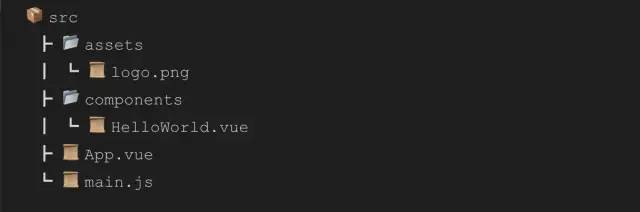
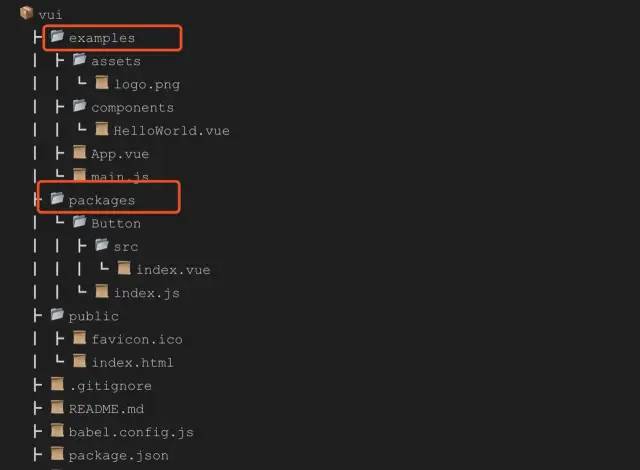
vue create vui
module.exports = {
  pages: {
    index: {
      entry: 'examples/main.js',
      template: 'public/index.html',
      filename: 'index.html'
    }
  },
  // 擴(kuò)展 webpack 配置,使 packages 加入編譯
  chainWebpack: config => {
    config.module
      .rule('js')
      .include
        .add('/packages')
        .end()
      .use('babel')
        .loader('babel-loader')
  }
}
2.編寫組件代碼
<template>
  <div class="x-button">
    <slot>slot>
  div>
template>

<script>
export default {
  name: 'x-button',
  props: {
    type: String
  }
}
script>

<style scoped>
  .x-button {
      display: inline-block;
      padding: 3px 6px;
      background: #000;
      color: #fff;
  }
style>
// 導(dǎo)入組件,組件必須聲明 name
import XButton from './src'
// 為組件提供 install 安裝方法,供按需引入
XButton.install = function (Vue) {
  Vue.component(XButton.name, XButton)
}
// 導(dǎo)出組件
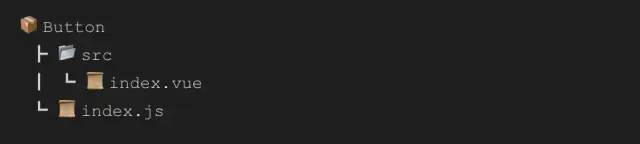
export default XButton
// 導(dǎo)入button組件
import XButton from './Button'

// 組件列表
const components = [
  XButton
]

// 定義 install 方法,接收 Vue 作為參數(shù)。如果使用 use 注冊插件,那么所有的組件都會(huì)被注冊
const install = function (Vue) {
  // 判斷是否安裝
  if (install.installed) return
  // 遍歷注冊全局組件
  components.map(component => Vue.component(component.name, component))
}

// 判斷是否是直接引入文件
if (typeof window !== 'undefined' && window.Vue) {
  install(window.Vue)
}

export default {
  // 導(dǎo)出的對象必須具有 install,才能被 Vue.use() 方法安裝
  install,
  // 以下是具體的組件列表
  XButton
}
3.測試代碼
// examples/main.js
import Vue from 'vue'
import App from './App.vue'

// 導(dǎo)入組件庫
import xui from '../packages'
// 注冊組件庫
Vue.use(xui)

Vue.config.productionTip = false

new Vue({
  render: h => h(App),
}).$mount('#app')
  <div id="app">
    <img alt="Vue logo" src="./assets/logo.png">
    <x-button type="primary">buttonx-button>
  div>
template>
<script>
export default {
  name: 'App',
  components: {

  }
}
script>
<style>
#app {
  font-family: Avenir, Helvetica, Arial, sans-serif;
  -webkit-font-smoothing: antialiased;
  -moz-osx-font-smoothing: grayscale;
}
style>

4.配置package.json文件
"scripts": {
    "serve": "vue-cli-service serve",
    "build": "vue-cli-service build",
    "lib": "vue-cli-service build --target lib --name xui --dest lib packages/index.js"
  }
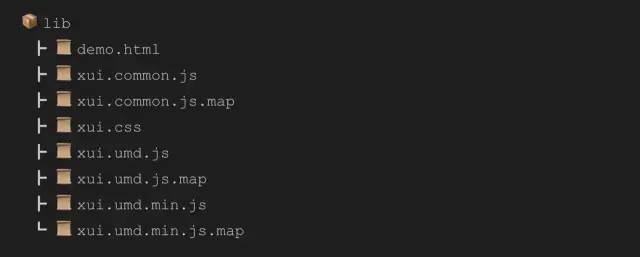
description 組件庫的描述文本 keywords 組件庫的關(guān)鍵詞 license 許可協(xié)議 repository 組件庫關(guān)聯(lián)的git倉庫地址 homepage 組件庫展示的首頁地址 main 組件庫的主入口地址(在使用組件時(shí)引入的地址) private 聲明組件庫的私有性,如果要發(fā)布到npm公網(wǎng)上,需刪除該屬性或者設(shè)置為false publishConfig 用來設(shè)置npm發(fā)布的地址,這個(gè)配置作為團(tuán)隊(duì)內(nèi)部的npm服務(wù)器來說非常關(guān)鍵,可以設(shè)置為私有的npm倉庫
5.發(fā)布到npm
// 本地編譯組件庫代碼
yarn lib
// 登錄
 npm login
 // 發(fā)布
 npm publish
 // 如果發(fā)布失敗提示權(quán)限問題,請執(zhí)行以下命令
 npm publish --access public
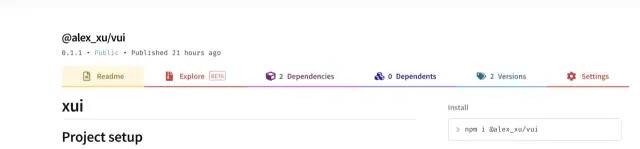
import vui from '@alex_xu/vui'
import '/@alex_xu/vui/lib/vui.css'
Vue.use(vui)
1. .npmignore 配置文件
2. npm發(fā)包的版本管理
Major 表示主版本號,做了不兼容的API修改時(shí)需要更新 Minor 表示次版本號,做了向下兼容的功能性需求時(shí)需要更新 Patch 表示修訂號, 做了向下兼容的問題修正時(shí)需要更新
npm version patch
npm version minor
npm version major
復(fù)制代碼
關(guān)注數(shù):10億+?文章數(shù):10億+
粉絲量:10億+?點(diǎn)擊量:10億+
?
懸賞博主專區(qū)請掃描這里

喜愛數(shù):?1億+?發(fā)帖數(shù):?1億+
回帖數(shù):?1億+?結(jié)貼率:?99.9%
—————END—————
喜歡本文的朋友,歡迎關(guān)注公眾號?程序員哆啦A夢,收看更多精彩內(nèi)容
點(diǎn)個(gè)[在看],是對小達(dá)最大的支持!

如果覺得這篇文章還不錯(cuò),來個(gè)【分享、點(diǎn)贊、在看】三連吧,讓更多的人也看到~